04Chip radio chọn size
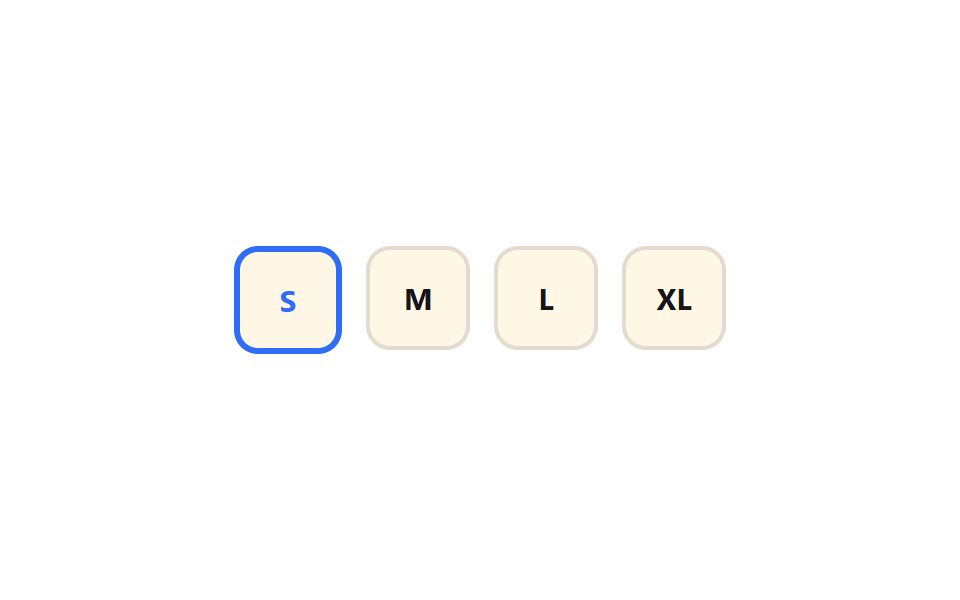
Chọn một trong các chip radio S/M/L/XL thì chip đó lún nhẹ về scale(0.94) rồi bật lại 1, viền quanh chip dày lên.
Dùng choChọn size sản phẩm trên trang mua sắm, chọn số người khi đặt chỗ
scale 바운스cubic-bezier 오버슈트0.3초
<main class="stage">
  <fieldset class="sz is-demo">
    <legend class="sr-only">Kích cỡ</legend>
    <label class="sz__chip"><input type="radio" name="sz1" class="sz__input" checked><span>S</span></label>
    <label class="sz__chip"><input type="radio" name="sz1" class="sz__input"><span>M</span></label>
    <label class="sz__chip"><input type="radio" name="sz1" class="sz__input"><span>L</span></label>
    <label class="sz__chip"><input type="radio" name="sz1" class="sz__input"><span>XL</span></label>
  </fieldset>
</main>
@use "../../../../site/static/demo-tokens" as *;
// ── 변수 3개 ──────────────────────────────
$duration: $dur-enter;
$easing: $ease-pop;
$color: $subject-blue;
@include stage($stage-paper);
.sr-only {
position: absolute; width: 1px; height: 1px; padding: 0; margin: -1px;
overflow: hidden; clip: rect(0, 0, 0, 0); white-space: nowrap; border: 0;
}
.sz { display: flex; gap: $sp-3; border: 0; margin: 0; padding: 0; }
.sz__input { position: absolute; opacity: 0; pointer-events: none; width: 1px; height: 1px; }
.sz__chip {
position: relative;
display: grid; place-items: center;
width: $sp-12; height: $sp-12;
border-radius: $r-control;
background: $subject-cream;
border: 2px solid rgba($subject-ink, .12);
font-weight: 700;
font-size: 15px;
font-family: inherit;
color: $subject-ink;
cursor: pointer;
-webkit-tap-highlight-color: transparent;
transform: scale(1);
transition: transform $duration $easing, border-color $dur-quick $easing, color $dur-quick $easing;
}
.sz__chip:has(.sz__input:checked) {
border-color: $color;
border-width: 3px;
color: $color;
animation: sz-press-jelly $duration $easing;
}
@keyframes sz-press {
0% { transform: scale(1); }
35% { transform: scale(.84); }
70% { transform: scale(1.05); }
100% { transform: scale(1); }
}
// 눌림 젤리 보강: 눌릴 때 납작(scaleX .86 / scaleY 1.08 역바운스), 튀어오를 때 세로로 늘어났다 안착
@keyframes sz-press-jelly {
0% { transform: scaleX(1) scaleY(1); }
35% { transform: scaleX(.86) scaleY(1.08); }
65% { transform: scaleX(1.08) scaleY(.94); }
85% { transform: scaleX(.97) scaleY(1.03); }
100% { transform: scaleX(1) scaleY(1); }
}
@media (prefers-reduced-motion: reduce) {
.sz__chip { transition: none; animation: none !important; }
}html, body {
margin: 0;
overflow: hidden;
}
.stage {
box-sizing: border-box;
min-height: 100vh;
display: grid;
place-items: center;
margin: 0;
background: #ffffff;
font-family: -apple-system, "Segoe UI", "Noto Sans KR", sans-serif;
padding: clamp(8px, 4vw, 24px);
}
.sr-only {
position: absolute;
width: 1px;
height: 1px;
padding: 0;
margin: -1px;
overflow: hidden;
clip: rect(0, 0, 0, 0);
white-space: nowrap;
border: 0;
}
.sz {
display: flex;
gap: 12px;
border: 0;
margin: 0;
padding: 0;
}
.sz__input {
position: absolute;
opacity: 0;
pointer-events: none;
width: 1px;
height: 1px;
}
.sz__chip {
position: relative;
display: grid;
place-items: center;
width: 48px;
height: 48px;
border-radius: 12px;
background: #fff7e6;
border: 2px solid rgba(23, 20, 26, 0.12);
font-weight: 700;
font-size: 15px;
font-family: inherit;
color: #17141a;
cursor: pointer;
-webkit-tap-highlight-color: transparent;
transform: scale(1);
transition: transform 600ms cubic-bezier(0.2, 1.4, 0.4, 1), border-color 220ms cubic-bezier(0.2, 1.4, 0.4, 1), color 220ms cubic-bezier(0.2, 1.4, 0.4, 1);
}
.sz__chip:has(.sz__input:checked) {
border-color: #2f6df6;
border-width: 3px;
color: #2f6df6;
animation: sz-press-jelly 600ms cubic-bezier(0.2, 1.4, 0.4, 1);
}
@keyframes sz-press {
0% {
transform: scale(1);
}
35% {
transform: scale(0.84);
}
70% {
transform: scale(1.05);
}
100% {
transform: scale(1);
}
}
@keyframes sz-press-jelly {
0% {
transform: scaleX(1) scaleY(1);
}
35% {
transform: scaleX(0.86) scaleY(1.08);
}
65% {
transform: scaleX(1.08) scaleY(0.94);
}
85% {
transform: scaleX(0.97) scaleY(1.03);
}
100% {
transform: scaleX(1) scaleY(1);
}
}
@media (prefers-reduced-motion: reduce) {
.sz__chip {
transition: none;
animation: none !important;
}
}// .is-demo 자동 순환 (실제 클릭이 오면 멈춘다, 6줄)
var sz = document.querySelector('.sz');
var inputs = sz.querySelectorAll('.sz__input'); var i = 0;
var t = setInterval(function () { inputs[i % inputs.length].checked = true; i++; }, 480);
inputs.forEach(function (el) { el.addEventListener('pointerdown', function () { sz.classList.remove('is-demo'); clearInterval(t); }); });import { useState } from "react";
import type { CSSProperties } from "react";
import styles from "./ChipSelectSizeRadioPress.module.scss";
export type ChipSelectSizeRadioPressProps = {
legend?: string;
sizes?: string[];
duration?: number;
easing?: string;
ringColor?: string;
};
type Vars = CSSProperties & { "--duration"?: string; "--easing"?: string; "--ring"?: string };
export default function ChipSelectSizeRadioPress({
legend = "Size",
sizes = ["S", "M", "L", "XL"],
duration = 300,
easing = "cubic-bezier(.2,1.4,.4,1)",
ringColor = "#2f6df6",
}: ChipSelectSizeRadioPressProps) {
const [value, setValue] = useState(sizes[0]);
const vars: Vars = { "--duration": `${duration}ms`, "--easing": easing, "--ring": ringColor };
return (
<fieldset className={styles.sz} style={vars}>
<legend className={styles.srOnly}>{legend}</legend>
{sizes.map((s) => (
<label key={s} className={styles.chip} data-checked={value === s}>
<input
type="radio"
name="size"
className={styles.srInput}
checked={value === s}
onChange={() => setValue(s)}
/>
{s}
</label>
))}
</fieldset>
);
}04 Chip radio chọn size — Diện tích đo được 2.096% · khung hình chuyển động 10/23Nguyên tác GODRICH · SCSS và React nằm trong tệp zip · 9 Segmented Control UI — dán là chạy
Bài viết chứa demo này
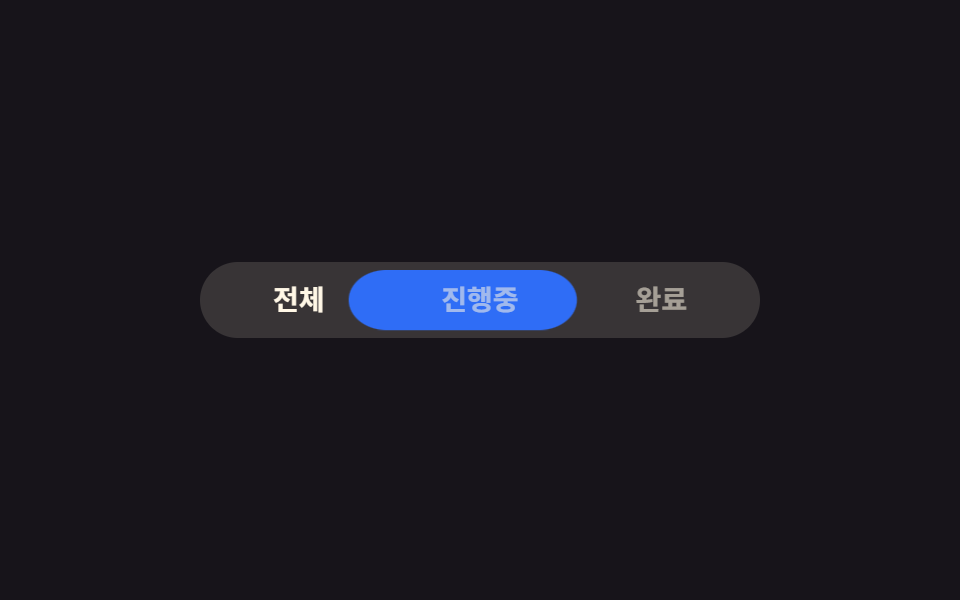 9 Segmented Control UI — dán là chạySegmented control là nút chuyển tab hình viên thuốc mà bạn hay thấy trong màn hình cài đặt iOS, chọn một trong vài lựa c Xem tất cả demo trong bài này