06Parallel-Coordinates Chart Linking Values Across Axes With Crossing Lines
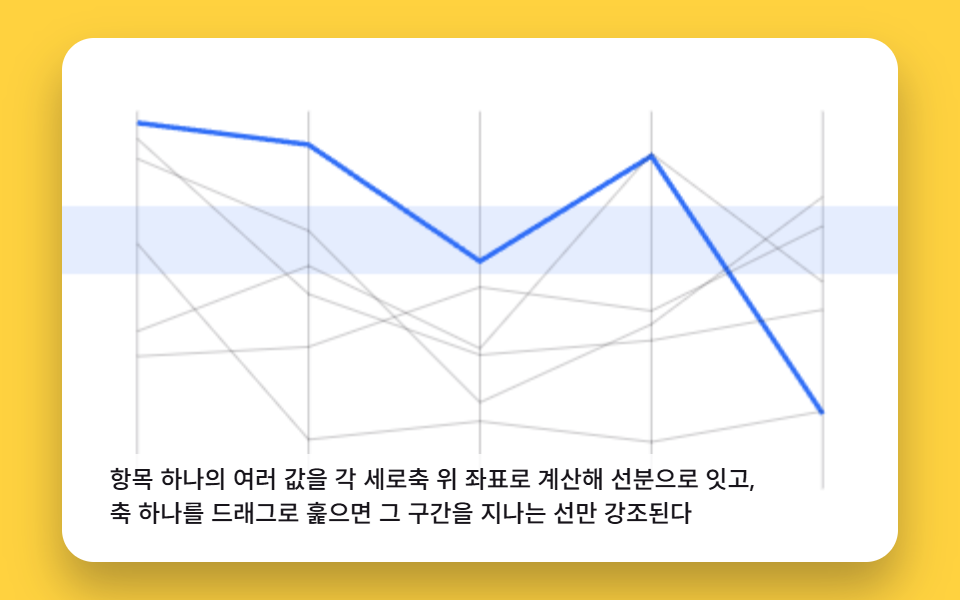
One item's several values are calculated as coordinates on each vertical axis and joined by line segments, and dragging across one axis highlights only the lines passing through it.
Best forMulti-attribute product spec comparison
BRUSH_AXIS_INDEXsetBrushCenterautoDemoStep
<main class="stage">
<div class="pcb is-demo" id="pcbRoot">
  <canvas class="pcb__canvas" id="pcbCanvas" width="480" height="300"></canvas>
  <div class="pcb__kbd" id="pcbKbd" tabindex="0" aria-label="Move brush"></div>
  <p class="pcb__caption">Each item's multiple values are calculated as coordinates on separate vertical axes and joined with line segments, and dragging one axis to sweep it highlights only the lines passing through that range</p>
</div>
</main>
@use "../../../../site/static/demo-tokens" as *;
@include stage($stage-yellow);
.pcb {
position: relative;
width: min(92vw, calc(160vh - 12.8vw));
aspect-ratio: 480 / 300;
margin: 0 auto;
border-radius: $r-card;
overflow: hidden;
box-shadow: $shadow-raised;
background: $stage-paper;
}
.pcb__canvas {
display: block;
width: 100%;
height: 100%;
}
.pcb__kbd {
position: absolute;
inset: 0;
background: transparent;
outline-offset: -2px;
pointer-events: none;
}
.pcb__kbd:focus-visible {
outline: 2px solid $subject-blue-light;
}
.pcb__caption {
position: absolute;
left: $sp-3;
bottom: $sp-3;
max-width: 78%;
margin: 0;
padding: $sp-1 $sp-3;
border-radius: $r-pill;
background: rgba(255, 255, 255, .85);
color: $subject-ink;
font-weight: 500;
font-size: 12px;
line-height: 1.4;
pointer-events: none;
}
@media (max-width: 340px) {
.pcb__caption { font-size: 10px; padding: $sp-1 $sp-2; }
}
@media (prefers-reduced-motion: reduce) {
.pcb { cursor: default; }
}html, body {
margin: 0;
overflow: hidden;
}
.stage {
box-sizing: border-box;
min-height: 100vh;
display: grid;
place-items: center;
margin: 0;
background: #ffd23f;
font-family: -apple-system, "Segoe UI", "Noto Sans KR", sans-serif;
padding: clamp(8px, 4vw, 24px);
}
.pcb {
position: relative;
width: min(92vw, 160vh - 12.8vw);
aspect-ratio: 480/300;
margin: 0 auto;
border-radius: 16px;
overflow: hidden;
box-shadow: 0 14px 24px rgba(23, 20, 26, 0.32);
background: #ffffff;
}
.pcb__canvas {
display: block;
width: 100%;
height: 100%;
}
.pcb__kbd {
position: absolute;
inset: 0;
background: transparent;
outline-offset: -2px;
pointer-events: none;
}
.pcb__kbd:focus-visible {
outline: 2px solid #5b8cf8;
}
.pcb__caption {
position: absolute;
left: 12px;
bottom: 12px;
max-width: 78%;
margin: 0;
padding: 4px 12px;
border-radius: 999px;
background: rgba(255, 255, 255, 0.85);
color: #17141a;
font-weight: 500;
font-size: 12px;
line-height: 1.4;
pointer-events: none;
}
@media (max-width: 340px) {
.pcb__caption {
font-size: 10px;
padding: 4px 8px;
}
}
@media (prefers-reduced-motion: reduce) {
.pcb {
cursor: default;
}
}(function () {
// 기법: 축마다 0~1 로 정규화된 값을 세로 좌표로 계산해 인접 축을 선분으로 이어 병렬좌표를
// 그리고, 가운데 축 위의 브러시 구간(포인터 드래그 · 화살표 키)에 걸리는 값을 가진 선만
// 강조 색으로 두껍게, 그렇지 않은 선은 흐리게 그린다. 매 프레임 전체 데이터를 다시 그리는
// 방식이라 별도의 상태 저장 없이 브러시 위치 하나만 갱신하면 된다.
var root = document.getElementById('pcbRoot');
var canvas = document.getElementById('pcbCanvas');
var kbdEl = document.getElementById('pcbKbd');
var ctx = canvas.getContext('2d');
var wrap = canvas.parentElement;
function seedRand(seed) {
var s = seed >>> 0;
return function () { s = (s * 1664525 + 1013904223) >>> 0; return s / 4294967296; };
}
var rand = seedRand(425061);
var AXIS_COUNT = 5, ITEM_COUNT = 6;
var DATA = [];
for (var di = 0; di < ITEM_COUNT; di += 1) {
var row = [];
for (var da = 0; da < AXIS_COUNT; da += 1) row.push(rand());
DATA.push(row);
}
var BRUSH_AXIS_INDEX = 2;
var BRUSH_HALF = 0.09;
var brushCenter = 0.5;
var dragging = false;
var lastUserInputAt = -9999;
var LOOP_MS = 2000;
var T0 = 200;
var cw = 480, ch = 300;
function clamp(v, lo, hi) { return Math.max(lo, Math.min(hi, v)); }
function axisX(a) {
var padX = cw * 0.09;
return padX + (cw - padX * 2) * (a / (AXIS_COUNT - 1));
}
function valueY(v) {
var padY = ch * 0.14;
return ch - padY - (ch - padY * 2) * v;
}
function yToValue(y) {
var padY = ch * 0.14;
return clamp(1 - (y - padY) / (ch - padY * 2), 0, 1);
}
function render() {
ctx.clearRect(0, 0, cw, ch);
ctx.strokeStyle = 'rgba(23,20,26,.22)';
ctx.lineWidth = 1;
for (var a = 0; a < AXIS_COUNT; a += 1) {
var x = axisX(a);
ctx.beginPath();
ctx.moveTo(x, valueY(0));
ctx.lineTo(x, valueY(1));
ctx.stroke();
}
var lo = brushCenter - BRUSH_HALF, hi = brushCenter + BRUSH_HALF;
var yLo = valueY(lo), yHi = valueY(hi);
ctx.fillStyle = 'rgba(91,140,248,.16)';
ctx.fillRect(0, yHi, cw, yLo - yHi);
for (var it = 0; it < ITEM_COUNT; it += 1) {
var v = DATA[it][BRUSH_AXIS_INDEX];
var inBand = v >= lo && v <= hi;
ctx.strokeStyle = inBand ? '#2f6df6' : 'rgba(23,20,26,.22)';
ctx.lineWidth = inBand ? 2.5 : 1;
ctx.beginPath();
for (var a2 = 0; a2 < AXIS_COUNT; a2 += 1) {
var px = axisX(a2), py = valueY(DATA[it][a2]);
if (a2 === 0) ctx.moveTo(px, py); else ctx.lineTo(px, py);
}
ctx.stroke();
}
}
function setBrushCenter(v) {
brushCenter = clamp(v, BRUSH_HALF, 1 - BRUSH_HALF);
render();
}
canvas.addEventListener('pointerdown', function (e) {
var rect = canvas.getBoundingClientRect();
var x = (e.clientX - rect.left) * (cw / rect.width);
var axisPx = axisX(BRUSH_AXIS_INDEX);
if (Math.abs(x - axisPx) < cw * 0.14) {
dragging = true;
var y = (e.clientY - rect.top) * (ch / rect.height);
lastUserInputAt = elapsed;
setBrushCenter(yToValue(y));
}
});
canvas.addEventListener('pointermove', function (e) {
if (!dragging) return;
var rect = canvas.getBoundingClientRect();
var y = (e.clientY - rect.top) * (ch / rect.height);
lastUserInputAt = elapsed;
setBrushCenter(yToValue(y));
});
canvas.addEventListener('pointerup', function () { dragging = false; });
canvas.addEventListener('pointerleave', function () { dragging = false; });
kbdEl.addEventListener('keydown', function (e) {
e.preventDefault();
if (e.key === 'ArrowUp') { lastUserInputAt = elapsed; setBrushCenter(brushCenter + 0.04); }
else if (e.key === 'ArrowDown') { lastUserInputAt = elapsed; setBrushCenter(brushCenter - 0.04); }
});
function autoDemoStep(elapsedMs) {
if (elapsedMs < T0) return;
if (elapsedMs - lastUserInputAt < 800) return;
var t = elapsedMs % LOOP_MS;
setBrushCenter(0.5 + Math.sin((t - T0) / LOOP_MS * Math.PI * 2) * 0.35);
}
function fit() {
var r = wrap.getBoundingClientRect();
cw = Math.max(1, Math.round(r.width));
ch = Math.max(1, Math.round(r.height));
canvas.width = cw; canvas.height = ch;
render();
}
var reduce = window.matchMedia('(prefers-reduced-motion: reduce)').matches;
if (reduce) root.classList.remove('is-demo');
var elapsed = 0;
var lastTs = null;
function tick(ts) {
if (lastTs === null) lastTs = ts;
var dt = Math.min(ts - lastTs, 48);
lastTs = ts;
if (!reduce) {
elapsed += dt;
autoDemoStep(elapsed);
}
requestAnimationFrame(tick);
}
fit();
window.addEventListener('resize', fit);
render();
requestAnimationFrame(tick);
})();import { useEffect, useRef } from "react";
import styles from "./ChartAdvancedParallelCoordinatesBrush.module.scss";
export default function ChartAdvancedParallelCoordinatesBrush() {
const rootRef = useRef<HTMLDivElement>(null);
const canvasRef = useRef<HTMLCanvasElement>(null);
const kbdRef = useRef<HTMLDivElement>(null);
useEffect(() => {
const root = rootRef.current;
const canvas = canvasRef.current;
const kbdEl = kbdRef.current;
if (!root || !canvas || !kbdEl) return;
const ctx = canvas.getContext("2d");
if (!ctx) return;
const wrap = canvas.parentElement as HTMLElement;
function seedRand(seed: number) {
let s = seed >>> 0;
return function () { s = (s * 1664525 + 1013904223) >>> 0; return s / 4294967296; };
}
const rand = seedRand(425061);
const AXIS_COUNT = 5, ITEM_COUNT = 6;
const DATA: number[][] = [];
for (let di = 0; di < ITEM_COUNT; di += 1) {
const row: number[] = [];
for (let da = 0; da < AXIS_COUNT; da += 1) row.push(rand());
DATA.push(row);
}
const BRUSH_AXIS_INDEX = 2;
const BRUSH_HALF = 0.09;
let brushCenter = 0.5;
let dragging = false;
let lastUserInputAt = -9999;
const LOOP_MS = 2000;
const T0 = 200;
let cw = 480, ch = 300;
function clamp(v: number, lo: number, hi: number) { return Math.max(lo, Math.min(hi, v)); }
function axisX(a: number) {
const padX = cw * 0.09;
return padX + (cw - padX * 2) * (a / (AXIS_COUNT - 1));
}
function valueY(v: number) {
const padY = ch * 0.14;
return ch - padY - (ch - padY * 2) * v;
}
function yToValue(y: number) {
const padY = ch * 0.14;
return clamp(1 - (y - padY) / (ch - padY * 2), 0, 1);
}
function render() {
ctx!.clearRect(0, 0, cw, ch);
ctx!.strokeStyle = "rgba(23,20,26,.22)";
ctx!.lineWidth = 1;
for (let a = 0; a < AXIS_COUNT; a += 1) {
const x = axisX(a);
ctx!.beginPath();
ctx!.moveTo(x, valueY(0));
ctx!.lineTo(x, valueY(1));
ctx!.stroke();
}
const lo = brushCenter - BRUSH_HALF, hi = brushCenter + BRUSH_HALF;
const yLo = valueY(lo), yHi = valueY(hi);
ctx!.fillStyle = "rgba(91,140,248,.16)";
ctx!.fillRect(0, yHi, cw, yLo - yHi);
for (let it = 0; it < ITEM_COUNT; it += 1) {
const v = DATA[it][BRUSH_AXIS_INDEX];
const inBand = v >= lo && v <= hi;
ctx!.strokeStyle = inBand ? "#2f6df6" : "rgba(23,20,26,.22)";
ctx!.lineWidth = inBand ? 2.5 : 1;
ctx!.beginPath();
for (let a2 = 0; a2 < AXIS_COUNT; a2 += 1) {
const px = axisX(a2), py = valueY(DATA[it][a2]);
if (a2 === 0) ctx!.moveTo(px, py); else ctx!.lineTo(px, py);
}
ctx!.stroke();
}
}
function setBrushCenter(v: number) {
brushCenter = clamp(v, BRUSH_HALF, 1 - BRUSH_HALF);
render();
}
function onPointerDown(e: PointerEvent) {
const rect = canvas!.getBoundingClientRect();
const x = (e.clientX - rect.left) * (cw / rect.width);
const axisPx = axisX(BRUSH_AXIS_INDEX);
if (Math.abs(x - axisPx) < cw * 0.14) {
dragging = true;
const y = (e.clientY - rect.top) * (ch / rect.height);
lastUserInputAt = elapsed;
setBrushCenter(yToValue(y));
}
}
function onPointerMove(e: PointerEvent) {
if (!dragging) return;
const rect = canvas!.getBoundingClientRect();
const y = (e.clientY - rect.top) * (ch / rect.height);
lastUserInputAt = elapsed;
setBrushCenter(yToValue(y));
}
function onPointerUp() { dragging = false; }
function onPointerLeave() { dragging = false; }
function onKeyDown(e: KeyboardEvent) {
e.preventDefault();
if (e.key === "ArrowUp") { lastUserInputAt = elapsed; setBrushCenter(brushCenter + 0.04); }
else if (e.key === "ArrowDown") { lastUserInputAt = elapsed; setBrushCenter(brushCenter - 0.04); }
}
canvas.addEventListener("pointerdown", onPointerDown);
canvas.addEventListener("pointermove", onPointerMove);
canvas.addEventListener("pointerup", onPointerUp);
canvas.addEventListener("pointerleave", onPointerLeave);
kbdEl.addEventListener("keydown", onKeyDown);
function autoDemoStep(elapsedMs: number) {
if (elapsedMs < T0) return;
if (elapsedMs - lastUserInputAt < 800) return;
const t = elapsedMs % LOOP_MS;
setBrushCenter(0.5 + Math.sin((t - T0) / LOOP_MS * Math.PI * 2) * 0.35);
}
function fit() {
const r = wrap.getBoundingClientRect();
cw = Math.max(1, Math.round(r.width));
ch = Math.max(1, Math.round(r.height));
canvas!.width = cw; canvas!.height = ch;
render();
}
const reduce = window.matchMedia("(prefers-reduced-motion: reduce)").matches;
if (reduce) root.classList.remove("is-demo");
let elapsed = 0;
let lastTs: number | null = null;
let raf = 0;
function tick(ts: number) {
if (lastTs === null) lastTs = ts;
const dt = Math.min(ts - lastTs, 48);
lastTs = ts;
if (!reduce) {
elapsed += dt;
autoDemoStep(elapsed);
}
raf = requestAnimationFrame(tick);
}
fit();
window.addEventListener("resize", fit);
render();
raf = requestAnimationFrame(tick);
return () => {
cancelAnimationFrame(raf);
window.removeEventListener("resize", fit);
canvas.removeEventListener("pointerdown", onPointerDown);
canvas.removeEventListener("pointermove", onPointerMove);
canvas.removeEventListener("pointerup", onPointerUp);
canvas.removeEventListener("pointerleave", onPointerLeave);
kbdEl.removeEventListener("keydown", onKeyDown);
};
}, []);
return (
<main className={styles.stage}>
<div className={`${styles.pcb} is-demo`} ref={rootRef}>
<canvas className={styles.pcb__canvas} ref={canvasRef} width={480} height={300} />
<div className={styles.pcb__kbd} ref={kbdRef} tabIndex={0} aria-label="브러시 이동" />
<p className={styles.pcb__caption}>항목 하나의 여러 값을 각 세로축 위 좌표로 계산해 선분으로 잇고, 축 하나를 드래그로 훑으면 그 구간을 지나는 선만 강조된다</p>
</div>
</main>
);
}06 Parallel-Coordinates Chart Linking Values Across Axes With Crossing Lines — Measured area 46.867% · moving frames 21/23Original by GODRICH · SCSS and React ship in the zip · 9 Data Visualization Chart Types With Real Math
The post this demo lives in
 9 Data Visualization Chart Types With Real MathA data visualization chart types set built from real math, not screenshots. Three of the nine flow like ribbons, three b See all demos in this post