07Step-back slide out
Clicking an upper step slides the crumbs behind it out to the left one after another, and going back down pushes the same crumbs in from the right.
Best forFile managers and settings screens where folders open and close inside one view
translateXcubic-bezieranimationend
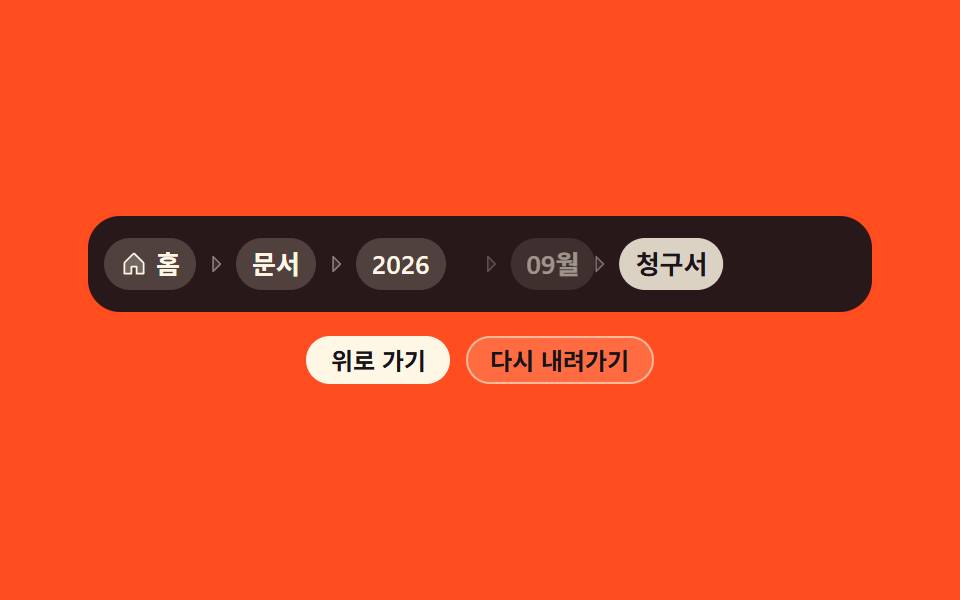
<main class="stage">
  <div class="st is-demo" id="st">
    <div class="st__rail">
      <nav class="st__nav" aria-label="Breadcrumb">
        <ol class="st__list" id="st-list">
          <li class="st__item"><a class="st__link" href="#" data-i="0"><svg viewBox="0 0 256 256" width="14" height="14" aria-hidden="true"><g fill="currentColor"><path d="M216 120v96h-64v-64h-48v64H40v-96a8 8 0 0 1 2.34-5.66l80-80a8 8 0 0 1 11.32 0l80 80A8 8 0 0 1 216 120" opacity=".2"/><path d="m219.31 108.68l-80-80a16 16 0 0 0-22.62 0l-80 80A15.87 15.87 0 0 0 32 120v96a8 8 0 0 0 8 8h64a8 8 0 0 0 8-8v-56h32v56a8 8 0 0 0 8 8h64a8 8 0 0 0 8-8v-96a15.87 15.87 0 0 0-4.69-11.32M208 208h-48v-56a8 8 0 0 0-8-8h-48a8 8 0 0 0-8 8v56H48v-88l80-80l80 80Z"/></g></svg>Home</a></li>
          <li class="st__item"><span class="st__sep" aria-hidden="true"><svg viewBox="0 0 256 256" width="12" height="12" aria-hidden="true"><g fill="currentColor"><path d="m176 128l-80 80V48Z" opacity=".2"/><path d="m181.66 122.34l-80-80A8 8 0 0 0 88 48v160a8 8 0 0 0 13.66 5.66l80-80a8 8 0 0 0 0-11.32M104 188.69V67.31L164.69 128Z"/></g></svg></span><a class="st__link" href="#" data-i="1">Docs</a></li>
          <li class="st__item"><span class="st__sep" aria-hidden="true"><svg viewBox="0 0 256 256" width="12" height="12" aria-hidden="true"><g fill="currentColor"><path d="m176 128l-80 80V48Z" opacity=".2"/><path d="m181.66 122.34l-80-80A8 8 0 0 0 88 48v160a8 8 0 0 0 13.66 5.66l80-80a8 8 0 0 0 0-11.32M104 188.69V67.31L164.69 128Z"/></g></svg></span><a class="st__link" href="#" data-i="2">2026</a></li>
          <li class="st__item"><span class="st__sep" aria-hidden="true"><svg viewBox="0 0 256 256" width="12" height="12" aria-hidden="true"><g fill="currentColor"><path d="m176 128l-80 80V48Z" opacity=".2"/><path d="m181.66 122.34l-80-80A8 8 0 0 0 88 48v160a8 8 0 0 0 13.66 5.66l80-80a8 8 0 0 0 0-11.32M104 188.69V67.31L164.69 128Z"/></g></svg></span><a class="st__link" href="#" data-i="3">Sep</a></li>
          <li class="st__item"><span class="st__sep" aria-hidden="true"><svg viewBox="0 0 256 256" width="12" height="12" aria-hidden="true"><g fill="currentColor"><path d="m176 128l-80 80V48Z" opacity=".2"/><path d="m181.66 122.34l-80-80A8 8 0 0 0 88 48v160a8 8 0 0 0 13.66 5.66l80-80a8 8 0 0 0 0-11.32M104 188.69V67.31L164.69 128Z"/></g></svg></span><span class="st__link st__link--now" aria-current="page">Invoice</span></li>
        </ol>
      </nav>
    </div>
    <div class="st__btns">
      <button class="st__btn" type="button" id="st-up">Go up</button>
      <button class="st__btn st__btn--ghost" type="button" id="st-down">Go back down</button>
    </div>
  </div>
</main>
@use "../../../../site/static/demo-tokens" as *;
$duration: $dur-base;
$easing: $ease-spring;
$color: $subject-cream;
@include stage($stage-orange);
.st {
display: flex;
flex-direction: column;
align-items: center;
gap: $sp-3;
width: 100%;
max-width: 392px;
}
// 슬라이드 아웃이 문서 폭·높이를 늘리지 않게 — 고정 높이 + overflow:hidden (247 실측)
.st__rail {
box-sizing: border-box;
width: 100%;
height: 48px;
overflow: hidden;
display: flex;
align-items: center;
padding: 0 $sp-2;
border-radius: $r-card;
background: rgba($subject-ink, .92);
}
.st__nav { width: 100%; }
.st__list {
display: flex;
align-items: center;
flex-wrap: nowrap;
gap: $sp-1;
margin: 0;
padding: 0;
list-style: none;
}
.st__item {
display: flex;
align-items: center;
gap: $sp-1;
flex: 0 0 auto;
}
.st__item[hidden] { display: none; }
.st__sep {
display: inline-flex;
flex: none;
color: rgba($subject-cream, .45);
}
.st__link {
display: inline-flex;
align-items: center;
gap: $sp-1;
padding: $sp-1 $sp-2;
border-radius: $r-pill;
background: rgba($subject-cream, .18);
color: $color;
font-size: 13px;
line-height: 18px;
font-weight: 600;
text-decoration: none;
white-space: nowrap;
cursor: pointer;
// 이징을 토큰 말고 값으로도 한 번 — 칩 `cubic-bezier` 대조용
transition: transform $duration cubic-bezier(.2, .8, .2, 1), background $duration $easing;
}
.st__link svg { flex: none; }
.st__link:hover { background: rgba($subject-cream, .34); transform: translateY(-1px); }
.st__link:focus-visible { outline: 2px solid $subject-cream; outline-offset: 2px; }
.st__link--now {
background: $subject-cream;
color: $subject-ink;
font-weight: 700;
cursor: default;
}
.st__btns { display: flex; gap: $sp-2; }
.st__btn {
padding: $sp-1 $sp-3;
border: 0;
border-radius: $r-pill;
background: $subject-cream;
color: $subject-ink;
font-family: inherit;
font-size: 12px;
line-height: 16px;
font-weight: 700;
cursor: pointer;
}
.st__btn--ghost {
background: rgba($subject-cream, .18);
color: $subject-ink; // 주황 칩 면 위 크림 2.64:1 → 잉크 6.48:1
box-shadow: inset 0 0 0 1px rgba($subject-cream, .55);
}
.st__btn:focus-visible { outline: 2px solid $subject-cream; outline-offset: 2px; }
// ── 사람이 만졌을 때의 진짜 동작 ──
@keyframes st-out {
from { transform: translateX(0); opacity: 1; }
to { transform: translateX(-28px); opacity: 0; }
}
@keyframes st-in {
from { transform: translateX(28px); opacity: 0; }
to { transform: translateX(0); opacity: 1; }
}
.st__item.is-out { animation: st-out $dur-base cubic-bezier(.2, .8, .2, 1) forwards; }
.st__item.is-in { animation: st-in $dur-base cubic-bezier(.2, .8, .2, 1); }
// ── 격자 미리보기용 자동 루프 (2초) ──
// 뒤 두 칸이 시차를 두고 왼쪽으로 빠졌다가, 오른쪽에서 되돌아온다. 86% 에 끝난다
@keyframes st-slide {
0%, 6% { transform: translateX(0); opacity: 1; }
34% { transform: translateX(-28px); opacity: 0; }
46% { transform: translateX(-28px); opacity: 0; }
47% { transform: translateX(28px); opacity: 0; }
58% { transform: translateX(28px); opacity: 0; }
86%, 100% { transform: translateX(0); opacity: 1; }
}
// animation 단축을 쓰면 delay 가 0 으로 리셋된다 — 낱개 속성으로 (240 실측)
.st.is-demo .st__item:nth-child(4),
.st.is-demo .st__item:nth-child(5) {
animation-name: st-slide;
animation-duration: $dur-loop;
animation-timing-function: $ease-spring;
animation-iteration-count: infinite;
}
.st.is-demo .st__item:nth-child(5) { animation-delay: 0s; }
.st.is-demo .st__item:nth-child(4) { animation-delay: .09s; }
@media (max-width: 340px) {
.st { gap: $sp-2; }
.st__rail { height: 40px; padding: 0 $sp-1; border-radius: $r-control; }
.st__list { gap: 0; }
.st__item { gap: 0; }
.st__link { padding: 0 $sp-1; font-size: 11px; line-height: 16px; gap: 0; }
.st__link svg { width: 11px; height: 11px; }
.st__sep svg { width: 10px; height: 10px; }
.st__btn { padding: $sp-1 $sp-2; font-size: 11px; line-height: 14px; }
}
@media (prefers-reduced-motion: reduce) {
.st.is-demo .st__item { animation: none !important; }
.st__item.is-out, .st__item.is-in { animation-duration: 1ms !important; }
.st__link { transition: none; }
.st__link:hover { transform: none; }
}html, body {
margin: 0;
overflow: hidden;
}
.stage {
box-sizing: border-box;
min-height: 100vh;
display: grid;
place-items: center;
margin: 0;
background: #ff4d1f;
font-family: -apple-system, "Segoe UI", "Noto Sans KR", sans-serif;
padding: clamp(8px, 4vw, 24px);
}
.st {
display: flex;
flex-direction: column;
align-items: center;
gap: 12px;
width: 100%;
max-width: 392px;
}
.st__rail {
box-sizing: border-box;
width: 100%;
height: 48px;
overflow: hidden;
display: flex;
align-items: center;
padding: 0 8px;
border-radius: 16px;
background: rgba(23, 20, 26, 0.92);
}
.st__nav {
width: 100%;
}
.st__list {
display: flex;
align-items: center;
flex-wrap: nowrap;
gap: 4px;
margin: 0;
padding: 0;
list-style: none;
}
.st__item {
display: flex;
align-items: center;
gap: 4px;
flex: 0 0 auto;
}
.st__item[hidden] {
display: none;
}
.st__sep {
display: inline-flex;
flex: none;
color: rgba(255, 247, 230, 0.45);
}
.st__link {
display: inline-flex;
align-items: center;
gap: 4px;
padding: 4px 8px;
border-radius: 999px;
background: rgba(255, 247, 230, 0.18);
color: #fff7e6;
font-size: 13px;
line-height: 18px;
font-weight: 600;
text-decoration: none;
white-space: nowrap;
cursor: pointer;
transition: transform 300ms cubic-bezier(0.2, 0.8, 0.2, 1), background 300ms cubic-bezier(0.2, 0.8, 0.2, 1);
}
.st__link svg {
flex: none;
}
.st__link:hover {
background: rgba(255, 247, 230, 0.34);
transform: translateY(-1px);
}
.st__link:focus-visible {
outline: 2px solid #fff7e6;
outline-offset: 2px;
}
.st__link--now {
background: #fff7e6;
color: #17141a;
font-weight: 700;
cursor: default;
}
.st__btns {
display: flex;
gap: 8px;
}
.st__btn {
padding: 4px 12px;
border: 0;
border-radius: 999px;
background: #fff7e6;
color: #17141a;
font-family: inherit;
font-size: 12px;
line-height: 16px;
font-weight: 700;
cursor: pointer;
}
.st__btn--ghost {
background: rgba(255, 247, 230, 0.18);
color: #17141a;
box-shadow: inset 0 0 0 1px rgba(255, 247, 230, 0.55);
}
.st__btn:focus-visible {
outline: 2px solid #fff7e6;
outline-offset: 2px;
}
@keyframes st-out {
from {
transform: translateX(0);
opacity: 1;
}
to {
transform: translateX(-28px);
opacity: 0;
}
}
@keyframes st-in {
from {
transform: translateX(28px);
opacity: 0;
}
to {
transform: translateX(0);
opacity: 1;
}
}
.st__item.is-out {
animation: st-out 300ms cubic-bezier(0.2, 0.8, 0.2, 1) forwards;
}
.st__item.is-in {
animation: st-in 300ms cubic-bezier(0.2, 0.8, 0.2, 1);
}
@keyframes st-slide {
0%, 6% {
transform: translateX(0);
opacity: 1;
}
34% {
transform: translateX(-28px);
opacity: 0;
}
46% {
transform: translateX(-28px);
opacity: 0;
}
47% {
transform: translateX(28px);
opacity: 0;
}
58% {
transform: translateX(28px);
opacity: 0;
}
86%, 100% {
transform: translateX(0);
opacity: 1;
}
}
.st.is-demo .st__item:nth-child(4),
.st.is-demo .st__item:nth-child(5) {
animation-name: st-slide;
animation-duration: 2s;
animation-timing-function: cubic-bezier(0.2, 0.8, 0.2, 1);
animation-iteration-count: infinite;
}
.st.is-demo .st__item:nth-child(5) {
animation-delay: 0s;
}
.st.is-demo .st__item:nth-child(4) {
animation-delay: 0.09s;
}
@media (max-width: 340px) {
.st {
gap: 8px;
}
.st__rail {
height: 40px;
padding: 0 4px;
border-radius: 12px;
}
.st__list {
gap: 0;
}
.st__item {
gap: 0;
}
.st__link {
padding: 0 4px;
font-size: 11px;
line-height: 16px;
gap: 0;
}
.st__link svg {
width: 11px;
height: 11px;
}
.st__sep svg {
width: 10px;
height: 10px;
}
.st__btn {
padding: 4px 8px;
font-size: 11px;
line-height: 14px;
}
}
@media (prefers-reduced-motion: reduce) {
.st.is-demo .st__item {
animation: none !important;
}
.st__item.is-out, .st__item.is-in {
animation-duration: 1ms !important;
}
.st__link {
transition: none;
}
.st__link:hover {
transform: none;
}
}// 실제 동작: 칸을 누르면 그 뒤 칸이 왼쪽으로 미끄러져 나가고(animationend 에서 hidden),
// 「Go back down」가 오른쪽에서 밀어 넣는다. 링크·버튼이라 Enter·Space 로도 같은 동작.
var root = document.getElementById('st');
var list = document.getElementById('st-list');
var items = [].slice.call(list.children);
function stop() { root.classList.remove('is-demo'); }
function leave(li) { li.classList.remove('is-in'); li.classList.add('is-out'); }
function enter(li) { li.hidden = false; li.classList.remove('is-out'); li.classList.add('is-in'); }
function lastVisible() {
var k = -1;
for (var i = 0; i < items.length; i++) { if (!items[i].hidden) k = i; }
return k;
}
list.addEventListener('animationend', function (e) {
var li = e.target.closest('.st__item');
if (!li) return;
if (li.classList.contains('is-out')) { li.hidden = true; li.classList.remove('is-out'); }
else if (li.classList.contains('is-in')) { li.classList.remove('is-in'); }
});
list.addEventListener('click', function (e) {
var a = e.target.closest('.st__link');
if (!a || !a.hasAttribute('data-i')) return;
e.preventDefault();
stop();
for (var k = items.length - 1; k > +a.getAttribute('data-i'); k--) {
if (!items[k].hidden) leave(items[k]);
}
});
document.getElementById('st-up').addEventListener('click', function () {
stop();
var k = lastVisible();
if (k > 0) leave(items[k]);
});
document.getElementById('st-down').addEventListener('click', function () {
stop();
for (var k = 0; k < items.length; k++) { if (items[k].hidden) enter(items[k]); }
});import { useState } from "react";
import type { CSSProperties } from "react";
import styles from "./StepTransition.module.scss";
export type Crumb = { label: string; href?: string };
export type StepTransitionProps = {
crumbs?: Crumb[];
duration?: number;
easing?: string;
color?: string;
};
// 도구/demo.py 의 ambient.d.ts 는 React 이벤트 제네릭을 안 준다 — 로컬 타입으로 TS7006 을 막는다
type ClickEvt = { preventDefault(): void };
type AnimEvt = { currentTarget: { getAttribute(n: string): string | null } };
type Vars = CSSProperties & { "--duration"?: string; "--easing"?: string; "--color"?: string };
const IconHouse = () => (
<svg viewBox="0 0 256 256" width="14" height="14" aria-hidden="true"><g fill="currentColor"><path d="M216 120v96h-64v-64h-48v64H40v-96a8 8 0 0 1 2.34-5.66l80-80a8 8 0 0 1 11.32 0l80 80A8 8 0 0 1 216 120" opacity=".2"/><path d="m219.31 108.68l-80-80a16 16 0 0 0-22.62 0l-80 80A15.87 15.87 0 0 0 32 120v96a8 8 0 0 0 8 8h64a8 8 0 0 0 8-8v-56h32v56a8 8 0 0 0 8 8h64a8 8 0 0 0 8-8v-96a15.87 15.87 0 0 0-4.69-11.32M208 208h-48v-56a8 8 0 0 0-8-8h-48a8 8 0 0 0-8 8v56H48v-88l80-80l80 80Z"/></g></svg>
);
const IconCaretRight = () => (
<svg viewBox="0 0 256 256" width="12" height="12" aria-hidden="true"><g fill="currentColor"><path d="m176 128l-80 80V48Z" opacity=".2"/><path d="m181.66 122.34l-80-80A8 8 0 0 0 88 48v160a8 8 0 0 0 13.66 5.66l80-80a8 8 0 0 0 0-11.32M104 188.69V67.31L164.69 128Z"/></g></svg>
);
const DEFAULT_CRUMBS: Crumb[] = [
{ label: "Home", href: "#" },
{ label: "Docs", href: "#" },
{ label: "2026", href: "#" },
{ label: "Sep", href: "#" },
{ label: "Invoice" },
];
export default function StepTransition({
crumbs = DEFAULT_CRUMBS,
duration = 300,
easing = "cubic-bezier(.2, .8, .2, 1)",
color = "#fff7e6",
}: StepTransitionProps) {
const [shown, setShown] = useState(crumbs.length); // 화면에 남은 칸 수
const [leaving, setLeaving] = useState<number[]>([]); // 지금 왼쪽으로 빠지는 중인 칸
const [entering, setEntering] = useState<number[]>([]);
const vars: Vars = { "--duration": `${duration}ms`, "--easing": easing, "--color": color };
function cutTo(i: number) {
const out: number[] = [];
for (let k = shown - 1; k > i; k--) out.push(k);
if (!out.length) return;
setEntering([]);
setLeaving(out);
}
function restore() {
const back: number[] = [];
for (let k = shown; k < crumbs.length; k++) back.push(k);
if (!back.length) return;
setLeaving([]);
setShown(crumbs.length);
setEntering(back);
}
function onEnd(e: AnimEvt) {
const k = Number(e.currentTarget.getAttribute("data-k"));
if (leaving.indexOf(k) >= 0) {
setShown((p: number) => Math.min(p, k));
setLeaving((p: number[]) => p.filter((x: number) => x !== k));
} else {
setEntering((p: number[]) => p.filter((x: number) => x !== k));
}
}
return (
<div className={styles.st} style={vars}>
<div className={styles.rail}>
<nav aria-label="Breadcrumb" className={styles.nav}>
<ol className={styles.list}>
{crumbs.map((c: Crumb, i: number) => {
if (i >= shown && entering.indexOf(i) < 0) return null;
const cls = [styles.item, leaving.indexOf(i) >= 0 ? styles.out : "", entering.indexOf(i) >= 0 ? styles.in : ""].join(" ");
const last = i === crumbs.length - 1;
return (
<li key={c.label} className={cls} data-k={i} onAnimationEnd={onEnd}>
{i > 0 && <span className={styles.sep} aria-hidden="true"><IconCaretRight /></span>}
{last ? (
<span className={`${styles.link} ${styles.now}`} aria-current="page">{c.label}</span>
) : (
<a className={styles.link} href={c.href} onClick={(e: ClickEvt): void => { e.preventDefault(); cutTo(i); }}>
{i === 0 && <IconHouse />}{c.label}
</a>
)}
</li>
);
})}
</ol>
</nav>
</div>
<div className={styles.btns}>
<button type="button" className={styles.btn} onClick={(): void => cutTo(shown - 2)}>Go up</button>
<button type="button" className={`${styles.btn} ${styles.ghost}`} onClick={restore}>Go back down</button>
</div>
</div>
);
}07 Step-back slide out — Measured area 2.395% · moving frames 12/23Original by GODRICH · SCSS and React ship in the zip · 9 Breadcrumb UI Patterns That Survive Deep Paths
The post this demo lives in
 9 Breadcrumb UI Patterns That Survive Deep PathsBreadcrumb UI is the trail of links at the top of a page showing where you are, from Home to the item in view. Nine work See all demos in this post