05Stepped option sheet
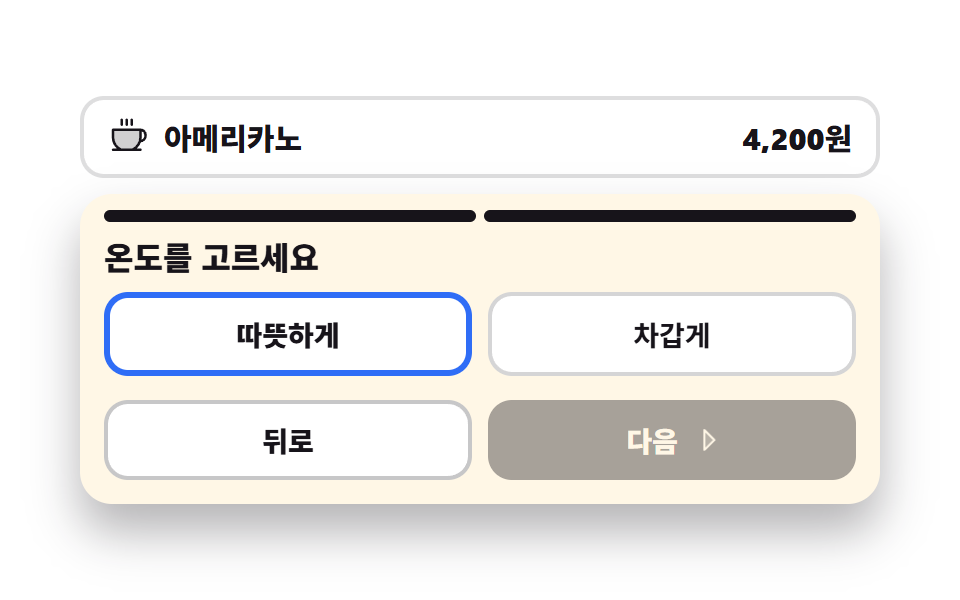
A large sheet under the menu splits size and temperature into two steps, and one more segment above fills as the step changes. Going back keeps what the earlier step already picked.
Best forPicking a drink size and temperature, a menu detail with two option steps
aria-checkedsteps(1, end)translateX
<main class="stage">
<div class="ko is-demo" id="ko">
  <p class="ko__menu">
    <svg xmlns="http://www.w3.org/2000/svg" viewBox="0 0 256 256" fill="currentColor" class="ko__ico" aria-hidden="true"><path d="M208,88v48a88,88,0,0,1-51.3,80H83.3A88,88,0,0,1,32,136V88Z" opacity="0.2"/><path d="M80,56V24a8,8,0,0,1,16,0V56a8,8,0,0,1-16,0Zm40,8a8,8,0,0,0,8-8V24a8,8,0,0,0-16,0V56A8,8,0,0,0,120,64Zm32,0a8,8,0,0,0,8-8V24a8,8,0,0,0-16,0V56A8,8,0,0,0,152,64Zm96,56v8a40,40,0,0,1-37.51,39.91,96.59,96.59,0,0,1-27,40.09H208a8,8,0,0,1,0,16H32a8,8,0,0,1,0-16H56.54A96.3,96.3,0,0,1,24,136V88a8,8,0,0,1,8-8H208A40,40,0,0,1,248,120ZM200,96H40v40a80.27,80.27,0,0,0,45.12,72h69.76A80.27,80.27,0,0,0,200,136Zm32,24a24,24,0,0,0-16-22.62V136a95.78,95.78,0,0,1-1.2,15A24,24,0,0,0,232,128Z"/></svg>
    <span class="ko__name">Americano</span>
    <b class="ko__price">4,200 won</b>
  </p>

  <div class="ko__sheet" id="sheet">
    <span class="ko__steps" aria-hidden="true">
      <i class="ko__seg ko__seg--1"></i>
      <i class="ko__seg ko__seg--2"></i>
    </span>

    <div class="ko__panes">
      <section class="ko__pane ko__pane--1" id="pane1">
        <h2 class="ko__title">Choose a size</h2>
        <div class="ko__opts" role="radiogroup" aria-label="Size" data-group="size">
          <button type="button" class="ko__opt" role="radio" aria-checked="false" data-v="Small">Small</button>
          <button type="button" class="ko__opt is-on" role="radio" aria-checked="true" data-v="Medium">Medium</button>
          <button type="button" class="ko__opt" role="radio" aria-checked="false" data-v="Large">Large</button>
        </div>
      </section>
      <section class="ko__pane ko__pane--2" id="pane2">
        <h2 class="ko__title">Choose hot or iced</h2>
        <div class="ko__opts" role="radiogroup" aria-label="Temperature" data-group="temp">
          <button type="button" class="ko__opt is-on" role="radio" aria-checked="true" data-v="Hot">Hot</button>
          <button type="button" class="ko__opt" role="radio" aria-checked="false" data-v="Iced">Iced</button>
        </div>
      </section>
    </div>

    <div class="ko__nav">
      <button type="button" class="ko__back" id="back">Back</button>
      <button type="button" class="ko__next" id="next">
        <span>Next</span>
        <svg xmlns="http://www.w3.org/2000/svg" viewBox="0 0 256 256" fill="currentColor" class="ko__caret" aria-hidden="true"><path d="M176,128,96,208V48Z" opacity="0.2"/><path d="M181.66,122.34l-80-80A8,8,0,0,0,88,48V208a8,8,0,0,0,13.66,5.66l80-80A8,8,0,0,0,181.66,122.34ZM104,188.69V67.31L164.69,128Z"/></svg>
      </button>
    </div>
  </div>
</div>
</main>@use "../../../../site/static/demo-tokens" as *;
// 옵션 고르는 큰 시트 — 한 화면에 다 늘어놓지 않고 크기·온도 두 걸음으로 나눈다.
// 걸음 교체는 steps(1, end) 컷이다. 두 판을 opacity 로 겹쳐 교차하면 24장 표본의 중간 프레임이
// 두 걸음이 반투명하게 겹친 유령이 되고 그 장이 poster 로 뽑힌다 (237·248 계열).
// 걸음 표시·제목·옵션 줄이 전부 같은 컷 시각표에 올라가야 「굵어진 걸음 표시 + 옛 제목」 같은 어긋난 장면이 안 생긴다.
// 컷만 있으면 움직인 프레임이 두세 장으로 떨어지므로, 「다음」의 꺾쇠가 오른쪽으로 밀렸다 돌아오는 움직임을 같은 2초 시계에 붙인다.
// 시트를 아래에서 끌어올리는 연출은 쓰지 않는다 — 루프가 이어붙는 지점에서 시트가 한 번에 다시 내려가 튄다.
$duration: $dur-loop;
$easing: $ease-spring;
$color: $subject-blue;
@include stage($stage-paper);
.ko { display: grid; gap: $sp-2; width: 100%; max-width: 400px; }
.ko__menu {
display: flex; align-items: center; gap: $sp-2; margin: 0;
padding: $sp-2 $sp-3; border: 2px solid rgba(23, 20, 26, .14); border-radius: $r-control;
background: $stage-paper; color: $subject-ink;
}
.ko__ico { width: clamp(16px, 4.4vw, 20px); height: clamp(16px, 4.4vw, 20px); flex: 0 0 auto; }
.ko__name { flex: 1 1 auto; font-weight: 800; font-size: clamp(12px, 3.2vw, 15px); }
.ko__price { font-weight: 800; font-size: clamp(12px, 3.2vw, 15px); }
.ko__sheet {
padding: $sp-2 $sp-3 $sp-3; border-radius: $r-card;
background: $subject-cream; box-shadow: $shadow-raised;
}
.ko__steps { display: grid; grid-template-columns: repeat(2, 1fr); gap: $sp-1; margin-bottom: $sp-2; }
.ko__seg { display: block; height: 6px; border-radius: $r-pill; background: rgba(23, 20, 26, .16); }
.ko__seg--1 { background: $subject-ink; }
.ko.is-step2 .ko__seg--2 { background: $subject-ink; }
// 두 걸음 판을 같은 격자 칸에 겹쳐 둔다 — 높이가 큰 쪽으로 고정돼 걸음이 바뀔 때 시트가 들썩이지 않는다
.ko__panes { display: grid; }
.ko__pane { grid-area: 1 / 1; }
.ko:not(.is-step2) .ko__pane--2,
.ko.is-step2 .ko__pane--1 { visibility: hidden; opacity: 0; }
.ko__title {
margin: 0 0 $sp-2; font-weight: 800; font-size: clamp(13px, 3.6vw, 16px); line-height: 1.2;
color: $subject-ink;
}
.ko__opts { display: grid; grid-auto-flow: column; grid-auto-columns: 1fr; gap: $sp-2; }
// 버튼 격자는 width:100% 를 못 박는다 — 버튼은 fit-content 라 1fr 칸이 내용 폭으로 접힌다
.ko__opt {
width: 100%; padding: $sp-2 $sp-1; cursor: pointer;
border: 2px solid rgba(23, 20, 26, .18); border-radius: $r-control;
background: $stage-paper; color: $subject-ink;
font-family: inherit; font-weight: 700; font-size: clamp(11px, 3vw, 14px);
}
// 고른 칸은 흰 바탕에 파란 테두리다. 파랑을 바탕으로 깔고 크림 글자를 얹으면 4.25:1 로 AA 에 못 미친다
.ko__opt.is-on { border-color: $color; border-width: 3px; font-weight: 800; }
.ko__opt:focus-visible { outline: 3px solid $color; outline-offset: 2px; }
.ko__nav { display: grid; grid-template-columns: repeat(2, 1fr); gap: $sp-2; margin-top: $sp-3; }
.ko__back, .ko__next {
width: 100%; padding: $sp-2; cursor: pointer; border-radius: $r-control;
font-family: inherit; font-weight: 800; font-size: clamp(11px, 3vw, 14px);
}
.ko__back { border: 2px solid rgba(23, 20, 26, .24); background: $stage-paper; color: $subject-ink; }
.ko__next {
display: flex; align-items: center; justify-content: center; gap: $sp-1;
border: 0; background: $subject-ink; color: $subject-cream;
}
.ko__back:disabled, .ko__next:disabled { opacity: .38; cursor: default; }
.ko__back:focus-visible, .ko__next:focus-visible { outline: 3px solid $color; outline-offset: 2px; }
.ko__caret { width: clamp(13px, 3.4vw, 16px); height: clamp(13px, 3.4vw, 16px); flex: 0 0 auto; }
// ── 미리보기 루프 ────────────────────────────────────────────────
// 1걸음 → 2걸음 → 1걸음. 세 컷이 전부 같은 2초 시계를 쓰므로 제목·옵션·걸음 표시가 한 프레임에 함께 간다.
.ko.is-demo .ko__pane--1,
.ko.is-demo .ko__pane--2 {
animation-duration: $duration; animation-timing-function: steps(1, end);
animation-iteration-count: infinite; animation-fill-mode: backwards;
}
.ko.is-demo .ko__pane--1 { animation-name: koPane1; }
.ko.is-demo .ko__pane--2 { animation-name: koPane2; }
@keyframes koPane1 {
0%, 46% { visibility: visible; opacity: 1; }
50%, 82% { visibility: hidden; opacity: 0; }
86%, 100% { visibility: visible; opacity: 1; }
}
@keyframes koPane2 {
0%, 46% { visibility: hidden; opacity: 0; }
50%, 82% { visibility: visible; opacity: 1; }
86%, 100% { visibility: hidden; opacity: 0; }
}
.ko.is-demo .ko__seg--2 {
animation-name: koSeg; animation-duration: $duration;
animation-timing-function: steps(1, end); animation-iteration-count: infinite;
animation-fill-mode: backwards;
}
@keyframes koSeg {
0%, 46% { background: rgba(23, 20, 26, .16); }
50%, 82% { background: $subject-ink; }
86%, 100% { background: rgba(23, 20, 26, .16); }
}
// 걸음이 바뀌면 쓸 수 있는 버튼도 바뀐다 — 1걸음에서는 「뒤로」가, 2걸음에서는 「다음」이 흐리다.
// 이것도 같은 컷 시각표에 올려야 「2걸음 판인데 뒤로가 흐린」 어긋난 장면이 대표 이미지로 뽑히지 않는다
// (`disabled` 속성은 CSS 가 못 바꾸므로 미리보기에서는 흐림만 같은 시각표로 흉내 낸다)
.ko.is-demo .ko__back,
.ko.is-demo .ko__next {
animation-duration: $duration; animation-timing-function: steps(1, end);
animation-iteration-count: infinite; animation-fill-mode: backwards;
}
.ko.is-demo .ko__back { animation-name: koBack; }
.ko.is-demo .ko__next { animation-name: koNext; }
@keyframes koBack {
0%, 46% { opacity: .38; }
50%, 82% { opacity: 1; }
86%, 100% { opacity: .38; }
}
@keyframes koNext {
0%, 46% { opacity: 1; }
50%, 82% { opacity: .38; }
86%, 100% { opacity: 1; }
}
// 꺾쇠는 자기 중심에서 오른쪽으로 밀렸다 돌아온다 — 컷 사이의 빈 칸을 이 움직임이 채운다
.ko.is-demo .ko__caret {
animation-name: koCaret; animation-duration: $duration;
animation-timing-function: $easing; animation-iteration-count: infinite;
}
@keyframes koCaret {
0%, 100% { transform: translateX(0); }
22% { transform: translateX(4px); }
44% { transform: translateX(0); }
66% { transform: translateX(4px); }
88% { transform: translateX(0); }
}
@media (max-width: 340px) {
.ko__menu { padding: $sp-1 $sp-2; }
.ko__sheet { padding: $sp-2; }
.ko__title { margin-bottom: $sp-1; }
.ko__nav { margin-top: $sp-2; }
}
@media (prefers-reduced-motion: reduce) {
.ko.is-demo .ko__pane--1,
.ko.is-demo .ko__pane--2,
.ko.is-demo .ko__seg--2,
.ko.is-demo .ko__back,
.ko.is-demo .ko__next,
.ko.is-demo .ko__caret { animation: none !important; }
.ko.is-demo .ko__back { opacity: 1 !important; }
.ko.is-demo .ko__next { opacity: .38 !important; }
// 움직임 없이 2걸음이 열린 자리에 세워 둔다
.ko.is-demo .ko__pane--1 { visibility: hidden !important; opacity: 0 !important; }
.ko.is-demo .ko__pane--2 { visibility: visible !important; opacity: 1 !important; }
.ko.is-demo .ko__seg--2 { background: $subject-ink !important; }
}html, body {
margin: 0;
overflow: hidden;
}
.stage {
box-sizing: border-box;
min-height: 100vh;
display: grid;
place-items: center;
margin: 0;
background: #ffffff;
font-family: -apple-system, "Segoe UI", "Noto Sans KR", sans-serif;
padding: clamp(8px, 4vw, 24px);
}
.ko {
display: grid;
gap: 8px;
width: 100%;
max-width: 400px;
}
.ko__menu {
display: flex;
align-items: center;
gap: 8px;
margin: 0;
padding: 8px 12px;
border: 2px solid rgba(23, 20, 26, 0.14);
border-radius: 12px;
background: #ffffff;
color: #17141a;
}
.ko__ico {
width: clamp(16px, 4.4vw, 20px);
height: clamp(16px, 4.4vw, 20px);
flex: 0 0 auto;
}
.ko__name {
flex: 1 1 auto;
font-weight: 800;
font-size: clamp(12px, 3.2vw, 15px);
}
.ko__price {
font-weight: 800;
font-size: clamp(12px, 3.2vw, 15px);
}
.ko__sheet {
padding: 8px 12px 12px;
border-radius: 16px;
background: #fff7e6;
box-shadow: 0 14px 24px rgba(23, 20, 26, 0.32);
}
.ko__steps {
display: grid;
grid-template-columns: repeat(2, 1fr);
gap: 4px;
margin-bottom: 8px;
}
.ko__seg {
display: block;
height: 6px;
border-radius: 999px;
background: rgba(23, 20, 26, 0.16);
}
.ko__seg--1 {
background: #17141a;
}
.ko.is-step2 .ko__seg--2 {
background: #17141a;
}
.ko__panes {
display: grid;
}
.ko__pane {
grid-area: 1/1;
}
.ko:not(.is-step2) .ko__pane--2,
.ko.is-step2 .ko__pane--1 {
visibility: hidden;
opacity: 0;
}
.ko__title {
margin: 0 0 8px;
font-weight: 800;
font-size: clamp(13px, 3.6vw, 16px);
line-height: 1.2;
color: #17141a;
}
.ko__opts {
display: grid;
grid-auto-flow: column;
grid-auto-columns: 1fr;
gap: 8px;
}
.ko__opt {
width: 100%;
padding: 8px 4px;
cursor: pointer;
border: 2px solid rgba(23, 20, 26, 0.18);
border-radius: 12px;
background: #ffffff;
color: #17141a;
font-family: inherit;
font-weight: 700;
font-size: clamp(11px, 3vw, 14px);
}
.ko__opt.is-on {
border-color: #2f6df6;
border-width: 3px;
font-weight: 800;
}
.ko__opt:focus-visible {
outline: 3px solid #2f6df6;
outline-offset: 2px;
}
.ko__nav {
display: grid;
grid-template-columns: repeat(2, 1fr);
gap: 8px;
margin-top: 12px;
}
.ko__back, .ko__next {
width: 100%;
padding: 8px;
cursor: pointer;
border-radius: 12px;
font-family: inherit;
font-weight: 800;
font-size: clamp(11px, 3vw, 14px);
}
.ko__back {
border: 2px solid rgba(23, 20, 26, 0.24);
background: #ffffff;
color: #17141a;
}
.ko__next {
display: flex;
align-items: center;
justify-content: center;
gap: 4px;
border: 0;
background: #17141a;
color: #fff7e6;
}
.ko__back:disabled, .ko__next:disabled {
opacity: 0.38;
cursor: default;
}
.ko__back:focus-visible, .ko__next:focus-visible {
outline: 3px solid #2f6df6;
outline-offset: 2px;
}
.ko__caret {
width: clamp(13px, 3.4vw, 16px);
height: clamp(13px, 3.4vw, 16px);
flex: 0 0 auto;
}
.ko.is-demo .ko__pane--1,
.ko.is-demo .ko__pane--2 {
animation-duration: 2s;
animation-timing-function: steps(1, end);
animation-iteration-count: infinite;
animation-fill-mode: backwards;
}
.ko.is-demo .ko__pane--1 {
animation-name: koPane1;
}
.ko.is-demo .ko__pane--2 {
animation-name: koPane2;
}
@keyframes koPane1 {
0%, 46% {
visibility: visible;
opacity: 1;
}
50%, 82% {
visibility: hidden;
opacity: 0;
}
86%, 100% {
visibility: visible;
opacity: 1;
}
}
@keyframes koPane2 {
0%, 46% {
visibility: hidden;
opacity: 0;
}
50%, 82% {
visibility: visible;
opacity: 1;
}
86%, 100% {
visibility: hidden;
opacity: 0;
}
}
.ko.is-demo .ko__seg--2 {
animation-name: koSeg;
animation-duration: 2s;
animation-timing-function: steps(1, end);
animation-iteration-count: infinite;
animation-fill-mode: backwards;
}
@keyframes koSeg {
0%, 46% {
background: rgba(23, 20, 26, 0.16);
}
50%, 82% {
background: #17141a;
}
86%, 100% {
background: rgba(23, 20, 26, 0.16);
}
}
.ko.is-demo .ko__back,
.ko.is-demo .ko__next {
animation-duration: 2s;
animation-timing-function: steps(1, end);
animation-iteration-count: infinite;
animation-fill-mode: backwards;
}
.ko.is-demo .ko__back {
animation-name: koBack;
}
.ko.is-demo .ko__next {
animation-name: koNext;
}
@keyframes koBack {
0%, 46% {
opacity: 0.38;
}
50%, 82% {
opacity: 1;
}
86%, 100% {
opacity: 0.38;
}
}
@keyframes koNext {
0%, 46% {
opacity: 1;
}
50%, 82% {
opacity: 0.38;
}
86%, 100% {
opacity: 1;
}
}
.ko.is-demo .ko__caret {
animation-name: koCaret;
animation-duration: 2s;
animation-timing-function: cubic-bezier(0.2, 0.8, 0.2, 1);
animation-iteration-count: infinite;
}
@keyframes koCaret {
0%, 100% {
transform: translateX(0);
}
22% {
transform: translateX(4px);
}
44% {
transform: translateX(0);
}
66% {
transform: translateX(4px);
}
88% {
transform: translateX(0);
}
}
@media (max-width: 340px) {
.ko__menu {
padding: 4px 8px;
}
.ko__sheet {
padding: 8px;
}
.ko__title {
margin-bottom: 4px;
}
.ko__nav {
margin-top: 8px;
}
}
@media (prefers-reduced-motion: reduce) {
.ko.is-demo .ko__pane--1,
.ko.is-demo .ko__pane--2,
.ko.is-demo .ko__seg--2,
.ko.is-demo .ko__back,
.ko.is-demo .ko__next,
.ko.is-demo .ko__caret {
animation: none !important;
}
.ko.is-demo .ko__back {
opacity: 1 !important;
}
.ko.is-demo .ko__next {
opacity: 0.38 !important;
}
.ko.is-demo .ko__pane--1 {
visibility: hidden !important;
opacity: 0 !important;
}
.ko.is-demo .ko__pane--2 {
visibility: visible !important;
opacity: 1 !important;
}
.ko.is-demo .ko__seg--2 {
background: #17141a !important;
}
}var ko = document.getElementById('ko');
var back = document.getElementById('back');
var next = document.getElementById('next');
var panes = [document.getElementById('pane1'), document.getElementById('pane2')];
var step = 0;
// 시트는 걸음마다 옵션 줄만 갈아 끼운다. 고른 값은 걸음을 오가도 버리지 않는다 —
// 라디오 상태를 DOM 에 그대로 두고 보이는 칸만 바꾸기 때문이다.
var picks = { size: 'Medium', temp: 'Hot' };
function paint() {
ko.classList.toggle('is-step2', step === 1);
for (var i = 0; i < panes.length; i++) {
panes[i].setAttribute('aria-hidden', i === step ? 'false' : 'true');
}
back.disabled = step === 0;
next.disabled = step === panes.length - 1;
}
function go(to) {
ko.classList.remove('is-demo');
step = Math.max(0, Math.min(panes.length - 1, to));
paint();
var first = panes[step].querySelector('[aria-checked="true"]') || panes[step].querySelector('.ko__opt');
if (first) { first.focus({ preventScroll: true }); }
}
function pick(group, btn) {
ko.classList.remove('is-demo');
var opts = btn.parentNode.querySelectorAll('.ko__opt');
for (var i = 0; i < opts.length; i++) {
var on = opts[i] === btn;
opts[i].setAttribute('aria-checked', on ? 'true' : 'false');
opts[i].classList.toggle('is-on', on);
opts[i].tabIndex = on ? 0 : -1;
}
picks[group] = btn.getAttribute('data-v');
}
var groups = ko.querySelectorAll('.ko__opts');
for (var g = 0; g < groups.length; g++) {
(function (box) {
var group = box.getAttribute('data-group');
var opts = box.querySelectorAll('.ko__opt');
for (var i = 0; i < opts.length; i++) {
opts[i].tabIndex = opts[i].getAttribute('aria-checked') === 'true' ? 0 : -1;
opts[i].addEventListener('click', function () { pick(group, this); });
}
// 라디오 묶음은 화살표로 옮겨 다닌다 — Tab 은 묶음 하나에 한 번만 들어온다
box.addEventListener('keydown', function (e) {
var list = Array.prototype.slice.call(opts);
var at = list.indexOf(document.activeElement);
var d = 0;
if (e.key === 'ArrowRight' || e.key === 'ArrowDown') { d = 1; }
else if (e.key === 'ArrowLeft' || e.key === 'ArrowUp') { d = -1; }
else { return; }
e.preventDefault();
var to = list[(at + d + list.length) % list.length];
pick(group, to);
to.focus({ preventScroll: true });
});
})(groups[g]);
}
back.addEventListener('click', function () { go(step - 1); });
next.addEventListener('click', function () { go(step + 1); });
paint();// OptionSheetStep — vanilla 판(run/298/demo/05-kiosk-option-sheet-step/index.html) 의 React 포트.
// 옵션을 한 화면에 다 늘어놓지 않고 크기·온도 두 걸음으로 나눈다. 두 판은 같은 격자 칸(grid-area: 1 / 1)에
// 겹쳐 서고 visibility + opacity 로만 갈린다 — 높이가 큰 쪽으로 고정돼 걸음이 바뀔 때 시트가 들썩이지 않는다.
// 고른 값은 걸음을 오가도 버리지 않는다. 라디오 상태를 DOM 에 그대로 두고 보이는 칸만 바꾸기 때문이다.
// 라디오 묶음은 Tab 이 한 번만 들어오는 로빙 tabindex 다 — 안에서는 화살표로 옮겨 다닌다.
// 미리보기 루프(.isDemo)는 CSS 키프레임이 돌리고, 사람이 만지면 여기서 루프를 뗀다. 값·수치는 vanilla 와 같다.
import { useEffect, useRef, useState } from "react";
import type { CSSProperties } from "react";
import styles from "./OptionSheetStep.module.scss";
export type OptionSheetStepProps = {
duration?: number;
easing?: string;
color?: string;
};
type Vars = CSSProperties & {
"--duration"?: string;
"--easing"?: string;
"--color"?: string;
};
// ambient 타입에는 React 이벤트 제네릭이 없다 — 핸들러가 실제로 쓰는 것만 지역 타입으로 적는다
type KeyEvt = { key: string; preventDefault(): void };
// useRef 는 T | null 을 돌려준다. 처음부터 값이 있고 절대 비지 않는 상자는 이렇게 좁혀 쓴다
type Box<T> = { current: T };
const MENU_NAME = "아메리카노";
const MENU_PRICE = "4,200원";
const BACK_LABEL = "뒤로";
const NEXT_LABEL = "다음";
type Group = { pane: string; title: string; label: string; opts: string[] };
const GROUPS: Group[] = [
{ pane: "pane1", title: "크기를 고르세요", label: "크기 고르기", opts: ["작게", "보통", "크게"] },
{ pane: "pane2", title: "온도를 고르세요", label: "온도 고르기", opts: ["따뜻하게", "차갑게"] },
];
const FIRST_PICKS: string[] = ["보통", "따뜻하게"];
export default function OptionSheetStep({
duration = 2000,
easing = "cubic-bezier(.2, .8, .2, 1)",
color = "#2f6df6",
}: OptionSheetStepProps) {
const box1 = useRef<HTMLDivElement | null>(null);
const box2 = useRef<HTMLDivElement | null>(null);
const boxes = [box1, box2];
// 첫 렌더에는 초점을 옮기지 않는다 — 사람이 만진 뒤부터가 걸음 이동이다
const touchedRef = useRef<boolean>(false) as Box<boolean>;
const [step, setStep] = useState(0);
const [picks, setPicks] = useState(FIRST_PICKS);
const [demo, setDemo] = useState(true);
const vars: Vars = { "--duration": `${duration}ms`, "--easing": easing, "--color": color };
useEffect(() => {
if (!touchedRef.current) return;
const box = boxes[step].current;
if (!box) return;
// 걸음을 옮기면 그 판에서 이미 고른 칸으로 초점이 간다 (없으면 첫 칸)
const on = box.querySelector('[aria-checked="true"]') as HTMLButtonElement | null;
const first = on || (box.querySelector("button") as HTMLButtonElement | null);
if (first) first.focus({ preventScroll: true });
}, [step]);
function go(to: number): void {
touchedRef.current = true;
setDemo(false);
setStep(Math.max(0, Math.min(GROUPS.length - 1, to)));
}
function pick(gi: number, value: string): void {
setDemo(false);
setPicks((prev) => prev.map((v, i) => (i === gi ? value : v)));
}
// 라디오 묶음은 화살표로 옮겨 다닌다 — 로빙 tabindex 라 초점은 늘 고른 칸에 있다
function keys(gi: number, event: KeyEvt): void {
let d = 0;
if (event.key === "ArrowRight" || event.key === "ArrowDown") d = 1;
else if (event.key === "ArrowLeft" || event.key === "ArrowUp") d = -1;
else return;
event.preventDefault();
const opts = GROUPS[gi].opts;
const at = opts.indexOf(picks[gi]);
const next = (at + d + opts.length) % opts.length;
pick(gi, opts[next]);
const box = boxes[gi].current;
if (!box) return;
const btn = box.querySelectorAll("button")[next] as HTMLButtonElement | undefined;
if (btn) btn.focus({ preventScroll: true });
}
const cls = [styles.root, demo ? styles.isDemo : "", step === 1 ? styles.isStep2 : ""].filter(Boolean).join(" ");
return (
<main className={styles.stage}>
<div className={cls} style={vars}>
<p className={styles.menu}>
<svg xmlns="http://www.w3.org/2000/svg" viewBox="0 0 256 256" fill="currentColor" className={styles.ico} aria-hidden="true"><path d="M208,88v48a88,88,0,0,1-51.3,80H83.3A88,88,0,0,1,32,136V88Z" opacity="0.2"/><path d="M80,56V24a8,8,0,0,1,16,0V56a8,8,0,0,1-16,0Zm40,8a8,8,0,0,0,8-8V24a8,8,0,0,0-16,0V56A8,8,0,0,0,120,64Zm32,0a8,8,0,0,0,8-8V24a8,8,0,0,0-16,0V56A8,8,0,0,0,152,64Zm96,56v8a40,40,0,0,1-37.51,39.91,96.59,96.59,0,0,1-27,40.09H208a8,8,0,0,1,0,16H32a8,8,0,0,1,0-16H56.54A96.3,96.3,0,0,1,24,136V88a8,8,0,0,1,8-8H208A40,40,0,0,1,248,120ZM200,96H40v40a80.27,80.27,0,0,0,45.12,72h69.76A80.27,80.27,0,0,0,200,136Zm32,24a24,24,0,0,0-16-22.62V136a95.78,95.78,0,0,1-1.2,15A24,24,0,0,0,232,128Z"/></svg>
<span className={styles.name}>{MENU_NAME}</span>
<b className={styles.price}>{MENU_PRICE}</b>
</p>
<div className={styles.sheet}>
<span className={styles.steps} aria-hidden="true">
<i className={`${styles.seg} ${styles.seg1}`}></i>
<i className={`${styles.seg} ${styles.seg2}`}></i>
</span>
<div className={styles.panes}>
{GROUPS.map((group, gi) => (
<section className={`${styles.pane} ${styles[group.pane]}`} key={group.pane} aria-hidden={gi === step ? "false" : "true"}>
<h2 className={styles.title}>{group.title}</h2>
<div
className={styles.opts}
role="radiogroup"
aria-label={group.label}
ref={boxes[gi]}
onKeyDown={(event: KeyEvt) => keys(gi, event)}
>
{group.opts.map((opt) => {
const on = picks[gi] === opt;
return (
<button
type="button"
key={opt}
className={[styles.opt, on ? styles.isOn : ""].filter(Boolean).join(" ")}
role="radio"
aria-checked={on ? "true" : "false"}
tabIndex={on ? 0 : -1}
onClick={() => pick(gi, opt)}
>
{opt}
</button>
);
})}
</div>
</section>
))}
</div>
<div className={styles.nav}>
<button type="button" className={styles.back} disabled={step === 0} onClick={() => go(step - 1)}>{BACK_LABEL}</button>
<button type="button" className={styles.next} disabled={step === GROUPS.length - 1} onClick={() => go(step + 1)}>
<span>{NEXT_LABEL}</span>
<svg xmlns="http://www.w3.org/2000/svg" viewBox="0 0 256 256" fill="currentColor" className={styles.caret} aria-hidden="true"><path d="M176,128,96,208V48Z" opacity="0.2"/><path d="M181.66,122.34l-80-80A8,8,0,0,0,88,48V208a8,8,0,0,0,13.66,5.66l80-80A8,8,0,0,0,181.66,122.34ZM104,188.69V67.31L164.69,128Z"/></svg>
</button>
</div>
</div>
</div>
</main>
);
}05 Stepped option sheet — Measured area 14.037% · moving frames 17/23Original by GODRICH · SCSS and React ship in the zip · Kiosk UI Design: 9 Finger-Sized Order Screens
The post this demo lives in
 Kiosk UI Design: 9 Finger-Sized Order ScreensKiosk UI design is the craft of handing a standing stranger one decision per screen. These nine finger-sized order scree See all demos in this post