08Question-mark help sheet
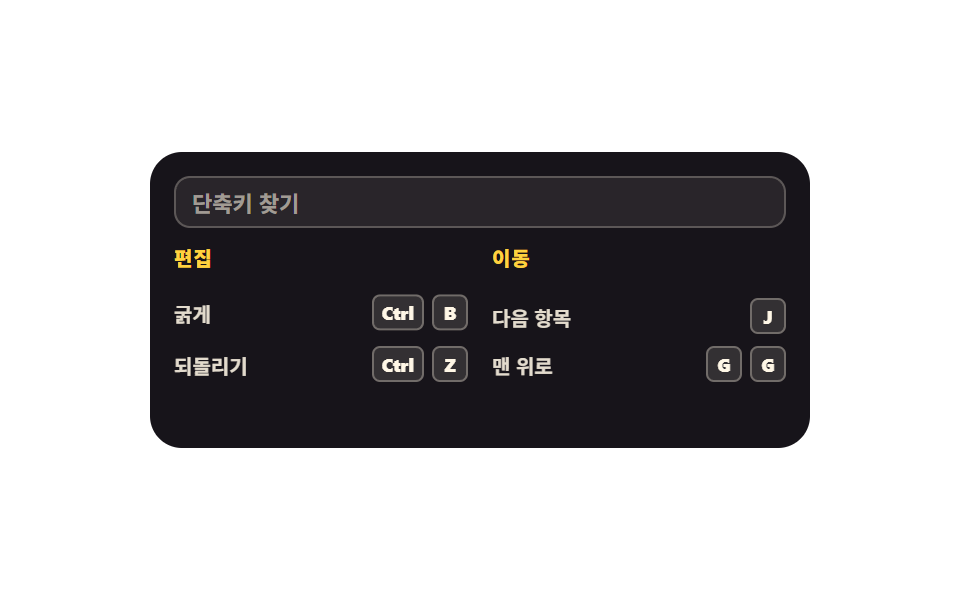
Press the question mark and only the shortcuts that work on this screen unfold, grouped. Type in the search box at the top and the list filters in place; Esc closes it.
Best forFull shortcut guide in a productivity web app, dashboard help
clip-pathsteps(1, end)aria-modal
<svg width="0" height="0" style="position:absolute" aria-hidden="true">
  <defs>
    <symbol id="question" viewBox="0 0 256 256" fill="currentColor"><path d="M224,128a96,96,0,1,1-96-96A96,96,0,0,1,224,128Z" opacity="0.2"/><path d="M140,180a12,12,0,1,1-12-12A12,12,0,0,1,140,180ZM128,72c-22.06,0-40,16.15-40,36v4a8,8,0,0,0,16,0v-4c0-11,10.77-20,24-20s24,9,24,20-10.77,20-24,20a8,8,0,0,0-8,8v8a8,8,0,0,0,16,0v-.72c18.24-3.35,32-17.9,32-35.28C168,88.15,150.06,72,128,72Zm104,56A104,104,0,1,1,128,24,104.11,104.11,0,0,1,232,128Zm-16,0a88,88,0,1,0-88,88A88.1,88.1,0,0,0,216,128Z"/></symbol>
  </defs>
</svg>
<main class="stage">
<div class="hs is-demo" id="hs">
  <div class="hs__app">
    <div class="hs__bar">
      <span class="hs__appName">Document editor</span>
      <button type="button" class="hs__ask" id="ask" aria-expanded="false" aria-controls="sheet" aria-keyshortcuts="Shift+?">
        <svg class="hs__ico" aria-hidden="true"><use href="#question"/></svg>
      </button>
    </div>
    <div class="hs__paper" aria-hidden="true"><i></i><i></i><i></i></div>
    <div class="hs__sheet" id="sheet" role="dialog" aria-modal="true" aria-label="Shortcuts on this screen">
      <input class="hs__search" id="search" type="search" placeholder="Search shortcuts" aria-label="Search shortcuts">
      <div class="hs__cols">
        <section class="hs__group">
          <p class="hs__groupName">Editing</p>
          <ul class="hs__list">
            <li class="hs__item"><span class="hs__what">Bold</span><span class="hs__keys"><kbd class="hs__key">Ctrl</kbd><kbd class="hs__key">B</kbd></span></li>
            <li class="hs__item"><span class="hs__what">Undo</span><span class="hs__keys"><kbd class="hs__key">Ctrl</kbd><kbd class="hs__key">Z</kbd></span></li>
          </ul>
        </section>
        <section class="hs__group">
          <p class="hs__groupName">Navigation</p>
          <ul class="hs__list">
            <li class="hs__item"><span class="hs__what">Next item</span><span class="hs__keys"><kbd class="hs__key">J</kbd></span></li>
            <li class="hs__item"><span class="hs__what">Back to top</span><span class="hs__keys"><kbd class="hs__key">G</kbd><kbd class="hs__key">G</kbd></span></li>
          </ul>
        </section>
      </div>
    </div>
  </div>
</div>
</main>@use "../../../../site/static/demo-tokens" as *;
// 물음표 도움말 시트 — ? 를 누르면 지금 화면에서 쓸 수 있는 단축키만 묶음별로 펼쳐진다.
// 실제 조작(클릭·? 입력)에서 열림은 clip-path 위프(transition, ease-out)이고 안쪽 줄은 translateY 로 뒤따른다.
// 시트는 앱 카드 안(inset: 0)에 갇힌 절대배치라 무대 높이를 넘기지 않는다.
$duration: $dur-base;
$easing: $ease-spring;
$color: $subject-ink;
@include stage($stage-paper);
.hs { display: flex; justify-content: center; width: 100%; }
.hs__app {
position: relative; overflow: hidden; box-sizing: border-box;
width: min(100%, 330px); height: 148px;
background: rgba(23, 20, 26, .05); border-radius: $r-card; padding: $sp-3;
}
.hs__bar { display: flex; align-items: center; justify-content: space-between; gap: $sp-2; }
.hs__appName { font-weight: 800; font-size: clamp(11px, 3vw, 12px); color: $color; }
.hs__ask {
display: grid; place-items: center; border: 0; cursor: pointer;
width: 24px; height: 24px; border-radius: 50%;
background: rgba(23, 20, 26, .10); color: $color;
transition: transform $dur-instant $easing, background $dur-instant $easing;
}
.hs__ask:focus-visible { outline: 3px solid $subject-blue; outline-offset: 2px; }
.hs__ico { width: 16px; height: 16px; }
.hs__paper { display: flex; flex-direction: column; gap: $sp-2; margin-top: $sp-4; }
.hs__paper i { height: 6px; border-radius: $r-pill; background: rgba(23, 20, 26, .10); }
.hs__paper i:nth-child(2) { width: 76%; }
.hs__paper i:nth-child(3) { width: 54%; }
.hs__sheet {
position: absolute; inset: 0; box-sizing: border-box;
display: flex; flex-direction: column; gap: $sp-2;
background: $color; padding: $sp-3;
clip-path: inset(0 0 100% 0);
transition: clip-path $duration $ease-out;
}
.hs.is-open .hs__sheet { clip-path: inset(0 0 0 0); }
.hs__search {
box-sizing: border-box; width: 100%; height: 26px;
border: 1px solid rgba(255, 247, 230, .24); border-radius: $r-sm;
background: rgba(255, 247, 230, .08); color: $subject-cream;
font-family: inherit; font-weight: 600; font-size: 11px; line-height: 1; padding: 0 $sp-2;
}
.hs__search::placeholder { color: rgba(255, 247, 230, .56); }
.hs__cols { display: grid; grid-template-columns: repeat(2, 1fr); gap: $sp-3; }
.hs__group { min-width: 0; }
.hs__groupName {
margin: 0 0 $sp-1; font-weight: 800; font-size: 10px; line-height: 1.4;
color: $stage-yellow; letter-spacing: .04em;
}
.hs__list { list-style: none; margin: 0; padding: 0; display: flex; flex-direction: column; gap: $sp-1; }
.hs__item {
display: flex; align-items: center; justify-content: space-between; gap: $sp-1;
min-height: 20px;
}
.hs__item.is-hidden { visibility: hidden; }
.hs__what { font-weight: 600; font-size: 10px; color: rgba(255, 247, 230, .88); }
.hs__keys { display: flex; align-items: center; gap: $sp-1; }
.hs__key {
display: grid; place-items: center; box-sizing: border-box; height: 18px; min-width: 18px;
border-radius: $r-xs; border: 1px solid rgba(255, 247, 230, .30);
background: rgba(255, 247, 230, .12); color: $subject-cream;
font-family: inherit; font-weight: 800; font-size: 9px; line-height: 1; padding: 0 $sp-1;
}
// ── 격자 미리보기 루프: 0~14% 닫힌 문서 · 15% 에 시트가 한 프레임에 열리고 그 뒤로는 열린 채로 머문다.
// 위프를 그대로 미리보기에 쓰면 24프레임 중 한 장이 **반쯤 열린** 장면이 되고, 그 장이 최대 변화라
// poster 로 뽑힌다 (이 편 실측). 시트처럼 면적이 큰 판은 미리보기에서만 steps(1, end) 로 컷한다 —
// 실제 클릭·? 입력은 위의 transition: clip-path 그대로 부드럽게 열린다 (252 와 같은 계열).
// 닫히는 장면은 루프에 두지 않는다 — 빈 문서 화면이 최대 변화가 되어 버린다 (255 실측).
.hs.is-demo .hs__sheet {
animation-name: hsOpen; animation-duration: $dur-loop; animation-timing-function: steps(1, end);
animation-iteration-count: infinite; animation-fill-mode: backwards;
}
@keyframes hsOpen {
0%, 14% { clip-path: inset(0 0 100% 0); }
15%, 100% { clip-path: inset(0 0 0 0); }
}
.hs.is-demo .hs__ask {
animation-name: hsAsk; animation-duration: $dur-loop; animation-timing-function: $easing;
animation-iteration-count: infinite; animation-fill-mode: backwards;
}
@keyframes hsAsk {
0%, 8% { transform: scale(1); background: rgba(23, 20, 26, .10); }
14% { transform: scale(.86); background: rgba(23, 20, 26, .20); }
22%, 100% { transform: scale(1); background: rgba(23, 20, 26, .10); }
}
// 묶음 안 줄은 위프가 지나간 뒤 차례로 올라온다 — 퍼센트로 시차를 주고 delay 는 쓰지 않는다
.hs.is-demo .hs__item {
animation-duration: $dur-loop; animation-timing-function: $easing;
animation-iteration-count: infinite; animation-fill-mode: backwards;
}
.hs.is-demo .hs__group:nth-child(1) .hs__item:nth-child(1) { animation-name: hsRise1; }
.hs.is-demo .hs__group:nth-child(1) .hs__item:nth-child(2) { animation-name: hsRise2; }
.hs.is-demo .hs__group:nth-child(2) .hs__item:nth-child(1) { animation-name: hsRise3; }
.hs.is-demo .hs__group:nth-child(2) .hs__item:nth-child(2) { animation-name: hsRise4; }
@keyframes hsRise1 { 0%, 16% { transform: translateY(8px); } 28%, 100% { transform: translateY(0); } }
@keyframes hsRise2 { 0%, 21% { transform: translateY(8px); } 33%, 100% { transform: translateY(0); } }
@keyframes hsRise3 { 0%, 26% { transform: translateY(8px); } 38%, 100% { transform: translateY(0); } }
@keyframes hsRise4 { 0%, 31% { transform: translateY(8px); } 43%, 100% { transform: translateY(0); } }
@media (max-width: 340px) {
.hs__app { padding: $sp-2; height: 144px; }
.hs__sheet { padding: $sp-2; gap: $sp-1; }
.hs__cols { gap: $sp-2; }
.hs__paper { margin-top: $sp-3; }
}
@media (prefers-reduced-motion: reduce) {
.hs.is-demo .hs__sheet,
.hs.is-demo .hs__ask,
.hs.is-demo .hs__item { animation: none !important; }
.hs.is-demo .hs__sheet { clip-path: inset(0 0 0 0) !important; }
.hs__sheet, .hs__ask { transition: none !important; }
}html, body {
margin: 0;
overflow: hidden;
}
.stage {
box-sizing: border-box;
min-height: 100vh;
display: grid;
place-items: center;
margin: 0;
background: #ffffff;
font-family: -apple-system, "Segoe UI", "Noto Sans KR", sans-serif;
padding: clamp(8px, 4vw, 24px);
}
.hs {
display: flex;
justify-content: center;
width: 100%;
}
.hs__app {
position: relative;
overflow: hidden;
box-sizing: border-box;
width: min(100%, 330px);
height: 148px;
background: rgba(23, 20, 26, 0.05);
border-radius: 16px;
padding: 12px;
}
.hs__bar {
display: flex;
align-items: center;
justify-content: space-between;
gap: 8px;
}
.hs__appName {
font-weight: 800;
font-size: clamp(11px, 3vw, 12px);
color: #17141a;
}
.hs__ask {
display: grid;
place-items: center;
border: 0;
cursor: pointer;
width: 24px;
height: 24px;
border-radius: 50%;
background: rgba(23, 20, 26, 0.1);
color: #17141a;
transition: transform 140ms cubic-bezier(0.2, 0.8, 0.2, 1), background 140ms cubic-bezier(0.2, 0.8, 0.2, 1);
}
.hs__ask:focus-visible {
outline: 3px solid #2f6df6;
outline-offset: 2px;
}
.hs__ico {
width: 16px;
height: 16px;
}
.hs__paper {
display: flex;
flex-direction: column;
gap: 8px;
margin-top: 16px;
}
.hs__paper i {
height: 6px;
border-radius: 999px;
background: rgba(23, 20, 26, 0.1);
}
.hs__paper i:nth-child(2) {
width: 76%;
}
.hs__paper i:nth-child(3) {
width: 54%;
}
.hs__sheet {
position: absolute;
inset: 0;
box-sizing: border-box;
display: flex;
flex-direction: column;
gap: 8px;
background: #17141a;
padding: 12px;
clip-path: inset(0 0 100% 0);
transition: clip-path 300ms ease-out;
}
.hs.is-open .hs__sheet {
clip-path: inset(0 0 0 0);
}
.hs__search {
box-sizing: border-box;
width: 100%;
height: 26px;
border: 1px solid rgba(255, 247, 230, 0.24);
border-radius: 8px;
background: rgba(255, 247, 230, 0.08);
color: #fff7e6;
font-family: inherit;
font-weight: 600;
font-size: 11px;
line-height: 1;
padding: 0 8px;
}
.hs__search::placeholder {
color: rgba(255, 247, 230, 0.56);
}
.hs__cols {
display: grid;
grid-template-columns: repeat(2, 1fr);
gap: 12px;
}
.hs__group {
min-width: 0;
}
.hs__groupName {
margin: 0 0 4px;
font-weight: 800;
font-size: 10px;
line-height: 1.4;
color: #ffd23f;
letter-spacing: 0.04em;
}
.hs__list {
list-style: none;
margin: 0;
padding: 0;
display: flex;
flex-direction: column;
gap: 4px;
}
.hs__item {
display: flex;
align-items: center;
justify-content: space-between;
gap: 4px;
min-height: 20px;
}
.hs__item.is-hidden {
visibility: hidden;
}
.hs__what {
font-weight: 600;
font-size: 10px;
color: rgba(255, 247, 230, 0.88);
}
.hs__keys {
display: flex;
align-items: center;
gap: 4px;
}
.hs__key {
display: grid;
place-items: center;
box-sizing: border-box;
height: 18px;
min-width: 18px;
border-radius: 4px;
border: 1px solid rgba(255, 247, 230, 0.3);
background: rgba(255, 247, 230, 0.12);
color: #fff7e6;
font-family: inherit;
font-weight: 800;
font-size: 9px;
line-height: 1;
padding: 0 4px;
}
.hs.is-demo .hs__sheet {
animation-name: hsOpen;
animation-duration: 2s;
animation-timing-function: steps(1, end);
animation-iteration-count: infinite;
animation-fill-mode: backwards;
}
@keyframes hsOpen {
0%, 14% {
clip-path: inset(0 0 100% 0);
}
15%, 100% {
clip-path: inset(0 0 0 0);
}
}
.hs.is-demo .hs__ask {
animation-name: hsAsk;
animation-duration: 2s;
animation-timing-function: cubic-bezier(0.2, 0.8, 0.2, 1);
animation-iteration-count: infinite;
animation-fill-mode: backwards;
}
@keyframes hsAsk {
0%, 8% {
transform: scale(1);
background: rgba(23, 20, 26, 0.1);
}
14% {
transform: scale(0.86);
background: rgba(23, 20, 26, 0.2);
}
22%, 100% {
transform: scale(1);
background: rgba(23, 20, 26, 0.1);
}
}
.hs.is-demo .hs__item {
animation-duration: 2s;
animation-timing-function: cubic-bezier(0.2, 0.8, 0.2, 1);
animation-iteration-count: infinite;
animation-fill-mode: backwards;
}
.hs.is-demo .hs__group:nth-child(1) .hs__item:nth-child(1) {
animation-name: hsRise1;
}
.hs.is-demo .hs__group:nth-child(1) .hs__item:nth-child(2) {
animation-name: hsRise2;
}
.hs.is-demo .hs__group:nth-child(2) .hs__item:nth-child(1) {
animation-name: hsRise3;
}
.hs.is-demo .hs__group:nth-child(2) .hs__item:nth-child(2) {
animation-name: hsRise4;
}
@keyframes hsRise1 {
0%, 16% {
transform: translateY(8px);
}
28%, 100% {
transform: translateY(0);
}
}
@keyframes hsRise2 {
0%, 21% {
transform: translateY(8px);
}
33%, 100% {
transform: translateY(0);
}
}
@keyframes hsRise3 {
0%, 26% {
transform: translateY(8px);
}
38%, 100% {
transform: translateY(0);
}
}
@keyframes hsRise4 {
0%, 31% {
transform: translateY(8px);
}
43%, 100% {
transform: translateY(0);
}
}
@media (max-width: 340px) {
.hs__app {
padding: 8px;
height: 144px;
}
.hs__sheet {
padding: 8px;
gap: 4px;
}
.hs__cols {
gap: 8px;
}
.hs__paper {
margin-top: 12px;
}
}
@media (prefers-reduced-motion: reduce) {
.hs.is-demo .hs__sheet,
.hs.is-demo .hs__ask,
.hs.is-demo .hs__item {
animation: none !important;
}
.hs.is-demo .hs__sheet {
clip-path: inset(0 0 0 0) !important;
}
.hs__sheet, .hs__ask {
transition: none !important;
}
}var hs = document.getElementById('hs');
var ask = document.getElementById('ask');
var search = document.getElementById('search');
var items = Array.prototype.slice.call(document.querySelectorAll('.hs__item'));
function applySheet(open) {
hs.classList.remove('is-demo');
hs.classList.toggle('is-open', open);
ask.setAttribute('aria-expanded', open ? 'true' : 'false');
if (open) { search.focus({ preventScroll: true }); }
}
ask.addEventListener('click', function () {
applySheet(ask.getAttribute('aria-expanded') !== 'true');
});
window.addEventListener('keydown', function (e) {
if (e.isComposing) { return; }
if (e.key === '?') { e.preventDefault(); applySheet(true); return; }
if (e.key === 'Escape') { applySheet(false); }
});
search.addEventListener('input', function () {
var want = search.value.trim().toLowerCase();
items.forEach(function (item) {
var text = item.textContent.toLowerCase();
item.classList.toggle('is-hidden', want !== '' && text.indexOf(want) < 0);
});
});// HelpSheet — vanilla 판(run/288/demo/08-shortcut-help-sheet/index.html) 의 React 포트.
// ? 로 열고 Esc 로 닫는다. 검색칸에 글자를 넣으면 지금 화면의 단축키만 그 자리에서 걸러진다.
import { useEffect, useRef, useState } from "react";
import type { CSSProperties } from "react";
import styles from "./HelpSheet.module.scss";
export type HelpSheetProps = {
/** 격자 미리보기용 2초 자동 루프. 물음표를 누르거나 ? 를 입력하면 꺼진다 */
demo?: boolean;
duration?: number;
easing?: string;
color?: string;
};
type Vars = CSSProperties & { "--duration"?: string; "--easing"?: string; "--color"?: string };
/** useRef<T> 는 T | null 을 돌려주므로 쓰기 전에 null 을 걸러 낸다 */
type InputBox = { current: HTMLInputElement | null };
/** React 이벤트 제네릭이 ambient 에 없어 쓰는 필드만 지역 타입으로 선언한다 */
type ChangeEvt = { target: { value: string } };
type Group = { name: string; items: { what: string; keys: string[] }[] };
const GROUPS: Group[] = [
{ name: "편집", items: [{ what: "굵게", keys: ["Ctrl", "B"] }, { what: "되돌리기", keys: ["Ctrl", "Z"] }] },
{ name: "이동", items: [{ what: "다음 항목", keys: ["J"] }, { what: "맨 위로", keys: ["G", "G"] }] },
];
export default function HelpSheet({
demo = true,
duration = 300,
easing = "cubic-bezier(.2, .8, .2, 1)",
color = "#17141a",
}: HelpSheetProps) {
const [live, setLive] = useState(demo);
const [open, setOpen] = useState(false);
const [query, setQuery] = useState("");
const searchRef = useRef<HTMLInputElement>(null) as InputBox;
const vars: Vars = { "--duration": `${duration}ms`, "--easing": easing, "--color": color };
function applySheet(next: boolean) {
setLive(false);
setOpen(next);
if (next && searchRef.current) {
searchRef.current.focus({ preventScroll: true });
}
}
useEffect(() => {
function handleDown(e: KeyboardEvent) {
if (e.isComposing) { return; }
if (e.key === "?") { e.preventDefault(); applySheet(true); return; }
if (e.key === "Escape") { applySheet(false); }
}
window.addEventListener("keydown", handleDown);
return () => window.removeEventListener("keydown", handleDown);
}, []);
const want = query.trim().toLowerCase();
const cls = [styles.root, live ? styles.isDemo : "", open ? styles.isOpen : ""].filter(Boolean).join(" ");
return (
<main className={styles.stage} style={vars}>
<svg width="0" height="0" style={{ position: "absolute" }} aria-hidden="true">
<defs>
<symbol id="question" viewBox="0 0 256 256" fill="currentColor">
<path d="M224,128a96,96,0,1,1-96-96A96,96,0,0,1,224,128Z" opacity="0.2" />
<path d="M140,180a12,12,0,1,1-12-12A12,12,0,0,1,140,180ZM128,72c-22.06,0-40,16.15-40,36v4a8,8,0,0,0,16,0v-4c0-11,10.77-20,24-20s24,9,24,20-10.77,20-24,20a8,8,0,0,0-8,8v8a8,8,0,0,0,16,0v-.72c18.24-3.35,32-17.9,32-35.28C168,88.15,150.06,72,128,72Zm104,56A104,104,0,1,1,128,24,104.11,104.11,0,0,1,232,128Zm-16,0a88,88,0,1,0-88,88A88.1,88.1,0,0,0,216,128Z" />
</symbol>
</defs>
</svg>
<div className={cls}>
<div className={styles.app}>
<div className={styles.bar}>
<span className={styles.appName}>문서 편집</span>
<button
type="button"
className={styles.ask}
aria-expanded={open}
aria-controls="sheet"
aria-keyshortcuts="Shift+?"
onClick={() => applySheet(!open)}
>
<svg className={styles.ico} aria-hidden="true"><use href="#question" /></svg>
</button>
</div>
<div className={styles.paper} aria-hidden="true"><i /><i /><i /></div>
<div className={styles.sheet} id="sheet" role="dialog" aria-modal="true" aria-label="이 화면의 단축키">
<input
ref={searchRef}
className={styles.search}
type="search"
placeholder="단축키 찾기"
aria-label="단축키 찾기"
value={query}
onChange={(e: ChangeEvt) => setQuery(e.target.value)}
/>
<div className={styles.cols}>
{GROUPS.map((group) => (
<section className={styles.group} key={group.name}>
<p className={styles.groupName}>{group.name}</p>
<ul className={styles.list}>
{group.items.map((item) => {
const text = (item.what + item.keys.join("")).toLowerCase();
const hidden = want !== "" && text.indexOf(want) < 0;
return (
<li className={[styles.item, hidden ? styles.isHidden : ""].filter(Boolean).join(" ")} key={item.what}>
<span className={styles.what}>{item.what}</span>
<span className={styles.keys}>
{item.keys.map((k, ki) => (
<kbd className={styles.key} key={String(ki) + k}>{k}</kbd>
))}
</span>
</li>
);
})}
</ul>
</section>
))}
</div>
</div>
</div>
</div>
</main>
);
}08 Question-mark help sheet — Measured area 33.781% · moving frames 9/23Original by GODRICH · SCSS and React ship in the zip · Keyboard Shortcuts UI Design: 9 Working Parts
The post this demo lives in
 Keyboard Shortcuts UI Design: 9 Working PartsKeyboard shortcuts UI design is the craft of making a page answer the keyboard: keycaps, hints, recorders, help sheets. See all demos in this post