09Noise Button That Turns to Static When an Error Value Flips
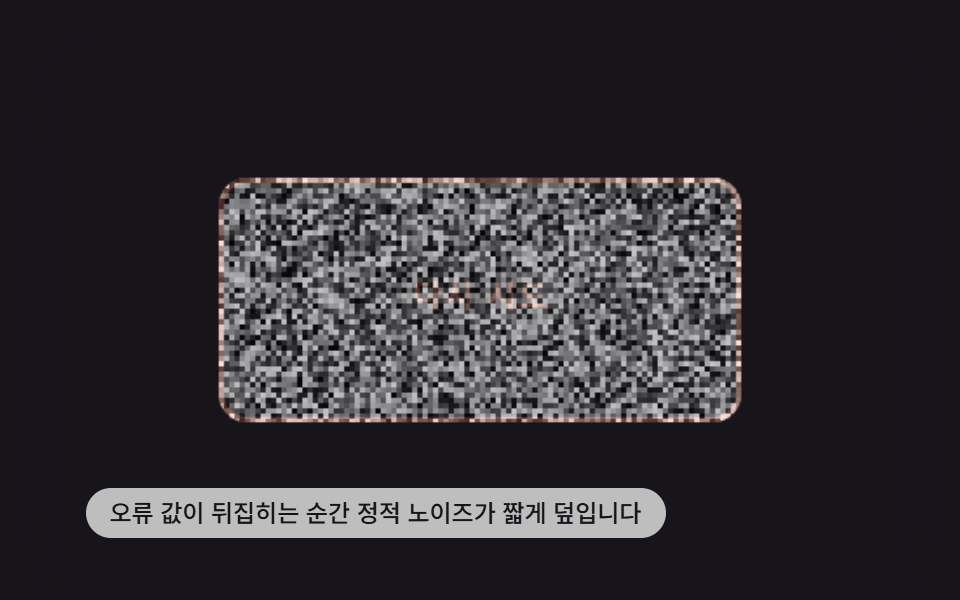
The instant an error value flips from false to true, every pixel on the button surface gets its brightness value randomly recalculated, briefly covering it in television-static noise.
Best forError-state buttons, retry prompts
BTN_CANVAS_STATIC_BURST_MSdrawNoiseTICK_MS
<main class="stage">
<div class="ns is-demo" id="root">
  <canvas class="ns__cv" id="cv" width="480" height="300"></canvas>
  <button class="ns__btn" id="btn" type="button">Retry</button>
  <p class="ns__hint">The instant the error value flips, static noise briefly covers the button</p>
</div>
</main>
@use "../../../../site/static/demo-tokens" as *;
$duration: $dur-instant;
$easing: $ease-out;
$color: $subject-cream;
@include stage($stage-ink);
.ns {
position: relative;
width: min(92vw, calc(160vh - 12.8vw));
aspect-ratio: 480 / 300;
margin: 0 auto;
border-radius: $r-card;
overflow: hidden;
box-shadow: $shadow-raised;
}
.ns__cv {
display: block;
width: 100%;
height: 100%;
}
.ns__btn {
position: absolute;
left: 50%;
top: 50%;
width: calc(300 / 480 * 100%);
height: calc(140 / 300 * 100%);
transform: translate(-50%, -50%);
z-index: 2;
border: 0;
border-radius: $r-control;
background: transparent;
color: transparent;
cursor: pointer;
font-size: 16px;
font-weight: 700;
}
.ns__btn:focus-visible {
outline: 2px solid $subject-cream;
outline-offset: 3px;
}
.ns__hint {
position: absolute;
left: $sp-3;
bottom: $sp-3;
margin: 0;
padding: $sp-1 $sp-3;
border-radius: $r-pill;
font-size: 12px;
line-height: 1.4;
font-weight: 500;
background: rgba(255, 255, 255, .72);
color: $subject-ink;
pointer-events: none;
z-index: 3;
}
@media (prefers-reduced-motion: reduce) {
.ns__btn { transition: none; }
}html, body {
margin: 0;
overflow: hidden;
}
.stage {
box-sizing: border-box;
min-height: 100vh;
display: grid;
place-items: center;
margin: 0;
background: #17141a;
font-family: -apple-system, "Segoe UI", "Noto Sans KR", sans-serif;
padding: clamp(8px, 4vw, 24px);
}
.ns {
position: relative;
width: min(92vw, 160vh - 12.8vw);
aspect-ratio: 480/300;
margin: 0 auto;
border-radius: 16px;
overflow: hidden;
box-shadow: 0 14px 24px rgba(23, 20, 26, 0.32);
}
.ns__cv {
display: block;
width: 100%;
height: 100%;
}
.ns__btn {
position: absolute;
left: 50%;
top: 50%;
width: 62.5%;
height: 46.6666666667%;
transform: translate(-50%, -50%);
z-index: 2;
border: 0;
border-radius: 12px;
background: transparent;
color: transparent;
cursor: pointer;
font-size: 16px;
font-weight: 700;
}
.ns__btn:focus-visible {
outline: 2px solid #fff7e6;
outline-offset: 3px;
}
.ns__hint {
position: absolute;
left: 12px;
bottom: 12px;
margin: 0;
padding: 4px 12px;
border-radius: 999px;
font-size: 12px;
line-height: 1.4;
font-weight: 500;
background: rgba(255, 255, 255, 0.72);
color: #17141a;
pointer-events: none;
z-index: 3;
}
@media (prefers-reduced-motion: reduce) {
.ns__btn {
transition: none;
}
}(function () {
'use strict';
function hashNoise(x, y, seed) {
var v = Math.sin(x * 12.9898 + y * 78.233 + seed * 0.0013) * 43758.5453;
return v - Math.floor(v);
}
function roundRect(c, x, y, w, h, r) {
c.beginPath();
c.moveTo(x + r, y);
c.arcTo(x + w, y, x + w, y + h, r);
c.arcTo(x + w, y + h, x, y + h, r);
c.arcTo(x, y + h, x, y, r);
c.arcTo(x, y, x + w, y, r);
c.closePath();
}
var W = 480, H = 300;
var SEED = 90909;
var BW = 300, BH = 140;
var BX = (W - BW) / 2, BY = (H - BH) / 2;
var NOISE_CELL = 3; // px — 노이즈 블록 한 칸
var BTN_CANVAS_STATIC_BURST_MS = 650; // 정적이 덮였다가 가라앉는 데 걸리는 시간
var TICK_MS = 40; // 이 간격마다 노이즈 패턴을 다시 계산한다 (깜빡임 속도)
var root = document.getElementById('root');
var cv = document.getElementById('cv');
var btn = document.getElementById('btn');
var ctx = cv.getContext('2d');
var reduceMQ = window.matchMedia('(prefers-reduced-motion: reduce)');
var errorOn = false;
var burstT0 = null;
function drawPanel(errored) {
roundRect(ctx, BX, BY, BW, BH, 16);
ctx.fillStyle = '#17141a';
ctx.fill();
ctx.fillStyle = errored ? '#ff8a6b' : '#fff7e6';
ctx.font = '700 18px system-ui, sans-serif';
ctx.textAlign = 'center';
ctx.textBaseline = 'middle';
ctx.fillText('Retry', BX + BW / 2, BY + BH / 2);
if (errored) {
ctx.lineWidth = 3;
ctx.strokeStyle = '#ff8a6b';
roundRect(ctx, BX + 1.5, BY + 1.5, BW - 3, BH - 3, 15);
ctx.stroke();
}
}
function drawNoise(envelope, tick) {
ctx.save();
roundRect(ctx, BX, BY, BW, BH, 16);
ctx.clip();
ctx.globalAlpha = envelope;
for (var y = BY; y < BY + BH; y += NOISE_CELL) {
for (var x = BX; x < BX + BW; x += NOISE_CELL) {
var n = hashNoise(x / NOISE_CELL, y / NOISE_CELL, SEED + tick);
var v = Math.floor(n * 255);
ctx.fillStyle = 'rgb(' + v + ',' + v + ',' + v + ')';
ctx.fillRect(x, y, NOISE_CELL, NOISE_CELL);
}
}
ctx.restore();
ctx.globalAlpha = 1;
}
function render(now) {
ctx.clearRect(0, 0, W, H);
drawPanel(errorOn);
if (burstT0 !== null) {
var elapsed = now - burstT0;
if (elapsed >= BTN_CANVAS_STATIC_BURST_MS) {
burstT0 = null;
} else {
var envelope = 1 - elapsed / BTN_CANVAS_STATIC_BURST_MS;
var tick = Math.floor(elapsed / TICK_MS);
drawNoise(envelope, tick);
}
}
}
function trigger() {
root.classList.remove('is-demo');
errorOn = !errorOn;
if (errorOn) burstT0 = performance.now();
if (reduceMQ.matches) render(performance.now());
}
btn.addEventListener('click', trigger);
btn.addEventListener('keydown', function (e) {
if (e.key !== 'Enter' && e.key !== ' ') return;
e.preventDefault();
trigger();
});
cv.addEventListener('pointerdown', function () { trigger(); });
window.addEventListener('resize', function () { render(performance.now()); });
function frame(now) {
if (!reduceMQ.matches) {
if (root.classList.contains('is-demo')) {
// 데모 재생 중엔 정적이 끊기지 않도록 번짐이 끝나는 즉시 다음 번짐을 이어 붙인다.
errorOn = true;
if (burstT0 === null || now - burstT0 >= BTN_CANVAS_STATIC_BURST_MS) burstT0 = now;
}
render(now);
requestAnimationFrame(frame);
}
}
if (reduceMQ.matches) {
errorOn = true;
burstT0 = performance.now() - BTN_CANVAS_STATIC_BURST_MS * 0.4;
render(performance.now());
} else {
requestAnimationFrame(frame);
}
})();// NoiseStaticButton — vanilla 판(run/404/demo/09-btn-canvas-noise-static-glitch/index.html) 의 React 포트.
// 오류 값이 false에서 true로 뒤집히는 순간 버튼 표면 픽셀마다 밝기 값을 무작위로 다시 계산해
// 텔레비전 정적 같은 노이즈를 짧게 덮어씌운다.
import { useEffect, useRef } from "react";
import styles from "./NoiseStaticButton.module.scss";
type Box<T> = { current: T };
type KeyEvt = { key: string; preventDefault(): void };
const W = 480, H = 300;
const SEED = 90909;
const BW = 300, BH = 140;
const BX = (W - BW) / 2, BY = (H - BH) / 2;
const NOISE_CELL = 3;
const BTN_CANVAS_STATIC_BURST_MS = 650;
const TICK_MS = 40;
function hashNoise(x: number, y: number, seed: number): number {
const v = Math.sin(x * 12.9898 + y * 78.233 + seed * 0.0013) * 43758.5453;
return v - Math.floor(v);
}
function roundRect(c: CanvasRenderingContext2D, x: number, y: number, w: number, h: number, r: number): void {
c.beginPath();
c.moveTo(x + r, y);
c.arcTo(x + w, y, x + w, y + h, r);
c.arcTo(x + w, y + h, x, y + h, r);
c.arcTo(x, y + h, x, y, r);
c.arcTo(x, y, x + w, y, r);
c.closePath();
}
export default function NoiseStaticButton() {
const cvRef = useRef<HTMLCanvasElement | null>(null);
const btnRef = useRef<HTMLButtonElement | null>(null);
const errorOnRef = useRef<boolean>(false) as Box<boolean>;
const burstT0Ref = useRef<number | null>(null) as Box<number | null>;
const reduceRef = useRef<boolean>(false) as Box<boolean>;
const demoRef = useRef<boolean>(true) as Box<boolean>;
const frameRef = useRef<number>(0) as Box<number>;
function drawPanel(ctx: CanvasRenderingContext2D, errored: boolean): void {
roundRect(ctx, BX, BY, BW, BH, 16);
ctx.fillStyle = "#17141a";
ctx.fill();
ctx.fillStyle = errored ? "#ff8a6b" : "#fff7e6";
ctx.font = "700 18px system-ui, sans-serif";
ctx.textAlign = "center";
ctx.textBaseline = "middle";
ctx.fillText("다시 시도", BX + BW / 2, BY + BH / 2);
if (errored) {
ctx.lineWidth = 3;
ctx.strokeStyle = "#ff8a6b";
roundRect(ctx, BX + 1.5, BY + 1.5, BW - 3, BH - 3, 15);
ctx.stroke();
}
}
function drawNoise(ctx: CanvasRenderingContext2D, envelope: number, tick: number): void {
ctx.save();
roundRect(ctx, BX, BY, BW, BH, 16);
ctx.clip();
ctx.globalAlpha = envelope;
for (let y = BY; y < BY + BH; y += NOISE_CELL) {
for (let x = BX; x < BX + BW; x += NOISE_CELL) {
const n = hashNoise(x / NOISE_CELL, y / NOISE_CELL, SEED + tick);
const v = Math.floor(n * 255);
ctx.fillStyle = "rgb(" + v + "," + v + "," + v + ")";
ctx.fillRect(x, y, NOISE_CELL, NOISE_CELL);
}
}
ctx.restore();
ctx.globalAlpha = 1;
}
function render(now: number): void {
const cv = cvRef.current;
if (!cv) return;
const ctx = cv.getContext("2d");
if (!ctx) return;
ctx.clearRect(0, 0, W, H);
drawPanel(ctx, errorOnRef.current);
const burstT0 = burstT0Ref.current;
if (burstT0 !== null) {
const elapsed = now - burstT0;
if (elapsed >= BTN_CANVAS_STATIC_BURST_MS) {
burstT0Ref.current = null;
} else {
const envelope = 1 - elapsed / BTN_CANVAS_STATIC_BURST_MS;
const tick = Math.floor(elapsed / TICK_MS);
drawNoise(ctx, envelope, tick);
}
}
}
function trigger(): void {
demoRef.current = false;
errorOnRef.current = !errorOnRef.current;
if (errorOnRef.current) burstT0Ref.current = performance.now();
if (reduceRef.current) render(performance.now());
}
function onKeyDown(e: KeyEvt): void {
if (e.key !== "Enter" && e.key !== " ") return;
e.preventDefault();
trigger();
}
useEffect(() => {
reduceRef.current = window.matchMedia("(prefers-reduced-motion: reduce)").matches;
if (reduceRef.current) {
errorOnRef.current = true;
burstT0Ref.current = performance.now() - BTN_CANVAS_STATIC_BURST_MS * 0.4;
render(performance.now());
return;
}
function frame(now: number): void {
if (demoRef.current) {
// 데모 재생 중엔 정적이 끊기지 않도록 번짐이 끝나는 즉시 다음 번짐을 이어 붙인다.
errorOnRef.current = true;
const t0 = burstT0Ref.current;
if (t0 === null || now - t0 >= BTN_CANVAS_STATIC_BURST_MS) burstT0Ref.current = now;
}
render(now);
frameRef.current = requestAnimationFrame(frame);
}
frameRef.current = requestAnimationFrame(frame);
return () => cancelAnimationFrame(frameRef.current);
}, []);
return (
<main className={styles.stage}>
<div className={styles.ns}>
<canvas className={styles.cv} ref={cvRef} width={W} height={H} onPointerDown={trigger} />
<button className={styles.btn} ref={btnRef} type="button" onClick={trigger} onKeyDown={onKeyDown}>
다시 시도
</button>
<p className={styles.hint}>오류 값이 뒤집히는 순간 정적 노이즈가 짧게 덮입니다</p>
</div>
</main>
);
}09 Noise Button That Turns to Static When an Error Value Flips — Measured area 22.181% · moving frames 23/23Original by GODRICH · SCSS and React ship in the zip · Button Click Effect CSS: 9 Canvas Pixel Patterns
The post this demo lives in
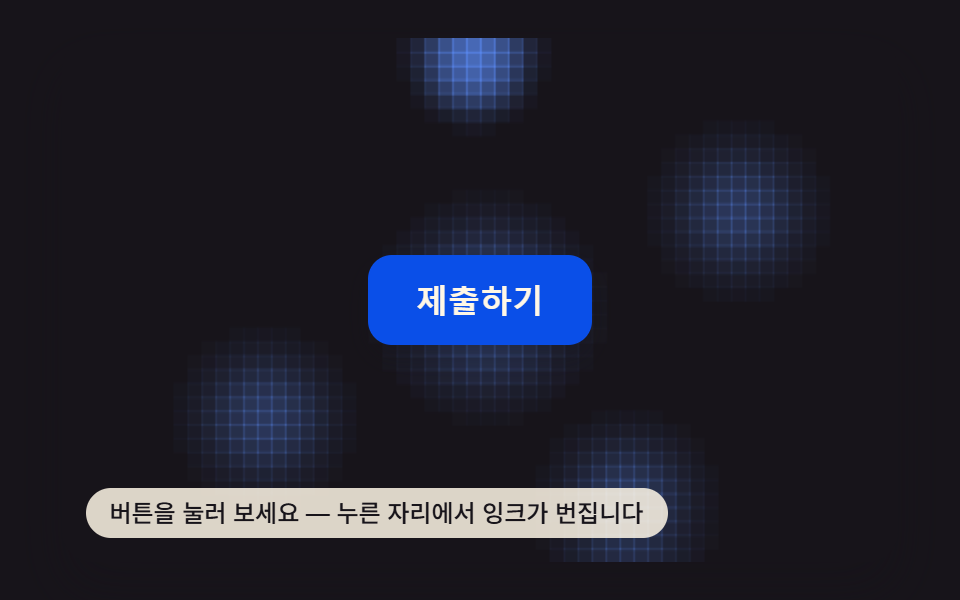 Button Click Effect CSS: 9 Canvas Pixel PatternsNine button click effect css demos. The button cracks like glass for one reason: a crack-angle value tied to a press-sta See all demos in this post
If you like this effect - similar demos
 Buttons05 Split-dual value reveal — when a confirm value turns on, the button splits into two pieces, each revealing a different valueExpanding Button UI: 9 Shape-Morph Patterns
 Buttons04 Exclusive pressed state — when one button's pressed value turns on, every other button's pressed value turns off at the same instantButton Group CSS: 9 Adjoined Patterns
 Buttons02 Button that unlocks when the form is valid9 button state css patterns, loading to done