Button Click Effect CSS: 9 Canvas Pixel Patterns
Nine button click effect css demos. The button cracks like glass for one reason: a crack-angle value tied to a press-state flag.
 01 btn-canvas-ink-splash-diffuse
 02 btn-canvas-crack-shatter-press
 03 btn-canvas-ember-trail-drag
 04 btn-canvas-liquid-metal-merge
 05 btn-canvas-electric-arc-edge
 06 btn-canvas-smoke-dissolve-disable
 07 btn-canvas-sand-fill-progress
 08 btn-canvas-ripple-refract-press
 09 btn-canvas-noise-static-glitch
Auto-plays · click a tile to jump to its section · all nine in one zip
- 01 Ink-diffusion Button That Spreads From the Click Point
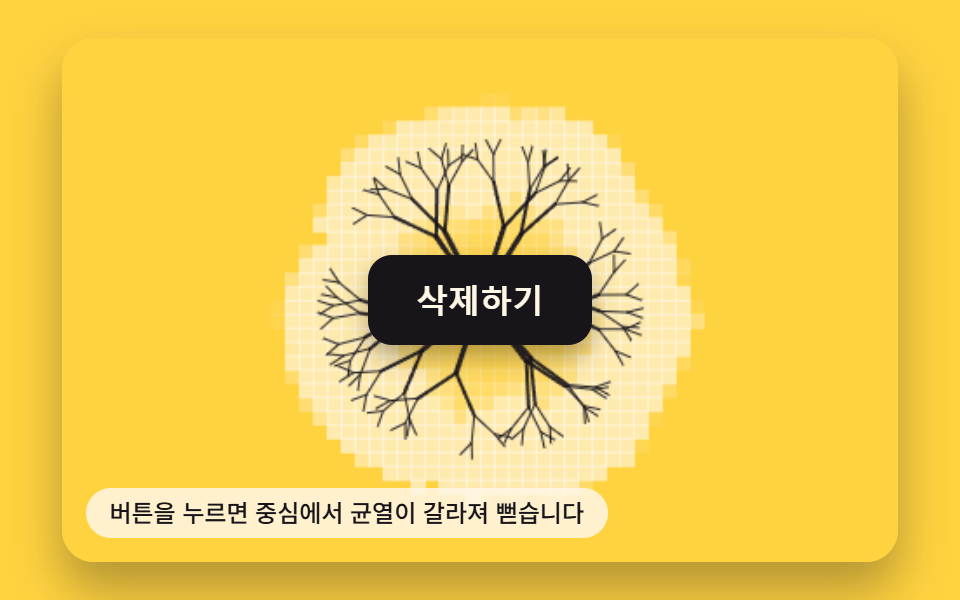
- 02 Crack-line Button That Splits With a Press-state Value
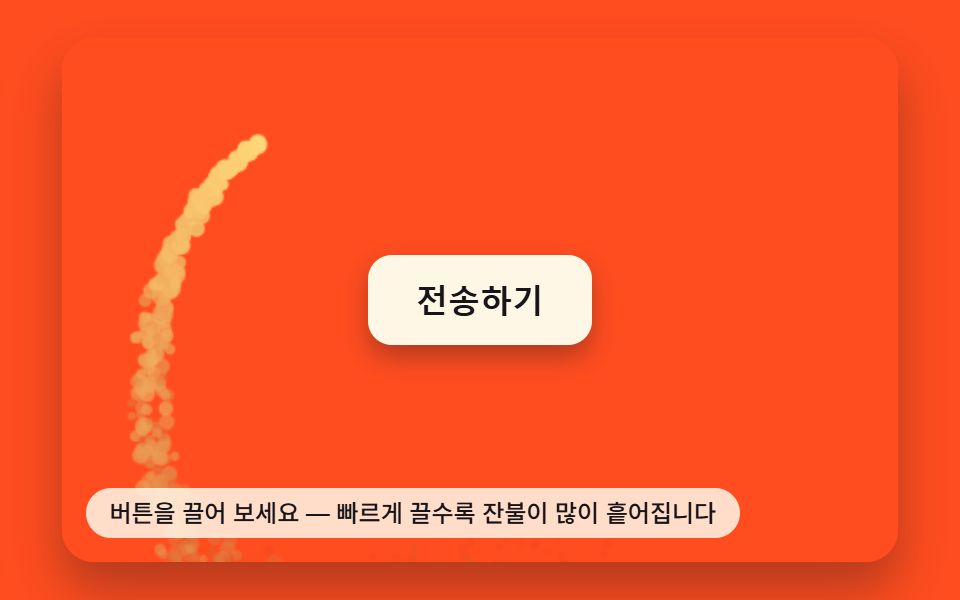
- 03 Ember-trail Button Scattered by a Drag-speed Value
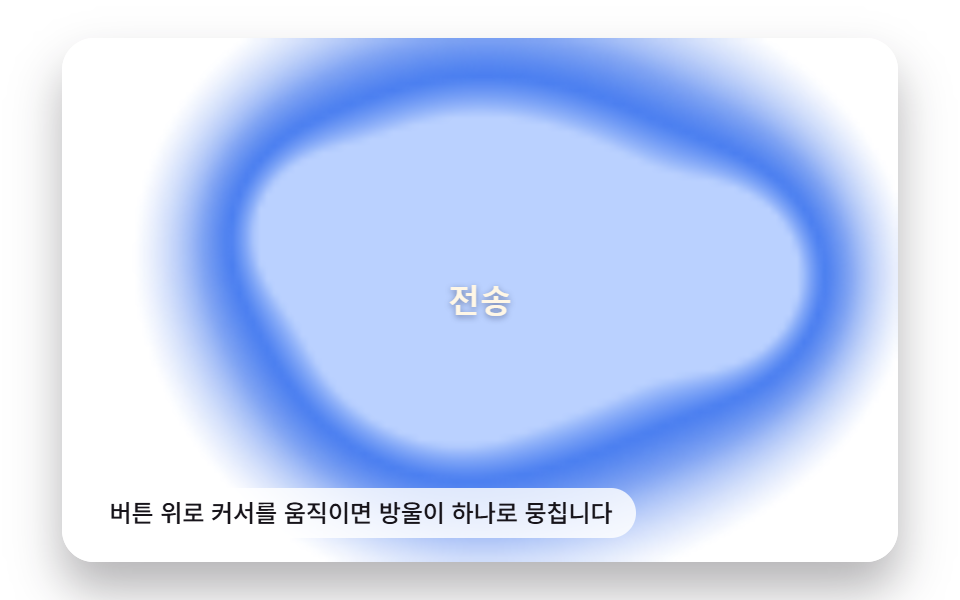
- 04 Liquid-metal Button That Merges and Spreads With a Pointer-distance Value
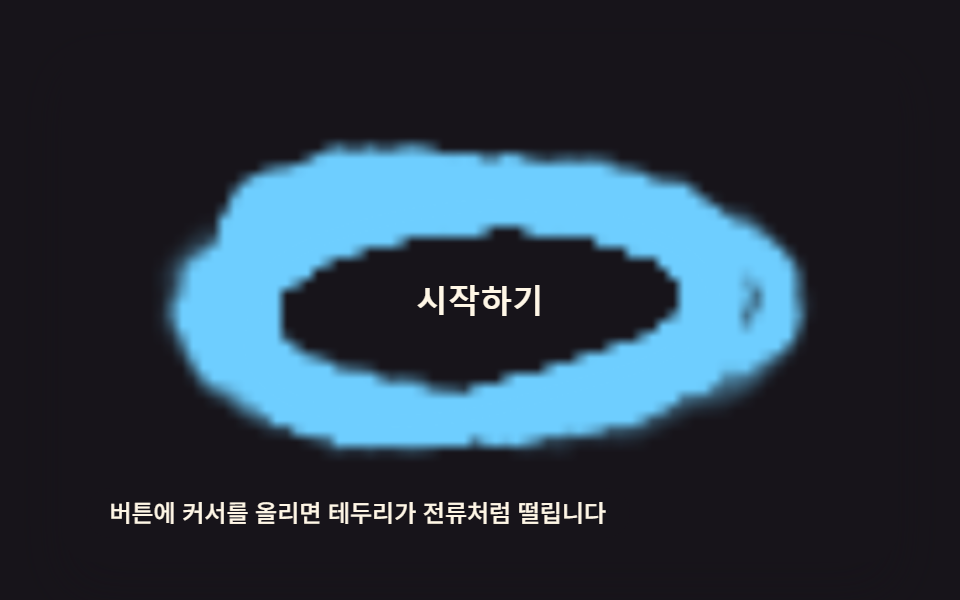
- 05 Electric-arc Border Button That Thickens With a Hover-intensity Value
- 06 Button That Dissolves Into Smoke When a Disabled Value Turns On
- 07 Progress Button That Piles Up Like Sand With a Progress Value
- 08 Refraction-ripple Button That Displaces Pixels From the Press Point
- 09 Noise Button That Turns to Static When an Error Value Flips
One Canvas Loop, Nine Different Constants
Every one of these nine starts from the same harness: a <canvas> sized to the button, one requestAnimationFrame loop, and four listeners — click, keydown for Enter/Space, pointerdown for coordinates, and resize. What changes from pattern to pattern is only the single constant each demo's math is built around — a diffuse rate, a branch count, a jitter interval, a decay time — and none of the nine loads a library, a WebGL context, or a CDN script to do it.
01Ink-diffusion Button That Spreads From the Click Point
A click seeds one bright cell in a stored grid, then diffuseStep() runs every frame, averaging that value into each neighbor at DIFFUSE_RATE = 0.46 while DECAY_PER_FRAME = 0.978 fades the whole grid at the same time. render() reads the grid back into pixels each frame, so the bloom is the grid's own averaged state, not a CSS radial-gradient animating its size.
<main class="stage">
<div class="ik is-demo" id="root">
  <canvas class="ik__cv" id="cv" width="480" height="300"></canvas>
  <button class="ik__btn" id="btn" type="button">Submit</button>
  <p class="ik__hint">Press the button — ink spreads from where you press</p>
</div>
</main>
@use "../../../../site/static/demo-tokens" as *;
$duration: $dur-quick;
$easing: $ease-spring;
$color: $subject-blue-light;
@include stage($stage-ink);
.ik {
position: relative;
width: min(92vw, calc(160vh - 12.8vw));
aspect-ratio: 480 / 300;
margin: 0 auto;
border-radius: $r-card;
overflow: hidden;
box-shadow: $shadow-raised;
}
.ik__cv {
display: block;
width: 100%;
height: 100%;
}
.ik__btn {
position: absolute;
left: 50%;
top: 50%;
transform: translate(-50%, -50%);
z-index: 2;
border: 0;
cursor: pointer;
padding: $sp-3 $sp-6;
border-radius: $r-control;
background: $subject-blue-deep;
color: $subject-cream;
font-size: 16px;
font-weight: 700;
box-shadow: $shadow-press;
}
.ik__btn:focus-visible {
outline: 2px solid $subject-cream;
outline-offset: 3px;
}
.ik__hint {
position: absolute;
left: $sp-3;
bottom: $sp-3;
margin: 0;
padding: $sp-1 $sp-3;
border-radius: $r-pill;
font-size: 12px;
line-height: 1.4;
font-weight: 500;
background: rgba(255, 247, 230, .85);
color: $subject-ink;
pointer-events: none;
z-index: 3;
}
@media (prefers-reduced-motion: reduce) {
.ik__btn { transition: none; }
}html, body {
margin: 0;
overflow: hidden;
}
.stage {
box-sizing: border-box;
min-height: 100vh;
display: grid;
place-items: center;
margin: 0;
background: #17141a;
font-family: -apple-system, "Segoe UI", "Noto Sans KR", sans-serif;
padding: clamp(8px, 4vw, 24px);
}
.ik {
position: relative;
width: min(92vw, 160vh - 12.8vw);
aspect-ratio: 480/300;
margin: 0 auto;
border-radius: 16px;
overflow: hidden;
box-shadow: 0 14px 24px rgba(23, 20, 26, 0.32);
}
.ik__cv {
display: block;
width: 100%;
height: 100%;
}
.ik__btn {
position: absolute;
left: 50%;
top: 50%;
transform: translate(-50%, -50%);
z-index: 2;
border: 0;
cursor: pointer;
padding: 12px 24px;
border-radius: 12px;
background: #0a4fe8;
color: #fff7e6;
font-size: 16px;
font-weight: 700;
box-shadow: 0 6px 12px rgba(23, 20, 26, 0.32);
}
.ik__btn:focus-visible {
outline: 2px solid #fff7e6;
outline-offset: 3px;
}
.ik__hint {
position: absolute;
left: 12px;
bottom: 12px;
margin: 0;
padding: 4px 12px;
border-radius: 999px;
font-size: 12px;
line-height: 1.4;
font-weight: 500;
background: rgba(255, 247, 230, 0.85);
color: #17141a;
pointer-events: none;
z-index: 3;
}
@media (prefers-reduced-motion: reduce) {
.ik__btn {
transition: none;
}
}(function () {
'use strict';
function makeLcg(seed) {
var s = seed >>> 0;
return function () { s = (s * 1664525 + 1013904223) >>> 0; return s / 4294967296; };
}
var W = 480, H = 300;
var COLS = 60, ROWS = 38;
var CELL_W = W / COLS, CELL_H = H / ROWS;
var SEED = 10102;
var rnd = makeLcg(SEED);
var DIFFUSE_RATE = 0.46; // 이웃 평균으로 끌려가는 비율 — 클수록 빨리 번진다
var DECAY_PER_FRAME = 0.978; // 프레임마다 농도가 줄어드는 비율
var INK_COLOR = [91, 140, 248]; // $subject-blue-light
var root = document.getElementById('root');
var cv = document.getElementById('cv');
var btn = document.getElementById('btn');
var ctx = cv.getContext('2d');
var reduceMQ = window.matchMedia('(prefers-reduced-motion: reduce)');
var field = new Float32Array(COLS * ROWS);
var next = new Float32Array(COLS * ROWS);
function idx(gx, gy) { return gy * COLS + gx; }
function injectAt(px, py, rIn) {
var gx = Math.max(0, Math.min(COLS - 1, Math.round(px / CELL_W)));
var gy = Math.max(0, Math.min(ROWS - 1, Math.round(py / CELL_H)));
var r = rIn || 4;
for (var dy = -r; dy <= r; dy++) {
for (var dx = -r; dx <= r; dx++) {
var x = gx + dx, y = gy + dy;
if (x < 0 || x >= COLS || y < 0 || y >= ROWS) continue;
var d = Math.sqrt(dx * dx + dy * dy);
if (d > r) continue;
var v = 1 - d / (r + 1);
var i = idx(x, y);
field[i] = Math.max(field[i], v);
}
}
}
  function diffuseStep() {
    for (var y = 0; y < ROWS; y++) {
      for (var x = 0; x < COLS; x++) {
        var i = idx(x, y);
        var sum = 0, n = 0;
        if (x > 0) { sum += field[idx(x - 1, y)]; n++; }
        if (x < COLS - 1) { sum += field[idx(x + 1, y)]; n++; }
        if (y > 0) { sum += field[idx(x, y - 1)]; n++; }
        if (y < ROWS - 1) { sum += field[idx(x, y + 1)]; n++; }
        var avg = n ? sum / n : field[i];
        var v = field[i] + (avg - field[i]) * DIFFUSE_RATE;
        next[i] = v * DECAY_PER_FRAME;
      }
    }
    var tmp = field; field = next; next = tmp;
  }
function render() {
ctx.fillStyle = '#17141a';
ctx.fillRect(0, 0, W, H);
for (var y = 0; y < ROWS; y++) {
for (var x = 0; x < COLS; x++) {
var v = field[idx(x, y)];
if (v < 0.02) continue;
var a = Math.min(1, v);
ctx.fillStyle = 'rgba(' + INK_COLOR[0] + ',' + INK_COLOR[1] + ',' + INK_COLOR[2] + ',' + a.toFixed(3) + ')';
ctx.fillRect(x * CELL_W, y * CELL_H, CELL_W + 1, CELL_H + 1);
}
}
}
function press(px, py) {
root.classList.remove('is-demo');
injectAt(px, py, 5);
injectAt(px + 70, py - 40, 3);
injectAt(px - 80, py + 30, 3);
if (reduceMQ.matches) { render(); }
}
function pointFromEvent(e) {
var r = cv.getBoundingClientRect();
return [(e.clientX - r.left) * (W / r.width), (e.clientY - r.top) * (H / r.height)];
}
btn.addEventListener('click', function () {
var r = btn.getBoundingClientRect(), c = cv.getBoundingClientRect();
var cx = (r.left + r.width / 2 - c.left) * (W / c.width);
var cy = (r.top + r.height / 2 - c.top) * (H / c.height);
press(cx, cy);
});
btn.addEventListener('keydown', function (e) {
if (e.key !== 'Enter' && e.key !== ' ') return;
e.preventDefault();
var r = btn.getBoundingClientRect(), c = cv.getBoundingClientRect();
press((r.left + r.width / 2 - c.left) * (W / c.width), (r.top + r.height / 2 - c.top) * (H / c.height));
});
cv.addEventListener('pointerdown', function (e) {
var p = pointFromEvent(e);
press(p[0], p[1]);
});
window.addEventListener('resize', function () { render(); });
var autoStart = null;
var nextAutoAt = 0;
function syntheticPoint(k) {
var a = rnd() * Math.PI * 2, r2 = 40 + rnd() * 170;
return [W / 2 + Math.cos(a) * r2, H / 2 + Math.sin(a) * r2 - k * 0];
}
function frame(now) {
if (!reduceMQ.matches) {
if (autoStart === null) autoStart = now;
var t = now - autoStart;
if (root.classList.contains('is-demo') && t >= nextAutoAt) {
var p = syntheticPoint(t);
injectAt(p[0], p[1], 4);
nextAutoAt = t + 260;
}
diffuseStep();
render();
requestAnimationFrame(frame);
}
}
if (reduceMQ.matches) {
injectAt(W / 2, H / 2, 5);
render();
} else {
injectAt(W / 2, H / 2, 6);
injectAt(W / 2 - 130, H / 2 + 60, 4);
injectAt(W / 2 + 140, H / 2 - 55, 4);
requestAnimationFrame(frame);
}
})();// IkSplashButton — vanilla 판(run/404/demo/01-btn-canvas-ink-splash-diffuse/index.html) 의 React 포트.
// 클릭 좌표를 중심으로 확산 필드(field)에 값을 주입하고, 매 프레임 이웃 평균으로 끌리는 확산 계산을 돌려
// 캔버스에 격자 블록으로 그린다. 값·상수는 vanilla 와 같다.
import { useEffect, useRef } from "react";
import type { PointerEvent as ReactPointerEvent } from "react";
import styles from "./IkSplashButton.module.scss";
type Box<T> = { current: T };
type KeyEvt = { key: string; preventDefault(): void };
const W = 480, H = 300;
const COLS = 60, ROWS = 38;
const CELL_W = W / COLS, CELL_H = H / ROWS;
const DIFFUSE_RATE = 0.46;
const DECAY_PER_FRAME = 0.978;
const INK_COLOR: [number, number, number] = [91, 140, 248];
const SEED = 10102;
function makeLcg(seed: number) {
let s = seed >>> 0;
return function () {
s = (s * 1664525 + 1013904223) >>> 0;
return s / 4294967296;
};
}
function idx(gx: number, gy: number): number {
return gy * COLS + gx;
}
export default function IkSplashButton() {
const rootRef = useRef<HTMLDivElement | null>(null);
const cvRef = useRef<HTMLCanvasElement | null>(null);
const btnRef = useRef<HTMLButtonElement | null>(null);
const fieldRef = useRef<Float32Array>(new Float32Array(COLS * ROWS)) as Box<Float32Array>;
const nextRef = useRef<Float32Array>(new Float32Array(COLS * ROWS)) as Box<Float32Array>;
const rndRef = useRef(makeLcg(SEED)) as Box<() => number>;
const demoRef = useRef<boolean>(true) as Box<boolean>;
const reduceRef = useRef<boolean>(false) as Box<boolean>;
const frameRef = useRef<number>(0) as Box<number>;
const autoStartRef = useRef<number | null>(null) as Box<number | null>;
const nextAutoRef = useRef<number>(0) as Box<number>;
function injectAt(px: number, py: number, rIn?: number): void {
const field = fieldRef.current;
const gx = Math.max(0, Math.min(COLS - 1, Math.round(px / CELL_W)));
const gy = Math.max(0, Math.min(ROWS - 1, Math.round(py / CELL_H)));
const r = rIn || 4;
for (let dy = -r; dy <= r; dy++) {
for (let dx = -r; dx <= r; dx++) {
const x = gx + dx, y = gy + dy;
if (x < 0 || x >= COLS || y < 0 || y >= ROWS) continue;
const d = Math.sqrt(dx * dx + dy * dy);
if (d > r) continue;
const v = 1 - d / (r + 1);
const i = idx(x, y);
field[i] = Math.max(field[i], v);
}
}
}
function diffuseStep(): void {
const field = fieldRef.current;
const next = nextRef.current;
for (let y = 0; y < ROWS; y++) {
for (let x = 0; x < COLS; x++) {
const i = idx(x, y);
let sum = 0, n = 0;
if (x > 0) { sum += field[idx(x - 1, y)]; n++; }
if (x < COLS - 1) { sum += field[idx(x + 1, y)]; n++; }
if (y > 0) { sum += field[idx(x, y - 1)]; n++; }
if (y < ROWS - 1) { sum += field[idx(x, y + 1)]; n++; }
const avg = n ? sum / n : field[i];
const v = field[i] + (avg - field[i]) * DIFFUSE_RATE;
next[i] = v * DECAY_PER_FRAME;
}
}
fieldRef.current = next;
nextRef.current = field;
}
function render(): void {
const cv = cvRef.current;
if (!cv) return;
const ctx = cv.getContext("2d");
if (!ctx) return;
const field = fieldRef.current;
ctx.fillStyle = "#17141a";
ctx.fillRect(0, 0, W, H);
for (let y = 0; y < ROWS; y++) {
for (let x = 0; x < COLS; x++) {
const v = field[idx(x, y)];
if (v < 0.02) continue;
const a = Math.min(1, v);
ctx.fillStyle = "rgba(" + INK_COLOR[0] + "," + INK_COLOR[1] + "," + INK_COLOR[2] + "," + a.toFixed(3) + ")";
ctx.fillRect(x * CELL_W, y * CELL_H, CELL_W + 1, CELL_H + 1);
}
}
}
function press(px: number, py: number): void {
demoRef.current = false;
injectAt(px, py, 5);
injectAt(px + 70, py - 40, 3);
injectAt(px - 80, py + 30, 3);
if (reduceRef.current) render();
}
function pointFromClient(cx: number, cy: number): [number, number] {
const cv = cvRef.current;
if (!cv) return [0, 0];
const r = cv.getBoundingClientRect();
return [(cx - r.left) * (W / r.width), (cy - r.top) * (H / r.height)];
}
function pressAtButtonCenter(): void {
const btn = btnRef.current;
const cv = cvRef.current;
if (!btn || !cv) return;
const r = btn.getBoundingClientRect();
const c = cv.getBoundingClientRect();
press((r.left + r.width / 2 - c.left) * (W / c.width), (r.top + r.height / 2 - c.top) * (H / c.height));
}
function onPointerDown(e: ReactPointerEvent<HTMLCanvasElement>): void {
const p = pointFromClient(e.clientX, e.clientY);
press(p[0], p[1]);
}
function onKeyDown(e: KeyEvt): void {
if (e.key !== "Enter" && e.key !== " ") return;
e.preventDefault();
pressAtButtonCenter();
}
function syntheticPoint(): [number, number] {
const rnd = rndRef.current;
const a = rnd() * Math.PI * 2;
const r2 = 40 + rnd() * 170;
return [W / 2 + Math.cos(a) * r2, H / 2 + Math.sin(a) * r2];
}
useEffect(() => {
reduceRef.current = window.matchMedia("(prefers-reduced-motion: reduce)").matches;
if (reduceRef.current) {
injectAt(W / 2, H / 2, 5);
render();
return;
}
injectAt(W / 2, H / 2, 6);
injectAt(W / 2 - 130, H / 2 + 60, 4);
injectAt(W / 2 + 140, H / 2 - 55, 4);
render();
function frame(now: number): void {
if (autoStartRef.current === null) autoStartRef.current = now;
const t = now - (autoStartRef.current as number);
if (demoRef.current && t >= nextAutoRef.current) {
const p = syntheticPoint();
injectAt(p[0], p[1], 4);
nextAutoRef.current = t + 260;
}
diffuseStep();
render();
frameRef.current = requestAnimationFrame(frame);
}
frameRef.current = requestAnimationFrame(frame);
return () => cancelAnimationFrame(frameRef.current);
}, []);
return (
<main className={styles.stage}>
<div className={styles.ik} ref={rootRef}>
<canvas className={styles.cv} ref={cvRef} width={W} height={H} onPointerDown={onPointerDown} />
<button className={styles.btn} ref={btnRef} type="button" onClick={pressAtButtonCenter} onKeyDown={onKeyDown}>
제출하기
</button>
<p className={styles.hint}>버튼을 눌러 보세요 — 누른 자리에서 잉크가 번집니다</p>
</div>
</main>
);
}01 · Ink-diffusion Button That Spreads From the Click Point — Measured area 29.288% · moving frames 23/23Original by GODRICH · SCSS and React ship in the zip · See the password
function diffuseStep() {
for (var y = 0; y < ROWS; y++) {
for (var x = 0; x < COLS; x++) {
var i = idx(x, y);
var sum = 0, n = 0;
if (x > 0) { sum += field[idx(x - 1, y)]; n++; }
if (x < COLS - 1) { sum += field[idx(x + 1, y)]; n++; }
if (y > 0) { sum += field[idx(x, y - 1)]; n++; }
if (y < ROWS - 1) { sum += field[idx(x, y + 1)]; n++; }
var avg = n ? sum / n : field[i];
var v = field[i] + (avg - field[i]) * DIFFUSE_RATE;
next[i] = v * DECAY_PER_FRAME;
}
}
var tmp = field; field = next; next = tmp;
}
02Crack-line Button That Splits With a Press-state Value
The moment a press-state flag flips on, buildTree() fires BTN_CANVAS_CRACK_BRANCH_COUNT (6 by default) calls into genBranch(), and each call recurses up to CRACK_MAX_DEPTH = 3 times, splitting by CRACK_ANGLE_SPREAD and shrinking by CRACK_LEN_DECAY each generation. Every branch segment carries its own t0/t1 timestamps, so the crack grows outward over a few hundred milliseconds instead of appearing all at once.
<main class="stage">
<div class="cc is-demo" id="root">
  <canvas class="cc__cv" id="cv" width="480" height="300"></canvas>
  <button class="cc__btn" id="btn" type="button">Delete</button>
  <p class="cc__hint">Press the button and cracks branch out from the center</p>
</div>
</main>
@use "../../../../site/static/demo-tokens" as *;
$duration: $dur-base;
$easing: $ease-pop;
$color: $subject-ink;
@include stage($stage-yellow);
.cc {
position: relative;
width: min(92vw, calc(160vh - 12.8vw));
aspect-ratio: 480 / 300;
margin: 0 auto;
border-radius: $r-card;
overflow: hidden;
box-shadow: $shadow-raised;
}
.cc__cv {
display: block;
width: 100%;
height: 100%;
}
.cc__btn {
position: absolute;
left: 50%;
top: 50%;
transform: translate(-50%, -50%);
z-index: 2;
border: 0;
cursor: pointer;
padding: $sp-3 $sp-6;
border-radius: $r-control;
background: $subject-ink;
color: $subject-cream;
font-size: 16px;
font-weight: 700;
box-shadow: $shadow-press;
}
.cc__btn:focus-visible {
outline: 2px solid $subject-ink;
outline-offset: 3px;
}
.cc__hint {
position: absolute;
left: $sp-3;
bottom: $sp-3;
margin: 0;
padding: $sp-1 $sp-3;
border-radius: $r-pill;
font-size: 12px;
line-height: 1.4;
font-weight: 500;
background: rgba(255, 247, 230, .85);
color: $subject-ink;
pointer-events: none;
z-index: 3;
}
@media (prefers-reduced-motion: reduce) {
.cc__btn { transition: none; }
}html, body {
margin: 0;
overflow: hidden;
}
.stage {
box-sizing: border-box;
min-height: 100vh;
display: grid;
place-items: center;
margin: 0;
background: #ffd23f;
font-family: -apple-system, "Segoe UI", "Noto Sans KR", sans-serif;
padding: clamp(8px, 4vw, 24px);
}
.cc {
position: relative;
width: min(92vw, 160vh - 12.8vw);
aspect-ratio: 480/300;
margin: 0 auto;
border-radius: 16px;
overflow: hidden;
box-shadow: 0 14px 24px rgba(23, 20, 26, 0.32);
}
.cc__cv {
display: block;
width: 100%;
height: 100%;
}
.cc__btn {
position: absolute;
left: 50%;
top: 50%;
transform: translate(-50%, -50%);
z-index: 2;
border: 0;
cursor: pointer;
padding: 12px 24px;
border-radius: 12px;
background: #17141a;
color: #fff7e6;
font-size: 16px;
font-weight: 700;
box-shadow: 0 6px 12px rgba(23, 20, 26, 0.32);
}
.cc__btn:focus-visible {
outline: 2px solid #17141a;
outline-offset: 3px;
}
.cc__hint {
position: absolute;
left: 12px;
bottom: 12px;
margin: 0;
padding: 4px 12px;
border-radius: 999px;
font-size: 12px;
line-height: 1.4;
font-weight: 500;
background: rgba(255, 247, 230, 0.85);
color: #17141a;
pointer-events: none;
z-index: 3;
}
@media (prefers-reduced-motion: reduce) {
.cc__btn {
transition: none;
}
}(function () {
'use strict';
function makeLcg(seed) {
var s = seed >>> 0;
return function () { s = (s * 1664525 + 1013904223) >>> 0; return s / 4294967296; };
}
var W = 480, H = 300;
var COLS = 60, ROWS = 38;
var CELL_W = W / COLS, CELL_H = H / ROWS;
var SEED = 20205;
var rnd = makeLcg(SEED);
var BTN_CANVAS_CRACK_BRANCH_COUNT = 6; // 중심에서 뻗는 1차 균열 가지 수 — 변형 칩이 바꾸는 값
var CRACK_MAX_DEPTH = 3; // 가지가 다시 갈라지는 깊이
var CRACK_SEG_LEN = 44; // 1차 가지 길이(px)
var CRACK_LEN_DECAY = 0.6; // 갈라질 때마다 길이가 줄어드는 비율
var CRACK_ANGLE_SPREAD = 0.85; // 두 자식 가지가 벌어지는 각도(rad)
var GLOW_DECAY = 0.90; // 균열 앞머리 잔광이 사그라드는 비율
var MAX_TREES = 3; // 화면에 동시에 남겨 둘 균열 나무 수
var LINE_COLOR = [23, 20, 26]; // $subject-ink
var GLOW_COLOR = [255, 247, 230]; // $subject-cream
var root = document.getElementById('root');
var cv = document.getElementById('cv');
var btn = document.getElementById('btn');
var ctx = cv.getContext('2d');
var reduceMQ = window.matchMedia('(prefers-reduced-motion: reduce)');
var field = new Float32Array(COLS * ROWS);
function fidx(gx, gy) { return gy * COLS + gx; }
function stampGlow(px, py, r) {
var gx = Math.round(px / CELL_W), gy = Math.round(py / CELL_H);
for (var dy = -r; dy <= r; dy++) {
for (var dx = -r; dx <= r; dx++) {
var x = gx + dx, y = gy + dy;
if (x < 0 || x >= COLS || y < 0 || y >= ROWS) continue;
var d = Math.sqrt(dx * dx + dy * dy);
if (d > r) continue;
var v = 1 - d / (r + 1);
var i = fidx(x, y);
field[i] = Math.min(1, field[i] + v * 0.6);
}
}
}
  function genBranch(x, y, angle, len, depth, t0, segs) {
    if (depth > CRACK_MAX_DEPTH || len < 5) return;
    var ang = angle + (rnd() - 0.5) * 0.35;
    var x2 = x + Math.cos(ang) * len;
    var y2 = y + Math.sin(ang) * len;
    var dur = 120 + len * 4;
    segs.push({ x1: x, y1: y, x2: x2, y2: y2, t0: t0, t1: t0 + dur, w: Math.max(1, 3 - depth) });
    var childT0 = t0 + dur * 0.6;
    var childA = [ang + CRACK_ANGLE_SPREAD * 0.5, ang - CRACK_ANGLE_SPREAD * 0.5];
    for (var i = 0; i < childA.length; i++) {
      genBranch(x2, y2, childA[i] + (rnd() - 0.5) * 0.3, len * CRACK_LEN_DECAY, depth + 1, childT0, segs);
    }
  }

  function buildTree(cx, cy) {
    var segs = [];
    for (var i = 0; i < BTN_CANVAS_CRACK_BRANCH_COUNT; i++) {
      var base = (Math.PI * 2 * i) / BTN_CANVAS_CRACK_BRANCH_COUNT;
      var ang = base + (rnd() - 0.5) * 0.5;
      genBranch(cx, cy, ang, CRACK_SEG_LEN, 0, 0, segs);
    }
    return segs;
  }
var trees = [];
function paint(now) {
for (var i = 0; i < field.length; i++) field[i] *= GLOW_DECAY;
var lineDraws = [];
for (var t = 0; t < trees.length; t++) {
var tree = trees[t];
var elapsed = now - tree.t0;
for (var s = 0; s < tree.segs.length; s++) {
var seg = tree.segs[s];
if (elapsed < seg.t0) continue;
var progress = Math.max(0, Math.min(1, (elapsed - seg.t0) / (seg.t1 - seg.t0)));
var tipx = seg.x1 + (seg.x2 - seg.x1) * progress;
var tipy = seg.y1 + (seg.y2 - seg.y1) * progress;
if (progress < 1) stampGlow(tipx, tipy, 3);
lineDraws.push([seg.x1, seg.y1, tipx, tipy, seg.w]);
}
}
ctx.fillStyle = '#ffd23f';
ctx.fillRect(0, 0, W, H);
for (var y = 0; y < ROWS; y++) {
for (var x = 0; x < COLS; x++) {
var v = field[fidx(x, y)];
if (v < 0.03) continue;
var a = Math.min(1, v);
ctx.fillStyle = 'rgba(' + GLOW_COLOR[0] + ',' + GLOW_COLOR[1] + ',' + GLOW_COLOR[2] + ',' + a.toFixed(3) + ')';
ctx.fillRect(x * CELL_W, y * CELL_H, CELL_W + 1, CELL_H + 1);
}
}
ctx.strokeStyle = 'rgba(' + LINE_COLOR[0] + ',' + LINE_COLOR[1] + ',' + LINE_COLOR[2] + ',.92)';
ctx.lineCap = 'round';
for (var d = 0; d < lineDraws.length; d++) {
var ln = lineDraws[d];
ctx.lineWidth = ln[4];
ctx.beginPath();
ctx.moveTo(ln[0], ln[1]);
ctx.lineTo(ln[2], ln[3]);
ctx.stroke();
}
}
function press(px, py) {
root.classList.remove('is-demo');
trees.push({ segs: buildTree(px, py), t0: performance.now() });
if (trees.length > MAX_TREES) trees.shift();
if (reduceMQ.matches) {
trees[trees.length - 1].t0 = performance.now() - 999999;
paint(performance.now());
}
}
function pointFromEvent(e) {
var r = cv.getBoundingClientRect();
return [(e.clientX - r.left) * (W / r.width), (e.clientY - r.top) * (H / r.height)];
}
function buttonCenter() {
var r = btn.getBoundingClientRect(), c = cv.getBoundingClientRect();
return [(r.left + r.width / 2 - c.left) * (W / c.width), (r.top + r.height / 2 - c.top) * (H / c.height)];
}
btn.addEventListener('click', function () { var p = buttonCenter(); press(p[0], p[1]); });
btn.addEventListener('keydown', function (e) {
if (e.key !== 'Enter' && e.key !== ' ') return;
e.preventDefault();
var p = buttonCenter(); press(p[0], p[1]);
});
cv.addEventListener('pointerdown', function (e) { var p = pointFromEvent(e); press(p[0], p[1]); });
window.addEventListener('resize', function () { paint(performance.now()); });
var nextAutoAt = 0;
function frame(now) {
if (!reduceMQ.matches) {
if (root.classList.contains('is-demo') && now >= nextAutoAt) {
var p = buttonCenter();
trees.push({ segs: buildTree(p[0], p[1]), t0: now });
if (trees.length > MAX_TREES) trees.shift();
nextAutoAt = now + 640;
}
paint(now);
requestAnimationFrame(frame);
}
}
if (reduceMQ.matches) {
var c0 = buttonCenter();
trees.push({ segs: buildTree(c0[0], c0[1]), t0: performance.now() - 999999 });
paint(performance.now());
} else {
var c1 = buttonCenter();
trees.push({ segs: buildTree(c1[0], c1[1]), t0: performance.now() });
requestAnimationFrame(frame);
}
})();// CrackShatterButton — vanilla 판(run/404/demo/02-btn-canvas-crack-shatter-press/index.html) 의 React 포트.
// 누른 좌표를 중심으로 균열 가지 나무(재귀 분기)를 만들어 시간에 따라 자라게 그린다. 값·상수는 vanilla 와 같다.
import { useEffect, useRef } from "react";
import type { PointerEvent as ReactPointerEvent } from "react";
import styles from "./CrackShatterButton.module.scss";
type Box<T> = { current: T };
type KeyEvt = { key: string; preventDefault(): void };
type Segment = { x1: number; y1: number; x2: number; y2: number; t0: number; t1: number; w: number };
type Tree = { segs: Segment[]; t0: number };
const W = 480, H = 300;
const COLS = 60, ROWS = 38;
const CELL_W = W / COLS, CELL_H = H / ROWS;
const SEED = 20205;
const BTN_CANVAS_CRACK_BRANCH_COUNT = 6;
const CRACK_MAX_DEPTH = 3;
const CRACK_SEG_LEN = 44;
const CRACK_LEN_DECAY = 0.6;
const CRACK_ANGLE_SPREAD = 0.85;
const GLOW_DECAY = 0.90;
const MAX_TREES = 3;
const LINE_COLOR: [number, number, number] = [23, 20, 26];
const GLOW_COLOR: [number, number, number] = [255, 247, 230];
function makeLcg(seed: number) {
let s = seed >>> 0;
return function () {
s = (s * 1664525 + 1013904223) >>> 0;
return s / 4294967296;
};
}
function fidx(gx: number, gy: number): number {
return gy * COLS + gx;
}
export default function CrackShatterButton() {
const cvRef = useRef<HTMLCanvasElement | null>(null);
const btnRef = useRef<HTMLButtonElement | null>(null);
const fieldRef = useRef<Float32Array>(new Float32Array(COLS * ROWS)) as Box<Float32Array>;
const rndRef = useRef(makeLcg(SEED)) as Box<() => number>;
const treesRef = useRef<Tree[]>([]) as Box<Tree[]>;
const demoRef = useRef<boolean>(true) as Box<boolean>;
const reduceRef = useRef<boolean>(false) as Box<boolean>;
const frameRef = useRef<number>(0) as Box<number>;
const nextAutoRef = useRef<number>(0) as Box<number>;
function stampGlow(px: number, py: number, r: number): void {
const field = fieldRef.current;
const gx = Math.round(px / CELL_W), gy = Math.round(py / CELL_H);
for (let dy = -r; dy <= r; dy++) {
for (let dx = -r; dx <= r; dx++) {
const x = gx + dx, y = gy + dy;
if (x < 0 || x >= COLS || y < 0 || y >= ROWS) continue;
const d = Math.sqrt(dx * dx + dy * dy);
if (d > r) continue;
const v = 1 - d / (r + 1);
const i = fidx(x, y);
field[i] = Math.min(1, field[i] + v * 0.6);
}
}
}
function genBranch(x: number, y: number, angle: number, len: number, depth: number, t0: number, segs: Segment[]): void {
if (depth > CRACK_MAX_DEPTH || len < 5) return;
const rnd = rndRef.current;
const ang = angle + (rnd() - 0.5) * 0.35;
const x2 = x + Math.cos(ang) * len;
const y2 = y + Math.sin(ang) * len;
const dur = 120 + len * 4;
segs.push({ x1: x, y1: y, x2: x2, y2: y2, t0: t0, t1: t0 + dur, w: Math.max(1, 3 - depth) });
const childT0 = t0 + dur * 0.6;
const childA = [ang + CRACK_ANGLE_SPREAD * 0.5, ang - CRACK_ANGLE_SPREAD * 0.5];
for (let i = 0; i < childA.length; i++) {
genBranch(x2, y2, childA[i] + (rnd() - 0.5) * 0.3, len * CRACK_LEN_DECAY, depth + 1, childT0, segs);
}
}
function buildTree(cx: number, cy: number): Segment[] {
const rnd = rndRef.current;
const segs: Segment[] = [];
for (let i = 0; i < BTN_CANVAS_CRACK_BRANCH_COUNT; i++) {
const base = (Math.PI * 2 * i) / BTN_CANVAS_CRACK_BRANCH_COUNT;
const ang = base + (rnd() - 0.5) * 0.5;
genBranch(cx, cy, ang, CRACK_SEG_LEN, 0, 0, segs);
}
return segs;
}
function paint(now: number): void {
const cv = cvRef.current;
if (!cv) return;
const ctx = cv.getContext("2d");
if (!ctx) return;
const field = fieldRef.current;
for (let i = 0; i < field.length; i++) field[i] *= GLOW_DECAY;
const trees = treesRef.current;
const lineDraws: [number, number, number, number, number][] = [];
for (let t = 0; t < trees.length; t++) {
const tree = trees[t];
const elapsed = now - tree.t0;
for (let s = 0; s < tree.segs.length; s++) {
const seg = tree.segs[s];
if (elapsed < seg.t0) continue;
const progress = Math.max(0, Math.min(1, (elapsed - seg.t0) / (seg.t1 - seg.t0)));
const tipx = seg.x1 + (seg.x2 - seg.x1) * progress;
const tipy = seg.y1 + (seg.y2 - seg.y1) * progress;
if (progress < 1) stampGlow(tipx, tipy, 3);
lineDraws.push([seg.x1, seg.y1, tipx, tipy, seg.w]);
}
}
ctx.fillStyle = "#ffd23f";
ctx.fillRect(0, 0, W, H);
for (let y = 0; y < ROWS; y++) {
for (let x = 0; x < COLS; x++) {
const v = field[fidx(x, y)];
if (v < 0.03) continue;
const a = Math.min(1, v);
ctx.fillStyle = "rgba(" + GLOW_COLOR[0] + "," + GLOW_COLOR[1] + "," + GLOW_COLOR[2] + "," + a.toFixed(3) + ")";
ctx.fillRect(x * CELL_W, y * CELL_H, CELL_W + 1, CELL_H + 1);
}
}
ctx.strokeStyle = "rgba(" + LINE_COLOR[0] + "," + LINE_COLOR[1] + "," + LINE_COLOR[2] + ",.92)";
ctx.lineCap = "round";
for (let d = 0; d < lineDraws.length; d++) {
const ln = lineDraws[d];
ctx.lineWidth = ln[4];
ctx.beginPath();
ctx.moveTo(ln[0], ln[1]);
ctx.lineTo(ln[2], ln[3]);
ctx.stroke();
}
}
function pushTree(px: number, py: number, t0: number): void {
const trees = treesRef.current;
trees.push({ segs: buildTree(px, py), t0: t0 });
if (trees.length > MAX_TREES) trees.shift();
}
function press(px: number, py: number): void {
demoRef.current = false;
pushTree(px, py, performance.now());
if (reduceRef.current) {
const trees = treesRef.current;
trees[trees.length - 1].t0 = performance.now() - 999999;
paint(performance.now());
}
}
function pointFromClient(cx: number, cy: number): [number, number] {
const cv = cvRef.current;
if (!cv) return [0, 0];
const r = cv.getBoundingClientRect();
return [(cx - r.left) * (W / r.width), (cy - r.top) * (H / r.height)];
}
function buttonCenter(): [number, number] {
const btn = btnRef.current;
const cv = cvRef.current;
if (!btn || !cv) return [W / 2, H / 2];
const r = btn.getBoundingClientRect();
const c = cv.getBoundingClientRect();
return [(r.left + r.width / 2 - c.left) * (W / c.width), (r.top + r.height / 2 - c.top) * (H / c.height)];
}
function pressAtButtonCenter(): void {
const p = buttonCenter();
press(p[0], p[1]);
}
function onPointerDown(e: ReactPointerEvent<HTMLCanvasElement>): void {
const p = pointFromClient(e.clientX, e.clientY);
press(p[0], p[1]);
}
function onKeyDown(e: KeyEvt): void {
if (e.key !== "Enter" && e.key !== " ") return;
e.preventDefault();
pressAtButtonCenter();
}
useEffect(() => {
reduceRef.current = window.matchMedia("(prefers-reduced-motion: reduce)").matches;
const c0 = buttonCenter();
if (reduceRef.current) {
pushTree(c0[0], c0[1], performance.now() - 999999);
paint(performance.now());
return;
}
pushTree(c0[0], c0[1], performance.now());
function frame(now: number): void {
if (demoRef.current && now >= nextAutoRef.current) {
const p = buttonCenter();
pushTree(p[0], p[1], now);
nextAutoRef.current = now + 640;
}
paint(now);
frameRef.current = requestAnimationFrame(frame);
}
frameRef.current = requestAnimationFrame(frame);
return () => cancelAnimationFrame(frameRef.current);
}, []);
return (
<main className={styles.stage}>
<div className={styles.cc}>
<canvas className={styles.cv} ref={cvRef} width={W} height={H} onPointerDown={onPointerDown} />
<button className={styles.btn} ref={btnRef} type="button" onClick={pressAtButtonCenter} onKeyDown={onKeyDown}>
삭제하기
</button>
<p className={styles.hint}>버튼을 누르면 중심에서 균열이 갈라져 뻗습니다</p>
</div>
</main>
);
}02 · Crack-line Button That Splits With a Press-state Value — Measured area 20.131% · moving frames 23/23Original by GODRICH · SCSS and React ship in the zip · See the password
function genBranch(x, y, angle, len, depth, t0, segs) {
if (depth > CRACK_MAX_DEPTH || len < 5) return;
var ang = angle + (rnd() - 0.5) * 0.35;
var x2 = x + Math.cos(ang) * len;
var y2 = y + Math.sin(ang) * len;
var dur = 120 + len * 4;
segs.push({ x1: x, y1: y, x2: x2, y2: y2, t0: t0, t1: t0 + dur, w: Math.max(1, 3 - depth) });
var childT0 = t0 + dur * 0.6;
var childA = [ang + CRACK_ANGLE_SPREAD * 0.5, ang - CRACK_ANGLE_SPREAD * 0.5];
for (var i = 0; i < childA.length; i++) {
genBranch(x2, y2, childA[i] + (rnd() - 0.5) * 0.3, len * CRACK_LEN_DECAY, depth + 1, childT0, segs);
}
}
function buildTree(cx, cy) {
var segs = [];
for (var i = 0; i < BTN_CANVAS_CRACK_BRANCH_COUNT; i++) {
var base = (Math.PI * 2 * i) / BTN_CANVAS_CRACK_BRANCH_COUNT;
var ang = base + (rnd() - 0.5) * 0.5;
genBranch(cx, cy, ang, CRACK_SEG_LEN, 0, 0, segs);
}
return segs;
}
03Ember-trail Button Scattered by a Drag-speed Value
dragTo() turns the distance the pointer moved since the last frame into a speed value, and spawnEmbers() converts that speed into a particle count — Math.round(speed / 26), clamped between 1 and 9 — for every frame the pointer keeps moving. Each new ember gets its own outward velocity, then GRAVITY = 520 and AIR_DRAG = 0.988 pull and slow it until it fades.
<main class="stage">
<div class="et is-demo" id="root">
  <canvas class="et__cv" id="cv" width="480" height="300"></canvas>
  <button class="et__btn" id="btn" type="button">Send</button>
  <p class="et__hint">Drag the button — the faster you drag, the more embers scatter</p>
</div>
</main>
@use "../../../../site/static/demo-tokens" as *;
$duration: $dur-quick;
$easing: $ease-out;
$color: $subject-cream;
@include stage($stage-orange);
.et {
position: relative;
width: min(92vw, calc(160vh - 12.8vw));
aspect-ratio: 480 / 300;
margin: 0 auto;
border-radius: $r-card;
overflow: hidden;
box-shadow: $shadow-raised;
}
.et__cv {
display: block;
width: 100%;
height: 100%;
touch-action: none;
}
.et__btn {
position: absolute;
left: 50%;
top: 50%;
transform: translate(-50%, -50%);
z-index: 2;
border: 0;
cursor: grab;
padding: $sp-3 $sp-6;
border-radius: $r-control;
background: $subject-cream;
color: $subject-ink;
font-size: 16px;
font-weight: 700;
box-shadow: $shadow-press;
}
.et__btn:focus-visible {
outline: 2px solid $subject-ink;
outline-offset: 3px;
}
.et__hint {
position: absolute;
left: $sp-3;
bottom: $sp-3;
margin: 0;
padding: $sp-1 $sp-3;
border-radius: $r-pill;
font-size: 12px;
line-height: 1.4;
font-weight: 500;
background: rgba(255, 247, 230, .85);
color: $subject-ink;
pointer-events: none;
z-index: 3;
}
@media (prefers-reduced-motion: reduce) {
.et__btn { transition: none; }
}html, body {
margin: 0;
overflow: hidden;
}
.stage {
box-sizing: border-box;
min-height: 100vh;
display: grid;
place-items: center;
margin: 0;
background: #ff4d1f;
font-family: -apple-system, "Segoe UI", "Noto Sans KR", sans-serif;
padding: clamp(8px, 4vw, 24px);
}
.et {
position: relative;
width: min(92vw, 160vh - 12.8vw);
aspect-ratio: 480/300;
margin: 0 auto;
border-radius: 16px;
overflow: hidden;
box-shadow: 0 14px 24px rgba(23, 20, 26, 0.32);
}
.et__cv {
display: block;
width: 100%;
height: 100%;
touch-action: none;
}
.et__btn {
position: absolute;
left: 50%;
top: 50%;
transform: translate(-50%, -50%);
z-index: 2;
border: 0;
cursor: grab;
padding: 12px 24px;
border-radius: 12px;
background: #fff7e6;
color: #17141a;
font-size: 16px;
font-weight: 700;
box-shadow: 0 6px 12px rgba(23, 20, 26, 0.32);
}
.et__btn:focus-visible {
outline: 2px solid #17141a;
outline-offset: 3px;
}
.et__hint {
position: absolute;
left: 12px;
bottom: 12px;
margin: 0;
padding: 4px 12px;
border-radius: 999px;
font-size: 12px;
line-height: 1.4;
font-weight: 500;
background: rgba(255, 247, 230, 0.85);
color: #17141a;
pointer-events: none;
z-index: 3;
}
@media (prefers-reduced-motion: reduce) {
.et__btn {
transition: none;
}
}(function () {
'use strict';
function makeLcg(seed) {
var s = seed >>> 0;
return function () { s = (s * 1664525 + 1013904223) >>> 0; return s / 4294967296; };
}
var W = 480, H = 300;
var SEED = 30309;
var rnd = makeLcg(SEED);
var GRAVITY = 520; // px/s^2 — 잔불을 아래로 끌어내리는 중력 가속도
var AIR_DRAG = 0.988; // 프레임마다 속도에 곱해지는 공기 저항
var EMBER_LIFE_MIN = 620; // ms
var EMBER_LIFE_SPAN = 620;
var EMBER_HOT = [255, 214, 120];
var EMBER_COOL = [196, 40, 10];
var root = document.getElementById('root');
var cv = document.getElementById('cv');
var btn = document.getElementById('btn');
var ctx = cv.getContext('2d');
var reduceMQ = window.matchMedia('(prefers-reduced-motion: reduce)');
var particles = [];
var dragging = false;
var lastX = null, lastY = null, lastT = null;
  function spawnEmbers(x, y, speed, now) {
    var count = Math.max(1, Math.min(9, Math.round(speed / 26)));
    for (var i = 0; i < count; i++) {
      var ang = rnd() * Math.PI * 2;
      var spd = 24 + rnd() * 96;
      particles.push({
        x: x, y: y,
        vx: Math.cos(ang) * spd * 0.34,
        vy: Math.sin(ang) * spd * 0.34 - 34 - rnd() * 46,
        born: now,
        life: EMBER_LIFE_MIN + rnd() * EMBER_LIFE_SPAN,
        size: 2.6 + rnd() * 3.2
      });
    }
  }
function stepParticles(now, dt) {
for (var i = particles.length - 1; i >= 0; i--) {
var p = particles[i];
var age = now - p.born;
if (age > p.life) { particles.splice(i, 1); continue; }
p.vy += GRAVITY * dt;
p.vx *= AIR_DRAG;
p.vy *= AIR_DRAG;
p.x += p.vx * dt;
p.y += p.vy * dt;
}
}
function render(now) {
ctx.fillStyle = '#ff4d1f';
ctx.fillRect(0, 0, W, H);
for (var i = 0; i < particles.length; i++) {
var p = particles[i];
var age = Math.max(0, now - p.born);
var frac = Math.max(0, Math.min(1, age / p.life));
var r = EMBER_HOT[0] + (EMBER_COOL[0] - EMBER_HOT[0]) * frac;
var g = EMBER_HOT[1] + (EMBER_COOL[1] - EMBER_HOT[1]) * frac;
var b = EMBER_HOT[2] + (EMBER_COOL[2] - EMBER_HOT[2]) * frac;
var a = 1 - frac;
ctx.beginPath();
ctx.fillStyle = 'rgba(' + (r | 0) + ',' + (g | 0) + ',' + (b | 0) + ',' + a.toFixed(3) + ')';
ctx.arc(p.x, p.y, p.size * (1 - frac * 0.4), 0, Math.PI * 2);
ctx.fill();
}
}
function pointFromEvent(e) {
var r = cv.getBoundingClientRect();
return [(e.clientX - r.left) * (W / r.width), (e.clientY - r.top) * (H / r.height)];
}
function buttonCenter() {
var r = btn.getBoundingClientRect(), c = cv.getBoundingClientRect();
return [(r.left + r.width / 2 - c.left) * (W / c.width), (r.top + r.height / 2 - c.top) * (H / c.height)];
}
function dragTo(x, y, now) {
if (lastX !== null) {
var dt = Math.max(1, now - lastT);
var dist = Math.hypot(x - lastX, y - lastY);
var speed = dist / dt * 1000;
spawnEmbers(x, y, speed, now);
}
lastX = x; lastY = y; lastT = now;
}
function press(px, py) {
root.classList.remove('is-demo');
lastX = null; lastY = null; lastT = null;
spawnEmbers(px, py, 240, performance.now());
if (reduceMQ.matches) render(performance.now());
}
btn.addEventListener('click', function () { var p = buttonCenter(); press(p[0], p[1]); });
btn.addEventListener('keydown', function (e) {
if (e.key !== 'Enter' && e.key !== ' ') return;
e.preventDefault();
var p = buttonCenter(); press(p[0], p[1]);
});
cv.addEventListener('pointerdown', function (e) {
root.classList.remove('is-demo');
dragging = true;
cv.setPointerCapture(e.pointerId);
var p = pointFromEvent(e);
lastX = null; lastY = null; lastT = null;
dragTo(p[0], p[1], performance.now());
if (reduceMQ.matches) render(performance.now());
});
cv.addEventListener('pointermove', function (e) {
if (!dragging) return;
var p = pointFromEvent(e);
dragTo(p[0], p[1], performance.now());
if (reduceMQ.matches) render(performance.now());
});
window.addEventListener('pointerup', function () { dragging = false; });
window.addEventListener('pointercancel', function () { dragging = false; });
window.addEventListener('resize', function () { render(performance.now()); });
function pathPoint(t) {
var cx = W / 2, cy = H / 2;
return [cx + Math.sin(t * 0.0026) * 190, cy + Math.sin(t * 0.0044 + 1) * 108];
}
var autoStart = null;
function frame(now) {
if (!reduceMQ.matches) {
if (autoStart === null) autoStart = now;
var dt = lastT === null ? 0.016 : Math.min(0.05, (now - lastT) / 1000);
if (root.classList.contains('is-demo')) {
var t = now - autoStart;
var p = pathPoint(t);
dragTo(p[0], p[1], now);
}
stepParticles(now, dt);
render(now);
requestAnimationFrame(frame);
}
}
if (reduceMQ.matches) {
var t0 = performance.now();
var pts = [pathPoint(0), pathPoint(120), pathPoint(240)];
for (var i = 0; i < pts.length; i++) spawnEmbers(pts[i][0], pts[i][1], 200, t0 - 260 + i * 90);
render(t0);
} else {
var p0 = pathPoint(0);
dragTo(p0[0], p0[1], performance.now());
requestAnimationFrame(frame);
}
})();// EmberTrailButton — vanilla 판(run/404/demo/03-btn-canvas-ember-trail-drag/index.html) 의 React 포트.
// 드래그(또는 자동 경로)의 이동 속도를 계산해 그 속도에 비례한 개수의 잔불 입자를 만들고,
// 중력·공기저항으로 매 프레임 물리 업데이트하며 나이에 따라 뜨거운 색에서 식은 색으로 보간해 그린다.
import { useEffect, useRef } from "react";
import type { PointerEvent as ReactPointerEvent } from "react";
import styles from "./EmberTrailButton.module.scss";
type Box<T> = { current: T };
type KeyEvt = { key: string; preventDefault(): void };
type Ember = { x: number; y: number; vx: number; vy: number; born: number; life: number; size: number };
const W = 480, H = 300;
const SEED = 30309;
const GRAVITY = 520;
const AIR_DRAG = 0.988;
const EMBER_LIFE_MIN = 620;
const EMBER_LIFE_SPAN = 620;
const EMBER_HOT: [number, number, number] = [255, 214, 120];
const EMBER_COOL: [number, number, number] = [196, 40, 10];
function makeLcg(seed: number) {
let s = seed >>> 0;
return function () {
s = (s * 1664525 + 1013904223) >>> 0;
return s / 4294967296;
};
}
export default function EmberTrailButton() {
const cvRef = useRef<HTMLCanvasElement | null>(null);
const btnRef = useRef<HTMLButtonElement | null>(null);
const rndRef = useRef(makeLcg(SEED)) as Box<() => number>;
const particlesRef = useRef<Ember[]>([]) as Box<Ember[]>;
const draggingRef = useRef<boolean>(false) as Box<boolean>;
const demoRef = useRef<boolean>(true) as Box<boolean>;
const lastRef = useRef<{ x: number | null; y: number | null; t: number | null }>({ x: null, y: null, t: null }) as Box<{ x: number | null; y: number | null; t: number | null }>;
const reduceRef = useRef<boolean>(false) as Box<boolean>;
const frameRef = useRef<number>(0) as Box<number>;
const autoStartRef = useRef<number | null>(null) as Box<number | null>;
function spawnEmbers(x: number, y: number, speed: number, now: number): void {
const rnd = rndRef.current;
const particles = particlesRef.current;
const count = Math.max(1, Math.min(9, Math.round(speed / 26)));
for (let i = 0; i < count; i++) {
const ang = rnd() * Math.PI * 2;
const spd = 24 + rnd() * 96;
particles.push({
x: x, y: y,
vx: Math.cos(ang) * spd * 0.34,
vy: Math.sin(ang) * spd * 0.34 - 34 - rnd() * 46,
born: now,
life: EMBER_LIFE_MIN + rnd() * EMBER_LIFE_SPAN,
size: 2.6 + rnd() * 3.2,
});
}
}
function stepParticles(now: number, dt: number): void {
const particles = particlesRef.current;
for (let i = particles.length - 1; i >= 0; i--) {
const p = particles[i];
const age = now - p.born;
if (age > p.life) { particles.splice(i, 1); continue; }
p.vy += GRAVITY * dt;
p.vx *= AIR_DRAG;
p.vy *= AIR_DRAG;
p.x += p.vx * dt;
p.y += p.vy * dt;
}
}
function render(now: number): void {
const cv = cvRef.current;
if (!cv) return;
const ctx = cv.getContext("2d");
if (!ctx) return;
ctx.fillStyle = "#ff4d1f";
ctx.fillRect(0, 0, W, H);
const particles = particlesRef.current;
for (let i = 0; i < particles.length; i++) {
const p = particles[i];
const age = Math.max(0, now - p.born);
const frac = Math.max(0, Math.min(1, age / p.life));
const r = EMBER_HOT[0] + (EMBER_COOL[0] - EMBER_HOT[0]) * frac;
const g = EMBER_HOT[1] + (EMBER_COOL[1] - EMBER_HOT[1]) * frac;
const b = EMBER_HOT[2] + (EMBER_COOL[2] - EMBER_HOT[2]) * frac;
const a = 1 - frac;
ctx.beginPath();
ctx.fillStyle = "rgba(" + (r | 0) + "," + (g | 0) + "," + (b | 0) + "," + a.toFixed(3) + ")";
ctx.arc(p.x, p.y, p.size * (1 - frac * 0.4), 0, Math.PI * 2);
ctx.fill();
}
}
function pointFromClient(cx: number, cy: number): [number, number] {
const cv = cvRef.current;
if (!cv) return [0, 0];
const r = cv.getBoundingClientRect();
return [(cx - r.left) * (W / r.width), (cy - r.top) * (H / r.height)];
}
function buttonCenter(): [number, number] {
const btn = btnRef.current;
const cv = cvRef.current;
if (!btn || !cv) return [W / 2, H / 2];
const r = btn.getBoundingClientRect();
const c = cv.getBoundingClientRect();
return [(r.left + r.width / 2 - c.left) * (W / c.width), (r.top + r.height / 2 - c.top) * (H / c.height)];
}
function dragTo(x: number, y: number, now: number): void {
const last = lastRef.current;
if (last.x !== null && last.y !== null && last.t !== null) {
const dt = Math.max(1, now - last.t);
const dist = Math.hypot(x - last.x, y - last.y);
const speed = (dist / dt) * 1000;
spawnEmbers(x, y, speed, now);
}
last.x = x; last.y = y; last.t = now;
}
function press(px: number, py: number): void {
demoRef.current = false;
const last = lastRef.current;
last.x = null; last.y = null; last.t = null;
spawnEmbers(px, py, 240, performance.now());
if (reduceRef.current) render(performance.now());
}
function pressAtButtonCenter(): void {
const p = buttonCenter();
press(p[0], p[1]);
}
function onKeyDown(e: KeyEvt): void {
if (e.key !== "Enter" && e.key !== " ") return;
e.preventDefault();
pressAtButtonCenter();
}
function onPointerDown(e: ReactPointerEvent<HTMLCanvasElement>): void {
draggingRef.current = true;
demoRef.current = false;
const cv = cvRef.current;
if (cv) { try { cv.setPointerCapture(e.pointerId); } catch (err) { /* noop */ } }
const p = pointFromClient(e.clientX, e.clientY);
const last = lastRef.current;
last.x = null; last.y = null; last.t = null;
dragTo(p[0], p[1], performance.now());
if (reduceRef.current) render(performance.now());
}
function onPointerMove(e: ReactPointerEvent<HTMLCanvasElement>): void {
if (!draggingRef.current) return;
const p = pointFromClient(e.clientX, e.clientY);
dragTo(p[0], p[1], performance.now());
if (reduceRef.current) render(performance.now());
}
function onPointerUp(): void {
draggingRef.current = false;
}
function pathPoint(t: number): [number, number] {
const cx = W / 2, cy = H / 2;
return [cx + Math.sin(t * 0.0021) * 150, cy + Math.sin(t * 0.0037 + 1) * 82];
}
useEffect(() => {
reduceRef.current = window.matchMedia("(prefers-reduced-motion: reduce)").matches;
if (reduceRef.current) {
const t0 = performance.now();
const pts = [pathPoint(0), pathPoint(120), pathPoint(240)];
for (let i = 0; i < pts.length; i++) spawnEmbers(pts[i][0], pts[i][1], 200, t0 - 260 + i * 90);
render(t0);
return;
}
const p0 = pathPoint(0);
dragTo(p0[0], p0[1], performance.now());
function frame(now: number): void {
if (autoStartRef.current === null) autoStartRef.current = now;
const last = lastRef.current;
const dt = last.t === null ? 0.016 : Math.min(0.05, (now - last.t) / 1000);
const t = now - (autoStartRef.current as number);
if (demoRef.current) {
const p = pathPoint(t);
dragTo(p[0], p[1], now);
}
stepParticles(now, dt);
render(now);
frameRef.current = requestAnimationFrame(frame);
}
frameRef.current = requestAnimationFrame(frame);
return () => cancelAnimationFrame(frameRef.current);
}, []);
return (
<main className={styles.stage}>
<div className={styles.et}>
<canvas
className={styles.cv}
ref={cvRef}
width={W}
height={H}
onPointerDown={onPointerDown}
onPointerMove={onPointerMove}
onPointerUp={onPointerUp}
onPointerCancel={onPointerUp}
/>
<button className={styles.btn} ref={btnRef} type="button" onClick={pressAtButtonCenter} onKeyDown={onKeyDown}>
전송하기
</button>
<p className={styles.hint}>버튼을 끌어 보세요 — 빠르게 끌수록 잔불이 많이 흩어집니다</p>
</div>
</main>
);
}03 · Ember-trail Button Scattered by a Drag-speed Value — Measured area 28.606% · moving frames 23/23Original by GODRICH · SCSS and React ship in the zip · See the password
function spawnEmbers(x, y, speed, now) {
var count = Math.max(1, Math.min(9, Math.round(speed / 26)));
for (var i = 0; i < count; i++) {
var ang = rnd() * Math.PI * 2;
var spd = 24 + rnd() * 96;
particles.push({
x: x, y: y,
vx: Math.cos(ang) * spd * 0.34,
vy: Math.sin(ang) * spd * 0.34 - 34 - rnd() * 46,
born: now,
life: EMBER_LIFE_MIN + rnd() * EMBER_LIFE_SPAN,
size: 2.6 + rnd() * 3.2
});
}
}
04Liquid-metal Button That Merges and Spreads With a Pointer-distance Value
Each of BLOB_COUNT = 7 drops keeps its own radius, and fieldAt() sums (effR * effR) / dist2 across all seven for any point on the canvas, boosted by POINTER_BOOST when the cursor sits close and by BURST_BOOST right after a click. Wherever that summed field crosses THRESH = 1.0, the drops are drawn as one merged surface instead of seven separate circles — a metaball field, not a blurred box-shadow.
<main class="stage">
<div class="lm is-demo" id="root">
  <canvas class="lm__cv" id="cv" width="480" height="300"></canvas>
  <button class="lm__btn" id="btn" type="button">Send</button>
  <p class="lm__hint">Move the cursor over the button and the droplets merge into one</p>
</div>
</main>
@use "../../../../site/static/demo-tokens" as *;
$duration: $dur-base;
$easing: $ease-spring;
$color: $subject-blue;
@include stage($stage-paper);
.lm {
position: relative;
width: min(92vw, calc(160vh - 12.8vw));
aspect-ratio: 480 / 300;
margin: 0 auto;
border-radius: $r-card;
overflow: hidden;
box-shadow: $shadow-raised;
}
.lm__cv {
display: block;
width: 100%;
height: 100%;
}
.lm__btn {
position: absolute;
left: 50%;
top: 50%;
transform: translate(-50%, -50%);
z-index: 2;
border: 0;
background: transparent;
cursor: pointer;
padding: $sp-3 $sp-6;
font-size: 16px;
font-weight: 700;
color: $subject-cream;
text-shadow: 0 1px 3px rgba(10, 20, 60, .45);
}
.lm__btn:focus-visible {
outline: 2px solid $subject-blue-deep;
outline-offset: 3px;
border-radius: $r-control;
}
.lm__hint {
position: absolute;
left: $sp-3;
bottom: $sp-3;
margin: 0;
padding: $sp-1 $sp-3;
border-radius: $r-pill;
font-size: 12px;
line-height: 1.4;
font-weight: 500;
background: rgba(255, 255, 255, .82);
color: $subject-ink;
pointer-events: none;
z-index: 3;
}
@media (prefers-reduced-motion: reduce) {
.lm__btn { transition: none; }
}html, body {
margin: 0;
overflow: hidden;
}
.stage {
box-sizing: border-box;
min-height: 100vh;
display: grid;
place-items: center;
margin: 0;
background: #ffffff;
font-family: -apple-system, "Segoe UI", "Noto Sans KR", sans-serif;
padding: clamp(8px, 4vw, 24px);
}
.lm {
position: relative;
width: min(92vw, 160vh - 12.8vw);
aspect-ratio: 480/300;
margin: 0 auto;
border-radius: 16px;
overflow: hidden;
box-shadow: 0 14px 24px rgba(23, 20, 26, 0.32);
}
.lm__cv {
display: block;
width: 100%;
height: 100%;
}
.lm__btn {
position: absolute;
left: 50%;
top: 50%;
transform: translate(-50%, -50%);
z-index: 2;
border: 0;
background: transparent;
cursor: pointer;
padding: 12px 24px;
font-size: 16px;
font-weight: 700;
color: #fff7e6;
text-shadow: 0 1px 3px rgba(10, 20, 60, 0.45);
}
.lm__btn:focus-visible {
outline: 2px solid #0a4fe8;
outline-offset: 3px;
border-radius: 12px;
}
.lm__hint {
position: absolute;
left: 12px;
bottom: 12px;
margin: 0;
padding: 4px 12px;
border-radius: 999px;
font-size: 12px;
line-height: 1.4;
font-weight: 500;
background: rgba(255, 255, 255, 0.82);
color: #17141a;
pointer-events: none;
z-index: 3;
}
@media (prefers-reduced-motion: reduce) {
.lm__btn {
transition: none;
}
}(function () {
'use strict';
function makeLcg(seed) {
var s = seed >>> 0;
return function () { s = (s * 1664525 + 1013904223) >>> 0; return s / 4294967296; };
}
var W = 480, H = 300;
var SEED = 40404;
var rnd = makeLcg(SEED);
var GRID_STEP = 4;
var GRID_W = Math.floor(W / GRID_STEP);
var GRID_H = Math.floor(H / GRID_STEP);
var BLOB_COUNT = 7;
var R_BASE = 32;
var POINTER_BOOST = 1.5; // 포인터 거리 값 → 세기 값으로 바뀔 때의 최대 배수
var POINTER_FALLOFF = 112; // px — 이 거리만큼 멀어지면 세기 값이 절반 아래로 줄어든다
var BURST_BOOST = 1.7; // 클릭 시 전체 방울에 한 번에 더해지는 세기 값
var BURST_MS = 520;
var THRESH = 1.0; // 세기 값을 합친 장(場)이 이 문턱을 넘으면 하나로 뭉쳐 보인다
var EDGE = 0.42;
var HILITE_SPAN = 1.15;
var METAL_DARK = [10, 79, 232];
var METAL_LIGHT = [186, 209, 255];
var PAPER_BG = [255, 255, 255];
var root = document.getElementById('root');
var cv = document.getElementById('cv');
var btn = document.getElementById('btn');
var ctx = cv.getContext('2d');
var reduceMQ = window.matchMedia('(prefers-reduced-motion: reduce)');
var small = document.createElement('canvas');
small.width = GRID_W; small.height = GRID_H;
var sctx = small.getContext('2d');
var img = sctx.createImageData(GRID_W, GRID_H);
var blobs = [];
(function buildBlobs() {
var cx0 = W / 2, cy0 = H / 2;
var rx = 152, ry = 66;
for (var i = 0; i < BLOB_COUNT; i++) {
var ang = rnd() * Math.PI * 2;
var rad = 0.32 + rnd() * 0.68;
blobs.push({
x: cx0 + Math.cos(ang) * rx * rad,
y: cy0 + Math.sin(ang) * ry * rad,
r: R_BASE * (0.72 + rnd() * 0.56)
});
}
})();
var pointer = null; // 실제 포인터 좌표 {x,y}
var burstUntil = 0; // 클릭 버스트가 끝나는 시각
var burstFrom = 0;
function clamp01(v) { return v < 0 ? 0 : v > 1 ? 1 : v; }
  function fieldAt(px, py, now) {
    var burstT = now < burstUntil ? clamp01((burstUntil - now) / BURST_MS) : 0;
    var burstBoost = burstT * BURST_BOOST;
    var sum = 0;
    for (var i = 0; i < blobs.length; i++) {
      var b = blobs[i];
      var boost = burstBoost;
      if (pointer) {
        var dpx = pointer.x - b.x, dpy = pointer.y - b.y;
        var distToPointer = Math.sqrt(dpx * dpx + dpy * dpy);
        boost += POINTER_BOOST * Math.exp(-distToPointer / POINTER_FALLOFF);
      }
      var effR = b.r * (1 + boost);
      var dx = px - b.x, dy = py - b.y;
      var dist2 = dx * dx + dy * dy + 1;
      sum += (effR * effR) / dist2;
    }
    return sum;
  }
function render(now) {
var data = img.data;
var p = 0;
for (var gy = 0; gy < GRID_H; gy++) {
var py = gy * GRID_STEP + GRID_STEP / 2;
for (var gx = 0; gx < GRID_W; gx++) {
var px = gx * GRID_STEP + GRID_STEP / 2;
var f = fieldAt(px, py, now);
var alpha = clamp01((f - (THRESH - EDGE)) / (2 * EDGE));
var hi = clamp01((f - THRESH) / HILITE_SPAN);
var r = METAL_DARK[0] + (METAL_LIGHT[0] - METAL_DARK[0]) * hi;
var g = METAL_DARK[1] + (METAL_LIGHT[1] - METAL_DARK[1]) * hi;
var b2 = METAL_DARK[2] + (METAL_LIGHT[2] - METAL_DARK[2]) * hi;
data[p] = r | 0; data[p + 1] = g | 0; data[p + 2] = b2 | 0; data[p + 3] = (alpha * 255) | 0;
p += 4;
}
}
sctx.putImageData(img, 0, 0);
ctx.fillStyle = 'rgb(' + PAPER_BG[0] + ',' + PAPER_BG[1] + ',' + PAPER_BG[2] + ')';
ctx.fillRect(0, 0, W, H);
ctx.imageSmoothingEnabled = true;
ctx.drawImage(small, 0, 0, GRID_W, GRID_H, 0, 0, W, H);
}
function pointFromEvent(e) {
var r = cv.getBoundingClientRect();
return [(e.clientX - r.left) * (W / r.width), (e.clientY - r.top) * (H / r.height)];
}
function buttonCenter() {
var r = btn.getBoundingClientRect(), c = cv.getBoundingClientRect();
return [(r.left + r.width / 2 - c.left) * (W / c.width), (r.top + r.height / 2 - c.top) * (H / c.height)];
}
function press() {
root.classList.remove('is-demo');
burstFrom = performance.now();
burstUntil = burstFrom + BURST_MS;
if (reduceMQ.matches) render(burstFrom);
}
btn.addEventListener('click', press);
btn.addEventListener('keydown', function (e) {
if (e.key !== 'Enter' && e.key !== ' ') return;
e.preventDefault();
press();
});
cv.addEventListener('pointerdown', function (e) {
root.classList.remove('is-demo');
var p = pointFromEvent(e);
pointer = { x: p[0], y: p[1] };
if (reduceMQ.matches) render(performance.now());
});
cv.addEventListener('pointermove', function (e) {
if (root.classList.contains('is-demo')) return;
var p = pointFromEvent(e);
pointer = { x: p[0], y: p[1] };
if (reduceMQ.matches) render(performance.now());
});
cv.addEventListener('pointerleave', function () {
pointer = null;
if (reduceMQ.matches) render(performance.now());
});
window.addEventListener('resize', function () { render(performance.now()); });
function pathPoint(t) {
var cx = W / 2, cy = H / 2;
return {
x: cx + Math.sin(t * 0.0031) * 168 + Math.sin(t * 0.021) * 10,
y: cy + Math.sin(t * 0.0052 + 1) * 74 + Math.cos(t * 0.017) * 8
};
}
var autoStart = null;
function frame(now) {
if (!reduceMQ.matches) {
if (autoStart === null) autoStart = now;
if (root.classList.contains('is-demo')) {
var t = now - autoStart;
pointer = pathPoint(t);
}
render(now);
requestAnimationFrame(frame);
}
}
if (reduceMQ.matches) {
pointer = pathPoint(180);
render(performance.now());
} else {
requestAnimationFrame(frame);
}
})();// LiquidMetalButton — vanilla 판(run/404/demo/04-btn-canvas-liquid-metal-merge/index.html) 의 React 포트.
// 방울마다 포인터까지의 거리를 세기 값으로 바꾸고, 그 세기 값을 합친 장(場)을 그리드 단위로 계산해
// 문턱을 넘는 자리끼리 색이 이어지도록 렌더한다(메타볼).
import { useEffect, useRef } from "react";
import type { PointerEvent as ReactPointerEvent } from "react";
import styles from "./LiquidMetalButton.module.scss";
type Box<T> = { current: T };
type KeyEvt = { key: string; preventDefault(): void };
type Blob = { x: number; y: number; r: number };
type Pointer = { x: number; y: number };
const W = 480, H = 300;
const SEED = 40404;
const GRID_STEP = 4;
const GRID_W = Math.floor(W / GRID_STEP);
const GRID_H = Math.floor(H / GRID_STEP);
const BLOB_COUNT = 7;
const R_BASE = 32;
const POINTER_BOOST = 1.5;
const POINTER_FALLOFF = 112;
const BURST_BOOST = 1.7;
const BURST_MS = 520;
const THRESH = 1.0;
const EDGE = 0.42;
const HILITE_SPAN = 1.15;
const METAL_DARK: [number, number, number] = [10, 79, 232];
const METAL_LIGHT: [number, number, number] = [186, 209, 255];
const PAPER_BG: [number, number, number] = [255, 255, 255];
function makeLcg(seed: number) {
let s = seed >>> 0;
return function () {
s = (s * 1664525 + 1013904223) >>> 0;
return s / 4294967296;
};
}
function clamp01(v: number): number {
return v < 0 ? 0 : v > 1 ? 1 : v;
}
function buildBlobs(rnd: () => number): Blob[] {
const list: Blob[] = [];
const cx0 = W / 2, cy0 = H / 2;
const rx = 152, ry = 66;
for (let i = 0; i < BLOB_COUNT; i++) {
const ang = rnd() * Math.PI * 2;
const rad = 0.32 + rnd() * 0.68;
list.push({
x: cx0 + Math.cos(ang) * rx * rad,
y: cy0 + Math.sin(ang) * ry * rad,
r: R_BASE * (0.72 + rnd() * 0.56),
});
}
return list;
}
export default function LiquidMetalButton() {
const cvRef = useRef<HTMLCanvasElement | null>(null);
const btnRef = useRef<HTMLButtonElement | null>(null);
const smallRef = useRef<HTMLCanvasElement | null>(null) as Box<HTMLCanvasElement | null>;
const imgRef = useRef<ImageData | null>(null) as Box<ImageData | null>;
const blobsRef = useRef<Blob[]>(buildBlobs(makeLcg(SEED))) as Box<Blob[]>;
const pointerRef = useRef<Pointer | null>(null) as Box<Pointer | null>;
const demoRef = useRef<boolean>(true) as Box<boolean>;
const burstUntilRef = useRef<number>(0) as Box<number>;
const reduceRef = useRef<boolean>(false) as Box<boolean>;
const frameRef = useRef<number>(0) as Box<number>;
const autoStartRef = useRef<number | null>(null) as Box<number | null>;
function fieldAt(px: number, py: number, now: number): number {
const blobs = blobsRef.current;
const pointer = pointerRef.current;
const burstUntil = burstUntilRef.current;
const burstT = now < burstUntil ? clamp01((burstUntil - now) / BURST_MS) : 0;
const burstBoost = burstT * BURST_BOOST;
let sum = 0;
for (let i = 0; i < blobs.length; i++) {
const b = blobs[i];
let boost = burstBoost;
if (pointer) {
const dpx = pointer.x - b.x, dpy = pointer.y - b.y;
const distToPointer = Math.sqrt(dpx * dpx + dpy * dpy);
boost += POINTER_BOOST * Math.exp(-distToPointer / POINTER_FALLOFF);
}
const effR = b.r * (1 + boost);
const dx = px - b.x, dy = py - b.y;
const dist2 = dx * dx + dy * dy + 1;
sum += (effR * effR) / dist2;
}
return sum;
}
function render(now: number): void {
const cv = cvRef.current;
const small = smallRef.current;
const img = imgRef.current;
if (!cv || !small || !img) return;
const ctx = cv.getContext("2d");
const sctx = small.getContext("2d");
if (!ctx || !sctx) return;
const data = img.data;
let p = 0;
for (let gy = 0; gy < GRID_H; gy++) {
const py = gy * GRID_STEP + GRID_STEP / 2;
for (let gx = 0; gx < GRID_W; gx++) {
const px = gx * GRID_STEP + GRID_STEP / 2;
const f = fieldAt(px, py, now);
const alpha = clamp01((f - (THRESH - EDGE)) / (2 * EDGE));
const hi = clamp01((f - THRESH) / HILITE_SPAN);
const r = METAL_DARK[0] + (METAL_LIGHT[0] - METAL_DARK[0]) * hi;
const g = METAL_DARK[1] + (METAL_LIGHT[1] - METAL_DARK[1]) * hi;
const b2 = METAL_DARK[2] + (METAL_LIGHT[2] - METAL_DARK[2]) * hi;
data[p] = r | 0; data[p + 1] = g | 0; data[p + 2] = b2 | 0; data[p + 3] = (alpha * 255) | 0;
p += 4;
}
}
sctx.putImageData(img, 0, 0);
ctx.fillStyle = "rgb(" + PAPER_BG[0] + "," + PAPER_BG[1] + "," + PAPER_BG[2] + ")";
ctx.fillRect(0, 0, W, H);
ctx.imageSmoothingEnabled = true;
ctx.drawImage(small, 0, 0, GRID_W, GRID_H, 0, 0, W, H);
}
function pointFromClient(cx: number, cy: number): [number, number] {
const cv = cvRef.current;
if (!cv) return [0, 0];
const r = cv.getBoundingClientRect();
return [(cx - r.left) * (W / r.width), (cy - r.top) * (H / r.height)];
}
function press(): void {
demoRef.current = false;
const from = performance.now();
burstUntilRef.current = from + BURST_MS;
if (reduceRef.current) render(from);
}
function onKeyDown(e: KeyEvt): void {
if (e.key !== "Enter" && e.key !== " ") return;
e.preventDefault();
press();
}
function onPointerDown(e: ReactPointerEvent<HTMLCanvasElement>): void {
demoRef.current = false;
const p = pointFromClient(e.clientX, e.clientY);
pointerRef.current = { x: p[0], y: p[1] };
if (reduceRef.current) render(performance.now());
}
function onPointerMove(e: ReactPointerEvent<HTMLCanvasElement>): void {
if (demoRef.current) return;
const p = pointFromClient(e.clientX, e.clientY);
pointerRef.current = { x: p[0], y: p[1] };
if (reduceRef.current) render(performance.now());
}
function onPointerLeave(): void {
pointerRef.current = null;
if (reduceRef.current) render(performance.now());
}
function pathPoint(t: number): Pointer {
const cx = W / 2, cy = H / 2;
return {
x: cx + Math.sin(t * 0.0031) * 168 + Math.sin(t * 0.021) * 10,
y: cy + Math.sin(t * 0.0052 + 1) * 74 + Math.cos(t * 0.017) * 8,
};
}
useEffect(() => {
const small = document.createElement("canvas");
small.width = GRID_W; small.height = GRID_H;
smallRef.current = small;
const sctx = small.getContext("2d");
imgRef.current = sctx ? sctx.createImageData(GRID_W, GRID_H) : null;
reduceRef.current = window.matchMedia("(prefers-reduced-motion: reduce)").matches;
if (reduceRef.current) {
pointerRef.current = pathPoint(180);
render(performance.now());
return;
}
function frame(now: number): void {
if (autoStartRef.current === null) autoStartRef.current = now;
if (demoRef.current) {
const t = now - (autoStartRef.current as number);
pointerRef.current = pathPoint(t);
}
render(now);
frameRef.current = requestAnimationFrame(frame);
}
frameRef.current = requestAnimationFrame(frame);
return () => cancelAnimationFrame(frameRef.current);
}, []);
return (
<main className={styles.stage}>
<div className={styles.lm}>
<canvas
className={styles.cv}
ref={cvRef}
width={W}
height={H}
onPointerDown={onPointerDown}
onPointerMove={onPointerMove}
onPointerLeave={onPointerLeave}
/>
<button className={styles.btn} ref={btnRef} type="button" onClick={press} onKeyDown={onKeyDown}>
전송
</button>
<p className={styles.hint}>버튼 위로 커서를 움직이면 방울이 하나로 뭉칩니다</p>
</div>
</main>
);
}04 · Liquid-metal Button That Merges and Spreads With a Pointer-distance Value — Measured area 51.592% · moving frames 23/23Original by GODRICH · SCSS and React ship in the zip · See the password
function fieldAt(px, py, now) {
var burstT = now < burstUntil ? clamp01((burstUntil - now) / BURST_MS) : 0;
var burstBoost = burstT * BURST_BOOST;
var sum = 0;
for (var i = 0; i < blobs.length; i++) {
var b = blobs[i];
var boost = burstBoost;
if (pointer) {
var dpx = pointer.x - b.x, dpy = pointer.y - b.y;
var distToPointer = Math.sqrt(dpx * dpx + dpy * dpy);
boost += POINTER_BOOST * Math.exp(-distToPointer / POINTER_FALLOFF);
}
var effR = b.r * (1 + boost);
var dx = px - b.x, dy = py - b.y;
var dist2 = dx * dx + dy * dy + 1;
sum += (effR * effR) / dist2;
}
return sum;
}
05Electric-arc Border Button That Thickens With a Hover-intensity Value
pathPoints() walks the button's rounded-rect edge, and every BTN_CANVAS_ARC_JITTER_MS (70ms by default) a fresh random offset lands on each of ARC_SEGMENTS = 6 anchors, so the line reads as arcing rather than smoothly easing. The same intensity value that widens the jitter also feeds CRACK_VALUE_ECHO into the line-width formula, so a hotter arc looks both shakier and thicker at once.
<main class="stage">
<div class="ae is-demo" id="root">
  <canvas class="ae__cv" id="cv" width="480" height="300"></canvas>
  <button class="ae__btn" id="btn" type="button">Start</button>
  <p class="ae__hint">Hover the button and the border flickers like electric current</p>
</div>
</main>
@use "../../../../site/static/demo-tokens" as *;
$duration: $dur-quick;
$easing: $ease-out;
$color: $subject-blue-light;
@include stage($stage-ink);
.ae {
position: relative;
width: min(92vw, calc(160vh - 12.8vw));
aspect-ratio: 480 / 300;
margin: 0 auto;
border-radius: $r-card;
overflow: hidden;
box-shadow: $shadow-raised;
}
.ae__cv {
display: block;
width: 100%;
height: 100%;
}
.ae__btn {
position: absolute;
left: 50%;
top: 50%;
transform: translate(-50%, -50%);
z-index: 2;
border: 0;
cursor: pointer;
padding: $sp-3 $sp-6;
border-radius: $r-control;
background: $subject-ink;
color: $subject-cream;
font-size: 16px;
font-weight: 700;
}
.ae__btn:focus-visible {
outline: 2px solid $subject-blue-light;
outline-offset: 3px;
}
.ae__hint {
position: absolute;
left: $sp-3;
bottom: $sp-3;
margin: 0;
padding: $sp-1 $sp-3;
border-radius: $r-pill;
font-size: 12px;
line-height: 1.4;
font-weight: 500;
background: rgba(23, 20, 26, .72);
color: $subject-cream;
pointer-events: none;
z-index: 3;
}
@media (prefers-reduced-motion: reduce) {
.ae__btn { transition: none; }
}html, body {
margin: 0;
overflow: hidden;
}
.stage {
box-sizing: border-box;
min-height: 100vh;
display: grid;
place-items: center;
margin: 0;
background: #17141a;
font-family: -apple-system, "Segoe UI", "Noto Sans KR", sans-serif;
padding: clamp(8px, 4vw, 24px);
}
.ae {
position: relative;
width: min(92vw, 160vh - 12.8vw);
aspect-ratio: 480/300;
margin: 0 auto;
border-radius: 16px;
overflow: hidden;
box-shadow: 0 14px 24px rgba(23, 20, 26, 0.32);
}
.ae__cv {
display: block;
width: 100%;
height: 100%;
}
.ae__btn {
position: absolute;
left: 50%;
top: 50%;
transform: translate(-50%, -50%);
z-index: 2;
border: 0;
cursor: pointer;
padding: 12px 24px;
border-radius: 12px;
background: #17141a;
color: #fff7e6;
font-size: 16px;
font-weight: 700;
}
.ae__btn:focus-visible {
outline: 2px solid #5b8cf8;
outline-offset: 3px;
}
.ae__hint {
position: absolute;
left: 12px;
bottom: 12px;
margin: 0;
padding: 4px 12px;
border-radius: 999px;
font-size: 12px;
line-height: 1.4;
font-weight: 500;
background: rgba(23, 20, 26, 0.72);
color: #fff7e6;
pointer-events: none;
z-index: 3;
}
@media (prefers-reduced-motion: reduce) {
.ae__btn {
transition: none;
}
}(function () {
'use strict';
function makeLcg(seed) {
var s = seed >>> 0;
return function () { s = (s * 1664525 + 1013904223) >>> 0; return s / 4294967296; };
}
var W = 480, H = 300;
var SEED = 50510;
var rnd = makeLcg(SEED);
// 02번(btn-canvas-crack-shatter-press)의 균열 각도 값(BTN_CANVAS_CRACK_BRANCH_COUNT = 6)을
// 이 편의 "테두리를 도는 전류 굵기" 계산에 그대로 재사용한다 (훅 참고).
var CRACK_VALUE_ECHO = 6;
var BTN_CANVAS_ARC_JITTER_MS = 70; // 앵커 하나가 새 값으로 튀기까지 걸리는 시간
var ARC_SEGMENTS = 6; // 테두리를 나누는 앵커 개수 — 02번 균열 가지 개수와 같다
var SUBDIV = 12; // 앵커 사이를 매끄럽게 잇는 보간 점 수
var JITTER_AMP_MAX = 28; // px — 세기 값 1.0 일 때 앵커가 튀는 최대 폭
var GLOW_DECAY = 0.90;
var GLOW_CELL = 6;
var GLOW_COLS = Math.floor(W / GLOW_CELL);
var GLOW_ROWS = Math.floor(H / GLOW_CELL);
var GLOW_COLOR = [110, 206, 255];
var BG = [23, 20, 26];
var RX = 158, RY = 68;
var CX = W / 2, CY = H / 2;
var root = document.getElementById('root');
var cv = document.getElementById('cv');
var btn = document.getElementById('btn');
var ctx = cv.getContext('2d');
var reduceMQ = window.matchMedia('(prefers-reduced-motion: reduce)');
var field = new Float32Array(GLOW_COLS * GLOW_ROWS);
var small = document.createElement('canvas');
small.width = GLOW_COLS; small.height = GLOW_ROWS;
var sctx = small.getContext('2d');
var img = sctx.createImageData(GLOW_COLS, GLOW_ROWS);
var anchors = [];
for (var ai = 0; ai < ARC_SEGMENTS; ai++) anchors.push(0);
var intensity = 0, targetIntensity = 0;
var lastJitter = 0;
var lastT = null;
function stampGlow(px, py, strength) {
var gx = Math.floor(px / GLOW_CELL), gy = Math.floor(py / GLOW_CELL);
for (var oy = -2; oy <= 2; oy++) {
for (var ox = -2; ox <= 2; ox++) {
var xx = gx + ox, yy = gy + oy;
if (xx < 0 || yy < 0 || xx >= GLOW_COLS || yy >= GLOW_ROWS) continue;
var d = Math.sqrt(ox * ox + oy * oy);
var w = d === 0 ? 1 : Math.max(0, 1 - d / 2.6);
field[yy * GLOW_COLS + xx] += strength * w;
}
}
}
function pathPoints() {
var pts = [];
for (var i = 0; i < ARC_SEGMENTS; i++) {
var a0 = anchors[i], a1 = anchors[(i + 1) % ARC_SEGMENTS];
for (var s = 0; s < SUBDIV; s++) {
var u = s / SUBDIV;
var w = (1 - Math.cos(u * Math.PI)) / 2; // 코사인 보간 — 앵커 사이를 매끄럽게
var jitter = a0 + (a1 - a0) * w;
var ang = ((i + u) / ARC_SEGMENTS) * Math.PI * 2;
var rr = 1 + jitter / ((RX + RY) / 2);
pts.push({
x: CX + Math.cos(ang) * RX * rr,
y: CY + Math.sin(ang) * RY * rr
});
}
}
return pts;
}
function render(now, dt) {
    intensity += (targetIntensity - intensity) * Math.min(1, dt * 7);

    if (now - lastJitter >= BTN_CANVAS_ARC_JITTER_MS) {
      lastJitter = now;
      for (var i = 0; i < ARC_SEGMENTS; i++) {
        anchors[i] = (rnd() - 0.5) * 2 * JITTER_AMP_MAX * (0.12 + intensity);
      }
    }
for (var f = 0; f < field.length; f++) field[f] *= GLOW_DECAY;
var pts = pathPoints();
for (var p = 0; p < pts.length; p++) {
stampGlow(pts[p].x, pts[p].y, 0.62 + intensity * 2.0);
}
var data = img.data, idx = 0;
for (var gy = 0; gy < GLOW_ROWS; gy++) {
for (var gx = 0; gx < GLOW_COLS; gx++) {
var v = Math.min(1, field[gy * GLOW_COLS + gx] / 2.4);
data[idx] = GLOW_COLOR[0]; data[idx + 1] = GLOW_COLOR[1]; data[idx + 2] = GLOW_COLOR[2];
data[idx + 3] = (v * 255) | 0;
idx += 4;
}
}
sctx.putImageData(img, 0, 0);
ctx.fillStyle = 'rgb(' + BG[0] + ',' + BG[1] + ',' + BG[2] + ')';
ctx.fillRect(0, 0, W, H);
ctx.imageSmoothingEnabled = true;
ctx.drawImage(small, 0, 0, GLOW_COLS, GLOW_ROWS, 0, 0, W, H);
var lineWidth = 1 + intensity * CRACK_VALUE_ECHO;
ctx.beginPath();
for (var q = 0; q < pts.length; q++) {
if (q === 0) ctx.moveTo(pts[q].x, pts[q].y); else ctx.lineTo(pts[q].x, pts[q].y);
}
ctx.closePath();
ctx.lineWidth = lineWidth;
ctx.strokeStyle = 'rgba(' + GLOW_COLOR[0] + ',' + GLOW_COLOR[1] + ',' + GLOW_COLOR[2] + ',' + (0.55 + intensity * 0.45).toFixed(3) + ')';
ctx.stroke();
}
function setHover(on) {
targetIntensity = on ? 1 : 0;
}
btn.addEventListener('pointerenter', function () { root.classList.remove('is-demo'); setHover(true); if (reduceMQ.matches) render(performance.now(), 0.05); });
btn.addEventListener('pointerleave', function () { setHover(false); if (reduceMQ.matches) render(performance.now(), 0.05); });
btn.addEventListener('click', function () { root.classList.remove('is-demo'); setHover(true); if (reduceMQ.matches) render(performance.now(), 0.05); });
btn.addEventListener('keydown', function (e) {
if (e.key !== 'Enter' && e.key !== ' ') return;
e.preventDefault();
root.classList.remove('is-demo');
setHover(true);
if (reduceMQ.matches) render(performance.now(), 0.05);
});
cv.addEventListener('pointerdown', function (e) {
root.classList.remove('is-demo');
setHover(true);
if (reduceMQ.matches) render(performance.now(), 0.05);
});
window.addEventListener('resize', function () { render(performance.now(), 0.016); });
function frame(now) {
if (!reduceMQ.matches) {
var dt = lastT === null ? 0.016 : Math.min(0.05, (now - lastT) / 1000);
lastT = now;
if (root.classList.contains('is-demo')) {
var t = now % 2400;
targetIntensity = t < 1400 ? Math.min(1, t / 500) : Math.max(0, 1 - (t - 1400) / 700);
}
render(now, dt);
requestAnimationFrame(frame);
}
}
if (reduceMQ.matches) {
targetIntensity = 0.6;
intensity = 0.6;
for (var i0 = 0; i0 < ARC_SEGMENTS; i0++) anchors[i0] = (rnd() - 0.5) * 2 * JITTER_AMP_MAX * 0.6;
render(performance.now(), 0.05);
} else {
requestAnimationFrame(frame);
}
})();// ElectricArcButton — vanilla 판(run/404/demo/05-btn-canvas-electric-arc-edge/index.html) 의 React 포트.
// 02번 크랙 데모의 균열 각도 값(6)을 전류 선 굵기 계산에 재사용하고, 호버 세기 값이 오르내리는 만큼
// 테두리 앵커가 튀는 폭과 아크 글로우 필드의 밝기가 함께 커진다.
import { useEffect, useRef } from "react";
import type { PointerEvent as ReactPointerEvent } from "react";
import styles from "./ElectricArcButton.module.scss";
type Box<T> = { current: T };
type KeyEvt = { key: string; preventDefault(): void };
type Pt = { x: number; y: number };
const W = 480, H = 300;
const SEED = 50510;
// 02번(btn-canvas-crack-shatter-press)의 BTN_CANVAS_CRACK_BRANCH_COUNT(=6) 값을
// 이 편의 "테두리를 도는 전류 굵기" 계산에 그대로 재사용한다 (훅 참고).
const CRACK_VALUE_ECHO = 6;
const BTN_CANVAS_ARC_JITTER_MS = 70;
const ARC_SEGMENTS = 6;
const SUBDIV = 12;
const JITTER_AMP_MAX = 28;
const GLOW_DECAY = 0.90;
const GLOW_CELL = 6;
const GLOW_COLS = Math.floor(W / GLOW_CELL);
const GLOW_ROWS = Math.floor(H / GLOW_CELL);
const GLOW_COLOR: [number, number, number] = [110, 206, 255];
const BG: [number, number, number] = [23, 20, 26];
const RX = 158, RY = 68;
const CX = W / 2, CY = H / 2;
function makeLcg(seed: number) {
let s = seed >>> 0;
return function () {
s = (s * 1664525 + 1013904223) >>> 0;
return s / 4294967296;
};
}
export default function ElectricArcButton() {
const cvRef = useRef<HTMLCanvasElement | null>(null);
const btnRef = useRef<HTMLButtonElement | null>(null);
const rndRef = useRef(makeLcg(SEED)) as Box<() => number>;
const smallRef = useRef<HTMLCanvasElement | null>(null) as Box<HTMLCanvasElement | null>;
const imgRef = useRef<ImageData | null>(null) as Box<ImageData | null>;
const fieldRef = useRef<Float32Array>(new Float32Array(GLOW_COLS * GLOW_ROWS)) as Box<Float32Array>;
const anchorsRef = useRef<number[]>(new Array(ARC_SEGMENTS).fill(0)) as Box<number[]>;
const intensityRef = useRef<number>(0) as Box<number>;
const targetRef = useRef<number>(0) as Box<number>;
const lastJitterRef = useRef<number>(0) as Box<number>;
const lastTRef = useRef<number | null>(null) as Box<number | null>;
const demoRef = useRef<boolean>(true) as Box<boolean>;
const reduceRef = useRef<boolean>(false) as Box<boolean>;
const frameRef = useRef<number>(0) as Box<number>;
function stampGlow(px: number, py: number, strength: number): void {
const field = fieldRef.current;
const gx = Math.floor(px / GLOW_CELL), gy = Math.floor(py / GLOW_CELL);
for (let oy = -2; oy <= 2; oy++) {
for (let ox = -2; ox <= 2; ox++) {
const xx = gx + ox, yy = gy + oy;
if (xx < 0 || yy < 0 || xx >= GLOW_COLS || yy >= GLOW_ROWS) continue;
const d = Math.sqrt(ox * ox + oy * oy);
const w = d === 0 ? 1 : Math.max(0, 1 - d / 2.6);
field[yy * GLOW_COLS + xx] += strength * w;
}
}
}
function pathPoints(): Pt[] {
const anchors = anchorsRef.current;
const pts: Pt[] = [];
for (let i = 0; i < ARC_SEGMENTS; i++) {
const a0 = anchors[i], a1 = anchors[(i + 1) % ARC_SEGMENTS];
for (let s = 0; s < SUBDIV; s++) {
const u = s / SUBDIV;
const w = (1 - Math.cos(u * Math.PI)) / 2;
const jitter = a0 + (a1 - a0) * w;
const ang = ((i + u) / ARC_SEGMENTS) * Math.PI * 2;
const rr = 1 + jitter / ((RX + RY) / 2);
pts.push({ x: CX + Math.cos(ang) * RX * rr, y: CY + Math.sin(ang) * RY * rr });
}
}
return pts;
}
function render(now: number, dt: number): void {
const cv = cvRef.current;
const small = smallRef.current;
const img = imgRef.current;
if (!cv || !small || !img) return;
const ctx = cv.getContext("2d");
const sctx = small.getContext("2d");
if (!ctx || !sctx) return;
const rnd = rndRef.current;
const anchors = anchorsRef.current;
const field = fieldRef.current;
intensityRef.current += (targetRef.current - intensityRef.current) * Math.min(1, dt * 7);
const intensity = intensityRef.current;
if (now - lastJitterRef.current >= BTN_CANVAS_ARC_JITTER_MS) {
lastJitterRef.current = now;
for (let i = 0; i < ARC_SEGMENTS; i++) {
anchors[i] = (rnd() - 0.5) * 2 * JITTER_AMP_MAX * (0.12 + intensity);
}
}
for (let f = 0; f < field.length; f++) field[f] *= GLOW_DECAY;
const pts = pathPoints();
for (let p = 0; p < pts.length; p++) {
stampGlow(pts[p].x, pts[p].y, 0.62 + intensity * 2.0);
}
const data = img.data;
let idx = 0;
for (let gy = 0; gy < GLOW_ROWS; gy++) {
for (let gx = 0; gx < GLOW_COLS; gx++) {
const v = Math.min(1, field[gy * GLOW_COLS + gx] / 2.4);
data[idx] = GLOW_COLOR[0]; data[idx + 1] = GLOW_COLOR[1]; data[idx + 2] = GLOW_COLOR[2];
data[idx + 3] = (v * 255) | 0;
idx += 4;
}
}
sctx.putImageData(img, 0, 0);
ctx.fillStyle = "rgb(" + BG[0] + "," + BG[1] + "," + BG[2] + ")";
ctx.fillRect(0, 0, W, H);
ctx.imageSmoothingEnabled = true;
ctx.drawImage(small, 0, 0, GLOW_COLS, GLOW_ROWS, 0, 0, W, H);
const lineWidth = 1 + intensity * CRACK_VALUE_ECHO;
ctx.beginPath();
for (let q = 0; q < pts.length; q++) {
if (q === 0) ctx.moveTo(pts[q].x, pts[q].y); else ctx.lineTo(pts[q].x, pts[q].y);
}
ctx.closePath();
ctx.lineWidth = lineWidth;
ctx.strokeStyle = "rgba(" + GLOW_COLOR[0] + "," + GLOW_COLOR[1] + "," + GLOW_COLOR[2] + "," + (0.55 + intensity * 0.45).toFixed(3) + ")";
ctx.stroke();
}
function setHover(on: boolean): void {
targetRef.current = on ? 1 : 0;
}
function onKeyDown(e: KeyEvt): void {
if (e.key !== "Enter" && e.key !== " ") return;
e.preventDefault();
demoRef.current = false;
setHover(true);
if (reduceRef.current) render(performance.now(), 0.05);
}
function onPointerEnter(): void {
demoRef.current = false;
setHover(true);
if (reduceRef.current) render(performance.now(), 0.05);
}
function onPointerLeave(): void {
setHover(false);
if (reduceRef.current) render(performance.now(), 0.05);
}
function onClick(): void {
demoRef.current = false;
setHover(true);
if (reduceRef.current) render(performance.now(), 0.05);
}
function onPointerDown(_e: ReactPointerEvent<HTMLCanvasElement>): void {
demoRef.current = false;
setHover(true);
if (reduceRef.current) render(performance.now(), 0.05);
}
useEffect(() => {
const small = document.createElement("canvas");
small.width = GLOW_COLS; small.height = GLOW_ROWS;
smallRef.current = small;
const sctx = small.getContext("2d");
imgRef.current = sctx ? sctx.createImageData(GLOW_COLS, GLOW_ROWS) : null;
reduceRef.current = window.matchMedia("(prefers-reduced-motion: reduce)").matches;
if (reduceRef.current) {
const rnd = rndRef.current;
targetRef.current = 0.6;
intensityRef.current = 0.6;
const anchors = anchorsRef.current;
for (let i = 0; i < ARC_SEGMENTS; i++) anchors[i] = (rnd() - 0.5) * 2 * JITTER_AMP_MAX * 0.6;
render(performance.now(), 0.05);
return;
}
function frame(now: number): void {
const last = lastTRef.current;
const dt = last === null ? 0.016 : Math.min(0.05, (now - last) / 1000);
lastTRef.current = now;
if (demoRef.current) {
const t = now % 2400;
targetRef.current = t < 1400 ? Math.min(1, t / 500) : Math.max(0, 1 - (t - 1400) / 700);
}
render(now, dt);
frameRef.current = requestAnimationFrame(frame);
}
frameRef.current = requestAnimationFrame(frame);
return () => cancelAnimationFrame(frameRef.current);
}, []);
return (
<main className={styles.stage}>
<div className={styles.ae}>
<canvas className={styles.cv} ref={cvRef} width={W} height={H} onPointerDown={onPointerDown} />
<button
className={styles.btn}
ref={btnRef}
type="button"
onClick={onClick}
onKeyDown={onKeyDown}
onPointerEnter={onPointerEnter}
onPointerLeave={onPointerLeave}
>
시작하기
</button>
<p className={styles.hint}>버튼에 커서를 올리면 테두리가 전류처럼 떨립니다</p>
</div>
</main>
);
}05 · Electric-arc Border Button That Thickens With a Hover-intensity Value — Measured area 23.585% · moving frames 23/23Original by GODRICH · SCSS and React ship in the zip · See the password
intensity += (targetIntensity - intensity) * Math.min(1, dt * 7);
if (now - lastJitter >= BTN_CANVAS_ARC_JITTER_MS) {
lastJitter = now;
for (var i = 0; i < ARC_SEGMENTS; i++) {
anchors[i] = (rnd() - 0.5) * 2 * JITTER_AMP_MAX * (0.12 + intensity);
}
}
06Button That Dissolves Into Smoke When a Disabled Value Turns On
The moment a disabled value turns on, the button's own pixels are pre-sampled into a shards[] array, and render() eases an assembly value toward 0 at ASSEMBLE_SPEED = 2.6, moving every shard along its own stored drift and a small upward lift. Turning the disabled value back off reverses the same assembly easing, so the shards reassemble into the original button instead of a new sprite fading in.
<main class="stage">
<div class="sd is-demo" id="root">
  <canvas class="sd__cv" id="cv" width="480" height="300"></canvas>
  <button class="sd__btn" id="btn" type="button">Buy Now</button>
  <p class="sd__hint">Press the button and it marks sold-out, dissolving into smoke</p>
</div>
</main>
@use "../../../../site/static/demo-tokens" as *;
$duration: $dur-base;
$easing: $ease-pop;
$color: $subject-ink;
@include stage($stage-yellow);
.sd {
position: relative;
width: min(92vw, calc(160vh - 12.8vw));
aspect-ratio: 480 / 300;
margin: 0 auto;
border-radius: $r-card;
overflow: hidden;
box-shadow: $shadow-raised;
}
.sd__cv {
display: block;
width: 100%;
height: 100%;
}
.sd__btn {
position: absolute;
left: 50%;
top: 50%;
width: calc(224 / 480 * 100%);
height: calc(68 / 300 * 100%);
transform: translate(-50%, -50%);
z-index: 2;
border: 0;
border-radius: $r-control;
background: transparent;
color: transparent;
cursor: pointer;
font-size: 16px;
font-weight: 700;
}
.sd__btn:focus-visible {
outline: 2px solid $subject-ink;
outline-offset: 3px;
}
.sd__hint {
position: absolute;
left: $sp-3;
bottom: $sp-3;
margin: 0;
padding: $sp-1 $sp-3;
border-radius: $r-pill;
font-size: 12px;
line-height: 1.4;
font-weight: 500;
background: rgba(255, 255, 255, .72);
color: $subject-ink;
pointer-events: none;
z-index: 3;
}
@media (prefers-reduced-motion: reduce) {
.sd__btn { transition: none; }
}html, body {
margin: 0;
overflow: hidden;
}
.stage {
box-sizing: border-box;
min-height: 100vh;
display: grid;
place-items: center;
margin: 0;
background: #ffd23f;
font-family: -apple-system, "Segoe UI", "Noto Sans KR", sans-serif;
padding: clamp(8px, 4vw, 24px);
}
.sd {
position: relative;
width: min(92vw, 160vh - 12.8vw);
aspect-ratio: 480/300;
margin: 0 auto;
border-radius: 16px;
overflow: hidden;
box-shadow: 0 14px 24px rgba(23, 20, 26, 0.32);
}
.sd__cv {
display: block;
width: 100%;
height: 100%;
}
.sd__btn {
position: absolute;
left: 50%;
top: 50%;
width: 46.6666666667%;
height: 22.6666666667%;
transform: translate(-50%, -50%);
z-index: 2;
border: 0;
border-radius: 12px;
background: transparent;
color: transparent;
cursor: pointer;
font-size: 16px;
font-weight: 700;
}
.sd__btn:focus-visible {
outline: 2px solid #17141a;
outline-offset: 3px;
}
.sd__hint {
position: absolute;
left: 12px;
bottom: 12px;
margin: 0;
padding: 4px 12px;
border-radius: 999px;
font-size: 12px;
line-height: 1.4;
font-weight: 500;
background: rgba(255, 255, 255, 0.72);
color: #17141a;
pointer-events: none;
z-index: 3;
}
@media (prefers-reduced-motion: reduce) {
.sd__btn {
transition: none;
}
}(function () {
'use strict';
function makeLcg(seed) {
var s = seed >>> 0;
return function () { s = (s * 1664525 + 1013904223) >>> 0; return s / 4294967296; };
}
var W = 480, H = 300;
var SEED = 60611;
var rnd = makeLcg(SEED);
var BW = 224, BH = 68;
var BX = (W - BW) / 2, BY = (H - BH) / 2;
var CELL = 7;
var COLS = Math.ceil(BW / CELL), ROWS = Math.ceil(BH / CELL);
var ASSEMBLE_SPEED = 2.6; // 초당 조립도(0~1)가 목표를 따라가는 속도
var root = document.getElementById('root');
var cv = document.getElementById('cv');
var btn = document.getElementById('btn');
var ctx = cv.getContext('2d');
var reduceMQ = window.matchMedia('(prefers-reduced-motion: reduce)');
// 버튼을 한 번 오프스크린에 그려 실제 픽셀을 격자 단위로 표본한다.
var off = document.createElement('canvas');
off.width = BW; off.height = BH;
var octx = off.getContext('2d');
octx.fillStyle = '#17141a';
roundRect(octx, 0, 0, BW, BH, 12);
octx.fill();
octx.fillStyle = '#fff7e6';
octx.font = '700 18px system-ui, sans-serif';
octx.textAlign = 'center';
octx.textBaseline = 'middle';
octx.fillText('Buy Now', BW / 2, BH / 2 + 1);
function roundRect(c, x, y, w, h, r) {
c.beginPath();
c.moveTo(x + r, y);
c.arcTo(x + w, y, x + w, y + h, r);
c.arcTo(x + w, y + h, x, y + h, r);
c.arcTo(x, y + h, x, y, r);
c.arcTo(x, y, x + w, y, r);
c.closePath();
}
var offData = octx.getImageData(0, 0, BW, BH).data;
var shards = [];
for (var gy = 0; gy < ROWS; gy++) {
for (var gx = 0; gx < COLS; gx++) {
var sx = gx * CELL, sy = gy * CELL;
var sw = Math.min(CELL, BW - sx), sh = Math.min(CELL, BH - sy);
if (sw <= 0 || sh <= 0) continue;
var cxp = Math.min(BW - 1, sx + (sw / 2 | 0));
var cyp = Math.min(BH - 1, sy + (sh / 2 | 0));
var pi = (cyp * BW + cxp) * 4;
var a = offData[pi + 3];
if (a < 10) continue;
var ang = rnd() * Math.PI * 2;
var driftMag = 26 + rnd() * 54;
shards.push({
ox: BX + sx, oy: BY + sy, w: sw, h: sh,
r: offData[pi], g: offData[pi + 1], b: offData[pi + 2],
dirX: Math.cos(ang) * driftMag,
dirY: Math.sin(ang) * driftMag - 40 - rnd() * 46,
spin: (rnd() - 0.5) * 2.4,
delay: rnd() * 0.28
});
}
}
var assembly = 1, target = 1;
  function render(dt) {
    assembly += (target - assembly) * Math.min(1, dt * ASSEMBLE_SPEED);
    ctx.clearRect(0, 0, W, H);
    for (var i = 0; i < shards.length; i++) {
      var s = shards[i];
      var local = Math.max(0, Math.min(1, (assembly - s.delay) / (1 - s.delay)));
      var scatter = 1 - local;
      var px = s.ox + s.dirX * scatter * scatter;
      var py = s.oy + s.dirY * scatter * scatter - scatter * 18;
      var alpha = local;
      if (alpha <= 0.01) continue;
      ctx.save();
      ctx.globalAlpha = alpha;
      ctx.translate(px + s.w / 2, py + s.h / 2);
      ctx.rotate(s.spin * scatter);
      ctx.fillStyle = 'rgb(' + s.r + ',' + s.g + ',' + s.b + ')';
      ctx.fillRect(-s.w / 2, -s.h / 2, s.w, s.h);
      ctx.restore();
    }
  }
function toggle() {
root.classList.remove('is-demo');
target = target === 1 ? 0 : 1;
if (reduceMQ.matches) render(0.05);
}
btn.addEventListener('click', toggle);
btn.addEventListener('keydown', function (e) {
if (e.key !== 'Enter' && e.key !== ' ') return;
e.preventDefault();
toggle();
});
cv.addEventListener('pointerdown', function () { toggle(); });
window.addEventListener('resize', function () { render(0.016); });
var lastT = null;
function frame(now) {
if (!reduceMQ.matches) {
var dt = lastT === null ? 0.016 : Math.min(0.05, (now - lastT) / 1000);
lastT = now;
if (root.classList.contains('is-demo')) {
var t = now % 2200;
target = t < 1100 ? 0 : 1;
}
render(dt);
requestAnimationFrame(frame);
}
}
if (reduceMQ.matches) {
target = 0.4; assembly = 0.4;
render(0.05);
} else {
target = 0;
requestAnimationFrame(frame);
}
})();// SmokeDissolveButton — vanilla 판(run/404/demo/06-btn-canvas-smoke-dissolve-disable/index.html) 의 React 포트.
// 버튼을 오프스크린에 한 번 그려 실제 픽셀을 격자로 표본하고, 비활성(품절) 토글이 켜지는 순간
// 칸마다 정해진 방향 값·속도 값을 따라 위로 흩어지며 옅어진다. 다시 누르면 역순으로 모인다.
import { useEffect, useRef } from "react";
import styles from "./SmokeDissolveButton.module.scss";
type Box<T> = { current: T };
type KeyEvt = { key: string; preventDefault(): void };
type Shard = {
ox: number; oy: number; w: number; h: number;
r: number; g: number; b: number;
dirX: number; dirY: number; spin: number; delay: number;
};
const W = 480, H = 300;
const SEED = 60611;
const BW = 224, BH = 68;
const BX = (W - BW) / 2, BY = (H - BH) / 2;
const CELL = 7;
const COLS = Math.ceil(BW / CELL), ROWS = Math.ceil(BH / CELL);
const ASSEMBLE_SPEED = 2.6;
function makeLcg(seed: number) {
let s = seed >>> 0;
return function () {
s = (s * 1664525 + 1013904223) >>> 0;
return s / 4294967296;
};
}
function roundRect(c: CanvasRenderingContext2D, x: number, y: number, w: number, h: number, r: number): void {
c.beginPath();
c.moveTo(x + r, y);
c.arcTo(x + w, y, x + w, y + h, r);
c.arcTo(x + w, y + h, x, y + h, r);
c.arcTo(x, y + h, x, y, r);
c.arcTo(x, y, x + w, y, r);
c.closePath();
}
function buildShards(rnd: () => number): Shard[] {
const off = document.createElement("canvas");
off.width = BW; off.height = BH;
const octx = off.getContext("2d");
if (!octx) return [];
octx.fillStyle = "#17141a";
roundRect(octx, 0, 0, BW, BH, 12);
octx.fill();
octx.fillStyle = "#fff7e6";
octx.font = "700 18px system-ui, sans-serif";
octx.textAlign = "center";
octx.textBaseline = "middle";
octx.fillText("구매하기", BW / 2, BH / 2 + 1);
const offData = octx.getImageData(0, 0, BW, BH).data;
const list: Shard[] = [];
for (let gy = 0; gy < ROWS; gy++) {
for (let gx = 0; gx < COLS; gx++) {
const sx = gx * CELL, sy = gy * CELL;
const sw = Math.min(CELL, BW - sx), sh = Math.min(CELL, BH - sy);
if (sw <= 0 || sh <= 0) continue;
const cxp = Math.min(BW - 1, sx + (sw / 2 | 0));
const cyp = Math.min(BH - 1, sy + (sh / 2 | 0));
const pi = (cyp * BW + cxp) * 4;
const a = offData[pi + 3];
if (a < 10) continue;
const ang = rnd() * Math.PI * 2;
const driftMag = 26 + rnd() * 54;
list.push({
ox: BX + sx, oy: BY + sy, w: sw, h: sh,
r: offData[pi], g: offData[pi + 1], b: offData[pi + 2],
dirX: Math.cos(ang) * driftMag,
dirY: Math.sin(ang) * driftMag - 40 - rnd() * 46,
spin: (rnd() - 0.5) * 2.4,
delay: rnd() * 0.28,
});
}
}
return list;
}
export default function SmokeDissolveButton() {
const cvRef = useRef<HTMLCanvasElement | null>(null);
const btnRef = useRef<HTMLButtonElement | null>(null);
const rndRef = useRef(makeLcg(SEED)) as Box<() => number>;
const shardsRef = useRef<Shard[]>([]) as Box<Shard[]>;
const assemblyRef = useRef<number>(1) as Box<number>;
const targetRef = useRef<number>(1) as Box<number>;
const demoRef = useRef<boolean>(true) as Box<boolean>;
const reduceRef = useRef<boolean>(false) as Box<boolean>;
const lastTRef = useRef<number | null>(null) as Box<number | null>;
const frameRef = useRef<number>(0) as Box<number>;
function render(dt: number): void {
const cv = cvRef.current;
if (!cv) return;
const ctx = cv.getContext("2d");
if (!ctx) return;
assemblyRef.current += (targetRef.current - assemblyRef.current) * Math.min(1, dt * ASSEMBLE_SPEED);
const assembly = assemblyRef.current;
ctx.clearRect(0, 0, W, H);
const shards = shardsRef.current;
for (let i = 0; i < shards.length; i++) {
const s = shards[i];
const local = Math.max(0, Math.min(1, (assembly - s.delay) / (1 - s.delay)));
const scatter = 1 - local;
const px = s.ox + s.dirX * scatter * scatter;
const py = s.oy + s.dirY * scatter * scatter - scatter * 18;
const alpha = local;
if (alpha <= 0.01) continue;
ctx.save();
ctx.globalAlpha = alpha;
ctx.translate(px + s.w / 2, py + s.h / 2);
ctx.rotate(s.spin * scatter);
ctx.fillStyle = "rgb(" + s.r + "," + s.g + "," + s.b + ")";
ctx.fillRect(-s.w / 2, -s.h / 2, s.w, s.h);
ctx.restore();
}
}
function toggle(): void {
demoRef.current = false;
targetRef.current = targetRef.current === 1 ? 0 : 1;
if (reduceRef.current) render(0.05);
}
function onKeyDown(e: KeyEvt): void {
if (e.key !== "Enter" && e.key !== " ") return;
e.preventDefault();
toggle();
}
useEffect(() => {
shardsRef.current = buildShards(rndRef.current);
reduceRef.current = window.matchMedia("(prefers-reduced-motion: reduce)").matches;
if (reduceRef.current) {
targetRef.current = 0.4;
assemblyRef.current = 0.4;
render(0.05);
return;
}
targetRef.current = 0;
function frame(now: number): void {
const last = lastTRef.current;
const dt = last === null ? 0.016 : Math.min(0.05, (now - last) / 1000);
lastTRef.current = now;
if (demoRef.current) {
const t = now % 2200;
targetRef.current = t < 1100 ? 0 : 1;
}
render(dt);
frameRef.current = requestAnimationFrame(frame);
}
frameRef.current = requestAnimationFrame(frame);
return () => cancelAnimationFrame(frameRef.current);
}, []);
return (
<main className={styles.stage}>
<div className={styles.sd}>
<canvas className={styles.cv} ref={cvRef} width={W} height={H} onPointerDown={toggle} />
<button className={styles.btn} ref={btnRef} type="button" onClick={toggle} onKeyDown={onKeyDown}>
구매하기
</button>
<p className={styles.hint}>버튼을 누르면 품절 처리되며 연기처럼 흩어집니다</p>
</div>
</main>
);
}06 · Button That Dissolves Into Smoke When a Disabled Value Turns On — Measured area 22.697% · moving frames 23/23Original by GODRICH · SCSS and React ship in the zip · See the password
function render(dt) {
assembly += (target - assembly) * Math.min(1, dt * ASSEMBLE_SPEED);
ctx.clearRect(0, 0, W, H);
for (var i = 0; i < shards.length; i++) {
var s = shards[i];
var local = Math.max(0, Math.min(1, (assembly - s.delay) / (1 - s.delay)));
var scatter = 1 - local;
var px = s.ox + s.dirX * scatter * scatter;
var py = s.oy + s.dirY * scatter * scatter - scatter * 18;
var alpha = local;
if (alpha <= 0.01) continue;
ctx.save();
ctx.globalAlpha = alpha;
ctx.translate(px + s.w / 2, py + s.h / 2);
ctx.rotate(s.spin * scatter);
ctx.fillStyle = 'rgb(' + s.r + ',' + s.g + ',' + s.b + ')';
ctx.fillRect(-s.w / 2, -s.h / 2, s.w, s.h);
ctx.restore();
}
}
07Progress Button That Piles Up Like Sand With a Progress Value
Every time the progress value climbs, spawnGrain() drops one grain at a random column, and updateGrains() pulls each grain down with GRAVITY = 560 until it reaches the current pile height and is removed from the active list. updatePile() eases each column's stored height toward targetFill * BH at EASE_RATE = 5.5, so the pile's outline settles a beat after the grains stop falling, not in the same frame.
<main class="stage">
<div class="sf is-demo" id="root">
  <canvas class="sf__cv" id="cv" width="480" height="300"></canvas>
  <button class="sf__btn" id="btn" type="button">Download</button>
  <p class="sf__hint">Press it and the progress value rises as sand grains pile up</p>
</div>
</main>
@use "../../../../site/static/demo-tokens" as *;
$duration: $dur-base;
$easing: $ease-pop;
$color: $subject-orange-deep;
@include stage($stage-orange);
.sf {
position: relative;
width: min(92vw, calc(160vh - 12.8vw));
aspect-ratio: 480 / 300;
margin: 0 auto;
border-radius: $r-card;
overflow: hidden;
box-shadow: $shadow-raised;
}
.sf__cv {
display: block;
width: 100%;
height: 100%;
}
.sf__btn {
position: absolute;
left: 50%;
top: 50%;
width: calc(300 / 480 * 100%);
height: calc(140 / 300 * 100%);
transform: translate(-50%, -50%);
z-index: 2;
border: 0;
border-radius: $r-control;
background: transparent;
color: transparent;
cursor: pointer;
font-size: 16px;
font-weight: 700;
}
.sf__btn:focus-visible {
outline: 2px solid $subject-ink;
outline-offset: 3px;
}
.sf__hint {
position: absolute;
left: $sp-3;
bottom: $sp-3;
margin: 0;
padding: $sp-1 $sp-3;
border-radius: $r-pill;
font-size: 12px;
line-height: 1.4;
font-weight: 500;
background: rgba(255, 255, 255, .72);
color: $subject-ink;
pointer-events: none;
z-index: 3;
}
@media (prefers-reduced-motion: reduce) {
.sf__btn { transition: none; }
}html, body {
margin: 0;
overflow: hidden;
}
.stage {
box-sizing: border-box;
min-height: 100vh;
display: grid;
place-items: center;
margin: 0;
background: #ff4d1f;
font-family: -apple-system, "Segoe UI", "Noto Sans KR", sans-serif;
padding: clamp(8px, 4vw, 24px);
}
.sf {
position: relative;
width: min(92vw, 160vh - 12.8vw);
aspect-ratio: 480/300;
margin: 0 auto;
border-radius: 16px;
overflow: hidden;
box-shadow: 0 14px 24px rgba(23, 20, 26, 0.32);
}
.sf__cv {
display: block;
width: 100%;
height: 100%;
}
.sf__btn {
position: absolute;
left: 50%;
top: 50%;
width: 62.5%;
height: 46.6666666667%;
transform: translate(-50%, -50%);
z-index: 2;
border: 0;
border-radius: 12px;
background: transparent;
color: transparent;
cursor: pointer;
font-size: 16px;
font-weight: 700;
}
.sf__btn:focus-visible {
outline: 2px solid #17141a;
outline-offset: 3px;
}
.sf__hint {
position: absolute;
left: 12px;
bottom: 12px;
margin: 0;
padding: 4px 12px;
border-radius: 999px;
font-size: 12px;
line-height: 1.4;
font-weight: 500;
background: rgba(255, 255, 255, 0.72);
color: #17141a;
pointer-events: none;
z-index: 3;
}
@media (prefers-reduced-motion: reduce) {
.sf__btn {
transition: none;
}
}(function () {
'use strict';
function makeLcg(seed) {
var s = seed >>> 0;
return function () { s = (s * 1664525 + 1013904223) >>> 0; return s / 4294967296; };
}
function hashNoise(x, y, seed) {
var v = Math.sin(x * 12.9898 + y * 78.233 + seed * 0.0013) * 43758.5453;
return v - Math.floor(v);
}
function roundRect(c, x, y, w, h, r) {
c.beginPath();
c.moveTo(x + r, y);
c.arcTo(x + w, y, x + w, y + h, r);
c.arcTo(x + w, y + h, x, y + h, r);
c.arcTo(x, y + h, x, y, r);
c.arcTo(x, y, x + w, y, r);
c.closePath();
}
var W = 480, H = 300;
var SEED = 70722;
var rnd = makeLcg(SEED);
var BW = 300, BH = 140;
var BX = (W - BW) / 2, BY = (H - BH) / 2;
var COLS = 36;
var COL_W = BW / COLS;
var GRAVITY = 560; // px/s^2 — 알갱이가 떨어지는 가속
var SPAWN_Y = 12; // 캔버스 위쪽 빈 공간에서부터 떨어뜨린다
var SPAWN_INTERVAL_MS = 30;
var EASE_RATE = 5.5; // 진행 값 → 쌓인 높이 값이 따라붙는 속도
var root = document.getElementById('root');
var cv = document.getElementById('cv');
var btn = document.getElementById('btn');
var ctx = cv.getContext('2d');
var reduceMQ = window.matchMedia('(prefers-reduced-motion: reduce)');
var colJitter = [];
for (var ci = 0; ci < COLS; ci++) colJitter.push((hashNoise(ci, 7, SEED) - 0.5) * 10);
var pileHeights = new Float32Array(COLS);
var grains = [];
var targetFill = 0;
var lastSpawn = 0;
  function spawnGrain() {
    var col = Math.floor(rnd() * COLS);
    var size = 3 + rnd() * 3;
    grains.push({ x: BX + col * COL_W + COL_W / 2, y: SPAWN_Y, vy: 40 + rnd() * 30, size: size, col: col });
  }

  function updateGrains(dt) {
    if (grains.length > 90) grains.length = 90;
    for (var i = grains.length - 1; i >= 0; i--) {
      var g = grains[i];
      g.vy += GRAVITY * dt;
      g.y += g.vy * dt;
      var floorY = BY + BH - pileHeights[g.col];
      if (g.y + g.size / 2 >= floorY) grains.splice(i, 1);
    }
  }

  function updatePile(dt) {
    var targetHeight = targetFill * BH;
    for (var c = 0; c < COLS; c++) {
      var t = Math.max(0, Math.min(BH, targetHeight + colJitter[c]));
      pileHeights[c] += (t - pileHeights[c]) * Math.min(1, dt * EASE_RATE);
    }
  }
function render(now, dt) {
updateGrains(dt);
updatePile(dt);
if (now - lastSpawn >= SPAWN_INTERVAL_MS) {
lastSpawn = now;
spawnGrain();
}
ctx.clearRect(0, 0, W, H);
ctx.save();
roundRect(ctx, BX, BY, BW, BH, 14);
ctx.clip();
ctx.fillStyle = '#17141a';
ctx.fillRect(BX, BY, BW, BH);
for (var c1 = 0; c1 < COLS; c1++) {
var h = pileHeights[c1];
if (h <= 0) continue;
var x = BX + c1 * COL_W;
var y = BY + BH - h;
var grad = ctx.createLinearGradient(0, y, 0, BY + BH);
grad.addColorStop(0, '#e3c48a');
grad.addColorStop(1, '#b8925c');
ctx.fillStyle = grad;
ctx.fillRect(x, y, COL_W + 1, h + 2);
}
var speckleCell = 4;
for (var sy = 0; sy < BH; sy += speckleCell) {
for (var sx = 0; sx < BW; sx += speckleCell) {
var col = Math.min(COLS - 1, Math.floor(sx / COL_W));
var topY = BH - pileHeights[col];
if (sy < topY) continue;
var n = hashNoise(sx, sy, SEED);
if (n > 0.74) {
ctx.fillStyle = 'rgba(120,90,50,' + (0.25 + n * 0.3).toFixed(3) + ')';
ctx.fillRect(BX + sx, BY + sy, speckleCell - 1, speckleCell - 1);
}
}
}
ctx.fillStyle = '#fff7e6';
ctx.font = '700 18px system-ui, sans-serif';
ctx.textAlign = 'center';
ctx.textBaseline = 'middle';
ctx.fillText('Download', BW / 2 + BX, BY + 20);
ctx.restore();
for (var i2 = 0; i2 < grains.length; i2++) {
var gr = grains[i2];
ctx.beginPath();
ctx.arc(gr.x, gr.y, gr.size / 2, 0, Math.PI * 2);
ctx.fillStyle = '#d9b171';
ctx.fill();
}
}
function trigger() {
root.classList.remove('is-demo');
targetFill = targetFill > 0.5 ? 0 : 1;
if (reduceMQ.matches) render(performance.now(), 0.05);
}
btn.addEventListener('click', trigger);
btn.addEventListener('keydown', function (e) {
if (e.key !== 'Enter' && e.key !== ' ') return;
e.preventDefault();
trigger();
});
cv.addEventListener('pointerdown', function () { trigger(); });
window.addEventListener('resize', function () { render(performance.now(), 0.016); });
var lastT = null;
function frame(now) {
if (!reduceMQ.matches) {
var dt = lastT === null ? 0.016 : Math.min(0.05, (now - lastT) / 1000);
lastT = now;
if (root.classList.contains('is-demo')) {
var t = now % 900;
if (t < 500) targetFill = t / 500;
else if (t < 600) targetFill = 1;
else targetFill = Math.max(0, 1 - (t - 600) / 300);
}
render(now, dt);
requestAnimationFrame(frame);
}
}
if (reduceMQ.matches) {
targetFill = 0.55;
var th = targetFill * BH;
for (var c2 = 0; c2 < COLS; c2++) {
pileHeights[c2] = Math.max(0, Math.min(BH, th + colJitter[c2]));
}
render(performance.now(), 0.05);
} else {
requestAnimationFrame(frame);
}
})();// SandFillButton — vanilla 판(run/404/demo/07-btn-canvas-sand-fill-progress/index.html) 의 React 포트.
// 진행 값이 오를수록 목표 높이 값을 따라 쌓인 높이 값이 붙고, 동시에 캔버스 위쪽 빈 공간에서
// 모래 알갱이가 끊임없이 떨어져 내려와 진행률이 오르는 걸 실감나게 보여준다.
import { useEffect, useRef } from "react";
import styles from "./SandFillButton.module.scss";
type Box<T> = { current: T };
type KeyEvt = { key: string; preventDefault(): void };
type Grain = { x: number; y: number; vy: number; size: number; col: number };
const W = 480, H = 300;
const SEED = 70722;
const BW = 300, BH = 140;
const BX = (W - BW) / 2, BY = (H - BH) / 2;
const COLS = 36;
const COL_W = BW / COLS;
const GRAVITY = 560;
const SPAWN_Y = 12;
const SPAWN_INTERVAL_MS = 30;
const EASE_RATE = 5.5;
function makeLcg(seed: number) {
let s = seed >>> 0;
return function () {
s = (s * 1664525 + 1013904223) >>> 0;
return s / 4294967296;
};
}
function hashNoise(x: number, y: number, seed: number): number {
const v = Math.sin(x * 12.9898 + y * 78.233 + seed * 0.0013) * 43758.5453;
return v - Math.floor(v);
}
function roundRect(c: CanvasRenderingContext2D, x: number, y: number, w: number, h: number, r: number): void {
c.beginPath();
c.moveTo(x + r, y);
c.arcTo(x + w, y, x + w, y + h, r);
c.arcTo(x + w, y + h, x, y + h, r);
c.arcTo(x, y + h, x, y, r);
c.arcTo(x, y, x + w, y, r);
c.closePath();
}
const colJitter: number[] = [];
for (let ci = 0; ci < COLS; ci++) colJitter.push((hashNoise(ci, 7, SEED) - 0.5) * 10);
export default function SandFillButton() {
const cvRef = useRef<HTMLCanvasElement | null>(null);
const btnRef = useRef<HTMLButtonElement | null>(null);
const rndRef = useRef(makeLcg(SEED)) as Box<() => number>;
const pileRef = useRef<Float32Array>(new Float32Array(COLS)) as Box<Float32Array>;
const grainsRef = useRef<Grain[]>([]) as Box<Grain[]>;
const targetFillRef = useRef<number>(0) as Box<number>;
const lastSpawnRef = useRef<number>(0) as Box<number>;
const lastTRef = useRef<number | null>(null) as Box<number | null>;
const demoRef = useRef<boolean>(true) as Box<boolean>;
const reduceRef = useRef<boolean>(false) as Box<boolean>;
const frameRef = useRef<number>(0) as Box<number>;
function updateGrains(dt: number): void {
const grains = grainsRef.current;
if (grains.length > 90) grains.length = 90;
const pile = pileRef.current;
for (let i = grains.length - 1; i >= 0; i--) {
const g = grains[i];
g.vy += GRAVITY * dt;
g.y += g.vy * dt;
const floorY = BY + BH - pile[g.col];
if (g.y + g.size / 2 >= floorY) grains.splice(i, 1);
}
}
function updatePile(dt: number): void {
const pile = pileRef.current;
const targetHeight = targetFillRef.current * BH;
for (let c = 0; c < COLS; c++) {
const t = Math.max(0, Math.min(BH, targetHeight + colJitter[c]));
pile[c] += (t - pile[c]) * Math.min(1, dt * EASE_RATE);
}
}
function render(now: number, dt: number): void {
const cv = cvRef.current;
if (!cv) return;
const ctx = cv.getContext("2d");
if (!ctx) return;
const rnd = rndRef.current;
const pile = pileRef.current;
const grains = grainsRef.current;
updateGrains(dt);
updatePile(dt);
if (now - lastSpawnRef.current >= SPAWN_INTERVAL_MS) {
lastSpawnRef.current = now;
const col = Math.floor(rnd() * COLS);
const size = 3 + rnd() * 3;
grains.push({ x: BX + col * COL_W + COL_W / 2, y: SPAWN_Y, vy: 40 + rnd() * 30, size, col });
}
ctx.clearRect(0, 0, W, H);
ctx.save();
roundRect(ctx, BX, BY, BW, BH, 14);
ctx.clip();
ctx.fillStyle = "#17141a";
ctx.fillRect(BX, BY, BW, BH);
for (let c1 = 0; c1 < COLS; c1++) {
const h = pile[c1];
if (h <= 0) continue;
const x = BX + c1 * COL_W;
const y = BY + BH - h;
const grad = ctx.createLinearGradient(0, y, 0, BY + BH);
grad.addColorStop(0, "#e3c48a");
grad.addColorStop(1, "#b8925c");
ctx.fillStyle = grad;
ctx.fillRect(x, y, COL_W + 1, h + 2);
}
const speckleCell = 4;
for (let sy = 0; sy < BH; sy += speckleCell) {
for (let sx = 0; sx < BW; sx += speckleCell) {
const col = Math.min(COLS - 1, Math.floor(sx / COL_W));
const topY = BH - pile[col];
if (sy < topY) continue;
const n = hashNoise(sx, sy, SEED);
if (n > 0.74) {
ctx.fillStyle = "rgba(120,90,50," + (0.25 + n * 0.3).toFixed(3) + ")";
ctx.fillRect(BX + sx, BY + sy, speckleCell - 1, speckleCell - 1);
}
}
}
ctx.fillStyle = "#fff7e6";
ctx.font = "700 18px system-ui, sans-serif";
ctx.textAlign = "center";
ctx.textBaseline = "middle";
ctx.fillText("다운로드", BW / 2 + BX, BY + 20);
ctx.restore();
for (let i2 = 0; i2 < grains.length; i2++) {
const gr = grains[i2];
ctx.beginPath();
ctx.arc(gr.x, gr.y, gr.size / 2, 0, Math.PI * 2);
ctx.fillStyle = "#d9b171";
ctx.fill();
}
}
function trigger(): void {
demoRef.current = false;
targetFillRef.current = targetFillRef.current > 0.5 ? 0 : 1;
if (reduceRef.current) render(performance.now(), 0.05);
}
function onKeyDown(e: KeyEvt): void {
if (e.key !== "Enter" && e.key !== " ") return;
e.preventDefault();
trigger();
}
useEffect(() => {
reduceRef.current = window.matchMedia("(prefers-reduced-motion: reduce)").matches;
if (reduceRef.current) {
const pile = pileRef.current;
targetFillRef.current = 0.55;
const th = targetFillRef.current * BH;
for (let c2 = 0; c2 < COLS; c2++) {
pile[c2] = Math.max(0, Math.min(BH, th + colJitter[c2]));
}
render(performance.now(), 0.05);
return;
}
function frame(now: number): void {
const last = lastTRef.current;
const dt = last === null ? 0.016 : Math.min(0.05, (now - last) / 1000);
lastTRef.current = now;
if (demoRef.current) {
const t = now % 900;
if (t < 500) targetFillRef.current = t / 500;
else if (t < 600) targetFillRef.current = 1;
else targetFillRef.current = Math.max(0, 1 - (t - 600) / 300);
}
render(now, dt);
frameRef.current = requestAnimationFrame(frame);
}
frameRef.current = requestAnimationFrame(frame);
return () => cancelAnimationFrame(frameRef.current);
}, []);
return (
<main className={styles.stage}>
<div className={styles.sf}>
<canvas className={styles.cv} ref={cvRef} width={W} height={H} onPointerDown={trigger} />
<button className={styles.btn} ref={btnRef} type="button" onClick={trigger} onKeyDown={onKeyDown}>
다운로드
</button>
<p className={styles.hint}>누르면 진행 값이 오르며 모래가 알갱이째 쌓입니다</p>
</div>
</main>
);
}07 · Progress Button That Piles Up Like Sand With a Progress Value — Measured area 21.685% · moving frames 23/23Original by GODRICH · SCSS and React ship in the zip · See the password
function spawnGrain() {
var col = Math.floor(rnd() * COLS);
var size = 3 + rnd() * 3;
grains.push({ x: BX + col * COL_W + COL_W / 2, y: SPAWN_Y, vy: 40 + rnd() * 30, size: size, col: col });
}
function updateGrains(dt) {
if (grains.length > 90) grains.length = 90;
for (var i = grains.length - 1; i >= 0; i--) {
var g = grains[i];
g.vy += GRAVITY * dt;
g.y += g.vy * dt;
var floorY = BY + BH - pileHeights[g.col];
if (g.y + g.size / 2 >= floorY) grains.splice(i, 1);
}
}
function updatePile(dt) {
var targetHeight = targetFill * BH;
for (var c = 0; c < COLS; c++) {
var t = Math.max(0, Math.min(BH, targetHeight + colJitter[c]));
pileHeights[c] += (t - pileHeights[c]) * Math.min(1, dt * EASE_RATE);
}
}
08Refraction-ripple Button That Displaces Pixels From the Press Point
Every pixel inside the ripple band gets getImageData's source pixel resampled from a shifted position instead of its own, where shiftMag = CRACK_VALUE_ECHO * ampDecay * envelope * Math.sin(phase) — the same 6 that item 02 uses as a branch count, here scaling how far a pixel gets pushed. BTN_CANVAS_RIPPLE_DECAY_MS (320ms by default) controls how fast ampDecay falls to zero, so a shorter value settles the wave in a frame or two instead of rippling out toward the edges.
<main class="stage">
<div class="rf is-demo" id="root">
  <canvas class="rf__cv" id="cv" width="480" height="300"></canvas>
  <button class="rf__btn" id="btn" type="button">Search</button>
  <p class="rf__hint">A ripple spreads from the pressed point, pushing pixels aside</p>
</div>
</main>
@use "../../../../site/static/demo-tokens" as *;
$duration: $dur-quick;
$easing: $ease-out;
$color: $subject-blue-deep;
@include stage($stage-paper);
.rf {
position: relative;
width: min(92vw, calc(160vh - 12.8vw));
aspect-ratio: 480 / 300;
margin: 0 auto;
border-radius: $r-card;
overflow: hidden;
box-shadow: $shadow-raised;
}
.rf__cv {
display: block;
width: 100%;
height: 100%;
}
.rf__btn {
position: absolute;
left: 50%;
top: 50%;
width: calc(300 / 480 * 100%);
height: calc(140 / 300 * 100%);
transform: translate(-50%, -50%);
z-index: 2;
border: 0;
border-radius: $r-control;
background: transparent;
color: transparent;
cursor: pointer;
font-size: 16px;
font-weight: 700;
}
.rf__btn:focus-visible {
outline: 2px solid $subject-blue-deep;
outline-offset: 3px;
}
.rf__hint {
position: absolute;
left: $sp-3;
bottom: $sp-3;
margin: 0;
padding: $sp-1 $sp-3;
border-radius: $r-pill;
font-size: 12px;
line-height: 1.4;
font-weight: 500;
background: rgba(23, 20, 26, .06);
color: $subject-ink;
pointer-events: none;
z-index: 3;
}
@media (prefers-reduced-motion: reduce) {
.rf__btn { transition: none; }
}html, body {
margin: 0;
overflow: hidden;
}
.stage {
box-sizing: border-box;
min-height: 100vh;
display: grid;
place-items: center;
margin: 0;
background: #ffffff;
font-family: -apple-system, "Segoe UI", "Noto Sans KR", sans-serif;
padding: clamp(8px, 4vw, 24px);
}
.rf {
position: relative;
width: min(92vw, 160vh - 12.8vw);
aspect-ratio: 480/300;
margin: 0 auto;
border-radius: 16px;
overflow: hidden;
box-shadow: 0 14px 24px rgba(23, 20, 26, 0.32);
}
.rf__cv {
display: block;
width: 100%;
height: 100%;
}
.rf__btn {
position: absolute;
left: 50%;
top: 50%;
width: 62.5%;
height: 46.6666666667%;
transform: translate(-50%, -50%);
z-index: 2;
border: 0;
border-radius: 12px;
background: transparent;
color: transparent;
cursor: pointer;
font-size: 16px;
font-weight: 700;
}
.rf__btn:focus-visible {
outline: 2px solid #0a4fe8;
outline-offset: 3px;
}
.rf__hint {
position: absolute;
left: 12px;
bottom: 12px;
margin: 0;
padding: 4px 12px;
border-radius: 999px;
font-size: 12px;
line-height: 1.4;
font-weight: 500;
background: rgba(23, 20, 26, 0.06);
color: #17141a;
pointer-events: none;
z-index: 3;
}
@media (prefers-reduced-motion: reduce) {
.rf__btn {
transition: none;
}
}(function () {
'use strict';
function makeLcg(seed) {
var s = seed >>> 0;
return function () { s = (s * 1664525 + 1013904223) >>> 0; return s / 4294967296; };
}
function hashNoise(x, y, seed) {
var v = Math.sin(x * 12.9898 + y * 78.233 + seed * 0.0013) * 43758.5453;
return v - Math.floor(v);
}
function roundRect(c, x, y, w, h, r) {
c.beginPath();
c.moveTo(x + r, y);
c.arcTo(x + w, y, x + w, y + h, r);
c.arcTo(x + w, y + h, x, y + h, r);
c.arcTo(x, y + h, x, y, r);
c.arcTo(x, y, x + w, y, r);
c.closePath();
}
function clampInt(v, lo, hi) {
v = v | 0;
if (v < lo) return lo;
if (v > hi) return hi;
return v;
}
var W = 480, H = 300;
var SEED = 80809;
var rnd = makeLcg(SEED);
// 02번(btn-canvas-crack-shatter-press)의 균열 각도 값(BTN_CANVAS_CRACK_BRANCH_COUNT = 6)을
// 이 편의 "눌린 좌표를 중심으로 화면을 밀어내는 픽셀 이동량"에 그대로 재사용한다 (훅 참고).
var CRACK_VALUE_ECHO = 6;
var BTN_CANVAS_RIPPLE_DECAY_MS = 320; // 진폭 값이 e분의 1로 줄어드는 데 걸리는 시간
var WAVE_SPEED = 850; // px/s — 물결이 밀려 나가는 속도
var FREQ = 0.16; // rad/px — 물결의 공간 주파수
var ANG_SPEED = FREQ * WAVE_SPEED; // rad/s
var BAND_WIDTH = 46; // px — 물결 띠의 두께
var MAX_RIPPLES = 3;
var BW = 300, BH = 140;
var BX = (W - BW) / 2, BY = (H - BH) / 2;
// 화면 전체에 잔무늬를 깔아 둔다 — 물결이 지나가는 자리마다 픽셀이 이 무늬 경계를
// 넘나들며 눈에 보이는 차이를 만든다 (민무늬 배경만이면 안쪽은 밀려도 색이 같아 안 보인다).
var TEXTURE_CELL = 4;
var root = document.getElementById('root');
var cv = document.getElementById('cv');
var btn = document.getElementById('btn');
var ctx = cv.getContext('2d');
var reduceMQ = window.matchMedia('(prefers-reduced-motion: reduce)');
// 눌리지 않은 원래 화면을 한 번만 그려 픽셀을 표본할 원본으로 둔다.
var base = document.createElement('canvas');
base.width = W; base.height = H;
var bctx = base.getContext('2d');
for (var ty = 0; ty < H; ty += TEXTURE_CELL) {
for (var tx = 0; tx < W; tx += TEXTURE_CELL) {
var tn = hashNoise(tx, ty, SEED);
bctx.fillStyle = tn > 0.5 ? '#eef0f4' : '#d8dbe3';
bctx.fillRect(tx, ty, TEXTURE_CELL, TEXTURE_CELL);
}
}
roundRect(bctx, BX, BY, BW, BH, 16);
bctx.fillStyle = '#17141a';
bctx.fill();
bctx.fillStyle = '#fff7e6';
bctx.font = '700 20px system-ui, sans-serif';
bctx.textAlign = 'center';
bctx.textBaseline = 'middle';
bctx.fillText('Search', BX + BW / 2, BY + BH / 2);
var baseData = bctx.getImageData(0, 0, W, H).data;
var outImg = ctx.createImageData(W, H);
var outData = outImg.data;
var ripples = [];
function pushRipple(x, y, now) {
ripples.push({ x: x, y: y, t0: now });
if (ripples.length > MAX_RIPPLES) ripples.shift();
}
function toCanvasXY(e) {
var rect = cv.getBoundingClientRect();
var scaleX = W / rect.width, scaleY = H / rect.height;
return { x: (e.clientX - rect.left) * scaleX, y: (e.clientY - rect.top) * scaleY };
}
function render(now) {
outData.set(baseData);
ripples = ripples.filter(function (r) {
return Math.exp(-(now - r.t0) / BTN_CANVAS_RIPPLE_DECAY_MS) > 0.02;
});
for (var i = 0; i < ripples.length; i++) {
var r = ripples[i];
var elapsed = now - r.t0;
if (elapsed < 0) continue;
var radius = (elapsed / 1000) * WAVE_SPEED;
var ampDecay = Math.exp(-elapsed / BTN_CANVAS_RIPPLE_DECAY_MS);
var minX = clampInt(Math.floor(r.x - radius - BAND_WIDTH), 0, W - 1);
var maxX = clampInt(Math.ceil(r.x + radius + BAND_WIDTH), 0, W - 1);
var minY = clampInt(Math.floor(r.y - radius - BAND_WIDTH), 0, H - 1);
var maxY = clampInt(Math.ceil(r.y + radius + BAND_WIDTH), 0, H - 1);
      for (var y = minY; y <= maxY; y++) {
        for (var x = minX; x <= maxX; x++) {
          var dx = x - r.x, dy = y - r.y;
          var dist = Math.sqrt(dx * dx + dy * dy);
          var bandDist = dist - radius;
          if (bandDist > BAND_WIDTH || bandDist < -BAND_WIDTH) continue;
          var envelope = 1 - Math.abs(bandDist) / BAND_WIDTH;
          var phase = dist * FREQ - (elapsed / 1000) * ANG_SPEED;
          var shiftMag = CRACK_VALUE_ECHO * ampDecay * envelope * Math.sin(phase);
          var nx = dist > 0.0001 ? dx / dist : 0, ny = dist > 0.0001 ? dy / dist : 0;
          var sx = clampInt(Math.round(x + nx * shiftMag), 0, W - 1);
          var sy = clampInt(Math.round(y + ny * shiftMag), 0, H - 1);
          var srcIdx = (sy * W + sx) * 4, dstIdx = (y * W + x) * 4;
          outData[dstIdx] = baseData[srcIdx];
          outData[dstIdx + 1] = baseData[srcIdx + 1];
          outData[dstIdx + 2] = baseData[srcIdx + 2];
          outData[dstIdx + 3] = baseData[srcIdx + 3];
        }
      }
}
ctx.putImageData(outImg, 0, 0);
}
function trigger(x, y) {
root.classList.remove('is-demo');
pushRipple(x, y, performance.now());
if (reduceMQ.matches) render(performance.now());
}
btn.addEventListener('click', function () { trigger(BX + BW / 2, BY + BH / 2); });
btn.addEventListener('keydown', function (e) {
if (e.key !== 'Enter' && e.key !== ' ') return;
e.preventDefault();
trigger(BX + BW / 2, BY + BH / 2);
});
cv.addEventListener('pointerdown', function (e) {
var p = toCanvasXY(e);
trigger(p.x, p.y);
});
window.addEventListener('resize', function () { render(performance.now()); });
function frame(now) {
if (!reduceMQ.matches) {
if (root.classList.contains('is-demo')) {
var t = now % 550;
if (t < 16) {
var cx = BX + 40 + rnd() * (BW - 80);
var cy = BY + 24 + rnd() * (BH - 48);
pushRipple(cx, cy, now);
}
}
render(now);
requestAnimationFrame(frame);
}
}
if (reduceMQ.matches) {
pushRipple(BX + BW / 2, BY + BH / 2, performance.now() - 140);
render(performance.now());
} else {
requestAnimationFrame(frame);
}
})();// RippleRefractButton — vanilla 판(run/404/demo/08-btn-canvas-ripple-refract-press/index.html) 의 React 포트.
// 눌린 좌표를 중심으로 퍼지는 물결의 위상 값만큼 그 자리의 픽셀을 옆으로 밀어 다시 그리고,
// 진폭 값이 프레임마다 줄어들며 화면이 원래 자리로 가라앉는다.
import { useEffect, useRef } from "react";
import styles from "./RippleRefractButton.module.scss";
type Box<T> = { current: T };
type KeyEvt = { key: string; preventDefault(): void };
type PointerEvt = { clientX: number; clientY: number };
type Ripple = { x: number; y: number; t0: number };
const W = 480, H = 300;
const SEED = 80809;
// 02번(btn-canvas-crack-shatter-press)의 균열 각도 값(BTN_CANVAS_CRACK_BRANCH_COUNT = 6)을
// 이 편의 "눌린 좌표를 중심으로 화면을 밀어내는 픽셀 이동량"에 그대로 재사용한다 (훅 참고).
const CRACK_VALUE_ECHO = 6;
const BTN_CANVAS_RIPPLE_DECAY_MS = 320; // 진폭 값이 e분의 1로 줄어드는 데 걸리는 시간
const WAVE_SPEED = 850;
const FREQ = 0.16;
const ANG_SPEED = FREQ * WAVE_SPEED;
const BAND_WIDTH = 46;
const MAX_RIPPLES = 3;
const BW = 300, BH = 140;
const BX = (W - BW) / 2, BY = (H - BH) / 2;
// 화면 전체에 잔무늬를 깔아 둔다 — 물결이 지나가는 자리마다 픽셀이 이 무늬 경계를
// 넘나들며 눈에 보이는 차이를 만든다 (민무늬 배경만이면 안쪽은 밀려도 색이 같아 안 보인다).
const TEXTURE_CELL = 4;
function hashNoise(x: number, y: number, seed: number): number {
const v = Math.sin(x * 12.9898 + y * 78.233 + seed * 0.0013) * 43758.5453;
return v - Math.floor(v);
}
function makeLcg(seed: number) {
let s = seed >>> 0;
return function () {
s = (s * 1664525 + 1013904223) >>> 0;
return s / 4294967296;
};
}
function roundRect(c: CanvasRenderingContext2D, x: number, y: number, w: number, h: number, r: number): void {
c.beginPath();
c.moveTo(x + r, y);
c.arcTo(x + w, y, x + w, y + h, r);
c.arcTo(x + w, y + h, x, y + h, r);
c.arcTo(x, y + h, x, y, r);
c.arcTo(x, y, x + w, y, r);
c.closePath();
}
function clampInt(v: number, lo: number, hi: number): number {
v = v | 0;
if (v < lo) return lo;
if (v > hi) return hi;
return v;
}
export default function RippleRefractButton() {
const rootRef = useRef<HTMLDivElement | null>(null);
const cvRef = useRef<HTMLCanvasElement | null>(null);
const btnRef = useRef<HTMLButtonElement | null>(null);
const rndRef = useRef(makeLcg(SEED)) as Box<() => number>;
const ripplesRef = useRef<Ripple[]>([]) as Box<Ripple[]>;
const baseDataRef = useRef<Uint8ClampedArray | null>(null) as Box<Uint8ClampedArray | null>;
const outImgRef = useRef<ImageData | null>(null) as Box<ImageData | null>;
const reduceRef = useRef<boolean>(false) as Box<boolean>;
const demoRef = useRef<boolean>(true) as Box<boolean>;
const frameRef = useRef<number>(0) as Box<number>;
function pushRipple(x: number, y: number, now: number): void {
const ripples = ripplesRef.current;
ripples.push({ x, y, t0: now });
if (ripples.length > MAX_RIPPLES) ripples.shift();
}
function toCanvasXY(e: PointerEvt): { x: number; y: number } {
const cv = cvRef.current;
if (!cv) return { x: BX + BW / 2, y: BY + BH / 2 };
const rect = cv.getBoundingClientRect();
const scaleX = W / rect.width, scaleY = H / rect.height;
return { x: (e.clientX - rect.left) * scaleX, y: (e.clientY - rect.top) * scaleY };
}
function render(now: number): void {
const cv = cvRef.current;
if (!cv) return;
const ctx = cv.getContext("2d");
if (!ctx) return;
const baseData = baseDataRef.current;
const outImg = outImgRef.current;
if (!baseData || !outImg) return;
const outData = outImg.data;
outData.set(baseData);
let ripples = ripplesRef.current;
ripples = ripples.filter((r) => Math.exp(-(now - r.t0) / BTN_CANVAS_RIPPLE_DECAY_MS) > 0.02);
ripplesRef.current = ripples;
for (let i = 0; i < ripples.length; i++) {
const r = ripples[i];
const elapsed = now - r.t0;
if (elapsed < 0) continue;
const radius = (elapsed / 1000) * WAVE_SPEED;
const ampDecay = Math.exp(-elapsed / BTN_CANVAS_RIPPLE_DECAY_MS);
const minX = clampInt(Math.floor(r.x - radius - BAND_WIDTH), 0, W - 1);
const maxX = clampInt(Math.ceil(r.x + radius + BAND_WIDTH), 0, W - 1);
const minY = clampInt(Math.floor(r.y - radius - BAND_WIDTH), 0, H - 1);
const maxY = clampInt(Math.ceil(r.y + radius + BAND_WIDTH), 0, H - 1);
for (let y = minY; y <= maxY; y++) {
for (let x = minX; x <= maxX; x++) {
const dx = x - r.x, dy = y - r.y;
const dist = Math.sqrt(dx * dx + dy * dy);
const bandDist = dist - radius;
if (bandDist > BAND_WIDTH || bandDist < -BAND_WIDTH) continue;
const envelope = 1 - Math.abs(bandDist) / BAND_WIDTH;
const phase = dist * FREQ - (elapsed / 1000) * ANG_SPEED;
const shiftMag = CRACK_VALUE_ECHO * ampDecay * envelope * Math.sin(phase);
const nx = dist > 0.0001 ? dx / dist : 0, ny = dist > 0.0001 ? dy / dist : 0;
const sx = clampInt(Math.round(x + nx * shiftMag), 0, W - 1);
const sy = clampInt(Math.round(y + ny * shiftMag), 0, H - 1);
const srcIdx = (sy * W + sx) * 4, dstIdx = (y * W + x) * 4;
outData[dstIdx] = baseData[srcIdx];
outData[dstIdx + 1] = baseData[srcIdx + 1];
outData[dstIdx + 2] = baseData[srcIdx + 2];
outData[dstIdx + 3] = baseData[srcIdx + 3];
}
}
}
ctx.putImageData(outImg, 0, 0);
}
function trigger(x: number, y: number): void {
demoRef.current = false;
pushRipple(x, y, performance.now());
if (reduceRef.current) render(performance.now());
}
function onClick(): void {
trigger(BX + BW / 2, BY + BH / 2);
}
function onKeyDown(e: KeyEvt): void {
if (e.key !== "Enter" && e.key !== " ") return;
e.preventDefault();
trigger(BX + BW / 2, BY + BH / 2);
}
function onPointerDown(e: PointerEvt): void {
const p = toCanvasXY(e);
trigger(p.x, p.y);
}
useEffect(() => {
const cv = cvRef.current;
if (!cv) return;
const ctx = cv.getContext("2d");
if (!ctx) return;
const base = document.createElement("canvas");
base.width = W; base.height = H;
const bctx = base.getContext("2d");
if (!bctx) return;
for (let ty = 0; ty < H; ty += TEXTURE_CELL) {
for (let tx = 0; tx < W; tx += TEXTURE_CELL) {
const tn = hashNoise(tx, ty, SEED);
bctx.fillStyle = tn > 0.5 ? "#eef0f4" : "#d8dbe3";
bctx.fillRect(tx, ty, TEXTURE_CELL, TEXTURE_CELL);
}
}
roundRect(bctx, BX, BY, BW, BH, 16);
bctx.fillStyle = "#17141a";
bctx.fill();
bctx.fillStyle = "#fff7e6";
bctx.font = "700 20px system-ui, sans-serif";
bctx.textAlign = "center";
bctx.textBaseline = "middle";
bctx.fillText("검색하기", BX + BW / 2, BY + BH / 2);
baseDataRef.current = bctx.getImageData(0, 0, W, H).data;
outImgRef.current = ctx.createImageData(W, H);
reduceRef.current = window.matchMedia("(prefers-reduced-motion: reduce)").matches;
if (reduceRef.current) {
pushRipple(BX + BW / 2, BY + BH / 2, performance.now() - 140);
render(performance.now());
return;
}
const rnd = rndRef.current;
const root = rootRef.current;
function frame(now: number): void {
if (demoRef.current) {
const t = now % 550;
if (t < 16) {
const cx = BX + 40 + rnd() * (BW - 80);
const cy = BY + 24 + rnd() * (BH - 48);
pushRipple(cx, cy, now);
}
}
render(now);
frameRef.current = requestAnimationFrame(frame);
}
frameRef.current = requestAnimationFrame(frame);
return () => cancelAnimationFrame(frameRef.current);
}, []);
return (
<main className={styles.stage}>
<div className={styles.rf} ref={rootRef}>
<canvas
className={styles.cv}
ref={cvRef}
width={W}
height={H}
onPointerDown={onPointerDown}
/>
<button className={styles.btn} ref={btnRef} type="button" onClick={onClick} onKeyDown={onKeyDown}>
검색하기
</button>
<p className={styles.hint}>누른 좌표에서 물결이 픽셀을 밀어내며 퍼집니다</p>
</div>
</main>
);
}08 · Refraction-ripple Button That Displaces Pixels From the Press Point — Measured area 17.142% · moving frames 20/23Original by GODRICH · SCSS and React ship in the zip · See the password
for (var y = minY; y <= maxY; y++) {
for (var x = minX; x <= maxX; x++) {
var dx = x - r.x, dy = y - r.y;
var dist = Math.sqrt(dx * dx + dy * dy);
var bandDist = dist - radius;
if (bandDist > BAND_WIDTH || bandDist < -BAND_WIDTH) continue;
var envelope = 1 - Math.abs(bandDist) / BAND_WIDTH;
var phase = dist * FREQ - (elapsed / 1000) * ANG_SPEED;
var shiftMag = CRACK_VALUE_ECHO * ampDecay * envelope * Math.sin(phase);
var nx = dist > 0.0001 ? dx / dist : 0, ny = dist > 0.0001 ? dy / dist : 0;
var sx = clampInt(Math.round(x + nx * shiftMag), 0, W - 1);
var sy = clampInt(Math.round(y + ny * shiftMag), 0, H - 1);
var srcIdx = (sy * W + sx) * 4, dstIdx = (y * W + x) * 4;
outData[dstIdx] = baseData[srcIdx];
outData[dstIdx + 1] = baseData[srcIdx + 1];
outData[dstIdx + 2] = baseData[srcIdx + 2];
outData[dstIdx + 3] = baseData[srcIdx + 3];
}
}
09Noise Button That Turns to Static When an Error Value Flips
trigger() just flips a boolean errorOn, and drawNoise() recomputes every cell in a NOISE_CELL = 3 grid from a per-pixel hash each TICK_MS = 40, so the static is a fresh deterministic hash per tick, not an animated opacity layer. Nothing here needs the seeded makeLcg() walk the other eight items use for their auto-demo coordinates, because a static toggle needs no click position at all.
<main class="stage">
<div class="ns is-demo" id="root">
  <canvas class="ns__cv" id="cv" width="480" height="300"></canvas>
  <button class="ns__btn" id="btn" type="button">Retry</button>
  <p class="ns__hint">The instant the error value flips, static noise briefly covers the button</p>
</div>
</main>
@use "../../../../site/static/demo-tokens" as *;
$duration: $dur-instant;
$easing: $ease-out;
$color: $subject-cream;
@include stage($stage-ink);
.ns {
position: relative;
width: min(92vw, calc(160vh - 12.8vw));
aspect-ratio: 480 / 300;
margin: 0 auto;
border-radius: $r-card;
overflow: hidden;
box-shadow: $shadow-raised;
}
.ns__cv {
display: block;
width: 100%;
height: 100%;
}
.ns__btn {
position: absolute;
left: 50%;
top: 50%;
width: calc(300 / 480 * 100%);
height: calc(140 / 300 * 100%);
transform: translate(-50%, -50%);
z-index: 2;
border: 0;
border-radius: $r-control;
background: transparent;
color: transparent;
cursor: pointer;
font-size: 16px;
font-weight: 700;
}
.ns__btn:focus-visible {
outline: 2px solid $subject-cream;
outline-offset: 3px;
}
.ns__hint {
position: absolute;
left: $sp-3;
bottom: $sp-3;
margin: 0;
padding: $sp-1 $sp-3;
border-radius: $r-pill;
font-size: 12px;
line-height: 1.4;
font-weight: 500;
background: rgba(255, 255, 255, .72);
color: $subject-ink;
pointer-events: none;
z-index: 3;
}
@media (prefers-reduced-motion: reduce) {
.ns__btn { transition: none; }
}html, body {
margin: 0;
overflow: hidden;
}
.stage {
box-sizing: border-box;
min-height: 100vh;
display: grid;
place-items: center;
margin: 0;
background: #17141a;
font-family: -apple-system, "Segoe UI", "Noto Sans KR", sans-serif;
padding: clamp(8px, 4vw, 24px);
}
.ns {
position: relative;
width: min(92vw, 160vh - 12.8vw);
aspect-ratio: 480/300;
margin: 0 auto;
border-radius: 16px;
overflow: hidden;
box-shadow: 0 14px 24px rgba(23, 20, 26, 0.32);
}
.ns__cv {
display: block;
width: 100%;
height: 100%;
}
.ns__btn {
position: absolute;
left: 50%;
top: 50%;
width: 62.5%;
height: 46.6666666667%;
transform: translate(-50%, -50%);
z-index: 2;
border: 0;
border-radius: 12px;
background: transparent;
color: transparent;
cursor: pointer;
font-size: 16px;
font-weight: 700;
}
.ns__btn:focus-visible {
outline: 2px solid #fff7e6;
outline-offset: 3px;
}
.ns__hint {
position: absolute;
left: 12px;
bottom: 12px;
margin: 0;
padding: 4px 12px;
border-radius: 999px;
font-size: 12px;
line-height: 1.4;
font-weight: 500;
background: rgba(255, 255, 255, 0.72);
color: #17141a;
pointer-events: none;
z-index: 3;
}
@media (prefers-reduced-motion: reduce) {
.ns__btn {
transition: none;
}
}(function () {
'use strict';
function hashNoise(x, y, seed) {
var v = Math.sin(x * 12.9898 + y * 78.233 + seed * 0.0013) * 43758.5453;
return v - Math.floor(v);
}
function roundRect(c, x, y, w, h, r) {
c.beginPath();
c.moveTo(x + r, y);
c.arcTo(x + w, y, x + w, y + h, r);
c.arcTo(x + w, y + h, x, y + h, r);
c.arcTo(x, y + h, x, y, r);
c.arcTo(x, y, x + w, y, r);
c.closePath();
}
var W = 480, H = 300;
var SEED = 90909;
var BW = 300, BH = 140;
var BX = (W - BW) / 2, BY = (H - BH) / 2;
var NOISE_CELL = 3; // px — 노이즈 블록 한 칸
var BTN_CANVAS_STATIC_BURST_MS = 650; // 정적이 덮였다가 가라앉는 데 걸리는 시간
var TICK_MS = 40; // 이 간격마다 노이즈 패턴을 다시 계산한다 (깜빡임 속도)
var root = document.getElementById('root');
var cv = document.getElementById('cv');
var btn = document.getElementById('btn');
var ctx = cv.getContext('2d');
var reduceMQ = window.matchMedia('(prefers-reduced-motion: reduce)');
var errorOn = false;
var burstT0 = null;
function drawPanel(errored) {
roundRect(ctx, BX, BY, BW, BH, 16);
ctx.fillStyle = '#17141a';
ctx.fill();
ctx.fillStyle = errored ? '#ff8a6b' : '#fff7e6';
ctx.font = '700 18px system-ui, sans-serif';
ctx.textAlign = 'center';
ctx.textBaseline = 'middle';
ctx.fillText('Retry', BX + BW / 2, BY + BH / 2);
if (errored) {
ctx.lineWidth = 3;
ctx.strokeStyle = '#ff8a6b';
roundRect(ctx, BX + 1.5, BY + 1.5, BW - 3, BH - 3, 15);
ctx.stroke();
}
}
  function drawNoise(envelope, tick) {
    ctx.save();
    roundRect(ctx, BX, BY, BW, BH, 16);
    ctx.clip();
    ctx.globalAlpha = envelope;
    for (var y = BY; y < BY + BH; y += NOISE_CELL) {
      for (var x = BX; x < BX + BW; x += NOISE_CELL) {
        var n = hashNoise(x / NOISE_CELL, y / NOISE_CELL, SEED + tick);
        var v = Math.floor(n * 255);
        ctx.fillStyle = 'rgb(' + v + ',' + v + ',' + v + ')';
        ctx.fillRect(x, y, NOISE_CELL, NOISE_CELL);
      }
    }
    ctx.restore();
    ctx.globalAlpha = 1;
  }
function render(now) {
ctx.clearRect(0, 0, W, H);
drawPanel(errorOn);
if (burstT0 !== null) {
var elapsed = now - burstT0;
if (elapsed >= BTN_CANVAS_STATIC_BURST_MS) {
burstT0 = null;
} else {
var envelope = 1 - elapsed / BTN_CANVAS_STATIC_BURST_MS;
var tick = Math.floor(elapsed / TICK_MS);
drawNoise(envelope, tick);
}
}
}
function trigger() {
root.classList.remove('is-demo');
errorOn = !errorOn;
if (errorOn) burstT0 = performance.now();
if (reduceMQ.matches) render(performance.now());
}
btn.addEventListener('click', trigger);
btn.addEventListener('keydown', function (e) {
if (e.key !== 'Enter' && e.key !== ' ') return;
e.preventDefault();
trigger();
});
cv.addEventListener('pointerdown', function () { trigger(); });
window.addEventListener('resize', function () { render(performance.now()); });
function frame(now) {
if (!reduceMQ.matches) {
if (root.classList.contains('is-demo')) {
// 데모 재생 중엔 정적이 끊기지 않도록 번짐이 끝나는 즉시 다음 번짐을 이어 붙인다.
errorOn = true;
if (burstT0 === null || now - burstT0 >= BTN_CANVAS_STATIC_BURST_MS) burstT0 = now;
}
render(now);
requestAnimationFrame(frame);
}
}
if (reduceMQ.matches) {
errorOn = true;
burstT0 = performance.now() - BTN_CANVAS_STATIC_BURST_MS * 0.4;
render(performance.now());
} else {
requestAnimationFrame(frame);
}
})();// NoiseStaticButton — vanilla 판(run/404/demo/09-btn-canvas-noise-static-glitch/index.html) 의 React 포트.
// 오류 값이 false에서 true로 뒤집히는 순간 버튼 표면 픽셀마다 밝기 값을 무작위로 다시 계산해
// 텔레비전 정적 같은 노이즈를 짧게 덮어씌운다.
import { useEffect, useRef } from "react";
import styles from "./NoiseStaticButton.module.scss";
type Box<T> = { current: T };
type KeyEvt = { key: string; preventDefault(): void };
const W = 480, H = 300;
const SEED = 90909;
const BW = 300, BH = 140;
const BX = (W - BW) / 2, BY = (H - BH) / 2;
const NOISE_CELL = 3;
const BTN_CANVAS_STATIC_BURST_MS = 650;
const TICK_MS = 40;
function hashNoise(x: number, y: number, seed: number): number {
const v = Math.sin(x * 12.9898 + y * 78.233 + seed * 0.0013) * 43758.5453;
return v - Math.floor(v);
}
function roundRect(c: CanvasRenderingContext2D, x: number, y: number, w: number, h: number, r: number): void {
c.beginPath();
c.moveTo(x + r, y);
c.arcTo(x + w, y, x + w, y + h, r);
c.arcTo(x + w, y + h, x, y + h, r);
c.arcTo(x, y + h, x, y, r);
c.arcTo(x, y, x + w, y, r);
c.closePath();
}
export default function NoiseStaticButton() {
const cvRef = useRef<HTMLCanvasElement | null>(null);
const btnRef = useRef<HTMLButtonElement | null>(null);
const errorOnRef = useRef<boolean>(false) as Box<boolean>;
const burstT0Ref = useRef<number | null>(null) as Box<number | null>;
const reduceRef = useRef<boolean>(false) as Box<boolean>;
const demoRef = useRef<boolean>(true) as Box<boolean>;
const frameRef = useRef<number>(0) as Box<number>;
function drawPanel(ctx: CanvasRenderingContext2D, errored: boolean): void {
roundRect(ctx, BX, BY, BW, BH, 16);
ctx.fillStyle = "#17141a";
ctx.fill();
ctx.fillStyle = errored ? "#ff8a6b" : "#fff7e6";
ctx.font = "700 18px system-ui, sans-serif";
ctx.textAlign = "center";
ctx.textBaseline = "middle";
ctx.fillText("다시 시도", BX + BW / 2, BY + BH / 2);
if (errored) {
ctx.lineWidth = 3;
ctx.strokeStyle = "#ff8a6b";
roundRect(ctx, BX + 1.5, BY + 1.5, BW - 3, BH - 3, 15);
ctx.stroke();
}
}
function drawNoise(ctx: CanvasRenderingContext2D, envelope: number, tick: number): void {
ctx.save();
roundRect(ctx, BX, BY, BW, BH, 16);
ctx.clip();
ctx.globalAlpha = envelope;
for (let y = BY; y < BY + BH; y += NOISE_CELL) {
for (let x = BX; x < BX + BW; x += NOISE_CELL) {
const n = hashNoise(x / NOISE_CELL, y / NOISE_CELL, SEED + tick);
const v = Math.floor(n * 255);
ctx.fillStyle = "rgb(" + v + "," + v + "," + v + ")";
ctx.fillRect(x, y, NOISE_CELL, NOISE_CELL);
}
}
ctx.restore();
ctx.globalAlpha = 1;
}
function render(now: number): void {
const cv = cvRef.current;
if (!cv) return;
const ctx = cv.getContext("2d");
if (!ctx) return;
ctx.clearRect(0, 0, W, H);
drawPanel(ctx, errorOnRef.current);
const burstT0 = burstT0Ref.current;
if (burstT0 !== null) {
const elapsed = now - burstT0;
if (elapsed >= BTN_CANVAS_STATIC_BURST_MS) {
burstT0Ref.current = null;
} else {
const envelope = 1 - elapsed / BTN_CANVAS_STATIC_BURST_MS;
const tick = Math.floor(elapsed / TICK_MS);
drawNoise(ctx, envelope, tick);
}
}
}
function trigger(): void {
demoRef.current = false;
errorOnRef.current = !errorOnRef.current;
if (errorOnRef.current) burstT0Ref.current = performance.now();
if (reduceRef.current) render(performance.now());
}
function onKeyDown(e: KeyEvt): void {
if (e.key !== "Enter" && e.key !== " ") return;
e.preventDefault();
trigger();
}
useEffect(() => {
reduceRef.current = window.matchMedia("(prefers-reduced-motion: reduce)").matches;
if (reduceRef.current) {
errorOnRef.current = true;
burstT0Ref.current = performance.now() - BTN_CANVAS_STATIC_BURST_MS * 0.4;
render(performance.now());
return;
}
function frame(now: number): void {
if (demoRef.current) {
// 데모 재생 중엔 정적이 끊기지 않도록 번짐이 끝나는 즉시 다음 번짐을 이어 붙인다.
errorOnRef.current = true;
const t0 = burstT0Ref.current;
if (t0 === null || now - t0 >= BTN_CANVAS_STATIC_BURST_MS) burstT0Ref.current = now;
}
render(now);
frameRef.current = requestAnimationFrame(frame);
}
frameRef.current = requestAnimationFrame(frame);
return () => cancelAnimationFrame(frameRef.current);
}, []);
return (
<main className={styles.stage}>
<div className={styles.ns}>
<canvas className={styles.cv} ref={cvRef} width={W} height={H} onPointerDown={trigger} />
<button className={styles.btn} ref={btnRef} type="button" onClick={trigger} onKeyDown={onKeyDown}>
다시 시도
</button>
<p className={styles.hint}>오류 값이 뒤집히는 순간 정적 노이즈가 짧게 덮입니다</p>
</div>
</main>
);
}09 · Noise Button That Turns to Static When an Error Value Flips — Measured area 22.181% · moving frames 23/23Original by GODRICH · SCSS and React ship in the zip · See the password
function drawNoise(envelope, tick) {
ctx.save();
roundRect(ctx, BX, BY, BW, BH, 16);
ctx.clip();
ctx.globalAlpha = envelope;
for (var y = BY; y < BY + BH; y += NOISE_CELL) {
for (var x = BX; x < BX + BW; x += NOISE_CELL) {
var n = hashNoise(x / NOISE_CELL, y / NOISE_CELL, SEED + tick);
var v = Math.floor(n * 255);
ctx.fillStyle = 'rgb(' + v + ',' + v + ',' + v + ')';
ctx.fillRect(x, y, NOISE_CELL, NOISE_CELL);
}
}
ctx.restore();
ctx.globalAlpha = 1;
}
Three Kinds of Value Are Deciding What You See
Group these nine by what their constant actually controls, and only three shapes show up.
A Recomputed Field Decides Shape — 01, 04, 08
01's ink grid, 04's metaball sum, and 08's pixel-shift field are all recomputed in full every frame from a stored array or loop — nothing here is a CSS property easing between two keyframes.
A Branch or Particle Count Decides Complexity — 02, 03, 07
02's branch count, 03's ember count, and 07's grain count each come from a value — a constant, a drag speed, a progress percentage — turned into how many things get drawn this frame, not how those things move.
A Timing Interval Decides Rhythm — 05, 06, 09
05's jitter interval, 06's assemble speed, and 09's tick interval each gate how often a value is allowed to change, which is what makes a jitter read as jitter instead of a smooth ease.
Where a Crack's Angle Value Ends Up Twice More
Item 02 declares BTN_CANVAS_CRACK_BRANCH_COUNT = 6 and loops that many times in buildTree() to decide how many crack branches leave the center. Item 05 and item 08 each declare their own separate constant, CRACK_VALUE_ECHO = 6, with a comment naming item 02 directly — item 05 multiplies it into the arc's lineWidth, item 08 multiplies it into the ripple's shiftMag inside getImageData. Nothing imports the value across files; three independent constants happen to hold the same 6, and each file's own comment is what ties them together, not a shared variable.
What Nine Frame-by-frame Pixel Counts Add Up To
Every number below comes straight from this run's 측정.json files, one per item, with moved frames counted out of 23 possible deltas between the 24 captured frames.
| Item | Cumulative area | Avg. intensity | Moved frames |
|---|---|---|---|
| 01 Ink diffusion | 29.3% | 35.8 | 23/23 |
| 02 Crack branch | 20.1% | 64.7 | 23/23 |
| 03 Ember trail | 28.6% | 45.8 | 23/23 |
| 04 Liquid metal | 51.6% | 33.9 | 23/23 |
| 05 Electric arc | 23.6% | 54.0 | 23/23 |
| 06 Smoke dissolve | 22.7% | 57.2 | 23/23 |
| 07 Sand fill | 21.7% | 137.8 | 23/23 |
| 08 Ripple refraction | 17.1% | 37.4 | 20/23 |
| 09 Noise static | 22.2% | 61.5 | 23/23 |
04's merged metaball surface covers the most canvas area of the nine, and 08 is the only item that didn't move on all 23 of the 23 possible frames — more on that in the FAQ below.
Turn Three Constants, Feel Three Different Presses
Each of these three items ships with a second value in its source, ready to swap in for the default.
| Item | Value | What moving it does |
|---|---|---|
| 02 BTN_CANVAS_CRACK_BRANCH_COUNT | 6 → 3 | Lowering the value keeps the crack to one or two simple branches; raising it splits it into more branches, reading as a more shattered crack. |
| 05 BTN_CANVAS_ARC_JITTER_MS | 70 → 30 | Shortening the value makes the arc line jitter fast frame to frame, reading as a harsh crackle; lengthening it widens the jitter interval, making the arc waver slowly instead. |
| 08 BTN_CANVAS_RIPPLE_DECAY_MS | 320 → 220 | Shortening the value settles the ripple within a frame or two, leaving just a tap-like flicker; lengthening it lets the ripple spread longer, rippling out toward the edges more than once. |
Where Each of These Nine Breaks First
None of these nine sets aria-pressed or any other ARIA state on its button — every one of them is a plain <button> wired to click, so a screen reader announces the label but never the crack, the fill, or the flipped error value; if you ship one of these for real feedback, add the state yourself.
None of the nine reads devicePixelRatio either, so the canvas backing store stays at its CSS pixel size; on a high-DPI screen every pixel-level effect here — the diffusion grid, the noise cells, the ripple's getImageData sampling — is computed at half the resolution the screen can actually show.
The resize listener on every one of these nine only calls render() again — none of them re-sets canvas.width/canvas.height on resize, so a layout that stretches the canvas element in CSS stretches a fixed-resolution buffer instead of redrawing it sharp.
The zip below carries all nine index.html files behind xbg2dm72, unpacked exactly as measured in the table above.
Where to Find More button click animation examples Than Just These Nine
If you're browsing past this set for more button click animation css inspiration, most galleries you'll find are CSS transitions on :active — border color, scale, shadow. A few authors publish a single button click effect codepen you can fork, but forking someone else's :active scale tells you nothing about how a getImageData ripple or a recursive crack tree gets built; that's the gap these nine are written to close.
Screens Where a Computed Break Actually Earns Its Keep
A crack that only appears once a press-state flag turns on (02) reads naturally on a delete-this-forever button — the shatter is the confirmation, not a separate toast. The same logic works in reverse for item 09: flip an error value on after a failed payment submit and the button itself turns to static for a beat, instead of a red border nobody notices on a small screen.
Item 07's sand-fill turns a plain progress percentage into a button that visibly fills while an upload or export runs, which reads better inline than a separate progress bar competing for the same row's attention. None of the nine needs a design-system change to adopt — the button keeps its real text; only the canvas layer underneath is doing anything new.
How This Set Differs From Button-press Springs, CTA Micro-interactions, and Canvas Scenes
Button Press Animation UI: 9 Calculation Patterns also hangs its nine demos on one value each, but that value is a press-depth spring returning through a CSS transform — no canvas, no per-pixel work, no getImageData anywhere in it.
CTA Button Design: 9 Interaction Patterns covers a wider set of click feedback — growing shadows, bouncing bars, sliding fills — built for conversion-focused buttons rather than for showing off one computation; several of its nine could ship without canvas at all.
HTML5 Canvas Animation: 9 Warp & Droplet Effects runs the same class of pixel math — droplet refraction, warp fields — but across a full scene canvas that isn't scoped to a button or triggered by a click; these nine instead keep the canvas sized to the button itself and wake up only on click, key, or drag.
What prefers-reduced-motion Switches Off Here
Every one of these nine checks window.matchMedia('(prefers-reduced-motion: reduce)') before starting its requestAnimationFrame loop; when it matches, the frame callback never gets a second call, and pressing the button still calls render() once directly, so the state change is still visible — just as a single drawn frame instead of an animation. Nothing about the underlying computation changes: the diffusion grid, the branch tree, the pixel shift all still run once; only the repeated requestAnimationFrame calls that would otherwise redraw them 20-plus times a second are skipped.
Questions Worth Answering Before You Unzip These Nine
Is there a button click effect codepen version of these nine, or only the zip?
No — these nine ship only as the password-protected zip and the live demo grid on this page; there's no separate embed to fork.
Do any of these nine need a library, WebGL, or a CDN script?
No. All nine are a single <canvas>, vanilla JS, and 2D context calls — no library, no WebGL context, no CDN script tag in any of the nine files.
Why does item 08 move on 20 of 23 frames instead of 23?
BTN_CANVAS_RIPPLE_DECAY_MS is 320ms by default, and ampDecay falls close enough to zero before the last few captured frames that the ripple's pixel shift drops under the measurement's movement threshold — the wave is still mathematically running, it's just too small to register as a moved pixel by then.
You might also like
 Buttons9 CSS Button Animations (SCSS + React, copy-paste)
 Buttons9 button hover effects css that award sites reuse
 Buttons9 button state css patterns, loading to done
 ButtonsCTA Button Design: 9 Interaction Patterns
 ButtonsButton Press Animation UI: 9 Calculation Patterns
 Buttons9 CSS 3D Button Effects — Copy-paste Ready
 ButtonsCSS Download Button: 9 Demos With Springs and Arcs
 ButtonsSend Button Animation CSS: 9 Fold-and-Fly Buttons
 Buttons9 css button design ideas — candy, push, loading
 Buttons9 Icon Button CSS Patterns — Press, Drag, Expand