09Button Whose Shadow Takes the Fill Color
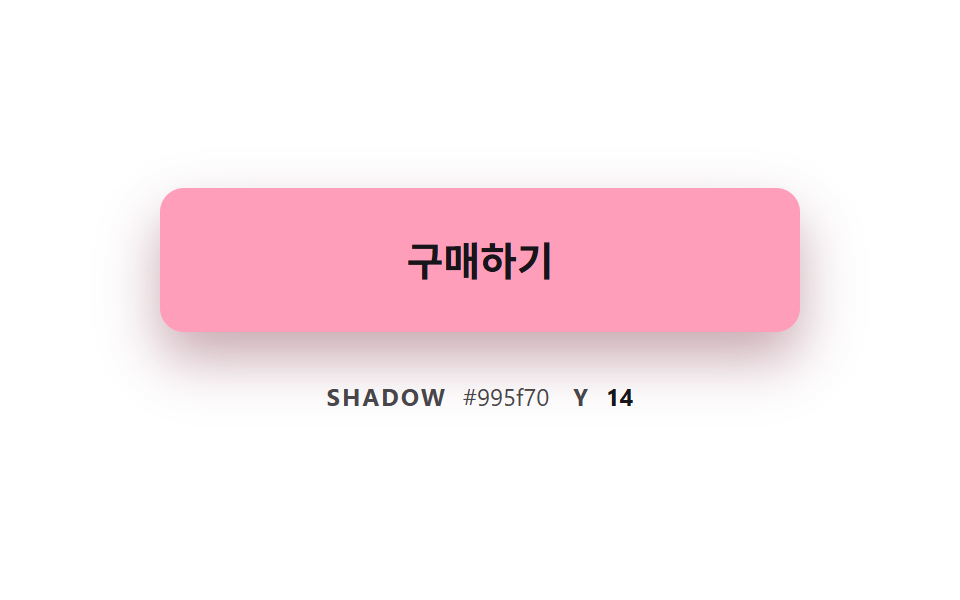
While hover changes the fill, the shadow color follows the same computed value scaled by 0.6, and the shadow height rises together as the color nears its target.
Best forMaking a color-changing button look lifted off the page
SHADOW_DARKENSHADOW_ALPHALIFT_HOVERBLUR_HOVERGLOW_RATE
<main class="stage">
<div class="bc is-demo" id="bcRoot">
  <button class="bc__btn" id="bcBtn" type="button">Buy now</button>
  <p class="bc__meta"><span class="bc__tag">SHADOW</span> <span id="bcHex">#6f6099</span> <span class="bc__tag">Y</span> <b id="bcY">4</b></p>
</div>
</main>
@use "../../../../site/static/demo-tokens" as *;
// 핵심: 바탕색·그림자 색·그림자 높이를 진행도 하나가 함께 정한다. 그림자 색은 지금 바탕색을 어둡게 곱해 만든 값이다.
$glow-from: $subject-lilac;
$glow-to: $subject-pink;
@include stage($stage-paper);
.bc {
--c-from: #{$glow-from};
--c-to: #{$glow-to};
width: min(100%, 320px);
display: grid;
gap: $sp-6;
justify-items: center;
}
.bc__btn {
box-sizing: border-box;
width: 100%;
height: 72px;
border: 0;
border-radius: $r-control;
background: $glow-from;
box-shadow: 0 4px 10px rgba(111, 96, 153, .55);
color: $subject-ink;
font-family: inherit;
font-size: 20px;
font-weight: 700;
line-height: 24px;
cursor: pointer;
}
.bc__btn:focus-visible { outline: 3px solid $subject-ink; outline-offset: 3px; }
.bc__meta {
margin: 0;
display: flex;
align-items: baseline;
flex-wrap: wrap;
justify-content: center;
gap: $sp-1;
font-size: 12px;
line-height: 16px;
color: rgba($subject-ink, .78);
}
.bc__tag { margin: 0 $sp-1 0 $sp-2; font-weight: 700; letter-spacing: .08em; }
.bc__tag:first-child { margin-left: 0; }
.bc__meta b { min-width: 2ch; text-align: right; font-variant-numeric: tabular-nums; color: $subject-ink; }
@media (prefers-reduced-motion: reduce) {
.bc__btn { transition: none; }
}html, body {
margin: 0;
overflow: hidden;
}
.stage {
box-sizing: border-box;
min-height: 100vh;
display: grid;
place-items: center;
margin: 0;
background: #ffffff;
font-family: -apple-system, "Segoe UI", "Noto Sans KR", sans-serif;
padding: clamp(8px, 4vw, 24px);
}
.bc {
--c-from: #b9a0ff;
--c-to: #ff9ebb;
width: min(100%, 320px);
display: grid;
gap: 24px;
justify-items: center;
}
.bc__btn {
box-sizing: border-box;
width: 100%;
height: 72px;
border: 0;
border-radius: 12px;
background: #b9a0ff;
box-shadow: 0 4px 10px rgba(111, 96, 153, 0.55);
color: #17141a;
font-family: inherit;
font-size: 20px;
font-weight: 700;
line-height: 24px;
cursor: pointer;
}
.bc__btn:focus-visible {
outline: 3px solid #17141a;
outline-offset: 3px;
}
.bc__meta {
margin: 0;
display: flex;
align-items: baseline;
flex-wrap: wrap;
justify-content: center;
gap: 4px;
font-size: 12px;
line-height: 16px;
color: rgba(23, 20, 26, 0.78);
}
.bc__tag {
margin: 0 4px 0 8px;
font-weight: 700;
letter-spacing: 0.08em;
}
.bc__tag:first-child {
margin-left: 0;
}
.bc__meta b {
min-width: 2ch;
text-align: right;
font-variant-numeric: tabular-nums;
color: #17141a;
}
@media (prefers-reduced-motion: reduce) {
.bc__btn {
transition: none;
}
}(function () {
// 기법: 진행도 p 하나가 바탕색·그림자 색·그림자 높이를 함께 정한다. 바탕색은 from→to 로 섞고,
// 그림자 색은 지금 바탕색의 각 채널에 SHADOW_DARKEN 을 곱해 만든다. p 는 목표로 일정 비율씩 끌린다.
var SHADOW_DARKEN = 0.6;
var SHADOW_ALPHA = 0.55;
var LIFT_REST = 4;
var LIFT_HOVER = 14;
var BLUR_REST = 10;
var BLUR_HOVER = 28;
var GLOW_RATE = 6;
var START_MS = 200;
var ON_MS = 1000;
var CYCLE_MS = 2000;
var root = document.getElementById('bcRoot');
var btn = document.getElementById('bcBtn');
var hexEl = document.getElementById('bcHex');
var yEl = document.getElementById('bcY');
var reduce = window.matchMedia('(prefers-reduced-motion: reduce)').matches;
function readRgb(name) {
var v = getComputedStyle(btn).getPropertyValue(name).trim().replace('#', '');
if (v.length === 3) v = v.split('').map(function (c) { return c + c; }).join('');
return [parseInt(v.slice(0, 2), 16), parseInt(v.slice(2, 4), 16), parseInt(v.slice(4, 6), 16)];
}
function toHex(rgb) {
return '#' + rgb.map(function (c) { return ('0' + Math.round(c).toString(16)).slice(-2); }).join('');
}
var from = readRgb('--c-from');
var to = readRgb('--c-to');
var p = 0;
var pointerIn = false;
var kbFocus = false;
var t0 = null;
var lastTs = null;
function demoOn(now) {
return root.classList.contains('is-demo') && now >= START_MS && (now - START_MS) % CYCLE_MS < ON_MS;
}
function paint() {
var fill = from.map(function (v, i) { return v + (to[i] - v) * p; });
var shade = fill.map(function (v) { return v * SHADOW_DARKEN; });
var lift = LIFT_REST + (LIFT_HOVER - LIFT_REST) * p;
var blur = BLUR_REST + (BLUR_HOVER - BLUR_REST) * p;
btn.style.background = toHex(fill);
btn.style.boxShadow = '0 ' + lift.toFixed(1) + 'px ' + blur.toFixed(1) + 'px rgba(' +
Math.round(shade[0]) + ', ' + Math.round(shade[1]) + ', ' + Math.round(shade[2]) + ', ' + SHADOW_ALPHA + ')';
hexEl.textContent = toHex(shade);
yEl.textContent = String(Math.round(lift));
}
function stopDemo() { root.classList.remove('is-demo'); }
function jump() { p = pointerIn || kbFocus ? 1 : 0; paint(); }
btn.addEventListener('pointerenter', function () { stopDemo(); pointerIn = true; if (reduce) jump(); });
btn.addEventListener('pointerleave', function () { pointerIn = false; if (reduce) jump(); });
btn.addEventListener('focus', function () { kbFocus = btn.matches(':focus-visible'); if (kbFocus) stopDemo(); if (reduce) jump(); });
btn.addEventListener('blur', function () { kbFocus = false; if (reduce) jump(); });
function tick(ts) {
if (t0 === null) t0 = ts;
var now = ts - t0;
var dt = lastTs === null ? 0.016 : Math.min(0.05, (ts - lastTs) / 1000);
lastTs = ts;
var g = demoOn(now) || pointerIn || kbFocus ? 1 : 0;
p += (g - p) * (1 - Math.exp(-dt * GLOW_RATE));
if (Math.abs(g - p) < 0.002) p = g;
paint();
requestAnimationFrame(tick);
}
if (reduce) {
stopDemo();
paint();
} else {
requestAnimationFrame(tick);
}
})();// ShadowFollowButton — vanilla 판(09-btn-color-shadow-follow-glow) 의 React 포트.
// 진행도 p 하나가 바탕색·그림자 색·그림자 높이를 함께 정한다. 그림자 색은 지금 바탕색에 SHADOW_DARKEN 을 곱한 값이다.
import { useEffect, useRef } from "react";
import styles from "./ShadowFollowButton.module.scss";
type Box<T> = { current: T };
type Rgb = [number, number, number];
const SHADOW_DARKEN = 0.6;
const SHADOW_ALPHA = 0.55;
const LIFT_REST = 4;
const LIFT_HOVER = 14;
const BLUR_REST = 10;
const BLUR_HOVER = 28;
const GLOW_RATE = 6;
const START_MS = 200;
const ON_MS = 1000;
const CYCLE_MS = 2000;
function toHex(rgb: Rgb): string {
return "#" + rgb.map((c) => ("0" + Math.round(c).toString(16)).slice(-2)).join("");
}
export default function ShadowFollowButton() {
const btnRef = useRef<HTMLButtonElement | null>(null) as Box<HTMLButtonElement | null>;
const hexRef = useRef<HTMLSpanElement | null>(null) as Box<HTMLSpanElement | null>;
const yRef = useRef<HTMLElement | null>(null) as Box<HTMLElement | null>;
useEffect(() => {
const btn = btnRef.current;
const hexEl = hexRef.current;
const yEl = yRef.current;
if (!btn || !hexEl || !yEl) return;
const reduce = window.matchMedia("(prefers-reduced-motion: reduce)").matches;
const readRgb = (name: string): Rgb => {
let v = getComputedStyle(btn).getPropertyValue(name).trim().replace("#", "");
if (v.length === 3) v = v.split("").map((c) => c + c).join("");
return [parseInt(v.slice(0, 2), 16), parseInt(v.slice(2, 4), 16), parseInt(v.slice(4, 6), 16)];
};
const from = readRgb("--c-from");
const to = readRgb("--c-to");
let p = 0;
let demo = !reduce;
let pointerIn = false;
let kbFocus = false;
let t0: number | null = null;
let lastTs: number | null = null;
let raf = 0;
const demoOn = (now: number): boolean => demo && now >= START_MS && (now - START_MS) % CYCLE_MS < ON_MS;
const paint = (): void => {
const fill: Rgb = [from[0] + (to[0] - from[0]) * p, from[1] + (to[1] - from[1]) * p, from[2] + (to[2] - from[2]) * p];
const shade: Rgb = [fill[0] * SHADOW_DARKEN, fill[1] * SHADOW_DARKEN, fill[2] * SHADOW_DARKEN];
const lift = LIFT_REST + (LIFT_HOVER - LIFT_REST) * p;
const blur = BLUR_REST + (BLUR_HOVER - BLUR_REST) * p;
btn.style.background = toHex(fill);
btn.style.boxShadow = "0 " + lift.toFixed(1) + "px " + blur.toFixed(1) + "px rgba(" +
Math.round(shade[0]) + ", " + Math.round(shade[1]) + ", " + Math.round(shade[2]) + ", " + SHADOW_ALPHA + ")";
hexEl.textContent = toHex(shade);
yEl.textContent = String(Math.round(lift));
};
const stopDemo = (): void => { demo = false; };
const jump = (): void => { p = pointerIn || kbFocus ? 1 : 0; paint(); };
const onEnter = (): void => { stopDemo(); pointerIn = true; if (reduce) jump(); };
const onLeave = (): void => { pointerIn = false; if (reduce) jump(); };
const onFocus = (): void => { kbFocus = btn.matches(":focus-visible"); if (kbFocus) stopDemo(); if (reduce) jump(); };
const onBlur = (): void => { kbFocus = false; if (reduce) jump(); };
btn.addEventListener("pointerenter", onEnter);
btn.addEventListener("pointerleave", onLeave);
btn.addEventListener("focus", onFocus);
btn.addEventListener("blur", onBlur);
function tick(ts: number): void {
if (t0 === null) t0 = ts;
const now = ts - t0;
const dt = lastTs === null ? 0.016 : Math.min(0.05, (ts - lastTs) / 1000);
lastTs = ts;
const g = demoOn(now) || pointerIn || kbFocus ? 1 : 0;
p += (g - p) * (1 - Math.exp(-dt * GLOW_RATE));
if (Math.abs(g - p) < 0.002) p = g;
paint();
raf = requestAnimationFrame(tick);
}
if (reduce) paint();
else raf = requestAnimationFrame(tick);
return () => {
cancelAnimationFrame(raf);
btn.removeEventListener("pointerenter", onEnter);
btn.removeEventListener("pointerleave", onLeave);
btn.removeEventListener("focus", onFocus);
btn.removeEventListener("blur", onBlur);
};
}, []);
return (
<main className={styles.stage}>
<div className={styles.bc}>
<button className={styles.bc__btn} type="button" ref={btnRef}>구매하기</button>
<p className={styles.bc__meta}>
<span className={styles.bc__tag}>SHADOW</span> <span ref={hexRef}>#6f6099</span> <span className={styles.bc__tag}>Y</span> <b ref={yRef}>4</b>
</p>
</div>
</main>
);
}09 Button Whose Shadow Takes the Fill Color — Measured area 23.888% · moving frames 21/23Original by GODRICH · SCSS and React ship in the zip · CSS Button Color Transition: 9 Hover Demos
The post this demo lives in
 CSS Button Color Transition: 9 Hover DemosOne line recolors a button on hover, yet it muddies the midpoint, cannot move a gradient and loses the label midway — sc See all demos in this post
If you like this effect - similar demos
 Buttons01 Button Whose Glow Widens With the Distance ValueCSS Button Hover Effects — 9 Proximity Patterns
 Buttons01 Long-shadow retro — a button whose trailing shadow length value extends and retracts with hover stateCTA Button Design: 9 Interaction Patterns
 Buttons01 Accordion-reveal value toggle — when the button's open value changes, its rounding and shadow values change along, presenting the content belowExpanding Button UI: 9 Shape-Morph Patterns