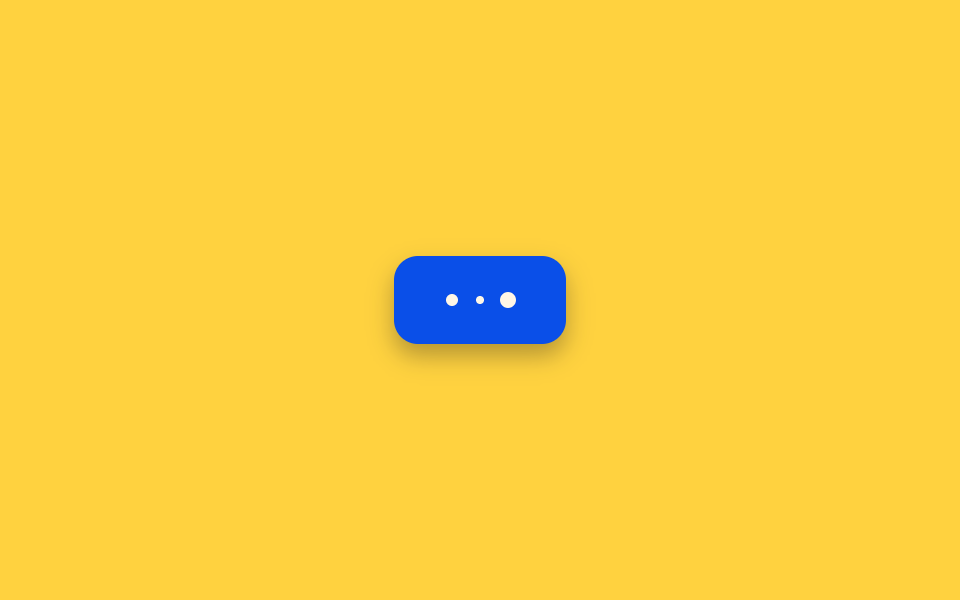
06Button Whose Label Is Replaced by Three Pulsing Dots
Once pressed, three small dots line up where the text used to be, and they grow and shrink one after another from left to right to signal that work is still in progress.
Best forIndicating a wait for something quick, like sending a chat message or a short API call
pulseLoopMath.sinPHASE_OFFSET_RAD
<main class="stage">
<div class="scene is-demo" id="scene">
  <button class="btn" id="btn" type="button">
    <span class="btnContent" id="content">
      <span class="btnLabel" id="label">Send</span>
      <span class="btnDots" id="dots" aria-hidden="true">
        <span class="btnDot" id="dot0"></span>
        <span class="btnDot" id="dot1"></span>
        <span class="btnDot" id="dot2"></span>
      </span>
    </span>
  </button>
  <span class="visuallyHidden" id="status" role="status" aria-live="polite"></span>
</div>
</main>
@use "../../../../site/static/demo-tokens" as *;
// 변수 3개
$duration: $dur-loop;
$easing: $ease-out;
$color: $subject-blue-deep;
// 계산 겹: index.html 의 pulseLoop() 가 점마다 위상을 다르게 준 사인파를 매 프레임 계산해
// scale 로 적용한다 — animation-delay 스태거가 아니라 매번 값을 직접 계산한다.
@include stage($stage-yellow);
.scene {
display: grid;
place-items: center;
}
.btn {
position: relative;
display: inline-flex;
align-items: center;
justify-content: center;
height: 44px;
padding: 0 $sp-5;
border: none;
border-radius: $r-control;
background: $color;
color: $subject-cream;
font-weight: 600;
font-size: 14px;
line-height: 1;
box-shadow: $shadow-press;
cursor: pointer;
&:focus-visible { outline: 2px solid $subject-ink; outline-offset: 3px; }
&:disabled { cursor: default; }
}
.btnContent {
position: relative;
display: inline-block;
min-width: 46px;
height: 18px;
}
.btnLabel,
.btnDots {
position: absolute;
inset: 0;
display: flex;
align-items: center;
justify-content: center;
gap: $sp-2;
white-space: nowrap;
}
.btnDots { opacity: 0; }
.btnDot {
width: 6px;
height: 6px;
border-radius: $r-pill;
background: $subject-cream;
}
.visuallyHidden {
position: absolute;
width: 1px;
height: 1px;
overflow: hidden;
clip: rect(0 0 0 0);
white-space: nowrap;
}
@media (max-width: 340px) {
.btn { height: 40px; padding: 0 $sp-4; font-size: 13px; }
}
@media (prefers-reduced-motion: reduce) {
// 실사용 경로 적용 — index.html 의 runReduced() 가 펄스 트윈 없이 opacity 만 즉시 바꾼다.
// scss 만: 남은 트랜지션을 전부 끈다.
* { transition: none !important; }
}html, body {
margin: 0;
overflow: hidden;
}
.stage {
box-sizing: border-box;
min-height: 100vh;
display: grid;
place-items: center;
margin: 0;
background: #ffd23f;
font-family: -apple-system, "Segoe UI", "Noto Sans KR", sans-serif;
padding: clamp(8px, 4vw, 24px);
}
.scene {
display: grid;
place-items: center;
}
.btn {
position: relative;
display: inline-flex;
align-items: center;
justify-content: center;
height: 44px;
padding: 0 20px;
border: none;
border-radius: 12px;
background: #0a4fe8;
color: #fff7e6;
font-weight: 600;
font-size: 14px;
line-height: 1;
box-shadow: 0 6px 12px rgba(23, 20, 26, 0.32);
cursor: pointer;
}
.btn:focus-visible {
outline: 2px solid #17141a;
outline-offset: 3px;
}
.btn:disabled {
cursor: default;
}
.btnContent {
position: relative;
display: inline-block;
min-width: 46px;
height: 18px;
}
.btnLabel,
.btnDots {
position: absolute;
inset: 0;
display: flex;
align-items: center;
justify-content: center;
gap: 8px;
white-space: nowrap;
}
.btnDots {
opacity: 0;
}
.btnDot {
width: 6px;
height: 6px;
border-radius: 999px;
background: #fff7e6;
}
.visuallyHidden {
position: absolute;
width: 1px;
height: 1px;
overflow: hidden;
clip: rect(0 0 0 0);
white-space: nowrap;
}
@media (max-width: 340px) {
.btn {
height: 40px;
padding: 0 16px;
font-size: 13px;
}
}
@media (prefers-reduced-motion: reduce) {
* {
transition: none !important;
}
}(function () {
var FADE_MS = 160;
var LOAD_MS = 1100;
var GAP_MS = 480;
var START_DELAY_MS = 200;
var PULSE_PERIOD_MS = 900;
var PHASE_OFFSET_RAD = (2 * Math.PI) / 3;
var AMPLITUDE = 0.38;
var scene = document.getElementById('scene');
var btn = document.getElementById('btn');
var label = document.getElementById('label');
var dots = document.getElementById('dots');
var dotEls = [document.getElementById('dot0'), document.getElementById('dot1'), document.getElementById('dot2')];
var status = document.getElementById('status');
var reduce = window.matchMedia('(prefers-reduced-motion: reduce)').matches;
var gen = 0;
var timers = [];
var rafId = 0;
function human() {
if (scene.classList.contains('is-demo')) {
scene.classList.remove('is-demo');
timers.forEach(function (t) { clearTimeout(t); });
timers = [];
}
}
function easeInOutQuad(p) { return p < .5 ? 2 * p * p : 1 - Math.pow(-2 * p + 2, 2) / 2; }
function fade(el, from, to, ms, myGen, onDone) {
var start = null;
function step(now) {
if (myGen !== gen) return;
if (start === null) start = now;
var p = Math.min(1, (now - start) / ms);
el.style.opacity = String(from + (to - from) * easeInOutQuad(p));
if (p < 1) requestAnimationFrame(step); else if (onDone) onDone();
}
requestAnimationFrame(step);
}
// 계산 겹: 점마다 위상을 다르게 준 사인파 scale_i(t) = 1 + A·sin(2π·t/period − i·phaseOffset)
// 를 매 프레임 계산한다 — animation-delay 로 어긋나게 도는 방식이 아니라 각 점을 매번 직접 계산한다.
function pulseLoop(myGen) {
var start = null;
function step(now) {
if (myGen !== gen) return;
if (start === null) start = now;
var t = now - start;
for (var i = 0; i < dotEls.length; i++) {
var s = 1 + AMPLITUDE * Math.sin((2 * Math.PI * t) / PULSE_PERIOD_MS - i * PHASE_OFFSET_RAD);
dotEls[i].style.transform = 'scale(' + s.toFixed(3) + ')';
}
rafId = requestAnimationFrame(step);
}
rafId = requestAnimationFrame(step);
}
function runAnimated() {
gen++;
var myGen = gen;
btn.disabled = true;
btn.setAttribute('aria-busy', 'true');
status.textContent = 'Sending';
fade(label, 1, 0, FADE_MS, myGen);
fade(dots, 0, 1, FADE_MS, myGen, function () { pulseLoop(myGen); });
timers.push(setTimeout(function () {
cancelAnimationFrame(rafId);
fade(dots, 1, 0, FADE_MS, myGen);
fade(label, 0, 1, FADE_MS, myGen, function () {
btn.disabled = false;
btn.removeAttribute('aria-busy');
status.textContent = 'Sent';
});
}, LOAD_MS));
}
function runReduced() {
gen++;
btn.disabled = true;
btn.setAttribute('aria-busy', 'true');
status.textContent = 'Sending';
label.style.opacity = '0';
dots.style.opacity = '1';
timers.push(setTimeout(function () {
dots.style.opacity = '0';
label.style.opacity = '1';
btn.disabled = false;
btn.removeAttribute('aria-busy');
status.textContent = 'Sent';
}, LOAD_MS));
}
btn.addEventListener('click', function () {
if (btn.disabled) return;
human();
if (reduce) runReduced(); else runAnimated();
});
// reduce: 실사용 경로 적용 — runReduced() 는 펄스 트윈 없이 opacity 만 즉시 바꾼다.
// 아래 자동 루프는 시연 게이트만 — reduce 에서는 돌지 않는다.
function cycle() {
if (!scene.classList.contains('is-demo')) return;
runAnimated();
timers.push(setTimeout(function () {
timers.push(setTimeout(cycle, GAP_MS));
}, LOAD_MS + FADE_MS));
}
if (!reduce) {
timers.push(setTimeout(cycle, START_DELAY_MS));
}
})();import { useEffect, useRef } from 'react';
import styles from './ButtonLoadingDotPulseInline.module.scss';
const FADE_MS = 160;
const LOAD_MS = 1100;
const GAP_MS = 480;
const START_DELAY_MS = 200;
const PULSE_PERIOD_MS = 900;
const PHASE_OFFSET_RAD = (2 * Math.PI) / 3;
const AMPLITUDE = 0.38;
export default function ButtonLoadingDotPulseInline() {
const sceneRef = useRef<HTMLDivElement>(null);
const btnRef = useRef<HTMLButtonElement>(null);
const labelRef = useRef<HTMLSpanElement>(null);
const dotsRef = useRef<HTMLSpanElement>(null);
const dot0Ref = useRef<HTMLSpanElement>(null);
const dot1Ref = useRef<HTMLSpanElement>(null);
const dot2Ref = useRef<HTMLSpanElement>(null);
const statusRef = useRef<HTMLSpanElement>(null);
useEffect(() => {
const scene = sceneRef.current;
const btn = btnRef.current;
const label = labelRef.current;
const dots = dotsRef.current;
const dot0 = dot0Ref.current;
const dot1 = dot1Ref.current;
const dot2 = dot2Ref.current;
const status = statusRef.current;
if (!scene || !btn || !label || !dots || !dot0 || !dot1 || !dot2 || !status) return undefined;
const dotEls = [dot0, dot1, dot2];
const reduce = window.matchMedia('(prefers-reduced-motion: reduce)').matches;
let gen = 0;
let timers: number[] = [];
let rafId = 0;
function human() {
if (scene!.classList.contains(styles['is-demo'])) {
scene!.classList.remove(styles['is-demo']);
timers.forEach((t) => window.clearTimeout(t));
timers = [];
}
}
function easeInOutQuad(p: number) { return p < .5 ? 2 * p * p : 1 - Math.pow(-2 * p + 2, 2) / 2; }
function fade(el: HTMLElement, from: number, to: number, ms: number, myGen: number, onDone?: () => void) {
let start: number | null = null;
function step(now: number) {
if (myGen !== gen) return;
if (start === null) start = now;
const p = Math.min(1, (now - start) / ms);
el.style.opacity = String(from + (to - from) * easeInOutQuad(p));
if (p < 1) requestAnimationFrame(step); else if (onDone) onDone();
}
requestAnimationFrame(step);
}
// 계산 겹: 점마다 위상을 다르게 준 사인파 scale_i(t) = 1 + A·sin(2π·t/period − i·phaseOffset)
// 를 매 프레임 계산한다 — animation-delay 로 어긋나게 도는 방식이 아니라 각 점을 매번 직접 계산한다.
function pulseLoop(myGen: number) {
let start: number | null = null;
function step(now: number) {
if (myGen !== gen) return;
if (start === null) start = now;
const t = now - start;
for (let i = 0; i < dotEls.length; i++) {
const s = 1 + AMPLITUDE * Math.sin((2 * Math.PI * t) / PULSE_PERIOD_MS - i * PHASE_OFFSET_RAD);
dotEls[i]!.style.transform = 'scale(' + s.toFixed(3) + ')';
}
rafId = requestAnimationFrame(step);
}
rafId = requestAnimationFrame(step);
}
function runAnimated() {
gen++;
const myGen = gen;
btn!.disabled = true;
btn!.setAttribute('aria-busy', 'true');
status!.textContent = '보내는 중';
fade(label!, 1, 0, FADE_MS, myGen);
fade(dots!, 0, 1, FADE_MS, myGen, () => { pulseLoop(myGen); });
timers.push(window.setTimeout(() => {
cancelAnimationFrame(rafId);
fade(dots!, 1, 0, FADE_MS, myGen);
fade(label!, 0, 1, FADE_MS, myGen, () => {
btn!.disabled = false;
btn!.removeAttribute('aria-busy');
status!.textContent = '전송 완료';
});
}, LOAD_MS));
}
function runReduced() {
gen++;
btn!.disabled = true;
btn!.setAttribute('aria-busy', 'true');
status!.textContent = '보내는 중';
label!.style.opacity = '0';
dots!.style.opacity = '1';
timers.push(window.setTimeout(() => {
dots!.style.opacity = '0';
label!.style.opacity = '1';
btn!.disabled = false;
btn!.removeAttribute('aria-busy');
status!.textContent = '전송 완료';
}, LOAD_MS));
}
function onClick() {
if (btn!.disabled) return;
human();
if (reduce) runReduced(); else runAnimated();
}
btn.addEventListener('click', onClick);
// reduce: 실사용 경로 적용 — runReduced() 는 펄스 트윈 없이 opacity 만 즉시 바꾼다.
// 아래 자동 루프는 시연 게이트만 — reduce 에서는 돌지 않는다.
function cycle() {
if (!scene!.classList.contains(styles['is-demo'])) return;
runAnimated();
timers.push(window.setTimeout(() => {
timers.push(window.setTimeout(cycle, GAP_MS));
}, LOAD_MS + FADE_MS));
}
if (!reduce) {
timers.push(window.setTimeout(cycle, START_DELAY_MS));
}
return () => {
btn.removeEventListener('click', onClick);
timers.forEach((t) => window.clearTimeout(t));
cancelAnimationFrame(rafId);
};
}, []);
return (
<main className={styles.stage}>
<div className={styles.scene + ' ' + styles['is-demo']} ref={sceneRef}>
<button className={styles.btn} ref={btnRef} type="button">
<span className={styles.btnContent}>
<span className={styles.btnLabel} ref={labelRef}>Send</span>
<span className={styles.btnDots} ref={dotsRef} aria-hidden="true">
<span className={styles.btnDot} ref={dot0Ref} />
<span className={styles.btnDot} ref={dot1Ref} />
<span className={styles.btnDot} ref={dot2Ref} />
</span>
</span>
</button>
<span className={styles.visuallyHidden} ref={statusRef} role="status" aria-live="polite" />
</div>
</main>
);
}06 Button Whose Label Is Replaced by Three Pulsing Dots — Measured area 0.207% · moving frames 20/23Original by GODRICH · SCSS and React ship in the zip · Loading Button UI — 9 States, Spinner to Success
The post this demo lives in
 Loading Button UI — 9 States, Spinner to SuccessAmong nine loading button patterns, one turns its spinner into a checkmark, one swaps the label for three pulsing dots, See all demos in this post