03Donut chart sweep
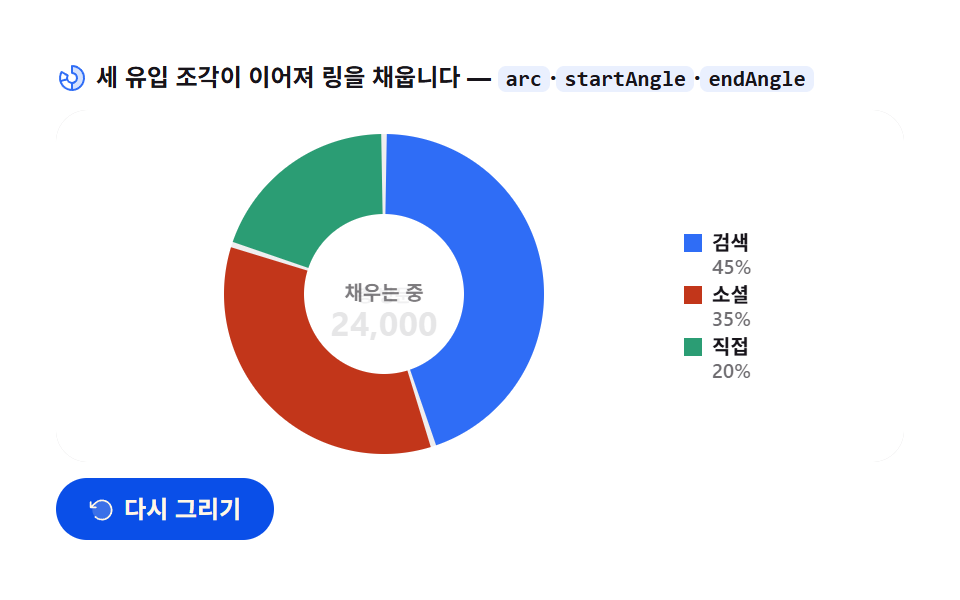
Three traffic sources sweep in as arcs, each starting where the last ended so the ring flows without pause; the center total flips in last.
Best forTraffic mix and composition at a glance
arcstartAngleendAngle
<main class="stage">
<div class="dn" id="dn">
  <p class="dn__hint">
    <svg class="dn__ico" viewBox="0 0 256 256" aria-hidden="true"><g fill="currentColor"><path d="M224 128a96 96 0 0 1-96 96v-56a40 40 0 0 0 0-80V32a96 96 0 0 1 96 96" opacity=".2"/><path d="M128 24a8 8 0 0 0-8 8v56a8 8 0 0 0 8 8a32 32 0 1 1-27.72 16a8 8 0 0 0-2.93-10.93l-48.5-28A8 8 0 0 0 37.92 76A104 104 0 1 0 128 24M48.09 91.1L83 111.26A48.1 48.1 0 0 0 80 128c0 1.53.08 3 .22 4.52L41.28 143a88.16 88.16 0 0 1 6.81-51.9m-2.67 67.31l39-10.44A48.1 48.1 0 0 0 120 175.32v40.31a88.2 88.2 0 0 1-74.58-57.22M136 215.63v-40.31a48 48 0 0 0 0-94.65V40.36a88 88 0 0 1 0 175.27"/></g></svg>
    <span>Three traffic slices join up to fill the ring — <code>arc</code>·<code>startAngle</code>·<code>endAngle</code></span>
  </p>
  <div class="dn__field" id="field" role="application" aria-label="Donut chart sweep test board" tabindex="0">
    <canvas class="dn__cv" id="cv" role="img" aria-label="Traffic-source donut chart — three slices filling in clockwise"></canvas>
  </div>
  <div class="dn__bar">
    <button class="dn__btn" id="replay" type="button">
      <svg class="dn__bico" viewBox="0 0 256 256" aria-hidden="true"><g fill="currentColor"><path d="M216 128a88 88 0 1 1-88-88a88 88 0 0 1 88 88" opacity=".2"/><path d="M224 128a96 96 0 0 1-94.71 96H128a95.38 95.38 0 0 1-65.9-26.2a8 8 0 0 1 11-11.63a80 80 0 1 0-1.67-114.78a3 3 0 0 1-.26.25L44.59 96H72a8 8 0 0 1 0 16H24a8 8 0 0 1-8-8V56a8 8 0 0 1 16 0v29.8L60.25 60A96 96 0 0 1 224 128"/></g></svg>
      <span>Redraw</span>
    </button>
    <table class="sr-only">
      <caption>Traffic source mix (unit: visits, total 24,000)</caption>
      <thead><tr><th scope="col">Source</th><th scope="col">Visits</th><th scope="col">Share</th></tr></thead>
      <tbody>
        <tr><th scope="row">Search</th><td>10,800</td><td>45%</td></tr>
        <tr><th scope="row">Social</th><td>8,400</td><td>35%</td></tr>
        <tr><th scope="row">Direct</th><td>4,800</td><td>20%</td></tr>
      </tbody>
    </table>
  </div>
</div>
</main>@use "../../../../site/static/demo-tokens" as *;
// 도넛 그래프 스윕 — 움직임은 전부 캔버스 rAF 루프 안(이어지는 arc 스윕 + 중앙 총량 플립).
// CSS 애니메이션 0개 — 렌더러가 실시간 24장을 찍는다(077·304 선례).
// 조각은 차트 토큰 고정 순서 1·2·3번.
$duration: $dur-loop;
$easing: $ease-out; // 스윕 감속은 JS 에서 계산하므로 CSS 쪽 이징 토큰은 감속 역할명으로
$color: $chart-1;
@include stage($stage-paper);
// 화면 낭독기용 표 — 캔버스를 읽지 못하므로 같은 데이터를 표로 붙인다
.sr-only {
// fixed + top/left 명시 — absolute 였을 때 표의 실제 콘텐츠 높이(행 수만큼 ≒ 390px)가
// scrollHeight 에 잡혀 데스크톱·폰 전부 세로 넘침(BD8/BD9)이 났다. top 을 주지 않으면
// static 자리 기준으로 배치돼 여전히 scrollHeight 에 들어간다 — 좌상단 고정으로 뺀다.
position: fixed; top: 0; left: 0; width: 1px; height: 1px; margin: -1px;
overflow: hidden; clip: rect(0 0 0 0); white-space: nowrap;
}
.dn {
// 캔버스가 읽는 색 — JS 가 getComputedStyle 로 꺼내 쓴다
--chart-1: #{$chart-1};
--chart-2: #{$chart-2};
--chart-3: #{$chart-3};
--ink: #{$subject-ink};
--mute: #{rgba($subject-ink, .62)};
--track: #{rgba($subject-ink, .07)};
--paper: #{$stage-paper};
display: flex; flex-direction: column; gap: $sp-2;
width: 100%; max-width: 424px;
}
.dn__hint {
display: flex; align-items: center; gap: $sp-1; margin: 0;
font-weight: 700; font-size: clamp(10px, 2.8vw, 12px); line-height: 1.35;
color: $subject-ink;
}
.dn__hint code {
padding: 0 $sp-1; border-radius: $r-xs;
background: rgba($chart-1, .10);
color: $subject-ink;
font-weight: 700; font-size: .92em; line-height: 1.3;
}
.dn__ico { width: 16px; height: 16px; flex: 0 0 auto; color: $color; }
.dn__field {
position: relative; height: 176px;
border-radius: $r-card; overflow: hidden;
background: $stage-paper;
box-shadow: inset 0 0 0 1px rgba($subject-ink, .16);
}
.dn__cv { display: block; width: 100%; height: 100%; }
.dn__bar {
display: flex; align-items: center; gap: $sp-2;
}
.dn__btn {
display: inline-flex; align-items: center; gap: $sp-1;
box-sizing: border-box; padding: $sp-2 $sp-4; border: 0;
border-radius: $r-pill; background: $subject-blue-deep; color: $subject-cream;
font-family: inherit; font-weight: 700; font-size: 12px; line-height: 1.2;
cursor: pointer;
}
.dn__btn:focus-visible { outline: 2px solid $color; outline-offset: 2px; }
.dn__bico { width: 14px; height: 14px; flex: 0 0 auto; }
@media (max-width: 340px) {
.dn { gap: $sp-1; }
.dn__field { height: 112px; }
.dn__hint { font-size: 10px; }
.dn__btn { padding: $sp-1 $sp-3; font-size: 11px; }
}
// reduce — 루프가 아예 안 돌므로 끌 애니메이션이 없다. 완성 상태 한 장만 남는다.
@media (prefers-reduced-motion: reduce) {
.dn__btn { cursor: default; }
}html, body {
margin: 0;
overflow: hidden;
}
.stage {
box-sizing: border-box;
min-height: 100vh;
display: grid;
place-items: center;
margin: 0;
background: #ffffff;
font-family: -apple-system, "Segoe UI", "Noto Sans KR", sans-serif;
padding: clamp(8px, 4vw, 24px);
}
.sr-only {
position: fixed;
top: 0;
left: 0;
width: 1px;
height: 1px;
margin: -1px;
overflow: hidden;
clip: rect(0 0 0 0);
white-space: nowrap;
}
.dn {
--chart-1: #2f6df6;
--chart-2: #c2361a;
--chart-3: #2b9d74;
--ink: #17141a;
--mute: rgba(23, 20, 26, 0.62);
--track: rgba(23, 20, 26, 0.07);
--paper: #ffffff;
display: flex;
flex-direction: column;
gap: 8px;
width: 100%;
max-width: 424px;
}
.dn__hint {
display: flex;
align-items: center;
gap: 4px;
margin: 0;
font-weight: 700;
font-size: clamp(10px, 2.8vw, 12px);
line-height: 1.35;
color: #17141a;
}
.dn__hint code {
padding: 0 4px;
border-radius: 4px;
background: rgba(47, 109, 246, 0.1);
color: #17141a;
font-weight: 700;
font-size: 0.92em;
line-height: 1.3;
}
.dn__ico {
width: 16px;
height: 16px;
flex: 0 0 auto;
color: #2f6df6;
}
.dn__field {
position: relative;
height: 176px;
border-radius: 16px;
overflow: hidden;
background: #ffffff;
box-shadow: inset 0 0 0 1px rgba(23, 20, 26, 0.16);
}
.dn__cv {
display: block;
width: 100%;
height: 100%;
}
.dn__bar {
display: flex;
align-items: center;
gap: 8px;
}
.dn__btn {
display: inline-flex;
align-items: center;
gap: 4px;
box-sizing: border-box;
padding: 8px 16px;
border: 0;
border-radius: 999px;
background: #0a4fe8;
color: #fff7e6;
font-family: inherit;
font-weight: 700;
font-size: 12px;
line-height: 1.2;
cursor: pointer;
}
.dn__btn:focus-visible {
outline: 2px solid #2f6df6;
outline-offset: 2px;
}
.dn__bico {
width: 14px;
height: 14px;
flex: 0 0 auto;
}
@media (max-width: 340px) {
.dn {
gap: 4px;
}
.dn__field {
height: 112px;
}
.dn__hint {
font-size: 10px;
}
.dn__btn {
padding: 4px 12px;
font-size: 11px;
}
}
@media (prefers-reduced-motion: reduce) {
.dn__btn {
cursor: default;
}
}// 도넛 그래프 스윕 — 세 트래픽 유입의 점유가 링을 채운다.
// 각 조각은 arc 로 그리되, 이어지는 조각의 시작각(startAngle)이 앞 조각의 현재 끝각(endAngle)에서 출발한다.
// 그래서 조각 경계에서 펜이 멈추지 않고 링 전체가 한 번에 흐른다.
// 중앙 총량은 링이 다 채워진 뒤 숫자가 뒤집히며(세로 슬라이드 교체) 나타난다.
var root = document.getElementById('dn');
var field = document.getElementById('field');
var cv = document.getElementById('cv');
var ctx = cv.getContext('2d');
var replayBtn = document.getElementById('replay');
var css = getComputedStyle(root);
var C_1 = css.getPropertyValue('--chart-1').trim();
var C_2 = css.getPropertyValue('--chart-2').trim();
var C_3 = css.getPropertyValue('--chart-3').trim();
var C_INK = css.getPropertyValue('--ink').trim();
var C_MUTE = css.getPropertyValue('--mute').trim();
var C_TRACK = css.getPropertyValue('--track').trim();
var C_PAPER = css.getPropertyValue('--paper').trim();
var FONT = '-apple-system, "Segoe UI", "Noto Sans KR", sans-serif';
// 고정 시드 데이터 — 세 유입원의 Visits Wed(합계 24,000). 난수가 아니라 코드 안 배열
var SRC = [
{ name: 'Search', v: 10800, c: C_1 }, // 45%
{ name: 'Social', v: 8400, c: C_2 }, // 35%
{ name: 'Direct', v: 4800, c: C_3 } // 20%
];
var TOTAL = 24000;
var TAU = Math.PI * 2;
var START = -Math.PI / 2; // 12h 방향에서 시작
var GAP = 0.035; // 조각 사이 표면 틈(라디안) — 붙어 있으면 경계가 안 읽힌다
var LOOP = 2; // 한 사이클 2초
var SWEEP = 0.80; // 전체 2초의 80% 동안 링이 채워진다
var reduce = window.matchMedia('(prefers-reduced-motion: reduce)').matches;
var W = 0, H = 0, dpr = 1;
var t0 = 0, raf = 0;
function fit() {
var r = field.getBoundingClientRect();
dpr = window.devicePixelRatio || 1;
W = r.width; H = r.height;
cv.width = Math.round(W * dpr);
cv.height = Math.round(H * dpr);
ctx.setTransform(dpr, 0, 0, dpr, 0, 0);
}
// p(0..1) → 이어지는 스윕의 현재 각도. 진행률을 점유합(1.0)에 얹는다
function sweepAngle(p) {
var q = Math.max(0, Math.min(1, p / SWEEP));
return q; // 0..1, 1 이면 링 전체
}
function draw(p) {
ctx.clearRect(0, 0, W, H);
ctx.fillStyle = C_PAPER;
ctx.fillRect(0, 0, W, H);
// 도넛 중심·반지름 — 캔버스를 채운다(누적면적). 범례는 오른쪽 세로 줄
var legendW = Math.min(96, Math.max(72, W * 0.26));
var cx = PAD_L() + (W - PAD_L() - legendW - PAD_R()) / 2;
var cy = H * 0.5 + 4;
var R = Math.min((W - PAD_L() - legendW - PAD_R()) / 2 - 4, H / 2 - 8);
var ring = Math.max(16, R * 0.5);
// 링 트랙 — 다 채워질 자리를 옅게 깐다. 스윕 진행까지만 깔린다:
// 첫 프레임에 전체 트랙을 깔면 그 자리는 끝까지 변하지 않아 누적면적이 죽는다 —
// 펜이 지나가며 트랙이 열리고 조각이 따라 붙는 그림(077 품질 기준선: 화면이 살아 있어야 한다)
var qTrack = sweepAngle(p);
if (qTrack > 0.005) {
ctx.beginPath();
ctx.arc(cx, cy, R - ring / 2, START, START + qTrack * TAU);
ctx.strokeStyle = C_TRACK;
ctx.lineWidth = ring;
ctx.stroke();
}
// 조각 — 이어지는 스윕. 진행 q 를 각 조각 점유에 분배한다:
// 앞 조각이 다 채워졌으면 전체 각을 확정하고, 현재 조각은 남은 진행으로 부분각을 그린다.
var q = qTrack;
var pen = START;
var acc = 0;
var cur = -1;
for (var i = 0; i < SRC.length; i++) {
var share = SRC[i].v / TOTAL;
var segEnd = acc + share;
if (q >= segEnd) {
// 이미 지나온 조각 — 전체 각을 그린다(양쪽에 틈 반씩)
var a0 = START + acc * TAU + GAP / 2;
var a1 = START + segEnd * TAU - GAP / 2;
slice(cx, cy, R, ring, a0, a1, SRC[i].c, 1);
pen = a1;
acc = segEnd;
} else if (q > acc) {
// 현재 그려지는 조각 — 시작각은 앞 조각의 끝각. 끝각은 진행에 따라 벌어진다
cur = i;
var a0c = START + acc * TAU + (i === 0 ? 0 : GAP / 2);
var a1c = START + q * TAU;
slice(cx, cy, R, ring, a0c, a1c, SRC[i].c, 1);
acc = segEnd;
} else {
break;
}
}
// 스윕 펜 끝 — 지나가는 지점에 작은 점. 조각이 흐른다는 감을 준다
if (cur >= 0 && q < 1) {
var penA = START + q * TAU;
var px = cx + Math.cos(penA) * (R - ring / 2);
var py = cy + Math.sin(penA) * (R - ring / 2);
ctx.beginPath();
ctx.arc(px, py, 2.6, 0, TAU);
ctx.fillStyle = C_PAPER;
ctx.fill();
ctx.strokeStyle = SRC[cur].c;
ctx.lineWidth = 2;
ctx.stroke();
}
// 중앙 총량 — 링이 다 채워진 뒤(SWEEP 이후) 세로 슬라이드로 뒤집혀 나타난다
var flipP = Math.max(0, Math.min(1, (p - SWEEP) / 0.16));
var midY = cy + 2;
var label = 'Total visits';
var value = '24,000';
if (flipP > 0) {
// 숫자가 위에서 내려오고 "Total visits" 은 자리를 비켜 준다 — 두 줄이 교체되는 뒤집힘
var up = 1 - flipP;
ctx.save();
ctx.beginPath();
ctx.rect(cx - R, cy - R, R * 2, R * 2);
ctx.clip();
ctx.globalAlpha = up;
ctx.fillStyle = C_MUTE;
ctx.textAlign = 'center';
ctx.textBaseline = 'middle';
ctx.font = '600 10px ' + FONT;
ctx.fillText('Filling', cx, midY - flipP * 18);
ctx.restore();
ctx.globalAlpha = 1;
}
if (flipP > 0) {
ctx.textAlign = 'center';
ctx.textBaseline = 'middle';
ctx.globalAlpha = flipP;
ctx.fillStyle = C_INK;
ctx.font = '700 17px ' + FONT;
ctx.fillText(value, cx, midY + (1 - flipP) * 16);
ctx.fillStyle = C_MUTE;
ctx.font = '600 9px ' + FONT;
ctx.fillText(label, cx, midY - 13 + (1 - flipP) * 14);
ctx.globalAlpha = 1;
} else {
ctx.textAlign = 'center';
ctx.textBaseline = 'middle';
ctx.fillStyle = C_MUTE;
ctx.font = '600 10px ' + FONT;
ctx.fillText('Filling', cx, midY);
}
// 범례 — 오른쪽 세로 줄. 각 항목은 조각이 시작될 때 나타난다
var lx = W - PAD_R() - legendW;
var ly = cy - 30;
for (var k = 0; k < SRC.length; k++) {
var appear = Math.max(0, Math.min(1, (p - (k * 0.26)) / 0.14));
if (appear <= 0) continue;
ctx.globalAlpha = appear;
var ly2 = ly + k * 26;
ctx.fillStyle = SRC[k].c;
ctx.fillRect(lx, ly2, 9, 9);
ctx.fillStyle = C_INK;
ctx.textAlign = 'left';
ctx.textBaseline = 'alphabetic';
ctx.font = '700 10px ' + FONT;
ctx.fillText(SRC[k].name, lx + 14, ly2 + 8);
ctx.fillStyle = C_MUTE;
ctx.font = '600 10px ' + FONT;
ctx.fillText(Math.round(SRC[k].v / TOTAL * 100) + '%', lx + 14, ly2 + 20);
ctx.globalAlpha = 1;
}
}
// 링 조각 한 덩이 — arc 를 stroke 로 그린다(선 두께 = 링 두께). cap 을 butt 로 둬야 각이 정확하다
function slice(cx, cy, R, ring, a0, a1, color, alpha) {
if (a1 <= a0) return;
ctx.beginPath();
ctx.arc(cx, cy, R - ring / 2, a0, a1);
ctx.strokeStyle = color;
ctx.lineWidth = ring;
ctx.lineCap = 'butt';
ctx.globalAlpha = alpha;
ctx.stroke();
ctx.globalAlpha = 1;
}
// 왼쪽 패드 — 폭이 좁으면 라벨 패드를 줄인다
function PAD_L() { return W < 220 ? 10 : 14; }
function PAD_R() { return W < 220 ? 8 : 14; }
function frame(now) {
if (!t0) t0 = now;
var p = ((now - t0) / 1000 % LOOP) / LOOP; // 0..1, 2초 루프
draw(p);
raf = requestAnimationFrame(frame);
}
replayBtn.addEventListener('click', function () { t0 = 0; });
window.addEventListener('resize', function () { fit(); if (reduce) draw(1); });
fit();
if (reduce) {
// reduce — 루프 없이 완성 상태(링이 다 채워지고 총량이 떠 있는 한 장)만 그린다
draw(1);
} else {
raf = requestAnimationFrame(frame);
}// DonutSweepChart — vanilla 판(run/305/demo/03-chart-canvas-donut-sweep/index.html) 의 React 포트.
// 세 트래픽 조각이 arc 로 채색되되 이어지는 조각의 시작각이 앞 조각의 끝각에서 출발해
// 링이 멈추지 않고 흐른다. 중앙 총량은 링이 다 채워진 뒤 뒤집혀 나타난다.
// @keyframes 없음 — props 는 CSS 변수로 내려간다.
import { useEffect, useRef } from "react";
import type { CSSProperties } from "react";
import styles from "./DonutSweepChart.module.scss";
export type DonutSweepChartProps = {
duration?: string;
easing?: string;
color?: string;
};
type Vars = CSSProperties & { "--duration"?: string; "--easing"?: string; "--color"?: string };
type Box<T> = { current: T };
// 고정 시드 데이터 — 세 유입원의 방문 수(합계 24,000)
const SRC = [
{ name: "검색", v: 10800, cvar: "--chart-1" },
{ name: "소셜", v: 8400, cvar: "--chart-2" },
{ name: "직접", v: 4800, cvar: "--chart-3" }
];
const TOTAL = 24000;
const TAU = Math.PI * 2;
const START = -Math.PI / 2; // 12시 방향에서 시작
const GAP = 0.035; // 조각 사이 표면 틈(라디안)
const LOOP = 2; // 한 사이클 2초
const SWEEP = 0.80; // 전체의 80% 동안 링이 채워진다
const FONT = '-apple-system, "Segoe UI", "Noto Sans KR", sans-serif';
const FIELD_LABEL = "도넛 그래프 스윕 실험판";
const CV_LABEL = "트래픽 유입 도넛 그래프 — 세 조각이 시계 방향으로 채워지는 모습";
export default function DonutSweepChart({
duration = "2s",
easing = "ease-out",
color = "#2f6df6",
}: DonutSweepChartProps) {
const rootRef = useRef<HTMLDivElement | null>(null);
const cvRef = useRef<HTMLCanvasElement | null>(null);
const ctxRef = useRef<CanvasRenderingContext2D | null>(null);
const sizeRef = useRef({ w: 0, h: 0 }) as Box<{ w: number; h: number }>;
const t0Ref = useRef(0) as Box<number>;
const rafRef = useRef(0) as Box<number>;
const vars: Vars = { "--duration": duration, "--easing": easing, "--color": color };
function reduced(): boolean {
return window.matchMedia("(prefers-reduced-motion: reduce)").matches;
}
function cssv(n: string): string {
const root = rootRef.current;
return root ? getComputedStyle(root).getPropertyValue(n).trim() : "";
}
// 고DPI — 배킹 스토어는 devicePixelRatio 배, 그리기 좌표계는 CSS 픽셀 그대로
function fit(): void {
const cv = cvRef.current;
const s = sizeRef.current;
if (!cv) return;
const r = cv.getBoundingClientRect();
const dpr = window.devicePixelRatio || 1;
s.w = r.width; s.h = r.height;
cv.width = Math.round(r.width * dpr);
cv.height = Math.round(r.height * dpr);
const ctx = ctxRef.current;
if (ctx) ctx.setTransform(dpr, 0, 0, dpr, 0, 0);
}
// 링 조각 한 덩이 — arc 를 stroke 로 그린다(선 두께 = 링 두께). cap 을 butt 로 둬야 각이 정확하다
function slice(cx: number, cy: number, R: number, ring: number, a0: number, a1: number, col: string): void {
const ctx = ctxRef.current;
if (!ctx || a1 <= a0) return;
ctx.beginPath();
ctx.arc(cx, cy, R - ring / 2, a0, a1);
ctx.strokeStyle = col;
ctx.lineWidth = ring;
ctx.lineCap = "butt";
ctx.stroke();
}
function draw(p: number): void {
const ctx = ctxRef.current;
if (!ctx) return;
const W = sizeRef.current.w, H = sizeRef.current.h;
const C_INK = cssv("--ink");
const C_MUTE = cssv("--mute");
const C_TRACK = cssv("--track");
const C_PAPER = cssv("--paper");
ctx.clearRect(0, 0, W, H);
ctx.fillStyle = C_PAPER;
ctx.fillRect(0, 0, W, H);
// 도넛 중심·반지름 — 캔버스를 채운다(누적면적). 범례는 오른쪽 세로 줄
const padL = W < 220 ? 10 : 14;
const padR = W < 220 ? 8 : 14;
const legendW = Math.min(96, Math.max(72, W * 0.26));
const cx = padL + (W - padL - legendW - padR) / 2;
const cy = H * 0.5 + 4;
const R = Math.min((W - padL - legendW - padR) / 2 - 8, H / 2 - 14);
const ring = Math.max(16, R * 0.34);
// 링 트랙 — 다 채워질 자리를 옅게 깐다
ctx.beginPath();
ctx.arc(cx, cy, R - ring / 2, 0, TAU);
ctx.strokeStyle = C_TRACK;
ctx.lineWidth = ring;
ctx.stroke();
// 조각 — 이어지는 스윕. q(0..1) 를 점유에 분배한다
const q = Math.max(0, Math.min(1, p / SWEEP));
let acc = 0;
let cur = -1;
for (let i = 0; i < SRC.length; i++) {
const share = SRC[i].v / TOTAL;
const segEnd = acc + share;
const col = i === 0 ? (cssv(SRC[i].cvar) || color) : cssv(SRC[i].cvar);
if (q >= segEnd) {
// 지나온 조각 — 전체 각(양쪽 틈 반씩)
const a0 = START + acc * TAU + GAP / 2;
const a1 = START + segEnd * TAU - GAP / 2;
slice(cx, cy, R, ring, a0, a1, col);
acc = segEnd;
} else if (q > acc) {
// 현재 조각 — 시작각은 앞 조각 끝각. 끝각은 진행에 따라 벌어진다
cur = i;
const a0c = START + acc * TAU + (i === 0 ? 0 : GAP / 2);
const a1c = START + q * TAU;
slice(cx, cy, R, ring, a0c, a1c, col);
acc = segEnd;
} else {
break;
}
}
// 스윕 펜 끝 — 지나가는 지점의 작은 점
if (cur >= 0 && q < 1) {
const penA = START + q * TAU;
const px = cx + Math.cos(penA) * (R - ring / 2);
const py = cy + Math.sin(penA) * (R - ring / 2);
const col = cur === 0 ? (cssv(SRC[cur].cvar) || color) : cssv(SRC[cur].cvar);
ctx.beginPath();
ctx.arc(px, py, 2.6, 0, TAU);
ctx.fillStyle = C_PAPER;
ctx.fill();
ctx.strokeStyle = col;
ctx.lineWidth = 2;
ctx.stroke();
}
// 중앙 총량 — 링이 다 채워진 뒤 세로 슬라이드로 뒤집혀 나타난다
const flipP = Math.max(0, Math.min(1, (p - SWEEP) / 0.16));
const midY = cy + 2;
ctx.textAlign = "center";
ctx.textBaseline = "middle";
if (flipP > 0) {
ctx.globalAlpha = 1 - flipP;
ctx.fillStyle = C_MUTE;
ctx.font = "600 10px " + FONT;
ctx.fillText("채우는 중", cx, midY - flipP * 18);
ctx.globalAlpha = 1;
ctx.globalAlpha = flipP;
ctx.fillStyle = C_INK;
ctx.font = "700 17px " + FONT;
ctx.fillText("24,000", cx, midY + (1 - flipP) * 16);
ctx.fillStyle = C_MUTE;
ctx.font = "600 9px " + FONT;
ctx.fillText("총 방문", cx, midY - 13 + (1 - flipP) * 14);
ctx.globalAlpha = 1;
} else {
ctx.fillStyle = C_MUTE;
ctx.font = "600 10px " + FONT;
ctx.fillText("채우는 중", cx, midY);
}
// 범례 — 각 항목은 조각이 시작될 때 나타난다
const lx = W - padR - legendW;
const ly = cy - 30;
for (let k = 0; k < SRC.length; k++) {
const appear = Math.max(0, Math.min(1, (p - k * 0.26) / 0.14));
if (appear <= 0) continue;
const col = k === 0 ? (cssv(SRC[k].cvar) || color) : cssv(SRC[k].cvar);
const ly2 = ly + k * 26;
ctx.globalAlpha = appear;
ctx.fillStyle = col;
ctx.fillRect(lx, ly2, 9, 9);
ctx.fillStyle = C_INK;
ctx.textAlign = "left";
ctx.textBaseline = "alphabetic";
ctx.font = "700 10px " + FONT;
ctx.fillText(SRC[k].name, lx + 14, ly2 + 8);
ctx.fillStyle = C_MUTE;
ctx.font = "600 10px " + FONT;
ctx.fillText(Math.round(SRC[k].v / TOTAL * 100) + "%", lx + 14, ly2 + 20);
ctx.globalAlpha = 1;
}
}
function frame(now: number): void {
if (!t0Ref.current) t0Ref.current = now;
const p = ((now - t0Ref.current) / 1000 % LOOP) / LOOP;
draw(p);
rafRef.current = requestAnimationFrame(frame);
}
function replay(): void {
t0Ref.current = 0;
}
function onResize(): void {
fit();
if (reduced()) draw(1);
}
useEffect(() => {
const cv = cvRef.current;
if (!cv) return;
ctxRef.current = cv.getContext("2d");
if (!ctxRef.current) return;
fit();
window.addEventListener("resize", onResize);
if (reduced()) {
// reduce — 루프 없이 완성 상태 한 장만 그린다
draw(1);
} else {
rafRef.current = requestAnimationFrame(frame);
}
return () => {
window.removeEventListener("resize", onResize);
cancelAnimationFrame(rafRef.current);
};
}, []);
return (
<main className={styles.stage}>
<div className={styles.root} ref={rootRef} style={vars}>
<p className={styles.hint}>
<svg className={styles.ico} viewBox="0 0 256 256" aria-hidden="true"><g fill="currentColor"><path d="M224 128a96 96 0 0 1-96 96v-56a40 40 0 0 0 0-80V32a96 96 0 0 1 96 96" opacity=".2"/><path d="M128 24a8 8 0 0 0-8 8v56a8 8 0 0 0 8 8a32 32 0 1 1-27.72 16a8 8 0 0 0-2.93-10.93l-48.5-28A8 8 0 0 0 37.92 76A104 104 0 1 0 128 24M48.09 91.1L83 111.26A48.1 48.1 0 0 0 80 128c0 1.53.08 3 .22 4.52L41.28 143a88.16 88.16 0 0 1 6.81-51.9m-2.67 67.31l39-10.44A48.1 48.1 0 0 0 120 175.32v40.31a88.2 88.2 0 0 1-74.58-57.22M136 215.63v-40.31a48 48 0 0 0 0-94.65V40.36a88 88 0 0 1 0 175.27"/></g></svg>
<span>세 유입 조각이 이어져 링을 채웁니다 — <code>arc</code>·<code>startAngle</code>·<code>endAngle</code></span>
</p>
<div className={styles.field} role="application" aria-label={FIELD_LABEL} tabIndex={0}>
<canvas className={styles.cv} ref={cvRef} role="img" aria-label={CV_LABEL}></canvas>
</div>
<div className={styles.bar}>
<button className={styles.btn} type="button" onClick={replay}>
<svg className={styles.bico} viewBox="0 0 256 256" aria-hidden="true"><g fill="currentColor"><path d="M216 128a88 88 0 1 1-88-88a88 88 0 0 1 88 88" opacity=".2"/><path d="M224 128a96 96 0 0 1-94.71 96H128a95.38 95.38 0 0 1-65.9-26.2a8 8 0 0 1 11-11.63a80 80 0 1 0-1.67-114.78a3 3 0 0 1-.26.25L44.59 96H72a8 8 0 0 1 0 16H24a8 8 0 0 1-8-8V56a8 8 0 0 1 16 0v29.8L60.25 60A96 96 0 0 1 224 128"/></g></svg>
<span>다시 그리기</span>
</button>
<table className={styles.srOnly}>
<caption>트래픽 유입 구성(단위: 방문, 합계 24,000)</caption>
<thead><tr><th scope="col">유입원</th><th scope="col">방문</th><th scope="col">점유</th></tr></thead>
<tbody>
{SRC.map((s, i) => (
<tr key={i}><th scope="row">{s.name}</th><td>{s.v.toLocaleString()}</td><td>{Math.round(s.v / TOTAL * 100)}%</td></tr>
))}
</tbody>
</table>
</div>
</div>
</main>
);
}03 Donut chart sweep — Measured area 11.843% · moving frames 23/23Original by GODRICH · SCSS and React ship in the zip · JavaScript Chart Drawing, 9 Ways — No Library
The post this demo lives in
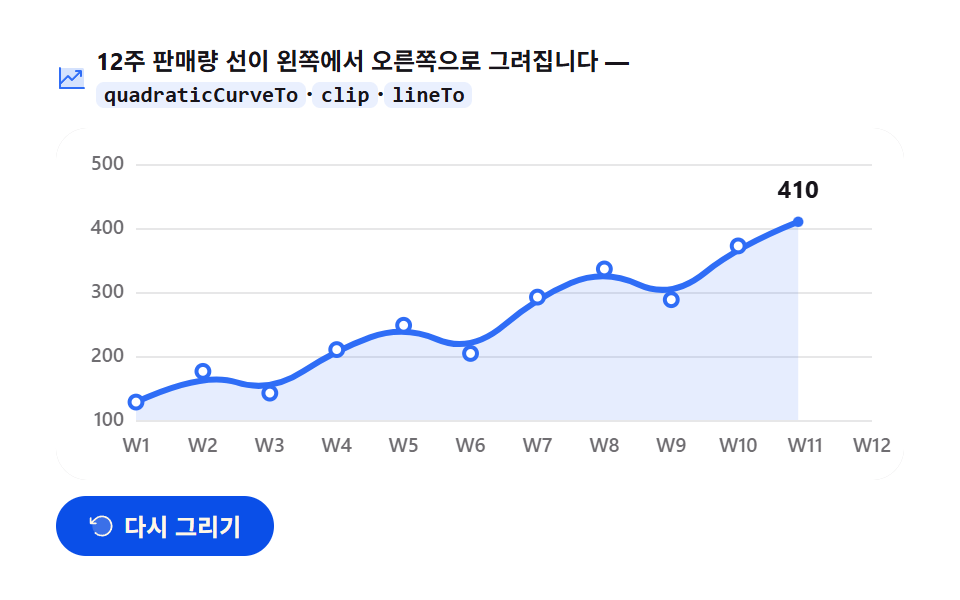 JavaScript Chart Drawing, 9 Ways — No LibraryA javascript chart is a data array turned into x·y coordinates painted onto a canvas as lines, bars, and arcs. These nin See all demos in this post
If you like this effect - similar demos
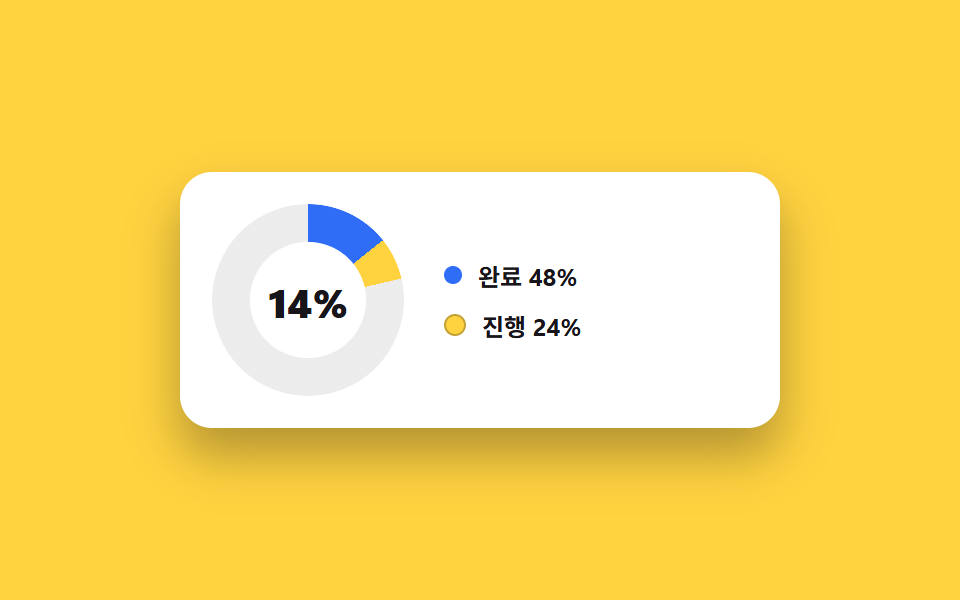 Dashboard UI04 Donut chart card with center counterDashboard Sidebar Design + 9 Widget UI Pieces
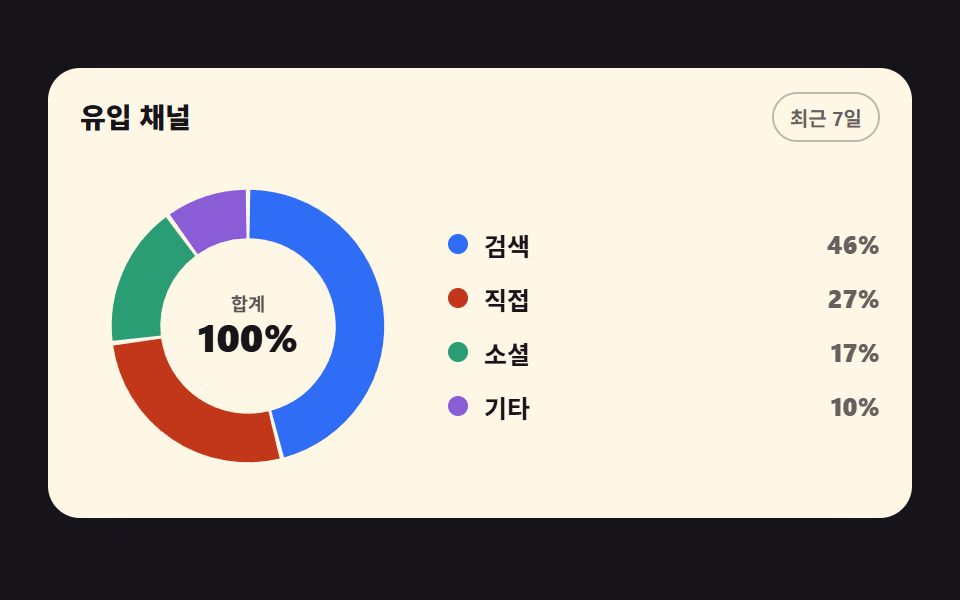 Dashboard UI03 Donut chart filling one segment at a timeCSS Chart Design: 9 SVG Graphs, No Library
 Dashboard UI01 A Pie Chart That Sweeps In Clockwise, One Slice After AnotherPie Chart CSS: 9 Slices That Pop, Tilt and Morph