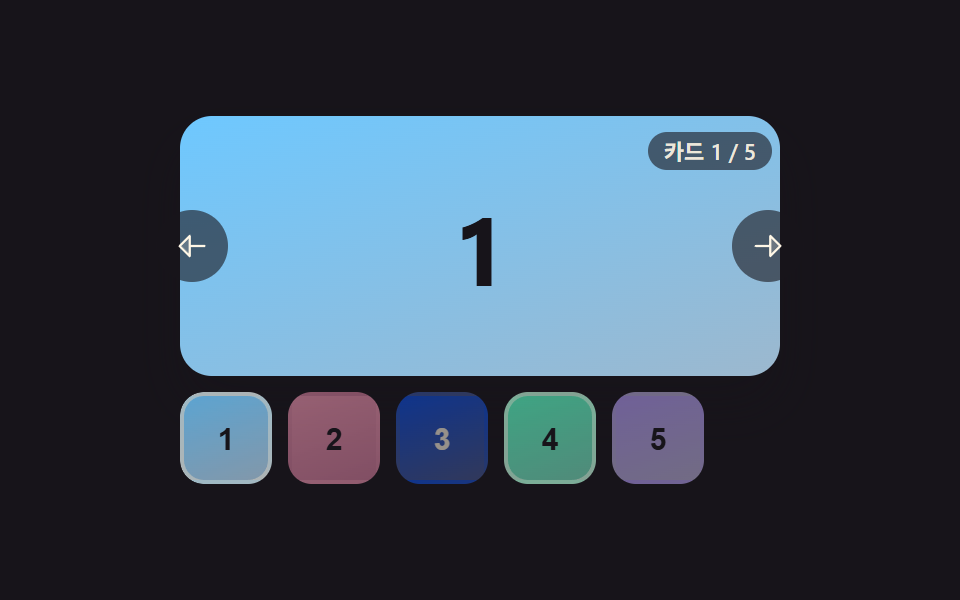
06Carousel Whose Thumbnail Strip Highlights the Active Card
Each time the large card changes, only the matching thumbnail below brightens its border while the rest dim, making the current position obvious at a glance.
Best forA product page's large image paired with a thumbnail list
computeTargetOffsetcenterActiveThumbthumbCenter
<main class="stage">
<section class="carousel is-demo" id="carousel" role="region" aria-roledescription="carousel" aria-label="Card carousel">
  <div class="viewport" id="viewport" tabindex="0">
    <div class="mainSlide" id="mainSlide"></div>
  </div>
  <button type="button" class="navBtn navBtn--prev" id="prevBtn" aria-label="Previous card">
    <svg viewBox="0 0 256 256" width="18" height="18" aria-hidden="true"><g fill="currentColor"><path d="M112 56v144l-72-72Z" opacity=".2"/><path d="M216 120h-96V56a8 8 0 0 0-13.66-5.66l-72 72a8 8 0 0 0 0 11.32l72 72A8 8 0 0 0 120 200v-64h96a8 8 0 0 0 0-16m-112 60.69L51.31 128L104 75.31Z"/></g></svg>
  </button>
  <button type="button" class="navBtn navBtn--next" id="nextBtn" aria-label="Next card">
    <svg viewBox="0 0 256 256" width="18" height="18" aria-hidden="true"><g fill="currentColor"><path d="m216 128l-72 72V56Z" opacity=".2"/><path d="m221.66 122.34l-72-72A8 8 0 0 0 136 56v64H40a8 8 0 0 0 0 16h96v64a8 8 0 0 0 13.66 5.66l72-72a8 8 0 0 0 0-11.32M152 180.69V75.31L204.69 128Z"/></g></svg>
  </button>
  <div class="thumbStrip" id="thumbStrip">
    <div class="thumbTrack" id="thumbTrack"></div>
  </div>
  <div class="readout" id="readout" aria-live="polite"></div>
</section>
</main>
@use "../../../../site/static/demo-tokens" as *;
// 변수 3개
$duration: $dur-base;
$easing: $ease-out;
$color: $subject-sky;
// 계산 겹: index.html 의 computeTargetOffset() 이 활성 썸네일 중심을 띠 중심에 맞추는 목표값을
// 산술로 구하고, centerActiveThumb() 이 매 프레임 lerp 로 다가간다 — scrollIntoView 를 쓰지 않는다.
@include stage($stage-ink);
.carousel {
position: relative;
width: 300px;
}
.viewport {
position: relative;
width: 300px;
height: 130px;
border-radius: $r-card;
overflow: hidden;
box-shadow: $shadow-raised;
background: $stage-ink;
outline: none;
}
.mainSlide {
width: 100%;
height: 100%;
display: grid;
place-items: center;
font-weight: 700;
font-size: 48px;
line-height: 1;
}
.card--0 { background: linear-gradient(160deg, $subject-sky, #9cb8ce); color: $subject-ink; }
.card--1 { background: linear-gradient(160deg, $subject-pink, #d97fa0); color: $subject-ink; }
.card--2 { background: linear-gradient(160deg, $subject-blue-deep, #475690); color: $subject-cream; }
.card--3 { background: linear-gradient(160deg, $subject-mint, #63b299); color: $subject-ink; }
.card--4 { background: linear-gradient(160deg, $subject-lilac, #bdb3da); color: $subject-ink; }
.thumbStrip {
position: relative;
width: 300px;
height: 46px;
margin-top: $sp-2;
overflow: hidden;
border-radius: $r-control;
}
.thumbTrack {
display: flex;
height: 100%;
will-change: transform;
}
.thumb {
flex: 0 0 46px;
height: 46px;
margin-right: $sp-2;
border: 2px solid transparent;
border-radius: $r-control;
display: grid;
place-items: center;
font-weight: 700;
font-size: 15px;
cursor: pointer;
opacity: .55;
transition: opacity $duration $easing, border-color $duration $easing;
&:last-child { margin-right: 0; }
&.isActive { opacity: 1; border-color: $subject-cream; }
&:focus-visible { outline: 2px solid $color; outline-offset: 2px; }
}
.navBtn {
position: absolute;
top: 65px;
margin-top: -18px;
width: 36px;
height: 36px;
border-radius: $r-pill;
border: none;
display: grid;
place-items: center;
background: rgba($stage-ink, .6);
color: $subject-cream;
cursor: pointer;
z-index: 4;
&:focus-visible { outline: 2px solid $color; outline-offset: 2px; }
}
.navBtn--prev { left: -($sp-3); }
.navBtn--next { right: -($sp-3); }
.readout {
position: absolute;
right: $sp-1;
top: $sp-2;
padding: $sp-1 $sp-2;
border-radius: $r-pill;
background: rgba($stage-ink, .6);
color: rgba($subject-cream, .9);
font-size: 11px;
font-weight: 600;
line-height: 1;
font-variant-numeric: tabular-nums;
z-index: 4;
}
@media (max-width: 340px) {
.carousel { width: 220px; }
.viewport { width: 220px; height: 96px; }
.mainSlide { font-size: 34px; }
.thumbStrip { width: 220px; height: 36px; }
.thumb { flex-basis: 36px; height: 36px; font-size: 12px; }
.navBtn { width: 28px; height: 28px; }
}
@media (prefers-reduced-motion: reduce) {
// 실사용 경로 적용 — 썸네일 클릭·버튼·키보드는 index.html 이 그대로 중앙 정렬 계산을 돌린다.
// scss 만: 썸네일 opacity/border 전환만 꺼서 잔여 트랜지션을 없앤다.
.thumb { transition: none; }
.navBtn { transition: none; }
}html, body {
margin: 0;
overflow: hidden;
}
.stage {
box-sizing: border-box;
min-height: 100vh;
display: grid;
place-items: center;
margin: 0;
background: #17141a;
font-family: -apple-system, "Segoe UI", "Noto Sans KR", sans-serif;
padding: clamp(8px, 4vw, 24px);
}
.carousel {
position: relative;
width: 300px;
}
.viewport {
position: relative;
width: 300px;
height: 130px;
border-radius: 16px;
overflow: hidden;
box-shadow: 0 14px 24px rgba(23, 20, 26, 0.32);
background: #17141a;
outline: none;
}
.mainSlide {
width: 100%;
height: 100%;
display: grid;
place-items: center;
font-weight: 700;
font-size: 48px;
line-height: 1;
}
.card--0 {
background: linear-gradient(160deg, #6ec8ff, #9cb8ce);
color: #17141a;
}
.card--1 {
background: linear-gradient(160deg, #ff9ebb, #d97fa0);
color: #17141a;
}
.card--2 {
background: linear-gradient(160deg, #0a4fe8, #475690);
color: #fff7e6;
}
.card--3 {
background: linear-gradient(160deg, #4cd4a6, #63b299);
color: #17141a;
}
.card--4 {
background: linear-gradient(160deg, #b9a0ff, #bdb3da);
color: #17141a;
}
.thumbStrip {
position: relative;
width: 300px;
height: 46px;
margin-top: 8px;
overflow: hidden;
border-radius: 12px;
}
.thumbTrack {
display: flex;
height: 100%;
will-change: transform;
}
.thumb {
flex: 0 0 46px;
height: 46px;
margin-right: 8px;
border: 2px solid transparent;
border-radius: 12px;
display: grid;
place-items: center;
font-weight: 700;
font-size: 15px;
cursor: pointer;
opacity: 0.55;
transition: opacity 300ms ease-out, border-color 300ms ease-out;
}
.thumb:last-child {
margin-right: 0;
}
.thumb.isActive {
opacity: 1;
border-color: #fff7e6;
}
.thumb:focus-visible {
outline: 2px solid #6ec8ff;
outline-offset: 2px;
}
.navBtn {
position: absolute;
top: 65px;
margin-top: -18px;
width: 36px;
height: 36px;
border-radius: 999px;
border: none;
display: grid;
place-items: center;
background: rgba(23, 20, 26, 0.6);
color: #fff7e6;
cursor: pointer;
z-index: 4;
}
.navBtn:focus-visible {
outline: 2px solid #6ec8ff;
outline-offset: 2px;
}
.navBtn--prev {
left: -12px;
}
.navBtn--next {
right: -12px;
}
.readout {
position: absolute;
right: 4px;
top: 8px;
padding: 4px 8px;
border-radius: 999px;
background: rgba(23, 20, 26, 0.6);
color: rgba(255, 247, 230, 0.9);
font-size: 11px;
font-weight: 600;
line-height: 1;
font-variant-numeric: tabular-nums;
z-index: 4;
}
@media (max-width: 340px) {
.carousel {
width: 220px;
}
.viewport {
width: 220px;
height: 96px;
}
.mainSlide {
font-size: 34px;
}
.thumbStrip {
width: 220px;
height: 36px;
}
.thumb {
flex-basis: 36px;
height: 36px;
font-size: 12px;
}
.navBtn {
width: 28px;
height: 28px;
}
}
@media (prefers-reduced-motion: reduce) {
.thumb {
transition: none;
}
.navBtn {
transition: none;
}
}(function () {
var TOTAL = 5;
var THUMB_W = 46;
var THUMB_GAP = 10;
var THUMB_STEP = THUMB_W + THUMB_GAP;
var STRIP_W = 300;
var CENTER_EASE = 0.24; // 매 프레임 목표 오프셋으로 당기는 비율 — scrollIntoView 가 아니라 직접 보간한다
var CENTER_STOP = 0.3;
var DEMO_HOLD_MS = 420;
var carousel = document.getElementById('carousel');
var viewport = document.getElementById('viewport');
var mainSlide = document.getElementById('mainSlide');
var thumbStrip = document.getElementById('thumbStrip');
var thumbTrack = document.getElementById('thumbTrack');
var readout = document.getElementById('readout');
var prevBtn = document.getElementById('prevBtn');
var nextBtn = document.getElementById('nextBtn');
var reduce = window.matchMedia('(prefers-reduced-motion: reduce)').matches;
var LABEL_PREFIX = 'Card ';
var LABEL_SEP = ' / ';
var COLOR_CLASSES = ['card--0', 'card--1', 'card--2', 'card--3', 'card--4'];
var thumbs = [];
for (var i = 0; i < TOTAL; i++) {
var t = document.createElement('button');
t.type = 'button';
t.className = 'thumb ' + COLOR_CLASSES[i];
t.textContent = String(i + 1);
t.setAttribute('aria-label', LABEL_PREFIX + (i + 1) + LABEL_SEP + TOTAL);
(function (idx) { t.addEventListener('click', function () { human(); goTo(idx); }); })(i);
thumbTrack.appendChild(t);
thumbs.push(t);
}
var current = 0;
var offset = 0; // 썸네일 트랙의 현재 translateX(px)
var targetOffset = 0; // 방금 계산한 목표 translateX(px)
var centerFrame = null;
var demoTimers = [];
function paintMain() {
mainSlide.className = 'mainSlide ' + COLOR_CLASSES[current];
mainSlide.textContent = String(current + 1);
readout.textContent = LABEL_PREFIX + (current + 1) + LABEL_SEP + TOTAL;
thumbs.forEach(function (el, n) { el.classList.toggle('isActive', n === current); });
}
// 계산 겹 — 활성 썸네일의 중심이 띠의 중심에 오도록 목표 오프셋을 산술로 구하고,
// 트랙 폭 안으로 클램프한 뒤 매 프레임 보간(lerp)해 다가간다. 브라우저의 scrollIntoView 를 쓰지 않는다.
function computeTargetOffset() {
var thumbCenter = current * THUMB_STEP + THUMB_W / 2;
var raw = STRIP_W / 2 - thumbCenter;
var trackWidth = TOTAL * THUMB_STEP - THUMB_GAP;
var minOffset = Math.min(0, STRIP_W - trackWidth);
return Math.max(minOffset, Math.min(0, raw));
}
function stopCenter() {
if (centerFrame) { cancelAnimationFrame(centerFrame); centerFrame = null; }
}
function centerActiveThumb() {
targetOffset = computeTargetOffset();
stopCenter();
function frame() {
offset += (targetOffset - offset) * CENTER_EASE;
thumbTrack.style.transform = 'translate3d(' + offset.toFixed(1) + 'px,0,0)';
if (Math.abs(targetOffset - offset) > CENTER_STOP) {
centerFrame = requestAnimationFrame(frame);
} else {
offset = targetOffset;
thumbTrack.style.transform = 'translate3d(' + offset.toFixed(1) + 'px,0,0)';
centerFrame = null;
}
}
centerFrame = requestAnimationFrame(frame);
}
function goTo(i) {
current = ((i % TOTAL) + TOTAL) % TOTAL;
paintMain();
centerActiveThumb();
}
function human() {
if (carousel.classList.contains('is-demo')) {
carousel.classList.remove('is-demo');
demoTimers.forEach(function (t) { clearTimeout(t); });
demoTimers = [];
}
}
prevBtn.addEventListener('click', function () { human(); goTo(current - 1); });
nextBtn.addEventListener('click', function () { human(); goTo(current + 1); });
function onKeydown(e) {
if (e.key === 'ArrowLeft') { human(); goTo(current - 1); e.preventDefault(); }
else if (e.key === 'ArrowRight') { human(); goTo(current + 1); e.preventDefault(); }
}
viewport.addEventListener('keydown', onKeydown);
// reduce: 실사용 경로 적용 — 썸네일 클릭·버튼·키보드는 위 리스너가 그대로 중앙 정렬 계산을 돌린다.
// 아래 demoCycle() 은 시연 게이트만이고 reduce 에서는 돌지 않는다.
var DEMO_SEQUENCE = [2, 4, 1, 3, 0];
function demoCycle(i) {
if (!carousel.classList.contains('is-demo')) return;
goTo(DEMO_SEQUENCE[i % DEMO_SEQUENCE.length]);
demoTimers.push(setTimeout(function () { demoCycle(i + 1); }, DEMO_HOLD_MS));
}
function init() {
paintMain();
offset = computeTargetOffset();
targetOffset = offset;
thumbTrack.style.transform = 'translate3d(' + offset.toFixed(1) + 'px,0,0)';
if (!reduce) demoCycle(0);
}
init();
})();import { useEffect, useRef } from 'react';
import styles from './CarouselThumbnailSync.module.scss';
// 상수 — vanilla demo 06 (run/384/demo/06-carousel-slide-thumbnail-sync/index.html) 과 동일
const TOTAL = 5;
const THUMB_W = 46;
const THUMB_GAP = 10;
const THUMB_STEP = THUMB_W + THUMB_GAP;
const STRIP_W = 300;
const CENTER_EASE = 0.24; // 매 프레임 목표 오프셋으로 당기는 비율 — scrollIntoView 가 아니라 직접 보간한다
const CENTER_STOP = 0.3;
const DEMO_HOLD_MS = 420;
const LABEL_PREFIX = '카드 ';
const LABEL_SEP = ' / ';
const COLOR_CLASSES = ['card--0', 'card--1', 'card--2', 'card--3', 'card--4'] as const;
const DEMO_SEQUENCE = [2, 4, 1, 3, 0];
export default function CarouselThumbnailSync() {
const carouselRef = useRef<HTMLElement>(null);
useEffect(() => {
const carousel = carouselRef.current;
if (!carousel) return undefined;
const viewport = carousel.querySelector<HTMLDivElement>('.' + styles.viewport);
const mainSlide = carousel.querySelector<HTMLDivElement>('.' + styles.mainSlide);
const thumbTrack = carousel.querySelector<HTMLDivElement>('.' + styles.thumbTrack);
const readout = carousel.querySelector<HTMLDivElement>('.' + styles.readout);
const prevBtn = carousel.querySelector<HTMLButtonElement>('.' + styles['navBtn--prev']);
const nextBtn = carousel.querySelector<HTMLButtonElement>('.' + styles['navBtn--next']);
if (!viewport || !mainSlide || !thumbTrack || !readout || !prevBtn || !nextBtn) return undefined;
const thumbs: HTMLButtonElement[] = [];
const thumbClickHandlers: (() => void)[] = [];
thumbTrack.innerHTML = '';
for (let i = 0; i < TOTAL; i++) {
const t = document.createElement('button');
t.type = 'button';
t.className = styles.thumb + ' ' + styles[COLOR_CLASSES[i]];
t.textContent = String(i + 1);
t.setAttribute('aria-label', LABEL_PREFIX + (i + 1) + LABEL_SEP + TOTAL);
const idx = i;
const handler = () => { human(); goTo(idx); };
thumbClickHandlers.push(handler);
t.addEventListener('click', handler);
thumbTrack.appendChild(t);
thumbs.push(t);
}
let current = 0;
let offset = 0; // 썸네일 트랙의 현재 translateX(px)
let targetOffset = 0; // 방금 계산한 목표 translateX(px)
let centerFrame = 0;
let demoTimers: number[] = [];
function paintMain() {
mainSlide!.className = styles.mainSlide + ' ' + styles[COLOR_CLASSES[current]];
mainSlide!.textContent = String(current + 1);
readout!.textContent = LABEL_PREFIX + (current + 1) + LABEL_SEP + TOTAL;
thumbs.forEach((el, n) => el.classList.toggle(styles.isActive, n === current));
}
// 계산 겹 — 활성 썸네일의 중심이 띠의 중심에 오도록 목표 오프셋을 산술로 구하고,
// 트랙 폭 안으로 클램프한 뒤 매 프레임 보간(lerp)해 다가간다. 브라우저의 scrollIntoView 를 쓰지 않는다.
function computeTargetOffset() {
const thumbCenter = current * THUMB_STEP + THUMB_W / 2;
const raw = STRIP_W / 2 - thumbCenter;
const trackWidth = TOTAL * THUMB_STEP - THUMB_GAP;
const minOffset = Math.min(0, STRIP_W - trackWidth);
return Math.max(minOffset, Math.min(0, raw));
}
function stopCenter() {
if (centerFrame) { cancelAnimationFrame(centerFrame); centerFrame = 0; }
}
function centerActiveThumb() {
targetOffset = computeTargetOffset();
stopCenter();
function frame() {
offset += (targetOffset - offset) * CENTER_EASE;
thumbTrack!.style.transform = 'translate3d(' + offset.toFixed(1) + 'px,0,0)';
if (Math.abs(targetOffset - offset) > CENTER_STOP) {
centerFrame = requestAnimationFrame(frame);
} else {
offset = targetOffset;
thumbTrack!.style.transform = 'translate3d(' + offset.toFixed(1) + 'px,0,0)';
centerFrame = 0;
}
}
centerFrame = requestAnimationFrame(frame);
}
function goTo(i: number) {
current = ((i % TOTAL) + TOTAL) % TOTAL;
paintMain();
centerActiveThumb();
}
function human() {
if (carousel!.classList.contains(styles['is-demo'])) {
carousel!.classList.remove(styles['is-demo']);
demoTimers.forEach((t) => window.clearTimeout(t));
demoTimers = [];
}
}
function onPrev() { human(); goTo(current - 1); }
function onNext() { human(); goTo(current + 1); }
function onKeydown(e: KeyboardEvent) {
if (e.key === 'ArrowLeft') { human(); goTo(current - 1); e.preventDefault(); }
else if (e.key === 'ArrowRight') { human(); goTo(current + 1); e.preventDefault(); }
}
prevBtn.addEventListener('click', onPrev);
nextBtn.addEventListener('click', onNext);
viewport.addEventListener('keydown', onKeydown);
const reduce = window.matchMedia('(prefers-reduced-motion: reduce)').matches;
// reduce: 실사용 경로 적용 — 썸네일 클릭·버튼·키보드는 위 리스너가 그대로 중앙 정렬 계산을 돌린다.
// 아래 demoCycle() 은 시연 게이트만이고 reduce 에서는 돌지 않는다.
function demoCycle(i: number) {
if (!carousel!.classList.contains(styles['is-demo'])) return;
goTo(DEMO_SEQUENCE[i % DEMO_SEQUENCE.length]);
demoTimers.push(window.setTimeout(() => demoCycle(i + 1), DEMO_HOLD_MS));
}
paintMain();
offset = computeTargetOffset();
targetOffset = offset;
thumbTrack.style.transform = 'translate3d(' + offset.toFixed(1) + 'px,0,0)';
if (!reduce) demoCycle(0);
return () => {
prevBtn.removeEventListener('click', onPrev);
nextBtn.removeEventListener('click', onNext);
viewport.removeEventListener('keydown', onKeydown);
thumbs.forEach((t, i) => t.removeEventListener('click', thumbClickHandlers[i]));
demoTimers.forEach((t) => window.clearTimeout(t));
stopCenter();
};
}, []);
return (
<main className={styles.stage}>
<section
className={styles.carousel + ' ' + styles['is-demo']}
ref={carouselRef}
role="region"
aria-roledescription="carousel"
aria-label="카드 캐러셀"
>
<div className={styles.viewport} tabIndex={0}>
<div className={styles.mainSlide}></div>
</div>
<button type="button" className={styles.navBtn + ' ' + styles['navBtn--prev']} aria-label="이전 카드">
<svg viewBox="0 0 256 256" width={18} height={18} aria-hidden="true"><g fill="currentColor"><path d="M112 56v144l-72-72Z" opacity=".2" /><path d="M216 120h-96V56a8 8 0 0 0-13.66-5.66l-72 72a8 8 0 0 0 0 11.32l72 72A8 8 0 0 0 120 200v-64h96a8 8 0 0 0 0-16m-112 60.69L51.31 128L104 75.31Z" /></g></svg>
</button>
<button type="button" className={styles.navBtn + ' ' + styles['navBtn--next']} aria-label="다음 카드">
<svg viewBox="0 0 256 256" width={18} height={18} aria-hidden="true"><g fill="currentColor"><path d="m216 128l-72 72V56Z" opacity=".2" /><path d="m221.66 122.34l-72-72A8 8 0 0 0 136 56v64H40a8 8 0 0 0 0 16h96v64a8 8 0 0 0 13.66 5.66l72-72a8 8 0 0 0 0-11.32M152 180.69V75.31L204.69 128Z" /></g></svg>
</button>
<div className={styles.thumbStrip}>
<div className={styles.thumbTrack}></div>
</div>
<div className={styles.readout} aria-live="polite"></div>
</section>
</main>
);
}06 Carousel Whose Thumbnail Strip Highlights the Active Card — Measured area 33.855% · moving frames 22/23Original by GODRICH · SCSS and React ship in the zip · Carousel Slider UI Design — 9 Transitions
The post this demo lives in
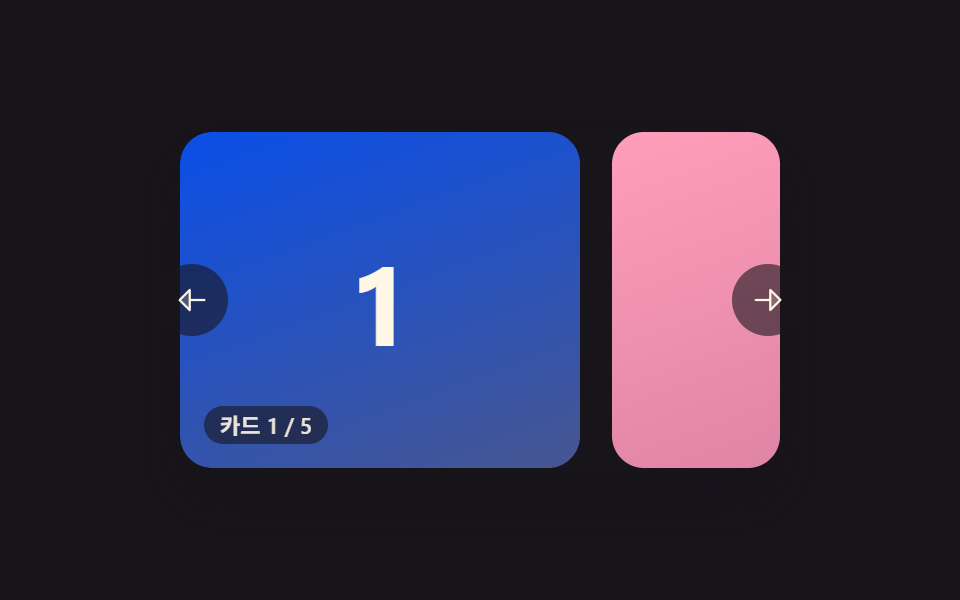 Carousel Slider UI Design — 9 TransitionsAmong nine carousel slider transitions, one glides on from inertia as a card advances, one snaps back like a rubber band See all demos in this post
If you like this effect - similar demos
 Transitions01 Active-indicator slide-morph toggle — when the selected tab changes, the highlight's position and width values shift together from the old spot to the new oneCSS Bottom Navigation Bar: 9 Transition Patterns
 Transitions08 Lightbox With a Thumbnail Strip That Follows AlongCSS Lightbox Gallery Animation — 9 Transitions
 Transitions02 Multi-level dropdown whose submenus slide right9 mega menu ui patterns, link list to site map