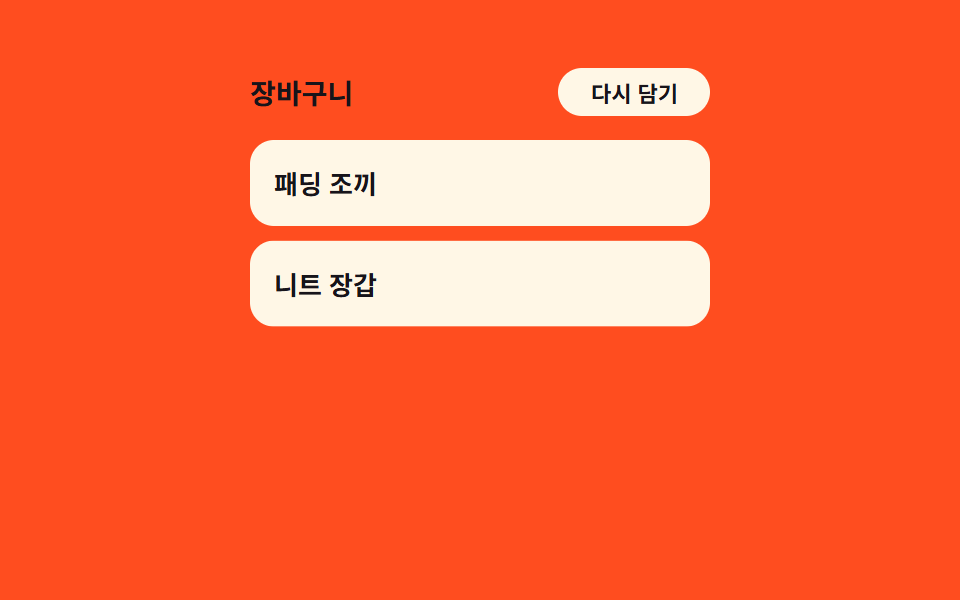
03Item stagger cascade — each row's delay grows with its position value in the list
Once the panel opens, each row receives a delay value proportional to its position in the list so rows appear top to bottom in sequence, and when items are reordered that delay value is recomputed for the new order.
Best forA cart holding several items, a wishlist panel
computeDelayTOTAL_SPREAD_MSBASE_MS
<main class="stage">
<div class="cdis is-demo" id="cdis">
  <header class="cdis__head"><span>Cart</span>
    <button class="cdis__shuffle" id="cdisShuffle" type="button">Restock</button>
  </header>
  <ul class="cdis__list" id="cdisList"></ul>
</div>
</main>
@use "../../../../site/static/demo-tokens" as *;
// 계산 겹: 총 등장 시간(TOTAL_SPREAD_MS)을 현재 항목 수로 나눠 항목마다 지연 값을 다시 구한다
// (computeDelay(), index.html) — 순서가 바뀌면 같은 규칙으로 각 자리의 지연 값이 새로 계산된다.
$duration: $dur-base;
$easing: $ease-pop;
$color: $subject-cream;
@include stage($stage-orange);
.stage { position: relative; }
.cdis {
width: min(230px, 68vw);
display: flex;
flex-direction: column;
gap: $sp-3;
}
.cdis__head {
display: flex;
align-items: center;
justify-content: space-between;
color: $subject-ink;
font-weight: 700;
font-size: 14px;
}
.cdis__shuffle {
border: 0;
border-radius: $r-pill;
padding: $sp-1 $sp-4;
background: $color;
color: $subject-ink;
font-family: inherit;
font-weight: 700;
font-size: 11px;
cursor: pointer;
}
.cdis__list {
list-style: none;
margin: 0;
padding: 0;
display: flex;
flex-direction: column;
gap: $sp-2;
}
.cdis__row {
padding: $sp-3;
border-radius: $r-control;
background: $color;
color: $subject-ink;
font-weight: 600;
font-size: 13px;
opacity: 0;
transform: translateY(14px);
animation-name: cdisRise;
animation-duration: $duration;
animation-timing-function: $easing;
animation-fill-mode: forwards;
animation-delay: var(--delay, 0ms);
}
@keyframes cdisRise {
from { opacity: 0; transform: translateY(14px); }
to { opacity: 1; transform: translateY(0); }
}
@media (max-width: 340px) {
.cdis { width: min(180px, 64vw); gap: $sp-1; }
.cdis__head { font-size: 12px; }
.cdis__list { gap: $sp-1; }
.cdis__row { font-size: 11px; padding: $sp-1 $sp-2; }
}
@media (prefers-reduced-motion: reduce) {
.cdis__row { animation: none !important; opacity: 1; transform: none; }
}html, body {
margin: 0;
overflow: hidden;
}
.stage {
box-sizing: border-box;
min-height: 100vh;
display: grid;
place-items: center;
margin: 0;
background: #ff4d1f;
font-family: -apple-system, "Segoe UI", "Noto Sans KR", sans-serif;
padding: clamp(8px, 4vw, 24px);
}
.stage {
position: relative;
}
.cdis {
width: min(230px, 68vw);
display: flex;
flex-direction: column;
gap: 12px;
}
.cdis__head {
display: flex;
align-items: center;
justify-content: space-between;
color: #17141a;
font-weight: 700;
font-size: 14px;
}
.cdis__shuffle {
border: 0;
border-radius: 999px;
padding: 4px 16px;
background: #fff7e6;
color: #17141a;
font-family: inherit;
font-weight: 700;
font-size: 11px;
cursor: pointer;
}
.cdis__list {
list-style: none;
margin: 0;
padding: 0;
display: flex;
flex-direction: column;
gap: 8px;
}
.cdis__row {
padding: 12px;
border-radius: 12px;
background: #fff7e6;
color: #17141a;
font-weight: 600;
font-size: 13px;
opacity: 0;
transform: translateY(14px);
animation-name: cdisRise;
animation-duration: 300ms;
animation-timing-function: cubic-bezier(0.2, 1.4, 0.4, 1);
animation-fill-mode: forwards;
animation-delay: var(--delay, 0ms);
}
@keyframes cdisRise {
from {
opacity: 0;
transform: translateY(14px);
}
to {
opacity: 1;
transform: translateY(0);
}
}
@media (max-width: 340px) {
.cdis {
width: min(180px, 64vw);
gap: 4px;
}
.cdis__head {
font-size: 12px;
}
.cdis__list {
gap: 4px;
}
.cdis__row {
font-size: 11px;
padding: 4px 8px;
}
}
@media (prefers-reduced-motion: reduce) {
.cdis__row {
animation: none !important;
opacity: 1;
transform: none;
}
}(function () {
var root = document.getElementById('cdis');
var list = document.getElementById('cdisList');
var shuffleBtn = document.getElementById('cdisShuffle');
var NAMES = ['Puffer Vest', 'Knit Gloves', 'Check Scarf', 'Winter Boots'];
// 계산 겹: 총 등장 시간(TOTAL_SPREAD_MS)을 현재 항목 수로 나눠 항목마다 지연 값을 다시 구한다
// (computeDelay()) — 순서가 바뀌면 같은 규칙으로 각 자리의 지연 값이 새로 계산된다.
var BASE_MS = 40;
var TOTAL_SPREAD_MS = 480;
function computeDelay(indexInOrder, total) {
var steps = Math.max(1, total - 1);
var perStep = TOTAL_SPREAD_MS / steps;
return BASE_MS + indexInOrder * perStep;
}
var order = NAMES.map(function (_, i) { return i; });
function render() {
list.textContent = '';
order.forEach(function (nameIndex, pos) {
var li = document.createElement('li');
li.className = 'cdis__row';
li.style.setProperty('--delay', computeDelay(pos, order.length) + 'ms');
li.textContent = NAMES[nameIndex];
list.appendChild(li);
});
}
function shuffle() {
for (var i = order.length - 1; i > 0; i -= 1) {
var j = Math.floor(Math.random() * (i + 1));
var tmp = order[i]; order[i] = order[j]; order[j] = tmp;
}
render();
}
shuffleBtn.addEventListener('click', function () {
root.classList.remove('is-demo');
stopAutoplay();
shuffle();
});
var autoplayTimer = null;
function stopAutoplay() {
if (autoplayTimer) { clearInterval(autoplayTimer); autoplayTimer = null; }
}
render();
var reduce = window.matchMedia('(prefers-reduced-motion: reduce)').matches;
if (!reduce) {
autoplayTimer = setInterval(shuffle, 1800);
}
})();import { useEffect, useRef, useState } from "react";
import type { CSSProperties } from "react";
import styles from "./CartDrawerItemStaggerCascade.module.scss";
export type CartDrawerItemStaggerCascadeProps = {
duration?: number;
color?: string;
};
const NAMES = ["패딩 조끼", "니트 장갑", "체크 목도리", "방한 부츠"];
// 계산 겹: 총 등장 시간(TOTAL_SPREAD_MS)을 현재 항목 수로 나눠 항목마다 지연 값을 다시 구한다
// (computeDelay()) — 순서가 바뀌면 같은 규칙으로 각 자리의 지연 값이 새로 계산된다.
const BASE_MS = 40;
const TOTAL_SPREAD_MS = 480;
function computeDelay(indexInOrder: number, total: number): number {
const steps = Math.max(1, total - 1);
const perStep = TOTAL_SPREAD_MS / steps;
return BASE_MS + indexInOrder * perStep;
}
export default function CartDrawerItemStaggerCascade({
color = "#fff7e6",
}: CartDrawerItemStaggerCascadeProps) {
const rootRef = useRef<HTMLDivElement | null>(null);
const [order, setOrder] = useState<number[]>(NAMES.map((_, i) => i));
const [tick, setTick] = useState(0);
const timerRef = useRef<ReturnType<typeof setInterval> | null>(null);
function shuffle() {
setOrder((prev) => {
const next = prev.slice();
for (let i = next.length - 1; i > 0; i -= 1) {
const j = Math.floor(Math.random() * (i + 1));
const tmp = next[i];
next[i] = next[j];
next[j] = tmp;
}
return next;
});
setTick((t) => t + 1);
}
function stopAutoplay() {
if (timerRef.current) {
clearInterval(timerRef.current);
timerRef.current = null;
}
}
useEffect(() => {
const reduce = window.matchMedia("(prefers-reduced-motion: reduce)").matches;
if (!reduce) {
timerRef.current = setInterval(shuffle, 1800);
}
return stopAutoplay;
}, []);
return (
<div ref={rootRef} className={`${styles.stage} ${styles.isDemo}`} style={{ "--color": color } as CSSProperties}>
<div className={styles.cdis}>
<header className={styles.head}>
<span>장바구니</span>
<button
className={styles.shuffle}
type="button"
onClick={() => {
rootRef.current?.classList.remove(styles.isDemo);
stopAutoplay();
shuffle();
}}
>
다시 담기
</button>
</header>
<ul className={styles.list} key={tick}>
{order.map((nameIndex, pos) => (
<li
key={nameIndex}
className={styles.row}
style={{ "--delay": `${computeDelay(pos, order.length)}ms` } as CSSProperties}
>
{NAMES[nameIndex]}
</li>
))}
</ul>
</div>
</div>
);
}03 Item stagger cascade — each row's delay grows with its position value in the list — Measured area 29.915% · moving frames 10/23Original by GODRICH · SCSS and React ship in the zip · Cart Drawer UI Patterns: 9 Motion Techniques
The post this demo lives in
 Cart Drawer UI Patterns: 9 Motion TechniquesOne panel overshoots its open position before a spring curve settles it, one drag distance meets growing resistance past See all demos in this post
If you like this effect - similar demos
 Transitions07 Row stagger reveal — each row's position fills in after a delay proportional to its own order valueContext Menu UI: 9 Right-Click Menu Patterns
 Transitions01 Row expand-value toggle — when an item's expand value changes, the detail area's height value grows or shrinks along with itCollapsible Table Row: 9 UI Patterns
 Transitions07 Swipe-follow toggle — while a horizontal drag-distance value grows, the highlight's position value follows toward the side tab by that same ratioCSS Bottom Navigation Bar: 9 Transition Patterns