01Bar Chart Loading Skeleton Whose Delay Is Computed Per Bar
Gray placeholder bars appear first, and once values arrive each bar's entrance delay is computed from its column index, so bars settle into their real height in that order.
Best forA spot where a dashboard's bar chart holds its place before the stats draw in
--phase--realtransform-origin

<main class="stage">
<div class="cb is-demo" id="cb">
  <div class="cb__chart" id="cbChart" role="img" aria-label="Monthly visitors bar chart" aria-busy="true">
    <div class="cb__col" data-i="0"><div class="cb__bar" id="cbBar0"></div></div>
    <div class="cb__col" data-i="1"><div class="cb__bar" id="cbBar1"></div></div>
    <div class="cb__col" data-i="2"><div class="cb__bar" id="cbBar2"></div></div>
    <div class="cb__col" data-i="3"><div class="cb__bar" id="cbBar3"></div></div>
    <div class="cb__col" data-i="4"><div class="cb__bar" id="cbBar4"></div></div>
    <div class="cb__col" data-i="5"><div class="cb__bar" id="cbBar5"></div></div>
  </div>
  <button type="button" class="cb__reload" id="cbReload">Reload</button>
</div>
</main>
@use "../../../../site/static/demo-tokens" as *;
// 변수 3개
$duration: $dur-loop;
$easing: $ease-spring;
$color: $subject-blue;
@include stage($stage-ink);
.cb { width: min(300px, 88vw); }
.cb__chart {
display: flex; align-items: flex-end; justify-content: space-between;
gap: $sp-2; height: 150px; padding: 0 $sp-1;
border-bottom: 2px solid rgba($subject-cream, .18);
}
.cb__col { flex: 1 1 0; height: 100%; display: flex; align-items: flex-end; }
.cb__bar {
width: 100%; height: 100%; border-radius: $r-xs $r-xs 0 0;
background: $color; transform-origin: bottom; // 시작 변(바닥)에서 자란다 — 채움 막대 예외(규칙 8)
transform: scaleY(.16); opacity: .32;
animation: cbReveal $duration var(--phase, 0ms) $easing infinite;
}
.cb__reload {
display: block; margin: $sp-4 auto 0; appearance: none; border: none; cursor: pointer;
background: rgba($subject-cream, .12); color: $subject-cream; font-weight: 700; font-size: 13px;
padding: $sp-2 $sp-4; border-radius: $r-pill;
}
.cb__reload:focus-visible { outline: 2px solid $subject-cream; outline-offset: 2px; }
@keyframes cbReveal {
0% { transform: scaleY(.16); opacity: .32; }
14% { transform: scaleY(.16); opacity: .32; }
46% { transform: scaleY(var(--real, .6)); opacity: 1; }
84% { transform: scaleY(var(--real, .6)); opacity: 1; }
100% { transform: scaleY(.16); opacity: .32; }
}
@media (max-width: 340px) {
.cb { width: min(250px, 84vw); }
.cb__chart { height: 120px; }
}
@media (prefers-reduced-motion: reduce) {
// 실사용 경로 적용: 자동 루프를 끄고 마지막 실제 값 상태로 고정한다
.cb__bar { animation: none; transform: scaleY(var(--real, .6)); opacity: 1; }
}html, body {
margin: 0;
overflow: hidden;
}
.stage {
box-sizing: border-box;
min-height: 100vh;
display: grid;
place-items: center;
margin: 0;
background: #17141a;
font-family: -apple-system, "Segoe UI", "Noto Sans KR", sans-serif;
padding: clamp(8px, 4vw, 24px);
}
.cb {
width: min(300px, 88vw);
}
.cb__chart {
display: flex;
align-items: flex-end;
justify-content: space-between;
gap: 8px;
height: 150px;
padding: 0 4px;
border-bottom: 2px solid rgba(255, 247, 230, 0.18);
}
.cb__col {
flex: 1 1 0;
height: 100%;
display: flex;
align-items: flex-end;
}
.cb__bar {
width: 100%;
height: 100%;
border-radius: 4px 4px 0 0;
background: #2f6df6;
transform-origin: bottom;
transform: scaleY(0.16);
opacity: 0.32;
animation: cbReveal 2s var(--phase, 0ms) cubic-bezier(0.2, 0.8, 0.2, 1) infinite;
}
.cb__reload {
display: block;
margin: 16px auto 0;
appearance: none;
border: none;
cursor: pointer;
background: rgba(255, 247, 230, 0.12);
color: #fff7e6;
font-weight: 700;
font-size: 13px;
padding: 8px 16px;
border-radius: 999px;
}
.cb__reload:focus-visible {
outline: 2px solid #fff7e6;
outline-offset: 2px;
}
@keyframes cbReveal {
0% {
transform: scaleY(0.16);
opacity: 0.32;
}
14% {
transform: scaleY(0.16);
opacity: 0.32;
}
46% {
transform: scaleY(var(--real, 0.6));
opacity: 1;
}
84% {
transform: scaleY(var(--real, 0.6));
opacity: 1;
}
100% {
transform: scaleY(0.16);
opacity: 0.32;
}
}
@media (max-width: 340px) {
.cb {
width: min(250px, 84vw);
}
.cb__chart {
height: 120px;
}
}
@media (prefers-reduced-motion: reduce) {
.cb__bar {
animation: none;
transform: scaleY(var(--real, 0.6));
opacity: 1;
}
}(function () {
var VALUES = [38, 82, 55, 96, 29, 68];
var STAGGER_MS = 70;
var SKELETON_SCALE = 0.16;
var root = document.getElementById('cb');
var chart = document.getElementById('cbChart');
var reload = document.getElementById('cbReload');
var bars = VALUES.map(function (v, i) { return document.getElementById('cbBar' + i); });
// 계산 겹: 막대 등장 지연을 열 번호(i)로 계산한다 — 열이 오른쪽일수록 늦게 실제 높이로 펴진다
function barDelay(i) { return i * STAGGER_MS; }
bars.forEach(function (bar, i) {
bar.style.setProperty('--real', String(VALUES[i] / 100));
bar.style.setProperty('--phase', barDelay(i) + 'ms');
});
function paintNow(i, value) {
bars[i].style.transform = 'scaleY(' + (value / 100) + ')';
bars[i].style.opacity = '1';
}
function skeletonNow(i) {
bars[i].style.transform = 'scaleY(' + SKELETON_SCALE + ')';
bars[i].style.opacity = '.32';
}
function human() {
root.classList.remove('is-demo');
bars.forEach(function (bar, i) { skeletonNow(i); });
chart.setAttribute('aria-busy', 'true');
bars.forEach(function (bar, i) {
window.setTimeout(function () { paintNow(i, VALUES[i]); }, 260 + barDelay(i));
});
window.setTimeout(function () { chart.setAttribute('aria-busy', 'false'); }, 260 + barDelay(VALUES.length - 1) + 200);
}
reload.addEventListener('click', human);
reload.addEventListener('keydown', function (e) {
if (e.key === 'Enter' || e.key === ' ') { e.preventDefault(); human(); }
});
}());import { useEffect, useRef } from 'react';
import styles from './ChartLoadingBarHeightStagger.module.scss';
const VALUES = [38, 82, 55, 96, 29, 68];
const STAGGER_MS = 70;
const SKELETON_SCALE = 0.16;
export default function ChartLoadingBarHeightStagger() {
const rootRef = useRef<HTMLDivElement>(null);
const chartRef = useRef<HTMLDivElement>(null);
const reloadRef = useRef<HTMLButtonElement>(null);
const barRefs = useRef<HTMLDivElement[]>([]);
useEffect(() => {
const root = rootRef.current;
const chart = chartRef.current;
const reload = reloadRef.current;
if (!root || !chart || !reload) return undefined;
const bars = barRefs.current!;
if (!bars || bars.length !== VALUES.length) return undefined;
// 계산 겹: 막대 등장 지연을 열 번호(i)로 계산한다 — 열이 오른쪽일수록 늦게 실제 높이로 펴진다
function barDelay(i: number) { return i * STAGGER_MS; }
bars.forEach((bar, i) => {
bar.style.setProperty('--real', String(VALUES[i] / 100));
bar.style.setProperty('--phase', barDelay(i) + 'ms');
});
function paintNow(i: number, value: number) {
bars[i].style.transform = 'scaleY(' + (value / 100) + ')';
bars[i].style.opacity = '1';
}
function skeletonNow(i: number) {
bars[i].style.transform = 'scaleY(' + SKELETON_SCALE + ')';
bars[i].style.opacity = '.32';
}
const timers: number[] = [];
function human() {
root!.classList.remove(styles['is-demo']);
bars.forEach((_bar, i) => skeletonNow(i));
chart!.setAttribute('aria-busy', 'true');
bars.forEach((_bar, i) => {
timers.push(window.setTimeout(() => paintNow(i, VALUES[i]), 260 + barDelay(i)));
});
timers.push(window.setTimeout(() => chart!.setAttribute('aria-busy', 'false'), 260 + barDelay(VALUES.length - 1) + 200));
}
function onClick() { human(); }
function onKey(e: KeyboardEvent) { if (e.key === 'Enter' || e.key === ' ') { e.preventDefault(); human(); } }
reload.addEventListener('click', onClick);
reload.addEventListener('keydown', onKey);
return () => {
reload.removeEventListener('click', onClick);
reload.removeEventListener('keydown', onKey);
timers.forEach((id) => window.clearTimeout(id));
};
}, []);
return (
<main className={styles.stage}>
<div className={styles.cb + ' ' + styles['is-demo']} ref={rootRef}>
<div className={styles.cbChart} ref={chartRef} role="img" aria-label="월별 방문자 막대 그래프" aria-busy="true">
{VALUES.map((_value, i) => (
<div className={styles.cbCol} data-i={i} key={i}>
<div
className={styles.cbBar}
ref={(el: HTMLDivElement | null) => { if (el) barRefs.current![i] = el; }}
/>
</div>
))}
</div>
<button type="button" className={styles.cbReload} ref={reloadRef}>다시 불러오기</button>
</div>
</main>
);
}01 Bar Chart Loading Skeleton Whose Delay Is Computed Per Bar — Measured area 16.224% · moving frames 16/23Original by GODRICH · SCSS and React ship in the zip · Chart Loading Animation — 9 Computed Patterns
The post this demo lives in
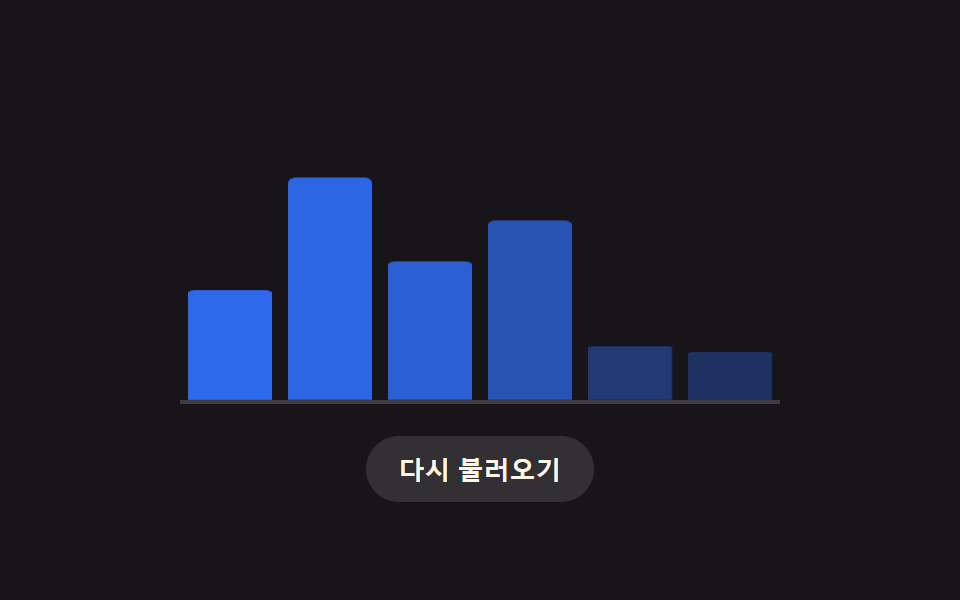 Chart Loading Animation — 9 Computed PatternsAmong nine chart loading animation patterns, a bar's delay comes from its column, a heatmap cell's from diagonal distanc See all demos in this post