09Reading-order waterfall
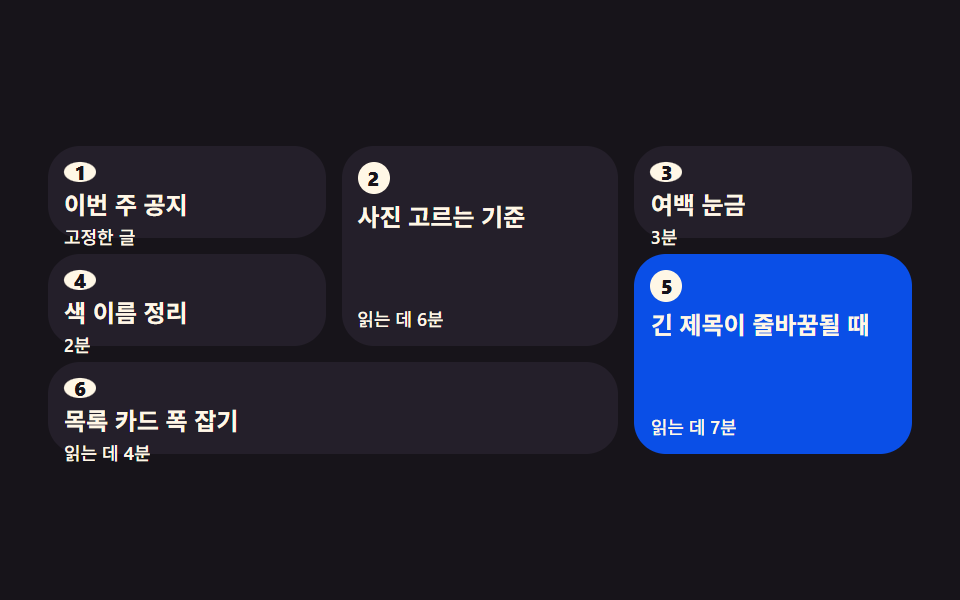
Cards of unequal height fill gaps through grid-auto-flow dense while keeping their numbered order, so the visual order matches the source order.
Best forA blog index, a product grid
grid-auto-flowgrid-roworder
<main class="stage">
<ol class="wf is-demo" id="wf">
  <li class="wf__card wf__card--tall wf__card--s2">
    <span class="wf__no">2</span>
    <h3 class="wf__title">How to pick photos</h3>
    <p class="wf__meta">6 min read</p>
  </li>
  <li class="wf__card wf__card--s3">
    <span class="wf__no">3</span>
    <h3 class="wf__title">Whitespace ruler</h3>
    <p class="wf__meta">3 min</p>
  </li>
  <li class="wf__card wf__card--s4">
    <span class="wf__no">4</span>
    <h3 class="wf__title">Naming colors</h3>
    <p class="wf__meta">2 min</p>
  </li>
  <li class="wf__card wf__card--tall wf__card--s5">
    <span class="wf__no">5</span>
    <h3 class="wf__title">When long titles wrap</h3>
    <p class="wf__meta">7 min read</p>
  </li>
  <li class="wf__card wf__card--wide wf__card--s6">
    <span class="wf__no">6</span>
    <h3 class="wf__title">Sizing list cards</h3>
    <p class="wf__meta">4 min read</p>
  </li>
  <li class="wf__card wf__card--pin wf__card--s1">
    <span class="wf__no">1</span>
    <h3 class="wf__title">This week's notice</h3>
    <p class="wf__meta">Pinned</p>
  </li>
</ol>
</main>@use "../../../../site/static/demo-tokens" as *;
// 읽는 순서를 지키는 워터폴 — 높이가 다른 카드를 빈칸 없이 채우면서 번호 순서도 지킨다.
// 세 속성이 각자 다른 일을 한다.
//
// grid-auto-flow: row dense — 자동 배치가 앞에 남은 칸을 되짚어 채운다. 빈칸이 안 남는다.
// 다만 그 칸을 채우는 건 언제나 **뒤 카드**라, dense 만 켜면
// 화면에서 읽는 차례가 번호와 어긋난다. 그래서 다음 줄이 필요하다.
// grid-row — 키 큰 카드(2·5)의 줄을 손으로 못 박는다. 명시 배치는 자동 배치보다
// 먼저 자리를 잡으므로, 자동으로 흐르는 카드들이 남은 칸에 번호 순서
// 그대로 떨어진다 — 애초에 되짚을 빈칸이 생기지 않는다.
// 2는 1행부터 두 줄, 5는 2행부터 두 줄이니 나머지 카드는
// (1,3)(2,1)(3,2)(4,1-2) 에 번호순으로 앉는다.
// order — 고정 글(1번)은 HTML 맨 **끝**에 붙는다(나중에 붙인 공지다).
// order: -1 하나로 배치 순서만 맨 앞으로 보낸다. 마크업은 그대로다.
//
// 미리보기는 읽는 눈을 흉내 낸다 — 1 → 6 순서로 카드가 하나씩 물든다.
// 화면에서 물드는 차례가 번호와 같다는 것이 이 항목이 보여주려는 전부다.
$duration: $dur-enter;
$easing: $ease-spring;
$color: $subject-blue-deep;
// 잉크 무대 위에서 한 단계 밝은 카드 면 (토큰 밖 실측값 — 크림 글자 15.1:1)
$panel: #241f2a;
// 카드 하나가 물들어 있는 시간 = 2초 / 6장
$beat: 0.3333s;
@include stage($stage-ink);
.wf {
box-sizing: border-box; width: min(100%, 432px);
display: grid;
grid-template-columns: repeat(3, minmax(0, 1fr));
grid-auto-rows: 46px;
// 남는 칸을 되짚어 채운다. 아래 grid-row 명시 배치와 짝이어야 순서가 안 어긋난다
grid-auto-flow: row dense;
gap: $sp-2;
margin: 0; padding: 0; list-style: none;
}
.wf__card {
position: relative;
box-sizing: border-box;
display: flex; flex-direction: column; gap: $sp-1;
padding: $sp-2;
border-radius: $r-card;
background: $panel;
// 미리보기 루프를 뗀 순간 색이 부드럽게 돌아온다
transition: background-color $duration $easing;
}
// 키 큰 카드는 줄을 손으로 못 박는다 — 자동 배치가 이 자리를 피해 번호 순서대로 흐른다
// (줄·칸 번호: 1행이 맨 위. 2 는 1행 2칸부터 두 줄, 5 는 2행 3칸부터 두 줄)
.wf__card--tall { grid-row: span 2; }
.wf__card--s2 { grid-row: 1 / span 2; grid-column: 2; }
.wf__card--s5 { grid-row: 2 / span 2; grid-column: 3; }
// 두 칸짜리 카드는 마지막 줄을 통째로 받는다
.wf__card--wide { grid-column: span 2; }
// 나중에 붙은 공지가 배치에서만 맨 앞으로 온다 (HTML 은 맨 끝 그대로)
.wf__card--pin { order: -1; }
.wf__no {
display: grid; place-items: center;
width: 16px; height: 16px;
border-radius: 50%;
background: $subject-cream; color: $subject-ink;
font-weight: 800; font-size: 10px; line-height: 1;
font-variant-numeric: tabular-nums;
}
.wf__title {
margin: 0;
color: $subject-cream;
font-weight: 700; font-size: clamp(10px, 2.8vw, 12px); line-height: 1.2;
}
.wf__meta {
margin: 0; margin-top: auto;
color: $subject-cream;
font-weight: 500; font-size: clamp(8px, 2.2vw, 9px); line-height: 1.2;
}
// ── 격자 미리보기 루프 (2초). 읽는 눈이 1 → 6 으로 옮겨 간다.
// 물드는 색은 $color(진한 파랑) — 크림 글자가 그 위에서 5.98:1 이라 물들어도 계속 읽힌다.
.wf.is-demo .wf__card {
animation-name: wfRead;
animation-duration: $dur-loop;
animation-timing-function: $easing;
animation-iteration-count: infinite;
// 지연 구간에 카드의 작성 상태가 0프레임에 번쩍이는 걸 막는다
animation-fill-mode: backwards;
}
.wf__card--s2 { animation-delay: $beat; }
.wf__card--s3 { animation-delay: $beat * 2; }
.wf__card--s4 { animation-delay: $beat * 3; }
.wf__card--s5 { animation-delay: $beat * 4; }
.wf__card--s6 { animation-delay: $beat * 5; }
@keyframes wfRead {
0% { background-color: $panel; }
5% { background-color: $color; }
13% { background-color: $color; }
18%, 100% { background-color: $panel; }
}
// ── 좁은 화면: 세 칸과 줄 배치는 그대로 두고 줄 높이와 글자만 줄인다
@media (max-width: 340px) {
.wf { grid-auto-rows: 40px; gap: $sp-1; }
.wf__card { gap: 0; padding: $sp-1; }
.wf__no { width: 14px; height: 14px; font-size: 9px; }
}
@media (prefers-reduced-motion: reduce) {
.wf.is-demo .wf__card {
animation: none !important;
}
.wf__card { transition: none !important; }
}html, body {
margin: 0;
overflow: hidden;
}
.stage {
box-sizing: border-box;
min-height: 100vh;
display: grid;
place-items: center;
margin: 0;
background: #17141a;
font-family: -apple-system, "Segoe UI", "Noto Sans KR", sans-serif;
padding: clamp(8px, 4vw, 24px);
}
.wf {
box-sizing: border-box;
width: min(100%, 432px);
display: grid;
grid-template-columns: repeat(3, minmax(0, 1fr));
grid-auto-rows: 46px;
grid-auto-flow: row dense;
gap: 8px;
margin: 0;
padding: 0;
list-style: none;
}
.wf__card {
position: relative;
box-sizing: border-box;
display: flex;
flex-direction: column;
gap: 4px;
padding: 8px;
border-radius: 16px;
background: #241f2a;
transition: background-color 600ms cubic-bezier(0.2, 0.8, 0.2, 1);
}
.wf__card--tall {
grid-row: span 2;
}
.wf__card--s2 {
grid-row: 1/span 2;
grid-column: 2;
}
.wf__card--s5 {
grid-row: 2/span 2;
grid-column: 3;
}
.wf__card--wide {
grid-column: span 2;
}
.wf__card--pin {
order: -1;
}
.wf__no {
display: grid;
place-items: center;
width: 16px;
height: 16px;
border-radius: 50%;
background: #fff7e6;
color: #17141a;
font-weight: 800;
font-size: 10px;
line-height: 1;
font-variant-numeric: tabular-nums;
}
.wf__title {
margin: 0;
color: #fff7e6;
font-weight: 700;
font-size: clamp(10px, 2.8vw, 12px);
line-height: 1.2;
}
.wf__meta {
margin: 0;
margin-top: auto;
color: #fff7e6;
font-weight: 500;
font-size: clamp(8px, 2.2vw, 9px);
line-height: 1.2;
}
.wf.is-demo .wf__card {
animation-name: wfRead;
animation-duration: 2s;
animation-timing-function: cubic-bezier(0.2, 0.8, 0.2, 1);
animation-iteration-count: infinite;
animation-fill-mode: backwards;
}
.wf__card--s2 {
animation-delay: 0.3333s;
}
.wf__card--s3 {
animation-delay: 0.6666s;
}
.wf__card--s4 {
animation-delay: 0.9999s;
}
.wf__card--s5 {
animation-delay: 1.3332s;
}
.wf__card--s6 {
animation-delay: 1.6665s;
}
@keyframes wfRead {
0% {
background-color: #241f2a;
}
5% {
background-color: #0a4fe8;
}
13% {
background-color: #0a4fe8;
}
18%, 100% {
background-color: #241f2a;
}
}
@media (max-width: 340px) {
.wf {
grid-auto-rows: 40px;
gap: 4px;
}
.wf__card {
gap: 0;
padding: 4px;
}
.wf__no {
width: 14px;
height: 14px;
font-size: 9px;
}
}
@media (prefers-reduced-motion: reduce) {
.wf.is-demo .wf__card {
animation: none !important;
}
.wf__card {
transition: none !important;
}
}// 사람이 만지면 미리보기 루프를 뗀다 — 뗀 뒤에도 여섯 칸은 dense 가 채운 자리에 그대로 있는다
var waterfall = document.getElementById('wf');
['pointerdown', 'focusin'].forEach(function (evt) {
waterfall.addEventListener(evt, function () { waterfall.classList.remove('is-demo'); });
});// WaterfallOrderGrid — vanilla 판(run/081/demo/09-content-card-waterfall-order/index.html) 의 React 포트.
// grid-auto-flow: row dense 가 남는 칸을 되짚어 채우고, 키 큰 카드의 grid-row 명시 배치가
// 번호 순서를 지킨다. 나중에 붙은 공지는 order: -1 로 배치에서만 맨 앞으로 보낸다.
// @keyframes 본문은 vanilla 와 같은 글자다 (값을 다시 타이핑하지 않는다).
import { useState } from "react";
import type { CSSProperties } from "react";
import styles from "./WaterfallOrderGrid.module.scss";
export type WaterfallOrderGridProps = {
duration?: number;
easing?: string;
color?: string;
};
type Vars = CSSProperties & {
"--duration"?: string;
"--easing"?: string;
"--color"?: string;
};
type Card = { no: string; title: string; meta: string; cls: string[] };
// HTML 순서가 곧 자동 배치 순서다. 공지(1번)는 마지막에 붙는다 — order 로 앞으로 보낸다
const CARDS: Card[] = [
{ no: "2", title: "사진 고르는 기준", meta: "읽는 데 6분", cls: ["tall", "s2"] },
{ no: "3", title: "여백 눈금", meta: "3분", cls: ["s3"] },
{ no: "4", title: "색 이름 정리", meta: "2분", cls: ["s4"] },
{ no: "5", title: "긴 제목이 줄바꿈될 때", meta: "읽는 데 7분", cls: ["tall", "s5"] },
{ no: "6", title: "목록 카드 폭 잡기", meta: "읽는 데 4분", cls: ["wide", "s6"] },
{ no: "1", title: "이번 주 공지", meta: "고정한 글", cls: ["pin", "s1"] },
];
export default function WaterfallOrderGrid({
duration = 600,
easing = "cubic-bezier(.2, .8, .2, 1)",
color = "#0a4fe8",
}: WaterfallOrderGridProps) {
const [preview, setPreview] = useState(true);
const vars: Vars = {
"--duration": duration + "ms",
"--easing": easing,
"--color": color,
};
const stop = () => setPreview(false);
return (
<main className={styles.stage}>
<ol
className={styles.wf + (preview ? " " + styles.isDemo : "")}
style={vars}
onPointerDown={stop}
onFocus={stop}
>
{CARDS.map((card) => (
<li className={[styles.card].concat(card.cls.map((c) => styles[c])).join(" ")} key={card.no}>
<span className={styles.no}>{card.no}</span>
<h3 className={styles.title}>{card.title}</h3>
<p className={styles.meta}>{card.meta}</p>
</li>
))}
</ol>
</main>
);
}09 Reading-order waterfall — Measured area 39.506% · moving frames 11/23Original by GODRICH · SCSS and React ship in the zip · CSS Card Design Examples — 9 Content Card Types
The post this demo lives in
 CSS Card Design Examples — 9 Content Card TypesCSS card design is the craft of building containers that lay out content. The rule across all nine: put the click on the See all demos in this post