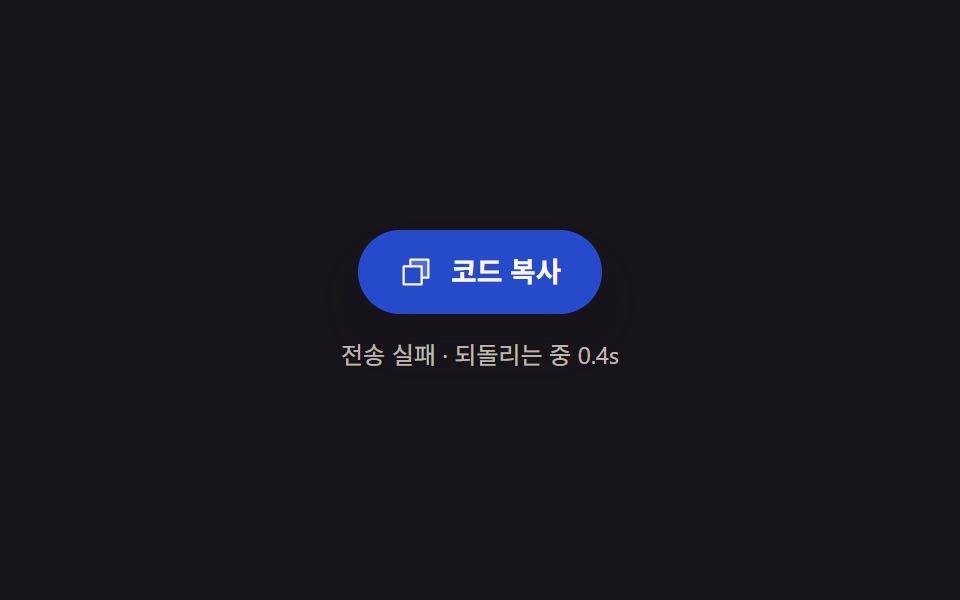
06Fail-recovery — a button interpolating its tint back to normal by elapsed time since failure
On copy failure the button tints to an error shade, then interpolates its tint back toward the original value by elapsed time since the failure, recovering on its own as time passes.
Best forCopy buttons in strict admin screens
backgroundColorclassList.addclassList.remove
<main class="stage">
<section class="panel">
  <button class="copyBtn" id="copyBtn" type="button" aria-label="Copy code">
    <svg class="icon" viewBox="0 0 256 256" aria-hidden="true"><g fill="currentColor"><path d="M216 40v128h-48V88H88V40Z" opacity=".2"/><path d="M216 32H88a8 8 0 0 0-8 8v40H40a8 8 0 0 0-8 8v128a8 8 0 0 0 8 8h128a8 8 0 0 0 8-8v-40h40a8 8 0 0 0 8-8V40a8 8 0 0 0-8-8m-56 176H48V96h112Zm48-48h-32V88a8 8 0 0 0-8-8H96V48h112Z"/></g></svg>
    <span class="label">Copy code</span>
  </button>
  <p class="hint" id="hint">Send failed · reverting in 2.4s</p>
</section>
</main>
@use "../../../../site/static/demo-tokens" as *;
@include stage($stage-ink);
.panel {
display: flex;
flex-direction: column;
align-items: center;
gap: $sp-3;
}
.copyBtn {
display: inline-flex;
align-items: center;
gap: $sp-2;
border: 0;
border-radius: $r-pill;
padding: $sp-3 $sp-5;
background: $error;
color: $subject-cream;
font-family: -apple-system, "Segoe UI", "Noto Sans KR", sans-serif;
font-weight: 600;
font-size: 14px;
line-height: 1.3;
cursor: pointer;
box-shadow: $shadow-raised;
}
.icon {
width: 18px;
height: 18px;
flex: none;
}
.label {
white-space: nowrap;
}
.hint {
margin: 0;
color: rgba($subject-cream, .72);
font-family: -apple-system, "Segoe UI", "Noto Sans KR", sans-serif;
font-size: 12px;
line-height: 1.4;
}
.hint.is-ok {
color: $subject-mint;
}
@media (max-width: 340px) {
.copyBtn {
padding: $sp-2 $sp-4;
font-size: 12px;
}
}
@media (prefers-reduced-motion: reduce) {
.copyBtn {
transition: none;
}
}html, body {
margin: 0;
overflow: hidden;
}
.stage {
box-sizing: border-box;
min-height: 100vh;
display: grid;
place-items: center;
margin: 0;
background: #17141a;
font-family: -apple-system, "Segoe UI", "Noto Sans KR", sans-serif;
padding: clamp(8px, 4vw, 24px);
}
.panel {
display: flex;
flex-direction: column;
align-items: center;
gap: 12px;
}
.copyBtn {
display: inline-flex;
align-items: center;
gap: 8px;
border: 0;
border-radius: 999px;
padding: 12px 20px;
background: #c2361a;
color: #fff7e6;
font-family: -apple-system, "Segoe UI", "Noto Sans KR", sans-serif;
font-weight: 600;
font-size: 14px;
line-height: 1.3;
cursor: pointer;
box-shadow: 0 14px 24px rgba(23, 20, 26, 0.32);
}
.icon {
width: 18px;
height: 18px;
flex: none;
}
.label {
white-space: nowrap;
}
.hint {
margin: 0;
color: rgba(255, 247, 230, 0.72);
font-family: -apple-system, "Segoe UI", "Noto Sans KR", sans-serif;
font-size: 12px;
line-height: 1.4;
}
.hint.is-ok {
color: #4cd4a6;
}
@media (max-width: 340px) {
.copyBtn {
padding: 8px 16px;
font-size: 12px;
}
}
@media (prefers-reduced-motion: reduce) {
.copyBtn {
transition: none;
}
}// 실패 되돌리기 — 복사가 실패하면 버튼이 오류 빛으로 물들고, 실패 뒤 흐른 시간을 기준으로
// 농도를 원래 색까지 조금씩 보간해 저절로 되돌아간다. 되돌리기 시간은 RECOVER_MS.
// 계산 겹: 경과시간 → 보간 비율(0~1) → RGB 채널별 lerp → backgroundColor 재계산.
// 자동 시연만, 실사용자 리스너 없음. 실 클립보드 API 호출 없음 — 상태는 시뮬레이션.
(function () {
var btn = document.getElementById('copyBtn');
var hint = document.getElementById('hint');
if (!btn || !hint) return;
var RECOVER_MS = 2400;
var ERROR_RGB = [194, 54, 26];
var NORMAL_RGB = [10, 79, 232];
function lerp(a, b, p) {
return Math.round(a + (b - a) * p);
}
function apply(t) {
var ratio = Math.min(Math.max(t / RECOVER_MS, 0), 1);
var r = lerp(ERROR_RGB[0], NORMAL_RGB[0], ratio);
var g = lerp(ERROR_RGB[1], NORMAL_RGB[1], ratio);
var b = lerp(ERROR_RGB[2], NORMAL_RGB[2], ratio);
btn.style.backgroundColor = 'rgb(' + r + ',' + g + ',' + b + ')';
if (ratio < 1) {
var remain = ((1 - ratio) * RECOVER_MS / 1000).toFixed(1);
hint.textContent = 'Send failed · reverting ' + remain + 's';
hint.classList.remove('is-ok');
} else {
hint.textContent = 'You can copy again';
hint.classList.add('is-ok');
}
}
apply(0);
var HOLD_MS = 400;
var CYCLE_MS = RECOVER_MS + HOLD_MS;
var reduce = window.matchMedia('(prefers-reduced-motion: reduce)').matches;
if (reduce) return;
var start = null;
function loop(ts) {
if (start === null) start = ts;
var t = (ts - start) % CYCLE_MS;
apply(t);
requestAnimationFrame(loop);
}
requestAnimationFrame(loop);
})();import { useEffect, useRef } from "react";
import styles from "./CopyFailRetryCountdown.module.scss";
// 실패 되돌리기 — 복사가 실패하면 버튼이 오류 빛으로 물들고, 실패 뒤 흐른 시간을 기준으로
// 농도를 원래 색까지 조금씩 보간해 저절로 되돌아간다. 되돌리기 시간은 RECOVER_MS.
// 계산 겹: 경과시간 → 보간 비율(0~1) → RGB 채널별 lerp → backgroundColor 재계산.
// 자동 시연만, 실사용자 리스너 없음. 실 클립보드 API 호출 없음 — 상태는 시뮬레이션.
const RECOVER_MS = 2400;
const HOLD_MS = 400;
const CYCLE_MS = RECOVER_MS + HOLD_MS;
const ERROR_RGB: [number, number, number] = [194, 54, 26];
const NORMAL_RGB: [number, number, number] = [10, 79, 232];
function lerp(a: number, b: number, p: number) {
return Math.round(a + (b - a) * p);
}
export default function CopyFailRetryCountdown() {
const btnRef = useRef<HTMLButtonElement>(null);
const hintRef = useRef<HTMLParagraphElement>(null);
useEffect(() => {
const btn = btnRef.current;
const hint = hintRef.current;
if (!btn || !hint) return;
function apply(t: number) {
const ratio = Math.min(Math.max(t / RECOVER_MS, 0), 1);
const r = lerp(ERROR_RGB[0], NORMAL_RGB[0], ratio);
const g = lerp(ERROR_RGB[1], NORMAL_RGB[1], ratio);
const b = lerp(ERROR_RGB[2], NORMAL_RGB[2], ratio);
btn!.style.backgroundColor = `rgb(${r},${g},${b})`;
if (ratio < 1) {
const remain = (((1 - ratio) * RECOVER_MS) / 1000).toFixed(1);
hint!.textContent = `전송 실패 · 되돌리는 중 ${remain}s`;
hint!.classList.remove(styles.isOk);
} else {
hint!.textContent = "다시 복사할 수 있어요";
hint!.classList.add(styles.isOk);
}
}
apply(0);
const reduce = window.matchMedia("(prefers-reduced-motion: reduce)").matches;
if (reduce) return;
let start: number | null = null;
let raf = 0;
function loop(ts: number) {
if (start === null) start = ts;
const t = (ts - start) % CYCLE_MS;
apply(t);
raf = requestAnimationFrame(loop);
}
raf = requestAnimationFrame(loop);
return () => cancelAnimationFrame(raf);
}, []);
return (
<div className={styles.stage}>
<section className={styles.panel}>
<button ref={btnRef} className={styles.copyBtn} type="button" aria-label="코드 복사">
<svg className={styles.icon} viewBox="0 0 256 256" aria-hidden="true">
<g fill="currentColor">
<path d="M216 40v128h-48V88H88V40Z" opacity=".2" />
<path d="M216 32H88a8 8 0 0 0-8 8v40H40a8 8 0 0 0-8 8v128a8 8 0 0 0 8 8h128a8 8 0 0 0 8-8v-40h40a8 8 0 0 0 8-8V40a8 8 0 0 0-8-8m-56 176H48V96h112Zm48-48h-32V88a8 8 0 0 0-8-8H96V48h112Z" />
</g>
</svg>
<span className={styles.label}>코드 복사</span>
</button>
<p ref={hintRef} className={styles.hint}>전송 실패 · 되돌리는 중 2.4s</p>
</section>
</div>
);
}06 Fail-recovery — a button interpolating its tint back to normal by elapsed time since failure — Measured area 4.012% · moving frames 21/23Original by GODRICH · SCSS and React ship in the zip · 9 Copy Button CSS UI Patterns (Copy to Clipboard)
The post this demo lives in
 9 Copy Button CSS UI Patterns (Copy to Clipboard)Nine copy-button UIs: one splits the result across two buttons, one fills its progress by the character count it just co See all demos in this post
If you like this effect - similar demos
 Interactions09 Clipboard copy — a basic button switching its label from a success-state valueMicro Interactions: 9 Essential UI Patterns
 Interactions06 A Jellyfish That Lurches Forward Each Time Its Bell SqueezesCursor Follow Animation: 9 Procedural Creatures
 Interactions02 Magnetic pull button9 Mouse Effects CSS Tricks You Can Copy-Paste