02Magnetic pull button
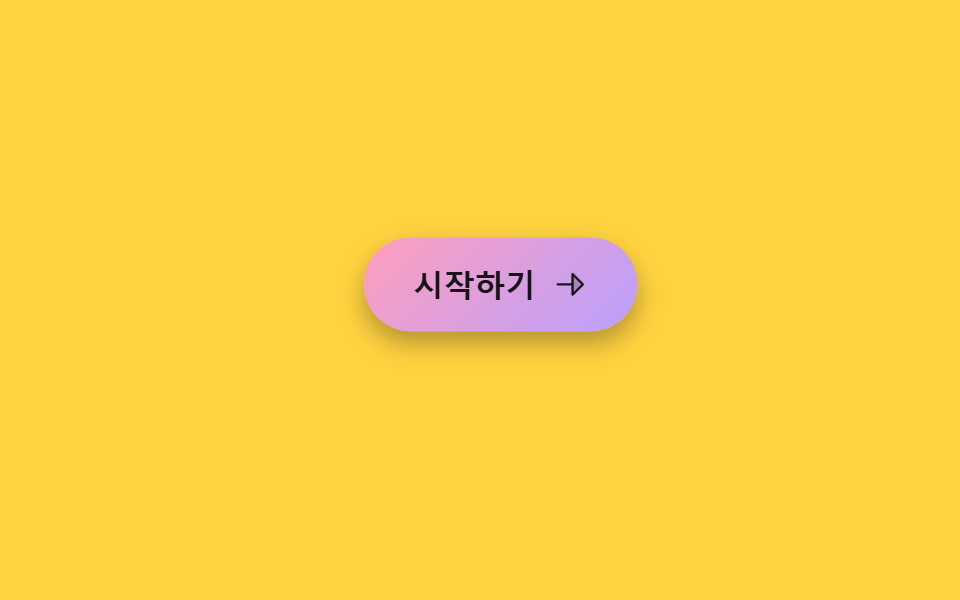
Moving the cursor near the button pulls it slightly toward the pointer; moving away springs it back.
Best forLanding-page CTA buttons, pricing-card buttons
pointermove 거리×계수transform: translatepointerleave 리셋
<main class="stage">
  <div class="mg-zone is-demo">
    <button class="mg-btn" type="button" tabindex="-1">
      <span>Get started</span>
      <svg viewBox="0 0 256 256" aria-hidden="true"><g fill="currentColor"><path d="m216 128l-72 72V56Z" opacity=".2"/><path d="m221.66 122.34l-72-72A8 8 0 0 0 136 56v64H40a8 8 0 0 0 0 16h96v64a8 8 0 0 0 13.66 5.66l72-72a8 8 0 0 0 0-11.32M152 180.69V75.31L204.69 128Z"/></g></svg>
    </button>
  </div>
</main>
@use "../../../../site/static/demo-tokens" as *;
$duration: $dur-base; // 자석에 끌려오는 시간
$easing: $ease-spring;
$color: $subject-pink;
@include stage($stage-yellow);
.mg-zone {
width: min(230px, 76vw);
height: 140px;
display: grid;
place-items: center;
}
.mg-btn {
display: inline-flex;
align-items: center;
gap: $sp-2;
padding: $sp-3 $sp-6;
border: 0;
border-radius: $r-pill;
background: linear-gradient(135deg, $subject-pink, $subject-lilac);
color: $subject-ink; // 파스텔 면 위 흰 글자는 2.09:1 — 잉크로 8.73:1
font-size: 15px;
font-weight: 800;
box-shadow: $shadow-press;
cursor: pointer;
transition: transform $duration $easing;
will-change: transform;
}
.mg-btn svg { width: 18px; height: 18px; }
@media (hover: none), (pointer: coarse) {
.mg-btn { transition: none; } // 터치엔 hover 좌표가 없다 — 그냥 보통 버튼으로 동작
}
// 데모 강제 루프 — 가상의 포인터가 버튼 오른쪽 위에서 다가왔다 멀어지는 것을 흉내
.mg-zone.is-demo .mg-btn { animation: mg-pull $dur-loop $easing infinite; }
@keyframes mg-pull {
0%, 10% { transform: translate(0, 0) scale(1); }
32%, 55% { transform: translate(20px, -15px) scale(1.04); }
82%, 100% { transform: translate(0, 0) scale(1); }
}
@media (prefers-reduced-motion: reduce) {
.mg-btn { animation: none !important; transition: none !important; }
}html, body {
margin: 0;
overflow: hidden;
}
.stage {
box-sizing: border-box;
min-height: 100vh;
display: grid;
place-items: center;
margin: 0;
background: #ffd23f;
font-family: -apple-system, "Segoe UI", "Noto Sans KR", sans-serif;
padding: clamp(8px, 4vw, 24px);
}
.mg-zone {
width: min(230px, 76vw);
height: 140px;
display: grid;
place-items: center;
}
.mg-btn {
display: inline-flex;
align-items: center;
gap: 8px;
padding: 12px 24px;
border: 0;
border-radius: 999px;
background: linear-gradient(135deg, #ff9ebb, #b9a0ff);
color: #17141a;
font-size: 15px;
font-weight: 800;
box-shadow: 0 6px 12px rgba(23, 20, 26, 0.32);
cursor: pointer;
transition: transform 300ms cubic-bezier(0.2, 0.8, 0.2, 1);
will-change: transform;
}
.mg-btn svg {
width: 18px;
height: 18px;
}
@media (hover: none), (pointer: coarse) {
.mg-btn {
transition: none;
}
}
.mg-zone.is-demo .mg-btn {
animation: mg-pull 2s cubic-bezier(0.2, 0.8, 0.2, 1) infinite;
}
@keyframes mg-pull {
0%, 10% {
transform: translate(0, 0) scale(1);
}
32%, 55% {
transform: translate(20px, -15px) scale(1.04);
}
82%, 100% {
transform: translate(0, 0) scale(1);
}
}
@media (prefers-reduced-motion: reduce) {
.mg-btn {
animation: none !important;
transition: none !important;
}
}(function () {
var zone = document.querySelector('.mg-zone');
var btn = zone.querySelector('.mg-btn');
var STRENGTH = 0.4; // 자석 세기 — 0에 가까울수록 덜 끌려온다
zone.addEventListener('pointermove', function (e) {
if (zone.classList.contains('is-demo')) return;
var r = zone.getBoundingClientRect();
var dx = e.clientX - (r.left + r.width / 2);
var dy = e.clientY - (r.top + r.height / 2);
btn.style.transform = 'translate(' + dx * STRENGTH + 'px,' + dy * STRENGTH + 'px)';
});
zone.addEventListener('pointerleave', function () { btn.style.transform = ''; });
})();import { useRef, type CSSProperties, type PointerEvent } from "react";
import styles from "./CursorMagneticPullButton.module.scss";
export type CursorMagneticPullButtonProps = {
label?: string;
duration?: number;
easing?: string;
color?: string;
};
type Vars = CSSProperties & { "--duration"?: string; "--easing"?: string; "--color"?: string };
const STRENGTH = 0.4;
/** 버튼 히트 존 안에서 pointermove 좌표로 자석처럼 끌려오는 translate 를 계산한다 */
export default function CursorMagneticPullButton({
label = "시작하기",
duration = 300,
easing = "cubic-bezier(.2,.8,.2,1)",
color = "#ff9ebb",
}: CursorMagneticPullButtonProps) {
const btnRef = useRef<HTMLButtonElement>(null);
const vars: Vars = { "--duration": `${duration}ms`, "--easing": easing, "--color": color };
const move = (e: PointerEvent<HTMLDivElement>) => {
const btn = btnRef.current;
if (!btn) return;
const r = e.currentTarget.getBoundingClientRect();
const dx = e.clientX - (r.left + r.width / 2);
const dy = e.clientY - (r.top + r.height / 2);
btn.style.transform = `translate(${dx * STRENGTH}px,${dy * STRENGTH}px)`;
};
const leave = () => { if (btnRef.current) btnRef.current.style.transform = ""; };
return (
<div className={styles.zone} style={vars} onPointerMove={move} onPointerLeave={leave}>
<button ref={btnRef} className={styles.btn} type="button">
<span>{label}</span>
<svg viewBox="0 0 256 256" aria-hidden="true"><g fill="currentColor"><path d="m216 128l-72 72V56Z" opacity=".2" /><path d="m221.66 122.34l-72-72A8 8 0 0 0 136 56v64H40a8 8 0 0 0 0 16h96v64a8 8 0 0 0 13.66 5.66l72-72a8 8 0 0 0 0-11.32M152 180.69V75.31L204.69 128Z" /></g></svg>
</button>
</div>
);
}02 Magnetic pull button — Measured area 6.596% · moving frames 11/23Original by GODRICH · SCSS and React ship in the zip · 9 Mouse Effects CSS Tricks You Can Copy-Paste
The post this demo lives in
 9 Mouse Effects CSS Tricks You Can Copy-PasteMouse effects css tricks are small interactions that react to pointer moves, clicks, drags, or scrolls. The cursor barel See all demos in this post