03Pointing at the next button
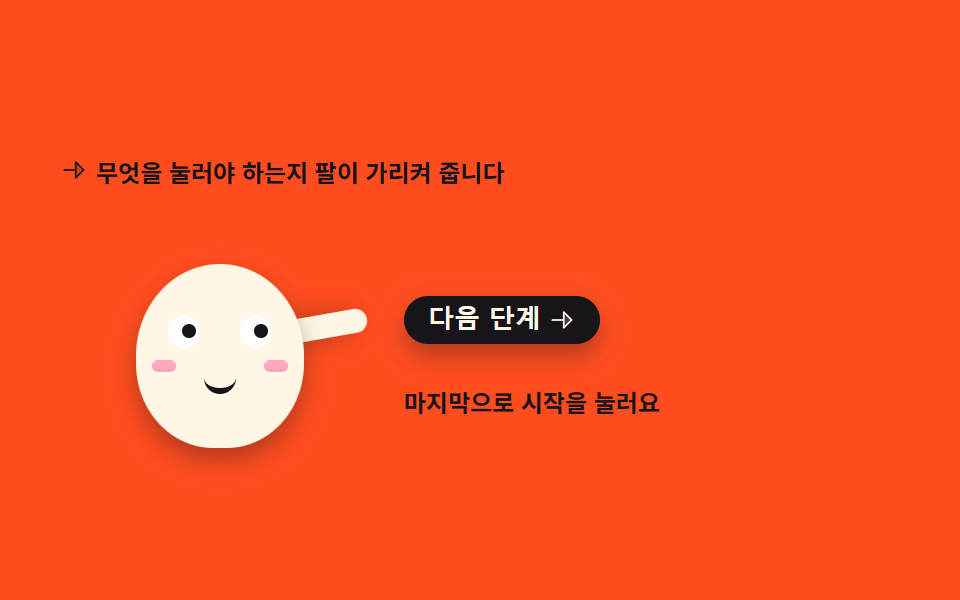
The arm reaches toward the button and the pupils shift the same way. Pressing the button lowers the arm and moves the guide one step on.
Best forA guide step that shows where to press the first time a feature is switched on
rotatetranslateXaria-livebox-shadow
<svg width="0" height="0" style="position:absolute" aria-hidden="true">
  <defs>
    <symbol id="ico-arrow" viewBox="0 0 256 256" fill="currentColor"><path d="m216 128l-72 72V56Z" opacity=".2"/><path d="m221.66 122.34l-72-72A8 8 0 0 0 136 56v64H40a8 8 0 0 0 0 16h96v64a8 8 0 0 0 13.66 5.66l72-72a8 8 0 0 0 0-11.32M152 180.69V75.31L204.69 128Z"/></symbol>
  </defs>
</svg>
<main class="stage">
<div class="pg is-demo" id="pg" data-step="0">
  <p class="pg__hint">
    <svg class="pg__ico" aria-hidden="true"><use href="#ico-arrow"/></svg>
    <span>The arm shows you what to press</span>
  </p>

  <div class="pg__row">
    <!-- 캐릭터는 피사체라 손으로 그린다 — 크림 몸에 잉크 이목구비, 오른쪽 버튼을 가리키는 팔 하나.
         팔의 축은 어깨, 눈동자는 버튼 쪽으로 같이 옮겨 간다. -->
    <div class="pg__char" aria-label="A mascot pointing at the button" role="img">
      <i class="pg__arm"></i>
      <span class="pg__body">
        <i class="pg__eye pg__eye--l"><span class="pg__pupil"></span></i>
        <i class="pg__eye pg__eye--r"><span class="pg__pupil"></span></i>
        <i class="pg__cheek pg__cheek--l"></i>
        <i class="pg__cheek pg__cheek--r"></i>
        <i class="pg__mouth"></i>
      </span>
    </div>

    <div class="pg__side">
      <button class="pg__btn" id="pgNext" type="button">
        <span>Next step</span>
        <svg class="pg__btnIco" aria-hidden="true"><use href="#ico-arrow"/></svg>
      </button>
      <!-- 안내 문구 교체를 스크린 낭독기에 알리는 영역 — data-step 이 바뀌면 보이는 스팬이 갈린다 -->
      <p class="pg__say" aria-live="polite">
        <span class="pg__msg pg__msg--0">First, fill in your profile</span>
        <span class="pg__msg pg__msg--1">Next, pick your alerts</span>
        <span class="pg__msg pg__msg--2">Last, press Start</span>
      </p>
    </div>
  </div>
</div>
</main>@use "../../../../site/static/demo-tokens" as *;
// 다음 버튼을 가리키는 안내 — 팔이 버튼 쪽으로 뻗고 눈동자도 같은 방향으로 옮겨 간다.
// 격자 미리보기(.is-demo)는 「가리킴 → 버튼 강조(box-shadow 링) → 다음 단계」를 2s 안에
// 세 바퀴째 보여 준다. 문구 교체는 steps(1, end) 로 한 프레임에 컷해 반투명 유령을 만들지 않고
// 컷 옆에는 팔 살짝 내림(rotate) 이 움직임 프레임을 채운다. 복귀는 87~90% 안에 끝난다.
// 사람이 버튼을 누르면 JS 가 .is-demo 를 떼고 data-step 로 세 단계를 순환시킨다.
$duration: $dur-loop;
$easing: $ease-spring;
$color: $subject-cream;
@include stage($stage-orange);
// 주황 무대 위 글자는 잉크만 쓴다(설계 대비 표 — 크림 글자는 주황 위 3.11 대 1 로 AA 미달).
// 캐릭터 몸은 크림(면은 규칙 밖), 몸에 얹는 이목구비는 잉크다.
.pg { display: flex; flex-direction: column; gap: $sp-3; width: 100%; max-width: 420px; }
.pg__hint {
display: flex; align-items: center; gap: $sp-1; margin: 0;
font-weight: 700; font-size: clamp(10px, 2.6vw, 12px); color: $subject-ink;
}
.pg__ico { width: 14px; height: 14px; flex: 0 0 auto; color: $subject-ink; }
.pg__row { display: flex; align-items: flex-end; gap: $sp-3; }
.pg__char { position: relative; width: 160px; height: 118px; flex: 0 0 auto; }
// 몸 — 크림 타원(01·02 와 같은 몸). 필요한 transform 이 없어 축은 그대로 둔다
.pg__body {
position: absolute; left: 38px; top: 26px; width: 84px; height: 92px;
border-radius: 50% 50% 46% 46%;
background: $color;
box-shadow: $shadow-press;
}
// 눈 — 크림 몸 위 흰 눈알 + 잉크 눈동자. 눈동자는 버튼 쪽(오른쪽)으로 translateX 로 옮겨 간다.
// 기본 자세부터 가리키는 중이라 눈동자는 오른쪽에 두고 미리보기 첫 8% 에 slide 한다.
.pg__eye {
position: absolute; top: 26px; width: 16px; height: 16px;
border-radius: 50%; background: $stage-paper;
}
.pg__eye--l { left: 16px; }
.pg__eye--r { left: 52px; }
.pg__pupil {
position: absolute; left: 4px; top: 4px; width: 7px; height: 7px;
border-radius: 50%; background: $subject-ink;
transform: translateX(3px);
}
.pg__cheek {
position: absolute; top: 48px; width: 12px; height: 6px;
border-radius: $r-pill; background: $subject-pink; opacity: .9;
}
.pg__cheek--l { left: 8px; }
.pg__cheek--r { right: 8px; }
.pg__mouth {
position: absolute; top: 54px; left: 34px; width: 16px; height: 8px;
border-bottom: 3px solid $subject-ink;
border-radius: 0 0 $r-pill $r-pill;
}
// 팔 — 몸 뒤에 붙는 캡슐. 축은 어깨(아래 끝, 50% 95%): 팔은 어깨에 붙어 있어 붙는 지점에서
// 돌아간다(규칙 8 예외). 기본 자세는 버튼을 가리키는 80도(위에서부터 시계 방향).
.pg__arm {
position: absolute; left: 110px; top: 22px; width: 12px; height: 40px;
border-radius: $r-pill; background: $color;
transform-origin: 50% 95%;
transform: rotate(80deg);
box-shadow: $shadow-press;
}
.pg__side { display: flex; flex-direction: column; gap: $sp-2; flex: 1 1 auto; min-width: 0; }
// 버튼 — 잉크 면에 크림 글자(대비 충분). 누르면 자기 중심에서 살짝 줄어든다(규칙 8 기본 축 그대로)
.pg__btn {
display: inline-flex; align-items: center; gap: $sp-1;
align-self: flex-start;
border: 0; border-radius: $r-control; padding: $sp-1 $sp-3;
background: $subject-ink; color: $subject-cream;
font-weight: 800; font-size: clamp(11px, 2.8vw, 13px); line-height: 1.2;
box-shadow: $shadow-press; cursor: pointer;
transition: transform $dur-instant $ease-out, box-shadow $dur-instant $ease-out;
}
.pg__btn:active { transform: scale(.96); box-shadow: none; }
.pg__btn:focus-visible { outline: 2px solid $subject-ink; outline-offset: 2px; }
.pg__btnIco { width: 14px; height: 14px; flex: 0 0 auto; }
// 안내 문구 — 절대배치 스팬 세 개의 자리를 height 로 미리 비운다(BD9: scrollHeight 는 절대배치도 잡는다).
// 실제 상태(미리보기 아님)는 data-step 에 따라 스팬 하나만 display 로 뜬다.
.pg__say { position: relative; height: 44px; margin: 0; }
.pg__msg {
position: absolute; inset: 0; display: none; align-items: center;
font-weight: 700; font-size: clamp(10px, 2.6vw, 12px); line-height: 1.4; color: $subject-ink;
}
.pg[data-step="0"] .pg__msg--0,
.pg[data-step="1"] .pg__msg--1,
.pg[data-step="2"] .pg__msg--2 { display: flex; }
// ── 미리보기 루프(.is-demo) ──────────────────────────────────
// 가리킴(유지) → 버튼 강조 링 → 문구 컷 → 팔 살짝 내림, 를 세 단계 반복하고 87% 에 첫 문구로 돌아온다.
.is-demo .pg__msg { display: flex; visibility: hidden; opacity: 0; }
@keyframes pgPoint {
0%, 31% { transform: rotate(80deg); }
34% { transform: rotate(92deg); }
37%, 62% { transform: rotate(80deg); }
65% { transform: rotate(92deg); }
68%, 86% { transform: rotate(80deg); }
88% { transform: rotate(92deg); }
90%, 100% { transform: rotate(80deg); }
}
@keyframes pgLook {
0% { transform: translateX(0); }
8%, 100% { transform: translateX(3px); }
}
// 버튼 강조 — box-shadow 링이 퍼지며 사라진다(칩 box-shadow). 문구 단계마다 한 번씩
@keyframes pgGlow {
0%, 2% { box-shadow: $shadow-press, 0 0 0 0 rgba(255, 247, 230, .55); }
26% { box-shadow: $shadow-press, 0 0 0 12px rgba(255, 247, 230, 0); }
33%, 38% { box-shadow: $shadow-press, 0 0 0 0 rgba(255, 247, 230, 0); }
40% { box-shadow: $shadow-press, 0 0 0 0 rgba(255, 247, 230, .55); }
57% { box-shadow: $shadow-press, 0 0 0 12px rgba(255, 247, 230, 0); }
63%, 68% { box-shadow: $shadow-press, 0 0 0 0 rgba(255, 247, 230, 0); }
70% { box-shadow: $shadow-press, 0 0 0 0 rgba(255, 247, 230, .55); }
84% { box-shadow: $shadow-press, 0 0 0 12px rgba(255, 247, 230, 0); }
90%, 100% { box-shadow: $shadow-press, 0 0 0 0 rgba(255, 247, 230, 0); }
}
// 문구 교체 — steps(1, end) 컷. 중간 반투명 프레임이 생기지 않는다
@keyframes pgMsg0 {
0%, 30% { opacity: 1; visibility: visible; }
31%, 86% { opacity: 0; visibility: hidden; }
87%, 100% { opacity: 1; visibility: visible; }
}
@keyframes pgMsg1 {
0%, 31% { opacity: 0; visibility: hidden; }
32%, 61% { opacity: 1; visibility: visible; }
62%, 100% { opacity: 0; visibility: hidden; }
}
@keyframes pgMsg2 {
0%, 62% { opacity: 0; visibility: hidden; }
63%, 86% { opacity: 1; visibility: visible; }
87%, 100% { opacity: 0; visibility: hidden; }
}
.is-demo .pg__arm {
animation-name: pgPoint;
animation-duration: $duration;
animation-timing-function: $easing;
animation-iteration-count: infinite;
}
.is-demo .pg__pupil {
animation-name: pgLook;
animation-duration: $duration;
animation-timing-function: $easing;
animation-iteration-count: infinite;
}
.is-demo .pg__btn {
animation-name: pgGlow;
animation-duration: $duration;
animation-timing-function: $ease-out;
animation-iteration-count: infinite;
}
.is-demo .pg__msg--0,
.is-demo .pg__msg--1,
.is-demo .pg__msg--2 {
animation-duration: $duration;
animation-timing-function: steps(1, end);
animation-iteration-count: infinite;
}
.is-demo .pg__msg--0 { animation-name: pgMsg0; }
.is-demo .pg__msg--1 { animation-name: pgMsg1; }
.is-demo .pg__msg--2 { animation-name: pgMsg2; }
// 사람이 버튼을 눌렀을 때 — 팔이 내려왔다 다시 버튼을 가리킨다(한 번 재생)
@keyframes pgNod {
0% { transform: rotate(80deg); }
35% { transform: rotate(126deg); }
70%, 100% { transform: rotate(80deg); }
}
.pg.is-bump .pg__arm {
animation-name: pgNod;
animation-duration: 640ms;
animation-timing-function: $easing;
animation-iteration-count: 1;
animation-fill-mode: both;
}
@media (max-width: 340px) {
.pg { gap: $sp-2; }
.pg__row { gap: $sp-2; }
.pg__char { width: 124px; height: 96px; }
.pg__body { left: 27px; top: 20px; width: 70px; height: 76px; }
.pg__eye { top: 21px; width: 13px; height: 13px; }
.pg__eye--l { left: 12px; }
.pg__eye--r { left: 45px; }
.pg__pupil { left: 3px; top: 3px; width: 6px; height: 6px; }
.pg__cheek { top: 40px; width: 10px; height: 5px; }
.pg__cheek--l { left: 7px; }
.pg__cheek--r { right: 7px; }
.pg__mouth { top: 45px; left: 28px; width: 14px; height: 7px; }
.pg__arm { left: 86px; top: 16px; width: 10px; height: 34px; }
.pg__say { height: 36px; }
}
// reduce 에서는 미리보기 루프를 끊고 첫 단계 문구를 띄운 한 장으로 세운다.
// is-demo 중에도 data-step 규칙이 문구를 보이게 한다(미리보기 애니메이션이 꺼져도 화면이 성립한다).
@media (prefers-reduced-motion: reduce) {
.is-demo .pg__arm,
.is-demo .pg__pupil,
.is-demo .pg__btn { animation: none !important; }
.is-demo .pg__msg--0,
.is-demo .pg__msg--1,
.is-demo .pg__msg--2 { animation: none !important; }
.is-demo[data-step="0"] .pg__msg--0,
.is-demo[data-step="1"] .pg__msg--1,
.is-demo[data-step="2"] .pg__msg--2 { visibility: visible !important; opacity: 1 !important; }
.pg.is-bump .pg__arm { animation: none !important; }
.pg__btn { transition: none !important; }
}html, body {
margin: 0;
overflow: hidden;
}
.stage {
box-sizing: border-box;
min-height: 100vh;
display: grid;
place-items: center;
margin: 0;
background: #ff4d1f;
font-family: -apple-system, "Segoe UI", "Noto Sans KR", sans-serif;
padding: clamp(8px, 4vw, 24px);
}
.pg {
display: flex;
flex-direction: column;
gap: 12px;
width: 100%;
max-width: 420px;
}
.pg__hint {
display: flex;
align-items: center;
gap: 4px;
margin: 0;
font-weight: 700;
font-size: clamp(10px, 2.6vw, 12px);
color: #17141a;
}
.pg__ico {
width: 14px;
height: 14px;
flex: 0 0 auto;
color: #17141a;
}
.pg__row {
display: flex;
align-items: flex-end;
gap: 12px;
}
.pg__char {
position: relative;
width: 160px;
height: 118px;
flex: 0 0 auto;
}
.pg__body {
position: absolute;
left: 38px;
top: 26px;
width: 84px;
height: 92px;
border-radius: 50% 50% 46% 46%;
background: #fff7e6;
box-shadow: 0 6px 12px rgba(23, 20, 26, 0.32);
}
.pg__eye {
position: absolute;
top: 26px;
width: 16px;
height: 16px;
border-radius: 50%;
background: #ffffff;
}
.pg__eye--l {
left: 16px;
}
.pg__eye--r {
left: 52px;
}
.pg__pupil {
position: absolute;
left: 4px;
top: 4px;
width: 7px;
height: 7px;
border-radius: 50%;
background: #17141a;
transform: translateX(3px);
}
.pg__cheek {
position: absolute;
top: 48px;
width: 12px;
height: 6px;
border-radius: 999px;
background: #ff9ebb;
opacity: 0.9;
}
.pg__cheek--l {
left: 8px;
}
.pg__cheek--r {
right: 8px;
}
.pg__mouth {
position: absolute;
top: 54px;
left: 34px;
width: 16px;
height: 8px;
border-bottom: 3px solid #17141a;
border-radius: 0 0 999px 999px;
}
.pg__arm {
position: absolute;
left: 110px;
top: 22px;
width: 12px;
height: 40px;
border-radius: 999px;
background: #fff7e6;
transform-origin: 50% 95%;
transform: rotate(80deg);
box-shadow: 0 6px 12px rgba(23, 20, 26, 0.32);
}
.pg__side {
display: flex;
flex-direction: column;
gap: 8px;
flex: 1 1 auto;
min-width: 0;
}
.pg__btn {
display: inline-flex;
align-items: center;
gap: 4px;
align-self: flex-start;
border: 0;
border-radius: 12px;
padding: 4px 12px;
background: #17141a;
color: #fff7e6;
font-weight: 800;
font-size: clamp(11px, 2.8vw, 13px);
line-height: 1.2;
box-shadow: 0 6px 12px rgba(23, 20, 26, 0.32);
cursor: pointer;
transition: transform 140ms ease-out, box-shadow 140ms ease-out;
}
.pg__btn:active {
transform: scale(0.96);
box-shadow: none;
}
.pg__btn:focus-visible {
outline: 2px solid #17141a;
outline-offset: 2px;
}
.pg__btnIco {
width: 14px;
height: 14px;
flex: 0 0 auto;
}
.pg__say {
position: relative;
height: 44px;
margin: 0;
}
.pg__msg {
position: absolute;
inset: 0;
display: none;
align-items: center;
font-weight: 700;
font-size: clamp(10px, 2.6vw, 12px);
line-height: 1.4;
color: #17141a;
}
.pg[data-step="0"] .pg__msg--0,
.pg[data-step="1"] .pg__msg--1,
.pg[data-step="2"] .pg__msg--2 {
display: flex;
}
.is-demo .pg__msg {
display: flex;
visibility: hidden;
opacity: 0;
}
@keyframes pgPoint {
0%, 31% {
transform: rotate(80deg);
}
34% {
transform: rotate(92deg);
}
37%, 62% {
transform: rotate(80deg);
}
65% {
transform: rotate(92deg);
}
68%, 86% {
transform: rotate(80deg);
}
88% {
transform: rotate(92deg);
}
90%, 100% {
transform: rotate(80deg);
}
}
@keyframes pgLook {
0% {
transform: translateX(0);
}
8%, 100% {
transform: translateX(3px);
}
}
@keyframes pgGlow {
0%, 2% {
box-shadow: 0 6px 12px rgba(23, 20, 26, 0.32), 0 0 0 0 rgba(255, 247, 230, 0.55);
}
26% {
box-shadow: 0 6px 12px rgba(23, 20, 26, 0.32), 0 0 0 12px rgba(255, 247, 230, 0);
}
33%, 38% {
box-shadow: 0 6px 12px rgba(23, 20, 26, 0.32), 0 0 0 0 rgba(255, 247, 230, 0);
}
40% {
box-shadow: 0 6px 12px rgba(23, 20, 26, 0.32), 0 0 0 0 rgba(255, 247, 230, 0.55);
}
57% {
box-shadow: 0 6px 12px rgba(23, 20, 26, 0.32), 0 0 0 12px rgba(255, 247, 230, 0);
}
63%, 68% {
box-shadow: 0 6px 12px rgba(23, 20, 26, 0.32), 0 0 0 0 rgba(255, 247, 230, 0);
}
70% {
box-shadow: 0 6px 12px rgba(23, 20, 26, 0.32), 0 0 0 0 rgba(255, 247, 230, 0.55);
}
84% {
box-shadow: 0 6px 12px rgba(23, 20, 26, 0.32), 0 0 0 12px rgba(255, 247, 230, 0);
}
90%, 100% {
box-shadow: 0 6px 12px rgba(23, 20, 26, 0.32), 0 0 0 0 rgba(255, 247, 230, 0);
}
}
@keyframes pgMsg0 {
0%, 30% {
opacity: 1;
visibility: visible;
}
31%, 86% {
opacity: 0;
visibility: hidden;
}
87%, 100% {
opacity: 1;
visibility: visible;
}
}
@keyframes pgMsg1 {
0%, 31% {
opacity: 0;
visibility: hidden;
}
32%, 61% {
opacity: 1;
visibility: visible;
}
62%, 100% {
opacity: 0;
visibility: hidden;
}
}
@keyframes pgMsg2 {
0%, 62% {
opacity: 0;
visibility: hidden;
}
63%, 86% {
opacity: 1;
visibility: visible;
}
87%, 100% {
opacity: 0;
visibility: hidden;
}
}
.is-demo .pg__arm {
animation-name: pgPoint;
animation-duration: 2s;
animation-timing-function: cubic-bezier(0.2, 0.8, 0.2, 1);
animation-iteration-count: infinite;
}
.is-demo .pg__pupil {
animation-name: pgLook;
animation-duration: 2s;
animation-timing-function: cubic-bezier(0.2, 0.8, 0.2, 1);
animation-iteration-count: infinite;
}
.is-demo .pg__btn {
animation-name: pgGlow;
animation-duration: 2s;
animation-timing-function: ease-out;
animation-iteration-count: infinite;
}
.is-demo .pg__msg--0,
.is-demo .pg__msg--1,
.is-demo .pg__msg--2 {
animation-duration: 2s;
animation-timing-function: steps(1, end);
animation-iteration-count: infinite;
}
.is-demo .pg__msg--0 {
animation-name: pgMsg0;
}
.is-demo .pg__msg--1 {
animation-name: pgMsg1;
}
.is-demo .pg__msg--2 {
animation-name: pgMsg2;
}
@keyframes pgNod {
0% {
transform: rotate(80deg);
}
35% {
transform: rotate(126deg);
}
70%, 100% {
transform: rotate(80deg);
}
}
.pg.is-bump .pg__arm {
animation-name: pgNod;
animation-duration: 640ms;
animation-timing-function: cubic-bezier(0.2, 0.8, 0.2, 1);
animation-iteration-count: 1;
animation-fill-mode: both;
}
@media (max-width: 340px) {
.pg {
gap: 8px;
}
.pg__row {
gap: 8px;
}
.pg__char {
width: 124px;
height: 96px;
}
.pg__body {
left: 27px;
top: 20px;
width: 70px;
height: 76px;
}
.pg__eye {
top: 21px;
width: 13px;
height: 13px;
}
.pg__eye--l {
left: 12px;
}
.pg__eye--r {
left: 45px;
}
.pg__pupil {
left: 3px;
top: 3px;
width: 6px;
height: 6px;
}
.pg__cheek {
top: 40px;
width: 10px;
height: 5px;
}
.pg__cheek--l {
left: 7px;
}
.pg__cheek--r {
right: 7px;
}
.pg__mouth {
top: 45px;
left: 28px;
width: 14px;
height: 7px;
}
.pg__arm {
left: 86px;
top: 16px;
width: 10px;
height: 34px;
}
.pg__say {
height: 36px;
}
}
@media (prefers-reduced-motion: reduce) {
.is-demo .pg__arm,
.is-demo .pg__pupil,
.is-demo .pg__btn {
animation: none !important;
}
.is-demo .pg__msg--0,
.is-demo .pg__msg--1,
.is-demo .pg__msg--2 {
animation: none !important;
}
.is-demo[data-step="0"] .pg__msg--0,
.is-demo[data-step="1"] .pg__msg--1,
.is-demo[data-step="2"] .pg__msg--2 {
visibility: visible !important;
opacity: 1 !important;
}
.pg.is-bump .pg__arm {
animation: none !important;
}
.pg__btn {
transition: none !important;
}
}// 다음 버튼을 가리키는 안내 — 격자 미리보기(.is-demo)를 떼고 실제 단계 진행을 맡는다.
// 단계 문구는 스팬 3개를 data-step 으로 갈아 끼운다(교체는 한 컷). 버튼은 <button> 이라
// 엔터·스페이스가 브라우저 기본 동작으로 그대로 먹는다. 식별자는 전부 영어다(BD22).
(function () {
var root = document.getElementById('pg');
var btn = document.getElementById('pgNext');
var bumpTimer = null;
function next() {
var step = Number(root.getAttribute('data-step') || '0');
root.classList.remove('is-demo');
root.setAttribute('data-step', String((step + 1) % 3));
root.classList.remove('is-bump');
void root.offsetWidth;
root.classList.add('is-bump');
clearTimeout(bumpTimer);
bumpTimer = setTimeout(function () { root.classList.remove('is-bump'); }, 700);
}
btn.addEventListener('click', next);
}());// PointGuide — vanilla 판(run/300/demo/03-mascot-point-guide/index.html) 의 React 포트.
// 버튼을 누르면 미리보기(.isDemo)를 떼고 data-step 로 세 단계를 순환한다.
// 팔 내렸다 올리기는 key 리마운트로 다시 시작한다(애니메이션 재발동). 훅은 useState 세 개뿐.
// 이벤트 핸들러 파라미터는 ambient 타입이 없어 쓰지 않는다 — () => advance() 로 인자를 받지 않는다.
import { useState } from "react";
import type { CSSProperties } from "react";
import styles from "./PointGuide.module.scss";
export type PointGuideProps = {
duration?: number;
easing?: string;
color?: string;
};
type Vars = CSSProperties & { "--duration"?: string; "--easing"?: string; "--color"?: string };
const HINT = "무엇을 눌러야 하는지 팔이 가리켜 줍니다";
const NEXT = "다음 단계";
const CHAR_LABEL = "버튼을 가리키는 마스코트";
const STEPS = ["먼저 프로필을 채워 봐요", "다음으로 알림을 골라요", "마지막으로 시작을 눌러요"];
export default function PointGuide({
duration = 2000,
easing = "cubic-bezier(.2, .8, .2, 1)",
color = "#fff7e6",
}: PointGuideProps) {
const [step, setStep] = useState(0);
const [demo, setDemo] = useState(true);
const [bump, setBump] = useState(0);
const vars: Vars = { "--duration": `${duration}ms`, "--easing": easing, "--color": color };
function advance() {
setDemo(false);
setStep((s) => (s + 1) % 3);
setBump((b) => b + 1);
}
const armClass = [styles.arm, demo ? "" : styles.nod].filter(Boolean).join(" ");
return (
<main className={styles.stage}>
<svg width="0" height="0" style={{ position: "absolute" }} aria-hidden="true">
<defs>
<symbol id="ico-arrow" viewBox="0 0 256 256" fill="currentColor"><path d="m216 128l-72 72V56Z" opacity=".2" /><path d="m221.66 122.34l-72-72A8 8 0 0 0 136 56v64H40a8 8 0 0 0 0 16h96v64a8 8 0 0 0 13.66 5.66l72-72a8 8 0 0 0 0-11.32M152 180.69V75.31L204.69 128Z" /></symbol>
</defs>
</svg>
<div className={`${styles.root} ${demo ? styles.isDemo : ""}`.trim()} style={vars} data-step={String(step)}>
<p className={styles.hint}>
<svg className={styles.ico} aria-hidden="true"><use href="#ico-arrow" /></svg>
<span>{HINT}</span>
</p>
<div className={styles.row}>
<div className={styles.char} aria-label={CHAR_LABEL} role="img">
<i className={armClass} key={demo ? "demo" : `nod-${bump}`}></i>
<span className={styles.body}>
<i className={`${styles.eye} ${styles.eyeL}`}><span className={styles.pupil}></span></i>
<i className={`${styles.eye} ${styles.eyeR}`}><span className={styles.pupil}></span></i>
<i className={`${styles.cheek} ${styles.cheekL}`}></i>
<i className={`${styles.cheek} ${styles.cheekR}`}></i>
<i className={styles.mouth}></i>
</span>
</div>
<div className={styles.side}>
<button className={styles.btn} type="button" onClick={() => advance()}>
<span>{NEXT}</span>
<svg className={styles.btnIco} aria-hidden="true"><use href="#ico-arrow" /></svg>
</button>
<p className={styles.say} aria-live="polite">
<span className={`${styles.msg} ${styles.msg0}`}>{STEPS[0]}</span>
<span className={`${styles.msg} ${styles.msg1}`}>{STEPS[1]}</span>
<span className={`${styles.msg} ${styles.msg2}`}>{STEPS[2]}</span>
</p>
</div>
</div>
</div>
</main>
);
}03 Pointing at the next button — Measured area 3.006% · moving frames 19/23Original by GODRICH · SCSS and React ship in the zip · Mascot Animation: 9 CSS Parts from Wave to Sleep
The post this demo lives in
 Mascot Animation: 9 CSS Parts from Wave to SleepA mascot animation is a small drawn character that reacts to what the screen is doing: waving at a new visitor, pointing See all demos in this post