01Double-tap zoom
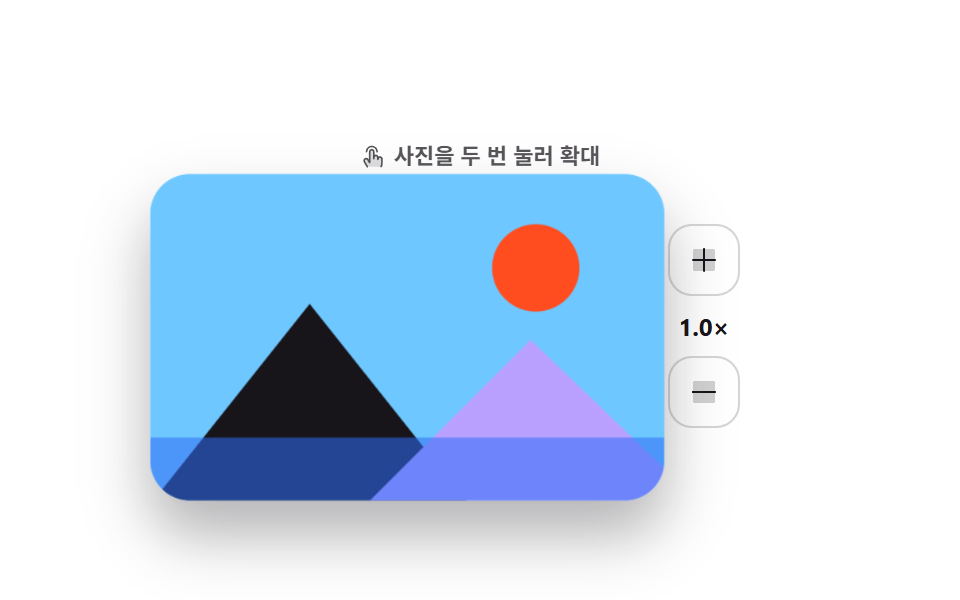
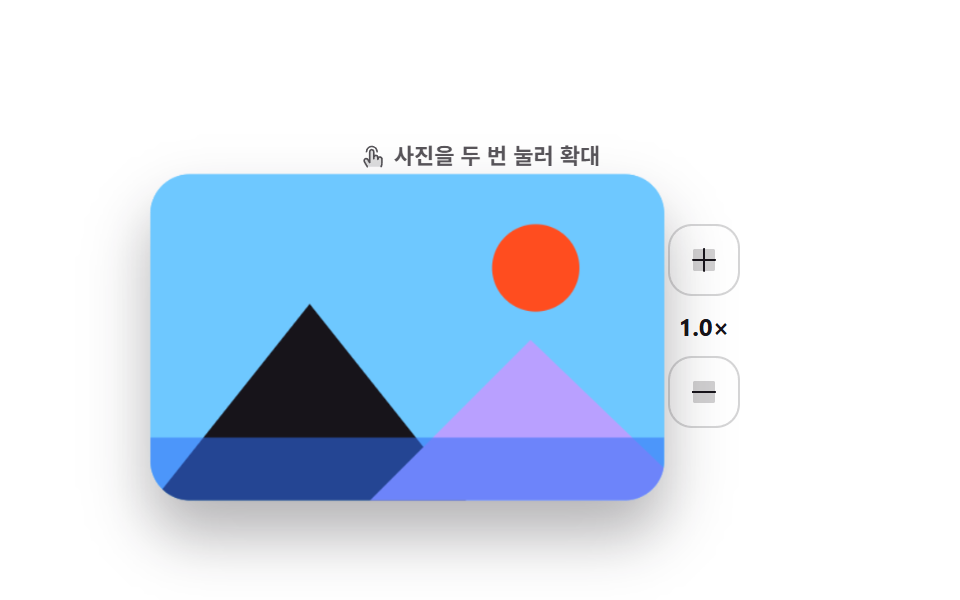
Tapping the photo twice zooms in centered on the second tap, tapping again zooms back out, and the plus and minus buttons step through the same levels.
Best forProduct shots and review galleries where one thumb should quickly zoom in for detail
dblclicktransform-originaria-live
<main class="stage">
  <div class="dz is-demo">
    <div class="dz__main">
    <div class="dz__photo" id="dz-photo">
      <svg viewBox="0 0 200 130" preserveAspectRatio="xMidYMid slice" aria-hidden="true">
        <rect class="dz__sky" width="200" height="130"/>
        <circle class="dz__sun" cx="150" cy="38" r="17"/>
        <polygon class="dz__m1" points="0,130 62,52 124,130"/>
        <polygon class="dz__m2" points="84,130 148,66 200,116 200,130"/>
        <rect class="dz__lake" y="104" width="200" height="26"/>
      </svg>
      <span class="dz__ring" id="dz-ring" aria-hidden="true"></span>
    </div>
    <div class="dz__side">
      <button class="dz__btn" type="button" id="dz-in" aria-label="Zoom in one step">
        <svg viewBox="0 0 256 256" width="16" height="16"><g fill="currentColor"><path d="M216 56v144a16 16 0 0 1-16 16H56a16 16 0 0 1-16-16V56a16 16 0 0 1 16-16h144a16 16 0 0 1 16 16" opacity=".2"/><path d="M224 128a8 8 0 0 1-8 8h-80v80a8 8 0 0 1-16 0v-80H40a8 8 0 0 1 0-16h80V40a8 8 0 0 1 16 0v80h80a8 8 0 0 1 8 8"/></g></svg>
      </button>
      <span class="dz__level" id="dz-level" aria-live="polite">1.0×</span>
      <button class="dz__btn" type="button" id="dz-out" aria-label="Zoom out one step">
        <svg viewBox="0 0 256 256" width="16" height="16"><g fill="currentColor"><path d="M216 56v144a16 16 0 0 1-16 16H56a16 16 0 0 1-16-16V56a16 16 0 0 1 16-16h144a16 16 0 0 1 16 16" opacity=".2"/><path d="M224 128a8 8 0 0 1-8 8H40a8 8 0 0 1 0-16h176a8 8 0 0 1 8 8"/></g></svg>
      </button>
    </div>
    </div>
    <p class="dz__hint" id="dz-hint"><svg viewBox="0 0 256 256" width="13" height="13"><g fill="currentColor"><path d="M216 148v36c0 24-8 40-8 40H72l-29.32-50a20 20 0 0 1 34.64-20L96 184V76a20 20 0 0 1 40 0v56a20 20 0 0 1 40 0v16a20 20 0 0 1 40 0" opacity=".2"/><path d="M56 76a60 60 0 0 1 120 0a8 8 0 0 1-16 0a44 44 0 0 0-88 0a8 8 0 1 1-16 0m140 44a27.9 27.9 0 0 0-13.36 3.39A28 28 0 0 0 144 106.7V76a28 28 0 0 0-56 0v80l-3.82-6.13a28 28 0 0 0-48.41 28.17l29.32 50a8 8 0 1 0 13.8-8.04L49.6 170a12 12 0 1 1 20.78-12l.14.23l18.68 30A8 8 0 0 0 104 184V76a12 12 0 0 1 24 0v68a8 8 0 1 0 16 0v-12a12 12 0 0 1 24 0v20a8 8 0 0 0 16 0v-4a12 12 0 0 1 24 0v36c0 21.61-7.1 36.3-7.16 36.42a8 8 0 0 0 3.58 10.73a7.9 7.9 0 0 0 3.58.85a8 8 0 0 0 7.16-4.42c.37-.73 8.85-18 8.85-43.58v-36A28 28 0 0 0 196 120"/></g></svg> Double-tap the photo to zoom</p>
  </div>
</main>@use "../../../../site/static/demo-tokens" as *;
$duration: $dur-enter;
$easing: $ease-spring;
$color: $subject-blue;
@include stage($stage-paper);
.dz {
display: flex;
flex-direction: column-reverse; // 힌트를 위로 — 확대된 사진이 힌트를 덮지 않게
align-items: center;
user-select: none;
-webkit-user-select: none;
}
.dz__main { display: flex; align-items: center; gap: $sp-4; }
.dz__photo {
position: relative;
width: 208px;
height: 132px;
border-radius: $r-card;
overflow: hidden;
box-shadow: $shadow-raised;
background: $subject-sky;
transform: scale(1);
transition: transform $duration $easing;
cursor: zoom-in;
touch-action: manipulation;
}
.dz__photo svg { display: block; width: 100%; height: 100%; }
.dz__sky { fill: $subject-sky; }
.dz__sun { fill: $stage-orange; }
.dz__m1 { fill: $subject-ink; }
.dz__m2 { fill: $subject-lilac; }
.dz__lake { fill: $subject-blue; opacity: .55; }
.dz__ring {
position: absolute;
width: 36px; height: 36px;
margin: -18px 0 0 -18px;
border: 2px solid #fff;
border-radius: 50%;
opacity: 0;
pointer-events: none;
}
.dz__ring.is-pulse { animation: dz-pulse $dur-quick $ease-out; }
@keyframes dz-pulse {
0% { opacity: .9; transform: scale(.4); }
100% { opacity: 0; transform: scale(1.15); }
}
.dz__side { display: flex; flex-direction: column; align-items: center; gap: $sp-2; }
.dz__btn {
display: inline-flex; align-items: center; justify-content: center;
width: 36px; height: 36px;
border: 1px solid rgba(23, 20, 26, .18);
background: #fff;
border-radius: $r-control;
color: $subject-ink;
cursor: pointer;
transition: background $dur-quick $easing, color $dur-quick $easing;
}
.dz__btn:hover { background: $color; color: #fff; }
.dz__btn:focus-visible { outline: 2px solid $color; outline-offset: 2px; }
.dz__level {
font-size: 12px; line-height: 14px; font-weight: 700;
color: $subject-ink;
font-variant-numeric: tabular-nums;
}
.dz__hint {
position: relative;
z-index: 1;
display: flex; align-items: center; gap: $sp-1;
margin: 0 0 $sp-3;
font-size: 11px; line-height: 14px; font-weight: 600;
color: rgba(23, 20, 26, .72);
}
.dz__hint svg { flex: none; color: rgba(23, 20, 26, .72); }
// ── 자동 루프: 탭 두 번 → 확대 → 유지 → 복귀. 복귀는 90% 안에 끝난다 ──
.dz.is-demo .dz__photo {
transform-origin: 148px 42px; // 규칙8: 탭 좌표(148,42) 줌 앵커
animation: dz-zoom $dur-loop $easing infinite;
}
@keyframes dz-zoom {
0%, 100% { transform: scale(1); }
30% { transform: scale(1); }
44% { transform: scale(2.1); }
76% { transform: scale(2.1); }
88% { transform: scale(1); }
}
.dz.is-demo .dz__ring {
left: 148px; top: 42px;
animation: dz-taps $dur-loop $ease-out infinite;
}
@keyframes dz-taps {
0%, 8% { opacity: 0; transform: scale(.4); }
13% { opacity: .95; transform: scale(.85); }
19% { opacity: 0; transform: scale(1.15); }
21% { opacity: 0; transform: scale(.4); }
26% { opacity: .95; transform: scale(.85); }
32% { opacity: 0; transform: scale(1.15); }
100% { opacity: 0; transform: scale(1.15); }
}
@media (prefers-reduced-motion: reduce) {
.dz.is-demo .dz__photo,
.dz.is-demo .dz__ring,
.dz.is-demo .dz__level { animation: none !important; }
.dz__photo, .dz__btn { transition: none; }
.dz__photo { transform: none; }
}html, body {
margin: 0;
overflow: hidden;
}
.stage {
box-sizing: border-box;
min-height: 100vh;
display: grid;
place-items: center;
margin: 0;
background: #ffffff;
font-family: -apple-system, "Segoe UI", "Noto Sans KR", sans-serif;
padding: clamp(8px, 4vw, 24px);
}
.dz {
display: flex;
flex-direction: column-reverse;
align-items: center;
user-select: none;
-webkit-user-select: none;
}
.dz__main {
display: flex;
align-items: center;
gap: 16px;
}
.dz__photo {
position: relative;
width: 208px;
height: 132px;
border-radius: 16px;
overflow: hidden;
box-shadow: 0 14px 24px rgba(23, 20, 26, 0.32);
background: #6ec8ff;
transform: scale(1);
transition: transform 600ms cubic-bezier(0.2, 0.8, 0.2, 1);
cursor: zoom-in;
touch-action: manipulation;
}
.dz__photo svg {
display: block;
width: 100%;
height: 100%;
}
.dz__sky {
fill: #6ec8ff;
}
.dz__sun {
fill: #ff4d1f;
}
.dz__m1 {
fill: #17141a;
}
.dz__m2 {
fill: #b9a0ff;
}
.dz__lake {
fill: #2f6df6;
opacity: 0.55;
}
.dz__ring {
position: absolute;
width: 36px;
height: 36px;
margin: -18px 0 0 -18px;
border: 2px solid #fff;
border-radius: 50%;
opacity: 0;
pointer-events: none;
}
.dz__ring.is-pulse {
animation: dz-pulse 220ms ease-out;
}
@keyframes dz-pulse {
0% {
opacity: 0.9;
transform: scale(0.4);
}
100% {
opacity: 0;
transform: scale(1.15);
}
}
.dz__side {
display: flex;
flex-direction: column;
align-items: center;
gap: 8px;
}
.dz__btn {
display: inline-flex;
align-items: center;
justify-content: center;
width: 36px;
height: 36px;
border: 1px solid rgba(23, 20, 26, 0.18);
background: #fff;
border-radius: 12px;
color: #17141a;
cursor: pointer;
transition: background 220ms cubic-bezier(0.2, 0.8, 0.2, 1), color 220ms cubic-bezier(0.2, 0.8, 0.2, 1);
}
.dz__btn:hover {
background: #2f6df6;
color: #fff;
}
.dz__btn:focus-visible {
outline: 2px solid #2f6df6;
outline-offset: 2px;
}
.dz__level {
font-size: 12px;
line-height: 14px;
font-weight: 700;
color: #17141a;
font-variant-numeric: tabular-nums;
}
.dz__hint {
position: relative;
z-index: 1;
display: flex;
align-items: center;
gap: 4px;
margin: 0 0 12px;
font-size: 11px;
line-height: 14px;
font-weight: 600;
color: rgba(23, 20, 26, 0.72);
}
.dz__hint svg {
flex: none;
color: rgba(23, 20, 26, 0.72);
}
.dz.is-demo .dz__photo {
transform-origin: 148px 42px;
animation: dz-zoom 2s cubic-bezier(0.2, 0.8, 0.2, 1) infinite;
}
@keyframes dz-zoom {
0%, 100% {
transform: scale(1);
}
30% {
transform: scale(1);
}
44% {
transform: scale(2.1);
}
76% {
transform: scale(2.1);
}
88% {
transform: scale(1);
}
}
.dz.is-demo .dz__ring {
left: 148px;
top: 42px;
animation: dz-taps 2s ease-out infinite;
}
@keyframes dz-taps {
0%, 8% {
opacity: 0;
transform: scale(0.4);
}
13% {
opacity: 0.95;
transform: scale(0.85);
}
19% {
opacity: 0;
transform: scale(1.15);
}
21% {
opacity: 0;
transform: scale(0.4);
}
26% {
opacity: 0.95;
transform: scale(0.85);
}
32% {
opacity: 0;
transform: scale(1.15);
}
100% {
opacity: 0;
transform: scale(1.15);
}
}
@media (prefers-reduced-motion: reduce) {
.dz.is-demo .dz__photo,
.dz.is-demo .dz__ring,
.dz.is-demo .dz__level {
animation: none !important;
}
.dz__photo, .dz__btn {
transition: none;
}
.dz__photo {
transform: none;
}
}// 실제 동작: 두 번 누르면 그 지점 중심으로 Zoom in/Zoom out, 버튼은 같은 단계를 밟는다.
var root = document.querySelector('.dz');
var photo = document.getElementById('dz-photo');
var ring = document.getElementById('dz-ring');
var level = document.getElementById('dz-level');
var STEPS = [1, 1.55, 2.1];
var at = 0, lastTap = 0;
function go(i, ox, oy) {
at = Math.max(0, Math.min(i, STEPS.length - 1));
if (ox !== undefined) photo.style.transformOrigin = ox + 'px ' + oy + 'px';
photo.style.transform = 'scale(' + STEPS[at] + ')';
level.textContent = STEPS[at].toFixed(1) + '×';
}
function pulse(x, y) {
ring.style.left = x + 'px';
ring.style.top = y + 'px';
ring.classList.remove('is-pulse');
void ring.offsetWidth;
ring.classList.add('is-pulse');
}
photo.addEventListener('pointerdown', function (e) {
root.classList.remove('is-demo');
var now = Date.now();
if (now - lastTap < 320) {
var r = photo.getBoundingClientRect();
var x = e.clientX - r.left, y = e.clientY - r.top;
pulse(x, y);
go(at === STEPS.length - 1 ? 0 : at + 1, x, y);
lastTap = 0;
e.preventDefault();
} else { lastTap = now; }
});
document.getElementById('dz-in').addEventListener('click', function () { root.classList.remove('is-demo'); go(at + 1, 150, 44); });
document.getElementById('dz-out').addEventListener('click', function () { root.classList.remove('is-demo'); go(at - 1, 150, 44); });import { useRef, useState } from "react";
import type { CSSProperties } from "react";
import styles from "./DoubleTapZoom.module.scss";
export type DoubleTapZoomProps = {
steps?: number[];
duration?: number;
easing?: string;
color?: string;
};
type PEvt = { clientX: number; clientY: number; pointerId: number; preventDefault(): void; currentTarget: { setPointerCapture(id: number): void } };
type Box<T> = { current: T };
type Vars = CSSProperties & { "--duration"?: string; "--easing"?: string; "--color"?: string };
const IconPlus = () => (
<svg viewBox="0 0 256 256" width="16" height="16"><g fill="currentColor"><path d="M216 56v144a16 16 0 0 1-16 16H56a16 16 0 0 1-16-16V56a16 16 0 0 1 16-16h144a16 16 0 0 1 16 16" opacity=".2"/><path d="M224 128a8 8 0 0 1-8 8h-80v80a8 8 0 0 1-16 0v-80H40a8 8 0 0 1 0-16h80V40a8 8 0 0 1 16 0v80h80a8 8 0 0 1 8 8"/></g></svg>
);
const IconMinus = () => (
<svg viewBox="0 0 256 256" width="16" height="16"><g fill="currentColor"><path d="M216 56v144a16 16 0 0 1-16 16H56a16 16 0 0 1-16-16V56a16 16 0 0 1 16-16h144a16 16 0 0 1 16 16" opacity=".2"/><path d="M224 128a8 8 0 0 1-8 8H40a8 8 0 0 1 0-16h176a8 8 0 0 1 8 8"/></g></svg>
);
export default function DoubleTapZoom({
steps = [1, 1.55, 2.1],
duration = 600,
easing = "cubic-bezier(.2,.8,.2,1)",
color = "#2f6df6",
}: DoubleTapZoomProps) {
const [at, setAt] = useState(0);
const [origin, setOrigin] = useState("50% 50%");
const [ring, setRing] = useState<{ x: number; y: number; k: number } | null>(null);
const lastTap = useRef(0) as Box<number>;
const photoRef = useRef<HTMLDivElement>(null);
const vars: Vars = { "--duration": `${duration}ms`, "--easing": easing, "--color": color };
function go(i: number, ox?: number, oy?: number) {
const next = Math.max(0, Math.min(i, steps.length - 1));
if (ox !== undefined && oy !== undefined) setOrigin(`${ox}px ${oy}px`);
setAt(next);
}
function onDown(e: PEvt) {
const now = Date.now();
if (now - lastTap.current < 320) {
const r = (photoRef.current as HTMLDivElement).getBoundingClientRect();
const x = e.clientX - r.left, y = e.clientY - r.top;
setRing({ x, y, k: now });
go(at === steps.length - 1 ? 0 : at + 1, x, y);
lastTap.current = 0;
} else {
lastTap.current = now;
}
}
return (
<div className={styles.dz} style={vars}>
<div
ref={photoRef}
className={styles.photo}
style={{ transform: `scale(${steps[at]})`, transformOrigin: origin }}
onPointerDown={onDown}
>
<svg viewBox="0 0 200 130" preserveAspectRatio="xMidYMid slice" aria-hidden="true">
<rect className={styles.sky} width="200" height="130" />
<circle className={styles.sun} cx="150" cy="38" r="17" />
<polygon className={styles.m1} points="0,130 62,52 124,130" />
<polygon className={styles.m2} points="84,130 148,66 200,116 200,130" />
<rect className={styles.lake} y="104" width="200" height="26" />
</svg>
{ring && (
<span key={ring.k} className={styles.ring} style={{ left: ring.x, top: ring.y }} aria-hidden="true" />
)}
</div>
<div className={styles.side}>
<button type="button" className={styles.btn} aria-label="Zoom in one step" onClick={(): void => go(at + 1, 150, 44)}>
<IconPlus />
</button>
<span className={styles.level} aria-live="polite">{steps[at].toFixed(1)}x</span>
<button type="button" className={styles.btn} aria-label="Zoom out one step" onClick={(): void => go(at - 1, 150, 44)}>
<IconMinus />
</button>
</div>
</div>
);
}01 Double-tap zoom — Measured area 60.957% · moving frames 14/23Original by GODRICH · SCSS and React ship in the zip · 9 Mobile Touch Gestures That Follow Your Finger
The post this demo lives in
 9 Mobile Touch Gestures That Follow Your FingerMobile touch gestures turn the distance and speed of a finger on glass into a change on screen. Nine of them are below, See all demos in this post