07Order number board
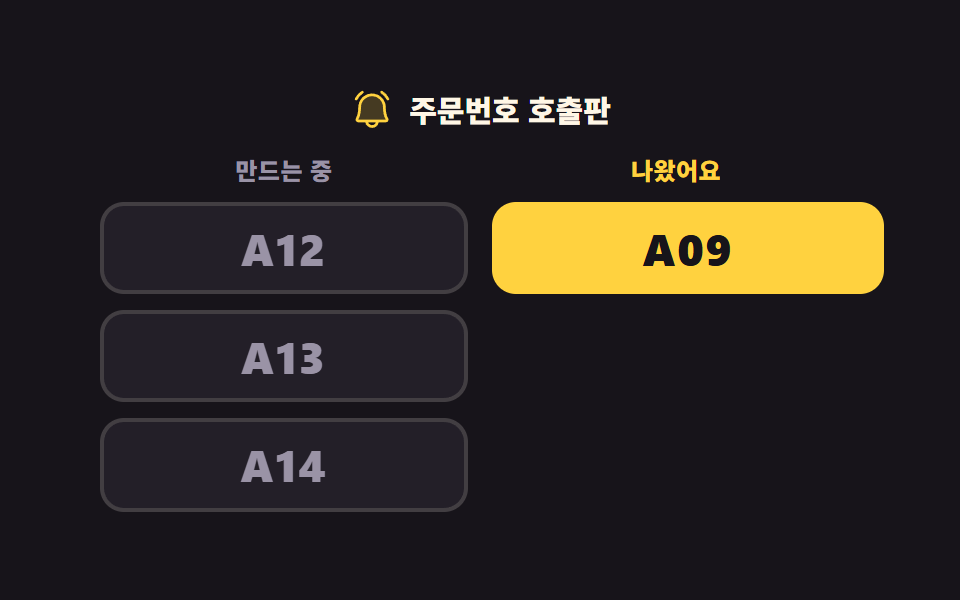
One number crosses from the preparing column to the ready column and blinks twice on arrival. The rest close the gap and step up.
Best forThe call screen above a cafe pickup counter, a number board used instead of a food court pager
translateXaria-livesteps(1, end)
<main class="stage">
<div class="kb is-demo" id="kb">
  <p class="kb__title">
    <svg xmlns="http://www.w3.org/2000/svg" viewBox="0 0 256 256" fill="currentColor" class="kb__ico" aria-hidden="true"><path d="M208,192H48a8,8,0,0,1-6.88-12C47.71,168.6,56,147.81,56,112a72,72,0,0,1,144,0c0,35.82,8.3,56.6,14.9,68A8,8,0,0,1,208,192Z" opacity="0.2"/><path d="M224,71.1a8,8,0,0,1-10.78-3.42,94.13,94.13,0,0,0-33.46-36.91,8,8,0,1,1,8.54-13.54,111.46,111.46,0,0,1,39.12,43.09A8,8,0,0,1,224,71.1ZM35.71,72a8,8,0,0,0,7.1-4.32A94.13,94.13,0,0,1,76.27,30.77a8,8,0,1,0-8.54-13.54A111.46,111.46,0,0,0,28.61,60.32,8,8,0,0,0,35.71,72Zm186.1,103.94A16,16,0,0,1,208,200H167.2a40,40,0,0,1-78.4,0H48a16,16,0,0,1-13.79-24.06C43.22,160.39,48,138.28,48,112a80,80,0,0,1,160,0C208,138.27,212.78,160.38,221.81,175.94ZM150.62,200H105.38a24,24,0,0,0,45.24,0ZM208,184c-10.64-18.27-16-42.49-16-72a64,64,0,0,0-128,0c0,29.52-5.38,53.74-16,72Z"/></svg>
    <span class="kb__titleText">Order number board</span>
  </p>
  <div class="kb__cols">
    <section class="kb__col">
      <h2 class="kb__head kb__head--making">Preparing</h2>
      <ul class="kb__list" id="making">
        <li><button type="button" class="kb__num kb__num--making kb__num--go">A12</button></li>
        <li><button type="button" class="kb__num kb__num--making kb__num--up1">A13</button></li>
        <li><button type="button" class="kb__num kb__num--making kb__num--up2">A14</button></li>
      </ul>
    </section>
    <section class="kb__col">
      <h2 class="kb__head kb__head--ready">Ready</h2>
      <ul class="kb__list" id="ready" aria-live="polite">
        <li><span class="kb__num kb__num--ready kb__num--down">A09</span></li>
      </ul>
    </section>
  </div>
</div>
</main>
@use "../../../../site/static/demo-tokens" as *;
// 주문번호 호출판 — 왼쪽 「만드는 중」, 오른쪽 「나왔어요」. 어두운 무대라 번호를 밝게 쓰되
// 오른쪽(나온 번호)은 노랑으로 눈에 띄게, 왼쪽(아직 만드는 번호)은 한 단계 낮은 밝기로 둔다
// (대비 실측은 run/298/_probe/대비.07.json — 작은 글자는 전부 4.5:1 이상).
//
// 미리보기 루프는 번호 하나가 왼쪽에서 오른쪽으로 건너가고, 도착한 번호만 두 번 깜빡이고,
// 남은 번호들이 빈자리를 메우며 올라선다. 깜빡임은 steps(1, end) 컷이다 —
// opacity 페이드로 하면 24장 표본의 중간 프레임이 반투명 유령이 되고 그 장이 poster 로 뽑힌다.
$duration: $dur-loop;
$easing: $ease-spring;
$color: $stage-yellow;
@include stage($stage-ink);
.kb { width: 100%; max-width: 380px; }
.kb__title {
display: flex; align-items: center; justify-content: center; gap: $sp-2;
margin: 0 0 $sp-3; color: $subject-cream;
font-weight: 800; font-size: clamp(12px, 3.4vw, 15px); line-height: 1.2;
}
.kb__ico { width: clamp(16px, 5vw, 22px); height: clamp(16px, 5vw, 22px); flex: 0 0 auto; color: $color; }
.kb__titleText { line-height: 1.2; }
.kb__cols { display: grid; grid-template-columns: repeat(2, 1fr); gap: $sp-3; align-items: start; }
.kb__col { min-width: 0; }
.kb__head {
margin: 0 0 $sp-2; text-align: center;
font-weight: 800; font-size: clamp(10px, 3vw, 12px); line-height: 1.2; letter-spacing: .02em;
}
.kb__head--making { color: $tick-mute; }
.kb__head--ready { color: $color; }
.kb__list { display: grid; gap: $sp-2; margin: 0; padding: 0; list-style: none; }
.kb__num {
display: block; width: 100%; margin: 0; padding: clamp(4px, 2.4vw, 8px) $sp-1;
border-radius: $r-control; text-align: center; font-family: inherit;
font-weight: 800; font-size: clamp(15px, 4.6vw, 22px); line-height: 1.2; letter-spacing: .04em;
}
.kb__num--making {
border: 2px solid rgba(255, 247, 230, .14); background: $tick-panel; color: $tick-mute; cursor: pointer;
}
.kb__num--ready {
border: 2px solid $color; background: $color; color: $subject-ink; cursor: default;
}
.kb__num:focus-visible { outline: 3px solid $subject-cream; outline-offset: 3px; }
// ── 미리보기 루프 ────────────────────────────────────────────────
// 순서가 있다. ① 오른쪽 칸이 8~24% 에 한 줄 내려가 자리를 비우고 ② 번호가 26~52% 에 건너가고
// ③ 남은 번호가 34~58% 에 올라선다. 겹쳐 돌리면 건너가는 번호가 노란 조각 위를 지나가고,
// 그 프레임(어두운 조각 위에 노랑)이 가장 크게 달라져 poster 로 뽑힌다 (298-07 실측).
// 복귀는 88% 컷 — 마지막 프레임이 2초의 95.8% 지점이라 90% 를 넘기면 아예 안 찍힌다.
// 되돌아가는 움직임을 보여 주면 "나온 번호가 다시 들어간다" 로 읽히므로 컷으로 끊는다.
.kb.is-demo .kb__num--go {
animation-name: kbGo, kbArrive;
animation-duration: $duration, $duration;
animation-timing-function: $easing, steps(1, end);
animation-iteration-count: infinite, infinite;
animation-fill-mode: backwards, backwards;
}
// 100% 는 자기 폭이고 $sp-3 은 두 칸 사이 간격이라, 둘을 더하면 정확히 오른쪽 칸의 같은 줄이다
@keyframes kbGo {
0% { transform: translateX(0); animation-timing-function: $ease-spring; }
26% { transform: translateX(0); animation-timing-function: $ease-spring; }
52% { transform: translateX(calc(100% + #{$sp-3})); animation-timing-function: steps(1, end); }
88% { transform: translateX(0); }
100% { transform: translateX(0); }
}
// 도착한 번호만 두 번 깜빡인다. 색을 바꾸는 컷이라 사라지는 프레임이 없다
@keyframes kbArrive {
0% { border-color: rgba(255, 247, 230, .14); background: $tick-panel; color: $tick-mute; }
52% { border-color: $stage-yellow; background: $stage-yellow; color: $subject-ink; }
58% { border-color: $subject-cream; background: $subject-cream; color: $subject-ink; }
66% { border-color: $stage-yellow; background: $stage-yellow; color: $subject-ink; }
70% { border-color: $subject-cream; background: $subject-cream; color: $subject-ink; }
78% { border-color: $stage-yellow; background: $stage-yellow; color: $subject-ink; }
88% { border-color: rgba(255, 247, 230, .14); background: $tick-panel; color: $tick-mute; }
100% { border-color: rgba(255, 247, 230, .14); background: $tick-panel; color: $tick-mute; }
}
.kb.is-demo .kb__num--up1,
.kb.is-demo .kb__num--up2 {
animation-name: kbUp; animation-duration: $duration;
animation-timing-function: $easing; animation-iteration-count: infinite;
animation-fill-mode: backwards;
}
// 한 줄 = 자기 높이 + 줄 간격($sp-2)
@keyframes kbUp {
0% { transform: translateY(0); animation-timing-function: $ease-spring; }
34% { transform: translateY(0); animation-timing-function: $ease-spring; }
58% { transform: translateY(calc(-100% - #{$sp-2})); animation-timing-function: steps(1, end); }
88% { transform: translateY(0); }
100% { transform: translateY(0); }
}
.kb.is-demo .kb__num--down {
animation-name: kbDown; animation-duration: $duration;
animation-timing-function: $easing; animation-iteration-count: infinite;
animation-fill-mode: backwards;
}
@keyframes kbDown {
0% { transform: translateY(0); animation-timing-function: $ease-spring; }
8% { transform: translateY(0); animation-timing-function: $ease-spring; }
24% { transform: translateY(calc(100% + #{$sp-2})); animation-timing-function: steps(1, end); }
88% { transform: translateY(0); }
100% { transform: translateY(0); }
}
@media (max-width: 340px) {
// 폰에서 쓸 수 있는 세로는 174px 남짓이다 — 좁은 화면에서는 간격을 올리지 않고 내린다
.kb__title { margin: 0 0 $sp-2; }
.kb__head { margin: 0 0 $sp-1; }
}
@media (prefers-reduced-motion: reduce) {
.kb.is-demo .kb__num--go,
.kb.is-demo .kb__num--up1,
.kb.is-demo .kb__num--up2,
.kb.is-demo .kb__num--down { animation: none !important; }
// 움직임 없이 두 칸이 각자 제자리에 선 호출판을 세워 둔다
.kb.is-demo .kb__num { transform: none !important; }
}html, body {
margin: 0;
overflow: hidden;
}
.stage {
box-sizing: border-box;
min-height: 100vh;
display: grid;
place-items: center;
margin: 0;
background: #17141a;
font-family: -apple-system, "Segoe UI", "Noto Sans KR", sans-serif;
padding: clamp(8px, 4vw, 24px);
}
.kb {
width: 100%;
max-width: 380px;
}
.kb__title {
display: flex;
align-items: center;
justify-content: center;
gap: 8px;
margin: 0 0 12px;
color: #fff7e6;
font-weight: 800;
font-size: clamp(12px, 3.4vw, 15px);
line-height: 1.2;
}
.kb__ico {
width: clamp(16px, 5vw, 22px);
height: clamp(16px, 5vw, 22px);
flex: 0 0 auto;
color: #ffd23f;
}
.kb__titleText {
line-height: 1.2;
}
.kb__cols {
display: grid;
grid-template-columns: repeat(2, 1fr);
gap: 12px;
align-items: start;
}
.kb__col {
min-width: 0;
}
.kb__head {
margin: 0 0 8px;
text-align: center;
font-weight: 800;
font-size: clamp(10px, 3vw, 12px);
line-height: 1.2;
letter-spacing: 0.02em;
}
.kb__head--making {
color: #9a93a6;
}
.kb__head--ready {
color: #ffd23f;
}
.kb__list {
display: grid;
gap: 8px;
margin: 0;
padding: 0;
list-style: none;
}
.kb__num {
display: block;
width: 100%;
margin: 0;
padding: clamp(4px, 2.4vw, 8px) 4px;
border-radius: 12px;
text-align: center;
font-family: inherit;
font-weight: 800;
font-size: clamp(15px, 4.6vw, 22px);
line-height: 1.2;
letter-spacing: 0.04em;
}
.kb__num--making {
border: 2px solid rgba(255, 247, 230, 0.14);
background: #231f28;
color: #9a93a6;
cursor: pointer;
}
.kb__num--ready {
border: 2px solid #ffd23f;
background: #ffd23f;
color: #17141a;
cursor: default;
}
.kb__num:focus-visible {
outline: 3px solid #fff7e6;
outline-offset: 3px;
}
.kb.is-demo .kb__num--go {
animation-name: kbGo, kbArrive;
animation-duration: 2s, 2s;
animation-timing-function: cubic-bezier(0.2, 0.8, 0.2, 1), steps(1, end);
animation-iteration-count: infinite, infinite;
animation-fill-mode: backwards, backwards;
}
@keyframes kbGo {
0% {
transform: translateX(0);
animation-timing-function: cubic-bezier(0.2, 0.8, 0.2, 1);
}
26% {
transform: translateX(0);
animation-timing-function: cubic-bezier(0.2, 0.8, 0.2, 1);
}
52% {
transform: translateX(calc(100% + 12px));
animation-timing-function: steps(1, end);
}
88% {
transform: translateX(0);
}
100% {
transform: translateX(0);
}
}
@keyframes kbArrive {
0% {
border-color: rgba(255, 247, 230, 0.14);
background: #231f28;
color: #9a93a6;
}
52% {
border-color: #ffd23f;
background: #ffd23f;
color: #17141a;
}
58% {
border-color: #fff7e6;
background: #fff7e6;
color: #17141a;
}
66% {
border-color: #ffd23f;
background: #ffd23f;
color: #17141a;
}
70% {
border-color: #fff7e6;
background: #fff7e6;
color: #17141a;
}
78% {
border-color: #ffd23f;
background: #ffd23f;
color: #17141a;
}
88% {
border-color: rgba(255, 247, 230, 0.14);
background: #231f28;
color: #9a93a6;
}
100% {
border-color: rgba(255, 247, 230, 0.14);
background: #231f28;
color: #9a93a6;
}
}
.kb.is-demo .kb__num--up1,
.kb.is-demo .kb__num--up2 {
animation-name: kbUp;
animation-duration: 2s;
animation-timing-function: cubic-bezier(0.2, 0.8, 0.2, 1);
animation-iteration-count: infinite;
animation-fill-mode: backwards;
}
@keyframes kbUp {
0% {
transform: translateY(0);
animation-timing-function: cubic-bezier(0.2, 0.8, 0.2, 1);
}
34% {
transform: translateY(0);
animation-timing-function: cubic-bezier(0.2, 0.8, 0.2, 1);
}
58% {
transform: translateY(calc(-100% - 8px));
animation-timing-function: steps(1, end);
}
88% {
transform: translateY(0);
}
100% {
transform: translateY(0);
}
}
.kb.is-demo .kb__num--down {
animation-name: kbDown;
animation-duration: 2s;
animation-timing-function: cubic-bezier(0.2, 0.8, 0.2, 1);
animation-iteration-count: infinite;
animation-fill-mode: backwards;
}
@keyframes kbDown {
0% {
transform: translateY(0);
animation-timing-function: cubic-bezier(0.2, 0.8, 0.2, 1);
}
8% {
transform: translateY(0);
animation-timing-function: cubic-bezier(0.2, 0.8, 0.2, 1);
}
24% {
transform: translateY(calc(100% + 8px));
animation-timing-function: steps(1, end);
}
88% {
transform: translateY(0);
}
100% {
transform: translateY(0);
}
}
@media (max-width: 340px) {
.kb__title {
margin: 0 0 8px;
}
.kb__head {
margin: 0 0 4px;
}
}
@media (prefers-reduced-motion: reduce) {
.kb.is-demo .kb__num--go,
.kb.is-demo .kb__num--up1,
.kb.is-demo .kb__num--up2,
.kb.is-demo .kb__num--down {
animation: none !important;
}
.kb.is-demo .kb__num {
transform: none !important;
}
}var kb = document.getElementById('kb');
var making = document.getElementById('making');
var ready = document.getElementById('ready');
var MAX_READY = 3;
// 「Preparing」의 번호를 누르면(Enter 도 같다 — 네이티브 button) 그 조각이 「Ready」 칸 맨 위로 옮겨간다.
// 옮겨 간 칸에 aria-live="polite" 가 붙어 있어 화면을 못 보는 사람도 새로 나온 번호를 듣는다.
// 미리보기 루프(.is-demo)는 CSS 키프레임이고 여기는 실제 DOM 이동이라 둘은 별개 코드다.
making.addEventListener('click', function (e) {
var btn = e.target.closest('.kb__num');
if (!btn || btn.disabled) return;
kb.classList.remove('is-demo');
var row = btn.parentNode;
btn.className = 'kb__num kb__num--ready';
btn.disabled = true;
ready.insertBefore(row, ready.firstChild);
// 호출판은 최근 MAX_READY 건만 남긴다. 무한히 쌓으면 칸이 화면 밖으로 자란다
// (298-07 실측: 네 칸이 되자 320×200 에서 문서높이 239px — 조작 전만 재는 BD9 는 이걸 못 본다)
while (ready.children.length > MAX_READY) ready.removeChild(ready.lastElementChild);
var next = making.querySelector('.kb__num');
if (next) next.focus({ preventScroll: true });
});// OrderNumberBoard — vanilla 판(run/298/demo/07-kiosk-order-number-board/index.html) 의 React 포트.
// 「만드는 중」의 번호를 누르면(Enter 도 같다 — 네이티브 button) 그 조각이 「나왔어요」 칸 맨 위로 옮겨간다.
// 옮겨 간 칸에 aria-live="polite" 가 붙어 있어 화면을 못 보는 사람도 새로 나온 번호를 듣는다.
// 미리보기 루프(.isDemo)는 CSS 키프레임이고 여기는 실제 목록 이동이라 둘은 별개 코드다.
import { useEffect, useRef, useState } from "react";
import type { CSSProperties } from "react";
import styles from "./OrderNumberBoard.module.scss";
export type OrderNumberBoardProps = {
duration?: number;
easing?: string;
color?: string;
};
type Vars = CSSProperties & {
"--duration"?: string;
"--easing"?: string;
"--color"?: string;
};
// useRef 는 T | null 을 돌려준다. 처음부터 값이 있고 절대 비지 않는 상자는 이렇게 좁혀 쓴다
type Box<T> = { current: T };
// 나온 번호 한 줄 — moved 는 사람이 눌러 건너온 조각인지(그러면 disabled 버튼이다)
type Ready = { num: string; moved: boolean };
const BOARD_TITLE = "주문번호 호출판";
const HEAD_MAKING = "만드는 중";
const HEAD_READY = "나왔어요";
// 호출판은 최근 MAX_READY 건만 남긴다. 무한히 쌓으면 칸이 화면 밖으로 자란다
// (298-07 실측: 네 칸이 되자 320×200 에서 문서높이 239px — 조작 전만 재는 BD9 는 이걸 못 본다)
const MAX_READY = 3;
const FIRST_MAKING = ["A12", "A13", "A14"];
const FIRST_READY: Ready[] = [{ num: "A09", moved: false }];
// 왼쪽 칸의 자리마다 붙는 미리보기 클래스 — 맨 위는 건너가고 아래 둘은 빈자리를 메우며 올라선다
const MAKING_ANIM = ["numGo", "numUp1", "numUp2"];
export default function OrderNumberBoard({
duration = 2000,
easing = "cubic-bezier(.2, .8, .2, 1)",
color = "#ffd23f",
}: OrderNumberBoardProps) {
const makingRef = useRef<HTMLUListElement | null>(null);
const wantFocusRef = useRef<boolean>(false) as Box<boolean>;
const [demo, setDemo] = useState(true);
const [making, setMaking] = useState<string[]>(FIRST_MAKING);
const [ready, setReady] = useState<Ready[]>(FIRST_READY);
const vars: Vars = { "--duration": `${duration}ms`, "--easing": easing, "--color": color };
// 옮긴 뒤 남은 줄의 맨 위로 초점을 넘긴다 — 목록이 다시 그려진 다음이라야 그 버튼이 있다
useEffect(() => {
if (!wantFocusRef.current) return;
wantFocusRef.current = false;
const list = makingRef.current;
if (!list) return;
const next = list.querySelector("button");
if (next) next.focus({ preventScroll: true });
}, [making]);
function call(num: string): void {
setDemo(false);
setMaking(making.filter((item) => item !== num));
setReady([{ num: num, moved: true }].concat(ready).slice(0, MAX_READY));
wantFocusRef.current = true;
}
const cls = [styles.root, demo ? styles.isDemo : ""].filter(Boolean).join(" ");
return (
<main className={styles.stage}>
<div className={cls} style={vars}>
<p className={styles.title}>
<svg xmlns="http://www.w3.org/2000/svg" viewBox="0 0 256 256" fill="currentColor" className={styles.ico} aria-hidden="true"><path d="M208,192H48a8,8,0,0,1-6.88-12C47.71,168.6,56,147.81,56,112a72,72,0,0,1,144,0c0,35.82,8.3,56.6,14.9,68A8,8,0,0,1,208,192Z" opacity="0.2"/><path d="M224,71.1a8,8,0,0,1-10.78-3.42,94.13,94.13,0,0,0-33.46-36.91,8,8,0,1,1,8.54-13.54,111.46,111.46,0,0,1,39.12,43.09A8,8,0,0,1,224,71.1ZM35.71,72a8,8,0,0,0,7.1-4.32A94.13,94.13,0,0,1,76.27,30.77a8,8,0,1,0-8.54-13.54A111.46,111.46,0,0,0,28.61,60.32,8,8,0,0,0,35.71,72Zm186.1,103.94A16,16,0,0,1,208,200H167.2a40,40,0,0,1-78.4,0H48a16,16,0,0,1-13.79-24.06C43.22,160.39,48,138.28,48,112a80,80,0,0,1,160,0C208,138.27,212.78,160.38,221.81,175.94ZM150.62,200H105.38a24,24,0,0,0,45.24,0ZM208,184c-10.64-18.27-16-42.49-16-72a64,64,0,0,0-128,0c0,29.52-5.38,53.74-16,72Z"/></svg>
<span className={styles.titleText}>{BOARD_TITLE}</span>
</p>
<div className={styles.cols}>
<section className={styles.col}>
<h2 className={`${styles.head} ${styles.headMaking}`}>{HEAD_MAKING}</h2>
<ul className={styles.list} ref={makingRef}>
{making.map((num, i) => (
<li key={num}>
<button
type="button"
className={`${styles.num} ${styles.numMaking} ${styles[MAKING_ANIM[i]] || ""}`}
onClick={() => call(num)}
>{num}</button>
</li>
))}
</ul>
</section>
<section className={styles.col}>
<h2 className={`${styles.head} ${styles.headReady}`}>{HEAD_READY}</h2>
<ul className={styles.list} aria-live="polite">
{ready.map((item) => (
<li key={item.num}>
{item.moved ? (
<button type="button" className={`${styles.num} ${styles.numReady}`} disabled>{item.num}</button>
) : (
<span className={`${styles.num} ${styles.numReady} ${styles.numDown}`}>{item.num}</span>
)}
</li>
))}
</ul>
</section>
</div>
</div>
</main>
);
}07 Order number board — Measured area 31.229% · moving frames 17/23Original by GODRICH · SCSS and React ship in the zip · Kiosk UI Design: 9 Finger-Sized Order Screens
The post this demo lives in
 Kiosk UI Design: 9 Finger-Sized Order ScreensKiosk UI design is the craft of handing a standing stranger one decision per screen. These nine finger-sized order scree See all demos in this post