09Double-line crayon buttons & inputs
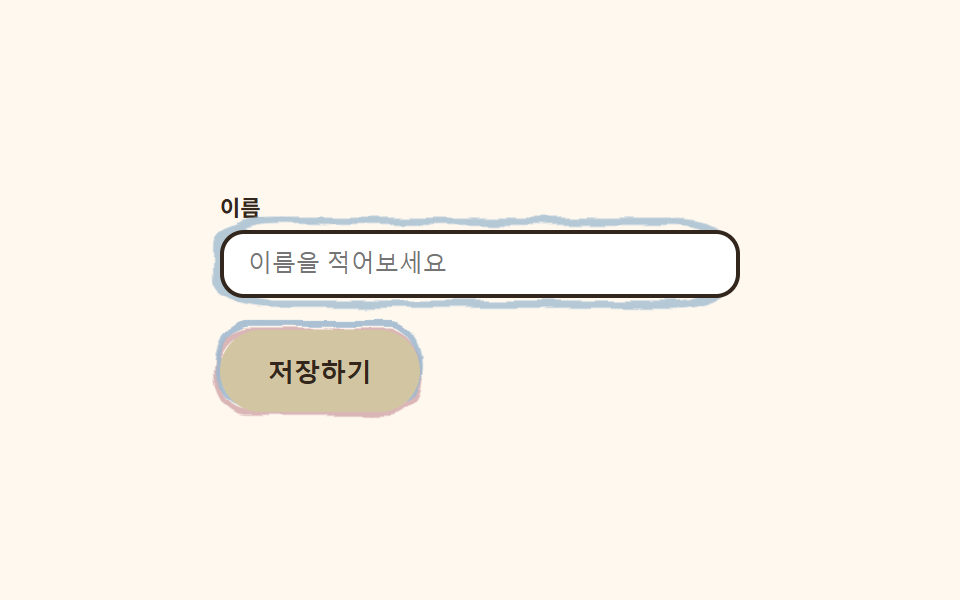
The button wears a thick crayon double-line border that shifts slightly out of register on press, and the input grows a loosely hand-drawn circle around itself on focus, spilling just past the edge. This one item bundles the whole kit's tactile feel.
Best forForm submit buttons, name and email inputs
이중선 어긋남focus 손그림 원radius 12
<main class="stage">
  <svg width="0" height="0" style="position:absolute" aria-hidden="true" focusable="false">
    <filter id="rough9" x="-40%" y="-40%" width="180%" height="180%">
      <feTurbulence type="fractalNoise" baseFrequency="0.05 0.07" numOctaves="2" seed="51" result="n"/>
      <feDisplacementMap in="SourceGraphic" in2="n" scale="5" xChannelSelector="R" yChannelSelector="G"/>
    </filter>
  </svg>
  <form class="formcrayon">
    <label class="formcrayon__field">
      <span class="formcrayon__label">Name</span>
      <span class="formcrayon__input-wrap">
        <svg class="formcrayon__ring" viewBox="0 0 100 40" preserveAspectRatio="none" aria-hidden="true">
          <rect x="3" y="3" width="94" height="34" rx="10" class="formcrayon__ring-rect" />
        </svg>
        <input class="formcrayon__input" type="text" placeholder="Type your name" readonly>
      </span>
    </label>
    <span class="formcrayon__btn-wrap">
      <svg class="formcrayon__btn-frame" viewBox="0 0 110 40" preserveAspectRatio="none" aria-hidden="true">
        <rect x="5" y="5" width="100" height="30" rx="15" class="formcrayon__btn-rect formcrayon__btn-rect--a" />
        <rect x="3" y="3" width="100" height="30" rx="15" class="formcrayon__btn-rect formcrayon__btn-rect--b" />
      </svg>
      <button class="formcrayon__btn" type="button">Save</button>
    </span>
  </form>
</main>@use "../../../../site/static/demo-tokens" as *;
$duration: $dur-loop; // 이중선이 한 번 어긋났다 돌아오는 주기
$easing: $ease-spring; // 어긋남 곡선
$color: $stage-ink; // 글자 색 기본값(토큰) — 아래 크레용 잉크로 덮는다
$crayon-paper: #fff8ef;
$crayon-ink: #33261c;
$crayon-red: #dbb6b7;
$crayon-yellow: #d1c5a2;
$crayon-blue: #9cb8ce;
$crayon-green: #6dbe6d;
$crayon-purple: #cbbfe0;
@include stage($crayon-paper);
.formcrayon {
display: flex;
flex-direction: column;
align-items: flex-start;
gap: $sp-4;
width: clamp(210px, 74vw, 260px);
}
.formcrayon__field {
display: flex;
flex-direction: column;
gap: $sp-1;
width: 100%;
}
.formcrayon__label {
color: $crayon-ink;
font-weight: 700;
font-size: 11px;
}
.formcrayon__input-wrap {
position: relative;
display: block;
}
.formcrayon__ring {
position: absolute;
inset: -8px;
width: calc(100% + 16px);
height: calc(100% + 16px);
pointer-events: none;
filter: url(#rough9);
}
.formcrayon__ring-rect {
fill: none;
stroke: $crayon-blue;
stroke-width: 3;
stroke-linecap: round;
animation: ringBloom $duration $easing infinite;
}
.formcrayon__input {
position: relative;
box-sizing: border-box;
width: 100%;
border: 2px solid $crayon-ink;
border-radius: $r-control;
background: $stage-paper;
color: $crayon-ink;
padding: $sp-2 $sp-3;
font-weight: 500;
font-size: 12px;
}
.formcrayon__input:focus-visible {
outline: 3px solid $crayon-blue;
outline-offset: 2px;
}
.formcrayon__btn-wrap {
position: relative;
display: inline-block;
}
.formcrayon__btn-frame {
position: absolute;
inset: -6px;
width: calc(100% + 12px);
height: calc(100% + 12px);
pointer-events: none;
filter: url(#rough9);
}
.formcrayon__btn-rect {
fill: none;
stroke-width: 2.6;
}
.formcrayon__btn-rect--a { stroke: $crayon-red; animation: lineShiftA $duration $easing infinite; }
.formcrayon__btn-rect--b { stroke: $crayon-blue; opacity: .85; animation: lineShiftB $duration $easing infinite; }
.formcrayon__btn {
position: relative;
border: 0;
border-radius: $r-pill;
background: $crayon-yellow;
color: $crayon-ink;
padding: $sp-3 $sp-6;
font-weight: 700;
font-size: 13px;
}
.formcrayon__btn:focus-visible {
outline: 3px solid $crayon-ink;
outline-offset: 2px;
}
// 데모: 인풋은 손으로 두른 동그라미가 번지듯 피어났다 사라지고, 버튼은 두 선이 살짝 어긋났다 돌아온다
@keyframes ringBloom {
0% { opacity: 0; transform: scale(.9); }
35% { opacity: 1; transform: scale(1); }
70% { opacity: 1; transform: scale(1.03); }
100% { opacity: 0; transform: scale(1.06); }
}
@keyframes lineShiftA {
0%, 100% { transform: translate(0, 0); }
50% { transform: translate(-2px, 1px); }
}
@keyframes lineShiftB {
0%, 100% { transform: translate(0, 0); }
50% { transform: translate(2px, -1px); }
}
@media (max-width: 340px), (max-height: 220px) {
.formcrayon { gap: $sp-2; }
.formcrayon__btn { padding: $sp-2 $sp-4; }
}
@media (prefers-reduced-motion: reduce) {
.formcrayon__ring-rect, .formcrayon__btn-rect {
animation: none !important;
transform: none;
}
.formcrayon__ring-rect { opacity: .8; }
}html, body {
margin: 0;
overflow: hidden;
}
.stage {
box-sizing: border-box;
min-height: 100vh;
display: grid;
place-items: center;
margin: 0;
background: #fff8ef;
font-family: -apple-system, "Segoe UI", "Noto Sans KR", sans-serif;
padding: clamp(8px, 4vw, 24px);
}
.formcrayon {
display: flex;
flex-direction: column;
align-items: flex-start;
gap: 16px;
width: clamp(210px, 74vw, 260px);
}
.formcrayon__field {
display: flex;
flex-direction: column;
gap: 4px;
width: 100%;
}
.formcrayon__label {
color: #33261c;
font-weight: 700;
font-size: 11px;
}
.formcrayon__input-wrap {
position: relative;
display: block;
}
.formcrayon__ring {
position: absolute;
inset: -8px;
width: calc(100% + 16px);
height: calc(100% + 16px);
pointer-events: none;
filter: url(#rough9);
}
.formcrayon__ring-rect {
fill: none;
stroke: #9cb8ce;
stroke-width: 3;
stroke-linecap: round;
animation: ringBloom 2s cubic-bezier(0.2, 0.8, 0.2, 1) infinite;
}
.formcrayon__input {
position: relative;
box-sizing: border-box;
width: 100%;
border: 2px solid #33261c;
border-radius: 12px;
background: #ffffff;
color: #33261c;
padding: 8px 12px;
font-weight: 500;
font-size: 12px;
}
.formcrayon__input:focus-visible {
outline: 3px solid #9cb8ce;
outline-offset: 2px;
}
.formcrayon__btn-wrap {
position: relative;
display: inline-block;
}
.formcrayon__btn-frame {
position: absolute;
inset: -6px;
width: calc(100% + 12px);
height: calc(100% + 12px);
pointer-events: none;
filter: url(#rough9);
}
.formcrayon__btn-rect {
fill: none;
stroke-width: 2.6;
}
.formcrayon__btn-rect--a {
stroke: #dbb6b7;
animation: lineShiftA 2s cubic-bezier(0.2, 0.8, 0.2, 1) infinite;
}
.formcrayon__btn-rect--b {
stroke: #9cb8ce;
opacity: 0.85;
animation: lineShiftB 2s cubic-bezier(0.2, 0.8, 0.2, 1) infinite;
}
.formcrayon__btn {
position: relative;
border: 0;
border-radius: 999px;
background: #d1c5a2;
color: #33261c;
padding: 12px 24px;
font-weight: 700;
font-size: 13px;
}
.formcrayon__btn:focus-visible {
outline: 3px solid #33261c;
outline-offset: 2px;
}
@keyframes ringBloom {
0% {
opacity: 0;
transform: scale(0.9);
}
35% {
opacity: 1;
transform: scale(1);
}
70% {
opacity: 1;
transform: scale(1.03);
}
100% {
opacity: 0;
transform: scale(1.06);
}
}
@keyframes lineShiftA {
0%, 100% {
transform: translate(0, 0);
}
50% {
transform: translate(-2px, 1px);
}
}
@keyframes lineShiftB {
0%, 100% {
transform: translate(0, 0);
}
50% {
transform: translate(2px, -1px);
}
}
@media (max-width: 340px), (max-height: 220px) {
.formcrayon {
gap: 8px;
}
.formcrayon__btn {
padding: 8px 16px;
}
}
@media (prefers-reduced-motion: reduce) {
.formcrayon__ring-rect, .formcrayon__btn-rect {
animation: none !important;
transform: none;
}
.formcrayon__ring-rect {
opacity: 0.8;
}
}import type { CSSProperties } from "react";
import styles from "./ButtonsInputsCrayon.module.scss";
export type ButtonsInputsCrayonProps = {
label?: string;
placeholder?: string;
cta?: string;
duration?: number;
easing?: string;
color?: string;
};
type Vars = CSSProperties & { "--duration"?: string; "--easing"?: string; "--color"?: string };
export default function ButtonsInputsCrayon({
label = "이름",
placeholder = "이름을 적어보세요",
cta = "저장하기",
duration = 2000,
easing = "cubic-bezier(.2,.8,.2,1)",
color = "#4fa3e3",
}: ButtonsInputsCrayonProps) {
const vars: Vars = { "--duration": `${duration}ms`, "--easing": easing, "--color": color };
return (
<form className={styles.form} style={vars}>
<svg width="0" height="0" style={{ position: "absolute" }} aria-hidden="true" focusable="false">
<filter id="bi-rough" x="-40%" y="-40%" width="180%" height="180%">
<feTurbulence type="fractalNoise" baseFrequency={0.06} numOctaves={2} seed={51} result="n" />
<feDisplacementMap in="SourceGraphic" in2="n" scale={5} xChannelSelector="R" yChannelSelector="G" />
</filter>
</svg>
<label className={styles.field}>
<span className={styles.label}>{label}</span>
<span className={styles.inputWrap}>
<svg className={styles.ring} viewBox="0 0 100 40" preserveAspectRatio="none" aria-hidden="true">
<rect x={3} y={3} width={94} height={34} rx={10} className={styles.ringRect} />
</svg>
<input className={styles.input} type="text" placeholder={placeholder} />
</span>
</label>
<span className={styles.btnWrap}>
<svg className={styles.btnFrame} viewBox="0 0 110 40" preserveAspectRatio="none" aria-hidden="true">
<rect x={5} y={5} width={100} height={30} rx={15} className={`${styles.btnRect} ${styles.btnRectA}`} />
<rect x={3} y={3} width={100} height={30} rx={15} className={`${styles.btnRect} ${styles.btnRectB}`} />
</svg>
<button type="button" className={styles.btn}>{cta}</button>
</span>
</form>
);
}09 Double-line crayon buttons & inputs — Measured area 3.212% · moving frames 18/23Original by GODRICH · SCSS and React ship in the zip · Crayon Web Design: 9 Hand-Drawn Landing Sections
The post this demo lives in
 Crayon Web Design: 9 Hand-Drawn Landing SectionsCrayon web design draws thick, wobbly outlines around cards and buttons and runs an SVG filter on just those outlines, s See all demos in this post