02A Check Where a Dial Turns a Tilted Landscape Upright and a Spring Snaps It In Once the Angle Is Close
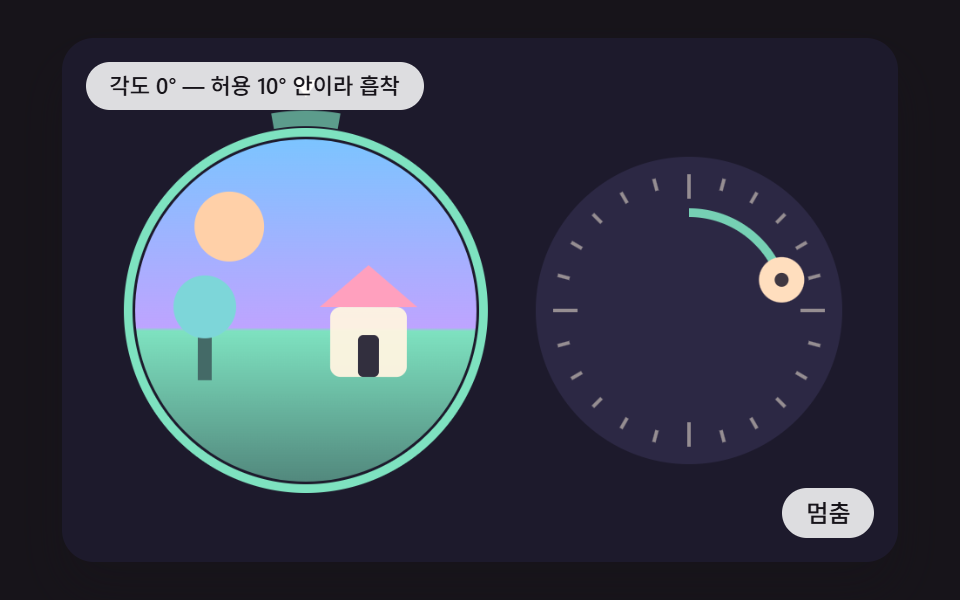
The dial angle is mapped to the scene rotation, and once the horizon falls inside the tolerance a spring pulls the remaining angle to zero. Outside it, the scene is left where it is.
Best forPhoto orientation checks and image rotation checks
SNAP_DEGDIAL_GAINSPRING_KDAMP
<main class="stage">
<div class="cp is-demo" id="cp">
  <canvas class="cp__canvas" data-role="canvas" width="480" height="300" tabindex="0" aria-label="A Check Where a Dial Turns a Tilted Landscape Upright and a Spring Snaps It In Once the Angle Is Close"></canvas>
  <p class="cp__status" data-role="status" aria-live="polite">Starting the demo</p>
  <button class="cp__btn" data-role="btn" type="button">Pause</button>
</div>
</main>
@use "../../../../site/static/demo-tokens" as *;
@include stage($stage-ink);
.cp {
position: relative;
width: min(92vw, calc(160vh - 12.8vw));
aspect-ratio: 480 / 300;
margin: 0 auto;
border-radius: $r-card;
overflow: hidden;
box-shadow: $shadow-raised;
background: $subject-ink;
}
.cp__canvas {
display: block;
width: 100%;
height: 100%;
touch-action: none;
}
.cp__canvas:focus-visible {
outline: 2px solid rgba(255, 255, 255, .85);
outline-offset: -6px;
}
.cp__status {
position: absolute;
left: $sp-3;
top: $sp-3;
max-width: 62%;
margin: 0;
padding: $sp-1 $sp-3;
border-radius: $r-pill;
background: rgba(255, 255, 255, .85);
color: $subject-ink;
font-weight: 500;
font-size: 11px;
line-height: 1.4;
pointer-events: none;
}
.cp__btn {
position: absolute;
right: $sp-3;
bottom: $sp-3;
margin: 0;
padding: $sp-1 $sp-3;
border: 0;
border-radius: $r-pill;
background: rgba(255, 255, 255, .85);
color: $subject-ink;
font-family: inherit;
font-weight: 500;
font-size: 12px;
line-height: 1.4;
cursor: pointer;
}
.cp__btn:focus-visible {
outline: 2px solid #ffffff;
outline-offset: 2px;
}
@media (max-width: 340px) {
.cp__btn { font-size: 10px; padding: $sp-1 $sp-2; }
.cp__status { font-size: 10px; }
}
@media (prefers-reduced-motion: reduce) {
.cp { cursor: default; }
}html, body {
margin: 0;
overflow: hidden;
}
.stage {
box-sizing: border-box;
min-height: 100vh;
display: grid;
place-items: center;
margin: 0;
background: #17141a;
font-family: -apple-system, "Segoe UI", "Noto Sans KR", sans-serif;
padding: clamp(8px, 4vw, 24px);
}
.cp {
position: relative;
width: min(92vw, 160vh - 12.8vw);
aspect-ratio: 480/300;
margin: 0 auto;
border-radius: 16px;
overflow: hidden;
box-shadow: 0 14px 24px rgba(23, 20, 26, 0.32);
background: #17141a;
}
.cp__canvas {
display: block;
width: 100%;
height: 100%;
touch-action: none;
}
.cp__canvas:focus-visible {
outline: 2px solid rgba(255, 255, 255, 0.85);
outline-offset: -6px;
}
.cp__status {
position: absolute;
left: 12px;
top: 12px;
max-width: 62%;
margin: 0;
padding: 4px 12px;
border-radius: 999px;
background: rgba(255, 255, 255, 0.85);
color: #17141a;
font-weight: 500;
font-size: 11px;
line-height: 1.4;
pointer-events: none;
}
.cp__btn {
position: absolute;
right: 12px;
bottom: 12px;
margin: 0;
padding: 4px 12px;
border: 0;
border-radius: 999px;
background: rgba(255, 255, 255, 0.85);
color: #17141a;
font-family: inherit;
font-weight: 500;
font-size: 12px;
line-height: 1.4;
cursor: pointer;
}
.cp__btn:focus-visible {
outline: 2px solid #ffffff;
outline-offset: 2px;
}
@media (max-width: 340px) {
.cp__btn {
font-size: 10px;
padding: 4px 8px;
}
.cp__status {
font-size: 10px;
}
}
@media (prefers-reduced-motion: reduce) {
.cp {
cursor: default;
}
}(function () {
const root = document.getElementById("cp");
if (!root)
return;
const W = 480;
const H = 300;
const PI2 = Math.PI * 2;
const FIXED_DT = 16;
const IDLE_TICKS = 150;
const BTN_PAUSE = 'Pause';
const BTN_PLAY = 'Play';
const BTN_NEXT = 'Next scene';
// 파스텔 팔레트 - 어두운 판 위에 밝은 색을 얹어 명도 차로 읽힌다
const BG = [29, 26, 44];
const PANEL = [44, 40, 68];
const MINT = [126, 226, 192];
const SKY = [124, 196, 255];
const LILAC = [190, 164, 255];
const PINK = [255, 160, 190];
const PEACH = [255, 208, 168];
const CREAM = [255, 244, 224];
const CHARSET = 'ABCDEFGHJKLMNPQRSTUVWXYZabdefghmnqrt23456789';
function clamp(v, lo, hi) { return v < lo ? lo : (v > hi ? hi : v); }
function lerp(a, b, k) { return a + (b - a) * k; }
function smooth(x) { const c = clamp(x, 0, 1); return c * c * (3 - 2 * c); }
function easeOutBack(x) { const c = clamp(x, 0, 1) - 1; return 1 + c * c * (2.7 * c + 1.7); }
function rgba(c, a) {
return 'rgba(' + Math.round(c[0]) + ',' + Math.round(c[1]) + ',' + Math.round(c[2]) + ',' + clamp(a, 0, 1).toFixed(3) + ')';
}
function mix(a, b, k) {
return [lerp(a[0], b[0], k), lerp(a[1], b[1], k), lerp(a[2], b[2], k)];
}
// 시드 고정 난수 - 같은 시드면 언제나 같은 수열 (선형 합동 방식)
function lcg(seed) {
let s = seed >>> 0;
return function () {
s = (Math.imul(s, 1664525) + 1013904223) >>> 0;
return s / 4294967296;
};
}
// 정수 두 개와 시드로 0 이상 1 미만의 값을 만드는 해시 (같은 입력은 늘 같은 값)
function hash2(x, y, seed) {
let h = (Math.imul(x | 0, 374761393) + Math.imul(y | 0, 668265263) + Math.imul(seed | 0, 1442695041)) | 0;
h = Math.imul(h ^ (h >>> 13), 1274126177);
h ^= h >>> 16;
return (h >>> 0) / 4294967296;
}
// 시드로 뜻 없는 글자열을 만든다
function glyphStr(seed, n) {
const r = lcg(seed * 7919 + 13);
let s = '';
for (let i = 0; i < n; i += 1) {
s += CHARSET.charAt(Math.floor(r() * CHARSET.length));
}
return s;
}
function rrect(ctx, x, y, w, h, r) {
const rr = Math.max(0, Math.min(r, w / 2, h / 2));
ctx.beginPath();
ctx.moveTo(x + rr, y);
ctx.lineTo(x + w - rr, y);
ctx.arcTo(x + w, y, x + w, y + rr, rr);
ctx.lineTo(x + w, y + h - rr);
ctx.arcTo(x + w, y + h, x + w - rr, y + h, rr);
ctx.lineTo(x + rr, y + h);
ctx.arcTo(x, y + h, x, y + h - rr, rr);
ctx.lineTo(x, y + rr);
ctx.arcTo(x, y, x + rr, y, rr);
ctx.closePath();
}
function mount(root, make) {
const canvas = root.querySelector('[data-role="canvas"]');
const statusEl = root.querySelector('[data-role="status"]');
const btnEl = root.querySelector('[data-role="btn"]');
if (!canvas || !statusEl || !btnEl) {
return function () { return; };
}
const ctx = canvas.getContext('2d');
if (!ctx) {
return function () { return; };
}
const dpr = Math.min(window.devicePixelRatio || 1, 2);
canvas.width = Math.round(W * dpr);
canvas.height = Math.round(H * dpr);
ctx.setTransform(dpr, 0, 0, dpr, 0, 0);
const reduce = window.matchMedia('(prefers-reduced-motion: reduce)').matches;
const inp = { idle: 99999, focus: false, key: false };
const scene = make(inp, reduce);
let paused = false;
let rafId = 0;
let lastTs = -1;
let accMs = 0;
let lastLabel = '';
let lastLabelTick = -999;
let lastLive = 'polite';
let tickN = 0;
let clk = 0;
let wasAuto = true;
const cleaners = [];
function listen(target, type, fn) {
target.addEventListener(type, fn);
cleaners.push(function () { target.removeEventListener(type, fn); });
}
function show() {
scene.draw(ctx);
// 시연이 혼자 돌 때는 낭독을 끄고, 사람이 만지는 동안은 값이 바뀌어도 0.7초에 한 번만 갱신한다
const live = (reduce || inp.idle <= IDLE_TICKS) ? 'polite' : 'off';
if (live !== lastLive) {
lastLive = live;
statusEl.setAttribute('aria-live', live);
}
const t = scene.label();
if (t !== lastLabel && (reduce || live === 'off' || tickN - lastLabelTick >= 44)) {
lastLabel = t;
lastLabelTick = tickN;
statusEl.textContent = t;
}
}
// 고정 간격 한 틱 - 입력이 없으면 시연 스크립트가 같은 입구로 입력을 대신 넣는다
function advance() {
inp.idle += 1;
tickN += 1;
const a = inp.idle > IDLE_TICKS;
if (a && !wasAuto) {
scene.reset();
clk = 0;
}
wasAuto = a;
if (a) {
clk += 1;
scene.auto(clk);
if (clk >= scene.CYCLE) {
clk = 0;
scene.reset();
}
}
scene.step();
}
// 움직임 줄이기: 틱을 몰아서 돌린 뒤 한 번만 그린다 (중간 보간 장면은 화면에 나오지 않는다)
function settle(n) {
for (let i = 0; i < n; i += 1) {
inp.idle = 0;
tickN += 1;
scene.step();
}
show();
}
function tick(ts) {
if (lastTs < 0) {
lastTs = ts;
}
const frameDt = Math.min(ts - lastTs, 160);
lastTs = ts;
if (!paused) {
accMs += frameDt;
while (accMs >= FIXED_DT) {
advance();
accMs -= FIXED_DT;
}
show();
}
rafId = requestAnimationFrame(tick);
}
function point(e) {
const r = canvas.getBoundingClientRect();
return [clamp((e.clientX - r.left) * W / r.width, 0, W), clamp((e.clientY - r.top) * H / r.height, 0, H)];
}
btnEl.textContent = reduce ? BTN_NEXT : BTN_PAUSE;
if (reduce) {
root.classList.remove('is-demo');
for (let i = 0; i < scene.REDUCE_TICKS; i += 1) {
advance();
}
show();
}
listen(btnEl, 'click', function () {
if (reduce) {
if (scene.next) {
scene.next();
show();
return;
}
const n = Math.round(scene.CYCLE / 3);
inp.idle = 99999;
wasAuto = true;
for (let i = 0; i < n; i += 1) {
advance();
}
show();
return;
}
paused = !paused;
if (paused) {
root.classList.remove('is-demo');
}
else {
root.classList.add('is-demo');
}
btnEl.textContent = paused ? BTN_PLAY : BTN_PAUSE;
});
listen(canvas, 'focus', function () { inp.focus = true; if (reduce) {
show();
} });
listen(canvas, 'blur', function () { inp.focus = false; inp.key = false; if (reduce) {
show();
} });
listen(canvas, 'pointerdown', function (e) {
const p = point(e);
inp.idle = 0;
inp.key = false;
try {
canvas.setPointerCapture(e.pointerId);
}
catch (err) { /* 캡처가 안 되는 환경은 그냥 넘어간다 */ }
scene.down(p[0], p[1]);
if (reduce) {
settle(30);
}
});
listen(canvas, 'pointermove', function (e) {
const p = point(e);
inp.idle = 0;
inp.key = false;
scene.move(p[0], p[1]);
if (reduce) {
settle(30);
}
});
listen(canvas, 'pointerup', function (e) {
const p = point(e);
inp.idle = 0;
scene.up(p[0], p[1]);
if (reduce) {
settle(30);
}
});
listen(canvas, 'keydown', function (e) {
inp.idle = 0;
inp.key = true;
if (scene.key(e.key)) {
e.preventDefault();
}
if (reduce) {
settle(30);
}
});
if (!reduce) {
rafId = requestAnimationFrame(tick);
}
return function () {
cancelAnimationFrame(rafId);
for (let i = 0; i < cleaners.length; i += 1) {
cleaners[i]();
}
};
}
const SNAP_DEG = 10; // 이 각도 안이면 똑바로 선 것으로 보고 끌어당긴다
const DIAL_GAIN = 1.5; // 다이얼 한 도가 그림을 몇 도 돌리는가
const SPRING_K = 190; // 흡착 스프링 세기
const DAMP = 15; // 흡착 감쇠
const IMG_X = 140;
const IMG_Y = 156;
const IMG_R = 98;
const DIAL_X = 360;
const DIAL_Y = 156;
const DIAL_R = 78;
const TXT_TURN = 'Angle {d}° · turning';
const TXT_PASS = 'Angle 0° · within {s}° so it snaps';
const TXT_MISS = 'Angle {d}° · outside the {s}° tolerance';
// PURE-BEGIN
// 각도를 -180 이상 180 미만으로 접는다
function wrapDeg(d) {
let r = (d + 180) % 360;
if (r < 0) {
r += 360;
}
return r - 180;
}
// 허용 각도 안이면 똑바로 서게 할 보정량(도), 밖이면 null
function snapCorrection(theta, snapDeg) {
const d = wrapDeg(theta);
return Math.abs(d) <= snapDeg ? -d : null;
}
// 스프링 한 걸음 (반암시적 오일러) - 위치와 속도를 돌려준다
function springStep(pos, vel, target, k, damp, dt) {
const a = -k * (pos - target) - damp * vel;
const v = vel + a * dt;
return [pos + v * dt, v];
}
// PURE-END
const make = (inp, reduce) => {
let off = 0;
let a = 0;
let corr = 0;
let corrV = 0;
let corrTarget = 0;
let mode = 'idle';
let grab = false;
let grabAng = 0;
let keyWait = 0;
let cycleN = 0;
let shake = 0;
function theta() { return DIAL_GAIN * a + off + corr; }
function startAngle() {
const r = lcg(cycleN * 53 + 11);
const sign = r() < 0.5 ? -1 : 1;
return sign * (100 + r() * 90);
}
function release() {
if (!grab && keyWait <= 0) {
return;
}
grab = false;
keyWait = 0;
const c = snapCorrection(DIAL_GAIN * a + off, SNAP_DEG);
if (c === null) {
mode = 'miss';
shake = 26;
}
else {
mode = 'pass';
corrTarget = c;
}
}
const scene = {
CYCLE: 128,
REDUCE_TICKS: 100,
reset() {
cycleN += 1;
off = startAngle();
a = 0;
corr = 0;
corrV = 0;
corrTarget = 0;
mode = 'idle';
grab = false;
keyWait = 0;
shake = 0;
},
auto(clk) {
// 홀수 번째 바퀴는 허용 각도 밖에서 놓아 실패 장면도 보인다
const miss = cycleN % 2 === 0 ? SNAP_DEG * 2.4 : SNAP_DEG * 0.55;
if (clk >= 8 && clk <= 66) {
mode = 'turn';
grab = true;
const goal = -(off - miss) / DIAL_GAIN;
a = goal * smooth((clk - 8) / 58);
}
if (clk === 70) {
release();
}
},
step() {
if (keyWait > 0) {
keyWait -= 1;
if (keyWait === 0) {
grab = true;
release();
}
}
if (mode === 'pass') {
const s = springStep(corr, corrV, corrTarget, SPRING_K, DAMP, FIXED_DT / 1000);
corr = s[0];
corrV = s[1];
}
if (shake > 0) {
shake -= 1;
}
},
draw(ctx) {
ctx.fillStyle = rgba(BG, 1);
ctx.fillRect(0, 0, W, H);
const th = theta();
const knobDeg = a + corr / DIAL_GAIN;
const ring = mode === 'pass' ? MINT : (mode === 'miss' ? PINK : CREAM);
const sx = shake > 0 ? Math.sin(shake * 1.4) * 5 : 0;
// 그림 - 둥근 창 안에서 통째로 돈다
ctx.save();
ctx.translate(IMG_X + sx, IMG_Y);
ctx.save();
ctx.beginPath();
ctx.arc(0, 0, IMG_R, 0, PI2);
ctx.clip();
ctx.rotate(th * Math.PI / 180);
const g = ctx.createLinearGradient(0, -IMG_R, 0, IMG_R);
g.addColorStop(0, rgba(SKY, 1));
g.addColorStop(0.55, rgba(LILAC, 1));
g.addColorStop(0.56, rgba(MINT, 1));
g.addColorStop(1, rgba(mix(MINT, BG, 0.45), 1));
ctx.fillStyle = g;
ctx.fillRect(-IMG_R - 4, -IMG_R - 4, IMG_R * 2 + 8, IMG_R * 2 + 8);
ctx.fillStyle = rgba(PEACH, 1);
ctx.beginPath();
ctx.arc(-44, -48, 20, 0, PI2);
ctx.fill();
ctx.fillStyle = rgba(CREAM, 0.95);
rrect(ctx, 14, -2, 44, 40, 6);
ctx.fill();
ctx.fillStyle = rgba(PINK, 1);
ctx.beginPath();
ctx.moveTo(8, -2);
ctx.lineTo(36, -26);
ctx.lineTo(64, -2);
ctx.closePath();
ctx.fill();
ctx.fillStyle = rgba(BG, 0.9);
rrect(ctx, 30, 14, 12, 24, 3);
ctx.fill();
ctx.fillStyle = rgba(mix(MINT, BG, 0.6), 1);
ctx.fillRect(-62, 6, 8, 34);
ctx.fillStyle = rgba(mix(MINT, SKY, 0.4), 1);
ctx.beginPath();
ctx.arc(-58, -2, 18, 0, PI2);
ctx.fill();
ctx.restore();
// 테두리 - 허용 각도 쐐기는 위쪽에 고정
ctx.lineWidth = 5;
ctx.strokeStyle = rgba(ring, 1);
ctx.beginPath();
ctx.arc(0, 0, IMG_R + 4, 0, PI2);
ctx.stroke();
ctx.lineWidth = 9;
ctx.strokeStyle = rgba(MINT, 0.65);
ctx.beginPath();
ctx.arc(0, 0, IMG_R + 12, -Math.PI / 2 - SNAP_DEG * Math.PI / 180, -Math.PI / 2 + SNAP_DEG * Math.PI / 180);
ctx.stroke();
ctx.fillStyle = rgba(CREAM, 1);
ctx.beginPath();
ctx.moveTo(0, -IMG_R - 24);
ctx.lineTo(-7, -IMG_R - 34);
ctx.lineTo(7, -IMG_R - 34);
ctx.closePath();
ctx.fill();
ctx.restore();
// 다이얼
ctx.save();
ctx.translate(DIAL_X, DIAL_Y);
ctx.fillStyle = rgba(PANEL, 1);
ctx.beginPath();
ctx.arc(0, 0, DIAL_R + 10, 0, PI2);
ctx.fill();
ctx.strokeStyle = rgba(CREAM, 0.5);
ctx.lineWidth = 2;
for (let i = 0; i < 24; i += 1) {
const t = i / 24 * PI2;
const r1 = DIAL_R - (i % 6 === 0 ? 14 : 7);
ctx.beginPath();
ctx.moveTo(Math.cos(t) * r1, Math.sin(t) * r1);
ctx.lineTo(Math.cos(t) * DIAL_R, Math.sin(t) * DIAL_R);
ctx.stroke();
}
const kt = (-90 + knobDeg) * Math.PI / 180;
ctx.strokeStyle = rgba(ring, 0.9);
ctx.lineWidth = 5;
ctx.beginPath();
ctx.arc(0, 0, DIAL_R - 22, -Math.PI / 2, kt, knobDeg < 0);
ctx.stroke();
ctx.fillStyle = rgba(grab ? PEACH : mix(PEACH, CREAM, 0.4), 1);
ctx.beginPath();
ctx.arc(Math.cos(kt) * (DIAL_R - 22), Math.sin(kt) * (DIAL_R - 22), 13, 0, PI2);
ctx.fill();
ctx.fillStyle = rgba(BG, 0.85);
ctx.beginPath();
ctx.arc(Math.cos(kt) * (DIAL_R - 22), Math.sin(kt) * (DIAL_R - 22), 4, 0, PI2);
ctx.fill();
ctx.restore();
if (inp.key && inp.focus) {
ctx.strokeStyle = 'rgba(255,255,255,0.92)';
ctx.lineWidth = 2.5;
ctx.beginPath();
ctx.arc(DIAL_X, DIAL_Y, DIAL_R + 14, 0, PI2);
ctx.stroke();
}
},
label() {
const d = String(Math.round(wrapDeg(theta())));
if (mode === 'pass') {
return TXT_PASS.replace('{s}', String(SNAP_DEG));
}
if (mode === 'miss') {
return TXT_MISS.replace('{d}', d).replace('{s}', String(SNAP_DEG));
}
return TXT_TURN.replace('{d}', d);
},
down(x, y) {
const dx = x - DIAL_X;
const dy = y - DIAL_Y;
if (Math.sqrt(dx * dx + dy * dy) <= DIAL_R + 18) {
grab = true;
mode = 'turn';
corr = 0;
corrV = 0;
grabAng = Math.atan2(dy, dx);
}
},
move(x, y) {
if (!grab) {
return;
}
const ang = Math.atan2(y - DIAL_Y, x - DIAL_X);
let d = ang - grabAng;
if (d > Math.PI) {
d -= PI2;
}
if (d < -Math.PI) {
d += PI2;
}
a += d * 180 / Math.PI;
grabAng = ang;
},
up() { release(); },
key(k) {
if (k === 'ArrowLeft' || k === 'ArrowRight') {
mode = 'turn';
corr = 0;
corrV = 0;
a += k === 'ArrowRight' ? 5 : -5;
keyWait = 30;
return true;
}
if (k === 'Enter' || k === ' ') {
grab = true;
release();
return true;
}
return false;
},
};
scene.reset();
return scene;
};
return mount(root, make);
})();// CapRotateDialUprightSnap - vanilla 판(02-cap-rotate-dial-upright-snap) 의 React 포트. 같은 계산을 useEffect 안에서 돌린다.
import { useEffect, useRef } from "react";
import styles from "./CapRotateDialUprightSnap.module.scss";
const cx = (s: string): string => s.split(" ").map((n) => styles[n] ?? n).join(" ");
export default function CapRotateDialUprightSnap() {
const rootRef = useRef<HTMLDivElement | null>(null);
useEffect(() => {
const root = rootRef.current;
if (!root) return;
type RGB = [number, number, number];
interface Input { idle: number; focus: boolean; key: boolean; }
interface Scene {
CYCLE: number;
REDUCE_TICKS: number;
reset(): void;
auto(clk: number): void;
step(): void;
draw(ctx: CanvasRenderingContext2D): void;
label(): string;
down(x: number, y: number): void;
move(x: number, y: number): void;
up(x: number, y: number): void;
key(k: string): boolean;
next?(): void;
}
type Make = (inp: Input, reduce: boolean) => Scene;
const W = 480;
const H = 300;
const PI2 = Math.PI * 2;
const FIXED_DT = 16;
const IDLE_TICKS = 150;
const BTN_PAUSE = '멈춤';
const BTN_PLAY = '재생';
const BTN_NEXT = '다음 장면';
// 파스텔 팔레트 - 어두운 판 위에 밝은 색을 얹어 명도 차로 읽힌다
const BG: RGB = [29, 26, 44];
const PANEL: RGB = [44, 40, 68];
const MINT: RGB = [126, 226, 192];
const SKY: RGB = [124, 196, 255];
const LILAC: RGB = [190, 164, 255];
const PINK: RGB = [255, 160, 190];
const PEACH: RGB = [255, 208, 168];
const CREAM: RGB = [255, 244, 224];
const CHARSET = 'ABCDEFGHJKLMNPQRSTUVWXYZabdefghmnqrt23456789';
function clamp(v: number, lo: number, hi: number): number { return v < lo ? lo : (v > hi ? hi : v); }
function lerp(a: number, b: number, k: number): number { return a + (b - a) * k; }
function smooth(x: number): number { const c = clamp(x, 0, 1); return c * c * (3 - 2 * c); }
function easeOutBack(x: number): number { const c = clamp(x, 0, 1) - 1; return 1 + c * c * (2.7 * c + 1.7); }
function rgba(c: RGB, a: number): string {
return 'rgba(' + Math.round(c[0]) + ',' + Math.round(c[1]) + ',' + Math.round(c[2]) + ',' + clamp(a, 0, 1).toFixed(3) + ')';
}
function mix(a: RGB, b: RGB, k: number): RGB {
return [lerp(a[0], b[0], k), lerp(a[1], b[1], k), lerp(a[2], b[2], k)];
}
// 시드 고정 난수 - 같은 시드면 언제나 같은 수열 (선형 합동 방식)
function lcg(seed: number): () => number {
let s = seed >>> 0;
return function () {
s = (Math.imul(s, 1664525) + 1013904223) >>> 0;
return s / 4294967296;
};
}
// 정수 두 개와 시드로 0 이상 1 미만의 값을 만드는 해시 (같은 입력은 늘 같은 값)
function hash2(x: number, y: number, seed: number): number {
let h = (Math.imul(x | 0, 374761393) + Math.imul(y | 0, 668265263) + Math.imul(seed | 0, 1442695041)) | 0;
h = Math.imul(h ^ (h >>> 13), 1274126177);
h ^= h >>> 16;
return (h >>> 0) / 4294967296;
}
// 시드로 뜻 없는 글자열을 만든다
function glyphStr(seed: number, n: number): string {
const r = lcg(seed * 7919 + 13);
let s = '';
for (let i = 0; i < n; i += 1) {
s += CHARSET.charAt(Math.floor(r() * CHARSET.length));
}
return s;
}
function rrect(ctx: CanvasRenderingContext2D, x: number, y: number, w: number, h: number, r: number): void {
const rr = Math.max(0, Math.min(r, w / 2, h / 2));
ctx.beginPath();
ctx.moveTo(x + rr, y);
ctx.lineTo(x + w - rr, y);
ctx.arcTo(x + w, y, x + w, y + rr, rr);
ctx.lineTo(x + w, y + h - rr);
ctx.arcTo(x + w, y + h, x + w - rr, y + h, rr);
ctx.lineTo(x + rr, y + h);
ctx.arcTo(x, y + h, x, y + h - rr, rr);
ctx.lineTo(x, y + rr);
ctx.arcTo(x, y, x + rr, y, rr);
ctx.closePath();
}
function mount(root: HTMLElement, make: Make): () => void {
const canvas = root.querySelector('[data-role="canvas"]') as HTMLCanvasElement;
const statusEl = root.querySelector('[data-role="status"]') as HTMLElement;
const btnEl = root.querySelector('[data-role="btn"]') as HTMLButtonElement;
if (!canvas || !statusEl || !btnEl) {
return function () { return; };
}
const ctx = canvas.getContext('2d') as CanvasRenderingContext2D;
if (!ctx) {
return function () { return; };
}
const dpr = Math.min(window.devicePixelRatio || 1, 2);
canvas.width = Math.round(W * dpr);
canvas.height = Math.round(H * dpr);
ctx.setTransform(dpr, 0, 0, dpr, 0, 0);
const reduce = window.matchMedia('(prefers-reduced-motion: reduce)').matches;
const inp: Input = { idle: 99999, focus: false, key: false };
const scene = make(inp, reduce);
let paused = false;
let rafId = 0;
let lastTs = -1;
let accMs = 0;
let lastLabel = '';
let lastLabelTick = -999;
let lastLive = 'polite';
let tickN = 0;
let clk = 0;
let wasAuto = true;
const cleaners: Array<() => void> = [];
function listen<K extends keyof HTMLElementEventMap>(target: HTMLElement, type: K, fn: (e: HTMLElementEventMap[K]) => void): void {
target.addEventListener(type, fn);
cleaners.push(function () { target.removeEventListener(type, fn); });
}
function show(): void {
scene.draw(ctx);
// 시연이 혼자 돌 때는 낭독을 끄고, 사람이 만지는 동안은 값이 바뀌어도 0.7초에 한 번만 갱신한다
const live = (reduce || inp.idle <= IDLE_TICKS) ? 'polite' : 'off';
if (live !== lastLive) {
lastLive = live;
statusEl.setAttribute('aria-live', live);
}
const t = scene.label();
if (t !== lastLabel && (reduce || live === 'off' || tickN - lastLabelTick >= 44)) {
lastLabel = t;
lastLabelTick = tickN;
statusEl.textContent = t;
}
}
// 고정 간격 한 틱 - 입력이 없으면 시연 스크립트가 같은 입구로 입력을 대신 넣는다
function advance(): void {
inp.idle += 1;
tickN += 1;
const a = inp.idle > IDLE_TICKS;
if (a && !wasAuto) {
scene.reset();
clk = 0;
}
wasAuto = a;
if (a) {
clk += 1;
scene.auto(clk);
if (clk >= scene.CYCLE) {
clk = 0;
scene.reset();
}
}
scene.step();
}
// 움직임 줄이기: 틱을 몰아서 돌린 뒤 한 번만 그린다 (중간 보간 장면은 화면에 나오지 않는다)
function settle(n: number): void {
for (let i = 0; i < n; i += 1) {
inp.idle = 0;
tickN += 1;
scene.step();
}
show();
}
function tick(ts: number): void {
if (lastTs < 0) {
lastTs = ts;
}
const frameDt = Math.min(ts - lastTs, 160);
lastTs = ts;
if (!paused) {
accMs += frameDt;
while (accMs >= FIXED_DT) {
advance();
accMs -= FIXED_DT;
}
show();
}
rafId = requestAnimationFrame(tick);
}
function point(e: PointerEvent): number[] {
const r = canvas.getBoundingClientRect();
return [clamp((e.clientX - r.left) * W / r.width, 0, W), clamp((e.clientY - r.top) * H / r.height, 0, H)];
}
btnEl.textContent = reduce ? BTN_NEXT : BTN_PAUSE;
if (reduce) {
root.classList.remove('is-demo');
for (let i = 0; i < scene.REDUCE_TICKS; i += 1) {
advance();
}
show();
}
listen(btnEl, 'click', function () {
if (reduce) {
if (scene.next) {
scene.next();
show();
return;
}
const n = Math.round(scene.CYCLE / 3);
inp.idle = 99999;
wasAuto = true;
for (let i = 0; i < n; i += 1) {
advance();
}
show();
return;
}
paused = !paused;
if (paused) {
root.classList.remove('is-demo');
}
else {
root.classList.add('is-demo');
}
btnEl.textContent = paused ? BTN_PLAY : BTN_PAUSE;
});
listen(canvas, 'focus', function () { inp.focus = true; if (reduce) { show(); } });
listen(canvas, 'blur', function () { inp.focus = false; inp.key = false; if (reduce) { show(); } });
listen(canvas, 'pointerdown', function (e) {
const p = point(e);
inp.idle = 0;
inp.key = false;
try { canvas.setPointerCapture(e.pointerId); } catch (err) { /* 캡처가 안 되는 환경은 그냥 넘어간다 */ }
scene.down(p[0], p[1]);
if (reduce) { settle(30); }
});
listen(canvas, 'pointermove', function (e) {
const p = point(e);
inp.idle = 0;
inp.key = false;
scene.move(p[0], p[1]);
if (reduce) { settle(30); }
});
listen(canvas, 'pointerup', function (e) {
const p = point(e);
inp.idle = 0;
scene.up(p[0], p[1]);
if (reduce) { settle(30); }
});
listen(canvas, 'keydown', function (e) {
inp.idle = 0;
inp.key = true;
if (scene.key(e.key)) {
e.preventDefault();
}
if (reduce) { settle(30); }
});
if (!reduce) {
rafId = requestAnimationFrame(tick);
}
return function () {
cancelAnimationFrame(rafId);
for (let i = 0; i < cleaners.length; i += 1) {
cleaners[i]();
}
};
}
const SNAP_DEG = 10; // 이 각도 안이면 똑바로 선 것으로 보고 끌어당긴다
const DIAL_GAIN = 1.5; // 다이얼 한 도가 그림을 몇 도 돌리는가
const SPRING_K = 190; // 흡착 스프링 세기
const DAMP = 15; // 흡착 감쇠
const IMG_X = 140;
const IMG_Y = 156;
const IMG_R = 98;
const DIAL_X = 360;
const DIAL_Y = 156;
const DIAL_R = 78;
const TXT_TURN = '각도 {d}° — 돌리는 중';
const TXT_PASS = '각도 0° — 허용 {s}° 안이라 흡착';
const TXT_MISS = '각도 {d}° — 허용 {s}° 밖';
// PURE-BEGIN
// 각도를 -180 이상 180 미만으로 접는다
function wrapDeg(d: number): number {
let r = (d + 180) % 360;
if (r < 0) { r += 360; }
return r - 180;
}
// 허용 각도 안이면 똑바로 서게 할 보정량(도), 밖이면 null
function snapCorrection(theta: number, snapDeg: number): number | null {
const d = wrapDeg(theta);
return Math.abs(d) <= snapDeg ? -d : null;
}
// 스프링 한 걸음 (반암시적 오일러) - 위치와 속도를 돌려준다
function springStep(pos: number, vel: number, target: number, k: number, damp: number, dt: number): [number, number] {
const a = -k * (pos - target) - damp * vel;
const v = vel + a * dt;
return [pos + v * dt, v];
}
// PURE-END
const make: Make = (inp, reduce) => {
let off = 0;
let a = 0;
let corr = 0;
let corrV = 0;
let corrTarget = 0;
let mode = 'idle';
let grab = false;
let grabAng = 0;
let keyWait = 0;
let cycleN = 0;
let shake = 0;
function theta(): number { return DIAL_GAIN * a + off + corr; }
function startAngle(): number {
const r = lcg(cycleN * 53 + 11);
const sign = r() < 0.5 ? -1 : 1;
return sign * (100 + r() * 90);
}
function release(): void {
if (!grab && keyWait <= 0) { return; }
grab = false;
keyWait = 0;
const c = snapCorrection(DIAL_GAIN * a + off, SNAP_DEG);
if (c === null) {
mode = 'miss';
shake = 26;
}
else {
mode = 'pass';
corrTarget = c;
}
}
const scene: Scene = {
CYCLE: 128,
REDUCE_TICKS: 100,
reset() {
cycleN += 1;
off = startAngle();
a = 0;
corr = 0;
corrV = 0;
corrTarget = 0;
mode = 'idle';
grab = false;
keyWait = 0;
shake = 0;
},
auto(clk) {
// 홀수 번째 바퀴는 허용 각도 밖에서 놓아 실패 장면도 보인다
const miss = cycleN % 2 === 0 ? SNAP_DEG * 2.4 : SNAP_DEG * 0.55;
if (clk >= 8 && clk <= 66) {
mode = 'turn';
grab = true;
const goal = -(off - miss) / DIAL_GAIN;
a = goal * smooth((clk - 8) / 58);
}
if (clk === 70) {
release();
}
},
step() {
if (keyWait > 0) {
keyWait -= 1;
if (keyWait === 0) { grab = true; release(); }
}
if (mode === 'pass') {
const s = springStep(corr, corrV, corrTarget, SPRING_K, DAMP, FIXED_DT / 1000);
corr = s[0];
corrV = s[1];
}
if (shake > 0) { shake -= 1; }
},
draw(ctx) {
ctx.fillStyle = rgba(BG, 1);
ctx.fillRect(0, 0, W, H);
const th = theta();
const knobDeg = a + corr / DIAL_GAIN;
const ring = mode === 'pass' ? MINT : (mode === 'miss' ? PINK : CREAM);
const sx = shake > 0 ? Math.sin(shake * 1.4) * 5 : 0;
// 그림 - 둥근 창 안에서 통째로 돈다
ctx.save();
ctx.translate(IMG_X + sx, IMG_Y);
ctx.save();
ctx.beginPath();
ctx.arc(0, 0, IMG_R, 0, PI2);
ctx.clip();
ctx.rotate(th * Math.PI / 180);
const g = ctx.createLinearGradient(0, -IMG_R, 0, IMG_R);
g.addColorStop(0, rgba(SKY, 1));
g.addColorStop(0.55, rgba(LILAC, 1));
g.addColorStop(0.56, rgba(MINT, 1));
g.addColorStop(1, rgba(mix(MINT, BG, 0.45), 1));
ctx.fillStyle = g;
ctx.fillRect(-IMG_R - 4, -IMG_R - 4, IMG_R * 2 + 8, IMG_R * 2 + 8);
ctx.fillStyle = rgba(PEACH, 1);
ctx.beginPath();
ctx.arc(-44, -48, 20, 0, PI2);
ctx.fill();
ctx.fillStyle = rgba(CREAM, 0.95);
rrect(ctx, 14, -2, 44, 40, 6);
ctx.fill();
ctx.fillStyle = rgba(PINK, 1);
ctx.beginPath();
ctx.moveTo(8, -2);
ctx.lineTo(36, -26);
ctx.lineTo(64, -2);
ctx.closePath();
ctx.fill();
ctx.fillStyle = rgba(BG, 0.9);
rrect(ctx, 30, 14, 12, 24, 3);
ctx.fill();
ctx.fillStyle = rgba(mix(MINT, BG, 0.6), 1);
ctx.fillRect(-62, 6, 8, 34);
ctx.fillStyle = rgba(mix(MINT, SKY, 0.4), 1);
ctx.beginPath();
ctx.arc(-58, -2, 18, 0, PI2);
ctx.fill();
ctx.restore();
// 테두리 - 허용 각도 쐐기는 위쪽에 고정
ctx.lineWidth = 5;
ctx.strokeStyle = rgba(ring, 1);
ctx.beginPath();
ctx.arc(0, 0, IMG_R + 4, 0, PI2);
ctx.stroke();
ctx.lineWidth = 9;
ctx.strokeStyle = rgba(MINT, 0.65);
ctx.beginPath();
ctx.arc(0, 0, IMG_R + 12, -Math.PI / 2 - SNAP_DEG * Math.PI / 180, -Math.PI / 2 + SNAP_DEG * Math.PI / 180);
ctx.stroke();
ctx.fillStyle = rgba(CREAM, 1);
ctx.beginPath();
ctx.moveTo(0, -IMG_R - 24);
ctx.lineTo(-7, -IMG_R - 34);
ctx.lineTo(7, -IMG_R - 34);
ctx.closePath();
ctx.fill();
ctx.restore();
// 다이얼
ctx.save();
ctx.translate(DIAL_X, DIAL_Y);
ctx.fillStyle = rgba(PANEL, 1);
ctx.beginPath();
ctx.arc(0, 0, DIAL_R + 10, 0, PI2);
ctx.fill();
ctx.strokeStyle = rgba(CREAM, 0.5);
ctx.lineWidth = 2;
for (let i = 0; i < 24; i += 1) {
const t = i / 24 * PI2;
const r1 = DIAL_R - (i % 6 === 0 ? 14 : 7);
ctx.beginPath();
ctx.moveTo(Math.cos(t) * r1, Math.sin(t) * r1);
ctx.lineTo(Math.cos(t) * DIAL_R, Math.sin(t) * DIAL_R);
ctx.stroke();
}
const kt = (-90 + knobDeg) * Math.PI / 180;
ctx.strokeStyle = rgba(ring, 0.9);
ctx.lineWidth = 5;
ctx.beginPath();
ctx.arc(0, 0, DIAL_R - 22, -Math.PI / 2, kt, knobDeg < 0);
ctx.stroke();
ctx.fillStyle = rgba(grab ? PEACH : mix(PEACH, CREAM, 0.4), 1);
ctx.beginPath();
ctx.arc(Math.cos(kt) * (DIAL_R - 22), Math.sin(kt) * (DIAL_R - 22), 13, 0, PI2);
ctx.fill();
ctx.fillStyle = rgba(BG, 0.85);
ctx.beginPath();
ctx.arc(Math.cos(kt) * (DIAL_R - 22), Math.sin(kt) * (DIAL_R - 22), 4, 0, PI2);
ctx.fill();
ctx.restore();
if (inp.key && inp.focus) {
ctx.strokeStyle = 'rgba(255,255,255,0.92)';
ctx.lineWidth = 2.5;
ctx.beginPath();
ctx.arc(DIAL_X, DIAL_Y, DIAL_R + 14, 0, PI2);
ctx.stroke();
}
},
label() {
const d = String(Math.round(wrapDeg(theta())));
if (mode === 'pass') { return TXT_PASS.replace('{s}', String(SNAP_DEG)); }
if (mode === 'miss') { return TXT_MISS.replace('{d}', d).replace('{s}', String(SNAP_DEG)); }
return TXT_TURN.replace('{d}', d);
},
down(x, y) {
const dx = x - DIAL_X;
const dy = y - DIAL_Y;
if (Math.sqrt(dx * dx + dy * dy) <= DIAL_R + 18) {
grab = true;
mode = 'turn';
corr = 0;
corrV = 0;
grabAng = Math.atan2(dy, dx);
}
},
move(x, y) {
if (!grab) { return; }
const ang = Math.atan2(y - DIAL_Y, x - DIAL_X);
let d = ang - grabAng;
if (d > Math.PI) { d -= PI2; }
if (d < -Math.PI) { d += PI2; }
a += d * 180 / Math.PI;
grabAng = ang;
},
up() { release(); },
key(k) {
if (k === 'ArrowLeft' || k === 'ArrowRight') {
mode = 'turn';
corr = 0;
corrV = 0;
a += k === 'ArrowRight' ? 5 : -5;
keyWait = 30;
return true;
}
if (k === 'Enter' || k === ' ') {
grab = true;
release();
return true;
}
return false;
},
};
scene.reset();
return scene;
};
return mount(root, make);
}, []);
return (
<div className={cx("cp") + " is-demo"} id="cp" ref={rootRef}>
<canvas className={cx("cp__canvas")} data-role="canvas" width="480" height="300" tabIndex={0} aria-label="다이얼을 돌려 기울어진 풍경을 바로 세우면 허용 각도 안에서 스프링으로 붙는 확인"></canvas>
<p className={cx("cp__status")} data-role="status" aria-live="polite">시연 준비 중</p>
<button className={cx("cp__btn")} data-role="btn" type="button">멈춤</button>
</div>
);
}02 A Check Where a Dial Turns a Tilted Landscape Upright and a Spring Snaps It In Once the Angle Is Close — Measured area 21.267% · moving frames 21/23Original by GODRICH · SCSS and React ship in the zip · CSS Captcha: 9 Warped Text and Rotate Checks
The post this demo lives in
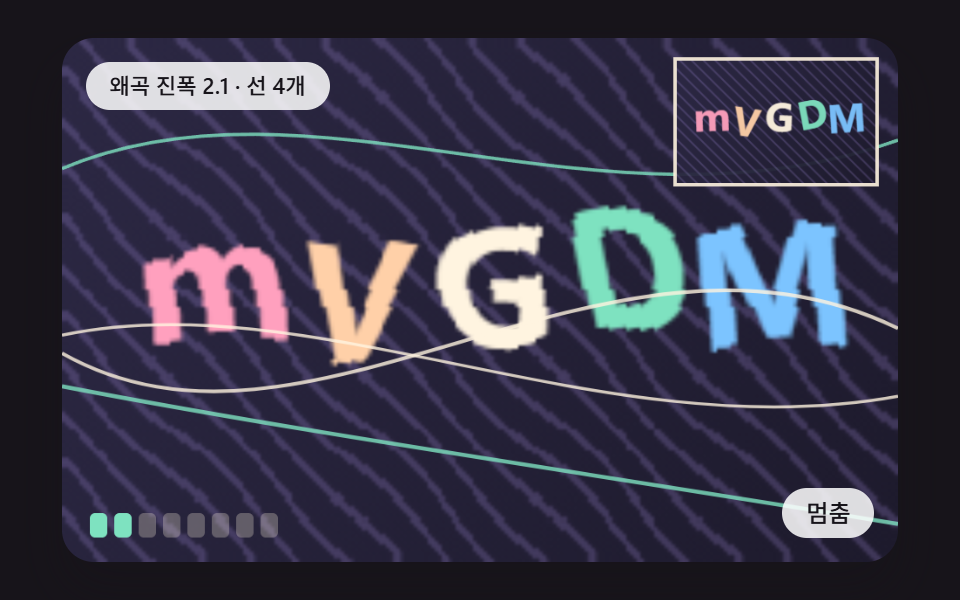 CSS Captcha: 9 Warped Text and Rotate ChecksCall it a human check, but a css captcha is arithmetic on screen — scene 01 slides glyph columns along a sine wave and s See all demos in this post
If you like this effect - similar demos
 Auth UI05 Alert banner slide-in — the banner's position value moves down from off-screen once repeated failures cross a thresholdToo Many Failed Login Attempts: 9 Patterns
 Auth UI03 Fail-shake decay — on a failed match, the icon shakes left-right along a spring-damping value that settles to zeroFingerprint Scan Animation: 9 Biometric UI Demos
 Auth UI08 Keyboard Path Where a Shortcut Toggle Brightens the Focus RingShow Password Toggle Icon: 9 Reveal Patterns