01Base Divider Whose Ends Fade to Transparent
One gradient line is solid in the middle and transparent at both ends, so the abrupt cut at the edges disappears.
Best forThe calculation skeleton behind a CSS divider
FADE_PCTLINE_H_PX
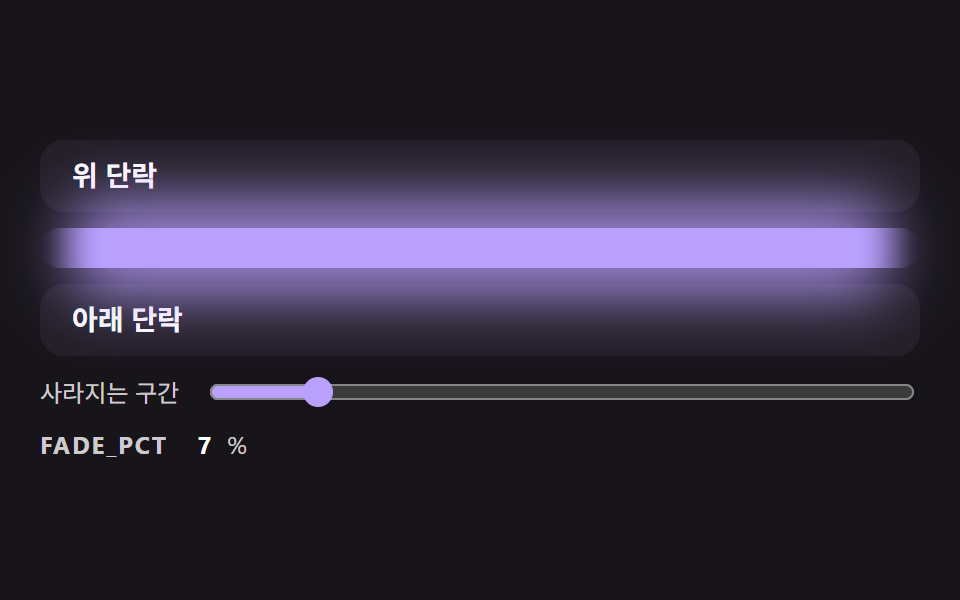
<main class="stage">
<div class="dv is-demo" id="dvRoot">
  <p class="dv__block">Upper paragraph</p>
  <div class="dv__rail">
    <div class="dv__glow" id="dvGlow"></div>
    <div class="dv__line" id="dvLine" role="separator"></div>
  </div>
  <p class="dv__block">Lower paragraph</p>
  <label class="dv__ctrl">
    <span>Fade length</span>
    <input type="range" id="dvRange" min="0" max="50" value="30">
  </label>
  <p class="dv__meta"><span class="dv__tag">FADE_PCT</span> <b id="dvPct">30</b>%</p>
</div>
</main>
@use "../../../../site/static/demo-tokens" as *;
// 핵심: 선 색의 알파를 양 끝 FADE_PCT% 구간에서만 smoothstep 곡선으로 올린다.
// 정지점은 JS 가 계산해 background 에 넣는다 (직선 보간보다 끝이 자연스럽다).
$line-h: 20px;
$line-color: $subject-lilac;
@include stage($stage-ink);
.dv {
width: min(100%, 440px);
display: grid;
gap: $sp-2;
}
.dv__block {
box-sizing: border-box;
margin: 0;
height: 36px;
padding: 0 $sp-4;
display: flex;
align-items: center;
border-radius: $r-control;
background: $tick-panel;
color: $stage-paper;
font-size: 14px;
font-weight: 700;
line-height: 20px;
}
.dv__rail {
position: relative;
height: $line-h;
}
.dv__glow {
position: absolute;
left: 0;
right: 0;
top: -14px;
bottom: -14px;
border-radius: $r-pill;
opacity: .8;
filter: blur(14px);
}
.dv__line {
position: relative;
height: $line-h;
border-radius: $r-pill;
background: $line-color;
}
.dv__ctrl {
display: flex;
align-items: center;
gap: $sp-3;
font-size: 12px;
line-height: 16px;
color: rgba($stage-paper, .78);
}
.dv__ctrl input { flex: 1; min-width: 0; accent-color: $line-color; }
.dv__meta {
margin: 0;
display: flex;
align-items: baseline;
gap: $sp-2;
font-size: 12px;
line-height: 16px;
color: rgba($stage-paper, .78);
}
.dv__tag { font-weight: 700; letter-spacing: .08em; }
.dv__meta b { min-width: 2ch; text-align: right; font-variant-numeric: tabular-nums; color: $stage-paper; }
@media (prefers-reduced-motion: reduce) {
.dv__line { transition: none; }
}html, body {
margin: 0;
overflow: hidden;
}
.stage {
box-sizing: border-box;
min-height: 100vh;
display: grid;
place-items: center;
margin: 0;
background: #17141a;
font-family: -apple-system, "Segoe UI", "Noto Sans KR", sans-serif;
padding: clamp(8px, 4vw, 24px);
}
.dv {
width: min(100%, 440px);
display: grid;
gap: 8px;
}
.dv__block {
box-sizing: border-box;
margin: 0;
height: 36px;
padding: 0 16px;
display: flex;
align-items: center;
border-radius: 12px;
background: #231f28;
color: #ffffff;
font-size: 14px;
font-weight: 700;
line-height: 20px;
}
.dv__rail {
position: relative;
height: 20px;
}
.dv__glow {
position: absolute;
left: 0;
right: 0;
top: -14px;
bottom: -14px;
border-radius: 999px;
opacity: 0.8;
filter: blur(14px);
}
.dv__line {
position: relative;
height: 20px;
border-radius: 999px;
background: #b9a0ff;
}
.dv__ctrl {
display: flex;
align-items: center;
gap: 12px;
font-size: 12px;
line-height: 16px;
color: rgba(255, 255, 255, 0.78);
}
.dv__ctrl input {
flex: 1;
min-width: 0;
accent-color: #b9a0ff;
}
.dv__meta {
margin: 0;
display: flex;
align-items: baseline;
gap: 8px;
font-size: 12px;
line-height: 16px;
color: rgba(255, 255, 255, 0.78);
}
.dv__tag {
font-weight: 700;
letter-spacing: 0.08em;
}
.dv__meta b {
min-width: 2ch;
text-align: right;
font-variant-numeric: tabular-nums;
color: #ffffff;
}
@media (prefers-reduced-motion: reduce) {
.dv__line {
transition: none;
}
}(function () {
// 기법: 선 색의 알파를 양 끝 FADE_PCT% 구간에서만 0 에서 1 로 올린다.
// 직선 보간은 선이 시작하는 곳에 띠가 보여서 smoothstep(3t^2 - 2t^3) 곡선으로 8단계 정지점을 직접 만든다.
var FADE_PCT = 30;
var LINE_H_PX = 20;
var STEPS = 8;
var CYCLE_MS = 2000;
var LOW_PCT = 6;
var HIGH_PCT = 50;
var RGB = '185,160,255';
var root = document.getElementById('dvRoot');
var line = document.getElementById('dvLine');
var glow = document.getElementById('dvGlow');
var range = document.getElementById('dvRange');
var pctEl = document.getElementById('dvPct');
var reduce = window.matchMedia('(prefers-reduced-motion: reduce)').matches;
function gradientOf(pct) {
var stops = [];
var i;
for (i = 0; i <= STEPS; i += 1) {
var t = i / STEPS;
var a = t * t * (3 - 2 * t);
stops.push('rgba(' + RGB + ',' + a.toFixed(3) + ') ' + (pct * t).toFixed(2) + '%');
}
for (i = STEPS; i >= 0; i -= 1) {
var u = i / STEPS;
var b = u * u * (3 - 2 * u);
stops.push('rgba(' + RGB + ',' + b.toFixed(3) + ') ' + (100 - pct * u).toFixed(2) + '%');
}
return 'linear-gradient(90deg,' + stops.join(',') + ')';
}
function paint(pct) {
var g = gradientOf(pct);
line.style.background = g;
glow.style.background = g;
pctEl.textContent = String(Math.round(pct));
range.value = String(Math.round(pct));
}
function stopDemo() { root.classList.remove('is-demo'); }
range.addEventListener('input', function () {
stopDemo();
FADE_PCT = Number(range.value);
paint(FADE_PCT);
});
var t0 = null;
function tick(ts) {
if (t0 === null) t0 = ts;
if (root.classList.contains('is-demo')) {
var phase = ((ts - t0) % CYCLE_MS) / CYCLE_MS;
var wave = 0.5 - 0.5 * Math.cos(phase * Math.PI * 2);
paint(LOW_PCT + (HIGH_PCT - LOW_PCT) * wave);
}
requestAnimationFrame(tick);
}
line.style.height = LINE_H_PX + 'px';
paint(FADE_PCT);
if (reduce) {
stopDemo();
} else {
requestAnimationFrame(tick);
}
})();// FadeDivider — vanilla 판(01-divl-gradient-fade-ends-line) 의 React 포트.
// 선 색의 알파를 양 끝 FADE_PCT% 구간에서만 smoothstep 곡선으로 올린다. 정지점은 JS 가 계산한다.
import { useEffect, useRef } from "react";
import styles from "./FadeDivider.module.scss";
type Box<T> = { current: T };
const LINE_H_PX = 20;
const STEPS = 8;
const CYCLE_MS = 2000;
const LOW_PCT = 6;
const HIGH_PCT = 50;
const RGB = "185,160,255";
function gradientOf(pct: number): string {
const stops: string[] = [];
for (let i = 0; i <= STEPS; i += 1) {
const t = i / STEPS;
const a = t * t * (3 - 2 * t);
stops.push("rgba(" + RGB + "," + a.toFixed(3) + ") " + (pct * t).toFixed(2) + "%");
}
for (let i = STEPS; i >= 0; i -= 1) {
const u = i / STEPS;
const b = u * u * (3 - 2 * u);
stops.push("rgba(" + RGB + "," + b.toFixed(3) + ") " + (100 - pct * u).toFixed(2) + "%");
}
return "linear-gradient(90deg," + stops.join(",") + ")";
}
export default function FadeDivider() {
const lineRef = useRef<HTMLDivElement | null>(null) as Box<HTMLDivElement | null>;
const glowRef = useRef<HTMLDivElement | null>(null) as Box<HTMLDivElement | null>;
const rangeRef = useRef<HTMLInputElement | null>(null) as Box<HTMLInputElement | null>;
const pctRef = useRef<HTMLElement | null>(null) as Box<HTMLElement | null>;
useEffect(() => {
const line = lineRef.current;
const glow = glowRef.current;
const range = rangeRef.current;
const pctEl = pctRef.current;
if (!line || !glow || !range || !pctEl) return;
const reduce = window.matchMedia("(prefers-reduced-motion: reduce)").matches;
let demo = !reduce;
let t0: number | null = null;
let raf = 0;
const paint = (pct: number): void => {
const g = gradientOf(pct);
line.style.background = g;
glow.style.background = g;
pctEl.textContent = String(Math.round(pct));
range.value = String(Math.round(pct));
};
const onInput = (): void => {
demo = false;
paint(Number(range.value));
};
range.addEventListener("input", onInput);
function tick(ts: number): void {
if (t0 === null) t0 = ts;
if (demo) {
const phase = ((ts - t0) % CYCLE_MS) / CYCLE_MS;
const wave = 0.5 - 0.5 * Math.cos(phase * Math.PI * 2);
paint(LOW_PCT + (HIGH_PCT - LOW_PCT) * wave);
}
raf = requestAnimationFrame(tick);
}
line.style.height = LINE_H_PX + "px";
paint(30);
if (!reduce) raf = requestAnimationFrame(tick);
return () => {
cancelAnimationFrame(raf);
range.removeEventListener("input", onInput);
};
}, []);
return (
<div className={styles.dv}>
<p className={styles.block}>위 단락</p>
<div className={styles.rail}>
<div className={styles.glow} ref={glowRef} />
<div className={styles.line} ref={lineRef} role="separator" />
</div>
<p className={styles.block}>아래 단락</p>
<label className={styles.ctrl}>
<span>사라지는 구간</span>
<input type="range" min={0} max={50} defaultValue={30} ref={rangeRef} />
</label>
<p className={styles.meta}>
<span className={styles.tag}>FADE_PCT</span> <b ref={pctRef}>30</b>%
</p>
</div>
);
}01 Base Divider Whose Ends Fade to Transparent — Measured area 20.444% · moving frames 23/23Original by GODRICH · SCSS and React ship in the zip · CSS Divider: 9 Demos That Compute the Line Shape
The post this demo lives in
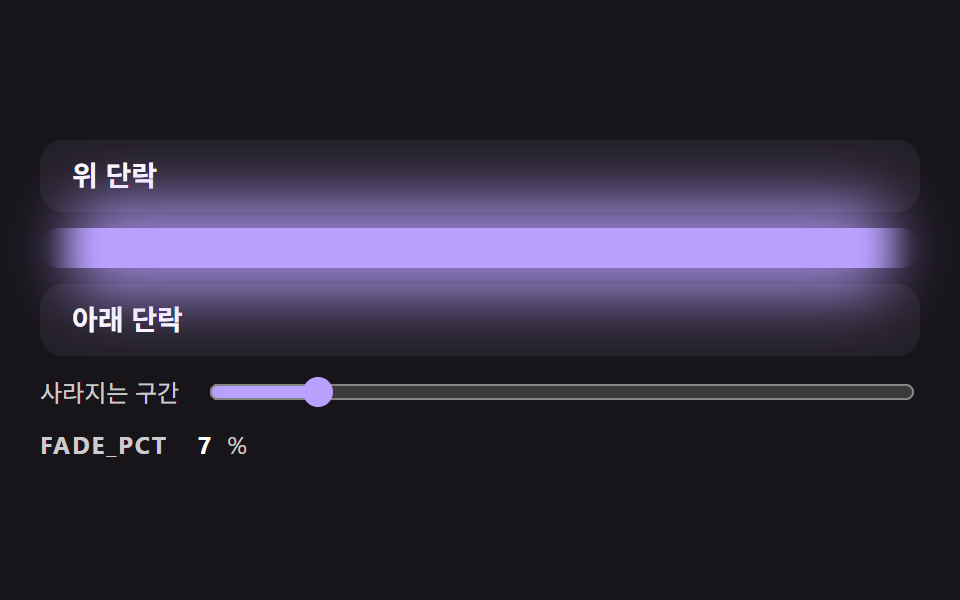 CSS Divider: 9 Demos That Compute the Line ShapeA CSS divider looks like a single line, yet its ends cut off hard, the lines do not fit the width of a centered label an See all demos in this post