02Divider That Splits Its Lines Around a Centered Label
The two lines share whatever width remains after the label, so a longer label never pushes the lines to one side.
Best forFitting a CSS divider that holds a label
LABEL_GAPLINE_H_PX
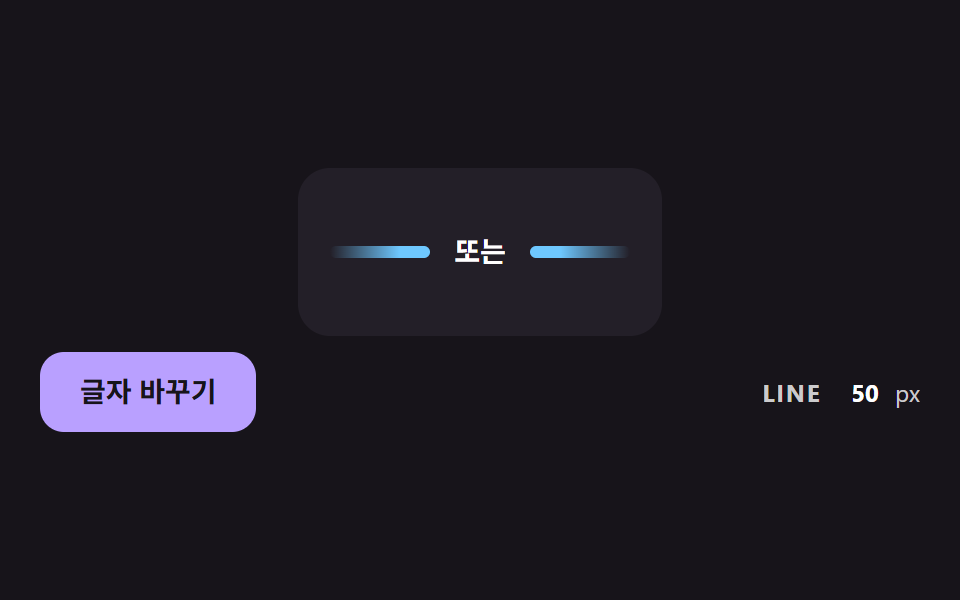
<main class="stage">
<div class="dv is-demo" id="dvRoot">
  <div class="dv__card" id="dvCard">
    <div class="dv__row" id="dvRow" role="separator">
      <span class="dv__side" id="dvLeft"></span>
      <span class="dv__label" id="dvLabel">or</span>
      <span class="dv__side dv__side--right" id="dvRight"></span>
    </div>
  </div>
  <div class="dv__bar">
  <button class="dv__btn" id="dvBtn" type="button">Change label</button>
  <p class="dv__meta"><span class="dv__tag">LINE</span> <b id="dvPx">0</b><span>px</span></p>
  </div>
</div>
</main>
@use "../../../../site/static/demo-tokens" as *;
// 핵심: 가운데 글자 폭을 재서 양쪽 선 폭을 (줄 폭 - 글자 폭 - 간격 * 2) / 2 로 직접 계산한다.
$line-h: 6px;
$label-gap: 12px;
$line-color: $subject-sky;
@include stage($stage-ink);
.dv {
width: min(100%, 440px);
display: grid;
gap: $sp-2;
justify-items: center;
}
.dv__card {
box-sizing: border-box;
width: 420px;
max-width: 100%;
padding: $sp-8 $sp-4;
border-radius: $r-card;
background: $tick-panel;
}
.dv__row {
display: flex;
align-items: center;
gap: $label-gap;
}
.dv__side {
display: block;
flex: none;
height: $line-h;
border-radius: $r-pill;
background: linear-gradient(90deg, rgba($line-color, 0), $line-color 70%);
}
.dv__side--right { background: linear-gradient(270deg, rgba($line-color, 0), $line-color 70%); }
.dv__label {
flex: none;
color: $stage-paper;
font-size: 14px;
font-weight: 700;
line-height: 20px;
white-space: nowrap;
}
.dv__btn {
box-sizing: border-box;
height: 40px;
padding: 0 $sp-5;
border: 0;
border-radius: $r-control;
background: $subject-lilac;
color: $subject-ink;
font-family: inherit;
font-size: 14px;
font-weight: 700;
line-height: 20px;
cursor: pointer;
}
.dv__btn:focus-visible { outline: 3px solid $stage-paper; outline-offset: 3px; }
.dv__meta {
margin: 0;
display: flex;
flex-wrap: wrap;
align-items: baseline;
gap: $sp-2;
font-size: 12px;
line-height: 16px;
color: rgba($stage-paper, .78);
}
.dv__tag { font-weight: 700; letter-spacing: .08em; }
.dv__meta b { min-width: 3ch; text-align: right; font-variant-numeric: tabular-nums; color: $stage-paper; }
@media (prefers-reduced-motion: reduce) {
.dv__btn { transition: none; }
}
.dv__bar { box-sizing: border-box; width: 100%; display: flex; flex-wrap: wrap; align-items: center; justify-content: space-between; gap: $sp-2 $sp-3; }html, body {
margin: 0;
overflow: hidden;
}
.stage {
box-sizing: border-box;
min-height: 100vh;
display: grid;
place-items: center;
margin: 0;
background: #17141a;
font-family: -apple-system, "Segoe UI", "Noto Sans KR", sans-serif;
padding: clamp(8px, 4vw, 24px);
}
.dv {
width: min(100%, 440px);
display: grid;
gap: 8px;
justify-items: center;
}
.dv__card {
box-sizing: border-box;
width: 420px;
max-width: 100%;
padding: 32px 16px;
border-radius: 16px;
background: #231f28;
}
.dv__row {
display: flex;
align-items: center;
gap: 12px;
}
.dv__side {
display: block;
flex: none;
height: 6px;
border-radius: 999px;
background: linear-gradient(90deg, rgba(110, 200, 255, 0), #6ec8ff 70%);
}
.dv__side--right {
background: linear-gradient(270deg, rgba(110, 200, 255, 0), #6ec8ff 70%);
}
.dv__label {
flex: none;
color: #ffffff;
font-size: 14px;
font-weight: 700;
line-height: 20px;
white-space: nowrap;
}
.dv__btn {
box-sizing: border-box;
height: 40px;
padding: 0 20px;
border: 0;
border-radius: 12px;
background: #b9a0ff;
color: #17141a;
font-family: inherit;
font-size: 14px;
font-weight: 700;
line-height: 20px;
cursor: pointer;
}
.dv__btn:focus-visible {
outline: 3px solid #ffffff;
outline-offset: 3px;
}
.dv__meta {
margin: 0;
display: flex;
flex-wrap: wrap;
align-items: baseline;
gap: 8px;
font-size: 12px;
line-height: 16px;
color: rgba(255, 255, 255, 0.78);
}
.dv__tag {
font-weight: 700;
letter-spacing: 0.08em;
}
.dv__meta b {
min-width: 3ch;
text-align: right;
font-variant-numeric: tabular-nums;
color: #ffffff;
}
@media (prefers-reduced-motion: reduce) {
.dv__btn {
transition: none;
}
}
.dv__bar {
box-sizing: border-box;
width: 100%;
display: flex;
flex-wrap: wrap;
align-items: center;
justify-content: space-between;
gap: 8px 12px;
}(function () {
// 기법: 글자 폭을 getBoundingClientRect 로 재고, 양쪽 선 Width = (줄 Width - 글자 Width - LABEL_GAP * 2) / 2 를 직접 계산해 width 로 준다.
// 데모는 카드 폭을 시간에 따라 줄였다 늘리고 글자를 돌려 가며 매 프레임 다시 계산한다.
var LABEL_GAP = 12;
var LINE_H_PX = 6;
var CYCLE_MS = 2000;
var NARROW_PX = 180;
var WIDE_PX = 420;
var LABELS = ['or', 'Continue another way', 'What you read so far'];
var root = document.getElementById('dvRoot');
var card = document.getElementById('dvCard');
var row = document.getElementById('dvRow');
var left = document.getElementById('dvLeft');
var right = document.getElementById('dvRight');
var label = document.getElementById('dvLabel');
var btn = document.getElementById('dvBtn');
var pxEl = document.getElementById('dvPx');
var reduce = window.matchMedia('(prefers-reduced-motion: reduce)').matches;
var labelIndex = 0;
function layout() {
var rowW = row.getBoundingClientRect().width;
var labelW = label.getBoundingClientRect().width;
var side = Math.max(0, (rowW - labelW - LABEL_GAP * 2) / 2);
left.style.width = side.toFixed(1) + 'px';
right.style.width = side.toFixed(1) + 'px';
pxEl.textContent = String(Math.round(side));
}
function setLabel(i) {
labelIndex = i;
label.textContent = LABELS[i];
}
function stopDemo() { root.classList.remove('is-demo'); }
btn.addEventListener('click', function () {
stopDemo();
setLabel((labelIndex + 1) % LABELS.length);
layout();
});
var t0 = null;
function tick(ts) {
if (t0 === null) t0 = ts;
if (root.classList.contains('is-demo')) {
var now = ts - t0;
var phase = (now % CYCLE_MS) / CYCLE_MS;
var wave = 0.5 - 0.5 * Math.cos(phase * Math.PI * 2);
card.style.width = (NARROW_PX + (WIDE_PX - NARROW_PX) * wave).toFixed(1) + 'px';
var i = Math.floor(now / CYCLE_MS * 3) % LABELS.length;
if (i !== labelIndex) setLabel(i);
layout();
}
requestAnimationFrame(tick);
}
left.style.height = LINE_H_PX + 'px';
right.style.height = LINE_H_PX + 'px';
layout();
if (reduce) {
stopDemo();
} else {
requestAnimationFrame(tick);
}
})();// LabelDivider — vanilla 판(02-divl-centered-label-flex-lines) 의 React 포트.
// 가운데 글자 폭을 재서 양쪽 선 폭을 (줄 폭 - 글자 폭 - LABEL_GAP * 2) / 2 로 직접 계산한다.
import { useEffect, useRef } from "react";
import styles from "./LabelDivider.module.scss";
type Box<T> = { current: T };
const LABEL_GAP = 12;
const LINE_H_PX = 6;
const CYCLE_MS = 2000;
const NARROW_PX = 180;
const WIDE_PX = 420;
const LABELS: string[] = ["또는", "다른 방법으로 계속", "여기까지 읽은 내용"];
export default function LabelDivider() {
const cardRef = useRef<HTMLDivElement | null>(null) as Box<HTMLDivElement | null>;
const rowRef = useRef<HTMLDivElement | null>(null) as Box<HTMLDivElement | null>;
const leftRef = useRef<HTMLSpanElement | null>(null) as Box<HTMLSpanElement | null>;
const rightRef = useRef<HTMLSpanElement | null>(null) as Box<HTMLSpanElement | null>;
const labelRef = useRef<HTMLSpanElement | null>(null) as Box<HTMLSpanElement | null>;
const btnRef = useRef<HTMLButtonElement | null>(null) as Box<HTMLButtonElement | null>;
const pxRef = useRef<HTMLElement | null>(null) as Box<HTMLElement | null>;
useEffect(() => {
const card = cardRef.current;
const row = rowRef.current;
const left = leftRef.current;
const right = rightRef.current;
const label = labelRef.current;
const btn = btnRef.current;
const pxEl = pxRef.current;
if (!card || !row || !left || !right || !label || !btn || !pxEl) return;
const reduce = window.matchMedia("(prefers-reduced-motion: reduce)").matches;
let demo = !reduce;
let labelIndex = 0;
let t0: number | null = null;
let raf = 0;
const layout = (): void => {
const rowW = row.getBoundingClientRect().width;
const labelW = label.getBoundingClientRect().width;
const side = Math.max(0, (rowW - labelW - LABEL_GAP * 2) / 2);
left.style.width = side.toFixed(1) + "px";
right.style.width = side.toFixed(1) + "px";
pxEl.textContent = String(Math.round(side));
};
const setLabel = (i: number): void => {
labelIndex = i;
label.textContent = LABELS[i];
};
const onClick = (): void => {
demo = false;
setLabel((labelIndex + 1) % LABELS.length);
layout();
};
btn.addEventListener("click", onClick);
const tick = (ts: number): void => {
if (t0 === null) t0 = ts;
if (demo) {
const now = ts - t0;
const phase = (now % CYCLE_MS) / CYCLE_MS;
const wave = 0.5 - 0.5 * Math.cos(phase * Math.PI * 2);
card.style.width = (NARROW_PX + (WIDE_PX - NARROW_PX) * wave).toFixed(1) + "px";
const i = Math.floor((now / CYCLE_MS) * 3) % LABELS.length;
if (i !== labelIndex) setLabel(i);
layout();
}
raf = requestAnimationFrame(tick);
};
left.style.height = LINE_H_PX + "px";
right.style.height = LINE_H_PX + "px";
layout();
if (!reduce) raf = requestAnimationFrame(tick);
return () => {
cancelAnimationFrame(raf);
btn.removeEventListener("click", onClick);
};
}, []);
return (
<div className={styles.dv}>
<div className={styles.card} ref={cardRef}>
<div className={styles.row} ref={rowRef} role="separator">
<span className={styles.side} ref={leftRef} />
<span className={styles.label} ref={labelRef}>또는</span>
<span className={styles.sideRight} ref={rightRef} />
</div>
</div>
<div className={styles.bar}>
<button className={styles.btn} ref={btnRef} type="button">글자 바꾸기</button>
<p className={styles.meta}>
<span className={styles.tag}>LINE</span> <b ref={pxRef}>0</b>
<span>px</span>
</p>
</div>
</div>
);
}02 Divider That Splits Its Lines Around a Centered Label — Measured area 15.208% · moving frames 23/23Original by GODRICH · SCSS and React ship in the zip · CSS Divider: 9 Demos That Compute the Line Shape
The post this demo lives in
 CSS Divider: 9 Demos That Compute the Line ShapeA CSS divider looks like a single line, yet its ends cut off hard, the lines do not fit the width of a centered label an See all demos in this post
If you like this effect - similar demos
 Transitions04 Elastic quantity bump — a quantity number that grows then eases back by the size of its changeCart Drawer UI Patterns: 9 Motion Techniques
 Transitions07 Row stagger reveal — each row's position fills in after a delay proportional to its own order valueContext Menu UI: 9 Right-Click Menu Patterns
 Transitions02 Carousel That Snaps Back Like a Rubber Band at Its EdgesCarousel Slider UI Design — 9 Transitions