08Divider Whose Ornament Opens as the Pointer Nears
The center ornament opens and the lines part in proportion to the pointer distance, and the value follows a share of the remaining gap each frame so it carries some inertia.
Best forA decorative divider that reacts to the pointer
NEAR_RANGEOPEN_RATEOPEN_MAX_PX
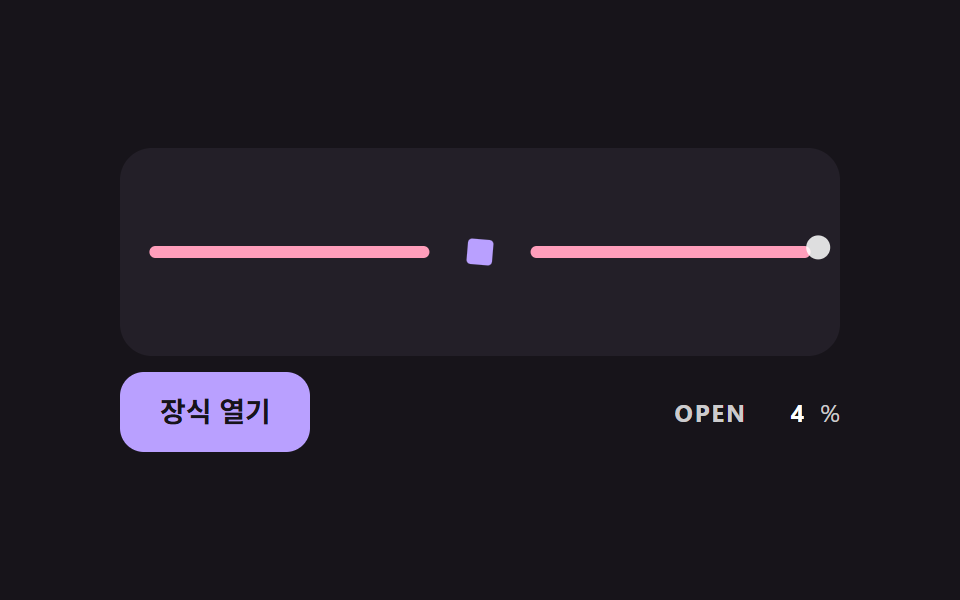
<main class="stage">
<div class="dv is-demo" id="dvRoot">
  <div class="dv__field" id="dvField">
    <div class="dv__row" id="dvRow" role="separator">
      <span class="dv__line dv__line--left" id="dvLeft"></span>
      <span class="dv__orn" id="dvOrn"></span>
      <span class="dv__line dv__line--right" id="dvRight"></span>
    </div>
    <span class="dv__ghost" id="dvGhost"></span>
  </div>
  <div class="dv__bar">
  <button class="dv__btn" id="dvBtn" type="button" aria-pressed="false">Open ornament</button>
  <p class="dv__meta"><span class="dv__tag">OPEN</span> <b id="dvOpen">0</b>%</p>
  </div>
</div>
</main>
@use "../../../../site/static/demo-tokens" as *;
// 핵심: 포인터와 장식 사이 거리를 NEAR_RANGE 로 정규화한 값이 열림이 되고, 열림은 매 프레임 일부씩 따라가며 선을 벌린다.
$orn-size: 24px;
@include stage($stage-ink);
.dv {
width: min(100%, 360px);
display: grid;
gap: $sp-2;
}
.dv__field {
position: relative;
box-sizing: border-box;
height: 104px;
display: grid;
align-items: center;
padding: 0 $sp-4;
border-radius: $r-card;
background: $tick-panel;
overflow: hidden;
}
.dv__row {
display: flex;
align-items: center;
justify-content: center;
gap: $sp-3;
}
.dv__line {
flex: 1;
height: 6px;
border-radius: $r-pill;
background: $subject-pink;
}
.dv__orn {
flex: none;
display: block;
width: $orn-size;
height: $orn-size;
border-radius: $r-xs;
background: $subject-lilac;
transform: scale(.5);
}
.dv__ghost {
position: absolute;
left: 0;
top: 0;
width: 12px;
height: 12px;
border-radius: $r-pill;
background: rgba($stage-paper, .85);
opacity: 0;
pointer-events: none;
}
.dv__bar {
box-sizing: border-box;
width: 100%;
display: flex;
flex-wrap: wrap;
align-items: center;
justify-content: space-between;
gap: $sp-2 $sp-3;
}
.dv__btn {
box-sizing: border-box;
height: 40px;
padding: 0 $sp-5;
border: 0;
border-radius: $r-control;
background: $subject-lilac;
color: $subject-ink;
font-family: inherit;
font-size: 14px;
font-weight: 700;
line-height: 20px;
cursor: pointer;
}
.dv__btn[aria-pressed="true"] { background: $subject-pink; }
.dv__btn:focus-visible { outline: 3px solid $stage-paper; outline-offset: 3px; }
.dv__meta {
margin: 0;
display: flex;
align-items: baseline;
gap: $sp-2;
font-size: 12px;
line-height: 16px;
color: rgba($stage-paper, .78);
}
.dv__tag { font-weight: 700; letter-spacing: .08em; }
.dv__meta b { min-width: 3ch; text-align: right; font-variant-numeric: tabular-nums; color: $stage-paper; }
@media (prefers-reduced-motion: reduce) {
.dv__btn { transition: none; }
}html, body {
margin: 0;
overflow: hidden;
}
.stage {
box-sizing: border-box;
min-height: 100vh;
display: grid;
place-items: center;
margin: 0;
background: #17141a;
font-family: -apple-system, "Segoe UI", "Noto Sans KR", sans-serif;
padding: clamp(8px, 4vw, 24px);
}
.dv {
width: min(100%, 360px);
display: grid;
gap: 8px;
}
.dv__field {
position: relative;
box-sizing: border-box;
height: 104px;
display: grid;
align-items: center;
padding: 0 16px;
border-radius: 16px;
background: #231f28;
overflow: hidden;
}
.dv__row {
display: flex;
align-items: center;
justify-content: center;
gap: 12px;
}
.dv__line {
flex: 1;
height: 6px;
border-radius: 999px;
background: #ff9ebb;
}
.dv__orn {
flex: none;
display: block;
width: 24px;
height: 24px;
border-radius: 4px;
background: #b9a0ff;
transform: scale(0.5);
}
.dv__ghost {
position: absolute;
left: 0;
top: 0;
width: 12px;
height: 12px;
border-radius: 999px;
background: rgba(255, 255, 255, 0.85);
opacity: 0;
pointer-events: none;
}
.dv__bar {
box-sizing: border-box;
width: 100%;
display: flex;
flex-wrap: wrap;
align-items: center;
justify-content: space-between;
gap: 8px 12px;
}
.dv__btn {
box-sizing: border-box;
height: 40px;
padding: 0 20px;
border: 0;
border-radius: 12px;
background: #b9a0ff;
color: #17141a;
font-family: inherit;
font-size: 14px;
font-weight: 700;
line-height: 20px;
cursor: pointer;
}
.dv__btn[aria-pressed=true] {
background: #ff9ebb;
}
.dv__btn:focus-visible {
outline: 3px solid #ffffff;
outline-offset: 3px;
}
.dv__meta {
margin: 0;
display: flex;
align-items: baseline;
gap: 8px;
font-size: 12px;
line-height: 16px;
color: rgba(255, 255, 255, 0.78);
}
.dv__tag {
font-weight: 700;
letter-spacing: 0.08em;
}
.dv__meta b {
min-width: 3ch;
text-align: right;
font-variant-numeric: tabular-nums;
color: #ffffff;
}
@media (prefers-reduced-motion: reduce) {
.dv__btn {
transition: none;
}
}(function () {
// 기법: 포인터와 장식 중심 사이 거리를 NEAR_RANGE 로 정규화해 목표 열림(0~1)을 만들고, 현재 열림은 매 프레임 남은 거리의 일부(OPEN_RATE)만 따라간다.
// 선 두 쪽은 OPEN_MAX_PX 만큼 벌어지고 장식은 열림에 따라 회전·확대된다. 데모는 가상 포인터(유령 점)가 좌우로 오간다.
var NEAR_RANGE = 120;
var OPEN_RATE = 9;
var OPEN_MAX_PX = 72;
var CYCLE_MS = 2000;
var root = document.getElementById('dvRoot');
var field = document.getElementById('dvField');
var orn = document.getElementById('dvOrn');
var left = document.getElementById('dvLeft');
var right = document.getElementById('dvRight');
var ghost = document.getElementById('dvGhost');
var btn = document.getElementById('dvBtn');
var openEl = document.getElementById('dvOpen');
var reduce = window.matchMedia('(prefers-reduced-motion: reduce)').matches;
var open = 0;
var pointer = null;
var pinned = false;
var lastTs = null;
var t0 = null;
function smooth(t) { return t * t * (3 - 2 * t); }
function paint() {
var half = OPEN_MAX_PX * open / 2;
left.style.transform = 'translateX(' + (-half).toFixed(2) + 'px)';
right.style.transform = 'translateX(' + half.toFixed(2) + 'px)';
orn.style.transform = 'rotate(' + (open * 135).toFixed(1) + 'deg) scale(' + (0.5 + open * 0.9).toFixed(3) + ')';
openEl.textContent = String(Math.round(open * 100));
}
function goalOf() {
if (pinned) return 1;
if (!pointer) return 0;
var box = orn.getBoundingClientRect();
var dx = pointer.x - (box.left + box.width / 2);
var dy = pointer.y - (box.top + box.height / 2);
var dist = Math.sqrt(dx * dx + dy * dy);
return smooth(Math.min(1, Math.max(0, 1 - dist / NEAR_RANGE)));
}
function stopDemo() { root.classList.remove('is-demo'); ghost.style.opacity = '0'; }
document.addEventListener('pointermove', function (e) {
stopDemo();
pointer = { x: e.clientX, y: e.clientY };
if (reduce) { open = goalOf(); paint(); }
});
document.addEventListener('pointerleave', function () {
pointer = null;
if (reduce) { open = goalOf(); paint(); }
});
btn.addEventListener('click', function () {
stopDemo();
pinned = !pinned;
btn.setAttribute('aria-pressed', String(pinned));
if (reduce) { open = goalOf(); paint(); }
});
function tick(ts) {
if (t0 === null) t0 = ts;
var dt = lastTs === null ? 0.016 : Math.min(0.05, (ts - lastTs) / 1000);
lastTs = ts;
if (root.classList.contains('is-demo')) {
var fb = field.getBoundingClientRect();
var ob = orn.getBoundingClientRect();
var phase = ((ts - t0) % CYCLE_MS) / CYCLE_MS * Math.PI * 2;
var gx = ob.left + ob.width / 2 + 170 * Math.cos(phase);
var gy = ob.top + ob.height / 2 + 22 * Math.sin(phase);
pointer = { x: gx, y: gy };
ghost.style.transform = 'translate(' + (gx - fb.left - 6).toFixed(1) + 'px,' + (gy - fb.top - 6).toFixed(1) + 'px)';
}
var k = 1 - Math.exp(-dt * OPEN_RATE);
open += (goalOf() - open) * k;
paint();
requestAnimationFrame(tick);
}
if (reduce) {
stopDemo();
paint();
} else {
ghost.style.opacity = '1';
requestAnimationFrame(tick);
}
})();// ProximityOrnament — vanilla 판(08-divl-ornament-proximity-open) 의 React 포트.
// 포인터와 장식 사이 거리를 NEAR_RANGE 로 정규화한 값이 열림이 되고, 열림은 매 프레임 일부(OPEN_RATE)씩 따라간다.
import { useEffect, useRef, useState } from "react";
import styles from "./ProximityOrnament.module.scss";
type Box<T> = { current: T };
type Point = { x: number; y: number };
const NEAR_RANGE = 120;
const OPEN_RATE = 9;
const OPEN_MAX_PX = 72;
const CYCLE_MS = 2000;
const smooth = (t: number): number => t * t * (3 - 2 * t);
export default function ProximityOrnament() {
const fieldRef = useRef<HTMLDivElement | null>(null) as Box<HTMLDivElement | null>;
const ornRef = useRef<HTMLSpanElement | null>(null) as Box<HTMLSpanElement | null>;
const leftRef = useRef<HTMLSpanElement | null>(null) as Box<HTMLSpanElement | null>;
const rightRef = useRef<HTMLSpanElement | null>(null) as Box<HTMLSpanElement | null>;
const ghostRef = useRef<HTMLSpanElement | null>(null) as Box<HTMLSpanElement | null>;
const openRef = useRef<HTMLElement | null>(null) as Box<HTMLElement | null>;
const pinnedRef = useRef(false) as Box<boolean>;
const stopRef = useRef<() => void>(() => undefined) as Box<() => void>;
const [pinned, setPinned] = useState(false);
useEffect(() => {
const field = fieldRef.current;
const orn = ornRef.current;
const left = leftRef.current;
const right = rightRef.current;
const ghost = ghostRef.current;
const openEl = openRef.current;
if (!field || !orn || !left || !right || !ghost || !openEl) return;
const reduce = window.matchMedia("(prefers-reduced-motion: reduce)").matches;
let demo = !reduce;
let open = 0;
let pointer: Point | null = null;
let lastTs: number | null = null;
let t0: number | null = null;
let raf = 0;
const paint = (): void => {
const half = (OPEN_MAX_PX * open) / 2;
left.style.transform = "translateX(" + (-half).toFixed(2) + "px)";
right.style.transform = "translateX(" + half.toFixed(2) + "px)";
orn.style.transform = "rotate(" + (open * 135).toFixed(1) + "deg) scale(" + (0.5 + open * 0.9).toFixed(3) + ")";
openEl.textContent = String(Math.round(open * 100));
};
const goalOf = (): number => {
if (pinnedRef.current) return 1;
if (!pointer) return 0;
const box = orn.getBoundingClientRect();
const dx = pointer.x - (box.left + box.width / 2);
const dy = pointer.y - (box.top + box.height / 2);
const dist = Math.sqrt(dx * dx + dy * dy);
return smooth(Math.min(1, Math.max(0, 1 - dist / NEAR_RANGE)));
};
const stopDemo = (): void => {
demo = false;
ghost.style.opacity = "0";
};
stopRef.current = () => {
stopDemo();
if (reduce) {
open = goalOf();
paint();
}
};
const onMove = (e: { clientX: number; clientY: number }): void => {
stopDemo();
pointer = { x: e.clientX, y: e.clientY };
if (reduce) {
open = goalOf();
paint();
}
};
const onLeave = (): void => {
pointer = null;
if (reduce) {
open = goalOf();
paint();
}
};
document.addEventListener("pointermove", onMove);
document.addEventListener("pointerleave", onLeave);
const tick = (ts: number): void => {
if (t0 === null) t0 = ts;
const dt = lastTs === null ? 0.016 : Math.min(0.05, (ts - lastTs) / 1000);
lastTs = ts;
if (demo) {
const fb = field.getBoundingClientRect();
const ob = orn.getBoundingClientRect();
const phase = (((ts - t0) % CYCLE_MS) / CYCLE_MS) * Math.PI * 2;
const gx = ob.left + ob.width / 2 + 170 * Math.cos(phase);
const gy = ob.top + ob.height / 2 + 22 * Math.sin(phase);
pointer = { x: gx, y: gy };
ghost.style.transform = "translate(" + (gx - fb.left - 6).toFixed(1) + "px," + (gy - fb.top - 6).toFixed(1) + "px)";
}
const k = 1 - Math.exp(-dt * OPEN_RATE);
open += (goalOf() - open) * k;
paint();
raf = requestAnimationFrame(tick);
};
paint();
if (!reduce) {
ghost.style.opacity = "1";
raf = requestAnimationFrame(tick);
}
return () => {
cancelAnimationFrame(raf);
document.removeEventListener("pointermove", onMove);
document.removeEventListener("pointerleave", onLeave);
};
}, []);
const toggle = (): void => {
pinnedRef.current = !pinnedRef.current;
setPinned(pinnedRef.current);
stopRef.current();
};
return (
<div className={styles.dv}>
<div className={styles.field} ref={fieldRef}>
<div className={styles.row} role="separator">
<span className={styles.line} ref={leftRef} />
<span className={styles.orn} ref={ornRef} />
<span className={styles.line} ref={rightRef} />
</div>
<span className={styles.ghost} ref={ghostRef} />
</div>
<div className={styles.bar}>
<button className={styles.btn} type="button" aria-pressed={pinned} onClick={toggle}>장식 열기</button>
<p className={styles.meta}>
<span className={styles.tag}>OPEN</span> <b ref={openRef}>0</b>%
</p>
</div>
</div>
);
}08 Divider Whose Ornament Opens as the Pointer Nears — Measured area 2.326% · moving frames 23/23Original by GODRICH · SCSS and React ship in the zip · CSS Divider: 9 Demos That Compute the Line Shape
The post this demo lives in
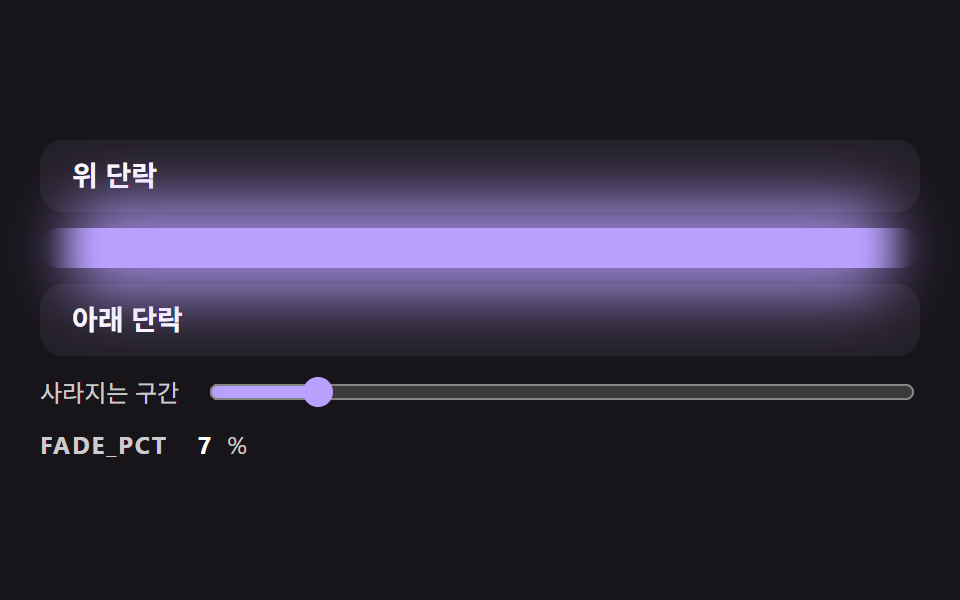 CSS Divider: 9 Demos That Compute the Line ShapeA CSS divider looks like a single line, yet its ends cut off hard, the lines do not fit the width of a centered label an See all demos in this post
If you like this effect - similar demos
 Transitions04 Submenu cascade open — a submenu opens once the hovered duration value passes a set amountContext Menu UI: 9 Right-Click Menu Patterns
 Transitions08 Circle reveal from the icon9 CSS Hamburger Menu Animations, No Library
 Transitions01 Slide overshoot — a cart panel whose open position value passes its target before settling backCart Drawer UI Patterns: 9 Motion Techniques