07A Split Button That Picks the Format
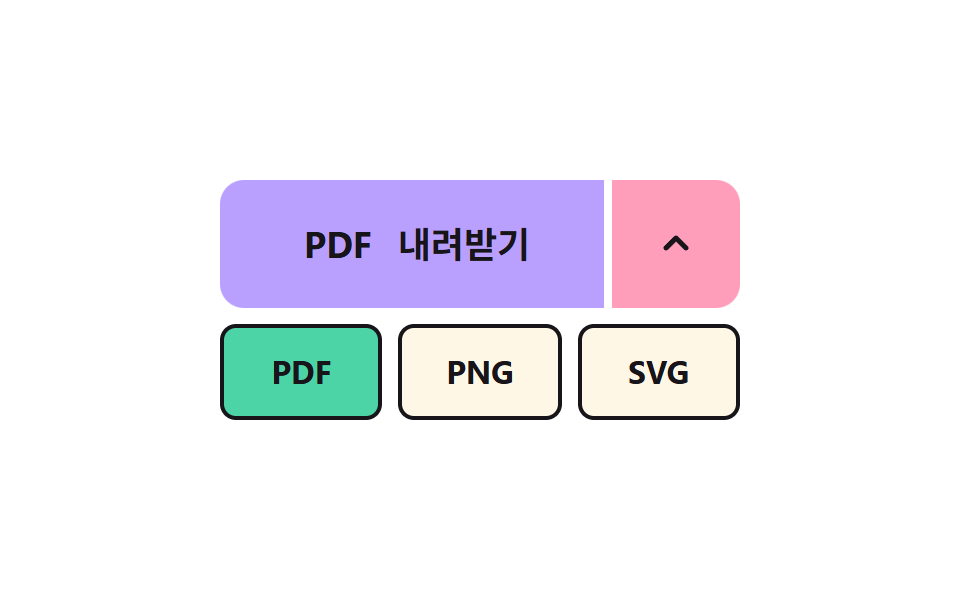
Opening the arrow part on the right unfolds a list of formats in a row, and the chosen format rises into the left button's label.
Best forChoosing a format such as PDF or PNG
MENU_STAGGERFORMATSLABEL_RISE
<main class="stage">
<div class="sp is-demo" id="spRoot">
  <div class="sp__row">
    <button class="sp__main" id="spMain" type="button">
      <span class="sp__win" aria-hidden="true"><span class="sp__fmt" id="spOld"></span><span class="sp__fmt" id="spNew">PDF</span></span>
      <span class="sp__sr" id="spFmtText">PDF</span>
      <span>Download</span>
    </button>
    <button class="sp__toggle" id="spToggle" type="button" aria-haspopup="menu" aria-expanded="false" aria-controls="spMenu" aria-label="Choose a format">
      <svg viewBox="0 0 24 24" aria-hidden="true"><path d="M7 10l5 5 5-5"/></svg>
    </button>
  </div>
  <div class="sp__menu" id="spMenu" role="menu" aria-label="Choose a format">
    <button class="sp__item" type="button" role="menuitem" data-i="0">PDF</button>
    <button class="sp__item" type="button" role="menuitem" data-i="1">PNG</button>
    <button class="sp__item" type="button" role="menuitem" data-i="2">SVG</button>
  </div>
</div>
</main>
@use "../../../../site/static/demo-tokens" as *;
// 핵심: 메뉴 칸마다 진행값이 따로 있다(JS 계산). 라벨은 창 안에서 위로 밀려 나가고 새 글자가 아래에서 올라온다.
$sp-face: $subject-lilac;
$sp-side: $subject-pink;
$sp-picked: $subject-mint;
@include stage($stage-paper);
.sp {
width: 260px;
max-width: 100%;
display: grid;
gap: $sp-2;
}
.sp__row {
display: grid;
grid-template-columns: 1fr 64px;
gap: $sp-1;
}
.sp__main, .sp__toggle {
box-sizing: border-box;
height: 64px;
border: 0;
color: $subject-ink;
font-family: inherit;
font-size: 18px;
font-weight: 700;
line-height: 24px;
cursor: pointer;
}
.sp__main {
display: flex;
align-items: center;
justify-content: center;
gap: $sp-2;
border-radius: $r-control 0 0 $r-control;
background: color-mix(in srgb, #{$sp-face}, #{$sp-picked} calc(var(--k, 0) * 100%));
}
.sp__toggle {
--o: 0;
display: grid;
place-items: center;
border-radius: 0 $r-control $r-control 0;
background: $sp-side;
}
.sp__toggle svg {
width: 24px;
height: 24px;
fill: none;
stroke: currentColor;
stroke-width: 2.5;
stroke-linecap: round;
stroke-linejoin: round;
transform: rotate(calc(var(--o) * 180deg));
}
.sp__main:focus-visible, .sp__toggle:focus-visible, .sp__item:focus-visible { outline: 3px solid $subject-ink; outline-offset: 3px; }
.sp__win {
position: relative;
display: block;
width: 44px;
height: 24px;
overflow: hidden;
}
.sp__fmt { position: absolute; inset: 0; text-align: center; }
.sp__menu {
display: grid;
grid-template-columns: repeat(3, 1fr);
gap: $sp-2;
}
.sp__item {
box-sizing: border-box;
height: 48px;
border: 2px solid $subject-ink;
border-radius: $r-sm;
background: $subject-cream;
color: $subject-ink;
font-family: inherit;
font-size: 16px;
font-weight: 700;
line-height: 24px;
cursor: pointer;
visibility: hidden;
}
.sp__item.is-picked { background: $sp-picked; }
.sp__sr {
position: absolute;
width: 1px;
height: 1px;
margin: -1px;
overflow: hidden;
clip-path: inset(50%);
white-space: nowrap;
}
@media (prefers-reduced-motion: reduce) {
.sp__item { transition: none; }
}html, body {
margin: 0;
overflow: hidden;
}
.stage {
box-sizing: border-box;
min-height: 100vh;
display: grid;
place-items: center;
margin: 0;
background: #ffffff;
font-family: -apple-system, "Segoe UI", "Noto Sans KR", sans-serif;
padding: clamp(8px, 4vw, 24px);
}
.sp {
width: 260px;
max-width: 100%;
display: grid;
gap: 8px;
}
.sp__row {
display: grid;
grid-template-columns: 1fr 64px;
gap: 4px;
}
.sp__main, .sp__toggle {
box-sizing: border-box;
height: 64px;
border: 0;
color: #17141a;
font-family: inherit;
font-size: 18px;
font-weight: 700;
line-height: 24px;
cursor: pointer;
}
.sp__main {
display: flex;
align-items: center;
justify-content: center;
gap: 8px;
border-radius: 12px 0 0 12px;
background: color-mix(in srgb, #b9a0ff, #4cd4a6 calc(var(--k, 0) * 100%));
}
.sp__toggle {
--o: 0;
display: grid;
place-items: center;
border-radius: 0 12px 12px 0;
background: #ff9ebb;
}
.sp__toggle svg {
width: 24px;
height: 24px;
fill: none;
stroke: currentColor;
stroke-width: 2.5;
stroke-linecap: round;
stroke-linejoin: round;
transform: rotate(calc(var(--o) * 180deg));
}
.sp__main:focus-visible, .sp__toggle:focus-visible, .sp__item:focus-visible {
outline: 3px solid #17141a;
outline-offset: 3px;
}
.sp__win {
position: relative;
display: block;
width: 44px;
height: 24px;
overflow: hidden;
}
.sp__fmt {
position: absolute;
inset: 0;
text-align: center;
}
.sp__menu {
display: grid;
grid-template-columns: repeat(3, 1fr);
gap: 8px;
}
.sp__item {
box-sizing: border-box;
height: 48px;
border: 2px solid #17141a;
border-radius: 8px;
background: #fff7e6;
color: #17141a;
font-family: inherit;
font-size: 16px;
font-weight: 700;
line-height: 24px;
cursor: pointer;
visibility: hidden;
}
.sp__item.is-picked {
background: #4cd4a6;
}
.sp__sr {
position: absolute;
width: 1px;
height: 1px;
margin: -1px;
overflow: hidden;
clip-path: inset(50%);
white-space: nowrap;
}
@media (prefers-reduced-motion: reduce) {
.sp__item {
transition: none;
}
}(function () {
// 기법: 메뉴 칸마다 시작 시각을 MENU_STAGGER 씩 늦춰 easeOutBack 으로 펼친다 (칸마다 따로 계산한 진행값).
// 고른 형식은 라벨 창 안에서 옛 글자가 위로 나가고 새 글자가 LABEL_RISE 만큼 아래에서 올라온다.
var MENU_STAGGER = 70;
var FORMATS = ['PDF', 'PNG', 'SVG'];
var LABEL_RISE = 24;
var ITEM_MS = 280;
var OPEN_MS = ITEM_MS + (FORMATS.length - 1) * MENU_STAGGER;
var RISE_MS = 320;
var START_MS = 200;
var CYCLE_MS = 2000;
var root = document.getElementById('spRoot');
var toggle = document.getElementById('spToggle');
var menu = document.getElementById('spMenu');
var oldEl = document.getElementById('spOld');
var newEl = document.getElementById('spNew');
var textEl = document.getElementById('spFmtText');
var items = Array.prototype.slice.call(menu.querySelectorAll('.sp__item'));
var reduce = window.matchMedia('(prefers-reduced-motion: reduce)').matches;
var wantOpen = false;
var wantFmt = 0;
var shownFmt = 0;
var open = 0;
var rise = 1;
var t0 = null;
var lastTs = null;
function clamp(v, lo, hi) { return Math.max(lo, Math.min(hi, v)); }
function stopDemo() { root.classList.remove('is-demo'); }
function outBack(t) { var c = 1.70158; return 1 + (c + 1) * Math.pow(t - 1, 3) + c * Math.pow(t - 1, 2); }
function outCubic(t) { return 1 - Math.pow(1 - t, 3); }
function render() {
var s = open * OPEN_MS;
var visible = open > 0.001 || wantOpen;
for (var i = 0; i < items.length; i += 1) {
var q = outBack(clamp((s - i * MENU_STAGGER) / ITEM_MS, 0, 1));
var o = clamp(q, 0, 1);
items[i].style.opacity = o.toFixed(3);
items[i].style.transform = 'translateY(' + ((1 - q) * -16).toFixed(2) + 'px) scale(' + (0.8 + 0.2 * q).toFixed(3) + ')';
items[i].style.visibility = visible ? 'visible' : 'hidden';
items[i].setAttribute('tabindex', wantOpen ? '0' : '-1');
items[i].classList.toggle('is-picked', i === wantFmt);
}
menu.setAttribute('aria-hidden', wantOpen ? 'false' : 'true');
toggle.setAttribute('aria-expanded', wantOpen ? 'true' : 'false');
toggle.style.setProperty('--o', open.toFixed(3));
root.style.setProperty('--k', (1 - rise).toFixed(3));
oldEl.style.transform = 'translateY(' + (-LABEL_RISE * outCubic(rise)).toFixed(2) + 'px)';
newEl.style.transform = 'translateY(' + (LABEL_RISE * (1 - outBack(rise))).toFixed(2) + 'px)';
oldEl.style.opacity = String((1 - rise).toFixed(2));
textEl.textContent = FORMATS[wantFmt];
}
function pick(i) {
if (i === wantFmt) return;
oldEl.textContent = FORMATS[shownFmt === wantFmt ? wantFmt : shownFmt];
wantFmt = i;
shownFmt = i;
newEl.textContent = FORMATS[i];
rise = reduce ? 1 : 0;
}
function setOpen(v) {
wantOpen = v;
if (reduce) open = v ? 1 : 0;
}
toggle.addEventListener('click', function () {
stopDemo();
setOpen(!wantOpen);
render();
if (wantOpen) items[wantFmt].focus({ preventScroll: true });
});
toggle.addEventListener('keydown', function (e) {
if (e.key === 'ArrowDown' && !wantOpen) { e.preventDefault(); stopDemo(); setOpen(true); render(); items[wantFmt].focus({ preventScroll: true }); }
});
items.forEach(function (it, i) {
it.addEventListener('click', function () { stopDemo(); pick(i); setOpen(false); render(); toggle.focus({ preventScroll: true }); });
it.addEventListener('keydown', function (e) {
if (e.key === 'ArrowRight' || e.key === 'ArrowDown') { e.preventDefault(); items[(i + 1) % items.length].focus({ preventScroll: true }); }
if (e.key === 'ArrowLeft' || e.key === 'ArrowUp') { e.preventDefault(); items[(i + items.length - 1) % items.length].focus({ preventScroll: true }); }
if (e.key === 'Escape') { e.preventDefault(); setOpen(false); render(); toggle.focus({ preventScroll: true }); }
});
});
function tick(ts) {
if (t0 === null) t0 = ts;
var now = ts - t0;
var dt = lastTs === null ? 0.016 : Math.min(0.05, (ts - lastTs) / 1000);
lastTs = ts;
if (root.classList.contains('is-demo') && now >= START_MS) {
var ph = (now - START_MS) % CYCLE_MS;
wantOpen = ph < 800;
var f = ph >= 600 && ph < 1700 ? 2 : 0;
if (f !== wantFmt) pick(f);
}
open = clamp(open + (wantOpen ? 1 : -1) * dt * 1000 / OPEN_MS, 0, 1);
rise = clamp(rise + dt * 1000 / RISE_MS, 0, 1);
render();
requestAnimationFrame(tick);
}
if (reduce) {
stopDemo();
render();
} else {
render();
requestAnimationFrame(tick);
}
})();// SplitFormatButton — vanilla 판(07-dlbtn-format-split-menu) 의 React 포트.
// 메뉴 칸마다 시작 시각을 MENU_STAGGER 씩 늦춰 easeOutBack 으로 펼치고, 고른 형식은 라벨 창 안에서 LABEL_RISE 만큼 올라온다.
import { useEffect, useRef } from "react";
import styles from "./SplitFormatButton.module.scss";
const MENU_STAGGER = 70;
const FORMATS = ["PDF", "PNG", "SVG"];
const LABEL_RISE = 24;
const ITEM_MS = 280;
const OPEN_MS = ITEM_MS + (FORMATS.length - 1) * MENU_STAGGER;
const RISE_MS = 320;
const START_MS = 200;
const CYCLE_MS = 2000;
function clamp(v: number, lo: number, hi: number): number {
return Math.max(lo, Math.min(hi, v));
}
function outBack(t: number): number {
const c = 1.70158;
return 1 + (c + 1) * Math.pow(t - 1, 3) + c * Math.pow(t - 1, 2);
}
function outCubic(t: number): number {
return 1 - Math.pow(1 - t, 3);
}
export default function SplitFormatButton() {
const toggleRef = useRef<HTMLButtonElement | null>(null);
const menuRef = useRef<HTMLDivElement | null>(null);
const oldRef = useRef<HTMLSpanElement | null>(null);
const newRef = useRef<HTMLSpanElement | null>(null);
const textRef = useRef<HTMLSpanElement | null>(null);
useEffect(() => {
const toggle = toggleRef.current;
const menu = menuRef.current;
const oldEl = oldRef.current;
const newEl = newRef.current;
const textEl = textRef.current;
if (!toggle || !menu || !oldEl || !newEl || !textEl) return;
const items = Array.from(menu.querySelectorAll<HTMLButtonElement>("button"));
const reduce = window.matchMedia("(prefers-reduced-motion: reduce)").matches;
let demo = !reduce;
let wantOpen = false;
let wantFmt = 0;
let open = 0;
let rise = 1;
let t0: number | null = null;
let lastTs: number | null = null;
let raf = 0;
const render = (): void => {
const s = open * OPEN_MS;
const visible = open > 0.001 || wantOpen;
items.forEach((it, i) => {
const q = outBack(clamp((s - i * MENU_STAGGER) / ITEM_MS, 0, 1));
it.style.opacity = clamp(q, 0, 1).toFixed(3);
it.style.transform = `translateY(${((1 - q) * -16).toFixed(2)}px) scale(${(0.8 + 0.2 * q).toFixed(3)})`;
it.style.visibility = visible ? "visible" : "hidden";
it.setAttribute("tabindex", wantOpen ? "0" : "-1");
it.classList.toggle(styles["is-picked"], i === wantFmt);
});
menu.setAttribute("aria-hidden", wantOpen ? "false" : "true");
toggle.setAttribute("aria-expanded", wantOpen ? "true" : "false");
toggle.style.setProperty("--o", open.toFixed(3));
toggle.parentElement!.style.setProperty("--k", (1 - rise).toFixed(3));
oldEl.style.transform = `translateY(${(-LABEL_RISE * outCubic(rise)).toFixed(2)}px)`;
newEl.style.transform = `translateY(${(LABEL_RISE * (1 - outBack(rise))).toFixed(2)}px)`;
oldEl.style.opacity = (1 - rise).toFixed(2);
textEl.textContent = FORMATS[wantFmt];
};
const pick = (i: number): void => {
if (i === wantFmt) return;
oldEl.textContent = FORMATS[wantFmt];
wantFmt = i;
newEl.textContent = FORMATS[i];
rise = reduce ? 1 : 0;
};
const setOpen = (v: boolean): void => {
wantOpen = v;
if (reduce) open = v ? 1 : 0;
};
const onToggle = (): void => {
demo = false;
setOpen(!wantOpen);
render();
if (wantOpen) items[wantFmt].focus({ preventScroll: true });
};
const onToggleKey = (e: KeyboardEvent): void => {
if (e.key === "ArrowDown" && !wantOpen) {
e.preventDefault();
demo = false;
setOpen(true);
render();
items[wantFmt].focus({ preventScroll: true });
}
};
toggle.addEventListener("click", onToggle);
toggle.addEventListener("keydown", onToggleKey);
const itemHandlers = items.map((it, i) => {
const onClick = (): void => { demo = false; pick(i); setOpen(false); render(); toggle.focus({ preventScroll: true }); };
const onKey = (e: KeyboardEvent): void => {
if (e.key === "ArrowRight" || e.key === "ArrowDown") { e.preventDefault(); items[(i + 1) % items.length].focus({ preventScroll: true }); }
if (e.key === "ArrowLeft" || e.key === "ArrowUp") { e.preventDefault(); items[(i + items.length - 1) % items.length].focus({ preventScroll: true }); }
if (e.key === "Escape") { e.preventDefault(); setOpen(false); render(); toggle.focus({ preventScroll: true }); }
};
it.addEventListener("click", onClick);
it.addEventListener("keydown", onKey);
return { it, onClick, onKey };
});
function tick(ts: number): void {
if (t0 === null) t0 = ts;
const now = ts - t0;
const dt = lastTs === null ? 0.016 : Math.min(0.05, (ts - lastTs) / 1000);
lastTs = ts;
if (demo && now >= START_MS) {
const ph = (now - START_MS) % CYCLE_MS;
wantOpen = ph < 800;
const f = ph >= 600 && ph < 1700 ? 2 : 0;
if (f !== wantFmt) pick(f);
}
open = clamp(open + (wantOpen ? 1 : -1) * dt * 1000 / OPEN_MS, 0, 1);
rise = clamp(rise + dt * 1000 / RISE_MS, 0, 1);
render();
raf = requestAnimationFrame(tick);
}
render();
if (!reduce) raf = requestAnimationFrame(tick);
return () => {
cancelAnimationFrame(raf);
toggle.removeEventListener("click", onToggle);
toggle.removeEventListener("keydown", onToggleKey);
itemHandlers.forEach((h) => {
h.it.removeEventListener("click", h.onClick);
h.it.removeEventListener("keydown", h.onKey);
});
};
}, []);
return (
<main className={styles.stage}>
<div className={styles.sp}>
<div className={styles.sp__row}>
<button className={styles.sp__main} type="button">
<span className={styles.sp__win} aria-hidden="true">
<span className={styles.sp__fmt} ref={oldRef} />
<span className={styles.sp__fmt} ref={newRef}>PDF</span>
</span>
<span className={styles.sp__sr} ref={textRef}>PDF</span>
<span>내려받기</span>
</button>
<button className={styles.sp__toggle} type="button" aria-haspopup="menu" aria-expanded="false" aria-controls="spMenu" aria-label="형식 선택" ref={toggleRef}>
<svg viewBox="0 0 24 24" aria-hidden="true"><path d="M7 10l5 5 5-5" /></svg>
</button>
</div>
<div className={styles.sp__menu} id="spMenu" role="menu" aria-label="형식 선택" ref={menuRef}>
{FORMATS.map((f) => (
<button className={styles.sp__item} type="button" role="menuitem" key={f}>{f}</button>
))}
</div>
</div>
</main>
);
}07 A Split Button That Picks the Format — Measured area 17.706% · moving frames 19/23Original by GODRICH · SCSS and React ship in the zip · CSS Download Button: 9 Demos With Springs and Arcs
The post this demo lives in
 CSS Download Button: 9 Demos With Springs and ArcsA css download button that only swaps its label leaves a stiff arrow, steps in progress and no sign of where the file we See all demos in this post
If you like this effect - similar demos
 Buttons02 Button that unlocks when the form is valid9 button state css patterns, loading to done
 Buttons07 Thrown-speed decay move — motion continues at the speed value captured at release, with that value shrinking over time until it stopsButton Press Animation UI: 9 Calculation Patterns
 Buttons05 Split-dual value reveal — when a confirm value turns on, the button splits into two pieces, each revealing a different valueExpanding Button UI: 9 Shape-Morph Patterns