09Grayscale Hover Reveal Where a Saturation Value Returns
The saturation value normally sits at zero for grayscale, and on hover that same value returns to its original level so color comes back.
Best forProduct grid hover
GRAYSCALE_HOVER_MSsetHoverStatebuildPhoto
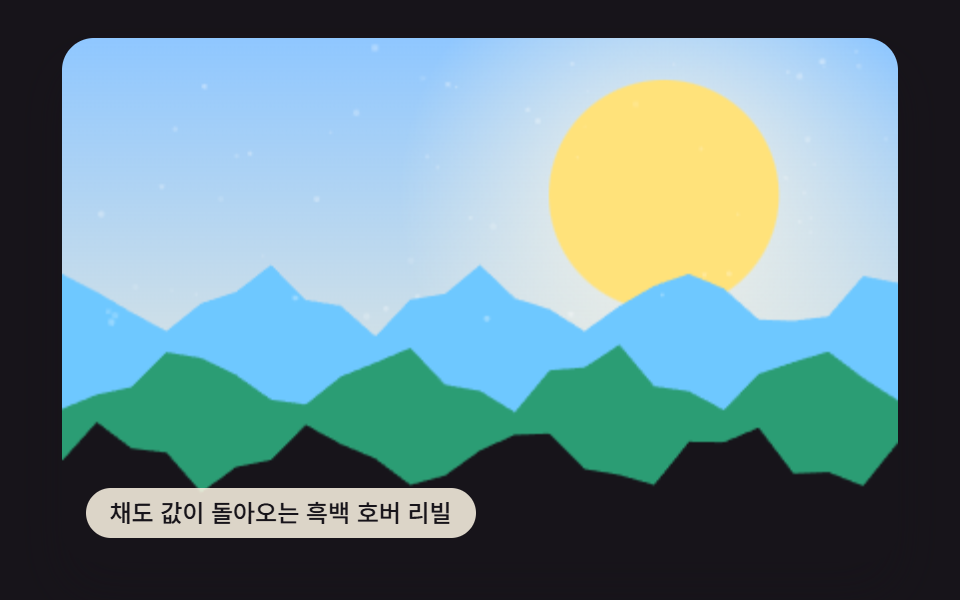
<main class="stage">
<div class="vd is-demo" id="vdRoot">
  <canvas class="vd__canvas" id="vdCanvas" width="480" height="300"></canvas>
  <p class="vd__caption">A Grayscale Hover Reveal Where a Saturation Value Returns</p>
</div>
</main>
@use "../../../../site/static/demo-tokens" as *;
@include stage($stage-ink);
.vd {
position: relative;
width: min(92vw, calc(160vh - 12.8vw));
aspect-ratio: 480 / 300;
margin: 0 auto;
border-radius: $r-card;
overflow: hidden;
box-shadow: $shadow-raised;
}
.vd__canvas {
display: block;
width: 100%;
height: 100%;
}
.vd__caption {
position: absolute;
left: $sp-3;
bottom: $sp-3;
max-width: 72%;
margin: 0;
padding: $sp-1 $sp-3;
border-radius: $r-pill;
background: rgba(255, 247, 230, .85);
color: $subject-ink;
font-weight: 500;
font-size: 12px;
line-height: 1.4;
pointer-events: none;
}
@media (max-width: 340px) {
.vd__caption { font-size: 10px; padding: $sp-1 $sp-2; }
}
@media (prefers-reduced-motion: reduce) {
.vd { cursor: default; }
}html, body {
margin: 0;
overflow: hidden;
}
.stage {
box-sizing: border-box;
min-height: 100vh;
display: grid;
place-items: center;
margin: 0;
background: #17141a;
font-family: -apple-system, "Segoe UI", "Noto Sans KR", sans-serif;
padding: clamp(8px, 4vw, 24px);
}
.vd {
position: relative;
width: min(92vw, 160vh - 12.8vw);
aspect-ratio: 480/300;
margin: 0 auto;
border-radius: 16px;
overflow: hidden;
box-shadow: 0 14px 24px rgba(23, 20, 26, 0.32);
}
.vd__canvas {
display: block;
width: 100%;
height: 100%;
}
.vd__caption {
position: absolute;
left: 12px;
bottom: 12px;
max-width: 72%;
margin: 0;
padding: 4px 12px;
border-radius: 999px;
background: rgba(255, 247, 230, 0.85);
color: #17141a;
font-weight: 500;
font-size: 12px;
line-height: 1.4;
pointer-events: none;
}
@media (max-width: 340px) {
.vd__caption {
font-size: 10px;
padding: 4px 8px;
}
}
@media (prefers-reduced-motion: reduce) {
.vd {
cursor: default;
}
}(function () {
var root = document.getElementById('vdRoot');
var canvas = document.getElementById('vdCanvas');
var ctx = canvas.getContext('2d');
var wrap = canvas.parentElement;
function seedRand(seed) {
var s = seed >>> 0;
return function () { s = (s * 1664525 + 1013904223) >>> 0; return s / 4294967296; };
}
function drawPhotoBase(pctx, w, h, seed) {
var rand = seedRand(seed);
var sky = pctx.createLinearGradient(0, 0, 0, h);
sky.addColorStop(0, '#8fc7ff');
sky.addColorStop(1, '#fff2d6');
pctx.fillStyle = sky;
pctx.fillRect(0, 0, w, h);
var sunX = w * 0.72, sunY = h * 0.3, sunR = h * 0.22;
var glow = pctx.createRadialGradient(sunX, sunY, 0, sunX, sunY, sunR * 2.3);
glow.addColorStop(0, 'rgba(255,247,230,.9)');
glow.addColorStop(1, 'rgba(255,247,230,0)');
pctx.fillStyle = glow;
pctx.fillRect(0, 0, w, h);
pctx.beginPath();
pctx.arc(sunX, sunY, sunR, 0, Math.PI * 2);
pctx.fillStyle = '#ffe27a';
pctx.fill();
var hillColors = ['#6ec8ff', '#2b9d74', '#17141a'];
for (var i = 0; i < 3; i += 1) {
var baseY = h * (0.5 + i * 0.15);
pctx.beginPath();
pctx.moveTo(0, h);
var step = Math.max(2, w / 24);
for (var x = 0; x <= w; x += step) {
var n = Math.sin(x * 0.06 + i * 2.4 + seed * 0.0003) * h * 0.05 + Math.sin(x * 0.17 + i) * h * 0.02;
pctx.lineTo(x, baseY + n);
}
pctx.lineTo(w, h);
pctx.closePath();
pctx.fillStyle = hillColors[i];
pctx.fill();
}
for (var k = 0; k < 60; k += 1) {
var px = rand() * w, py = rand() * h * 0.55, r = rand() * 1.4 + 0.3;
pctx.beginPath();
pctx.arc(px, py, r, 0, Math.PI * 2);
pctx.fillStyle = 'rgba(255,255,255,' + (0.12 + rand() * 0.22) + ')';
pctx.fill();
}
}
var LOOP_MS = 2000;
var GRAYSCALE_HOVER_MS = 200;
var photo = document.createElement('canvas');
var pctx = photo.getContext('2d');
var cw = 480, ch = 300;
function buildPhoto() {
photo.width = cw; photo.height = ch;
drawPhotoBase(pctx, cw, ch, 414091);
draw();
}
function draw() {
ctx.clearRect(0, 0, cw, ch);
ctx.drawImage(photo, 0, 0);
}
function fit() {
var r = wrap.getBoundingClientRect();
cw = Math.max(1, Math.round(r.width));
ch = Math.max(1, Math.round(r.height));
canvas.width = cw; canvas.height = ch;
buildPhoto();
}
canvas.style.transition = 'filter ' + GRAYSCALE_HOVER_MS + 'ms ease';
canvas.style.filter = 'grayscale(1) saturate(0)';
canvas.tabIndex = 0;
function setHoverState(on) {
canvas.style.filter = on ? 'grayscale(0) saturate(1)' : 'grayscale(1) saturate(0)';
}
canvas.addEventListener('pointerenter', function () { setHoverState(true); });
canvas.addEventListener('pointerleave', function () { setHoverState(false); });
canvas.addEventListener('focus', function () { setHoverState(true); });
canvas.addEventListener('blur', function () { setHoverState(false); });
var reduce = window.matchMedia('(prefers-reduced-motion: reduce)').matches;
var playing = !reduce;
if (reduce) { root.classList.remove('is-demo'); setHoverState(true); }
var elapsed = 0, lastTs = null, lastBucket = -1;
function tick(ts) {
if (lastTs === null) lastTs = ts;
var dt = ts - lastTs;
lastTs = ts;
if (playing) {
elapsed += dt;
if (elapsed >= LOOP_MS) elapsed -= LOOP_MS;
var bucket = Math.floor(elapsed / (LOOP_MS / 4));
if (bucket !== lastBucket) { lastBucket = bucket; setHoverState(bucket % 2 === 1); }
}
requestAnimationFrame(tick);
}
fit();
window.addEventListener('resize', fit);
requestAnimationFrame(tick);
})();import { useEffect, useRef } from "react";
import styles from "./FilterGrayscaleHoverReveal.module.scss";
export default function FilterGrayscaleHoverReveal() {
const rootRef = useRef<HTMLDivElement>(null);
const canvasRef = useRef<HTMLCanvasElement>(null);
useEffect(() => {
const root = rootRef.current;
const canvas = canvasRef.current;
if (!root || !canvas) return;
const ctx = canvas.getContext("2d");
if (!ctx) return;
const wrap = canvas.parentElement as HTMLElement;
function seedRand(seed: number) {
let s = seed >>> 0;
return function () { s = (s * 1664525 + 1013904223) >>> 0; return s / 4294967296; };
}
function drawPhotoBase(pctx: CanvasRenderingContext2D, w: number, h: number, seed: number) {
const rand = seedRand(seed);
const sky = pctx.createLinearGradient(0, 0, 0, h);
sky.addColorStop(0, "#8fc7ff");
sky.addColorStop(1, "#fff2d6");
pctx.fillStyle = sky;
pctx.fillRect(0, 0, w, h);
const sunX = w * 0.72, sunY = h * 0.3, sunR = h * 0.22;
const glow = pctx.createRadialGradient(sunX, sunY, 0, sunX, sunY, sunR * 2.3);
glow.addColorStop(0, "rgba(255,247,230,.9)");
glow.addColorStop(1, "rgba(255,247,230,0)");
pctx.fillStyle = glow;
pctx.fillRect(0, 0, w, h);
pctx.beginPath();
pctx.arc(sunX, sunY, sunR, 0, Math.PI * 2);
pctx.fillStyle = "#ffe27a";
pctx.fill();
const hillColors = ["#6ec8ff", "#2b9d74", "#17141a"];
for (let i = 0; i < 3; i += 1) {
const baseY = h * (0.5 + i * 0.15);
pctx.beginPath();
pctx.moveTo(0, h);
const step = Math.max(2, w / 24);
for (let x = 0; x <= w; x += step) {
const n = Math.sin(x * 0.06 + i * 2.4 + seed * 0.0003) * h * 0.05 + Math.sin(x * 0.17 + i) * h * 0.02;
pctx.lineTo(x, baseY + n);
}
pctx.lineTo(w, h);
pctx.closePath();
pctx.fillStyle = hillColors[i];
pctx.fill();
}
for (let k = 0; k < 60; k += 1) {
const px = rand() * w, py = rand() * h * 0.55, r = rand() * 1.4 + 0.3;
pctx.beginPath();
pctx.arc(px, py, r, 0, Math.PI * 2);
pctx.fillStyle = "rgba(255,255,255," + (0.12 + rand() * 0.22) + ")";
pctx.fill();
}
}
const LOOP_MS = 2000;
const GRAYSCALE_HOVER_MS = 200;
const photo = document.createElement("canvas");
const pctx = photo.getContext("2d") as CanvasRenderingContext2D;
let cw = 480, ch = 300;
function draw() {
ctx!.clearRect(0, 0, cw, ch);
ctx!.drawImage(photo, 0, 0);
}
function buildPhoto() {
photo.width = cw; photo.height = ch;
drawPhotoBase(pctx, cw, ch, 414091);
draw();
}
function fit() {
const r = wrap.getBoundingClientRect();
cw = Math.max(1, Math.round(r.width));
ch = Math.max(1, Math.round(r.height));
canvas!.width = cw; canvas!.height = ch;
buildPhoto();
}
canvas.style.transition = "filter " + GRAYSCALE_HOVER_MS + "ms ease";
canvas.style.filter = "grayscale(1) saturate(0)";
canvas.tabIndex = 0;
function setHoverState(on: boolean) {
canvas!.style.filter = on ? "grayscale(0) saturate(1)" : "grayscale(1) saturate(0)";
}
canvas.addEventListener("pointerenter", function () { setHoverState(true); });
canvas.addEventListener("pointerleave", function () { setHoverState(false); });
canvas.addEventListener("focus", function () { setHoverState(true); });
canvas.addEventListener("blur", function () { setHoverState(false); });
const reduce = window.matchMedia("(prefers-reduced-motion: reduce)").matches;
let playing = !reduce;
if (reduce) { root.classList.remove("is-demo"); setHoverState(true); }
let elapsed = 0, lastTs: number | null = null, lastBucket = -1;
let raf = 0;
function tick(ts: number) {
if (lastTs === null) lastTs = ts;
const dt = ts - lastTs;
lastTs = ts;
if (playing) {
elapsed += dt;
if (elapsed >= LOOP_MS) elapsed -= LOOP_MS;
const bucket = Math.floor(elapsed / (LOOP_MS / 4));
if (bucket !== lastBucket) { lastBucket = bucket; setHoverState(bucket % 2 === 1); }
}
raf = requestAnimationFrame(tick);
}
fit();
window.addEventListener("resize", fit);
raf = requestAnimationFrame(tick);
return () => {
cancelAnimationFrame(raf);
window.removeEventListener("resize", fit);
};
}, []);
return (
<main className={styles.stage}>
<div className={`${styles.vd} is-demo`} ref={rootRef}>
<canvas className={styles.vd__canvas} ref={canvasRef} width={480} height={300} />
<p className={styles.vd__caption}>채도 값이 돌아오는 흑백 호버 리빌</p>
</div>
</main>
);
}09 Grayscale Hover Reveal Where a Saturation Value Returns — Measured area 58.465% · moving frames 10/23Original by GODRICH · SCSS and React ship in the zip · CSS Image Filters: 9 Patterns, One Value
The post this demo lives in
 CSS Image Filters: 9 Patterns, One ValueThese are css image filters. A filter seemed like something that ruins a photo, until one value said otherwise. Item 1 b See all demos in this post
If you like this effect - similar demos
 Galleries08 Scrim caption reveal galleryPortfolio Gallery HTML CSS: 9 UI Patterns
 Galleries03 Hover Ripple That Reveals a Second ImageImage Ripple Effect CSS: 9 Canvas Wave Patterns
 Galleries08 A Shuffle Where Cards Move in Sequence When a Filter Is ChosenCSS Masonry Layout: 9 Ways to Pack Uneven Cards