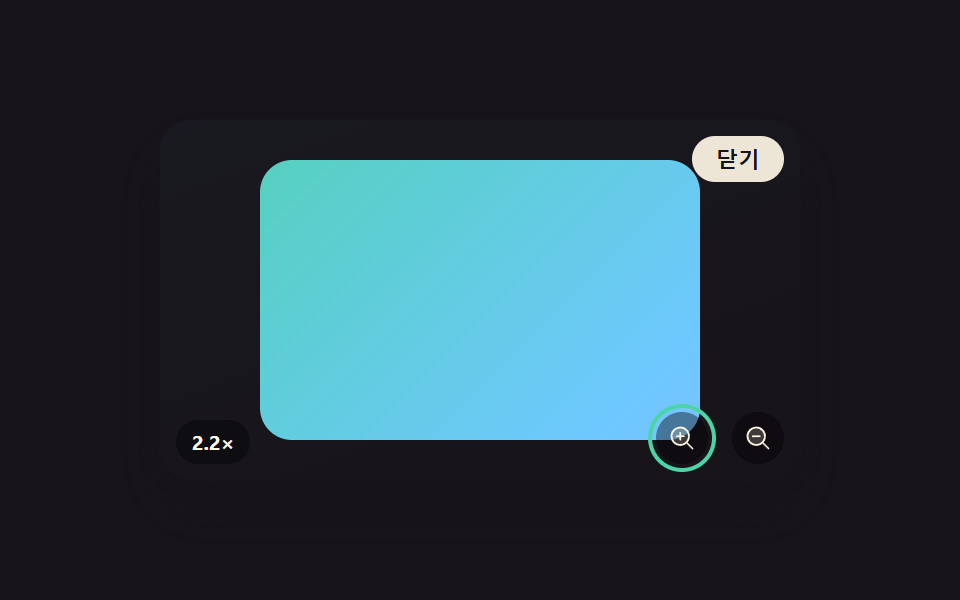
05Lightbox You Pan by Dragging After Zooming In
Once the image is zoomed in by a double-tap or button, dragging moves it around, but the movable range is recalculated each time so it never drags past the extra space the zoom created (a different demo from 256's magnifier and minimap viewer — this one only covers zoom-and-pan while the lightbox itself is open).
Best forProduct detail images, map and diagram close-ups
clamp()pointer drag pantransform: scale
<main class="stage">
<div class="scene is-demo" id="scene">
  <ul class="grid" id="grid">
    <li><button class="thumb" id="thumb0" type="button" aria-haspopup="dialog"><span class="thumbImg"></span></button></li>
  </ul>
  <div class="backdrop" id="backdrop"></div>
  <div class="lightbox" id="lightbox" role="dialog" aria-modal="true" aria-hidden="true" aria-label="Zoom and pan photo">
    <div class="frame" id="frame">
      <span class="fullImg" id="fullImg"></span>
    </div>
    <button class="zoomBtn zoomBtn--in" id="zoomInBtn" type="button" aria-label="Zoom in"><svg xmlns="http://www.w3.org/2000/svg" width="1em" height="1em" viewBox="0 0 256 256" aria-hidden="true"><g fill="currentColor"><path d="M192 112a80 80 0 1 1-80-80a80 80 0 0 1 80 80" opacity=".2"/><path d="m229.66 218.34l-50.06-50.06a88.21 88.21 0 1 0-11.32 11.31l50.06 50.07a8 8 0 0 0 11.32-11.32M40 112a72 72 0 1 1 72 72a72.08 72.08 0 0 1-72-72m112 0a8 8 0 0 1-8 8h-24v24a8 8 0 0 1-16 0v-24H80a8 8 0 0 1 0-16h24V80a8 8 0 0 1 16 0v24h24a8 8 0 0 1 8 8"/></g></svg></button>
    <button class="zoomBtn zoomBtn--out" id="zoomOutBtn" type="button" aria-label="Zoom out"><svg xmlns="http://www.w3.org/2000/svg" width="1em" height="1em" viewBox="0 0 256 256" aria-hidden="true"><g fill="currentColor"><path d="M192 112a80 80 0 1 1-80-80a80 80 0 0 1 80 80" opacity=".2"/><path d="m229.66 218.34l-50.06-50.06a88.21 88.21 0 1 0-11.32 11.31l50.06 50.07a8 8 0 0 0 11.32-11.32M40 112a72 72 0 1 1 72 72a72.08 72.08 0 0 1-72-72m112 0a8 8 0 0 1-8 8H80a8 8 0 0 1 0-16h64a8 8 0 0 1 8 8"/></g></svg></button>
    <p class="zoomNote" id="zoomNote">1.0×</p>
    <button class="closeBtn" id="closeBtn" type="button">Close</button>
  </div>
</div>
</main>
@use "../../../../site/static/demo-tokens" as *;
// 변수 3개
$duration: $dur-base;
$easing: $ease-out;
$color: $subject-mint;
// 계산 겹: index.html 의 panBounds() 가 확대 배율(scale)과 프레임 실측 크기(getBoundingClientRect)로
// 그때그때 남는 여백을 다시 계산해 드래그·자동 이동 범위를 그 값 안으로 clamp 한다.
@include stage($stage-ink);
.scene {
position: relative;
width: 320px;
height: 180px;
border-radius: $r-card;
overflow: hidden;
box-shadow: $shadow-raised;
background: linear-gradient(160deg, #232a3a, $stage-ink 85%);
}
.grid {
position: absolute;
inset: 0;
margin: 0;
padding: 0;
list-style: none;
display: flex;
align-items: center;
justify-content: center;
}
.thumb {
appearance: none;
border: none;
background: none;
padding: 0;
cursor: pointer;
&:focus-visible .thumbImg { outline: 2px solid $color; outline-offset: 2px; }
}
.thumbImg {
display: block;
width: 72px;
height: 72px;
border-radius: $r-sm;
box-shadow: $shadow-press;
background: linear-gradient(135deg, $subject-mint, $subject-sky);
}
.backdrop {
position: absolute;
inset: 0;
background: $subject-ink;
opacity: 0;
visibility: hidden;
pointer-events: none;
}
.lightbox {
position: absolute;
inset: 0;
display: grid;
place-items: center;
visibility: hidden;
}
.frame {
position: relative;
width: 220px;
height: 140px;
border-radius: $r-card;
overflow: hidden;
touch-action: none;
background: rgba(#000, .2);
}
.fullImg {
position: absolute;
inset: 0;
display: block;
background: linear-gradient(135deg, $subject-mint, $subject-sky 55%, $subject-lilac);
transform-origin: center center;
}
.zoomBtn {
position: absolute;
bottom: $sp-2;
appearance: none;
border: none;
width: 26px;
height: 26px;
border-radius: $r-pill;
display: grid;
place-items: center;
background: rgba(#000, .4);
color: $subject-cream;
font-size: 14px;
cursor: pointer;
&--in { right: 46px; }
&--out { right: $sp-2; }
&:focus-visible { outline: 2px solid $color; outline-offset: 2px; }
}
.zoomNote {
position: absolute;
bottom: $sp-2;
left: $sp-2;
margin: 0;
font-size: 10px;
font-weight: 700;
color: $subject-cream;
background: rgba(#000, .4);
padding: $sp-1 $sp-2;
border-radius: $r-pill;
}
.closeBtn {
position: absolute;
top: $sp-2;
right: $sp-2;
appearance: none;
border: none;
border-radius: $r-pill;
padding: $sp-1 $sp-3;
font-size: 11px;
font-weight: 600;
color: $subject-ink;
background: rgba($subject-cream, .92);
cursor: pointer;
&:focus-visible { outline: 2px solid $color; outline-offset: 2px; }
}
@media (max-width: 340px) {
.scene { width: 220px; height: 124px; }
.frame { width: 160px; height: 100px; }
.zoomBtn { width: 22px; height: 22px; font-size: 12px; }
.zoomBtn--in { right: 38px; }
}
@media (prefers-reduced-motion: reduce) {
// 실사용 경로 적용 — 확대·이동 트윈은 index.html 의 animate()/panLoop() 가 reduce 시 즉시 최종 상태로 처리한다.
.closeBtn, .zoomBtn, .thumb { transition: none; }
}html, body {
margin: 0;
overflow: hidden;
}
.stage {
box-sizing: border-box;
min-height: 100vh;
display: grid;
place-items: center;
margin: 0;
background: #17141a;
font-family: -apple-system, "Segoe UI", "Noto Sans KR", sans-serif;
padding: clamp(8px, 4vw, 24px);
}
.scene {
position: relative;
width: 320px;
height: 180px;
border-radius: 16px;
overflow: hidden;
box-shadow: 0 14px 24px rgba(23, 20, 26, 0.32);
background: linear-gradient(160deg, #232a3a, #17141a 85%);
}
.grid {
position: absolute;
inset: 0;
margin: 0;
padding: 0;
list-style: none;
display: flex;
align-items: center;
justify-content: center;
}
.thumb {
appearance: none;
border: none;
background: none;
padding: 0;
cursor: pointer;
}
.thumb:focus-visible .thumbImg {
outline: 2px solid #4cd4a6;
outline-offset: 2px;
}
.thumbImg {
display: block;
width: 72px;
height: 72px;
border-radius: 8px;
box-shadow: 0 6px 12px rgba(23, 20, 26, 0.32);
background: linear-gradient(135deg, #4cd4a6, #6ec8ff);
}
.backdrop {
position: absolute;
inset: 0;
background: #17141a;
opacity: 0;
visibility: hidden;
pointer-events: none;
}
.lightbox {
position: absolute;
inset: 0;
display: grid;
place-items: center;
visibility: hidden;
}
.frame {
position: relative;
width: 220px;
height: 140px;
border-radius: 16px;
overflow: hidden;
touch-action: none;
background: rgba(0, 0, 0, 0.2);
}
.fullImg {
position: absolute;
inset: 0;
display: block;
background: linear-gradient(135deg, #4cd4a6, #6ec8ff 55%, #b9a0ff);
transform-origin: center center;
}
.zoomBtn {
position: absolute;
bottom: 8px;
appearance: none;
border: none;
width: 26px;
height: 26px;
border-radius: 999px;
display: grid;
place-items: center;
background: rgba(0, 0, 0, 0.4);
color: #fff7e6;
font-size: 14px;
cursor: pointer;
}
.zoomBtn--in {
right: 46px;
}
.zoomBtn--out {
right: 8px;
}
.zoomBtn:focus-visible {
outline: 2px solid #4cd4a6;
outline-offset: 2px;
}
.zoomNote {
position: absolute;
bottom: 8px;
left: 8px;
margin: 0;
font-size: 10px;
font-weight: 700;
color: #fff7e6;
background: rgba(0, 0, 0, 0.4);
padding: 4px 8px;
border-radius: 999px;
}
.closeBtn {
position: absolute;
top: 8px;
right: 8px;
appearance: none;
border: none;
border-radius: 999px;
padding: 4px 12px;
font-size: 11px;
font-weight: 600;
color: #17141a;
background: rgba(255, 247, 230, 0.92);
cursor: pointer;
}
.closeBtn:focus-visible {
outline: 2px solid #4cd4a6;
outline-offset: 2px;
}
@media (max-width: 340px) {
.scene {
width: 220px;
height: 124px;
}
.frame {
width: 160px;
height: 100px;
}
.zoomBtn {
width: 22px;
height: 22px;
font-size: 12px;
}
.zoomBtn--in {
right: 38px;
}
}
@media (prefers-reduced-motion: reduce) {
.closeBtn, .zoomBtn, .thumb {
transition: none;
}
}(function () {
var ZOOM_SCALE = 2.2;
var ZOOM_MS = 420;
var PAN_MS = 900;
var LOOP_MS = 2000;
var scene = document.getElementById('scene');
var backdrop = document.getElementById('backdrop');
var lightbox = document.getElementById('lightbox');
var frame = document.getElementById('frame');
var fullImg = document.getElementById('fullImg');
var zoomInBtn = document.getElementById('zoomInBtn');
var zoomOutBtn = document.getElementById('zoomOutBtn');
var zoomNote = document.getElementById('zoomNote');
var closeBtn = document.getElementById('closeBtn');
var thumb = document.getElementById('thumb0');
var reduce = window.matchMedia('(prefers-reduced-motion: reduce)').matches;
var open = false;
var scale = 1;
var offX = 0;
var offY = 0;
var dragging = false;
var dragStartX = 0;
var dragStartY = 0;
var dragBaseX = 0;
var dragBaseY = 0;
var panRafId = null;
var timers = [];
function clamp(v, lo, hi) { return Math.min(hi, Math.max(lo, v)); }
function easeOutCubic(t) { return 1 - Math.pow(1 - t, 3); }
function animate(duration, onFrame, onDone) {
if (reduce) { onFrame(1); if (onDone) onDone(); return; }
var start = performance.now();
function frame(now) {
var p = clamp((now - start) / duration, 0, 1);
onFrame(easeOutCubic(p));
if (p < 1) requestAnimationFrame(frame);
else if (onDone) onDone();
}
requestAnimationFrame(frame);
}
// Zoom in 배율만큼 남는 여백을 프레임 실측 크기로 매번 다시 계산한다 — Zoom in 정도가 바뀌면 이동 가능 범위도 바뀐다
function panBounds(s) {
var r = frame.getBoundingClientRect();
return { x: (s - 1) * r.width / 2, y: (s - 1) * r.height / 2 };
}
function apply() {
fullImg.style.transform = 'translate(' + offX.toFixed(2) + 'px,' + offY.toFixed(2) + 'px) scale(' + scale.toFixed(3) + ')';
zoomNote.textContent = scale.toFixed(1) + '×';
}
function zoomTo(target, onDone) {
var fromScale = scale;
var fromX = offX, fromY = offY;
animate(ZOOM_MS, function (e) {
scale = fromScale + (target - fromScale) * e;
var b = panBounds(scale);
offX = clamp(fromX * (1 - e), -b.x, b.x);
offY = clamp(fromY * (1 - e), -b.y, b.y);
apply();
}, onDone);
}
function panLoop(durationMs, onDone) {
if (reduce) { if (onDone) onDone(); return; }
var start = performance.now();
function frame2(now) {
var t = now - start;
var b = panBounds(scale);
offX = clamp(b.x * Math.sin(t / 300), -b.x, b.x);
offY = clamp(b.y * 0.6 * Math.sin(t / 420 + 1), -b.y, b.y);
apply();
if (t < durationMs) panRafId = requestAnimationFrame(frame2);
else if (onDone) onDone();
}
panRafId = requestAnimationFrame(frame2);
}
function openFrom() {
if (open) return;
open = true;
scale = 1; offX = 0; offY = 0;
apply();
lightbox.style.visibility = 'visible';
lightbox.setAttribute('aria-hidden', 'false');
backdrop.style.visibility = 'visible';
animate(240, function (e) { backdrop.style.opacity = (e * 0.78).toFixed(3); }, function () {
zoomInBtn.focus({ preventScroll: true });
});
}
function closeLightbox() {
if (!open) return;
if (panRafId) cancelAnimationFrame(panRafId);
animate(220, function (e) { backdrop.style.opacity = (0.78 * (1 - e)).toFixed(3); }, function () {
lightbox.style.visibility = 'hidden';
lightbox.setAttribute('aria-hidden', 'true');
backdrop.style.visibility = 'hidden';
open = false;
thumb.focus({ preventScroll: true });
});
}
function human() {
if (scene.classList.contains('is-demo')) {
scene.classList.remove('is-demo');
if (panRafId) cancelAnimationFrame(panRafId);
timers.forEach(function (id) { clearTimeout(id); clearInterval(id); });
timers = [];
}
}
thumb.addEventListener('click', function () { human(); openFrom(); });
closeBtn.addEventListener('click', function () { human(); closeLightbox(); });
backdrop.addEventListener('click', function () { human(); closeLightbox(); });
zoomInBtn.addEventListener('click', function () { human(); zoomTo(ZOOM_SCALE); });
zoomOutBtn.addEventListener('click', function () { human(); zoomTo(1); });
frame.addEventListener('dblclick', function () { human(); zoomTo(scale > 1.01 ? 1 : ZOOM_SCALE); });
document.addEventListener('keydown', function (e) {
if (open && e.key === 'Escape') { human(); closeLightbox(); }
});
frame.addEventListener('pointerdown', function (e) {
if (scale <= 1.01) return;
human();
dragging = true;
dragStartX = e.clientX;
dragStartY = e.clientY;
dragBaseX = offX;
dragBaseY = offY;
frame.setPointerCapture(e.pointerId);
});
frame.addEventListener('pointermove', function (e) {
if (!dragging) return;
var b = panBounds(scale);
offX = clamp(dragBaseX + (e.clientX - dragStartX), -b.x, b.x);
offY = clamp(dragBaseY + (e.clientY - dragStartY), -b.y, b.y);
apply();
});
function endDrag() { dragging = false; }
frame.addEventListener('pointerup', endDrag);
frame.addEventListener('pointercancel', endDrag);
function cycle() {
openFrom();
timers.push(setTimeout(function () {
zoomTo(ZOOM_SCALE, function () {
panLoop(PAN_MS, function () {
zoomTo(1);
});
});
}, 260));
timers.push(setTimeout(closeLightbox, 1780));
}
if (!reduce) {
cycle();
timers.push(setInterval(function () {
if (scene.classList.contains('is-demo')) cycle();
}, LOOP_MS));
}
})();import { useEffect, useRef } from 'react';
import styles from './ZoomPanDrag.module.scss';
const ZOOM_SCALE = 2.2;
const ZOOM_MS = 420;
const PAN_MS = 900;
const LOOP_MS = 2000;
export default function ZoomPanDrag() {
const sceneRef = useRef<HTMLDivElement>(null);
useEffect(() => {
const scene0 = sceneRef.current;
if (!scene0) return undefined;
const backdrop0 = scene0.querySelector<HTMLDivElement>('.' + styles.backdrop);
const lightbox0 = scene0.querySelector<HTMLDivElement>('.' + styles.lightbox);
const frame0 = scene0.querySelector<HTMLDivElement>('.' + styles.frame);
const fullImg0 = scene0.querySelector<HTMLSpanElement>('.' + styles.fullImg);
const zoomInBtn0 = scene0.querySelector<HTMLButtonElement>('.' + styles['zoomBtn--in']);
const zoomOutBtn0 = scene0.querySelector<HTMLButtonElement>('.' + styles['zoomBtn--out']);
const zoomNote0 = scene0.querySelector<HTMLParagraphElement>('.' + styles.zoomNote);
const closeBtn0 = scene0.querySelector<HTMLButtonElement>('.' + styles.closeBtn);
const thumb0 = scene0.querySelector<HTMLButtonElement>('.' + styles.thumb);
if (!backdrop0 || !lightbox0 || !frame0 || !fullImg0 || !zoomInBtn0 || !zoomOutBtn0 || !zoomNote0 || !closeBtn0 || !thumb0) return undefined;
const scene = scene0;
const backdrop = backdrop0;
const lightbox = lightbox0;
const frame = frame0;
const fullImg = fullImg0;
const zoomInBtn = zoomInBtn0;
const zoomOutBtn = zoomOutBtn0;
const zoomNote = zoomNote0;
const closeBtn = closeBtn0;
const thumb = thumb0;
const reduce = window.matchMedia('(prefers-reduced-motion: reduce)').matches;
let open = false;
let scale = 1;
let offX = 0;
let offY = 0;
let dragging = false;
let dragStartX = 0;
let dragStartY = 0;
let dragBaseX = 0;
let dragBaseY = 0;
let panRafId: number | null = null;
let timers: number[] = [];
function clamp(v: number, lo: number, hi: number) { return Math.min(hi, Math.max(lo, v)); }
function easeOutCubic(t: number) { return 1 - Math.pow(1 - t, 3); }
function animate(duration: number, onFrame: (e: number) => void, onDone?: () => void) {
if (reduce) { onFrame(1); if (onDone) onDone(); return; }
const start = performance.now();
function frame2(now: number) {
const p = clamp((now - start) / duration, 0, 1);
onFrame(easeOutCubic(p));
if (p < 1) requestAnimationFrame(frame2);
else if (onDone) onDone();
}
requestAnimationFrame(frame2);
}
// 확대 배율만큼 남는 여백을 프레임 실측 크기로 매번 다시 계산한다 — 확대 정도가 바뀌면 이동 가능 범위도 바뀐다
function panBounds(s: number) {
const r = frame.getBoundingClientRect();
return { x: (s - 1) * r.width / 2, y: (s - 1) * r.height / 2 };
}
function apply() {
fullImg.style.transform = 'translate(' + offX.toFixed(2) + 'px,' + offY.toFixed(2) + 'px) scale(' + scale.toFixed(3) + ')';
zoomNote.textContent = scale.toFixed(1) + '×';
}
function zoomTo(target: number, onDone?: () => void) {
const fromScale = scale;
const fromX = offX, fromY = offY;
animate(ZOOM_MS, (e) => {
scale = fromScale + (target - fromScale) * e;
const b = panBounds(scale);
offX = clamp(fromX * (1 - e), -b.x, b.x);
offY = clamp(fromY * (1 - e), -b.y, b.y);
apply();
}, onDone);
}
function panLoop(durationMs: number, onDone?: () => void) {
if (reduce) { if (onDone) onDone(); return; }
const start = performance.now();
function frame2(now: number) {
const t = now - start;
const b = panBounds(scale);
offX = clamp(b.x * Math.sin(t / 300), -b.x, b.x);
offY = clamp(b.y * 0.6 * Math.sin(t / 420 + 1), -b.y, b.y);
apply();
if (t < durationMs) panRafId = requestAnimationFrame(frame2);
else if (onDone) onDone();
}
panRafId = requestAnimationFrame(frame2);
}
function openFrom() {
if (open) return;
open = true;
scale = 1; offX = 0; offY = 0;
apply();
lightbox.style.visibility = 'visible';
lightbox.setAttribute('aria-hidden', 'false');
backdrop.style.visibility = 'visible';
animate(240, (e) => { backdrop.style.opacity = (e * 0.78).toFixed(3); }, () => {
zoomInBtn.focus({ preventScroll: true });
});
}
function closeLightbox() {
if (!open) return;
if (panRafId) cancelAnimationFrame(panRafId);
animate(220, (e) => { backdrop.style.opacity = (0.78 * (1 - e)).toFixed(3); }, () => {
lightbox.style.visibility = 'hidden';
lightbox.setAttribute('aria-hidden', 'true');
backdrop.style.visibility = 'hidden';
open = false;
thumb.focus({ preventScroll: true });
});
}
function human() {
if (scene.classList.contains(styles['is-demo'])) {
scene.classList.remove(styles['is-demo']);
if (panRafId) cancelAnimationFrame(panRafId);
timers.forEach((id) => { window.clearTimeout(id); window.clearInterval(id); });
timers = [];
}
}
function onThumbClick() { human(); openFrom(); }
function onCloseClick() { human(); closeLightbox(); }
function onBackdropClick() { human(); closeLightbox(); }
function onZoomInClick() { human(); zoomTo(ZOOM_SCALE); }
function onZoomOutClick() { human(); zoomTo(1); }
function onFrameDblClick() { human(); zoomTo(scale > 1.01 ? 1 : ZOOM_SCALE); }
function onKeydown(e: KeyboardEvent) {
if (open && e.key === 'Escape') { human(); closeLightbox(); }
}
thumb.addEventListener('click', onThumbClick);
closeBtn.addEventListener('click', onCloseClick);
backdrop.addEventListener('click', onBackdropClick);
zoomInBtn.addEventListener('click', onZoomInClick);
zoomOutBtn.addEventListener('click', onZoomOutClick);
frame.addEventListener('dblclick', onFrameDblClick);
document.addEventListener('keydown', onKeydown);
function onPointerDown(e: PointerEvent) {
if (scale <= 1.01) return;
human();
dragging = true;
dragStartX = e.clientX;
dragStartY = e.clientY;
dragBaseX = offX;
dragBaseY = offY;
frame.setPointerCapture(e.pointerId);
}
function onPointerMove(e: PointerEvent) {
if (!dragging) return;
const b = panBounds(scale);
offX = clamp(dragBaseX + (e.clientX - dragStartX), -b.x, b.x);
offY = clamp(dragBaseY + (e.clientY - dragStartY), -b.y, b.y);
apply();
}
function endDrag() { dragging = false; }
frame.addEventListener('pointerdown', onPointerDown);
frame.addEventListener('pointermove', onPointerMove);
frame.addEventListener('pointerup', endDrag);
frame.addEventListener('pointercancel', endDrag);
function cycle() {
openFrom();
timers.push(window.setTimeout(() => {
zoomTo(ZOOM_SCALE, () => {
panLoop(PAN_MS, () => {
zoomTo(1);
});
});
}, 260));
timers.push(window.setTimeout(closeLightbox, 1780));
}
if (!reduce) {
cycle();
timers.push(window.setInterval(() => {
if (scene.classList.contains(styles['is-demo'])) cycle();
}, LOOP_MS));
}
return () => {
timers.forEach((id) => { window.clearTimeout(id); window.clearInterval(id); });
if (panRafId) cancelAnimationFrame(panRafId);
thumb.removeEventListener('click', onThumbClick);
closeBtn.removeEventListener('click', onCloseClick);
backdrop.removeEventListener('click', onBackdropClick);
zoomInBtn.removeEventListener('click', onZoomInClick);
zoomOutBtn.removeEventListener('click', onZoomOutClick);
frame.removeEventListener('dblclick', onFrameDblClick);
document.removeEventListener('keydown', onKeydown);
frame.removeEventListener('pointerdown', onPointerDown);
frame.removeEventListener('pointermove', onPointerMove);
frame.removeEventListener('pointerup', endDrag);
frame.removeEventListener('pointercancel', endDrag);
};
}, []);
return (
<div className={`${styles.scene} ${styles['is-demo']}`} ref={sceneRef}>
<ul className={styles.grid}>
<li><button className={styles.thumb} type="button" aria-haspopup="dialog"><span className={styles.thumbImg} /></button></li>
</ul>
<div className={styles.backdrop} />
<div className={styles.lightbox} role="dialog" aria-modal="true" aria-hidden="true" aria-label="사진 확대 이동">
<div className={styles.frame}>
<span className={styles.fullImg} />
</div>
<button className={`${styles.zoomBtn} ${styles['zoomBtn--in']}`} type="button" aria-label="확대">
<svg xmlns="http://www.w3.org/2000/svg" width="1em" height="1em" viewBox="0 0 256 256" aria-hidden="true">
<g fill="currentColor">
<path d="M192 112a80 80 0 1 1-80-80a80 80 0 0 1 80 80" opacity=".2" />
<path d="m229.66 218.34l-50.06-50.06a88.21 88.21 0 1 0-11.32 11.31l50.06 50.07a8 8 0 0 0 11.32-11.32M40 112a72 72 0 1 1 72 72a72.08 72.08 0 0 1-72-72m112 0a8 8 0 0 1-8 8h-24v24a8 8 0 0 1-16 0v-24H80a8 8 0 0 1 0-16h24V80a8 8 0 0 1 16 0v24h24a8 8 0 0 1 8 8" />
</g>
</svg>
</button>
<button className={`${styles.zoomBtn} ${styles['zoomBtn--out']}`} type="button" aria-label="축소">
<svg xmlns="http://www.w3.org/2000/svg" width="1em" height="1em" viewBox="0 0 256 256" aria-hidden="true">
<g fill="currentColor">
<path d="M192 112a80 80 0 1 1-80-80a80 80 0 0 1 80 80" opacity=".2" />
<path d="m229.66 218.34l-50.06-50.06a88.21 88.21 0 1 0-11.32 11.31l50.06 50.07a8 8 0 0 0 11.32-11.32M40 112a72 72 0 1 1 72 72a72.08 72.08 0 0 1-72-72m112 0a8 8 0 0 1-8 8H80a8 8 0 0 1 0-16h64a8 8 0 0 1 8 8" />
</g>
</svg>
</button>
<p className={styles.zoomNote}>1.0×</p>
<button className={styles.closeBtn} type="button">닫기</button>
</div>
</div>
);
}05 Lightbox You Pan by Dragging After Zooming In — Measured area 30.183% · moving frames 9/23Original by GODRICH · SCSS and React ship in the zip · CSS Lightbox Gallery Animation — 9 Transitions
The post this demo lives in
 CSS Lightbox Gallery Animation — 9 TransitionsAmong nine css lightbox gallery ideas, one grows from the clicked thumbnail's spot, one times a downward flick to decide See all demos in this post
If you like this effect - similar demos
 Transitions06 Card to detail zoom9 CSS Page Transitions — No Library, Pure CSS
 Transitions04 Header that folds smaller as you scroll9 mega menu ui patterns, link list to site map
 Transitions08 Mobile sheet drag — a bottom sheet mapping drag distance to its height9 Filter UI Patterns (Panel Slide to Chip Remove)