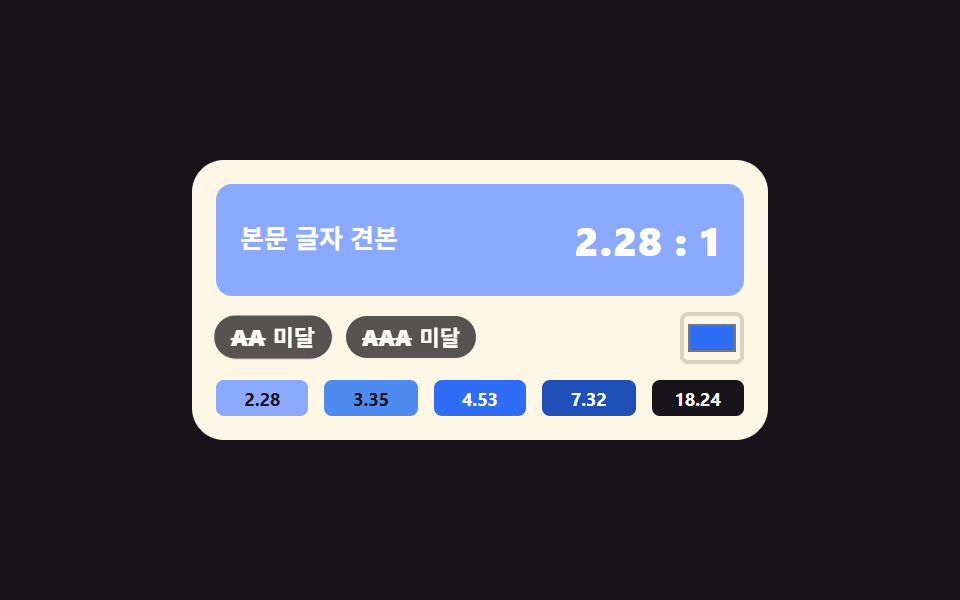
07Contrast checker that stamps AA and AAA
Relative luminance is computed for text and background, the ratio follows, and the badges light the moment it clears 4.5 and 7.
Best forAccessibility checks, design review
Math.powcounter-setaria-live
<main class="stage">
  <div class="cc is-demo">
    <div class="cc__prev">
      <span class="cc__sample">Body text sample</span>
      <span class="cc__ratio" aria-hidden="true"></span>
    </div>
    <div class="cc__row">
      <span class="cc__badge cc__badge--aa" aria-hidden="true">
        <b class="cc__grade">AA</b>
        <span class="cc__state"><i class="cc__pass">Pass</i><i class="cc__fail">Fail</i></span>
      </span>
      <span class="cc__badge cc__badge--aaa" aria-hidden="true">
        <b class="cc__grade">AAA</b>
        <span class="cc__state"><i class="cc__pass">Pass</i><i class="cc__fail">Fail</i></span>
      </span>
      <input class="cc__input" id="ccInput" type="color" value="#2f6df6" aria-label="Pick a background color">
    </div>
    <div class="cc__sws">
      <button type="button" class="cc__sw" data-bg="#8aa9ff">2.28</button>
      <button type="button" class="cc__sw" data-bg="#4d8bf0">3.35</button>
      <button type="button" class="cc__sw" data-bg="#2f6df6">4.53</button>
      <button type="button" class="cc__sw" data-bg="#1f4fb8">7.32</button>
      <button type="button" class="cc__sw" data-bg="#17141a">18.24</button>
    </div>
    <span class="cc__live" aria-live="polite"></span>
  </div>
</main>@use "../../../../site/static/demo-tokens" as *;
// 대비 검사기 — 흰 글자 고정, 배경만 다섯 단계로 바뀐다.
// 배경색(--bg)·비율 정수부(--rw)·소수 두 자리(--rf)·배지 두 개(--aa --aaa)를 **같은 퍼센트에서 한꺼번에**
// steps(1, end) 로 컷한다. 다섯 값이 한 키프레임 안에 같이 적혀 있으니 배경과 숫자와 배지가 갈릴 수가 없다.
// 숫자 글자는 계수기가 찍는다 — 4.53 도 18.24 도 정수부·소수부 두 계수기의 조합이다.
// 컷만 쓰면 움직인 프레임이 두세 장이라, 컷 직후 배지가 자기 중심에서 튀어올라 사이를 메운다.
$duration: $dur-loop;
$easing: $ease-pop;
$color: $subject-blue;
@include stage($stage-ink);
// 다섯 단계의 배경. 실제 WCAG 상대 휘도로 계산해 둔 값이라 아래 비율 숫자와 짝이 맞는다
$bg-1: #8aa9ff; // 흰 글자 대비 2.28 — AA 미달
$bg-2: #4d8bf0; // 3.35 — AA 미달
$bg-3: $subject-blue; // 4.53 — AA 통과
$bg-4: #1f4fb8; // 7.32 — AAA 통과
$bg-5: $stage-ink; // 18.24 — 넉넉히 통과
@property --bg { syntax: "<color>"; inherits: true; initial-value: #{$bg-3}; }
@property --rw { syntax: "<integer>"; inherits: true; initial-value: 4; }
@property --rf { syntax: "<integer>"; inherits: true; initial-value: 53; }
@property --aa { syntax: "<number>"; inherits: true; initial-value: 1; }
@property --aaa { syntax: "<number>"; inherits: true; initial-value: 0; }
// 소수 두 자리를 언제나 두 칸으로 찍는 눈금. pad 2 "0" 이 1.05 의 05 를 지켜 준다
@counter-style dd {
system: numeric;
symbols: "0" "1" "2" "3" "4" "5" "6" "7" "8" "9";
pad: 2 "0";
}
.cc {
position: relative;
box-sizing: border-box;
width: 288px;
max-width: 100%;
padding: $sp-3;
border-radius: $r-card;
background: $subject-cream;
color: $subject-ink;
font-family: inherit;
}
.cc * { box-sizing: border-box; }
.cc__prev {
display: flex;
align-items: center;
justify-content: space-between;
gap: $sp-2;
height: 56px;
padding: 0 $sp-3;
border-radius: $r-sm;
background: var(--bg);
color: #ffffff;
}
.cc__sample {
font-size: 13px;
font-weight: 600;
line-height: 1.3;
}
.cc__ratio {
counter-set: cw calc(var(--rw)) cf calc(var(--rf));
white-space: nowrap;
font-size: 20px;
font-weight: 800;
line-height: 1.1;
letter-spacing: .02em;
}
.cc__ratio::after { content: counter(cw) "." counter(cf, dd) " : 1"; }
.cc__row {
display: flex;
align-items: center;
gap: $sp-2;
margin-top: $sp-2;
}
.cc__badge {
position: relative;
display: flex;
align-items: center;
gap: $sp-1;
padding: $sp-1 $sp-2;
border-radius: $r-pill;
background: rgba(23, 20, 26, .72);
color: #ffffff;
}
// 통과하면 배지 알맹이가 파랗게 찬다. 켜짐은 색만이 아니라 아래 통과·미달 글자로도 알린다
.cc__badge::before {
content: "";
position: absolute;
inset: 0;
border-radius: inherit;
background: $color;
}
.cc__badge--aa::before { opacity: var(--aa); }
.cc__badge--aaa::before { opacity: var(--aaa); }
.cc__grade {
position: relative;
z-index: 1;
font-size: 11px;
font-weight: 800;
line-height: 1.2;
}
// 미달일 때 등급 글자에 취소선이 그어진다. 왼쪽 변에서 자라므로 transform-origin 을 변에 둔다
.cc__grade::after {
content: "";
position: absolute;
left: 0;
right: 0;
top: 50%;
height: 1px;
background: currentColor;
transform-origin: left center;
}
.cc__badge--aa .cc__grade::after { transform: scaleX(calc(1 - var(--aa))); }
.cc__badge--aaa .cc__grade::after { transform: scaleX(calc(1 - var(--aaa))); }
.cc__state {
position: relative;
z-index: 1;
display: grid;
font-size: 11px;
font-weight: 700;
line-height: 1.2;
}
.cc__state > i {
grid-area: 1 / 1;
font-style: normal;
white-space: nowrap;
}
.cc__badge--aa .cc__pass { opacity: var(--aa); }
.cc__badge--aa .cc__fail { opacity: calc(1 - var(--aa)); }
.cc__badge--aaa .cc__pass { opacity: var(--aaa); }
.cc__badge--aaa .cc__fail { opacity: calc(1 - var(--aaa)); }
.cc__input {
margin-left: auto;
width: 32px;
height: 26px;
padding: 0;
border: 2px solid rgba(23, 20, 26, .16);
border-radius: $r-xs;
background: transparent;
cursor: pointer;
}
.cc__sws {
display: grid;
grid-template-columns: repeat(5, 1fr);
gap: $sp-2;
margin-top: $sp-2;
}
// 칩에도 그 배경의 명암비를 적어 둔다 — 색만으로 상태를 전달하지 않는다
.cc__sw {
width: 100%;
padding: $sp-1 0;
border: 0;
border-radius: $r-xs;
background: rgba(23, 20, 26, .08);
color: $subject-ink;
cursor: pointer;
font-family: inherit;
font-size: 9px;
font-weight: 700;
line-height: 1.2;
}
.cc__sw:focus-visible { outline: 3px solid $color; outline-offset: 2px; }
// 화면에는 안 보이되 보조기술에는 읽히는 알림 줄
.cc__live {
position: absolute;
width: 1px;
height: 1px;
overflow: hidden;
clip-path: inset(50%);
white-space: nowrap;
}
// ── 미리보기 루프(정적 규칙 먼저, 그 위에 덧씌움) ─────────────────
.cc.is-demo {
animation-name: ccStep;
animation-duration: $duration;
animation-timing-function: steps(1, end);
animation-iteration-count: infinite;
}
// 배지는 자기 중심에서 튄다 — transform-origin 기본값(50% 50%)
.cc.is-demo .cc__badge {
animation-name: ccPop;
animation-duration: $duration;
animation-timing-function: $easing;
animation-iteration-count: infinite;
animation-fill-mode: backwards;
}
.cc.is-demo .cc__badge--aaa { animation-delay: 80ms; }
// 다섯 단계를 0 · 18 · 36 · 54 · 72% 에 두고 90% 에 첫 단계로 돌아온다.
// 24프레임의 마지막 장이 95.8% 지점이라 복귀가 90% 를 넘으면 촬영되지 않는다
@keyframes ccStep {
0% { --bg: #{$bg-1}; --rw: 2; --rf: 28; --aa: 0; --aaa: 0; }
18% { --bg: #{$bg-2}; --rw: 3; --rf: 35; --aa: 0; --aaa: 0; }
36% { --bg: #{$bg-3}; --rw: 4; --rf: 53; --aa: 1; --aaa: 0; }
54% { --bg: #{$bg-4}; --rw: 7; --rf: 32; --aa: 1; --aaa: 1; }
72% { --bg: #{$bg-5}; --rw: 18; --rf: 24; --aa: 1; --aaa: 1; }
90%, 100% { --bg: #{$bg-1}; --rw: 2; --rf: 28; --aa: 0; --aaa: 0; }
}
@keyframes ccPop {
0% { transform: scale(.8); }
6% { transform: scale(1.06); }
11%, 16% { transform: scale(1); }
18% { transform: scale(.8); }
24% { transform: scale(1.06); }
29%, 34% { transform: scale(1); }
36% { transform: scale(.8); }
42% { transform: scale(1.06); }
47%, 52% { transform: scale(1); }
54% { transform: scale(.8); }
60% { transform: scale(1.06); }
65%, 70% { transform: scale(1); }
72% { transform: scale(.8); }
78% { transform: scale(1.06); }
83%, 88% { transform: scale(1); }
90% { transform: scale(.8); }
96% { transform: scale(1.04); }
100% { transform: scale(1); }
}
@media (prefers-reduced-motion: reduce) {
.cc.is-demo,
.cc.is-demo .cc__badge {
animation: none !important;
}
}html, body {
margin: 0;
overflow: hidden;
}
.stage {
box-sizing: border-box;
min-height: 100vh;
display: grid;
place-items: center;
margin: 0;
background: #17141a;
font-family: -apple-system, "Segoe UI", "Noto Sans KR", sans-serif;
padding: clamp(8px, 4vw, 24px);
}
@property --bg {
syntax: "<color>";
inherits: true;
initial-value: #2f6df6;
}
@property --rw {
syntax: "<integer>";
inherits: true;
initial-value: 4;
}
@property --rf {
syntax: "<integer>";
inherits: true;
initial-value: 53;
}
@property --aa {
syntax: "<number>";
inherits: true;
initial-value: 1;
}
@property --aaa {
syntax: "<number>";
inherits: true;
initial-value: 0;
}
@counter-style dd {
system: numeric;
symbols: "0" "1" "2" "3" "4" "5" "6" "7" "8" "9";
pad: 2 "0";
}
.cc {
position: relative;
box-sizing: border-box;
width: 288px;
max-width: 100%;
padding: 12px;
border-radius: 16px;
background: #fff7e6;
color: #17141a;
font-family: inherit;
}
.cc * {
box-sizing: border-box;
}
.cc__prev {
display: flex;
align-items: center;
justify-content: space-between;
gap: 8px;
height: 56px;
padding: 0 12px;
border-radius: 8px;
background: var(--bg);
color: #ffffff;
}
.cc__sample {
font-size: 13px;
font-weight: 600;
line-height: 1.3;
}
.cc__ratio {
counter-set: cw calc(var(--rw)) cf calc(var(--rf));
white-space: nowrap;
font-size: 20px;
font-weight: 800;
line-height: 1.1;
letter-spacing: 0.02em;
}
.cc__ratio::after {
content: counter(cw) "." counter(cf, dd) " : 1";
}
.cc__row {
display: flex;
align-items: center;
gap: 8px;
margin-top: 8px;
}
.cc__badge {
position: relative;
display: flex;
align-items: center;
gap: 4px;
padding: 4px 8px;
border-radius: 999px;
background: rgba(23, 20, 26, 0.72);
color: #ffffff;
}
.cc__badge::before {
content: "";
position: absolute;
inset: 0;
border-radius: inherit;
background: #2f6df6;
}
.cc__badge--aa::before {
opacity: var(--aa);
}
.cc__badge--aaa::before {
opacity: var(--aaa);
}
.cc__grade {
position: relative;
z-index: 1;
font-size: 11px;
font-weight: 800;
line-height: 1.2;
}
.cc__grade::after {
content: "";
position: absolute;
left: 0;
right: 0;
top: 50%;
height: 1px;
background: currentColor;
transform-origin: left center;
}
.cc__badge--aa .cc__grade::after {
transform: scaleX(calc(1 - var(--aa)));
}
.cc__badge--aaa .cc__grade::after {
transform: scaleX(calc(1 - var(--aaa)));
}
.cc__state {
position: relative;
z-index: 1;
display: grid;
font-size: 11px;
font-weight: 700;
line-height: 1.2;
}
.cc__state > i {
grid-area: 1/1;
font-style: normal;
white-space: nowrap;
}
.cc__badge--aa .cc__pass {
opacity: var(--aa);
}
.cc__badge--aa .cc__fail {
opacity: calc(1 - var(--aa));
}
.cc__badge--aaa .cc__pass {
opacity: var(--aaa);
}
.cc__badge--aaa .cc__fail {
opacity: calc(1 - var(--aaa));
}
.cc__input {
margin-left: auto;
width: 32px;
height: 26px;
padding: 0;
border: 2px solid rgba(23, 20, 26, 0.16);
border-radius: 4px;
background: transparent;
cursor: pointer;
}
.cc__sws {
display: grid;
grid-template-columns: repeat(5, 1fr);
gap: 8px;
margin-top: 8px;
}
.cc__sw {
width: 100%;
padding: 4px 0;
border: 0;
border-radius: 4px;
background: rgba(23, 20, 26, 0.08);
color: #17141a;
cursor: pointer;
font-family: inherit;
font-size: 9px;
font-weight: 700;
line-height: 1.2;
}
.cc__sw:focus-visible {
outline: 3px solid #2f6df6;
outline-offset: 2px;
}
.cc__live {
position: absolute;
width: 1px;
height: 1px;
overflow: hidden;
clip-path: inset(50%);
white-space: nowrap;
}
.cc.is-demo {
animation-name: ccStep;
animation-duration: 2s;
animation-timing-function: steps(1, end);
animation-iteration-count: infinite;
}
.cc.is-demo .cc__badge {
animation-name: ccPop;
animation-duration: 2s;
animation-timing-function: cubic-bezier(0.2, 1.4, 0.4, 1);
animation-iteration-count: infinite;
animation-fill-mode: backwards;
}
.cc.is-demo .cc__badge--aaa {
animation-delay: 80ms;
}
@keyframes ccStep {
0% {
--bg: #8aa9ff;
--rw: 2;
--rf: 28;
--aa: 0;
--aaa: 0;
}
18% {
--bg: #4d8bf0;
--rw: 3;
--rf: 35;
--aa: 0;
--aaa: 0;
}
36% {
--bg: #2f6df6;
--rw: 4;
--rf: 53;
--aa: 1;
--aaa: 0;
}
54% {
--bg: #1f4fb8;
--rw: 7;
--rf: 32;
--aa: 1;
--aaa: 1;
}
72% {
--bg: #17141a;
--rw: 18;
--rf: 24;
--aa: 1;
--aaa: 1;
}
90%, 100% {
--bg: #8aa9ff;
--rw: 2;
--rf: 28;
--aa: 0;
--aaa: 0;
}
}
@keyframes ccPop {
0% {
transform: scale(0.8);
}
6% {
transform: scale(1.06);
}
11%, 16% {
transform: scale(1);
}
18% {
transform: scale(0.8);
}
24% {
transform: scale(1.06);
}
29%, 34% {
transform: scale(1);
}
36% {
transform: scale(0.8);
}
42% {
transform: scale(1.06);
}
47%, 52% {
transform: scale(1);
}
54% {
transform: scale(0.8);
}
60% {
transform: scale(1.06);
}
65%, 70% {
transform: scale(1);
}
72% {
transform: scale(0.8);
}
78% {
transform: scale(1.06);
}
83%, 88% {
transform: scale(1);
}
90% {
transform: scale(0.8);
}
96% {
transform: scale(1.04);
}
100% {
transform: scale(1);
}
}
@media (prefers-reduced-motion: reduce) {
.cc.is-demo,
.cc.is-demo .cc__badge {
animation: none !important;
}
}(function () {
var root = document.querySelector('.cc');
var input = document.getElementById('ccInput');
var live = root.querySelector('.cc__live');
var liveFormat = 'Contrast %r to 1, AA %a, AAA %b';
var passWord = 'Pass';
var failWord = 'Fail';
// WCAG 2.x 상대 휘도 — 채널마다 감마를 되돌린 뒤 사람 눈의 민감도로 가중한다
function channel(c) { return c <= 0.03928 ? c / 12.92 : Math.pow((c + 0.055) / 1.055, 2.4); }
function luminance(hex) {
var n = parseInt(hex.slice(1), 16);
var r = channel(((n >> 16) & 255) / 255);
var g = channel(((n >> 8) & 255) / 255);
var b = channel((n & 255) / 255);
return 0.2126 * r + 0.7152 * g + 0.0722 * b;
}
// 글자는 흰색 고정이므로 밝은 쪽 휘도는 언제나 1 이다
function ratioToWhite(hex) { return 1.05 / (luminance(hex) + 0.05); }
function ratioToInk(hex) { return (luminance(hex) + 0.05) / (luminance('#17141a') + 0.05); }
// 숫자 글자는 JS 가 쓰지 않는다 — 정수부와 소수 두 자리만 넘기면 계수기가 4.53 꼴로 찍는다
function setBg(hex) {
var ratio = ratioToWhite(hex);
var whole = Math.floor(ratio);
var frac = Math.round((ratio - whole) * 100);
if (frac === 100) { whole += 1; frac = 0; }
root.style.setProperty('--bg', hex);
root.style.setProperty('--rw', whole);
root.style.setProperty('--rf', frac);
root.style.setProperty('--aa', ratio >= 4.5 ? 1 : 0);
root.style.setProperty('--aaa', ratio >= 7 ? 1 : 0);
live.textContent = liveFormat
.replace('%r', whole + '.' + (frac < 10 ? '0' + frac : String(frac)))
.replace('%a', ratio >= 4.5 ? passWord : failWord)
.replace('%b', ratio >= 7 ? passWord : failWord);
}
[].slice.call(root.querySelectorAll('.cc__sw')).forEach(function (btn) {
var hex = btn.getAttribute('data-bg');
btn.style.background = hex;
btn.style.color = ratioToWhite(hex) >= ratioToInk(hex) ? '#ffffff' : '#17141a';
btn.addEventListener('click', function () {
root.classList.remove('is-demo');
input.value = hex;
setBg(hex);
});
});
input.addEventListener('input', function () {
root.classList.remove('is-demo');
setBg(input.value);
});
setBg(input.value);
})();// ContrastChecker — vanilla 판(run/286/demo/07-color-picker-contrast-checker) 의 React 포트.
// 변수 3개(duration·easing·color)는 props 로 받아 CSS 변수(var(--duration) 등)로 들어온다.
// 상태는 배경색 hex 문자열 하나뿐이다. 비율 숫자는 JS 가 글자로 쓰지 않는다 —
// 정수부(--rw)와 소수 두 자리(--rf)만 넘기면 module.scss 의 counter-set 이 4.53 꼴로 찍는다.
import { useState } from "react";
import type { CSSProperties, ChangeEvent } from "react";
import styles from "./ContrastChecker.module.scss";
export type ContrastCheckerProps = {
sampleText?: string;
passWord?: string;
failWord?: string;
inputLabel?: string;
/** "명암비 %r 대 1, AA %a, AAA %b" 처럼 자리표시자 셋을 가진 틀 */
liveFormat?: string;
/** 격자 미리보기용 2초 자동 루프. 사람이 손대면 꺼진다 */
demo?: boolean;
duration?: number;
easing?: string;
color?: string;
};
type Vars = CSSProperties & {
"--duration"?: string;
"--easing"?: string;
"--color"?: string;
"--bg"?: string;
"--rw"?: number;
"--rf"?: number;
"--aa"?: number;
"--aaa"?: number;
};
const SWATCHES = ["#8aa9ff", "#4d8bf0", "#2f6df6", "#1f4fb8", "#17141a"];
const INK = "#17141a";
// WCAG 2.x 상대 휘도 — 채널마다 감마를 되돌린 뒤 사람 눈의 민감도로 가중한다
function channel(c: number): number {
return c <= 0.03928 ? c / 12.92 : Math.pow((c + 0.055) / 1.055, 2.4);
}
function luminance(hex: string): number {
const n = parseInt(hex.slice(1), 16);
const r = channel(((n >> 16) & 255) / 255);
const g = channel(((n >> 8) & 255) / 255);
const b = channel((n & 255) / 255);
return 0.2126 * r + 0.7152 * g + 0.0722 * b;
}
// 글자는 흰색 고정이므로 밝은 쪽 휘도는 언제나 1 이다
function ratioToWhite(hex: string): number {
return 1.05 / (luminance(hex) + 0.05);
}
function ratioToInk(hex: string): number {
return (luminance(hex) + 0.05) / (luminance(INK) + 0.05);
}
function twoDigits(n: number): string {
return n < 10 ? `0${n}` : String(n);
}
export default function ContrastChecker({
sampleText = "본문 글자 견본",
passWord = "통과",
failWord = "미달",
inputLabel = "배경색 직접 고르기",
liveFormat = "명암비 %r 대 1, AA %a, AAA %b",
demo = true,
duration = 2000,
easing = "cubic-bezier(.2, 1.4, .4, 1)",
color = "#2f6df6",
}: ContrastCheckerProps) {
const [live, setLive] = useState(demo);
const [bg, setBg] = useState("#2f6df6");
const ratio = ratioToWhite(bg);
let whole = Math.floor(ratio);
let frac = Math.round((ratio - whole) * 100);
if (frac === 100) {
whole += 1;
frac = 0;
}
const passesAa = ratio >= 4.5;
const passesAaa = ratio >= 7;
const vars: Vars = {
"--duration": `${duration}ms`,
"--easing": easing,
"--color": color,
"--bg": bg,
"--rw": whole,
"--rf": frac,
"--aa": passesAa ? 1 : 0,
"--aaa": passesAaa ? 1 : 0,
};
const liveText = liveFormat
.replace("%r", `${whole}.${twoDigits(frac)}`)
.replace("%a", passesAa ? passWord : failWord)
.replace("%b", passesAaa ? passWord : failWord);
function pick(hex: string) {
setLive(false);
setBg(hex);
}
function onInput(e: ChangeEvent<HTMLInputElement>) {
setLive(false);
setBg(e.target.value);
}
function badge(kind: "aa" | "aaa", grade: string) {
return (
<span
className={[styles.badge, kind === "aa" ? styles.badgeAa : styles.badgeAaa].join(" ")}
aria-hidden="true"
>
<b className={styles.grade}>{grade}</b>
<span className={styles.state}>
<i className={styles.pass}>{passWord}</i>
<i className={styles.fail}>{failWord}</i>
</span>
</span>
);
}
return (
<div className={[styles.cc, live ? styles.isDemo : ""].filter(Boolean).join(" ")} style={vars}>
<div className={styles.prev}>
<span className={styles.sample}>{sampleText}</span>
<span className={styles.ratio} aria-hidden="true" />
</div>
<div className={styles.row}>
{badge("aa", "AA")}
{badge("aaa", "AAA")}
<input
className={styles.input}
type="color"
value={bg}
aria-label={inputLabel}
onChange={onInput}
/>
</div>
<div className={styles.sws}>
{SWATCHES.map((hex) => (
<button
key={hex}
type="button"
className={styles.sw}
style={{ background: hex, color: ratioToWhite(hex) >= ratioToInk(hex) ? "#ffffff" : INK }}
onClick={() => pick(hex)}
>
{`${Math.floor(ratioToWhite(hex))}.${twoDigits(Math.round((ratioToWhite(hex) % 1) * 100))}`}
</button>
))}
</div>
<span className={styles.liveRegion} aria-live="polite">
{liveText}
</span>
</div>
);
}07 Contrast checker that stamps AA and AAA — Measured area 12.05% · moving frames 23/23Original by GODRICH · SCSS and React ship in the zip · Custom Color Picker: 9 JS Parts, No Library
The post this demo lives in
 Custom Color Picker: 9 JS Parts, No LibraryA custom color picker is a control for choosing a color on screen and getting a HEX code back. This page runs nine such See all demos in this post