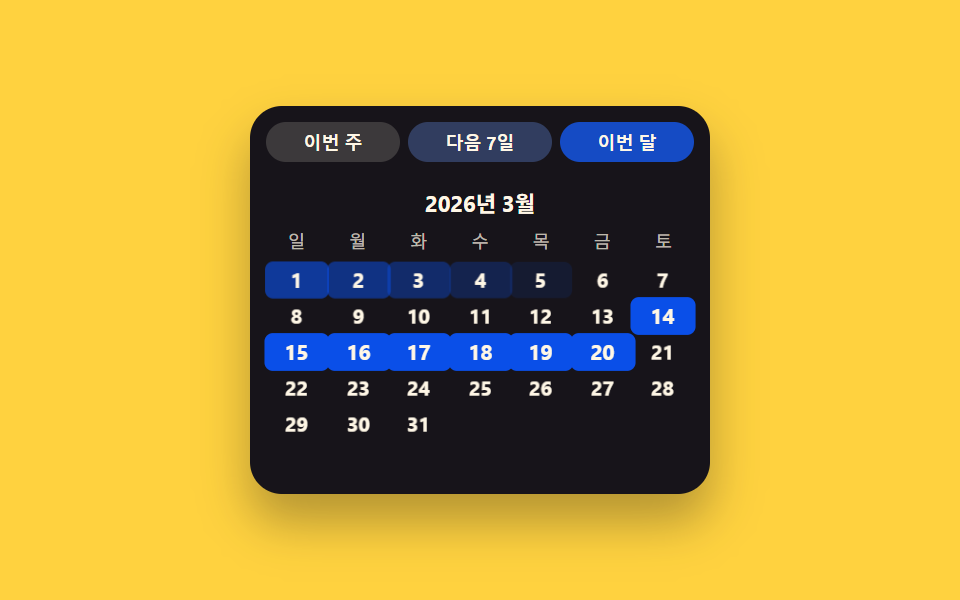
06Preset-chip value toggle — engaging a chip value sets the date value directly, skipping the grid
When one chip value turns on, the date value is set directly without touching the grid, leaving only that chip's background value filled in to mark the choice.
Best forA report's quick period pick, a search filter's recent-range shortcut
PRESETSSTAGGERapplyPreset()
<main class="stage">
<div class="ps is-demo" id="ps">
  <div class="ps__chips" id="psChips"></div>
  <div class="ps__head"><span class="ps__label">March 2026</span></div>
  <div class="ps__weekday" aria-hidden="true">
    <span>Sun</span><span>Mon</span><span>Tue</span><span>Wed</span><span>Thu</span><span>Fri</span><span>Sat</span>
  </div>
  <div class="ps__grid" id="psGrid"></div>
</div>
</main>
@use "../../../../site/static/demo-tokens" as *;
// 계산 겹: applyPreset() 이 선택 범위 시작으로부터 각 셀의 위치(pos)를 구해
// pos*STAGGER 만큼 transition-delay 를 매겨 순차 채움을 만든다.
@include stage($stage-yellow);
.ps { width: 100%; max-width: 230px; background: $subject-ink; border-radius: $r-card; padding: $sp-2; box-shadow: $shadow-raised; box-sizing: border-box; }
.ps__chips { display: flex; gap: $sp-1; margin-bottom: $sp-2; }
.ps__chip {
flex: 1 1 auto;
border: none;
border-radius: $r-pill;
padding: $sp-1 $sp-1;
font-size: 9px;
font-weight: 700;
color: $subject-cream;
background: rgba($subject-cream, .16);
cursor: pointer;
transition: background-color $dur-quick $ease-out;
}
.ps__chip--active { background: $subject-blue-deep; }
.ps__head { text-align: center; margin-bottom: $sp-1; }
.ps__label { font-size: 11px; font-weight: 700; color: $subject-cream; }
.ps__weekday, .ps__grid { display: grid; grid-template-columns: repeat(7, 1fr); }
.ps__weekday span { font-size: 9px; text-align: center; color: rgba($subject-cream, .72); padding-bottom: $sp-1; }
.ps__cell {
display: grid;
place-items: center;
height: 18px;
font-size: 10px;
color: $subject-cream;
border-radius: $r-xs;
border: none;
background: transparent;
transition: background-color $dur-base $ease-out, transform $dur-base $ease-out;
}
.ps__cell--out { visibility: hidden; }
.ps__cell--on { background: $subject-blue-deep; color: $subject-cream; font-weight: 700; transform: scale(1.05); }
@media (max-width: 340px) {
.ps { max-width: 190px; }
.ps__chip { font-size: 8px; padding: $sp-1 0; }
.ps__cell { height: 15px; font-size: 9px; }
.ps__weekday span { font-size: 8px; padding-bottom: 0; }
}
@media (prefers-reduced-motion: reduce) {
.ps__cell, .ps__chip { transition: none; }
}html, body {
margin: 0;
overflow: hidden;
}
.stage {
box-sizing: border-box;
min-height: 100vh;
display: grid;
place-items: center;
margin: 0;
background: #ffd23f;
font-family: -apple-system, "Segoe UI", "Noto Sans KR", sans-serif;
padding: clamp(8px, 4vw, 24px);
}
.ps {
width: 100%;
max-width: 230px;
background: #17141a;
border-radius: 16px;
padding: 8px;
box-shadow: 0 14px 24px rgba(23, 20, 26, 0.32);
box-sizing: border-box;
}
.ps__chips {
display: flex;
gap: 4px;
margin-bottom: 8px;
}
.ps__chip {
flex: 1 1 auto;
border: none;
border-radius: 999px;
padding: 4px 4px;
font-size: 9px;
font-weight: 700;
color: #fff7e6;
background: rgba(255, 247, 230, 0.16);
cursor: pointer;
transition: background-color 220ms ease-out;
}
.ps__chip--active {
background: #0a4fe8;
}
.ps__head {
text-align: center;
margin-bottom: 4px;
}
.ps__label {
font-size: 11px;
font-weight: 700;
color: #fff7e6;
}
.ps__weekday, .ps__grid {
display: grid;
grid-template-columns: repeat(7, 1fr);
}
.ps__weekday span {
font-size: 9px;
text-align: center;
color: rgba(255, 247, 230, 0.72);
padding-bottom: 4px;
}
.ps__cell {
display: grid;
place-items: center;
height: 18px;
font-size: 10px;
color: #fff7e6;
border-radius: 4px;
border: none;
background: transparent;
transition: background-color 300ms ease-out, transform 300ms ease-out;
}
.ps__cell--out {
visibility: hidden;
}
.ps__cell--on {
background: #0a4fe8;
color: #fff7e6;
font-weight: 700;
transform: scale(1.05);
}
@media (max-width: 340px) {
.ps {
max-width: 190px;
}
.ps__chip {
font-size: 8px;
padding: 4px 0;
}
.ps__cell {
height: 15px;
font-size: 9px;
}
.ps__weekday span {
font-size: 8px;
padding-bottom: 0;
}
}
@media (prefers-reduced-motion: reduce) {
.ps__cell, .ps__chip {
transition: none;
}
}(function () {
var BASE = { y: 2026, m: 3, d: 14 }; // 계산 겹 상수: 고정 오늘, new Date() 미사용
var CELL_TOTAL = 42;
var STAGGER = 28; // ms, 계산 겹: 범위 시작에서 이 셀까지의 위치 x STAGGER = 전환 지연
var PRESETS = [
{ id: 'week', label: 'This week', start: 8, end: 14 },
{ id: 'next7', label: 'Next 7 days', start: 14, end: 20 },
{ id: 'month', label: 'This month', start: 1, end: 31 }
];
function isLeap(y) { return (y % 4 === 0 && y % 100 !== 0) || y % 400 === 0; }
function daysInMonth(y, m) {
var t = [31, isLeap(y) ? 29 : 28, 31, 30, 31, 30, 31, 31, 30, 31, 30, 31];
return t[m - 1];
}
function dow(y, m, d) { // Zeller 합동식 — 0=Sun ~ 6=Sat
var yy = y, mm = m;
if (mm < 3) { yy -= 1; mm += 12; }
var K = yy % 100, J = Math.floor(yy / 100);
var h = (d + Math.floor(13 * (mm + 1) / 5) + K + Math.floor(K / 4) + Math.floor(J / 4) - 2 * J) % 7;
h = ((h % 7) + 7) % 7;
return (h + 6) % 7;
}
var ps = document.getElementById('ps');
var chipsWrap = document.getElementById('psChips');
var grid = document.getElementById('psGrid');
var n = daysInMonth(BASE.y, BASE.m);
var lead = dow(BASE.y, BASE.m, 1);
var trail = CELL_TOTAL - lead - n;
var cellByDay = {};
var i, cell;
for (i = 0; i < lead; i++) {
cell = document.createElement('span');
cell.className = 'ps__cell ps__cell--out';
grid.appendChild(cell);
}
for (var d = 1; d <= n; d++) {
cell = document.createElement('span');
cell.className = 'ps__cell';
cell.textContent = String(d);
grid.appendChild(cell);
cellByDay[d] = cell;
}
for (i = 0; i < trail; i++) {
cell = document.createElement('span');
cell.className = 'ps__cell ps__cell--out';
grid.appendChild(cell);
}
var chipEls = PRESETS.map(function (p, idx) {
var b = document.createElement('button');
b.type = 'button';
b.className = 'ps__chip';
b.textContent = p.label;
b.addEventListener('click', function () { human(); applyPreset(idx); });
chipsWrap.appendChild(b);
return b;
});
function applyPreset(idx) {
// 계산 겹: 선택 범위 시작으로부터의 위치(pos)만큼 전환 지연을 매겨 순차 채움을 만든다
var p = PRESETS[idx];
for (var day = 1; day <= n; day++) {
var c = cellByDay[day];
var inRange = day >= p.start && day <= p.end;
if (inRange) {
var pos = day - p.start;
c.style.transitionDelay = (pos * STAGGER) + 'ms';
} else {
c.style.transitionDelay = '0ms';
}
c.classList.toggle('ps__cell--on', inRange);
}
chipEls.forEach(function (el, i2) { el.classList.toggle('ps__chip--active', i2 === idx); });
}
function human() {
ps.classList.remove('is-demo');
stopAutoplay();
}
var seqIdx = -1;
var autoTimer = null;
function stopAutoplay() { if (autoTimer) { clearInterval(autoTimer); autoTimer = null; } }
function tick() {
seqIdx = (seqIdx + 1) % PRESETS.length;
applyPreset(seqIdx);
}
tick();
var reduce = window.matchMedia('(prefers-reduced-motion: reduce)').matches;
if (!reduce) { autoTimer = setInterval(tick, 650); }
})();import { useEffect, useRef, useState } from 'react';
import styles from './DatePickerPresetChips.module.scss';
type Box<T> = { current: T };
const BASE = { y: 2026, m: 3, d: 14 }; // 계산 겹 상수: 고정 오늘, new Date() 미사용
const CELL_TOTAL = 42;
const STAGGER = 28; // ms, 계산 겹: 범위 시작에서 이 셀까지의 위치 x STAGGER = 전환 지연
const PRESETS: { id: string; label: string; start: number; end: number }[] = [
{ id: 'week', label: '이번 주', start: 8, end: 14 },
{ id: 'next7', label: '다음 7일', start: 14, end: 20 },
{ id: 'month', label: '이번 달', start: 1, end: 31 },
];
const WEEKDAY = ['일', '월', '화', '수', '목', '금', '토'];
function isLeap(y: number) {
return (y % 4 === 0 && y % 100 !== 0) || y % 400 === 0;
}
function daysInMonth(y: number, m: number) {
const t = [31, isLeap(y) ? 29 : 28, 31, 30, 31, 30, 31, 31, 30, 31, 30, 31];
return t[m - 1];
}
function dow(y: number, m: number, d: number) { // Zeller 합동식 — 0=일 ~ 6=토
let yy = y;
let mm = m;
if (mm < 3) { yy -= 1; mm += 12; }
const K = yy % 100;
const J = Math.floor(yy / 100);
let h = (d + Math.floor((13 * (mm + 1)) / 5) + K + Math.floor(K / 4) + Math.floor(J / 4) - 2 * J) % 7;
h = ((h % 7) + 7) % 7;
return (h + 6) % 7;
}
const N_DAYS = daysInMonth(BASE.y, BASE.m);
const LEAD = dow(BASE.y, BASE.m, 1);
const TRAIL = CELL_TOTAL - LEAD - N_DAYS;
function delayOf(day: number, presetIdx: number) {
// 계산 겹: 선택 범위 시작으로부터의 위치(pos)만큼 전환 지연을 매겨 순차 채움을 만든다
const p = PRESETS[presetIdx];
if (day < p.start || day > p.end) return 0;
return (day - p.start) * STAGGER;
}
function inRangeOf(day: number, presetIdx: number) {
const p = PRESETS[presetIdx];
return day >= p.start && day <= p.end;
}
export default function DatePickerPresetChips() {
const isDemoRef = useRef(true) as unknown as Box<boolean>;
const [isDemo, setIsDemo] = useState(true);
const [presetIdx, setPresetIdx] = useState(0);
function human() {
isDemoRef.current = false;
setIsDemo(false);
}
useEffect(() => {
const reduce = window.matchMedia('(prefers-reduced-motion: reduce)').matches;
if (reduce) return;
let seqIdx = 0;
const timer = window.setInterval(() => {
if (!isDemoRef.current) return;
seqIdx = (seqIdx + 1) % PRESETS.length;
setPresetIdx(seqIdx);
}, 650);
return () => window.clearInterval(timer);
}, []);
function pickPreset(idx: number) {
human();
setPresetIdx(idx);
}
const lead = Array.from({ length: LEAD }, (_, i) => <span key={'l' + i} className={`${styles.psCell} ${styles.psCellOut}`} />);
const days = Array.from({ length: N_DAYS }, (_, i) => {
const d = i + 1;
const on = inRangeOf(d, presetIdx);
return (
<span
key={'d' + d}
className={`${styles.psCell} ${on ? styles.psCellOn : ''}`}
style={{ transitionDelay: delayOf(d, presetIdx) + 'ms' }}
>
{d}
</span>
);
});
const trail = Array.from({ length: TRAIL }, (_, i) => <span key={'t' + i} className={`${styles.psCell} ${styles.psCellOut}`} />);
return (
<div className={`${styles.ps} ${isDemo ? styles.isDemo : ''}`}>
<div className={styles.psChips}>
{PRESETS.map((p, idx) => (
<button
type="button"
key={p.id}
className={`${styles.psChip} ${idx === presetIdx ? styles.psChipActive : ''}`}
onClick={() => pickPreset(idx)}
>
{p.label}
</button>
))}
</div>
<div className={styles.psHead}><span className={styles.psLabel}>2026년 3월</span></div>
<div className={styles.psWeekday} aria-hidden="true">
{WEEKDAY.map((w) => <span key={w}>{w}</span>)}
</div>
<div className={styles.psGrid}>{lead}{days}{trail}</div>
</div>
);
}06 Preset-chip value toggle — engaging a chip value sets the date value directly, skipping the grid — Measured area 11.493% · moving frames 18/23Original by GODRICH · SCSS and React ship in the zip · Date Picker UI: 9 Popover & Calendar Patterns
The post this demo lives in
 Date Picker UI: 9 Popover & Calendar PatternsDate picker UI: One of nine opens a calendar popover when a focus value turns on, one fades out-of-range dates to unsele See all demos in this post