02Video embed play-button overlay
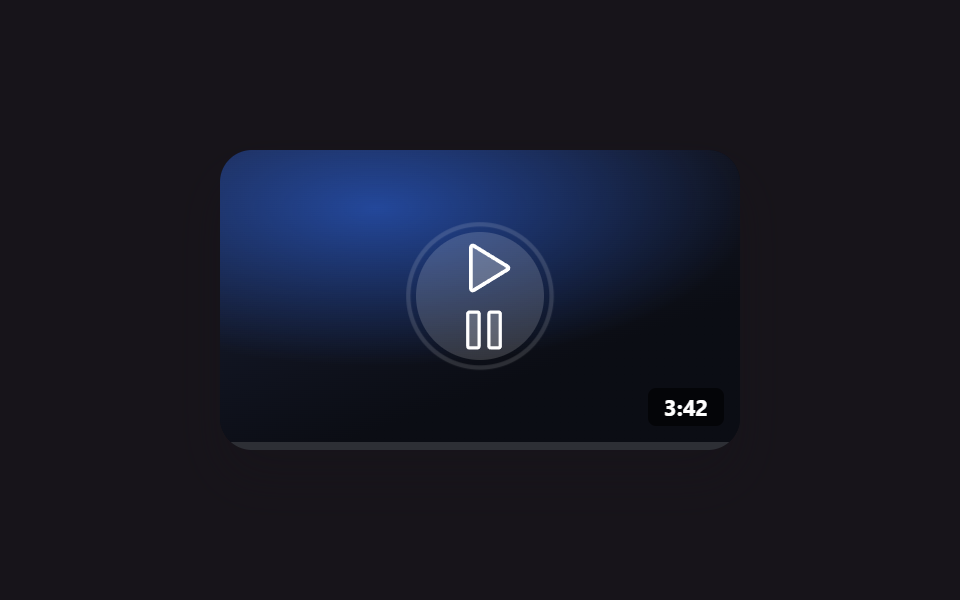
A white ring around the play button on a dark thumbnail keeps expanding and fading like a radar ping, and a real click swaps the icon to pause while the progress bar actually fills.
Best forA video-preview card without loading a real iframe yet, a placeholder before the actual player loads
ring ping looprequestAnimationFrame progressaria-label toggle
<main class="stage is-demo">
  <div class="vcard">
    <div class="vcard__thumb">
      <span class="vcard__ring" aria-hidden="true"></span>
      <button class="vcard__play" type="button" aria-label="Play video">
        <svg class="ic-play" viewBox="0 0 256 256" width="30" height="30" aria-hidden="true"><g fill="currentColor"><path d="M228.23 134.69L84.15 222.81A8 8 0 0 1 72 216.12V39.88a8 8 0 0 1 12.15-6.69l144.08 88.12a7.82 7.82 0 0 1 0 13.38" opacity=".2"/><path d="M232.4 114.49L88.32 26.35a16 16 0 0 0-16.2-.3A15.86 15.86 0 0 0 64 39.87v176.26A15.94 15.94 0 0 0 80 232a16.07 16.07 0 0 0 8.36-2.35l144.04-88.14a15.81 15.81 0 0 0 0-27ZM80 215.94V40l143.83 88Z"/></g></svg>
        <svg class="ic-pause" viewBox="0 0 256 256" width="26" height="26" aria-hidden="true" hidden><g fill="currentColor"><path d="M208 48v160a8 8 0 0 1-8 8h-40a8 8 0 0 1-8-8V48a8 8 0 0 1 8-8h40a8 8 0 0 1 8 8M96 40H56a8 8 0 0 0-8 8v160a8 8 0 0 0 8 8h40a8 8 0 0 0 8-8V48a8 8 0 0 0-8-8" opacity=".2"/><path d="M200 32h-40a16 16 0 0 0-16 16v160a16 16 0 0 0 16 16h40a16 16 0 0 0 16-16V48a16 16 0 0 0-16-16m0 176h-40V48h40ZM96 32H56a16 16 0 0 0-16 16v160a16 16 0 0 0 16 16h40a16 16 0 0 0 16-16V48a16 16 0 0 0-16-16m0 176H56V48h40Z"/></g></svg>
      </button>
      <span class="vcard__time">3:42</span>
    </div>
    <div class="vcard__bar"><span class="vcard__bar-fill"></span></div>
  </div>
</main>
@use "../../../../site/static/demo-tokens" as *;
// ── 변수 3개 ──────────────────────────────────────────
$duration: $dur-loop; // 2s — 링 펄스 한 주기
$easing: $ease-out;
$color: $subject-blue;
@include stage($stage-ink);
.vcard {
width: 260px;
border-radius: $r-card;
overflow: hidden;
box-shadow: $shadow-raised;
background: #0b0d14;
}
.vcard__thumb {
position: relative;
height: 146px;
display: grid; place-items: center;
background:
radial-gradient(120% 90% at 30% 20%, rgba($color, .55), transparent 60%),
linear-gradient(160deg, #1a2036, #0b0d14 70%);
}
.vcard__ring {
position: absolute;
width: 64px; height: 64px;
border-radius: 50%;
border: 2px solid rgba(255, 255, 255, .5);
opacity: 0;
transform: scale(.8);
}
.vcard__play {
position: relative;
width: 64px; height: 64px;
border-radius: 50%;
border: 0;
display: grid; place-items: center;
background: rgba(255, 255, 255, .16);
color: #fff;
cursor: pointer;
transition: transform $dur-quick $ease-out, background $dur-quick $ease-out;
}
.vcard__play:hover { background: rgba(255, 255, 255, .28); transform: scale(1.06); }
.vcard__play svg { transform: translateX(2px); }
.vcard__time {
position: absolute;
right: $sp-2; bottom: $sp-2;
padding: $sp-1 $sp-2;
border-radius: $r-xs;
background: rgba(0, 0, 0, .6);
color: #fff;
font: 700 11px/1 -apple-system, "Segoe UI", "Noto Sans KR", sans-serif;
}
.vcard__bar { height: 4px; background: rgba(255, 255, 255, .14); }
.vcard__bar-fill { display: block; height: 100%; width: 0%; background: $color; }
// 자동 재생 루프 — 재생 버튼 둘레 링이 신호를 보내듯 펄스
.stage.is-demo .vcard__ring { animation: vcard-ping $duration $easing infinite; }
@keyframes vcard-ping {
0% { opacity: .55; transform: scale(.8); }
70% { opacity: 0; transform: scale(1.35); }
100% { opacity: 0; transform: scale(1.35); }
}
@media (prefers-reduced-motion: reduce) {
.stage.is-demo .vcard__ring { animation: none; opacity: 0; }
}html, body {
margin: 0;
overflow: hidden;
}
.stage {
box-sizing: border-box;
min-height: 100vh;
display: grid;
place-items: center;
margin: 0;
background: #17141a;
font-family: -apple-system, "Segoe UI", "Noto Sans KR", sans-serif;
padding: clamp(8px, 4vw, 24px);
}
.vcard {
width: 260px;
border-radius: 16px;
overflow: hidden;
box-shadow: 0 14px 24px rgba(23, 20, 26, 0.32);
background: #0b0d14;
}
.vcard__thumb {
position: relative;
height: 146px;
display: grid;
place-items: center;
background: radial-gradient(120% 90% at 30% 20%, rgba(47, 109, 246, 0.55), transparent 60%), linear-gradient(160deg, #1a2036, #0b0d14 70%);
}
.vcard__ring {
position: absolute;
width: 64px;
height: 64px;
border-radius: 50%;
border: 2px solid rgba(255, 255, 255, 0.5);
opacity: 0;
transform: scale(0.8);
}
.vcard__play {
position: relative;
width: 64px;
height: 64px;
border-radius: 50%;
border: 0;
display: grid;
place-items: center;
background: rgba(255, 255, 255, 0.16);
color: #fff;
cursor: pointer;
transition: transform 220ms ease-out, background 220ms ease-out;
}
.vcard__play:hover {
background: rgba(255, 255, 255, 0.28);
transform: scale(1.06);
}
.vcard__play svg {
transform: translateX(2px);
}
.vcard__time {
position: absolute;
right: 8px;
bottom: 8px;
padding: 4px 8px;
border-radius: 4px;
background: rgba(0, 0, 0, 0.6);
color: #fff;
font: 700 11px/1 -apple-system, "Segoe UI", "Noto Sans KR", sans-serif;
}
.vcard__bar {
height: 4px;
background: rgba(255, 255, 255, 0.14);
}
.vcard__bar-fill {
display: block;
height: 100%;
width: 0%;
background: #2f6df6;
}
.stage.is-demo .vcard__ring {
animation: vcard-ping 2s ease-out infinite;
}
@keyframes vcard-ping {
0% {
opacity: 0.55;
transform: scale(0.8);
}
70% {
opacity: 0;
transform: scale(1.35);
}
100% {
opacity: 0;
transform: scale(1.35);
}
}
@media (prefers-reduced-motion: reduce) {
.stage.is-demo .vcard__ring {
animation: none;
opacity: 0;
}
}// 실제 동작: Play 버튼을 누르면 아이콘이 바뀌고 진행바가 실제로 채워진다(모형 Play — 진짜 영상 파일은 없음).
var btn = document.querySelector('.vcard__play');
var play = document.querySelector('.ic-play');
var pause = document.querySelector('.ic-pause');
var fill = document.querySelector('.vcard__bar-fill');
var playing = false;
var raf = null;
var start = 0;
function tick(ts) {
if (!start) start = ts;
var pct = Math.min(100, ((ts - start) / 6000) * 100);
fill.style.width = pct + '%';
if (pct < 100 && playing) raf = requestAnimationFrame(tick);
}
btn.addEventListener('click', function () {
playing = !playing;
play.hidden = playing;
pause.hidden = !playing;
btn.setAttribute('aria-label', playing ? 'Pause' : 'Play video');
if (playing) { start = 0; raf = requestAnimationFrame(tick); }
else if (raf) cancelAnimationFrame(raf);
});import { useEffect, useRef, useState } from "react";
import type { CSSProperties } from "react";
import styles from "./VideoPlayOverlay.module.scss";
export type VideoPlayOverlayProps = {
duration?: number;
easing?: string;
color?: string;
time?: string;
};
export default function VideoPlayOverlay({ duration = 2000, easing = "ease-out", color = "#2f6df6", time = "3:42" }: VideoPlayOverlayProps) {
const vars: CSSProperties = { "--duration": `${duration}ms`, "--easing": easing, "--color": color } as CSSProperties;
const [playing, setPlaying] = useState(false);
const [pct, setPct] = useState(0);
const raf = useRef<number | null>(null);
const start = useRef<number>(0);
useEffect(() => {
if (!playing) return;
start.current = 0;
const tick = (ts: number) => {
if (!start.current) start.current = ts;
const p = Math.min(100, ((ts - start.current) / 6000) * 100);
setPct(p);
if (p < 100) raf.current = requestAnimationFrame(tick);
};
raf.current = requestAnimationFrame(tick);
return () => { if (raf.current) cancelAnimationFrame(raf.current); };
}, [playing]);
return (
<div className={styles.card} style={vars}>
<div className={styles.thumb}>
<span className={styles.ring} aria-hidden="true" />
<button className={styles.play} type="button" aria-label={playing ? "일시정지" : "영상 재생"} onClick={() => setPlaying((v) => !v)}>
{playing ? (
<svg viewBox="0 0 256 256" width="26" height="26" aria-hidden="true"><g fill="currentColor">
<path opacity=".2" d="M208 48v160a8 8 0 0 1-8 8h-40a8 8 0 0 1-8-8V48a8 8 0 0 1 8-8h40a8 8 0 0 1 8 8M96 40H56a8 8 0 0 0-8 8v160a8 8 0 0 0 8 8h40a8 8 0 0 0 8-8V48a8 8 0 0 0-8-8" />
<path d="M200 32h-40a16 16 0 0 0-16 16v160a16 16 0 0 0 16 16h40a16 16 0 0 0 16-16V48a16 16 0 0 0-16-16m0 176h-40V48h40ZM96 32H56a16 16 0 0 0-16 16v160a16 16 0 0 0 16 16h40a16 16 0 0 0 16-16V48a16 16 0 0 0-16-16m0 176H56V48h40Z" />
</g></svg>
) : (
<svg viewBox="0 0 256 256" width="30" height="30" aria-hidden="true"><g fill="currentColor">
<path opacity=".2" d="M228.23 134.69L84.15 222.81A8 8 0 0 1 72 216.12V39.88a8 8 0 0 1 12.15-6.69l144.08 88.12a7.82 7.82 0 0 1 0 13.38" />
<path d="M232.4 114.49L88.32 26.35a16 16 0 0 0-16.2-.3A15.86 15.86 0 0 0 64 39.87v176.26A15.94 15.94 0 0 0 80 232a16.07 16.07 0 0 0 8.36-2.35l144.04-88.14a15.81 15.81 0 0 0 0-27ZM80 215.94V40l143.83 88Z" />
</g></svg>
)}
</button>
<span className={styles.time}>{time}</span>
</div>
<div className={styles.bar}><span className={styles.fill} style={{ width: `${pct}%` }} /></div>
</div>
);
}02 Video embed play-button overlay — Measured area 2.308% · moving frames 11/23Original by GODRICH · SCSS and React ship in the zip · 9 Social Share Button Design Embed Widgets
The post this demo lives in
 9 Social Share Button Design Embed WidgetsSocial share button design is a small standalone card for one job — share, reviews, contact. Copy-paste a few lines of C See all demos in this post
If you like this effect - similar demos
 Embeds01 Play/pause morph button9 Custom Video Player CSS Controls, No Video File
 Embeds01 YouTube responsive embed — a video frame that recomputes its ratio from the available width9 YouTube Embed Code UI Patterns (Copy-Paste)
 Embeds01 Copy button that says it copied9 Code Block UI Patterns — No Highlighter Library