05Letters That Float by How Much of Them Sits Underwater
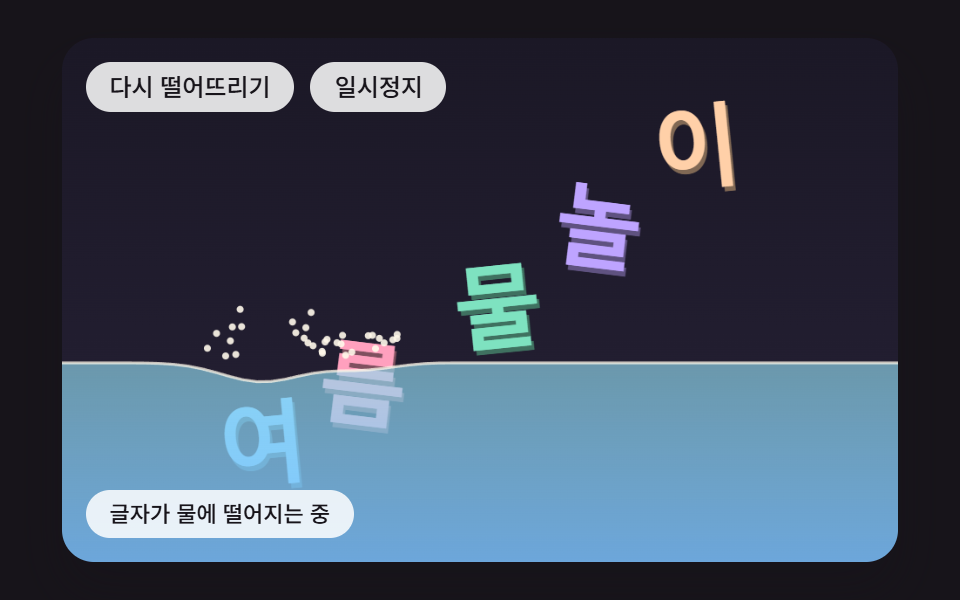
The water surface is a row of spring columns that pass height to their neighbors by WAVE_SPREAD, each letter box gets an upward push of its submerged area times WATER_DENSITY, and its entry speed times SPLASH_FORCE presses the columns below to start a wave.
Best forTitle for a summer event page
WATER_DENSITYWAVE_SPREADSPLASH_FORCE
<main class="stage">
<div class="pc is-demo" id="pc">
  <p class="pc__sr" data-role="word">SUMMER SPLASH</p>
  <canvas class="pc__canvas" data-role="canvas" width="480" height="300" tabindex="0" aria-label="Letters drop into water, raise waves, and float up by how much of them is submerged. Press to push the surface there, use the Down arrow to dunk the letters, the side arrows to push them, press Enter to drop them again and Space to pause."></canvas>
  <p class="pc__status" data-role="status" aria-live="off">Letters dropping into the water</p>
  <div class="pc__tools">
    <button class="pc__btn" data-role="restart" type="button">Drop again</button>
    <button class="pc__btn" data-role="pause" type="button" aria-pressed="false">Pause</button>
  </div>
</div>
</main>
@use "../../../../site/static/demo-tokens" as *;
@include stage($stage-ink);
.pc {
position: relative;
width: min(92vw, calc(160vh - 12.8vw));
aspect-ratio: 480 / 300;
margin: 0 auto;
border-radius: $r-card;
overflow: hidden;
box-shadow: $shadow-raised;
background: $subject-ink;
}
.pc__canvas {
display: block;
width: 100%;
height: 100%;
cursor: pointer;
}
.pc__canvas:focus-visible {
outline: 2px solid rgba(255, 255, 255, .85);
outline-offset: -6px;
}
// 원문 한 줄 — 화면에는 숨기고 화면 낭독기에만 남긴다(낱글자는 캔버스 그림이라 따로 읽히지 않는다)
.pc__sr {
position: absolute;
width: 1px;
height: 1px;
margin: -1px;
padding: 0;
border: 0;
overflow: hidden;
clip-path: inset(50%);
white-space: nowrap;
}
.pc__status {
position: absolute;
left: $sp-3;
bottom: $sp-3;
box-sizing: border-box;
max-width: 46%;
margin: 0;
padding: $sp-1 $sp-3;
border-radius: $r-control;
background: rgba(255, 255, 255, .85);
color: $subject-ink;
font-weight: 500;
font-size: 11px;
line-height: 1.4;
pointer-events: none;
}
// 버튼은 왼쪽 위 칸에 두고, 좁으면 줄을 바꿔 무대를 덮지 않는다
.pc__tools {
position: absolute;
left: $sp-3;
top: $sp-3;
box-sizing: border-box;
max-width: 46%;
display: flex;
flex-wrap: wrap;
gap: $sp-2;
}
.pc__btn {
margin: 0;
padding: $sp-1 $sp-3;
border: 0;
border-radius: $r-pill;
background: rgba(255, 255, 255, .85);
color: $subject-ink;
font: inherit;
font-weight: 500;
font-size: 12px;
line-height: 1.4;
cursor: pointer;
transition: background-color $dur-quick ease-out;
}
.pc__btn:hover {
background: $subject-cream;
}
.pc__btn[aria-pressed="true"] {
background: $subject-mint;
}
.pc__btn:focus-visible {
outline: 2px solid rgba(255, 255, 255, .95);
outline-offset: 2px;
}
// 손가락 가로 끌기는 이 캔버스가 받고, 세로 쓸기는 브라우저에 남겨 페이지 스크롤이 막히지 않게 한다
.pc__canvas { touch-action: pan-y; }
@media (max-width: 340px) {
.pc__btn { font-size: 10px; padding: $sp-1 $sp-2; }
.pc__status { font-size: 10px; padding: $sp-1 $sp-2; }
}
@media (prefers-reduced-motion: reduce) {
.pc__btn { transition: none; }
}html, body {
margin: 0;
overflow: hidden;
}
.stage {
box-sizing: border-box;
min-height: 100vh;
display: grid;
place-items: center;
margin: 0;
background: #17141a;
font-family: -apple-system, "Segoe UI", "Noto Sans KR", sans-serif;
padding: clamp(8px, 4vw, 24px);
}
.pc {
position: relative;
width: min(92vw, 160vh - 12.8vw);
aspect-ratio: 480/300;
margin: 0 auto;
border-radius: 16px;
overflow: hidden;
box-shadow: 0 14px 24px rgba(23, 20, 26, 0.32);
background: #17141a;
}
.pc__canvas {
display: block;
width: 100%;
height: 100%;
cursor: pointer;
}
.pc__canvas:focus-visible {
outline: 2px solid rgba(255, 255, 255, 0.85);
outline-offset: -6px;
}
.pc__sr {
position: absolute;
width: 1px;
height: 1px;
margin: -1px;
padding: 0;
border: 0;
overflow: hidden;
clip-path: inset(50%);
white-space: nowrap;
}
.pc__status {
position: absolute;
left: 12px;
bottom: 12px;
box-sizing: border-box;
max-width: 46%;
margin: 0;
padding: 4px 12px;
border-radius: 12px;
background: rgba(255, 255, 255, 0.85);
color: #17141a;
font-weight: 500;
font-size: 11px;
line-height: 1.4;
pointer-events: none;
}
.pc__tools {
position: absolute;
left: 12px;
top: 12px;
box-sizing: border-box;
max-width: 46%;
display: flex;
flex-wrap: wrap;
gap: 8px;
}
.pc__btn {
margin: 0;
padding: 4px 12px;
border: 0;
border-radius: 999px;
background: rgba(255, 255, 255, 0.85);
color: #17141a;
font: inherit;
font-weight: 500;
font-size: 12px;
line-height: 1.4;
cursor: pointer;
transition: background-color 220ms ease-out;
}
.pc__btn:hover {
background: #fff7e6;
}
.pc__btn[aria-pressed=true] {
background: #4cd4a6;
}
.pc__btn:focus-visible {
outline: 2px solid rgba(255, 255, 255, 0.95);
outline-offset: 2px;
}
.pc__canvas {
touch-action: pan-y;
}
@media (max-width: 340px) {
.pc__btn {
font-size: 10px;
padding: 4px 8px;
}
.pc__status {
font-size: 10px;
padding: 4px 8px;
}
}
@media (prefers-reduced-motion: reduce) {
.pc__btn {
transition: none;
}
}(function () {
const root = document.getElementById("pc");
if (!root) return;
const W = 480;
const H = 300;
const FIXED_DT = 16;
const TAU = Math.PI * 2;
const DEG = Math.PI / 180;
// 바닥 높이 — 왼쪽 아래 상태 줄 위에서 글자가 멈추도록 바닥을 띄워 둔다
const FLOOR = 250;
// 다시 떨어뜨린 뒤 첫 200ms 는 그대로 둔다 — 첫 변화가 200ms 뒤에 오게
const LEAD_MS = 200;
// 파스텔 팔레트 — 어두운 무대 위에 밝은 글자를 얹어 명도 차로 글자 경계가 읽힌다
const BG = [27, 24, 38];
const BG_LOW = [38, 33, 54];
const FLOOR_COL = [56, 50, 78];
const INK = [33, 29, 46];
const PAPER = [255, 248, 234];
const PAL = [
[124, 196, 255],
[255, 160, 190],
[126, 226, 192],
[190, 164, 255],
[255, 208, 168],
[246, 228, 140],
[150, 222, 236],
[232, 182, 228],
[196, 220, 160],
];
function clamp(v, lo, hi) { return v < lo ? lo : (v > hi ? hi : v); }
function lerp(a, b, k) { return a + (b - a) * k; }
function smooth(x) { const c = clamp(x, 0, 1); return c * c * (3 - 2 * c); }
function rgba(c, a) {
return 'rgba(' + Math.round(clamp(c[0], 0, 255)) + ',' + Math.round(clamp(c[1], 0, 255)) + ',' + Math.round(clamp(c[2], 0, 255)) + ',' + clamp(a, 0, 1).toFixed(3) + ')';
}
function shadeRGB(c, k) { return [c[0] * k, c[1] * k, c[2] * k]; }
// 시드 고정 난수 — 같은 시드면 같은 배치가 다시 나온다 (32비트 정수 섞기)
function makeRng(seed) {
let s = seed >>> 0;
return function () {
s = (s + 0x6d2b79f5) >>> 0;
let t = s;
t = Math.imul(t ^ (t >>> 15), t | 1);
t ^= t + Math.imul(t ^ (t >>> 7), t | 61);
return ((t ^ (t >>> 14)) >>> 0) / 4294967296;
};
}
const canvasEl = root.querySelector('[data-role="canvas"]');
const statusEl = root.querySelector('[data-role="status"]');
const wordEl = root.querySelector('[data-role="word"]');
const ctxRaw = canvasEl ? canvasEl.getContext('2d') : null;
if (!canvasEl || !ctxRaw || !statusEl || !wordEl) {
return;
}
const cv = canvasEl;
const ctx = ctxRaw;
const status = statusEl;
// 원문 한 줄 — 화면 낭독기는 이 문장만 한 번 읽는다. 캔버스에 그린 낱글자는 접근성 트리에 들어가지 않는다
const WORD = (wordEl.textContent || '').trim();
const restartBtn = root.querySelector('[data-role="restart"]');
const pauseBtn = root.querySelector('[data-role="pause"]');
const reduceQuery = window.matchMedia('(prefers-reduced-motion: reduce)');
// 페이지를 연 채 동작 줄이기 설정을 바꿔도 아래 change 리스너가 이 값을 다시 읽는다
let still = reduceQuery.matches;
// 자동 시연 중인가 — 사람이 처음 만지는 순간 시연을 멈추고 상태 줄을 읽어 주기 시작한다
let demo = root.classList.contains('is-demo');
function wake() {
if (!demo) {
return;
}
demo = false;
root.classList.remove('is-demo');
status.setAttribute('aria-live', 'polite');
}
function say(text) {
if (status.textContent !== text) {
status.textContent = text;
}
}
function fitCanvas() {
// 배율은 2 에서 자른다 — 배율 3 기기에서 화소가 2.25배로 늘어 프레임마다 일이 그만큼 커지지 않게
const dpr = Math.min(window.devicePixelRatio || 1, 2);
cv.width = Math.round(W * dpr);
cv.height = Math.round(H * dpr);
ctx.setTransform(dpr, 0, 0, dpr, 0, 0);
}
// 화면 좌표(CSS px) → 장면 좌표(480x300). 리사이즈 뒤에도 그때그때 현재 크기로 다시 잰다
function toScene(ev) {
const r = cv.getBoundingClientRect();
return [((ev.clientX - r.left) / r.width) * W, ((ev.clientY - r.top) / r.height) * H];
}
const FONT_FAMILY = '"Segoe UI", "Malgun Gothic", "Hiragino Sans", "Noto Sans KR", sans-serif';
// 글자 사이 간격 — 글자 크기에 대한 비율
const GLYPH_GAP = 0.1;
function fontAt(px) { return '800 ' + px.toFixed(1) + 'px ' + FONT_FAMILY; }
function layoutWord(text, sizeMax, maxW, cx, cy) {
const chars = Array.from(text);
ctx.font = fontAt(sizeMax);
const ws = [];
let total = 0;
for (let i = 0; i < chars.length; i += 1) {
const m = chars[i].trim() === '' ? sizeMax * 0.3 : ctx.measureText(chars[i]).width;
ws.push(m);
total += m;
}
total += GLYPH_GAP * sizeMax * Math.max(0, chars.length - 1);
// 줄이 maxW 보다 길면 글자 크기를 같은 비율로 줄인다 — 언어마다 글자 수가 달라도 무대 안에 든다
const k = total > maxW ? maxW / total : 1;
const size = sizeMax * k;
const out = [];
let x = cx - (total * k) / 2;
let n = 0;
for (let i = 0; i < chars.length; i += 1) {
const w = ws[i] * k;
if (chars[i].trim() !== '') {
out.push({ ch: chars[i], w: Math.max(w, size * 0.34), h: size * 0.9, hx: x + w / 2, hy: cy, size: size, col: PAL[n % PAL.length], i: n });
n += 1;
}
x += w + GLYPH_GAP * size;
}
return out;
}
// 글자 하나 그리기 — 같은 글자를 어둡게 한 번 아래로 비켜 찍어 두께를 만든 뒤 제 색으로 덮는다
function drawGlyph(g, x, y, a, sx, sy, fill) {
ctx.save();
ctx.translate(x, y);
ctx.rotate(a);
ctx.scale(sx, sy);
ctx.font = fontAt(g.size);
ctx.textAlign = 'center';
ctx.textBaseline = 'middle';
ctx.fillStyle = rgba(shadeRGB(fill, 0.5), 1);
ctx.fillText(g.ch, 1.4, g.size * 0.04 + 2.8);
ctx.fillStyle = rgba(fill, 1);
ctx.fillText(g.ch, 0, g.size * 0.04);
ctx.restore();
}
// 모서리가 둥근 사각형 경로 — 가운데 (0,0) 기준 폭 w·높이 h
function roundRectPath(x, y, w, h, r) {
const rr = Math.min(r, w / 2, h / 2);
ctx.beginPath();
ctx.moveTo(x + rr, y);
ctx.lineTo(x + w - rr, y);
ctx.quadraticCurveTo(x + w, y, x + w, y + rr);
ctx.lineTo(x + w, y + h - rr);
ctx.quadraticCurveTo(x + w, y + h, x + w - rr, y + h);
ctx.lineTo(x + rr, y + h);
ctx.quadraticCurveTo(x, y + h, x, y + h - rr);
ctx.lineTo(x, y + rr);
ctx.quadraticCurveTo(x, y, x + rr, y);
ctx.closePath();
}
// 바닥 그림자 — 글자 아래끝이 바닥에서 멀수록 옅고 넓게. 높이 값 하나로 크기와 진하기를 함께 정한다
function floorShadow(x, bottom, w) {
const lift = clamp((FLOOR - bottom) / 160, 0, 1);
ctx.fillStyle = rgba([0, 0, 0], 0.34 * (1 - lift) + 0.05);
ctx.beginPath();
ctx.ellipse(x, FLOOR + 3, w * (0.5 + 0.4 * lift), 3.5 + 2.5 * lift, 0, 0, TAU);
ctx.fill();
}
function clearStage() {
const g = ctx.createLinearGradient(0, 0, 0, H);
g.addColorStop(0, rgba(BG, 1));
g.addColorStop(1, rgba(BG_LOW, 1));
ctx.fillStyle = g;
ctx.fillRect(0, 0, W, H);
}
function drawFloor() {
ctx.fillStyle = rgba(FLOOR_COL, 1);
ctx.fillRect(0, FLOOR, W, H - FLOOR);
ctx.fillStyle = rgba(PAPER, 0.22);
ctx.fillRect(0, FLOOR, W, 1.5);
}
const TXT_PAUSE = 'Paused — press Space to resume';
// 시계 — clock 은 시연 시계, age 는 다시 떨어뜨린 뒤 흐른 시간(ms). 둘 다 16ms 고정 스텝으로만 늘어난다
let paused = false;
let clock = 0;
let age = 0;
function setPaused(v) {
paused = v;
if (pauseBtn) {
pauseBtn.setAttribute('aria-pressed', v ? 'true' : 'false');
}
}
function restart() {
age = 0;
onRestart();
}
function tick() {
age += FIXED_DT;
step();
}
function report() { say(paused ? TXT_PAUSE : stateText()); }
function render() {
draw();
report();
}
// 시연 — DEMO_LOOP_MS 마다 처음부터 다시 떨어뜨린다
let demoCycle = -1;
function demoTick(t) {
const cyc = Math.floor(t / DEMO_LOOP_MS);
if (cyc !== demoCycle) {
demoCycle = cyc;
restart();
}
demoDrive(t - cyc * DEMO_LOOP_MS);
}
// 동작 줄이기 — 움직임을 그리지 않고 SETTLE_TICKS 스텝을 한 번에 계산해 내려앉은 결과만 그린다
const SETTLE_TICKS = 360;
function settle() {
for (let k = 0; k < SETTLE_TICKS; k += 1) {
tick();
}
}
// 입력 한 번 뒤 — 동작 줄이기면 그 입력이 낳은 결과까지 바로 계산해 그린다
function after() {
if (still) {
settle();
}
render();
}
cv.addEventListener('pointerdown', function (ev) {
wake();
if (cv.setPointerCapture) {
cv.setPointerCapture(ev.pointerId);
}
const p = toScene(ev);
onPointer('down', p[0], p[1]);
after();
});
cv.addEventListener('pointermove', function (ev) {
const p = toScene(ev);
if (onPointer('move', p[0], p[1])) {
wake();
after();
}
});
cv.addEventListener('pointerup', function (ev) {
const p = toScene(ev);
onPointer('up', p[0], p[1]);
});
cv.addEventListener('pointercancel', function () { onPointer('up', -1, -1); });
cv.addEventListener('pointerleave', function () {
if (onPointer('leave', -1, -1)) {
after();
}
});
cv.addEventListener('keydown', function (ev) {
const k = ev.key;
if (k === 'Enter') {
restart();
}
else if (k === ' ') {
setPaused(!paused);
}
else if (!onKey(k)) {
return;
}
ev.preventDefault();
wake();
after();
});
if (restartBtn) {
restartBtn.addEventListener('click', function () { wake(); restart(); after(); });
}
if (pauseBtn) {
pauseBtn.addEventListener('click', function () { wake(); setPaused(!paused); after(); });
}
// 물 밀도 — 부력 = 잠긴 넓이 비율 x WATER_DENSITY x 중력. 1 보다 크면 일부만 잠긴 채 뜬다
const WATER_DENSITY = 1.7;
// 물결 퍼짐 — 이웃 기둥과의 높이 차의 이 비율을 틱마다 양옆으로 넘긴다
const WAVE_SPREAD = 0.24;
// 튀김 세기 — 물에 들어간 속도 x 이 값을 그 자리 기둥 속도에 더해 수면을 누른다
const SPLASH_FORCE = 0.3;
const WATER_Y = 186;
// 수면 기둥 — 8px 간격
const COLS = 61;
const COL_W = W / (COLS - 1);
// 기둥 스프링 — 제 높이로 돌아가려는 세기와 감쇠
const WAVE_K = 0.025;
const WAVE_DAMP = 0.02;
const FLOAT_GRAVITY = 0.4;
// 잠긴 넓이를 재는 표본 — 글자 상자 안 5 x 4 점
const SAMPLE_X = 5;
const SAMPLE_Y = 4;
const DEMO_LOOP_MS = 3400;
const TXT_RUN = 'Letters dropping into the water';
const TXT_REST = 'Floating on the water — press Enter to drop again';
const GLYPHS = layoutWord(WORD, 52, 400, 240, 0);
let floaters = [];
let colH = [];
let colV = [];
let drops = [];
let splashRng = makeRng(4725);
function onRestart() {
floaters = GLYPHS.map(function (g, i) {
return { g: g, x: g.hx, y: -g.h - i * 46, vx: 0, vy: 0, a: (i % 2 ? 0.12 : -0.1), w: 0, frac: 0, wet: false };
});
colH = [];
colV = [];
for (let k = 0; k < COLS; k += 1) {
colH.push(0);
colV.push(0);
}
drops = [];
splashRng = makeRng(4725);
}
// 수면 높이 — 이웃 두 기둥 사이를 직선으로 잇는다
function surfaceAt(x) {
const u = clamp(x / COL_W, 0, COLS - 1.001);
const k = Math.floor(u);
return WATER_Y + lerp(colH[k], colH[k + 1], u - k);
}
function nearCols(x, half, fn) {
const k0 = Math.max(0, Math.floor((x - half) / COL_W));
const k1 = Math.min(COLS - 1, Math.ceil((x + half) / COL_W));
for (let k = k0; k <= k1; k += 1) {
const wgt = 1 - Math.min(Math.abs(k * COL_W - x) / Math.max(half, 1), 1);
if (wgt > 0) {
fn(k, wgt);
}
}
}
function stepWater() {
for (let k = 0; k < COLS; k += 1) {
colV[k] += -WAVE_K * colH[k] - WAVE_DAMP * colV[k];
colH[k] += colV[k];
}
// 이웃 확산 — 두 번 돌려 물결이 한 틱에 두 기둥까지 번진다
for (let pass = 0; pass < 2; pass += 1) {
const lD = [];
const rD = [];
for (let k = 0; k < COLS; k += 1) {
lD.push(k > 0 ? WAVE_SPREAD * (colH[k] - colH[k - 1]) : 0);
rD.push(k < COLS - 1 ? WAVE_SPREAD * (colH[k] - colH[k + 1]) : 0);
}
for (let k = 0; k < COLS; k += 1) {
if (k > 0) {
colV[k - 1] += lD[k];
colH[k - 1] += lD[k];
}
if (k < COLS - 1) {
colV[k + 1] += rD[k];
colH[k + 1] += rD[k];
}
}
}
}
function stepFloater(f) {
const c = Math.cos(f.a);
const s = Math.sin(f.a);
// 잠긴 넓이 — 상자 안 표본 점 가운데 수면 아래 것의 비율과, 그 점들의 가운데
let n = 0;
let sx = 0;
for (let iy = 0; iy < SAMPLE_Y; iy += 1) {
for (let ix = 0; ix < SAMPLE_X; ix += 1) {
const lx = ((ix + 0.5) / SAMPLE_X - 0.5) * f.g.w;
const ly = ((iy + 0.5) / SAMPLE_Y - 0.5) * f.g.h;
const wx = f.x + lx * c - ly * s;
const wy = f.y + lx * s + ly * c;
if (wy > surfaceAt(wx)) {
n += 1;
sx += wx;
}
}
}
const frac = n / (SAMPLE_X * SAMPLE_Y);
// 물에 막 들어간 순간 — 들어간 속도만큼 그 자리 기둥을 누르고 물방울을 튀긴다
if (frac > 0 && !f.wet && f.vy > 0) {
const v = f.vy;
nearCols(f.x, f.g.w * 0.7, function (k, wgt) { colV[k] += v * SPLASH_FORCE * wgt; });
const count = Math.min(16, Math.round(v * 1.4));
for (let d = 0; d < count; d += 1) {
const side = d % 2 ? 1 : -1;
drops.push({ x: f.x + side * f.g.w * 0.4 * splashRng(), y: WATER_Y - 2, vx: side * (0.6 + 2.2 * splashRng()), vy: -(1.5 + splashRng() * v * 0.45), life: 1 });
}
}
f.wet = frac > 0;
f.frac = frac;
const lift = frac * WATER_DENSITY * FLOAT_GRAVITY;
f.vy += FLOAT_GRAVITY - lift;
// 잠긴 점들의 가운데가 몸 가운데에서 비켜 있으면 부력이 몸을 돌린다
if (n > 0) {
f.w -= ((sx / n - f.x) * lift) / (f.g.w * f.g.w) * 1.2;
}
// 물속 저항과 똑바로 서려는 힘 — 잠긴 만큼만
f.vx *= 1 - 0.05 * frac;
f.vy *= 1 - 0.08 * frac;
f.w = (f.w - f.a * 0.012 * frac) * (1 - 0.1 * frac);
// 떠 있는 동안 위아래로 움직인 만큼 둘레 수면도 함께 밀린다
if (frac > 0 && frac < 1) {
const pv = f.vy;
nearCols(f.x, f.g.w * 0.5, function (k, wgt) { colV[k] += pv * 0.04 * wgt; });
}
f.x = clamp(f.x + f.vx, f.g.w / 2 + 2, W - f.g.w / 2 - 2);
f.y += f.vy;
f.a += f.w;
}
function step() {
if (age < LEAD_MS) {
return;
}
stepWater();
for (let i = 0; i < floaters.length; i += 1) {
stepFloater(floaters[i]);
}
// 이웃 글자끼리 겹치면 옆으로 나눠 민다
for (let i = 0; i + 1 < floaters.length; i += 1) {
const a = floaters[i];
const b = floaters[i + 1];
const minD = (a.g.w + b.g.w) / 2 + 2;
const dx = b.x - a.x;
if (Math.abs(dx) < minD && Math.abs(b.y - a.y) < (a.g.h + b.g.h) / 2) {
const p = (minD - Math.abs(dx)) / 2;
a.x -= p;
b.x += p;
}
}
for (let d = drops.length - 1; d >= 0; d -= 1) {
const p = drops[d];
p.vy += FLOAT_GRAVITY;
p.x += p.vx;
p.y += p.vy;
if (p.y > surfaceAt(p.x) && p.vy > 0) {
drops.splice(d, 1);
}
}
}
function stateText() {
if (still) {
return TXT_REST;
}
for (let i = 0; i < floaters.length; i += 1) {
const f = floaters[i];
if (!f.wet || Math.abs(f.vy) > 0.15) {
return TXT_RUN;
}
}
return TXT_REST;
}
function draw() {
clearStage();
for (let i = 0; i < floaters.length; i += 1) {
const f = floaters[i];
drawGlyph(f.g, f.x, f.y, f.a, 1, 1, f.g.col);
}
// 물 — 글자 위에 반투명하게 덮어 잠긴 부분만 물색으로 물든다
ctx.beginPath();
ctx.moveTo(0, H);
for (let k = 0; k < COLS; k += 1) {
ctx.lineTo(k * COL_W, WATER_Y + colH[k]);
}
ctx.lineTo(W, H);
ctx.closePath();
const g = ctx.createLinearGradient(0, WATER_Y - 20, 0, H);
g.addColorStop(0, rgba(PAL[6], 0.62));
g.addColorStop(1, rgba(PAL[0], 0.82));
ctx.fillStyle = g;
ctx.fill();
ctx.strokeStyle = rgba(PAPER, 0.75);
ctx.lineWidth = 1.6;
ctx.beginPath();
for (let k = 0; k < COLS; k += 1) {
const y = WATER_Y + colH[k];
if (k === 0) {
ctx.moveTo(0, y);
}
else {
ctx.lineTo(k * COL_W, y);
}
}
ctx.stroke();
ctx.fillStyle = rgba(PAPER, 0.9);
for (let d = 0; d < drops.length; d += 1) {
ctx.beginPath();
ctx.arc(drops[d].x, drops[d].y, 2, 0, TAU);
ctx.fill();
}
}
function demoDrive(t) { }
// 누른 자리 둘레 수면을 눌러 물결을 만들고, 가까운 글자는 물속으로 민다
function onPointer(type, x, y) {
if (type !== 'down') {
return false;
}
nearCols(x, 30, function (k, wgt) { colV[k] += 6 * wgt; });
for (let i = 0; i < floaters.length; i += 1) {
const f = floaters[i];
if (Math.abs(f.x - x) < 40) {
f.vy += 5;
}
}
if (age < LEAD_MS) {
age = LEAD_MS;
}
return false;
}
// 아래 방향키 — 모두 물속으로 눌러 넣기, 옆 방향키 — 옆으로 밀기
function onKey(k) {
for (let i = 0; i < floaters.length; i += 1) {
const f = floaters[i];
if (k === 'ArrowDown') {
f.vy += 6;
}
else if (k === 'ArrowLeft') {
f.vx -= 3;
}
else if (k === 'ArrowRight') {
f.vx += 3;
}
else {
return false;
}
}
if (age < LEAD_MS) {
age = LEAD_MS;
}
return true;
}
function onResize() {
fitCanvas();
render();
}
fitCanvas();
window.addEventListener('resize', onResize);
let rafId = 0;
let lastTs = -1;
let acc = 0;
function frame(ts) {
if (still) {
rafId = 0;
return;
}
if (lastTs < 0) {
lastTs = ts;
}
// 탭이 숨었다 돌아와도 한 번에 100ms 까지만 따라잡는다 — 순간이동 대신 이어서 움직인다
acc += Math.min(ts - lastTs, 100);
lastTs = ts;
let n = 0;
while (acc >= FIXED_DT && n < 6) {
if (!paused) {
clock += FIXED_DT;
if (demo) {
demoTick(clock);
}
tick();
}
acc -= FIXED_DT;
n += 1;
}
render();
rafId = window.requestAnimationFrame(frame);
}
function startLoop() {
if (rafId) {
return;
}
lastTs = -1;
acc = 0;
rafId = window.requestAnimationFrame(frame);
}
// 동작 줄이기 설정이 페이지를 연 채 바뀌면 — 켜지면 루프를 멈추고 내려앉은 결과로, 꺼지면 루프를 다시 돈다
function onMotionPref() {
still = reduceQuery.matches;
if (still) {
if (rafId) {
window.cancelAnimationFrame(rafId);
rafId = 0;
}
after();
}
else {
startLoop();
}
}
if (typeof reduceQuery.addEventListener === 'function') {
reduceQuery.addEventListener('change', onMotionPref);
}
restart();
if (still) {
after();
}
else {
render();
startLoop();
}
return function () {
window.cancelAnimationFrame(rafId);
window.removeEventListener('resize', onResize);
if (typeof reduceQuery.removeEventListener === 'function') {
reduceQuery.removeEventListener('change', onMotionPref);
}
};
})();// WaterBuoyancyWave - vanilla 판(05-tx-phys-water-buoyancy-wave) 의 React 포트. 같은 계산을 useEffect 안에서 돌린다.
import { useEffect, useRef } from "react";
import styles from "./WaterBuoyancyWave.module.scss";
const cx = (s: string): string => s.split(" ").map((n) => styles[n] ?? n).join(" ");
export default function WaterBuoyancyWave() {
const rootRef = useRef<HTMLDivElement | null>(null);
useEffect(() => {
const rootEl = rootRef.current;
if (!rootEl) return;
const root: HTMLElement = rootEl;
type RGB = [number, number, number];
type Pt = [number, number];
const W = 480;
const H = 300;
const FIXED_DT = 16;
const TAU = Math.PI * 2;
const DEG = Math.PI / 180;
// 바닥 높이 — 왼쪽 아래 상태 줄 위에서 글자가 멈추도록 바닥을 띄워 둔다
const FLOOR = 250;
// 다시 떨어뜨린 뒤 첫 200ms 는 그대로 둔다 — 첫 변화가 200ms 뒤에 오게
const LEAD_MS = 200;
// 파스텔 팔레트 — 어두운 무대 위에 밝은 글자를 얹어 명도 차로 글자 경계가 읽힌다
const BG: RGB = [27, 24, 38];
const BG_LOW: RGB = [38, 33, 54];
const FLOOR_COL: RGB = [56, 50, 78];
const INK: RGB = [33, 29, 46];
const PAPER: RGB = [255, 248, 234];
const PAL: RGB[] = [
[124, 196, 255],
[255, 160, 190],
[126, 226, 192],
[190, 164, 255],
[255, 208, 168],
[246, 228, 140],
[150, 222, 236],
[232, 182, 228],
[196, 220, 160],
];
function clamp(v: number, lo: number, hi: number): number { return v < lo ? lo : (v > hi ? hi : v); }
function lerp(a: number, b: number, k: number): number { return a + (b - a) * k; }
function smooth(x: number): number { const c = clamp(x, 0, 1); return c * c * (3 - 2 * c); }
function rgba(c: RGB, a: number): string {
return 'rgba(' + Math.round(clamp(c[0], 0, 255)) + ',' + Math.round(clamp(c[1], 0, 255)) + ',' + Math.round(clamp(c[2], 0, 255)) + ',' + clamp(a, 0, 1).toFixed(3) + ')';
}
function shadeRGB(c: RGB, k: number): RGB { return [c[0] * k, c[1] * k, c[2] * k]; }
// 시드 고정 난수 — 같은 시드면 같은 배치가 다시 나온다 (32비트 정수 섞기)
function makeRng(seed: number): () => number {
let s = seed >>> 0;
return function (): number {
s = (s + 0x6d2b79f5) >>> 0;
let t = s;
t = Math.imul(t ^ (t >>> 15), t | 1);
t ^= t + Math.imul(t ^ (t >>> 7), t | 61);
return ((t ^ (t >>> 14)) >>> 0) / 4294967296;
};
}
const canvasEl = root.querySelector('[data-role="canvas"]') as HTMLCanvasElement | null;
const statusEl = root.querySelector('[data-role="status"]') as HTMLElement | null;
const wordEl = root.querySelector('[data-role="word"]') as HTMLElement | null;
const ctxRaw = canvasEl ? canvasEl.getContext('2d') : null;
if (!canvasEl || !ctxRaw || !statusEl || !wordEl) { return; }
const cv: HTMLCanvasElement = canvasEl;
const ctx: CanvasRenderingContext2D = ctxRaw;
const status: HTMLElement = statusEl;
// 원문 한 줄 — 화면 낭독기는 이 문장만 한 번 읽는다. 캔버스에 그린 낱글자는 접근성 트리에 들어가지 않는다
const WORD = (wordEl.textContent || '').trim();
const restartBtn = root.querySelector('[data-role="restart"]') as HTMLButtonElement | null;
const pauseBtn = root.querySelector('[data-role="pause"]') as HTMLButtonElement | null;
const reduceQuery = window.matchMedia('(prefers-reduced-motion: reduce)');
// 페이지를 연 채 동작 줄이기 설정을 바꿔도 아래 change 리스너가 이 값을 다시 읽는다
let still = reduceQuery.matches;
// 자동 시연 중인가 — 사람이 처음 만지는 순간 시연을 멈추고 상태 줄을 읽어 주기 시작한다
let demo = root.classList.contains('is-demo');
function wake(): void {
if (!demo) { return; }
demo = false;
root.classList.remove('is-demo');
status.setAttribute('aria-live', 'polite');
}
function say(text: string): void {
if (status.textContent !== text) { status.textContent = text; }
}
function fitCanvas(): void {
// 배율은 2 에서 자른다 — 배율 3 기기에서 화소가 2.25배로 늘어 프레임마다 일이 그만큼 커지지 않게
const dpr = Math.min(window.devicePixelRatio || 1, 2);
cv.width = Math.round(W * dpr);
cv.height = Math.round(H * dpr);
ctx.setTransform(dpr, 0, 0, dpr, 0, 0);
}
// 화면 좌표(CSS px) → 장면 좌표(480x300). 리사이즈 뒤에도 그때그때 현재 크기로 다시 잰다
function toScene(ev: PointerEvent): Pt {
const r = cv.getBoundingClientRect();
return [((ev.clientX - r.left) / r.width) * W, ((ev.clientY - r.top) / r.height) * H];
}
// 글자 상자 — measureText 로 잰 폭과 글자 크기로 상자를 잡고, 원래 읽는 순서대로 자리(hx, hy)를 매긴다
type Glyph = { ch: string; w: number; h: number; hx: number; hy: number; size: number; col: RGB; i: number };
const FONT_FAMILY = '"Segoe UI", "Malgun Gothic", "Hiragino Sans", "Noto Sans KR", sans-serif';
// 글자 사이 간격 — 글자 크기에 대한 비율
const GLYPH_GAP = 0.1;
function fontAt(px: number): string { return '800 ' + px.toFixed(1) + 'px ' + FONT_FAMILY; }
function layoutWord(text: string, sizeMax: number, maxW: number, cx: number, cy: number): Glyph[] {
const chars = Array.from(text);
ctx.font = fontAt(sizeMax);
const ws: number[] = [];
let total = 0;
for (let i = 0; i < chars.length; i += 1) {
const m = chars[i].trim() === '' ? sizeMax * 0.3 : ctx.measureText(chars[i]).width;
ws.push(m);
total += m;
}
total += GLYPH_GAP * sizeMax * Math.max(0, chars.length - 1);
// 줄이 maxW 보다 길면 글자 크기를 같은 비율로 줄인다 — 언어마다 글자 수가 달라도 무대 안에 든다
const k = total > maxW ? maxW / total : 1;
const size = sizeMax * k;
const out: Glyph[] = [];
let x = cx - (total * k) / 2;
let n = 0;
for (let i = 0; i < chars.length; i += 1) {
const w = ws[i] * k;
if (chars[i].trim() !== '') {
out.push({ ch: chars[i], w: Math.max(w, size * 0.34), h: size * 0.9, hx: x + w / 2, hy: cy, size: size, col: PAL[n % PAL.length], i: n });
n += 1;
}
x += w + GLYPH_GAP * size;
}
return out;
}
// 글자 하나 그리기 — 같은 글자를 어둡게 한 번 아래로 비켜 찍어 두께를 만든 뒤 제 색으로 덮는다
function drawGlyph(g: Glyph, x: number, y: number, a: number, sx: number, sy: number, fill: RGB): void {
ctx.save();
ctx.translate(x, y);
ctx.rotate(a);
ctx.scale(sx, sy);
ctx.font = fontAt(g.size);
ctx.textAlign = 'center';
ctx.textBaseline = 'middle';
ctx.fillStyle = rgba(shadeRGB(fill, 0.5), 1);
ctx.fillText(g.ch, 1.4, g.size * 0.04 + 2.8);
ctx.fillStyle = rgba(fill, 1);
ctx.fillText(g.ch, 0, g.size * 0.04);
ctx.restore();
}
// 모서리가 둥근 사각형 경로 — 가운데 (0,0) 기준 폭 w·높이 h
function roundRectPath(x: number, y: number, w: number, h: number, r: number): void {
const rr = Math.min(r, w / 2, h / 2);
ctx.beginPath();
ctx.moveTo(x + rr, y);
ctx.lineTo(x + w - rr, y);
ctx.quadraticCurveTo(x + w, y, x + w, y + rr);
ctx.lineTo(x + w, y + h - rr);
ctx.quadraticCurveTo(x + w, y + h, x + w - rr, y + h);
ctx.lineTo(x + rr, y + h);
ctx.quadraticCurveTo(x, y + h, x, y + h - rr);
ctx.lineTo(x, y + rr);
ctx.quadraticCurveTo(x, y, x + rr, y);
ctx.closePath();
}
// 바닥 그림자 — 글자 아래끝이 바닥에서 멀수록 옅고 넓게. 높이 값 하나로 크기와 진하기를 함께 정한다
function floorShadow(x: number, bottom: number, w: number): void {
const lift = clamp((FLOOR - bottom) / 160, 0, 1);
ctx.fillStyle = rgba([0, 0, 0], 0.34 * (1 - lift) + 0.05);
ctx.beginPath();
ctx.ellipse(x, FLOOR + 3, w * (0.5 + 0.4 * lift), 3.5 + 2.5 * lift, 0, 0, TAU);
ctx.fill();
}
function clearStage(): void {
const g = ctx.createLinearGradient(0, 0, 0, H);
g.addColorStop(0, rgba(BG, 1));
g.addColorStop(1, rgba(BG_LOW, 1));
ctx.fillStyle = g;
ctx.fillRect(0, 0, W, H);
}
function drawFloor(): void {
ctx.fillStyle = rgba(FLOOR_COL, 1);
ctx.fillRect(0, FLOOR, W, H - FLOOR);
ctx.fillStyle = rgba(PAPER, 0.22);
ctx.fillRect(0, FLOOR, W, 1.5);
}
const TXT_PAUSE = '일시정지 — Space 로 이어서';
// 시계 — clock 은 시연 시계, age 는 다시 떨어뜨린 뒤 흐른 시간(ms). 둘 다 16ms 고정 스텝으로만 늘어난다
let paused = false;
let clock = 0;
let age = 0;
function setPaused(v: boolean): void {
paused = v;
if (pauseBtn) { pauseBtn.setAttribute('aria-pressed', v ? 'true' : 'false'); }
}
function restart(): void {
age = 0;
onRestart();
}
function tick(): void {
age += FIXED_DT;
step();
}
function report(): void { say(paused ? TXT_PAUSE : stateText()); }
function render(): void {
draw();
report();
}
// 시연 — DEMO_LOOP_MS 마다 처음부터 다시 떨어뜨린다
let demoCycle = -1;
function demoTick(t: number): void {
const cyc = Math.floor(t / DEMO_LOOP_MS);
if (cyc !== demoCycle) {
demoCycle = cyc;
restart();
}
demoDrive(t - cyc * DEMO_LOOP_MS);
}
// 동작 줄이기 — 움직임을 그리지 않고 SETTLE_TICKS 스텝을 한 번에 계산해 내려앉은 결과만 그린다
const SETTLE_TICKS = 360;
function settle(): void {
for (let k = 0; k < SETTLE_TICKS; k += 1) { tick(); }
}
// 입력 한 번 뒤 — 동작 줄이기면 그 입력이 낳은 결과까지 바로 계산해 그린다
function after(): void {
if (still) { settle(); }
render();
}
cv.addEventListener('pointerdown', function (ev: PointerEvent): void {
wake();
if (cv.setPointerCapture) { cv.setPointerCapture(ev.pointerId); }
const p = toScene(ev);
onPointer('down', p[0], p[1]);
after();
});
cv.addEventListener('pointermove', function (ev: PointerEvent): void {
const p = toScene(ev);
if (onPointer('move', p[0], p[1])) {
wake();
after();
}
});
cv.addEventListener('pointerup', function (ev: PointerEvent): void {
const p = toScene(ev);
onPointer('up', p[0], p[1]);
});
cv.addEventListener('pointercancel', function (): void { onPointer('up', -1, -1); });
cv.addEventListener('pointerleave', function (): void {
if (onPointer('leave', -1, -1)) { after(); }
});
cv.addEventListener('keydown', function (ev: KeyboardEvent): void {
const k = ev.key;
if (k === 'Enter') { restart(); }
else if (k === ' ') { setPaused(!paused); }
else if (!onKey(k)) { return; }
ev.preventDefault();
wake();
after();
});
if (restartBtn) { restartBtn.addEventListener('click', function (): void { wake(); restart(); after(); }); }
if (pauseBtn) { pauseBtn.addEventListener('click', function (): void { wake(); setPaused(!paused); after(); }); }
// 물 밀도 — 부력 = 잠긴 넓이 비율 x WATER_DENSITY x 중력. 1 보다 크면 일부만 잠긴 채 뜬다
const WATER_DENSITY = 1.7;
// 물결 퍼짐 — 이웃 기둥과의 높이 차의 이 비율을 틱마다 양옆으로 넘긴다
const WAVE_SPREAD = 0.24;
// 튀김 세기 — 물에 들어간 속도 x 이 값을 그 자리 기둥 속도에 더해 수면을 누른다
const SPLASH_FORCE = 0.3;
const WATER_Y = 186;
// 수면 기둥 — 8px 간격
const COLS = 61;
const COL_W = W / (COLS - 1);
// 기둥 스프링 — 제 높이로 돌아가려는 세기와 감쇠
const WAVE_K = 0.025;
const WAVE_DAMP = 0.02;
const FLOAT_GRAVITY = 0.4;
// 잠긴 넓이를 재는 표본 — 글자 상자 안 5 x 4 점
const SAMPLE_X = 5;
const SAMPLE_Y = 4;
const DEMO_LOOP_MS = 3400;
const TXT_RUN = '글자가 물에 떨어지는 중';
const TXT_REST = '물 위에 떠 있어요 — Enter 로 다시';
const GLYPHS: Glyph[] = layoutWord(WORD, 52, 400, 240, 0);
type Floater = { g: Glyph; x: number; y: number; vx: number; vy: number; a: number; w: number; frac: number; wet: boolean };
type Drop = { x: number; y: number; vx: number; vy: number; life: number };
let floaters: Floater[] = [];
let colH: number[] = [];
let colV: number[] = [];
let drops: Drop[] = [];
let splashRng = makeRng(4725);
function onRestart(): void {
floaters = GLYPHS.map(function (g: Glyph, i: number): Floater {
return { g: g, x: g.hx, y: -g.h - i * 46, vx: 0, vy: 0, a: (i % 2 ? 0.12 : -0.1), w: 0, frac: 0, wet: false };
});
colH = [];
colV = [];
for (let k = 0; k < COLS; k += 1) { colH.push(0); colV.push(0); }
drops = [];
splashRng = makeRng(4725);
}
// 수면 높이 — 이웃 두 기둥 사이를 직선으로 잇는다
function surfaceAt(x: number): number {
const u = clamp(x / COL_W, 0, COLS - 1.001);
const k = Math.floor(u);
return WATER_Y + lerp(colH[k], colH[k + 1], u - k);
}
function nearCols(x: number, half: number, fn: (k: number, wgt: number) => void): void {
const k0 = Math.max(0, Math.floor((x - half) / COL_W));
const k1 = Math.min(COLS - 1, Math.ceil((x + half) / COL_W));
for (let k = k0; k <= k1; k += 1) {
const wgt = 1 - Math.min(Math.abs(k * COL_W - x) / Math.max(half, 1), 1);
if (wgt > 0) { fn(k, wgt); }
}
}
function stepWater(): void {
for (let k = 0; k < COLS; k += 1) {
colV[k] += -WAVE_K * colH[k] - WAVE_DAMP * colV[k];
colH[k] += colV[k];
}
// 이웃 확산 — 두 번 돌려 물결이 한 틱에 두 기둥까지 번진다
for (let pass = 0; pass < 2; pass += 1) {
const lD: number[] = [];
const rD: number[] = [];
for (let k = 0; k < COLS; k += 1) {
lD.push(k > 0 ? WAVE_SPREAD * (colH[k] - colH[k - 1]) : 0);
rD.push(k < COLS - 1 ? WAVE_SPREAD * (colH[k] - colH[k + 1]) : 0);
}
for (let k = 0; k < COLS; k += 1) {
if (k > 0) { colV[k - 1] += lD[k]; colH[k - 1] += lD[k]; }
if (k < COLS - 1) { colV[k + 1] += rD[k]; colH[k + 1] += rD[k]; }
}
}
}
function stepFloater(f: Floater): void {
const c = Math.cos(f.a);
const s = Math.sin(f.a);
// 잠긴 넓이 — 상자 안 표본 점 가운데 수면 아래 것의 비율과, 그 점들의 가운데
let n = 0;
let sx = 0;
for (let iy = 0; iy < SAMPLE_Y; iy += 1) {
for (let ix = 0; ix < SAMPLE_X; ix += 1) {
const lx = ((ix + 0.5) / SAMPLE_X - 0.5) * f.g.w;
const ly = ((iy + 0.5) / SAMPLE_Y - 0.5) * f.g.h;
const wx = f.x + lx * c - ly * s;
const wy = f.y + lx * s + ly * c;
if (wy > surfaceAt(wx)) { n += 1; sx += wx; }
}
}
const frac = n / (SAMPLE_X * SAMPLE_Y);
// 물에 막 들어간 순간 — 들어간 속도만큼 그 자리 기둥을 누르고 물방울을 튀긴다
if (frac > 0 && !f.wet && f.vy > 0) {
const v = f.vy;
nearCols(f.x, f.g.w * 0.7, function (k: number, wgt: number): void { colV[k] += v * SPLASH_FORCE * wgt; });
const count = Math.min(16, Math.round(v * 1.4));
for (let d = 0; d < count; d += 1) {
const side = d % 2 ? 1 : -1;
drops.push({ x: f.x + side * f.g.w * 0.4 * splashRng(), y: WATER_Y - 2, vx: side * (0.6 + 2.2 * splashRng()), vy: -(1.5 + splashRng() * v * 0.45), life: 1 });
}
}
f.wet = frac > 0;
f.frac = frac;
const lift = frac * WATER_DENSITY * FLOAT_GRAVITY;
f.vy += FLOAT_GRAVITY - lift;
// 잠긴 점들의 가운데가 몸 가운데에서 비켜 있으면 부력이 몸을 돌린다
if (n > 0) { f.w -= ((sx / n - f.x) * lift) / (f.g.w * f.g.w) * 1.2; }
// 물속 저항과 똑바로 서려는 힘 — 잠긴 만큼만
f.vx *= 1 - 0.05 * frac;
f.vy *= 1 - 0.08 * frac;
f.w = (f.w - f.a * 0.012 * frac) * (1 - 0.1 * frac);
// 떠 있는 동안 위아래로 움직인 만큼 둘레 수면도 함께 밀린다
if (frac > 0 && frac < 1) {
const pv = f.vy;
nearCols(f.x, f.g.w * 0.5, function (k: number, wgt: number): void { colV[k] += pv * 0.04 * wgt; });
}
f.x = clamp(f.x + f.vx, f.g.w / 2 + 2, W - f.g.w / 2 - 2);
f.y += f.vy;
f.a += f.w;
}
function step(): void {
if (age < LEAD_MS) { return; }
stepWater();
for (let i = 0; i < floaters.length; i += 1) { stepFloater(floaters[i]); }
// 이웃 글자끼리 겹치면 옆으로 나눠 민다
for (let i = 0; i + 1 < floaters.length; i += 1) {
const a = floaters[i];
const b = floaters[i + 1];
const minD = (a.g.w + b.g.w) / 2 + 2;
const dx = b.x - a.x;
if (Math.abs(dx) < minD && Math.abs(b.y - a.y) < (a.g.h + b.g.h) / 2) {
const p = (minD - Math.abs(dx)) / 2;
a.x -= p;
b.x += p;
}
}
for (let d = drops.length - 1; d >= 0; d -= 1) {
const p = drops[d];
p.vy += FLOAT_GRAVITY;
p.x += p.vx;
p.y += p.vy;
if (p.y > surfaceAt(p.x) && p.vy > 0) { drops.splice(d, 1); }
}
}
function stateText(): string {
if (still) { return TXT_REST; }
for (let i = 0; i < floaters.length; i += 1) {
const f = floaters[i];
if (!f.wet || Math.abs(f.vy) > 0.15) { return TXT_RUN; }
}
return TXT_REST;
}
function draw(): void {
clearStage();
for (let i = 0; i < floaters.length; i += 1) {
const f = floaters[i];
drawGlyph(f.g, f.x, f.y, f.a, 1, 1, f.g.col);
}
// 물 — 글자 위에 반투명하게 덮어 잠긴 부분만 물색으로 물든다
ctx.beginPath();
ctx.moveTo(0, H);
for (let k = 0; k < COLS; k += 1) { ctx.lineTo(k * COL_W, WATER_Y + colH[k]); }
ctx.lineTo(W, H);
ctx.closePath();
const g = ctx.createLinearGradient(0, WATER_Y - 20, 0, H);
g.addColorStop(0, rgba(PAL[6], 0.62));
g.addColorStop(1, rgba(PAL[0], 0.82));
ctx.fillStyle = g;
ctx.fill();
ctx.strokeStyle = rgba(PAPER, 0.75);
ctx.lineWidth = 1.6;
ctx.beginPath();
for (let k = 0; k < COLS; k += 1) {
const y = WATER_Y + colH[k];
if (k === 0) { ctx.moveTo(0, y); } else { ctx.lineTo(k * COL_W, y); }
}
ctx.stroke();
ctx.fillStyle = rgba(PAPER, 0.9);
for (let d = 0; d < drops.length; d += 1) {
ctx.beginPath();
ctx.arc(drops[d].x, drops[d].y, 2, 0, TAU);
ctx.fill();
}
}
function demoDrive(t: number): void { /* 시연은 떨어뜨리기만 한다 */ }
// 누른 자리 둘레 수면을 눌러 물결을 만들고, 가까운 글자는 물속으로 민다
function onPointer(type: string, x: number, y: number): boolean {
if (type !== 'down') { return false; }
nearCols(x, 30, function (k: number, wgt: number): void { colV[k] += 6 * wgt; });
for (let i = 0; i < floaters.length; i += 1) {
const f = floaters[i];
if (Math.abs(f.x - x) < 40) { f.vy += 5; }
}
if (age < LEAD_MS) { age = LEAD_MS; }
return false;
}
// 아래 방향키 — 모두 물속으로 눌러 넣기, 옆 방향키 — 옆으로 밀기
function onKey(k: string): boolean {
for (let i = 0; i < floaters.length; i += 1) {
const f = floaters[i];
if (k === 'ArrowDown') { f.vy += 6; }
else if (k === 'ArrowLeft') { f.vx -= 3; }
else if (k === 'ArrowRight') { f.vx += 3; }
else { return false; }
}
if (age < LEAD_MS) { age = LEAD_MS; }
return true;
}
function onResize(): void {
fitCanvas();
render();
}
fitCanvas();
window.addEventListener('resize', onResize);
let rafId = 0;
let lastTs = -1;
let acc = 0;
function frame(ts: number): void {
if (still) { rafId = 0; return; }
if (lastTs < 0) { lastTs = ts; }
// 탭이 숨었다 돌아와도 한 번에 100ms 까지만 따라잡는다 — 순간이동 대신 이어서 움직인다
acc += Math.min(ts - lastTs, 100);
lastTs = ts;
let n = 0;
while (acc >= FIXED_DT && n < 6) {
if (!paused) {
clock += FIXED_DT;
if (demo) { demoTick(clock); }
tick();
}
acc -= FIXED_DT;
n += 1;
}
render();
rafId = window.requestAnimationFrame(frame);
}
function startLoop(): void {
if (rafId) { return; }
lastTs = -1;
acc = 0;
rafId = window.requestAnimationFrame(frame);
}
// 동작 줄이기 설정이 페이지를 연 채 바뀌면 — 켜지면 루프를 멈추고 내려앉은 결과로, 꺼지면 루프를 다시 돈다
function onMotionPref(): void {
still = reduceQuery.matches;
if (still) {
if (rafId) { window.cancelAnimationFrame(rafId); rafId = 0; }
after();
} else {
startLoop();
}
}
if (typeof reduceQuery.addEventListener === 'function') { reduceQuery.addEventListener('change', onMotionPref); }
restart();
if (still) {
after();
} else {
render();
startLoop();
}
return function (): void {
window.cancelAnimationFrame(rafId);
window.removeEventListener('resize', onResize);
if (typeof reduceQuery.removeEventListener === 'function') { reduceQuery.removeEventListener('change', onMotionPref); }
};
}, []);
return (
<div className={cx("pc") + " is-demo"} ref={rootRef}>
<p className={cx("pc__sr")} data-role="word">여름 물놀이</p>
<canvas className={cx("pc__canvas")} data-role="canvas" width={480} height={300} tabIndex={0} aria-label="글자가 물에 떨어져 물결을 일으키고 잠긴 만큼 떠오르는 장면. 누르면 그 자리 수면을 누르고, 아래 방향키로 글자를 물속으로 누르고, 옆 방향키로 밀고, Enter 로 다시 떨어뜨리고, Space 로 일시정지한다"></canvas>
<p className={cx("pc__status")} data-role="status" aria-live="off">글자가 물에 떨어지는 중</p>
<div className={cx("pc__tools")}>
<button className={cx("pc__btn")} data-role="restart" type="button">다시 떨어뜨리기</button>
<button className={cx("pc__btn")} data-role="pause" type="button" aria-pressed="false">일시정지</button>
</div>
</div>
);
}05 Letters That Float by How Much of Them Sits Underwater — Measured area 27.119% · moving frames 22/23Original by GODRICH · SCSS and React ship in the zip · Falling Text Animation: 9 Letters With Physics
The post this demo lives in
 Falling Text Animation: 9 Letters With PhysicsDrop a headline and every letter bounces alike. Here 01 spins corner landings into a pile, 03 squashes letters like jell See all demos in this post