05Glitch Letters That Fracture by a Color-split Value
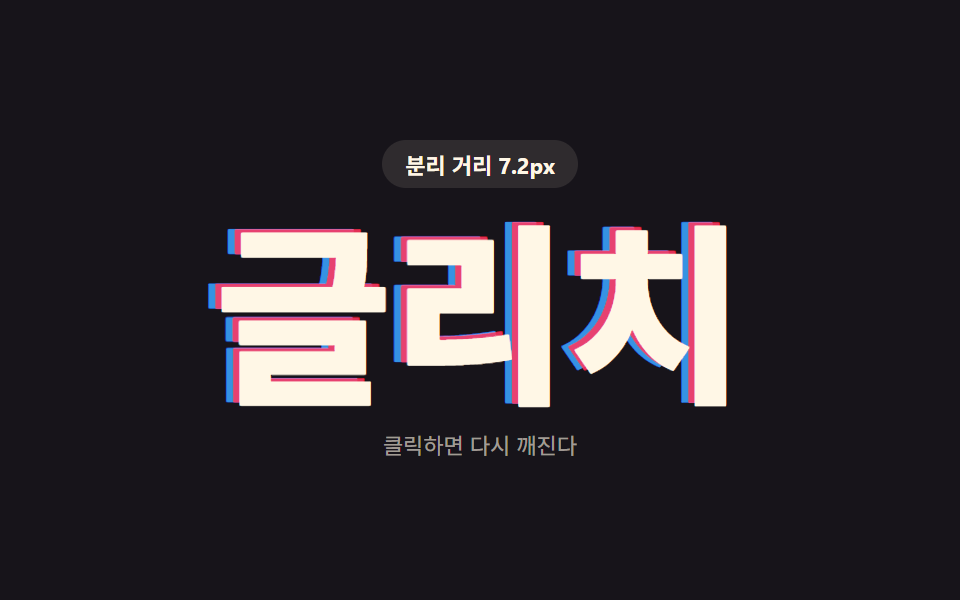
A red shadow and a blue shadow pull apart in opposite directions, so as the color-split distance value grows, the letters read like a misaligned broadcast signal.
Best forError screen headline
GLITCH_SPLIT_PXseedRandbuildGlitchShadow
<main class="stage">
<div class="gl is-demo" id="gl">
  <p class="gl__badge"><span class="gl__badgeLabel">Split distance</span> <span class="gl__badgeValue" id="glValue">0.0px</span></p>
  <button type="button" class="gl__word" id="glWord">Glitch</button>
  <p class="gl__hint">Click to break it again</p>
</div>
</main>
@use "../../../../site/static/demo-tokens" as *;
// 핵심: 값(mag) 하나를 고정 시드 PRNG 로 흔들어 빨강·파랑 그림자를 반대 방향으로 벌린다.
// mag 가 커질수록 화면이 어긋난 신호처럼 거칠게 깨진다. 클릭하면 시드를 새로 돌려 다시 깨진다.
$duration: $dur-instant;
$easing: linear;
$color: $subject-cream;
@include stage($stage-ink);
.gl {
display: grid;
gap: $sp-3;
justify-items: center;
text-align: center;
}
.gl__badge {
margin: 0;
padding: $sp-1 $sp-3;
border-radius: $r-pill;
background: rgba(255, 247, 230, .1);
color: $subject-cream;
font-weight: 700;
font-size: 11px;
font-variant-numeric: tabular-nums;
}
.gl__word {
margin: 0;
border: 0;
background: none;
padding: 0;
cursor: pointer;
font-weight: 800;
font-size: clamp(60px, 20vw, 116px);
line-height: 1;
white-space: nowrap;
color: $color;
font-family: inherit;
will-change: text-shadow;
}
.gl__word:focus-visible {
outline: 2px solid $subject-cream;
outline-offset: 6px;
}
.gl__hint {
margin: 0;
color: rgba(255, 247, 230, .6);
font-size: 11px;
}
@media (max-width: 340px) {
.gl__word { font-size: clamp(44px, 22vw, 76px); }
}
@media (prefers-reduced-motion: reduce) {
.gl__word { transition: none; }
}html, body {
margin: 0;
overflow: hidden;
}
.stage {
box-sizing: border-box;
min-height: 100vh;
display: grid;
place-items: center;
margin: 0;
background: #17141a;
font-family: -apple-system, "Segoe UI", "Noto Sans KR", sans-serif;
padding: clamp(8px, 4vw, 24px);
}
.gl {
display: grid;
gap: 12px;
justify-items: center;
text-align: center;
}
.gl__badge {
margin: 0;
padding: 4px 12px;
border-radius: 999px;
background: rgba(255, 247, 230, 0.1);
color: #fff7e6;
font-weight: 700;
font-size: 11px;
font-variant-numeric: tabular-nums;
}
.gl__word {
margin: 0;
border: 0;
background: none;
padding: 0;
cursor: pointer;
font-weight: 800;
font-size: clamp(60px, 20vw, 116px);
line-height: 1;
white-space: nowrap;
color: #fff7e6;
font-family: inherit;
will-change: text-shadow;
}
.gl__word:focus-visible {
outline: 2px solid #fff7e6;
outline-offset: 6px;
}
.gl__hint {
margin: 0;
color: rgba(255, 247, 230, 0.6);
font-size: 11px;
}
@media (max-width: 340px) {
.gl__word {
font-size: clamp(44px, 22vw, 76px);
}
}
@media (prefers-reduced-motion: reduce) {
.gl__word {
transition: none;
}
}(function () {
var GLITCH_SPLIT_PX = 2;
var BURST_PX = GLITCH_SPLIT_PX * 14;
var PULSE_MS = 480;
var word = document.getElementById('glWord');
var value = document.getElementById('glValue');
var reduce = window.matchMedia('(prefers-reduced-motion: reduce)').matches;
var seed = 11;
// 고정 시드 PRNG — Math.random 대신 프레임마다 같은 규칙으로 다음 값을 만든다
function seedRand(s) {
return function () {
s = (s * 1103515245 + 12345) & 0x7fffffff;
return s / 0x7fffffff;
};
}
var rnd = seedRand(seed);
// 값(mag) 하나를 시드 노이즈로 흔들어 빨강·파랑 그림자를 반대 방향으로 어긋나게 한다
function buildGlitchShadow(mag) {
var rx = (mag * (rnd() * 2 - 1)).toFixed(2);
var ry = (mag * 0.28 * (rnd() * 2 - 1)).toFixed(2);
var bx = (-mag * (rnd() * 2 - 1)).toFixed(2);
var by = (-mag * 0.28 * (rnd() * 2 - 1)).toFixed(2);
return [
rx + 'px ' + ry + 'px 0 rgba(255,54,96,.88)',
bx + 'px ' + by + 'px 0 rgba(58,164,255,.88)'
].join(', ');
}
function renderGlitch(mag) {
word.style.textShadow = buildGlitchShadow(mag);
value.textContent = mag.toFixed(1) + 'px';
}
var burstUntil = 0;
var startTime = null;
function loop(now) {
if (startTime === null) startTime = now;
var t = (now - startTime) % PULSE_MS;
var tri = Math.abs((t / PULSE_MS) * 2 - 1);
var mag = GLITCH_SPLIT_PX * (0.3 + tri * 9.5);
if (now < burstUntil) mag = BURST_PX;
renderGlitch(mag);
requestAnimationFrame(loop);
}
word.addEventListener('click', function () {
seed = (seed * 977 + 313) & 0x7fffffff;
rnd = seedRand(seed || 1);
burstUntil = performance.now() + 220;
if (reduce) renderGlitch(BURST_PX);
});
if (reduce) {
renderGlitch(GLITCH_SPLIT_PX);
} else {
requestAnimationFrame(loop);
}
})();// TextShadowGlitchRgbSplit — vanilla 판(run/412/demo/05-text-shadow-glitch-rgb-split/index.html) 의 React 포트.
// 값(mag) 하나를 고정 시드 PRNG 로 흔들어 빨강·파랑 그림자를 반대 방향으로 벌린다.
// 클릭하면 시드를 새로 돌려 다시 깨진다.
import { useEffect, useRef, useState } from "react";
import styles from "./TextShadowGlitchRgbSplit.module.scss";
type Box<T> = { current: T };
const GLITCH_SPLIT_PX = 2;
const BURST_PX = GLITCH_SPLIT_PX * 14;
const PULSE_MS = 480;
function seedRand(s: number): () => number {
let state = s;
return function () {
state = (state * 1103515245 + 12345) & 0x7fffffff;
return state / 0x7fffffff;
};
}
function buildGlitchShadow(mag: number, rnd: () => number): string {
const rx = (mag * (rnd() * 2 - 1)).toFixed(2);
const ry = (mag * 0.28 * (rnd() * 2 - 1)).toFixed(2);
const bx = (-mag * (rnd() * 2 - 1)).toFixed(2);
const by = (-mag * 0.28 * (rnd() * 2 - 1)).toFixed(2);
return [
rx + "px " + ry + "px 0 rgba(255,54,96,.88)",
bx + "px " + by + "px 0 rgba(58,164,255,.88)"
].join(", ");
}
export default function TextShadowGlitchRgbSplit() {
const wordRef = useRef<HTMLButtonElement | null>(null);
const valueRef = useRef<HTMLSpanElement | null>(null);
const t0Ref = useRef<number>(0) as Box<number>;
const frameRef = useRef<number>(0) as Box<number>;
const seedRef = useRef<number>(11) as Box<number>;
const rndRef = useRef<() => number>(seedRand(11)) as Box<() => number>;
const burstUntilRef = useRef<number>(0) as Box<number>;
const [reduce, setReduce] = useState(false);
function render(mag: number): void {
const word = wordRef.current;
const value = valueRef.current;
if (!word || !value) return;
word.style.textShadow = buildGlitchShadow(mag, rndRef.current);
value.textContent = mag.toFixed(1) + "px";
}
useEffect(() => {
setReduce(window.matchMedia("(prefers-reduced-motion: reduce)").matches);
}, []);
useEffect(() => {
if (reduce) {
render(GLITCH_SPLIT_PX);
return;
}
function loop(now: number): void {
if (t0Ref.current === 0) t0Ref.current = now;
const t = (now - t0Ref.current) % PULSE_MS;
const tri = Math.abs((t / PULSE_MS) * 2 - 1);
let mag = GLITCH_SPLIT_PX * (0.3 + tri * 9.5);
if (now < burstUntilRef.current) mag = BURST_PX;
render(mag);
frameRef.current = requestAnimationFrame(loop);
}
frameRef.current = requestAnimationFrame(loop);
return () => cancelAnimationFrame(frameRef.current);
}, [reduce]);
function onClick(): void {
seedRef.current = (seedRef.current * 977 + 313) & 0x7fffffff;
rndRef.current = seedRand(seedRef.current || 1);
burstUntilRef.current = performance.now() + 220;
if (reduce) render(BURST_PX);
}
return (
<main className={styles.stage}>
<div className={[styles.gl, styles.isDemo].join(" ")}>
<p className={styles.badge}><span>분리 거리</span> <span ref={valueRef}>0.0px</span></p>
<button type="button" className={styles.word} ref={wordRef} onClick={onClick}>글리치</button>
<p className={styles.hint}>클릭하면 다시 깨진다</p>
</div>
</main>
);
}05 Glitch Letters That Fracture by a Color-split Value — Measured area 10.158% · moving frames 23/23Original by GODRICH · SCSS and React ship in the zip · CSS Text Shadow Effects — 9 Patterns
The post this demo lives in
 CSS Text Shadow Effects — 9 Patternscss text shadow effects: A shadow is where light goes missing, yet these nine letters shine by shadow alone — item 1 sta See all demos in this post