01Floating label with a required mark
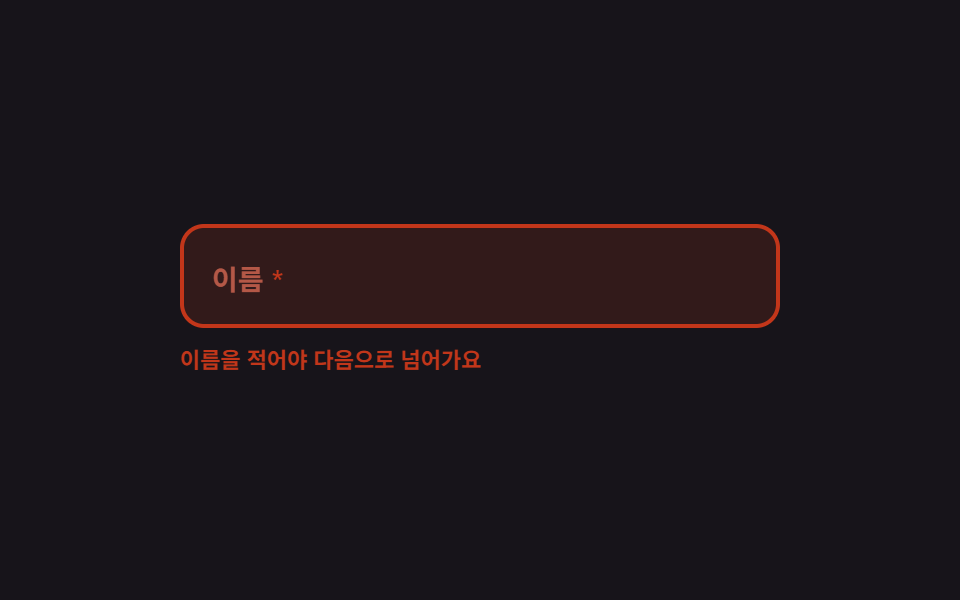
The label sits inside the field, floats up as you type, and when a required box loses focus while empty, the label, its asterisk, and the border all turn the error color together so the field itself names what is missing.
Best forSignup forms full of must-fill boxes like name and phone
translateYaria-requiredsteps(1, end)

<main class="stage">
  <form class="fl is-demo" id="fl" novalidate>
    <div class="fl__box" id="fl-box">
      <input class="fl__input" id="fl-input" type="text" autocomplete="off" aria-required="true" aria-describedby="fl-msg">
      <span class="fl__ghost" aria-hidden="true">Bitna Kim</span>
      <label class="fl__label" for="fl-input"><span class="fl__text">Name</span><span class="fl__star" aria-hidden="true">*</span></label>
    </div>
    <p class="fl__msg" id="fl-msg" role="status">
      <span class="fl__m1">Enter your name to continue</span>
      <span class="fl__m2">Name looks good</span>
    </p>
  </form>
</main>
@use "../../../../site/static/demo-tokens" as *;
$duration: $dur-quick;
$easing: $ease-spring;
$color: $subject-blue;
@include stage($stage-ink);
$ok: $subject-mint;
.fl {
position: relative;
box-sizing: border-box;
width: min(300px, 86vw);
display: flex;
flex-direction: column;
gap: $sp-2;
font-family: -apple-system, "Segoe UI", "Noto Sans KR", sans-serif;
}
// ── 입력 상자 ─────────────────────────────────────────
.fl__box {
position: relative;
box-sizing: border-box;
height: 52px;
border: 2px solid rgba(255, 255, 255, .18);
border-radius: $r-control;
background: rgba(255, 255, 255, .06);
transition: border-color $duration $easing, background $duration $easing;
}
.fl.is-up .fl__box { border-color: $color; }
.fl.is-ok .fl__box { border-color: $ok; }
.fl.is-bad .fl__box { border-color: $error; background: rgba($error, .16); }
.fl__input {
box-sizing: border-box;
width: 100%; height: 100%;
padding: $sp-5 $sp-3 0;
border: 0;
border-radius: $r-control;
background: transparent;
color: $subject-cream;
font-family: inherit;
font-size: 14px; line-height: 20px; font-weight: 600;
}
.fl__input:focus-visible { outline: 2px solid $color; outline-offset: 2px; }
// 자동 루프에서만 보이는 "쳐 넣는 글자"
.fl__ghost {
position: absolute;
left: 14px; top: 26px;
color: $subject-cream;
font-size: 14px; line-height: 20px; font-weight: 600;
white-space: nowrap;
pointer-events: none;
opacity: 0;
}
// ── 라벨 — 안에 앉아 있다가 위로 떠오른다 ───────────────
.fl__label {
position: absolute;
left: 14px; top: 16px;
display: inline-flex;
align-items: center;
gap: $sp-1;
color: rgba(255, 255, 255, .52);
font-size: 14px; line-height: 20px; font-weight: 600;
pointer-events: none;
transform-origin: left top; // 규칙8: 플로트 라벨 좌상단 고정
transform: translateY(0) scale(1);
transition: transform $duration $easing, color $duration $easing;
}
.fl.is-up .fl__label { transform: translateY(-8px) scale(.78); color: $color; }
.fl.is-ok .fl__label { transform: translateY(-8px) scale(.78); color: $ok; }
.fl.is-bad .fl__label { transform: translateY(0) scale(1); color: $error; }
.fl__star { color: $error; }
.fl.is-bad .fl__star { color: $error; }
// ── 아래 한 줄 — 자리를 미리 잡아 둔다 ──────────────────
.fl__msg {
position: relative;
height: 16px;
margin: 0;
font-size: 11px; line-height: 16px; font-weight: 600;
}
.fl__m1, .fl__m2 {
position: absolute;
left: 0; top: 0;
opacity: 0;
}
.fl__m1 { color: $error; }
.fl__m2 { color: $ok; }
.fl.is-bad .fl__m1 { opacity: 1; }
.fl.is-ok .fl__m2 { opacity: 1; }
// ── 자동 루프 (2s) ────────────────────────────────────
// 0~8% 빈 칸 → 12~40% 한 자씩 타이핑(라벨은 8% 에 이미 떠 있다) → 44~56% 통과 표시
// → 60% 비움(컷) + 오류 상태 → 76% 문구 · 82% 테두리 · 87% 라벨 순으로 흩어서 복귀한다.
// 복귀를 한 프레임에 몰면 그 프레임이 poster 로 뽑혀 정작 오류 장면이 대표 그림에서 밀린다 (실측).
.fl.is-demo .fl__ghost {
opacity: 1;
animation-name: fl-type;
animation-duration: $dur-loop;
animation-timing-function: steps(3, end);
animation-iteration-count: infinite;
}
.fl.is-demo .fl__label {
transition: none;
animation-name: fl-label;
animation-duration: $dur-loop;
animation-timing-function: $easing;
animation-iteration-count: infinite;
}
.fl.is-demo .fl__box {
transition: none;
animation-name: fl-box;
animation-duration: $dur-loop;
animation-timing-function: steps(1, end);
animation-iteration-count: infinite;
}
.fl.is-demo .fl__m1 {
animation-name: fl-m1;
animation-duration: $dur-loop;
animation-timing-function: steps(1, end);
animation-iteration-count: infinite;
}
.fl.is-demo .fl__m2 {
animation-name: fl-m2;
animation-duration: $dur-loop;
animation-timing-function: steps(1, end);
animation-iteration-count: infinite;
}
.fl.is-demo .fl__star {
animation-name: fl-star;
animation-duration: $dur-loop;
animation-timing-function: steps(1, end);
animation-iteration-count: infinite;
}
@keyframes fl-type {
0% { clip-path: inset(0 100% 0 0); }
12% { clip-path: inset(0 100% 0 0); }
40% { clip-path: inset(0 0 0 0); }
56% { clip-path: inset(0 0 0 0); }
60% { clip-path: inset(0 100% 0 0); }
100% { clip-path: inset(0 100% 0 0); }
}
@keyframes fl-label {
0% { transform: translateY(0) scale(1); color: rgba(255, 255, 255, .52); }
8% { transform: translateY(-8px) scale(.78); color: $color; }
44% { transform: translateY(-8px) scale(.78); color: $ok; }
60% { transform: translateY(0) scale(1); color: $error; }
87% { transform: translateY(0) scale(1); color: rgba(255, 255, 255, .52); }
100% { transform: translateY(0) scale(1); color: rgba(255, 255, 255, .52); }
}
@keyframes fl-box {
0% { border-color: rgba(255, 255, 255, .18); background: rgba(255, 255, 255, .06); }
8% { border-color: $color; background: rgba(255, 255, 255, .06); }
44% { border-color: $ok; background: rgba(255, 255, 255, .06); }
60% { border-color: $error; background: rgba($error, .16); }
82% { border-color: rgba(255, 255, 255, .18); background: rgba(255, 255, 255, .06); }
100% { border-color: rgba(255, 255, 255, .18); background: rgba(255, 255, 255, .06); }
}
@keyframes fl-m1 {
0% { opacity: 0; }
60% { opacity: 1; }
76% { opacity: 0; }
100% { opacity: 0; }
}
@keyframes fl-m2 {
0% { opacity: 0; }
44% { opacity: 1; }
60% { opacity: 0; }
100% { opacity: 0; }
}
@keyframes fl-star {
0% { color: $error; }
44% { color: $ok; }
60% { color: $error; }
100% { color: $error; }
}
// 320×200 — 무대 여백을 뺀 174px 안에 들어가도록 간격을 내린다(올리지 않는다)
@media (max-width: 360px) {
.fl { gap: $sp-1; }
.fl__box { height: 48px; }
.fl__ghost { top: 24px; }
}
@media (prefers-reduced-motion: reduce) {
.fl.is-demo .fl__ghost,
.fl.is-demo .fl__label,
.fl.is-demo .fl__box,
.fl.is-demo .fl__m1,
.fl.is-demo .fl__m2,
.fl.is-demo .fl__star { animation: none !important; }
.fl.is-demo .fl__ghost { opacity: 1; clip-path: inset(0 0 0 0); }
.fl.is-demo .fl__label { transform: translateY(-8px) scale(.78); color: $ok; }
.fl.is-demo .fl__box { border-color: $ok; }
.fl.is-demo .fl__m2 { opacity: 1; }
.fl__label, .fl__box { transition: none; }
}html, body {
margin: 0;
overflow: hidden;
}
.stage {
box-sizing: border-box;
min-height: 100vh;
display: grid;
place-items: center;
margin: 0;
background: #17141a;
font-family: -apple-system, "Segoe UI", "Noto Sans KR", sans-serif;
padding: clamp(8px, 4vw, 24px);
}
.fl {
position: relative;
box-sizing: border-box;
width: min(300px, 86vw);
display: flex;
flex-direction: column;
gap: 8px;
font-family: -apple-system, "Segoe UI", "Noto Sans KR", sans-serif;
}
.fl__box {
position: relative;
box-sizing: border-box;
height: 52px;
border: 2px solid rgba(255, 255, 255, 0.18);
border-radius: 12px;
background: rgba(255, 255, 255, 0.06);
transition: border-color 220ms cubic-bezier(0.2, 0.8, 0.2, 1), background 220ms cubic-bezier(0.2, 0.8, 0.2, 1);
}
.fl.is-up .fl__box {
border-color: #2f6df6;
}
.fl.is-ok .fl__box {
border-color: #4cd4a6;
}
.fl.is-bad .fl__box {
border-color: #c2361a;
background: rgba(194, 54, 26, 0.16);
}
.fl__input {
box-sizing: border-box;
width: 100%;
height: 100%;
padding: 20px 12px 0;
border: 0;
border-radius: 12px;
background: transparent;
color: #fff7e6;
font-family: inherit;
font-size: 14px;
line-height: 20px;
font-weight: 600;
}
.fl__input:focus-visible {
outline: 2px solid #2f6df6;
outline-offset: 2px;
}
.fl__ghost {
position: absolute;
left: 14px;
top: 26px;
color: #fff7e6;
font-size: 14px;
line-height: 20px;
font-weight: 600;
white-space: nowrap;
pointer-events: none;
opacity: 0;
}
.fl__label {
position: absolute;
left: 14px;
top: 16px;
display: inline-flex;
align-items: center;
gap: 4px;
color: rgba(255, 255, 255, 0.52);
font-size: 14px;
line-height: 20px;
font-weight: 600;
pointer-events: none;
transform-origin: left top;
transform: translateY(0) scale(1);
transition: transform 220ms cubic-bezier(0.2, 0.8, 0.2, 1), color 220ms cubic-bezier(0.2, 0.8, 0.2, 1);
}
.fl.is-up .fl__label {
transform: translateY(-8px) scale(0.78);
color: #2f6df6;
}
.fl.is-ok .fl__label {
transform: translateY(-8px) scale(0.78);
color: #4cd4a6;
}
.fl.is-bad .fl__label {
transform: translateY(0) scale(1);
color: #c2361a;
}
.fl__star {
color: #c2361a;
}
.fl.is-bad .fl__star {
color: #c2361a;
}
.fl__msg {
position: relative;
height: 16px;
margin: 0;
font-size: 11px;
line-height: 16px;
font-weight: 600;
}
.fl__m1, .fl__m2 {
position: absolute;
left: 0;
top: 0;
opacity: 0;
}
.fl__m1 {
color: #c2361a;
}
.fl__m2 {
color: #4cd4a6;
}
.fl.is-bad .fl__m1 {
opacity: 1;
}
.fl.is-ok .fl__m2 {
opacity: 1;
}
.fl.is-demo .fl__ghost {
opacity: 1;
animation-name: fl-type;
animation-duration: 2s;
animation-timing-function: steps(3, end);
animation-iteration-count: infinite;
}
.fl.is-demo .fl__label {
transition: none;
animation-name: fl-label;
animation-duration: 2s;
animation-timing-function: cubic-bezier(0.2, 0.8, 0.2, 1);
animation-iteration-count: infinite;
}
.fl.is-demo .fl__box {
transition: none;
animation-name: fl-box;
animation-duration: 2s;
animation-timing-function: steps(1, end);
animation-iteration-count: infinite;
}
.fl.is-demo .fl__m1 {
animation-name: fl-m1;
animation-duration: 2s;
animation-timing-function: steps(1, end);
animation-iteration-count: infinite;
}
.fl.is-demo .fl__m2 {
animation-name: fl-m2;
animation-duration: 2s;
animation-timing-function: steps(1, end);
animation-iteration-count: infinite;
}
.fl.is-demo .fl__star {
animation-name: fl-star;
animation-duration: 2s;
animation-timing-function: steps(1, end);
animation-iteration-count: infinite;
}
@keyframes fl-type {
0% {
clip-path: inset(0 100% 0 0);
}
12% {
clip-path: inset(0 100% 0 0);
}
40% {
clip-path: inset(0 0 0 0);
}
56% {
clip-path: inset(0 0 0 0);
}
60% {
clip-path: inset(0 100% 0 0);
}
100% {
clip-path: inset(0 100% 0 0);
}
}
@keyframes fl-label {
0% {
transform: translateY(0) scale(1);
color: rgba(255, 255, 255, 0.52);
}
8% {
transform: translateY(-8px) scale(0.78);
color: #2f6df6;
}
44% {
transform: translateY(-8px) scale(0.78);
color: #4cd4a6;
}
60% {
transform: translateY(0) scale(1);
color: #c2361a;
}
87% {
transform: translateY(0) scale(1);
color: rgba(255, 255, 255, 0.52);
}
100% {
transform: translateY(0) scale(1);
color: rgba(255, 255, 255, 0.52);
}
}
@keyframes fl-box {
0% {
border-color: rgba(255, 255, 255, 0.18);
background: rgba(255, 255, 255, 0.06);
}
8% {
border-color: #2f6df6;
background: rgba(255, 255, 255, 0.06);
}
44% {
border-color: #4cd4a6;
background: rgba(255, 255, 255, 0.06);
}
60% {
border-color: #c2361a;
background: rgba(194, 54, 26, 0.16);
}
82% {
border-color: rgba(255, 255, 255, 0.18);
background: rgba(255, 255, 255, 0.06);
}
100% {
border-color: rgba(255, 255, 255, 0.18);
background: rgba(255, 255, 255, 0.06);
}
}
@keyframes fl-m1 {
0% {
opacity: 0;
}
60% {
opacity: 1;
}
76% {
opacity: 0;
}
100% {
opacity: 0;
}
}
@keyframes fl-m2 {
0% {
opacity: 0;
}
44% {
opacity: 1;
}
60% {
opacity: 0;
}
100% {
opacity: 0;
}
}
@keyframes fl-star {
0% {
color: #c2361a;
}
44% {
color: #4cd4a6;
}
60% {
color: #c2361a;
}
100% {
color: #c2361a;
}
}
@media (max-width: 360px) {
.fl {
gap: 4px;
}
.fl__box {
height: 48px;
}
.fl__ghost {
top: 24px;
}
}
@media (prefers-reduced-motion: reduce) {
.fl.is-demo .fl__ghost,
.fl.is-demo .fl__label,
.fl.is-demo .fl__box,
.fl.is-demo .fl__m1,
.fl.is-demo .fl__m2,
.fl.is-demo .fl__star {
animation: none !important;
}
.fl.is-demo .fl__ghost {
opacity: 1;
clip-path: inset(0 0 0 0);
}
.fl.is-demo .fl__label {
transform: translateY(-8px) scale(0.78);
color: #4cd4a6;
}
.fl.is-demo .fl__box {
border-color: #4cd4a6;
}
.fl.is-demo .fl__m2 {
opacity: 1;
}
.fl__label, .fl__box {
transition: none;
}
}// 실제 동작: 치면 라벨이 위에 떠 있고, 비운 채 벗어나면 라벨·별표·테두리가 오류색으로 바뀐다.
var fl = document.getElementById('fl');
var flInput = document.getElementById('fl-input');
var flTouched = false;
function flState() {
fl.classList.remove('is-demo'); // 사람이 손대면 자동 루프를 멈춘다
var focused = document.activeElement === flInput;
var filled = flInput.value.length > 0;
var bad = flTouched && !filled;
fl.classList.toggle('is-up', focused || filled);
fl.classList.toggle('is-bad', bad);
fl.classList.toggle('is-ok', filled && !bad);
flInput.setAttribute('aria-invalid', bad ? 'true' : 'false');
}
flInput.addEventListener('focus', flState);
flInput.addEventListener('input', flState);
flInput.addEventListener('blur', function () { flTouched = true; flState(); });
fl.addEventListener('submit', function (e) {
e.preventDefault(); flTouched = true; flState();
flInput.focus({ preventScroll: true });
});import { useState } from "react";
import type { CSSProperties } from "react";
import styles from "./RequiredFloatLabel.module.scss";
export type RequiredFloatLabelProps = {
label?: string;
emptyMessage?: string;
filledMessage?: string;
/** 자동 재생 루프 (갤러리용). 사람이 손대면 꺼진다 */
demo?: boolean;
duration?: number;
easing?: string;
color?: string;
};
type Vars = CSSProperties & { "--duration"?: string; "--easing"?: string; "--color"?: string };
type ChangeEvt = { target: { value: string } };
export default function RequiredFloatLabel({
label = "Name",
emptyMessage = "Enter your name to continue",
filledMessage = "Name looks good",
demo = true,
duration = 220,
easing = "cubic-bezier(.2,.8,.2,1)",
color = "#2f6df6",
}: RequiredFloatLabelProps) {
const [value, setValue] = useState("");
const [focused, setFocused] = useState(false);
const [touched, setTouched] = useState(false);
const [live, setLive] = useState(demo);
const filled = value.length > 0;
const bad = touched && !filled;
const vars: Vars = { "--duration": `${duration}ms`, "--easing": easing, "--color": color };
const cls = [
styles.root,
live ? styles.isDemo : "",
focused || filled ? styles.isUp : "",
bad ? styles.isBad : "",
filled && !bad ? styles.isOk : "",
].join(" ");
return (
<form
className={cls}
style={vars}
noValidate
onSubmit={(e: { preventDefault: () => void }) => { e.preventDefault(); setTouched(true); setLive(false); }}
>
<div className={styles.box}>
<input
className={styles.input}
id="fl-input"
type="text"
autoComplete="off"
aria-required="true"
aria-invalid={bad}
aria-describedby="fl-msg"
value={value}
onChange={(e: ChangeEvt) => { setValue(e.target.value); setLive(false); }}
onFocus={() => { setFocused(true); setLive(false); }}
onBlur={() => { setFocused(false); setTouched(true); }}
/>
<span className={styles.ghost} aria-hidden="true">Bitna Kim</span>
<label className={styles.label} htmlFor="fl-input">
<span className={styles.text}>{label}</span>
<span className={styles.star} aria-hidden="true">*</span>
</label>
</div>
<p className={styles.msg} id="fl-msg" role="status">
<span className={styles.m1}>{emptyMessage}</span>
<span className={styles.m2}>{filledMessage}</span>
</p>
</form>
);
}01 Floating label with a required mark — Measured area 11.549% · moving frames 17/23Original by GODRICH · SCSS and React ship in the zip · 9 Form Validation UI Patterns — As You Type
The post this demo lives in
 9 Form Validation UI Patterns — As You TypeForm validation UI is the layer that checks a typed value against a rule and reports the verdict on screen. All nine run See all demos in this post
If you like this effect - similar demos
 Inputs01 Next button that stays locked until the rules are met9 Multi Step Form UI Patterns — Branch and Resume
 Inputs02 Floating label inputRegister Form Design: 9 Keyboard-Friendly Inputs
 Inputs02 Line item that slides down into the saved-for-later groupCheckout Page Design — 9 Cart Patterns, No Library