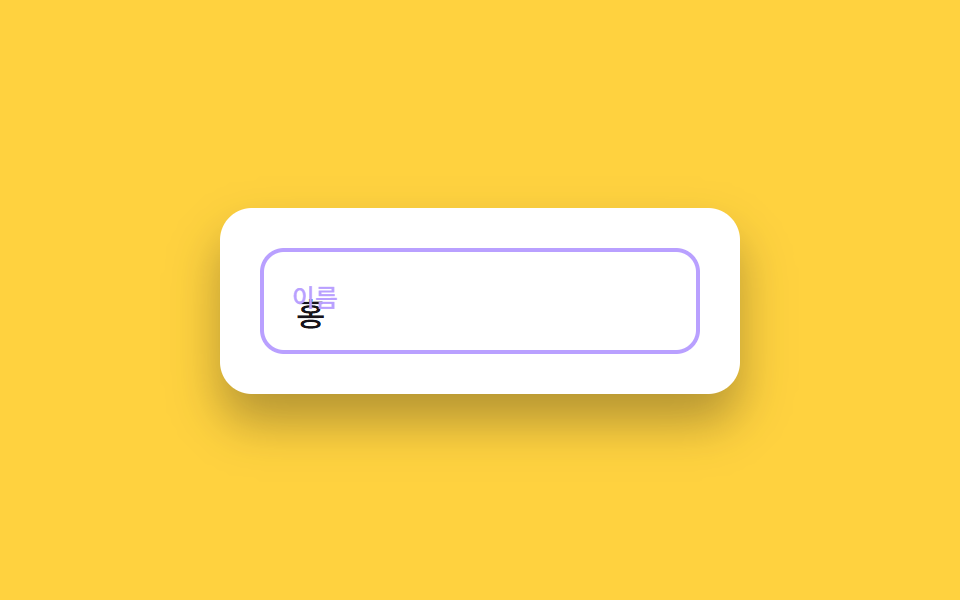
02Floating label input
The label sits inside the empty field, then floats up and shrinks the moment you focus or type.
Best forLogin forms, signup name and password fields
label transform포커스 색 전환채움 상태 유지
<main class="stage">
  <div class="fl is-demo" id="wrap">
    <div class="fl__control">
      <input class="fl__input" id="fl-name" type="text" placeholder=" ">
      <label class="fl__label" for="fl-name">Name</label>
    </div>
  </div>
</main>
@use "../../../../site/static/demo-tokens" as *;
// ── 변수 3개 ──────────────────────────────────────────
$duration: $dur-quick; // 라벨이 뜨는 시간
$easing: $ease-spring; // 스프링 이징
$color: $subject-lilac; // 포커스·라벨 강조 색
// ── 데모 무대 ──────────────────────────────────────────
@include stage($stage-yellow);
.fl {
box-sizing: border-box;
width: min(260px, 82vw);
background: #fff;
border-radius: $r-card;
padding: $sp-5;
box-shadow: $shadow-raised;
&__control {
position: relative;
}
&__input {
box-sizing: border-box;
width: 100%;
border: 2px solid rgba(23, 20, 26, .12);
border-radius: $r-control;
padding: $sp-5 $sp-4 $sp-2;
font-weight: 500;
font-size: clamp(14px, 4.2vw, 16px);
font-family: inherit;
color: $stage-ink;
background: #fff;
transition: border-color $duration $easing;
&:focus {
outline: none;
border-color: $color;
}
}
&__label {
position: absolute;
left: $sp-4;
top: 50%;
transform: translateY(-50%) scale(1);
transform-origin: left center; // 규칙8: 라벨 왼쪽 붙어 축소
font-size: 16px;
font-weight: 500;
font-family: inherit;
color: rgba(23, 20, 26, .48);
pointer-events: none;
transition: transform $duration $easing, color $duration $easing;
}
&__input:focus + &__label,
&__input:not(:placeholder-shown) + &__label {
transform: translateY(-14px) scale(.78);
color: $color;
}
}
@media (prefers-reduced-motion: reduce) {
.fl__input,
.fl__label {
transition: none;
}
}html, body {
margin: 0;
overflow: hidden;
}
.stage {
box-sizing: border-box;
min-height: 100vh;
display: grid;
place-items: center;
margin: 0;
background: #ffd23f;
font-family: -apple-system, "Segoe UI", "Noto Sans KR", sans-serif;
padding: clamp(8px, 4vw, 24px);
}
.fl {
box-sizing: border-box;
width: min(260px, 82vw);
background: #fff;
border-radius: 16px;
padding: 20px;
box-shadow: 0 14px 24px rgba(23, 20, 26, 0.32);
}
.fl__control {
position: relative;
}
.fl__input {
box-sizing: border-box;
width: 100%;
border: 2px solid rgba(23, 20, 26, 0.12);
border-radius: 12px;
padding: 20px 16px 8px;
font-weight: 500;
font-size: clamp(14px, 4.2vw, 16px);
font-family: inherit;
color: #17141a;
background: #fff;
transition: border-color 220ms cubic-bezier(0.2, 0.8, 0.2, 1);
}
.fl__input:focus {
outline: none;
border-color: #b9a0ff;
}
.fl__label {
position: absolute;
left: 16px;
top: 50%;
transform: translateY(-50%) scale(1);
transform-origin: left center;
font-size: 16px;
font-weight: 500;
font-family: inherit;
color: rgba(23, 20, 26, 0.48);
pointer-events: none;
transition: transform 220ms cubic-bezier(0.2, 0.8, 0.2, 1), color 220ms cubic-bezier(0.2, 0.8, 0.2, 1);
}
.fl__input:focus + .fl__label, .fl__input:not(:placeholder-shown) + .fl__label {
transform: translateY(-14px) scale(0.78);
color: #b9a0ff;
}
@media (prefers-reduced-motion: reduce) {
.fl__input,
.fl__label {
transition: none;
}
}(function () {
var wrap = document.getElementById('wrap');
var input = document.getElementById('fl-name');
function stopDemo() {
if (!wrap.classList.contains('is-demo')) return;
wrap.classList.remove('is-demo');
clearInterval(timer);
}
input.addEventListener('pointerdown', stopDemo);
input.addEventListener('keydown', stopDemo);
function fireInput() {
input.dispatchEvent(new Event('input', { bubbles: true }));
}
var word = 'Jane Doe';
var chars = '';
var phase = 'focus';
var pauseUntil = 0;
var timer = setInterval(function () {
var now = Date.now();
if (now < pauseUntil) return;
if (phase === 'focus') {
input.focus({ preventScroll: true });
phase = 'type';
return;
}
if (phase === 'type') {
if (chars.length < word.length) {
chars += word[chars.length];
input.value = chars;
fireInput();
} else {
phase = 'hold';
pauseUntil = now + 260;
}
return;
}
if (phase === 'hold') {
phase = 'clear';
return;
}
if (phase === 'clear') {
chars = '';
input.value = '';
fireInput();
input.blur();
phase = 'blurhold';
pauseUntil = now + 220;
return;
}
if (phase === 'blurhold') {
phase = 'focus';
}
}, 90);
})();import { useState } from "react";
import styles from "./FloatingLabelInput.module.scss";
export type FloatingLabelInputProps = {
label?: string;
};
export default function FloatingLabelInput({ label = "이름" }: FloatingLabelInputProps) {
const [value, setValue] = useState("");
return (
<div className={styles.fl}>
<div className={styles.control}>
<input
className={styles.input}
id="fl-name"
type="text"
placeholder=" "
value={value}
onChange={(e: any) => setValue(e.target.value)}
/>
<label className={styles.label} htmlFor="fl-name">
{label}
</label>
</div>
</div>
);
}02 Floating label input — Measured area 1.207% · moving frames 9/23Original by GODRICH · SCSS and React ship in the zip · Register Form Design: 9 Keyboard-Friendly Inputs
The post this demo lives in
 Register Form Design: 9 Keyboard-Friendly InputsRegister form design lives or dies in the fields, not the submit button. These nine inputs cover everything a signup scr See all demos in this post
If you like this effect - similar demos
 Inputs01 Floating label with a required mark9 Form Validation UI Patterns — As You Type
 Inputs03 Currency input with auto commaCSS Input Design: 9 Form Widgets You Can Paste In
 Inputs02 Debounce shimmer — gathering input for 300ms while the list shimmers as a waiting stateAutocomplete Input: 9 Search Dropdowns