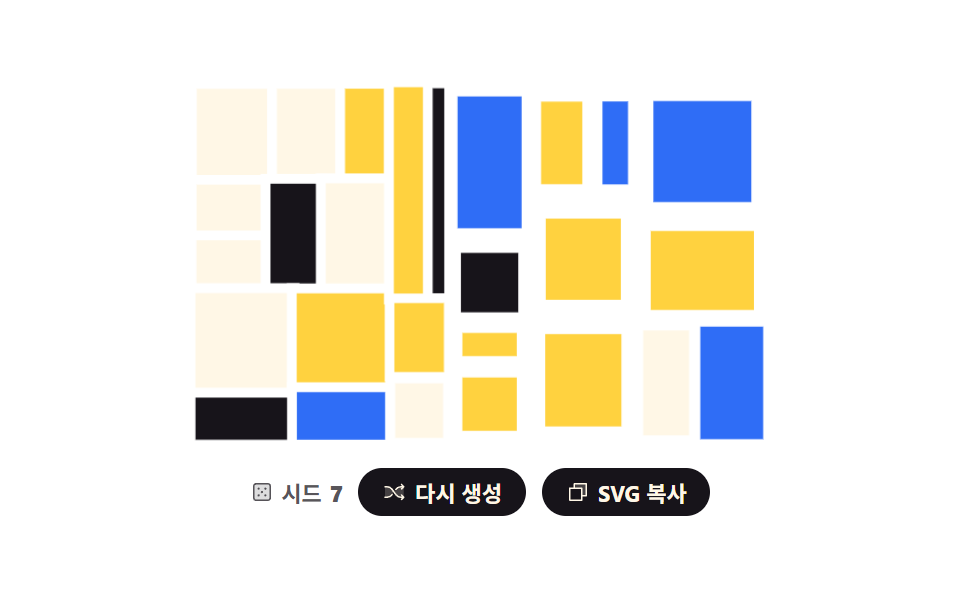
07Recursively split rectangles
A big rectangle is cut across or down, and each piece is cut again until a set depth is reached.
Best forPortfolio cover art, filler for empty slots in a gallery list
scaletransform-originanimation-fill-mode
<main class="stage">
<div class="rs is-demo" id="root">
  <svg class="rs__art" id="art" viewBox="0 0 240 150" role="img" data-label="A composition built by cutting one big rectangle over and over, seed {n}"></svg>
  <div class="rs__bar">
    <p class="rs__seed">
      <svg xmlns="http://www.w3.org/2000/svg" class="rs__ic" viewBox="0 0 256 256" aria-hidden="true"><g fill="currentColor"><path d="M216 64v128a24 24 0 0 1-24 24H64a24 24 0 0 1-24-24V64a24 24 0 0 1 24-24h128a24 24 0 0 1 24 24" opacity=".2"/><path d="M192 32H64a32 32 0 0 0-32 32v128a32 32 0 0 0 32 32h128a32 32 0 0 0 32-32V64a32 32 0 0 0-32-32m16 160a16 16 0 0 1-16 16H64a16 16 0 0 1-16-16V64a16 16 0 0 1 16-16h128a16 16 0 0 1 16 16ZM104 92a12 12 0 1 1-12-12a12 12 0 0 1 12 12m72 0a12 12 0 1 1-12-12a12 12 0 0 1 12 12m-72 72a12 12 0 1 1-12-12a12 12 0 0 1 12 12m36-36a12 12 0 1 1-12-12a12 12 0 0 1 12 12m36 36a12 12 0 1 1-12-12a12 12 0 0 1 12 12"/></g></svg>
      Seed <b id="num">7</b>
    </p>
    <button class="rs__btn" type="button" id="again">
      <svg xmlns="http://www.w3.org/2000/svg" class="rs__ic" viewBox="0 0 256 256" aria-hidden="true"><g fill="currentColor"><path d="M107.14 98.8L128 128l-20.86 29.2A64 64 0 0 1 55.06 184H32V72h23.06a64 64 0 0 1 52.08 26.8m93.8-26.8a64 64 0 0 0-52.08 26.8L128 128l20.86 29.2a64 64 0 0 0 52.08 26.8H232V72Z" opacity=".2"/><path d="M237.66 178.34a8 8 0 0 1 0 11.32l-24 24a8 8 0 0 1-11.32-11.32L212.69 192h-11.75a72.12 72.12 0 0 1-58.59-30.15l-41.72-58.4A56.1 56.1 0 0 0 55.06 80H32a8 8 0 0 1 0-16h23.06a72.12 72.12 0 0 1 58.59 30.15l41.72 58.4A56.1 56.1 0 0 0 200.94 176h11.75l-10.35-10.34a8 8 0 0 1 11.32-11.32ZM143 107a8 8 0 0 0 11.16-1.86l1.2-1.67A56.1 56.1 0 0 1 200.94 80h11.75l-10.35 10.34a8 8 0 0 0 11.32 11.32l24-24a8 8 0 0 0 0-11.32l-24-24a8 8 0 0 0-11.32 11.32L212.69 64h-11.75a72.12 72.12 0 0 0-58.59 30.15l-1.2 1.67A8 8 0 0 0 143 107m-30 42a8 8 0 0 0-11.16 1.86l-1.2 1.67A56.1 56.1 0 0 1 55.06 176H32a8 8 0 0 0 0 16h23.06a72.12 72.12 0 0 0 58.59-30.15l1.2-1.67A8 8 0 0 0 113 149"/></g></svg>
      <span class="rs__label">Regenerate</span>
    </button>
    <button class="rs__btn" type="button" id="copy" data-done="Copied">
      <svg xmlns="http://www.w3.org/2000/svg" class="rs__ic" viewBox="0 0 256 256" aria-hidden="true"><g fill="currentColor"><path d="M216 40v128h-48V88H88V40Z" opacity=".2"/><path d="M216 32H88a8 8 0 0 0-8 8v40H40a8 8 0 0 0-8 8v128a8 8 0 0 0 8 8h128a8 8 0 0 0 8-8v-40h40a8 8 0 0 0 8-8V40a8 8 0 0 0-8-8m-56 176H48V96h112Zm48-48h-32V88a8 8 0 0 0-8-8H96V48h112Z"/></g></svg>
      <span class="rs__label">Copy SVG</span>
    </button>
  </div>
</div>
</main>
@use "../../../../site/static/demo-tokens" as *;
// 재귀 분할 사각형 — 자르는 규칙 하나가 자기 자신을 부르며 깊이를 줄인다. 난수는 자르는 방향과
// 자르는 자리에만 쓴다. 미리보기 루프는 조각이 한 번씩 안으로 물러났다 제자리로 돌아오는 물결이라
// 시작과 끝이 같은 완성 구성이다 — 조각이 사라지지 않으니 루프 끝에서 튀지 않는다.
$duration: $dur-loop;
$easing: $ease-spring;
$color: $subject-blue;
@include stage($stage-paper);
.rs { display: grid; justify-items: center; gap: $sp-3; width: 100%; }
.rs__art { display: block; width: clamp(176px, 60vw, 320px); height: auto; }
// 조각은 자기 한가운데를 기준으로 물러난다 (blog-demo 규칙 8) — 모서리 기준이면 옆으로 밀려 보인다
.rs__box {
stroke: $stage-paper;
stroke-width: 4;
transform-box: fill-box;
transform-origin: 50% 50%;
}
.rs__box--a { fill: $subject-cream; }
.rs__box--b { fill: $color; }
.rs__box--c { fill: $subject-ink; }
.rs__box--d { fill: $stage-yellow; }
.rs__bar { display: flex; flex-wrap: wrap; align-items: center; justify-content: center; gap: $sp-2; }
.rs__seed {
margin: 0;
display: inline-flex; align-items: center; gap: $sp-1;
color: rgba(23, 20, 26, .72);
font-weight: 700; font-size: clamp(9px, 2.4vw, 11px);
}
.rs__btn {
display: inline-flex; align-items: center; gap: $sp-1;
border: 0; border-radius: $r-pill;
padding: $sp-1 $sp-3;
background: $subject-ink; color: $subject-cream;
font-family: inherit; font-weight: 700; font-size: clamp(9px, 2.4vw, 11px);
cursor: pointer;
}
.rs__btn:focus-visible { outline: 3px solid $color; outline-offset: 2px; }
.rs__ic { width: 12px; height: 12px; flex: none; }
// ── 미리보기 루프: 잘린 차례대로 조각이 물러났다 돌아온다.
// animation-fill-mode: backwards 가 없으면 지연 구간에 기본 상태가 그대로 그려져
// 첫 프레임에 전부 제자리로 한 번 번쩍인다 (blog-demo 252-08 실측 계열)
.rs.is-demo .rs__box {
animation-name: rsSettle;
animation-duration: $duration;
animation-timing-function: $easing;
animation-iteration-count: infinite;
animation-fill-mode: backwards;
animation-delay: calc(var(--i) * 52ms);
}
// 사람이 「다시 생성」을 누르면 새 시드의 조각이 잘린 차례대로 벌어진다
.rs.is-draw .rs__box {
animation-name: rsOpen;
animation-duration: $dur-enter;
animation-timing-function: $ease-pop;
animation-iteration-count: 1;
animation-fill-mode: backwards;
animation-delay: calc(var(--i) * 30ms);
}
@keyframes rsSettle {
0% { transform: scale(1); }
24% { transform: scale(.76); }
52% { transform: scale(1.03); }
76% { transform: scale(1); }
100% { transform: scale(1); }
}
@keyframes rsOpen {
from { transform: scale(.24); opacity: 0; }
to { transform: scale(1); opacity: 1; }
}
@media (max-width: 340px) {
.rs { gap: $sp-2; }
.rs__ic { width: 10px; height: 10px; }
}
@media (prefers-reduced-motion: reduce) {
.rs.is-demo .rs__box,
.rs.is-draw .rs__box { animation: none !important; transform: scale(1) !important; }
}html, body {
margin: 0;
overflow: hidden;
}
.stage {
box-sizing: border-box;
min-height: 100vh;
display: grid;
place-items: center;
margin: 0;
background: #ffffff;
font-family: -apple-system, "Segoe UI", "Noto Sans KR", sans-serif;
padding: clamp(8px, 4vw, 24px);
}
.rs {
display: grid;
justify-items: center;
gap: 12px;
width: 100%;
}
.rs__art {
display: block;
width: clamp(176px, 60vw, 320px);
height: auto;
}
.rs__box {
stroke: #ffffff;
stroke-width: 4;
transform-box: fill-box;
transform-origin: 50% 50%;
}
.rs__box--a {
fill: #fff7e6;
}
.rs__box--b {
fill: #2f6df6;
}
.rs__box--c {
fill: #17141a;
}
.rs__box--d {
fill: #ffd23f;
}
.rs__bar {
display: flex;
flex-wrap: wrap;
align-items: center;
justify-content: center;
gap: 8px;
}
.rs__seed {
margin: 0;
display: inline-flex;
align-items: center;
gap: 4px;
color: rgba(23, 20, 26, 0.72);
font-weight: 700;
font-size: clamp(9px, 2.4vw, 11px);
}
.rs__btn {
display: inline-flex;
align-items: center;
gap: 4px;
border: 0;
border-radius: 999px;
padding: 4px 12px;
background: #17141a;
color: #fff7e6;
font-family: inherit;
font-weight: 700;
font-size: clamp(9px, 2.4vw, 11px);
cursor: pointer;
}
.rs__btn:focus-visible {
outline: 3px solid #2f6df6;
outline-offset: 2px;
}
.rs__ic {
width: 12px;
height: 12px;
flex: none;
}
.rs.is-demo .rs__box {
animation-name: rsSettle;
animation-duration: 2s;
animation-timing-function: cubic-bezier(0.2, 0.8, 0.2, 1);
animation-iteration-count: infinite;
animation-fill-mode: backwards;
animation-delay: calc(var(--i) * 52ms);
}
.rs.is-draw .rs__box {
animation-name: rsOpen;
animation-duration: 600ms;
animation-timing-function: cubic-bezier(0.2, 1.4, 0.4, 1);
animation-iteration-count: 1;
animation-fill-mode: backwards;
animation-delay: calc(var(--i) * 30ms);
}
@keyframes rsSettle {
0% {
transform: scale(1);
}
24% {
transform: scale(0.76);
}
52% {
transform: scale(1.03);
}
76% {
transform: scale(1);
}
100% {
transform: scale(1);
}
}
@keyframes rsOpen {
from {
transform: scale(0.24);
opacity: 0;
}
to {
transform: scale(1);
opacity: 1;
}
}
@media (max-width: 340px) {
.rs {
gap: 8px;
}
.rs__ic {
width: 10px;
height: 10px;
}
}
@media (prefers-reduced-motion: reduce) {
.rs.is-demo .rs__box,
.rs.is-draw .rs__box {
animation: none !important;
transform: scale(1) !important;
}
}var root = document.getElementById('root');
var art = document.getElementById('art');
var num = document.getElementById('num');
var W = 240, H = 150, DEPTH = 5, MIN = 22;
var TONES = ['a', 'a', 'b', 'c', 'd'];
var seed = 7;
// mulberry32 — 32비트 정수 Seed 하나로 언제나 같은 난수열을 돌려준다. 재현 가능한 생성의 뿌리
function mulberry32(a) {
return function () {
a = a + 0x6D2B79F5 | 0;
var t = Math.imul(a ^ a >>> 15, 1 | a);
t = t + Math.imul(t ^ t >>> 7, 61 | t) ^ t;
return ((t ^ t >>> 14) >>> 0) / 4294967296;
};
}
// 자기 자신을 두 번 부르며 깊이를 하나씩 줄인다. 더 못 자를 만큼 작아지면 그 조각을 결과에 넣는다
function split(x, y, w, h, depth, rand, out) {
if (depth === 0 || (w < MIN * 2 && h < MIN * 2)) { out.push([x, y, w, h]); return; }
var cutDown = w > h ? rand() < 0.82 : rand() < 0.18; // 긴 쪽을 자르는 쪽으로 기울인다
var t = 0.32 + rand() * 0.36;
if (cutDown) {
split(x, y, w * t, h, depth - 1, rand, out);
split(x + w * t, y, w * (1 - t), h, depth - 1, rand, out);
} else {
split(x, y, w, h * t, depth - 1, rand, out);
split(x, y + h * t, w, h * (1 - t), depth - 1, rand, out);
}
}
function build() {
var rand = mulberry32(seed), boxes = [], parts = [], i;
split(0, 0, W, H, DEPTH, rand, boxes);
for (i = 0; i < boxes.length; i++) {
var b = boxes[i], tone = TONES[Math.floor(rand() * TONES.length)];
parts.push('<rect class="rs__box rs__box--' + tone + '" style="--i:' + i + '" x="' + b[0].toFixed(1) +
'" y="' + b[1].toFixed(1) + '" width="' + b[2].toFixed(1) + '" height="' + b[3].toFixed(1) + '"/>');
}
art.innerHTML = parts.join('');
art.setAttribute('aria-label', art.getAttribute('data-label').replace('{n}', seed));
num.textContent = seed;
}
document.getElementById('again').addEventListener('click', function () {
seed = (seed * 7 + 13) % 991 + 1;
build();
root.classList.remove('is-demo');
root.classList.remove('is-draw');
void art.getBoundingClientRect().width; // 한 번 읽어 리플로를 일으켜야 같은 애니메이션이 처음부터 다시 돈다
root.classList.add('is-draw');
});
var copyBtn = document.getElementById('copy');
copyBtn.addEventListener('click', function () {
var label = copyBtn.querySelector('.rs__label');
var before = label.textContent;
if (navigator.clipboard && navigator.clipboard.writeText) {
navigator.clipboard.writeText(art.outerHTML).catch(function () {});
}
label.textContent = copyBtn.getAttribute('data-done');
setTimeout(function () { label.textContent = before; }, 1200);
});
build();// RecursiveSplit — vanilla 판(run/293/demo/07-generative-recursive-split/index.html) 의 React 포트.
// 자르는 규칙 하나가 자기 자신을 부르며 깊이를 줄인다. 난수는 자르는 방향과 자르는 자리에만 쓴다.
// 시드·깊이(5)·최소 변(22)·확률(0.82 / 0.18)·자리(0.32 + 0.36)는 vanilla 와 같은 값이다.
import { useMemo, useRef, useState } from "react";
import type { CSSProperties } from "react";
import styles from "./RecursiveSplit.module.scss";
export type RecursiveSplitProps = {
duration?: number;
easing?: string;
color?: string;
label?: string;
seedText?: string;
regenerateText?: string;
copyText?: string;
copiedText?: string;
};
type Vars = CSSProperties & { "--duration"?: string; "--easing"?: string; "--color"?: string };
// useRef 는 T | null 을 돌려준다. 처음부터 값이 있고 절대 비지 않는 상자는 이렇게 좁혀 쓴다
type Box<T> = { current: T };
type Rect = { x: number; y: number; w: number; h: number };
type Piece = Rect & { tone: string };
const W = 240;
const H = 150;
const DEPTH = 5;
const MIN = 22;
// vanilla 의 TONES = ['a','a','b','c','d'] 와 같다 — 'a' 가 두 번이라 크림색이 더 자주 나온다
const TONES: string[] = ["toneA", "toneA", "toneB", "toneC", "toneD"];
// mulberry32 — 32비트 정수 시드 하나로 언제나 같은 난수열을 돌려준다. 재현 가능한 생성의 뿌리
function mulberry32(a: number): () => number {
return function (): number {
a = a + 0x6D2B79F5 | 0;
let t = Math.imul(a ^ a >>> 15, 1 | a);
t = t + Math.imul(t ^ t >>> 7, 61 | t) ^ t;
return ((t ^ t >>> 14) >>> 0) / 4294967296;
};
}
// 자기 자신을 두 번 부르며 깊이를 하나씩 줄인다. 더 못 자를 만큼 작아지면 그 조각을 결과에 넣는다
function split(x: number, y: number, w: number, h: number, depth: number, rand: () => number, out: Rect[]): void {
if (depth === 0 || (w < MIN * 2 && h < MIN * 2)) { out.push({ x: x, y: y, w: w, h: h }); return; }
const cutDown = w > h ? rand() < 0.82 : rand() < 0.18; // 긴 쪽을 자르는 쪽으로 기울인다
const t = 0.32 + rand() * 0.36;
if (cutDown) {
split(x, y, w * t, h, depth - 1, rand, out);
split(x + w * t, y, w * (1 - t), h, depth - 1, rand, out);
} else {
split(x, y, w, h * t, depth - 1, rand, out);
split(x, y + h * t, w, h * (1 - t), depth - 1, rand, out);
}
}
// 색은 조각을 다 자른 뒤에 고른다 — 난수를 부르는 차례가 vanilla 와 같아야 같은 그림이 나온다
function build(s: number): Piece[] {
const rand = mulberry32(s);
const boxes: Rect[] = [];
split(0, 0, W, H, DEPTH, rand, boxes);
const out: Piece[] = [];
for (let i = 0; i < boxes.length; i++) {
const b = boxes[i];
out.push({ x: b.x, y: b.y, w: b.w, h: b.h, tone: TONES[Math.floor(rand() * TONES.length)] });
}
return out;
}
export default function RecursiveSplit({
duration = 2000,
easing = "cubic-bezier(.2, .8, .2, 1)",
color = "#2f6df6",
label = "A composition built by cutting one big rectangle over and over, seed {n}",
seedText = "Seed",
regenerateText = "Regenerate",
copyText = "Copy SVG",
copiedText = "Copied",
}: RecursiveSplitProps) {
const artRef = useRef<SVGSVGElement | null>(null);
const timerRef = useRef<number>(0) as Box<number>;
const [seed, setSeed] = useState(7);
const [mode, setMode] = useState("demo");
const [copyLabel, setCopyLabel] = useState(copyText);
const vars: Vars = { "--duration": `${duration}ms`, "--easing": easing, "--color": color };
// 시드가 바뀔 때만 다시 계산한다 — 같은 시드면 언제나 같은 구성이 나온다
const pieces = useMemo(() => build(seed), [seed]);
function regenerate(): void {
setSeed((prev: number) => (prev * 7 + 13) % 991 + 1);
setMode("draw");
}
function copySvg(): void {
const art = artRef.current;
if (!art) { return; }
if (navigator.clipboard && navigator.clipboard.writeText) {
navigator.clipboard.writeText(art.outerHTML).catch(function () {});
}
setCopyLabel(copiedText);
clearTimeout(timerRef.current);
timerRef.current = window.setTimeout(() => setCopyLabel(copyText), 1200);
}
const rootClass = `${styles.rs} ${mode === "demo" ? styles.isDemo : styles.isDraw}`;
return (
<div className={rootClass} style={vars}>
<svg
ref={artRef}
className={styles.art}
viewBox={`0 0 ${W} ${H}`}
role="img"
aria-label={label.replace("{n}", String(seed))}
>
{/* 자리는 x·y 속성이 잡고 CSS 는 transform 만 건드린다 — 둘이 겹치지 않아 조각이 제자리를 지킨다 */}
{pieces.map((p: Piece, i: number) => (
<rect
key={i}
className={`${styles.box} ${styles[p.tone]}`}
style={{ "--i": i } as CSSProperties}
x={p.x.toFixed(1)}
y={p.y.toFixed(1)}
width={p.w.toFixed(1)}
height={p.h.toFixed(1)}
/>
))}
</svg>
<div className={styles.bar}>
<p className={styles.seed}>{seedText} <b>{seed}</b></p>
<button className={styles.btn} type="button" onClick={regenerate}>{regenerateText}</button>
<button className={styles.btn} type="button" onClick={copySvg}>{copyLabel}</button>
</div>
</div>
);
}07 Recursively split rectangles — Measured area 14.919% · moving frames 23/23Original by GODRICH · SCSS and React ship in the zip · CSS Background Pattern Generator: 9 Seeded Scenes
The post this demo lives in
 CSS Background Pattern Generator: 9 Seeded ScenesA CSS background pattern generator turns one number into a drawing instead of an image file. Feed these nine the same se See all demos in this post