07Screen Transition Where a Tracking-wobble Value Settles
A wobble value mimicking old Analog tape tracking is computed to slide the screen up and down heavily right as the transition begins, then settles as the value dies down to steady position.
Best forRetro-themed pages and intro-screen transitions
TAPE_WOBBLE_AMPLITUDErollYwrap
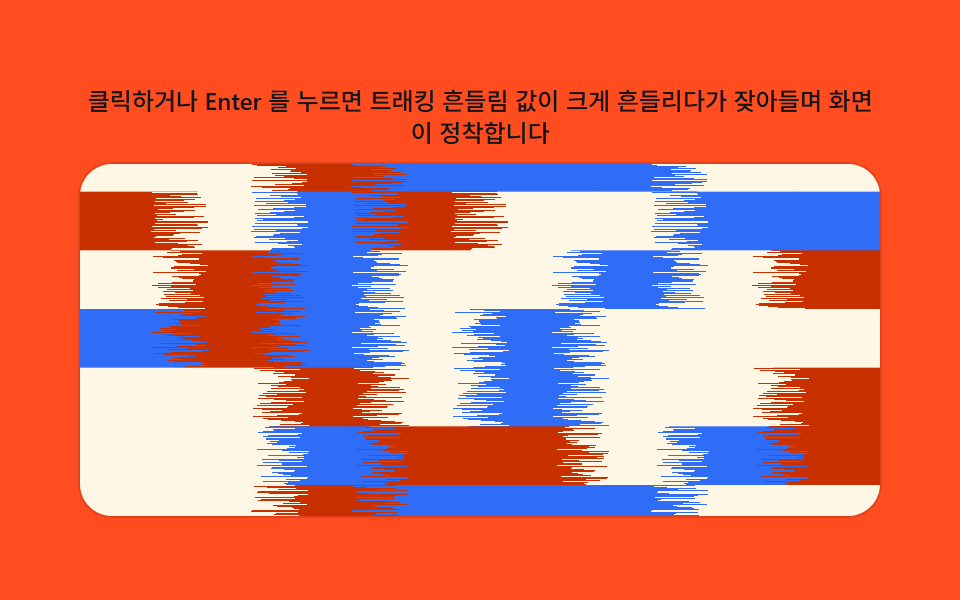
<main class="stage">
<div class="tw is-demo" id="tw">
  <p class="tw__hint"><span>Click or press Enter and the tracking-wobble value swings widely then settles as the screen steadies</span></p>
  <div class="tw__panel" id="panel" tabindex="0" role="button" aria-label="Replay intro transition where tape-tracking wobble value settles down">
    <canvas class="tw__cv" id="cv" aria-hidden="true"></canvas>
  </div>
</div>
</main>
@use "../../../../site/static/demo-tokens" as *;
// 계산 겹(테이프 트래킹 렌더)은 index.html 의 PRECOMPUTE()/RENDER() 에 있다. 여기는 무대·레이아웃만.
$duration: $dur-loop;
$easing: $ease-out;
$color: $subject-ink;
@include stage($stage-orange);
.tw {
--scene-tile1: #{$subject-orange-deep};
--scene-tile2: #{$subject-cream};
--scene-tile3: #{$subject-blue};
--accent: #{$color};
display: flex;
flex-direction: column;
align-items: center;
gap: $sp-2;
width: min(400px, 92vw);
}
.tw__hint {
margin: 0;
color: $subject-ink;
font-size: 12px;
font-weight: 500;
line-height: 1.35;
text-align: center;
}
.tw__panel {
position: relative;
width: 100%;
height: 176px;
border-radius: $r-card;
overflow: hidden;
cursor: pointer;
box-shadow: 0 0 0 1px rgba($subject-ink, .14);
transition: box-shadow $duration $easing;
}
.tw__panel:hover {
box-shadow: 0 0 0 1px $color;
}
.tw__panel:focus-visible {
outline: 2px solid $color;
outline-offset: 2px;
}
.tw__cv {
display: block;
width: 100%;
height: 100%;
}
@media (max-width: 340px) {
.tw__hint { font-size: 11px; }
.tw__panel, .tw__cv { height: 120px; }
}
@media (prefers-reduced-motion: reduce) {
.tw__panel { transition: none; }
}html, body {
margin: 0;
overflow: hidden;
}
.stage {
box-sizing: border-box;
min-height: 100vh;
display: grid;
place-items: center;
margin: 0;
background: #ff4d1f;
font-family: -apple-system, "Segoe UI", "Noto Sans KR", sans-serif;
padding: clamp(8px, 4vw, 24px);
}
.tw {
--scene-tile1: #c93000;
--scene-tile2: #fff7e6;
--scene-tile3: #2f6df6;
--accent: #17141a;
display: flex;
flex-direction: column;
align-items: center;
gap: 8px;
width: min(400px, 92vw);
}
.tw__hint {
margin: 0;
color: #17141a;
font-size: 12px;
font-weight: 500;
line-height: 1.35;
text-align: center;
}
.tw__panel {
position: relative;
width: 100%;
height: 176px;
border-radius: 16px;
overflow: hidden;
cursor: pointer;
box-shadow: 0 0 0 1px rgba(23, 20, 26, 0.14);
transition: box-shadow 2s ease-out;
}
.tw__panel:hover {
box-shadow: 0 0 0 1px #17141a;
}
.tw__panel:focus-visible {
outline: 2px solid #17141a;
outline-offset: 2px;
}
.tw__cv {
display: block;
width: 100%;
height: 100%;
}
@media (max-width: 340px) {
.tw__hint {
font-size: 11px;
}
.tw__panel, .tw__cv {
height: 120px;
}
}
@media (prefers-reduced-motion: reduce) {
.tw__panel {
transition: none;
}
}(function () {
var root = document.getElementById('tw');
var panel = document.getElementById('panel');
var cv = document.getElementById('cv');
var ctx = cv.getContext('2d');
var reduce = window.matchMedia('(prefers-reduced-motion: reduce)').matches;
var isDemo = true;
// 결정론 난수 — Math.random 을 쓰지 않는다. LCG(선형합동생성기) 하나로 장면을 만든다.
function makeLcg(seed) {
var s = seed >>> 0;
return function () { s = (s * 1664525 + 1013904223) >>> 0; return s / 4294967296; };
}
var css = getComputedStyle(root);
function tok(name, fb) { var v = css.getPropertyValue(name); return v ? (v.trim() || fb) : fb; }
var TILE1 = tok('--scene-tile1', '#f4a340');
var TILE2 = tok('--scene-tile2', '#fff7e6');
var TILE3 = tok('--scene-tile3', '#2f6df6');
var W = 0, H = 0, dpr = 1;
var buf = document.createElement('canvas');
var bctx = buf.getContext('2d');
// 장면(레트로 인트로 타이틀 카드 자리) — 격자 타일로 가로·세로 흔들림이 모두 드러나게 한다.
function paintScene(bc, w, h, seed) {
var rng = makeLcg(seed);
var cols = 8, rows = 6;
var tw = w / cols, th = h / rows;
for (var r = 0; r < rows; r++) {
for (var c = 0; c < cols; c++) {
var v = rng();
bc.fillStyle = v < 0.34 ? TILE1 : (v < 0.67 ? TILE2 : TILE3);
bc.fillRect(c * tw, r * th, tw + 1, th + 1);
}
}
}
var SEED = 919;
var TAPE_WOBBLE_AMPLITUDE = 40;
var TAPE_JITTER_AMPLITUDE = 16;
var data, outImg, iw, ih;
function PRECOMPUTE() {
iw = cv.width; ih = cv.height;
data = bctx.getImageData(0, 0, iw, ih).data;
outImg = ctx.createImageData(iw, ih);
}
function hash01(n) {
n = (n ^ 61) ^ (n >>> 16);
n = (n + (n << 3)) | 0;
n = n ^ (n >>> 4);
n = Math.imul(n, 0x27d4eb2d);
n = n ^ (n >>> 15);
return (n >>> 0) / 4294967295;
}
function clampI(v, lo, hi) { return v < lo ? lo : (v > hi ? hi : v); }
function wrap(v, m) { var r = v % m; return r < 0 ? r + m : r; }
var PLAY_MS = 640;
var phaseRoll = 0;
var frameCounter = 0;
function RENDER(p) {
phaseRoll += 0.33;
frameCounter = (frameCounter + 1) >>> 0;
var rollY = Math.round(TAPE_WOBBLE_AMPLITUDE * dpr * p * Math.sin(phaseRoll));
var fSalt = Math.imul(frameCounter, 2246822519) >>> 0;
var o = outImg.data;
for (var y = 0; y < ih; y++) {
var srcY = wrap(y - rollY, ih);
var jh = hash01((Math.imul(srcY, 668265263) ^ fSalt) >>> 0);
var jitterX = Math.round(TAPE_JITTER_AMPLITUDE * dpr * p * (jh * 2 - 1));
var base = y * iw;
var srcBase = srcY * iw;
for (var x = 0; x < iw; x++) {
var sx = clampI(x - jitterX, 0, iw - 1);
var k = (base + x) * 4;
var sk = (srcBase + sx) * 4;
o[k] = data[sk]; o[k + 1] = data[sk + 1]; o[k + 2] = data[sk + 2]; o[k + 3] = 255;
}
}
ctx.putImageData(outImg, 0, 0);
}
function fit() {
var r = panel.getBoundingClientRect();
dpr = window.devicePixelRatio || 1;
W = r.width; H = r.height;
cv.width = Math.round(W * dpr); cv.height = Math.round(H * dpr);
buf.width = cv.width; buf.height = cv.height;
paintScene(bctx, buf.width, buf.height, SEED);
PRECOMPUTE();
}
function human() { if (isDemo) { root.classList.remove('is-demo'); isDemo = false; } }
var progress = 0, target = 0, playT0 = 0, playFrom = 0, playing = false;
function easeInOut(t) { return t < 0.5 ? 2 * t * t : 1 - Math.pow(-2 * t + 2, 2) / 2; }
function play() {
human();
playFrom = progress; target = progress < 0.5 ? 1 : 0;
playT0 = 0; playing = true;
}
function stepPlay(now) {
if (!playing) return;
if (!playT0) playT0 = now;
var t = Math.min(1, (now - playT0) / PLAY_MS);
progress = playFrom + (target - playFrom) * easeInOut(t);
if (t >= 1) { playing = false; progress = target; }
}
var DRIVE_PERIOD_MS = 2000;
var driveStart = 0;
function triangle(frac) { return frac < 0.5 ? frac * 2 : 2 - frac * 2; }
function driveTick(now) {
if (!driveStart) driveStart = now;
if (isDemo) {
var frac = ((now - driveStart) % DRIVE_PERIOD_MS) / DRIVE_PERIOD_MS;
progress = triangle(frac);
}
requestAnimationFrame(driveTick);
}
function frame(now) {
stepPlay(now);
RENDER(progress);
requestAnimationFrame(frame);
}
window.addEventListener('resize', fit);
fit();
if (reduce) {
root.classList.add('is-still');
progress = 0; RENDER(progress);
panel.addEventListener('click', function () { human(); progress = progress < 0.5 ? 1 : 0; RENDER(progress); });
panel.addEventListener('keydown', function (e) {
if (e.key === 'Enter' || e.key === ' ') { e.preventDefault(); human(); progress = progress < 0.5 ? 1 : 0; RENDER(progress); }
});
} else {
panel.addEventListener('click', play);
panel.addEventListener('keydown', function (e) {
if (e.key === 'Enter' || e.key === ' ') { e.preventDefault(); play(); }
});
requestAnimationFrame(frame);
requestAnimationFrame(driveTick);
}
})();import { useEffect, useRef } from "react";
import styles from "./TapeTrackingWobble.module.scss";
export default function TapeTrackingWobble() {
const rootRef = useRef<HTMLDivElement | null>(null);
const panelRef = useRef<HTMLDivElement | null>(null);
const cvRef = useRef<HTMLCanvasElement | null>(null);
useEffect(() => {
const root = rootRef.current;
const panel = panelRef.current;
const cv = cvRef.current;
if (!root || !panel || !cv) return;
const ctx = cv.getContext("2d");
if (!ctx) return;
const reduce = window.matchMedia("(prefers-reduced-motion: reduce)").matches;
let isDemo = true;
// 결정론 난수 — Math.random 을 쓰지 않는다. LCG(선형합동생성기) 하나로 장면을 만든다.
function makeLcg(seed: number) {
let s = seed >>> 0;
return function () {
s = (s * 1664525 + 1013904223) >>> 0;
return s / 4294967296;
};
}
const css = getComputedStyle(root);
function tok(name: string, fb: string) {
const v = css.getPropertyValue(name);
return v ? v.trim() || fb : fb;
}
const TILE1 = tok("--scene-tile1", "#f4a340");
const TILE2 = tok("--scene-tile2", "#fff7e6");
const TILE3 = tok("--scene-tile3", "#2f6df6");
let W = 0;
let H = 0;
let dpr = 1;
const buf = document.createElement("canvas");
const bctx = buf.getContext("2d");
if (!bctx) return;
// 장면(레트로 인트로 타이틀 카드 자리) — 격자 타일로 가로·세로 흔들림이 모두 드러나게 한다.
function paintScene(bc: CanvasRenderingContext2D, w: number, h: number, seed: number) {
const rng = makeLcg(seed);
const cols = 8;
const rows = 6;
const tw = w / cols;
const th = h / rows;
for (let r = 0; r < rows; r++) {
for (let c = 0; c < cols; c++) {
const v = rng();
bc.fillStyle = v < 0.34 ? TILE1 : v < 0.67 ? TILE2 : TILE3;
bc.fillRect(c * tw, r * th, tw + 1, th + 1);
}
}
}
const SEED = 919;
const TAPE_WOBBLE_AMPLITUDE = 40;
const TAPE_JITTER_AMPLITUDE = 16;
let data: Uint8ClampedArray | null = null;
let outImg: ImageData | null = null;
let iw = 0;
let ih = 0;
function PRECOMPUTE() {
iw = cv!.width;
ih = cv!.height;
data = bctx!.getImageData(0, 0, iw, ih).data;
outImg = ctx!.createImageData(iw, ih);
}
function hash01(n: number) {
n = (n ^ 61) ^ (n >>> 16);
n = (n + (n << 3)) | 0;
n = n ^ (n >>> 4);
n = Math.imul(n, 0x27d4eb2d);
n = n ^ (n >>> 15);
return (n >>> 0) / 4294967295;
}
function clampI(v: number, lo: number, hi: number) {
return v < lo ? lo : v > hi ? hi : v;
}
function wrap(v: number, m: number) {
const r = v % m;
return r < 0 ? r + m : r;
}
const PLAY_MS = 640;
let phaseRoll = 0;
let frameCounter = 0;
function RENDER(p: number) {
phaseRoll += 0.33;
frameCounter = (frameCounter + 1) >>> 0;
const rollY = Math.round(TAPE_WOBBLE_AMPLITUDE * dpr * p * Math.sin(phaseRoll));
const fSalt = Math.imul(frameCounter, 2246822519) >>> 0;
const o = outImg!.data;
const d = data!;
for (let y = 0; y < ih; y++) {
const srcY = wrap(y - rollY, ih);
const jh = hash01((Math.imul(srcY, 668265263) ^ fSalt) >>> 0);
const jitterX = Math.round(TAPE_JITTER_AMPLITUDE * dpr * p * (jh * 2 - 1));
const base = y * iw;
const srcBase = srcY * iw;
for (let x = 0; x < iw; x++) {
const sx = clampI(x - jitterX, 0, iw - 1);
const k = (base + x) * 4;
const sk = (srcBase + sx) * 4;
o[k] = d[sk];
o[k + 1] = d[sk + 1];
o[k + 2] = d[sk + 2];
o[k + 3] = 255;
}
}
ctx!.putImageData(outImg!, 0, 0);
}
function fit() {
const r = panel!.getBoundingClientRect();
dpr = window.devicePixelRatio || 1;
W = r.width;
H = r.height;
cv!.width = Math.round(W * dpr);
cv!.height = Math.round(H * dpr);
buf.width = cv!.width;
buf.height = cv!.height;
paintScene(bctx!, buf.width, buf.height, SEED);
PRECOMPUTE();
}
function human() {
if (isDemo) {
root!.classList.remove("is-demo");
isDemo = false;
}
}
let progress = 0;
let target = 0;
let playT0 = 0;
let playFrom = 0;
let playing = false;
function easeInOut(t: number) {
return t < 0.5 ? 2 * t * t : 1 - Math.pow(-2 * t + 2, 2) / 2;
}
function play() {
human();
playFrom = progress;
target = progress < 0.5 ? 1 : 0;
playT0 = 0;
playing = true;
}
function stepPlay(now: number) {
if (!playing) return;
if (!playT0) playT0 = now;
const t = Math.min(1, (now - playT0) / PLAY_MS);
progress = playFrom + (target - playFrom) * easeInOut(t);
if (t >= 1) {
playing = false;
progress = target;
}
}
const DRIVE_PERIOD_MS = 2000;
let driveStart = 0;
let rafFrame = 0;
let rafDrive = 0;
function triangle(frac: number) {
return frac < 0.5 ? frac * 2 : 2 - frac * 2;
}
function driveTick(now: number) {
if (!driveStart) driveStart = now;
if (isDemo) {
const frac = ((now - driveStart) % DRIVE_PERIOD_MS) / DRIVE_PERIOD_MS;
progress = triangle(frac);
}
rafDrive = requestAnimationFrame(driveTick);
}
function frame(now: number) {
stepPlay(now);
RENDER(progress);
rafFrame = requestAnimationFrame(frame);
}
function onClick() {
play();
}
function onKeyDown(e: Event) {
const ke = e as KeyboardEvent;
if (ke.key === "Enter" || ke.key === " ") {
ke.preventDefault();
play();
}
}
function onClickReduce() {
human();
progress = progress < 0.5 ? 1 : 0;
RENDER(progress);
}
function onKeyDownReduce(e: Event) {
const ke = e as KeyboardEvent;
if (ke.key === "Enter" || ke.key === " ") {
ke.preventDefault();
human();
progress = progress < 0.5 ? 1 : 0;
RENDER(progress);
}
}
window.addEventListener("resize", fit);
fit();
if (reduce) {
root.classList.add("is-still");
progress = 0;
RENDER(progress);
panel.addEventListener("click", onClickReduce);
panel.addEventListener("keydown", onKeyDownReduce);
} else {
panel.addEventListener("click", onClick);
panel.addEventListener("keydown", onKeyDown);
rafFrame = requestAnimationFrame(frame);
rafDrive = requestAnimationFrame(driveTick);
}
return () => {
window.removeEventListener("resize", fit);
cancelAnimationFrame(rafFrame);
cancelAnimationFrame(rafDrive);
if (reduce) {
panel.removeEventListener("click", onClickReduce);
panel.removeEventListener("keydown", onKeyDownReduce);
} else {
panel.removeEventListener("click", onClick);
panel.removeEventListener("keydown", onKeyDown);
}
};
}, []);
return (
<main className={styles.stage}>
<div className={`${styles.root} is-demo`} ref={rootRef}>
<p className={styles.hint}>
<span>클릭하거나 Enter 를 누르면 트래킹 흔들림 값이 크게 흔들리다가 잦아들며 화면이 정착합니다</span>
</p>
<div
className={styles.panel}
ref={panelRef}
tabIndex={0}
role="button"
aria-label="테이프 트래킹 흔들림 값이 정착하는 인트로 전환 다시 재생"
>
<canvas className={styles.cv} ref={cvRef} aria-hidden="true" />
</div>
</div>
</main>
);
}07 Screen Transition Where a Tracking-wobble Value Settles — Measured area 44.612% · moving frames 23/23Original by GODRICH · SCSS and React ship in the zip · 9 CSS Glitch Effect Transitions (No Codepen)
The post this demo lives in
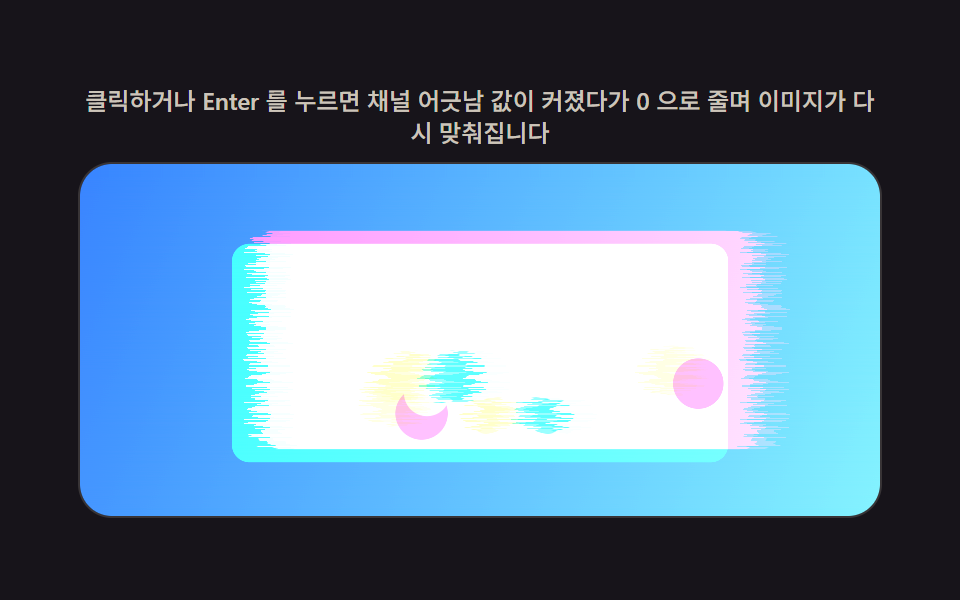 9 CSS Glitch Effect Transitions (No Codepen)This is a css glitch effect: An offset value pulls RGB channels apart on load, then back together. The same trick spikes See all demos in this post
If you like this effect - similar demos
 Transitions01 Transition a Vortex Pull-strength Value Sucks the Screen Away9 CSS Page Transition Effects, Canvas Particles
 Transitions08 Transition Where Cards Slide as a Sort-Order Value ChangesView Transitions API: 9 Patterns by One Value
 Transitions02 Viewport edge flip — the opening direction value reverses once the position value reaches a screen edgeContext Menu UI: 9 Right-Click Menu Patterns