01Picker Whose Histogram Bars Recompute Height With Every Drag
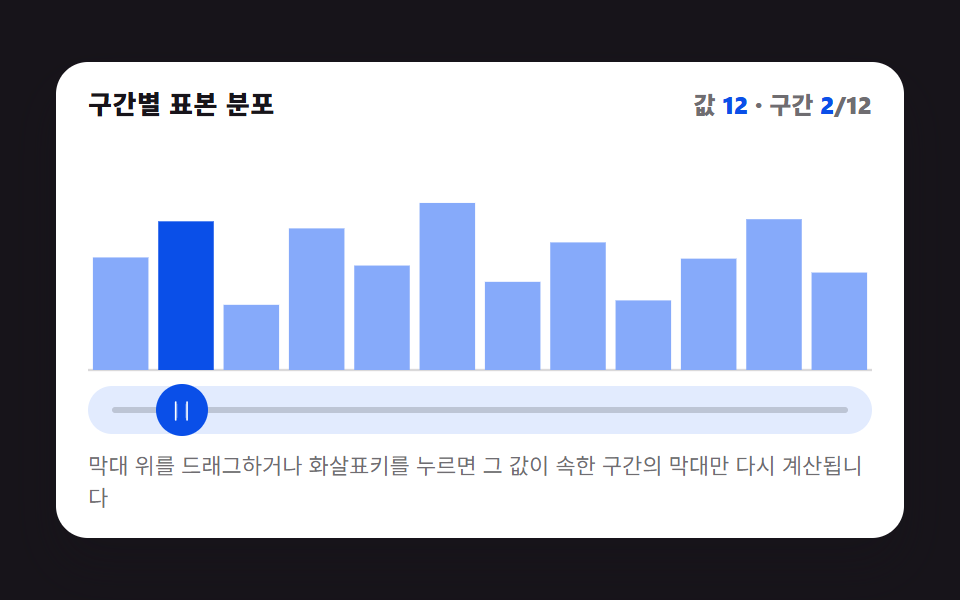
The dragged value is compared against a fixed list of buckets, and only the bar for the matching bucket recomputes its height upward while the rest stay low, showing which range the value now falls in.
Best forPrice-range filters and age-distribution selectors
BUCKET_COUNTPEAK_BOOSTCHART_H
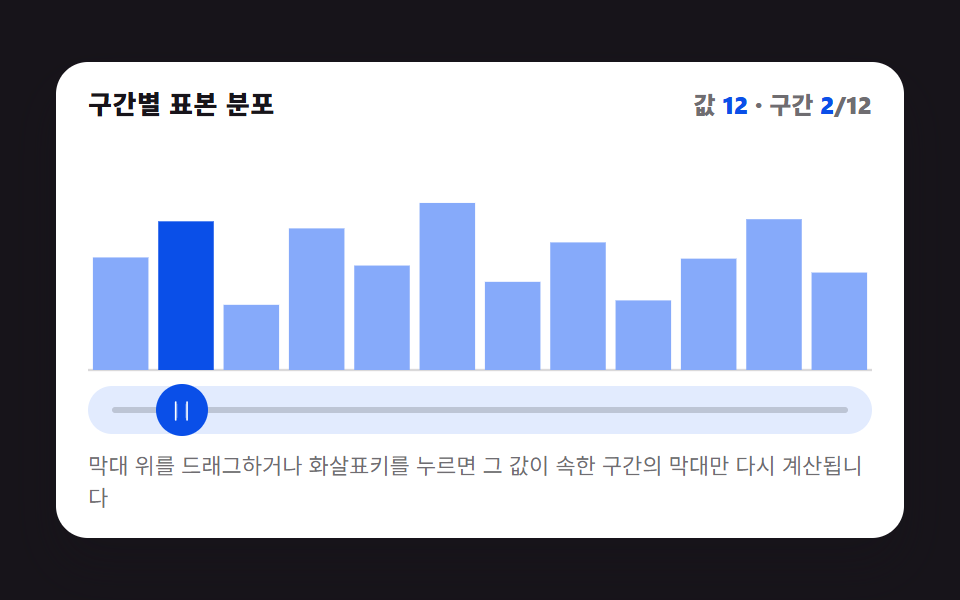
<main class="stage">
<figure class="hg is-demo" id="hg">
  <figcaption class="hg__head">
    <span class="hg__title">Sample distribution by bucket</span>
    <span class="hg__stat" aria-hidden="true">Value <b class="hg__n" id="hg-val">50</b> · bucket <b class="hg__n" id="hg-bucket">6</b>/12</span>
  </figcaption>

  <div class="hg__zone">
    <svg class="hg__chart" id="chart" viewBox="0 0 480 200" preserveAspectRatio="none" role="img" aria-label="Bar chart of sample distribution across 12 buckets; only the bar for the bucket containing the value recomputes and rises.">
      <line class="hg__base" x1="0" y1="200" x2="480" y2="200"></line>
    </svg>
  </div>

  <div class="hg__track" id="track">
    <span class="hg__rail" aria-hidden="true"></span>
    <button class="hg__grab" id="grab" type="button" role="slider" aria-orientation="horizontal"
            aria-label="Choose value" aria-valuemin="0" aria-valuemax="100"
            aria-valuenow="50" aria-valuetext="Value 50, bucket 6/12">
      <svg class="hg__ic" viewBox="0 0 256 256" aria-hidden="true"><g fill="currentColor"><path d="M96 64v128a8 8 0 0 1-16 0V64a8 8 0 0 1 16 0m88 0v128a8 8 0 0 1-16 0V64a8 8 0 0 1 16 0" opacity=".2"/><path d="M188 32a8 8 0 0 0-8 8v176a8 8 0 0 0 16 0V40a8 8 0 0 0-8-8M76 32a8 8 0 0 0-8 8v176a8 8 0 0 0 16 0V40a8 8 0 0 0-8-8"/></g></svg>
    </button>
  </div>

  <p class="hg__hint">Drag on the bars or press the arrow keys — only the bar for the bucket containing that value recomputes.</p>

  <div class="sr">
    <span aria-live="polite" id="hg-live"></span>
    <table>
      <caption>Baseline height by bucket</caption>
      <thead><tr><th>Bucket</th><th>Baseline height</th></tr></thead>
      <tbody id="hg-table"></tbody>
    </table>
  </div>
</figure>
</main>@use "../../../../site/static/demo-tokens" as *;
// 히스토그램 피커 — 드래그·키보드로 값(0~100)을 정하면 그 값이 속한 구간 하나만
// 목표 높이를 다시 계산해 올리고 나머지 11개는 기준 높이로 낮춘다. 어느 구간이
// 활성인지는 매 순간 바뀌는 정수라 선언형 keyframes 로 표현할 수 없어 rAF 루프가
// 직접 SVG rect 의 y·height 를 계산해 찍는다(@keyframes 0개, 395 캔버스 선례와 같은 이유).
// picker-graph-histogram-bucket-count(JS, BUCKET_COUNT)가 구간 개수를 정한다 — 변형 01 의 조정 대상.
$duration: $dur-loop;
$easing: $ease-lerp-settle;
$color: $subject-blue;
@include stage($stage-ink);
.sr {
position: absolute; width: 1px; height: 1px; overflow: hidden;
clip-path: inset(50%); white-space: nowrap;
}
.hg {
box-sizing: border-box;
width: min(424px, 92vw);
margin: 0; padding: $sp-3;
display: flex; flex-direction: column; gap: $sp-2;
border-radius: $r-card;
background: $stage-paper;
box-shadow: $shadow-raised;
color: $subject-ink;
}
.hg__head { display: flex; align-items: baseline; justify-content: space-between; gap: $sp-2; padding: 0 $sp-1; }
.hg__title { font-size: 13px; line-height: 18px; font-weight: 800; letter-spacing: .02em; }
.hg__stat { font-size: 12px; line-height: 18px; font-weight: 800; font-variant-numeric: tabular-nums; color: rgba($subject-ink, .62); }
.hg__n { color: $subject-blue-deep; }
.hg__zone { padding: 0 $sp-1; }
.hg__chart { display: block; width: 100%; height: 116px; overflow: visible; }
.hg__base { stroke: rgba($subject-ink, .16); stroke-width: 2; }
.hg__bar {
fill: mix($subject-blue, $stage-paper, 58%);
transition: none;
}
.hg__bar.is-active { fill: $subject-blue-deep; }
.hg__track {
position: relative;
height: 24px;
margin: 0 $sp-1;
border-radius: $r-pill;
background: mix($subject-blue, $stage-paper, 14%);
}
.hg__rail {
position: absolute; left: $sp-3; right: $sp-3; top: 50%;
height: 3px; transform: translateY(-50%);
border-radius: $r-pill;
background: rgba($subject-ink, .18);
}
.hg__grab {
position: absolute; top: 50%; left: 50%;
width: 26px; height: 26px;
margin: 0; padding: 0; border: 0; border-radius: 50%;
display: grid; place-items: center;
background: $subject-blue-deep;
color: $stage-paper;
transform: translate(-50%, -50%);
cursor: ew-resize;
touch-action: none;
}
.hg__grab:focus-visible { outline: 2px solid $subject-blue-deep; outline-offset: 2px; }
.hg__ic { width: 13px; height: 13px; }
.hg__hint { margin: 0; padding: 0 $sp-1; font-size: 11px; line-height: 16px; color: rgba($subject-ink, .62); }
@media (max-width: 340px) {
.hg { padding: $sp-2; gap: $sp-1; }
.hg__hint { display: none; }
.hg__title { font-size: 12px; line-height: 16px; }
.hg__stat { font-size: 11px; line-height: 16px; }
.hg__chart { height: 108px; }
.hg__grab { width: 22px; height: 22px; }
}
// reduce — rAF 루프를 시작하지 않는다. 드래그·키 입력은 여전히 currentH=targetH 를
// 즉시 맞추고 paint() 를 그 자리에서 한 번 호출해 화면에 반영한다(관성 lerp만 생략).
@media (prefers-reduced-motion: reduce) {
.hg.is-still .hg__bar { transition: none !important; }
}html, body {
margin: 0;
overflow: hidden;
}
.stage {
box-sizing: border-box;
min-height: 100vh;
display: grid;
place-items: center;
margin: 0;
background: #17141a;
font-family: -apple-system, "Segoe UI", "Noto Sans KR", sans-serif;
padding: clamp(8px, 4vw, 24px);
}
.sr {
position: absolute;
width: 1px;
height: 1px;
overflow: hidden;
clip-path: inset(50%);
white-space: nowrap;
}
.hg {
box-sizing: border-box;
width: min(424px, 92vw);
margin: 0;
padding: 12px;
display: flex;
flex-direction: column;
gap: 8px;
border-radius: 16px;
background: #ffffff;
box-shadow: 0 14px 24px rgba(23, 20, 26, 0.32);
color: #17141a;
}
.hg__head {
display: flex;
align-items: baseline;
justify-content: space-between;
gap: 8px;
padding: 0 4px;
}
.hg__title {
font-size: 13px;
line-height: 18px;
font-weight: 800;
letter-spacing: 0.02em;
}
.hg__stat {
font-size: 12px;
line-height: 18px;
font-weight: 800;
font-variant-numeric: tabular-nums;
color: rgba(23, 20, 26, 0.62);
}
.hg__n {
color: #0a4fe8;
}
.hg__zone {
padding: 0 4px;
}
.hg__chart {
display: block;
width: 100%;
height: 116px;
overflow: visible;
}
.hg__base {
stroke: rgba(23, 20, 26, 0.16);
stroke-width: 2;
}
.hg__bar {
fill: rgb(52.6901960784%, 66.7921568627%, 97.9529411765%);
transition: none;
}
.hg__bar.is-active {
fill: #0a4fe8;
}
.hg__track {
position: relative;
height: 24px;
margin: 0 4px;
border-radius: 999px;
background: rgb(88.5803921569%, 91.9843137255%, 99.5058823529%);
}
.hg__rail {
position: absolute;
left: 12px;
right: 12px;
top: 50%;
height: 3px;
transform: translateY(-50%);
border-radius: 999px;
background: rgba(23, 20, 26, 0.18);
}
.hg__grab {
position: absolute;
top: 50%;
left: 50%;
width: 26px;
height: 26px;
margin: 0;
padding: 0;
border: 0;
border-radius: 50%;
display: grid;
place-items: center;
background: #0a4fe8;
color: #ffffff;
transform: translate(-50%, -50%);
cursor: ew-resize;
touch-action: none;
}
.hg__grab:focus-visible {
outline: 2px solid #0a4fe8;
outline-offset: 2px;
}
.hg__ic {
width: 13px;
height: 13px;
}
.hg__hint {
margin: 0;
padding: 0 4px;
font-size: 11px;
line-height: 16px;
color: rgba(23, 20, 26, 0.62);
}
@media (max-width: 340px) {
.hg {
padding: 8px;
gap: 4px;
}
.hg__hint {
display: none;
}
.hg__title {
font-size: 12px;
line-height: 16px;
}
.hg__stat {
font-size: 11px;
line-height: 16px;
}
.hg__chart {
height: 108px;
}
.hg__grab {
width: 22px;
height: 22px;
}
}
@media (prefers-reduced-motion: reduce) {
.hg.is-still .hg__bar {
transition: none !important;
}
}// 실제 동작: pointerdown/move/up 과 keydown(화살표·Home·End) 이 Value(0~100)을 바꾸면
// 그 값이 속한 Bucket 하나만 목표 높이를 다시 계산해 올리고 나머지 11개는 기준 높이로 낮춘다.
// 매 프레임 rAF 루프가 현재 높이를 목표 높이로 관성 보간(lerp)한다 — CSS @keyframes 는
// 0개(어떤 구간이 지금 활성인지는 매 순간 바뀌는 정수라 선언형 keyframes 로 표현할 수 없다,
// 395 의 캔버스 rAF 선례와 같은 이유로 실시간 캡처 경로를 그대로 쓴다).
var root = document.getElementById('hg');
var chart = document.getElementById('chart');
var track = document.getElementById('track');
var grab = document.getElementById('grab');
var valEl = document.getElementById('hg-val');
var bucketEl = document.getElementById('hg-bucket');
var live = document.getElementById('hg-live');
var tableBody = document.getElementById('hg-table');
var BUCKET_COUNT = 12; // picker-graph-histogram-bucket-count — 변형 01 의 조정 대상
var BASE = [0.34, 0.52, 0.28, 0.61, 0.45, 0.72, 0.38, 0.55, 0.30, 0.48, 0.65, 0.42]; // 고정 표본(0~1, RNG 없음)
var PEAK_BOOST = 0.40; // 활성 구간에 더해지는 최대 여유 높이(0~1)
var LERP_RATE = 0.22; // 프레임마다 목표에 다가가는 Ratio — 관성
var AUTO_PERIOD = 1.5; // 자동 시연 한 바퀴(초)
var STEP = 5; // 키보드 한 번에 움직이는 Value
var CHART_H = 200;
var css = getComputedStyle(root);
function cssv(name) { return css.getPropertyValue(name).trim(); }
var currentH = BASE.slice();
var targetH = BASE.slice();
var value = 50;
var manual = false;
var autoT = 0;
var lastTs = 0;
var trackRect = null;
var rafId = 0;
function reduced() {
return window.matchMedia && window.matchMedia('(prefers-reduced-motion: reduce)').matches;
}
function bucketOf(v) {
var idx = Math.floor(v / 100 * BUCKET_COUNT);
return Math.max(0, Math.min(BUCKET_COUNT - 1, idx));
}
function fracIn(v, bucket) {
var raw = v / 100 * BUCKET_COUNT - bucket;
return Math.max(0, Math.min(1, raw));
}
// Bucket 하나만 목표 높이를 다시 계산한다 — 나머지는 Baseline height 그대로
function recompute() {
var b = bucketOf(value);
var f = fracIn(value, b);
for (var i = 0; i < BUCKET_COUNT; i++) {
targetH[i] = BASE[i];
}
targetH[b] = Math.min(0.96, BASE[b] + PEAK_BOOST * (0.4 + 0.6 * f));
return b;
}
function buildBars() {
var gap = 6;
var w = 480 / BUCKET_COUNT;
for (var i = 0; i < BUCKET_COUNT; i++) {
var r = document.createElementNS('http://www.w3.org/2000/svg', 'rect');
r.setAttribute('class', 'hg__bar');
r.setAttribute('x', String(i * w + gap / 2));
r.setAttribute('width', String(Math.max(1, w - gap)));
r.dataset.i = String(i);
chart.appendChild(r);
var tr = document.createElement('tr');
var th = document.createElement('th');
th.textContent = String(i + 1);
var td = document.createElement('td');
td.textContent = Math.round(BASE[i] * 100) + '%';
tr.appendChild(th); tr.appendChild(td);
tableBody.appendChild(tr);
}
}
function paint() {
var bars = chart.querySelectorAll('.hg__bar');
var activeIdx = bucketOf(value);
for (var i = 0; i < bars.length; i++) {
var h = currentH[i] * CHART_H;
bars[i].setAttribute('y', String(CHART_H - h));
bars[i].setAttribute('height', String(h));
bars[i].classList.toggle('is-active', i === activeIdx);
}
var rv = Math.round(value);
valEl.textContent = String(rv);
bucketEl.textContent = String(activeIdx + 1);
grab.style.left = value + '%';
grab.setAttribute('aria-valuenow', String(rv));
var text = 'Value ' + rv + ', bucket ' + (activeIdx + 1) + '/12';
grab.setAttribute('aria-valuetext', text);
}
function announce() {
var activeIdx = bucketOf(value);
live.textContent = 'Value ' + Math.round(value) + ', bucket ' + (activeIdx + 1) + '/12 recomputed';
}
function setValue(v, isManual) {
value = Math.max(0, Math.min(100, v));
if (isManual) {
manual = true;
root.classList.remove('is-demo');
}
recompute();
}
function fromPointer(clientX) {
if (!trackRect) trackRect = track.getBoundingClientRect();
var ratio = (clientX - trackRect.left) / trackRect.width;
setValue(ratio * 100, true);
}
function onDown(e) {
trackRect = track.getBoundingClientRect();
if (grab.setPointerCapture) { try { grab.setPointerCapture(e.pointerId); } catch (err) {} }
fromPointer(e.clientX);
if (reduced()) { currentH = targetH.slice(); paint(); announce(); }
}
function onMove(e) {
if (e.buttons === 0 && e.pointerType !== 'touch') { /* 버튼 안 눌렸으면 무시 */ }
fromPointer(e.clientX);
if (reduced()) { currentH = targetH.slice(); paint(); announce(); }
}
function onUp() { announce(); }
function onKey(e) {
var map = { ArrowLeft: -STEP, ArrowDown: -STEP, ArrowRight: STEP, ArrowUp: STEP };
if (e.key === 'Home') { setValue(0, true); e.preventDefault(); }
else if (e.key === 'End') { setValue(100, true); e.preventDefault(); }
else if (map[e.key] !== undefined) { setValue(value + map[e.key], true); e.preventDefault(); }
else { return; }
if (reduced()) { currentH = targetH.slice(); paint(); announce(); }
}
function onResize() {
trackRect = track.getBoundingClientRect();
if (reduced()) { paint(); }
}
function autoStep(dt) {
autoT += dt;
var omega = 2 * Math.PI / AUTO_PERIOD;
var v = 50 + 46 * Math.sin(autoT * omega);
value = v;
recompute();
}
function frame(ts) {
if (!lastTs) lastTs = ts;
var dt = Math.min(0.05, (ts - lastTs) / 1000);
lastTs = ts;
if (!manual) { autoStep(dt); }
for (var i = 0; i < BUCKET_COUNT; i++) {
currentH[i] += (targetH[i] - currentH[i]) * LERP_RATE;
}
paint();
rafId = requestAnimationFrame(frame);
}
buildBars();
recompute();
grab.addEventListener('pointerdown', onDown);
grab.addEventListener('pointermove', onMove);
grab.addEventListener('pointerup', onUp);
track.addEventListener('pointerdown', function (e) {
trackRect = track.getBoundingClientRect();
fromPointer(e.clientX);
if (reduced()) { currentH = targetH.slice(); paint(); announce(); }
});
grab.addEventListener('keydown', onKey);
window.addEventListener('resize', onResize);
if (reduced()) {
root.classList.add('is-still');
currentH = targetH.slice();
paint();
} else {
rafId = requestAnimationFrame(frame);
}// HistogramBarsLive — vanilla 판(run/398/demo/01-picker-graph-histogram-bars-live/index.html) 의 React 포트.
// 드래그·키보드로 값(0~100)을 정하면 그 값이 속한 구간 하나만 목표 높이를 다시 계산해 올리고
// 나머지 11개는 기준 높이로 낮춘다. 매 프레임 rAF 루프가 현재 높이를 목표 높이로 관성 보간(lerp)한다.
import { useEffect, useRef } from "react";
import styles from "./HistogramBarsLive.module.scss";
type Box<T> = { current: T };
type KeyEvt = { key: string; preventDefault(): void };
type PtrEvt = { clientX: number; clientY: number; pointerId: number; buttons?: number; pointerType?: string };
const BUCKET_COUNT = 12; // picker-graph-histogram-bucket-count — 변형 01 의 조정 대상
const BASE = [0.34, 0.52, 0.28, 0.61, 0.45, 0.72, 0.38, 0.55, 0.30, 0.48, 0.65, 0.42]; // 고정 표본(0~1, RNG 없음)
const PEAK_BOOST = 0.40;
const LERP_RATE = 0.22;
const AUTO_PERIOD = 1.5;
const STEP = 5;
const CHART_H = 200;
const GAP = 6;
const BAR_W = 480 / BUCKET_COUNT;
export default function HistogramBarsLive() {
const rootRef = useRef<HTMLElement | null>(null);
const chartRef = useRef<SVGSVGElement | null>(null);
const trackRef = useRef<HTMLDivElement | null>(null);
const grabRef = useRef<HTMLButtonElement | null>(null);
const valRef = useRef<HTMLElement | null>(null);
const bucketRef = useRef<HTMLElement | null>(null);
const liveRef = useRef<HTMLSpanElement | null>(null);
const barRefs = useRef(new Array(BUCKET_COUNT).fill(null)) as Box<(SVGRectElement | null)[]>;
const currentH = useRef(BASE.slice()) as Box<number[]>;
const targetH = useRef(BASE.slice()) as Box<number[]>;
const value = useRef(50) as Box<number>;
const manual = useRef(false) as Box<boolean>;
const autoT = useRef(0) as Box<number>;
const lastTs = useRef(0) as Box<number>;
const trackRect = useRef<DOMRect | null>(null) as Box<DOMRect | null>;
const rafId = useRef(0) as Box<number>;
function reduced(): boolean {
return window.matchMedia("(prefers-reduced-motion: reduce)").matches;
}
function bucketOf(v: number): number {
const idx = Math.floor((v / 100) * BUCKET_COUNT);
return Math.max(0, Math.min(BUCKET_COUNT - 1, idx));
}
function fracIn(v: number, bucket: number): number {
const raw = (v / 100) * BUCKET_COUNT - bucket;
return Math.max(0, Math.min(1, raw));
}
function recompute(): number {
const b = bucketOf(value.current);
const f = fracIn(value.current, b);
for (let i = 0; i < BUCKET_COUNT; i++) targetH.current[i] = BASE[i];
targetH.current[b] = Math.min(0.96, BASE[b] + PEAK_BOOST * (0.4 + 0.6 * f));
return b;
}
function paint(): void {
const activeIdx = bucketOf(value.current);
const bars = barRefs.current;
for (let i = 0; i < bars.length; i++) {
const r = bars[i];
if (!r) continue;
const h = currentH.current[i] * CHART_H;
r.setAttribute("y", String(CHART_H - h));
r.setAttribute("height", String(h));
r.classList.toggle("is-active", i === activeIdx);
}
const rv = Math.round(value.current);
if (valRef.current) valRef.current.textContent = String(rv);
if (bucketRef.current) bucketRef.current.textContent = String(activeIdx + 1);
const grab = grabRef.current;
if (grab) {
grab.style.left = value.current + "%";
grab.setAttribute("aria-valuenow", String(rv));
grab.setAttribute("aria-valuetext", "값 " + rv + ", 구간 " + (activeIdx + 1) + "/12");
}
}
function announce(): void {
const activeIdx = bucketOf(value.current);
if (liveRef.current) {
liveRef.current.textContent = "값 " + Math.round(value.current) + ", 구간 " + (activeIdx + 1) + "/12로 다시 계산됨";
}
}
function setValue(v: number, isManual: boolean): void {
value.current = Math.max(0, Math.min(100, v));
if (isManual) {
manual.current = true;
rootRef.current?.classList.remove("is-demo");
}
recompute();
}
function fromPointer(clientX: number): void {
if (!trackRect.current && trackRef.current) trackRect.current = trackRef.current.getBoundingClientRect();
const rect = trackRect.current;
if (!rect) return;
const ratio = (clientX - rect.left) / rect.width;
setValue(ratio * 100, true);
}
function reflectNow(): void {
currentH.current = targetH.current.slice();
paint();
announce();
}
function onDown(e: PtrEvt): void {
if (trackRef.current) trackRect.current = trackRef.current.getBoundingClientRect();
const grab = grabRef.current;
if (grab && typeof grab.setPointerCapture === "function") {
try { grab.setPointerCapture(e.pointerId); } catch { /* 캡처 실패는 치명적이지 않다 */ }
}
fromPointer(e.clientX);
if (reduced()) reflectNow();
}
function onMove(e: PtrEvt): void {
fromPointer(e.clientX);
if (reduced()) reflectNow();
}
function onUp(): void {
announce();
}
function onTrackDown(e: PtrEvt): void {
if (trackRef.current) trackRect.current = trackRef.current.getBoundingClientRect();
fromPointer(e.clientX);
if (reduced()) reflectNow();
}
function onKey(e: KeyEvt): void {
const map: Record<string, number> = { ArrowLeft: -STEP, ArrowDown: -STEP, ArrowRight: STEP, ArrowUp: STEP };
if (e.key === "Home") { setValue(0, true); e.preventDefault(); }
else if (e.key === "End") { setValue(100, true); e.preventDefault(); }
else if (map[e.key] !== undefined) { setValue(value.current + map[e.key], true); e.preventDefault(); }
else { return; }
if (reduced()) reflectNow();
}
function onResize(): void {
if (trackRef.current) trackRect.current = trackRef.current.getBoundingClientRect();
if (reduced()) paint();
}
function autoStep(dt: number): void {
autoT.current += dt;
const omega = (2 * Math.PI) / AUTO_PERIOD;
value.current = 50 + 46 * Math.sin(autoT.current * omega);
recompute();
}
function frame(ts: number): void {
if (!lastTs.current) lastTs.current = ts;
const dt = Math.min(0.05, (ts - lastTs.current) / 1000);
lastTs.current = ts;
if (!manual.current) autoStep(dt);
for (let i = 0; i < BUCKET_COUNT; i++) {
currentH.current[i] += (targetH.current[i] - currentH.current[i]) * LERP_RATE;
}
paint();
rafId.current = requestAnimationFrame(frame);
}
useEffect(() => {
recompute();
window.addEventListener("resize", onResize);
if (reduced()) {
rootRef.current?.classList.add("is-still");
reflectNow();
} else {
rafId.current = requestAnimationFrame(frame);
}
return () => {
window.removeEventListener("resize", onResize);
cancelAnimationFrame(rafId.current);
};
// eslint-disable-next-line react-hooks/exhaustive-deps
}, []);
return (
<main className={styles.stage}>
<figure className={styles.hg + " is-demo"} ref={rootRef}>
<figcaption className={styles.head}>
<span className={styles.title}>구간별 표본 분포</span>
<span className={styles.stat} aria-hidden="true">값 <b className={styles.n} ref={valRef}>50</b> · 구간 <b className={styles.n} ref={bucketRef}>6</b>/12</span>
</figcaption>
<div className={styles.zone}>
<svg
className={styles.chart}
ref={chartRef}
viewBox="0 0 480 200"
preserveAspectRatio="none"
role="img"
aria-label="구간 12개 표본 분포 막대그래프, 값이 속한 구간의 막대만 다시 계산되어 올라간다"
>
<line className={styles.base} x1="0" y1="200" x2="480" y2="200" />
{BASE.map((_, i) => (
<rect
key={i}
className={styles.bar}
ref={(el: SVGRectElement | null) => { barRefs.current[i] = el; }}
x={i * BAR_W + GAP / 2}
width={Math.max(1, BAR_W - GAP)}
/>
))}
</svg>
</div>
<div className={styles.track} ref={trackRef} onPointerDown={onTrackDown}>
<span className={styles.rail} aria-hidden="true" />
<button
className={styles.grab}
ref={grabRef}
type="button"
role="slider"
aria-orientation="horizontal"
aria-label="값 고르기"
aria-valuemin={0}
aria-valuemax={100}
aria-valuenow={50}
aria-valuetext="값 50, 구간 6/12"
onPointerDown={onDown}
onPointerMove={onMove}
onPointerUp={onUp}
onKeyDown={onKey}
>
<svg className={styles.ic} viewBox="0 0 256 256" aria-hidden="true"><g fill="currentColor"><path d="M96 64v128a8 8 0 0 1-16 0V64a8 8 0 0 1 16 0m88 0v128a8 8 0 0 1-16 0V64a8 8 0 0 1 16 0" opacity=".2" /><path d="M188 32a8 8 0 0 0-8 8v176a8 8 0 0 0 16 0V40a8 8 0 0 0-8-8M76 32a8 8 0 0 0-8 8v176a8 8 0 0 0 16 0V40a8 8 0 0 0-8-8" /></g></svg>
</button>
</div>
<p className={styles.hint}>막대 위를 드래그하거나 화살표키를 누르면 그 값이 속한 구간의 막대만 다시 계산됩니다</p>
<div className={styles.sr}>
<span aria-live="polite" ref={liveRef} />
<table>
<caption>구간별 기준 높이</caption>
<thead><tr><th>구간</th><th>기준 높이</th></tr></thead>
<tbody>
{BASE.map((b, i) => (
<tr key={i}><th>{i + 1}</th><td>{Math.round(b * 100)}%</td></tr>
))}
</tbody>
</table>
</div>
</figure>
</main>
);
}01 Picker Whose Histogram Bars Recompute Height With Every Drag — Measured area 23.203% · moving frames 23/23Original by GODRICH · SCSS and React ship in the zip · 9 Graph Animation CSS Pickers With Live Recompute
The post this demo lives in
 9 Graph Animation CSS Pickers With Live RecomputeMove a bar by pixel and the graph drifts from its value. So nine pickers recompute: bar height from a bucket value, a ga See all demos in this post
If you like this effect - similar demos
 Pickers01 Saturation and brightness square you dragCustom Color Picker: 9 JS Parts, No Library
 Pickers03 Drag inertia — tracking pointer velocity, then decaying it with an exponential glideCSS Range Slider: 9 Physics-Grade Custom Sliders
 Pickers02 Difficulty Cards Whose Shadow Deepens With the Chosen TierDifficulty Selector UI — 9 Computed Patterns