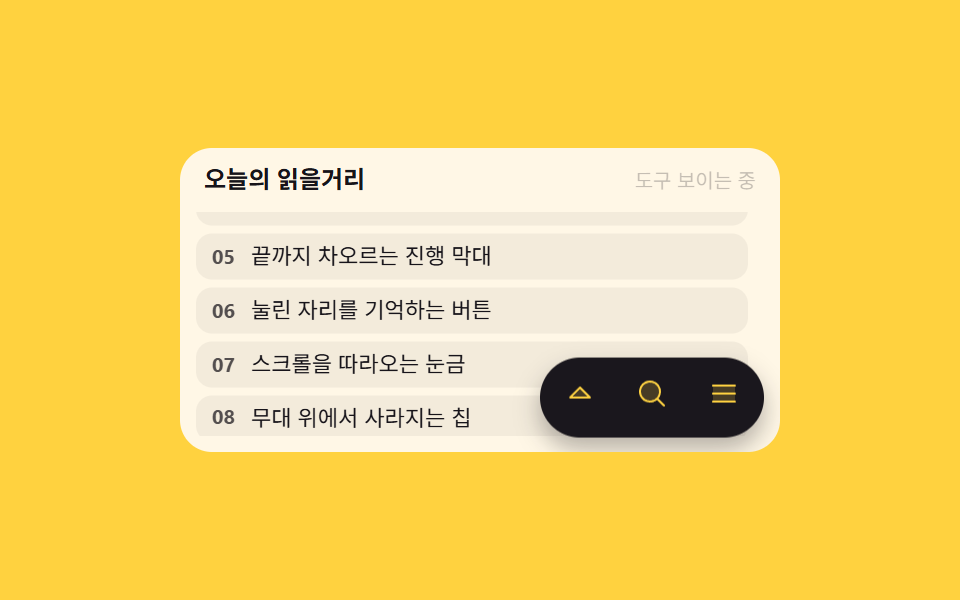
02Toolbar FABs that read which way you scroll
Scrolling down slides the three round buttons out of view with translateY and scrolling up brings them back; the direction is read from the change in the scrollTop value.
Best forLong lists read downward, document viewers that tuck tools away while you read
scrollToptranslateYaria-label
<main class="stage">
  <section class="tb is-demo" id="tb" aria-label="Toolbar buttons that hide while you read">
    <header class="tb__head">
      <p class="tb__title">Today's reads</p>
      <p class="tb__state" id="tb-state">Tools showing</p>
    </header>
    <div class="tb__view" id="tb-view" tabindex="0" role="region" aria-label="Article list">
      <ul class="tb__list">
        <li class="tb__row"><b>01</b> A card that holds soft shadows</li>
        <li class="tb__row"><b>02</b> An input that welcomes the hand</li>
        <li class="tb__row"><b>03</b> A notice one beat late</li>
        <li class="tb__row"><b>04</b> A list that breathes as it folds</li>
        <li class="tb__row"><b>05</b> A progress bar that fills to the brim</li>
        <li class="tb__row"><b>06</b> A button that remembers the press</li>
        <li class="tb__row"><b>07</b> A ruler that follows the scroll</li>
        <li class="tb__row"><b>08</b> A chip that leaves the stage</li>
        <li class="tb__row"><b>09</b> A ripple blooming at the fingertip</li>
      </ul>
    </div>
    <nav class="tb__bar" id="tb-bar" aria-label="Reading tools">
      <button class="tb__fab" type="button" id="tb-top" aria-label="Back to top">
        <span aria-hidden="true"><svg viewBox="0 0 256 256" width="1em" height="1em" fill="currentColor"><path d="M208,160H48l80-80Z" opacity=".2"/><path d="M213.66,154.34l-80-80a8,8,0,0,0-11.32,0l-80,80A8,8,0,0,0,48,168H208a8,8,0,0,0,5.66-13.66ZM67.31,152,128,91.31,188.69,152Z"/></svg></span>
      </button>
      <button class="tb__fab" type="button" aria-label="Find in the list">
        <span aria-hidden="true"><svg viewBox="0 0 256 256" width="1em" height="1em" fill="currentColor"><path d="M192,112a80,80,0,1,1-80-80A80,80,0,0,1,192,112Z" opacity=".2"/><path d="M229.66,218.34,179.6,168.28a88.21,88.21,0,1,0-11.32,11.31l50.06,50.07a8,8,0,0,0,11.32-11.32ZM40,112a72,72,0,1,1,72,72A72.08,72.08,0,0,1,40,112Z"/></svg></span>
      </button>
      <button class="tb__fab" type="button" aria-label="Open the index">
        <span aria-hidden="true"><svg viewBox="0 0 256 256" width="1em" height="1em" fill="currentColor"><path d="M216,64V192H40V64Z" opacity=".2"/><path d="M224,128a8,8,0,0,1-8,8H40a8,8,0,0,1,0-16H216A8,8,0,0,1,224,128ZM40,72H216a8,8,0,0,0,0-16H40a8,8,0,0,0,0,16ZM216,184H40a8,8,0,0,0,0,16H216a8,8,0,0,0,0-16Z"/></svg></span>
      </button>
    </nav>
  </section>
</main>@use "../../../../site/static/demo-tokens" as *;
// 스크롤 방향을 읽고 숨는 툴바 FAB — 목록을 내리면 도구가 치워지고 올리면 돌아온다
$duration: $dur-quick;
$easing: $ease-spring;
$color: $subject-ink;
@include stage($stage-yellow);
.tb {
position: relative;
box-sizing: border-box;
width: min(300px, 92vw);
border-radius: $r-card;
background: $subject-cream;
color: $subject-ink;
font-family: -apple-system, "Segoe UI", "Noto Sans KR", sans-serif;
overflow: hidden;
}
.tb__head {
display: flex;
align-items: baseline;
justify-content: space-between;
gap: $sp-2;
padding: $sp-2 $sp-3 0;
}
.tb__title {
margin: 0;
font-size: 12px;
font-weight: 700;
line-height: 1.3;
}
.tb__state {
margin: 0;
font-size: 10px;
line-height: 1.3;
color: rgba(23, 20, 26, .72);
}
.tb__view {
box-sizing: border-box;
height: 112px;
margin: $sp-2 $sp-2 $sp-2;
padding: 0 $sp-2 0 0;
overflow-y: auto;
scrollbar-width: none;
}
.tb__view::-webkit-scrollbar { display: none; }
.tb__view:focus-visible { outline: 2px solid $color; outline-offset: 2px; }
.tb__list {
display: grid;
gap: $sp-1;
margin: 0;
padding: 0;
list-style: none;
}
.tb__row {
display: flex;
align-items: center;
gap: $sp-2;
padding: $sp-1 $sp-2;
border-radius: $r-sm;
background: rgba(23, 20, 26, .05);
font-size: 11px;
line-height: 1.35;
}
.tb__row b { font-size: 10px; opacity: .72; }
// ── 툴바 FAB: 오른쪽 아래에 붙고, 방향에 따라 translateY 로 숨는다 ──
.tb__bar {
position: absolute;
right: $sp-2;
bottom: $sp-2;
display: flex;
gap: $sp-1;
padding: $sp-1;
border-radius: $r-pill;
background: $subject-ink;
box-shadow: $shadow-press;
transition: transform $duration $easing, opacity $dur-instant linear;
}
.tb__fab {
display: inline-grid;
place-items: center;
width: 32px;
height: 32px;
margin: 0;
padding: 0;
border: 0;
border-radius: 50%;
background: transparent;
color: $stage-yellow;
font-size: 16px;
line-height: 1;
cursor: pointer;
transition: transform $dur-instant $ease-out;
}
.tb__fab:focus-visible { outline: 2px solid $stage-yellow; outline-offset: 1px; }
.tb__fab:active { transform: scale(.88); }
// 정적 경로 — is-hidden 일 때만 밖으로 내려간다
.tb.is-hidden .tb__bar {
transform: translateY(150%);
opacity: 0;
}
// ── 격자 미리보기 전용 2초 루프: 목록이 흐르고 도구가 숨었다 돌아온다 ──
@keyframes tb-flow {
0% { transform: translateY(0); }
34% { transform: translateY(-44%); }
44% { transform: translateY(-44%); }
82%, 100% { transform: translateY(0); }
}
@keyframes tb-hide {
0%, 30% { transform: translateY(0); opacity: 1; }
34% { opacity: 0; }
34.01%, 43% { transform: translateY(150%); opacity: 0; }
47% { opacity: 1; }
47.01%, 92% { transform: translateY(0); opacity: 1; }
94%, 100% { transform: translateY(0); opacity: 1; }
}
@keyframes tb-note {
0%, 31% { opacity: 1; }
32%, 90% { opacity: .35; }
91%, 100% { opacity: 1; }
}
.tb.is-demo {
.tb__list {
animation-name: tb-flow;
animation-duration: $dur-loop;
animation-timing-function: $ease-out;
animation-iteration-count: infinite;
}
.tb__bar {
animation-name: tb-hide;
animation-duration: $dur-loop;
animation-timing-function: $easing;
animation-iteration-count: infinite;
}
.tb__state {
animation-name: tb-note;
animation-duration: $dur-loop;
animation-timing-function: steps(1, end);
animation-iteration-count: infinite;
}
}
@media (max-width: 340px) {
.tb__view { height: 96px; }
.tb__row { font-size: 10px; }
.tb__fab { width: 28px; height: 28px; font-size: 14px; }
}
@media (prefers-reduced-motion: reduce) {
.tb.is-demo .tb__list,
.tb.is-demo .tb__bar,
.tb.is-demo .tb__state { animation: none !important; transform: none !important; }
// 방향 감지 결과만 남는다 — 도구는 보이는 상태로 멈춘다
.tb.is-demo .tb__bar { opacity: 1 !important; }
.tb.is-demo .tb__state { opacity: 1 !important; }
}html, body {
margin: 0;
overflow: hidden;
}
.stage {
box-sizing: border-box;
min-height: 100vh;
display: grid;
place-items: center;
margin: 0;
background: #ffd23f;
font-family: -apple-system, "Segoe UI", "Noto Sans KR", sans-serif;
padding: clamp(8px, 4vw, 24px);
}
.tb {
position: relative;
box-sizing: border-box;
width: min(300px, 92vw);
border-radius: 16px;
background: #fff7e6;
color: #17141a;
font-family: -apple-system, "Segoe UI", "Noto Sans KR", sans-serif;
overflow: hidden;
}
.tb__head {
display: flex;
align-items: baseline;
justify-content: space-between;
gap: 8px;
padding: 8px 12px 0;
}
.tb__title {
margin: 0;
font-size: 12px;
font-weight: 700;
line-height: 1.3;
}
.tb__state {
margin: 0;
font-size: 10px;
line-height: 1.3;
color: rgba(23, 20, 26, 0.72);
}
.tb__view {
box-sizing: border-box;
height: 112px;
margin: 8px 8px 8px;
padding: 0 8px 0 0;
overflow-y: auto;
scrollbar-width: none;
}
.tb__view::-webkit-scrollbar {
display: none;
}
.tb__view:focus-visible {
outline: 2px solid #17141a;
outline-offset: 2px;
}
.tb__list {
display: grid;
gap: 4px;
margin: 0;
padding: 0;
list-style: none;
}
.tb__row {
display: flex;
align-items: center;
gap: 8px;
padding: 4px 8px;
border-radius: 8px;
background: rgba(23, 20, 26, 0.05);
font-size: 11px;
line-height: 1.35;
}
.tb__row b {
font-size: 10px;
opacity: 0.72;
}
.tb__bar {
position: absolute;
right: 8px;
bottom: 8px;
display: flex;
gap: 4px;
padding: 4px;
border-radius: 999px;
background: #17141a;
box-shadow: 0 6px 12px rgba(23, 20, 26, 0.32);
transition: transform 220ms cubic-bezier(0.2, 0.8, 0.2, 1), opacity 140ms linear;
}
.tb__fab {
display: inline-grid;
place-items: center;
width: 32px;
height: 32px;
margin: 0;
padding: 0;
border: 0;
border-radius: 50%;
background: transparent;
color: #ffd23f;
font-size: 16px;
line-height: 1;
cursor: pointer;
transition: transform 140ms ease-out;
}
.tb__fab:focus-visible {
outline: 2px solid #ffd23f;
outline-offset: 1px;
}
.tb__fab:active {
transform: scale(0.88);
}
.tb.is-hidden .tb__bar {
transform: translateY(150%);
opacity: 0;
}
@keyframes tb-flow {
0% {
transform: translateY(0);
}
34% {
transform: translateY(-44%);
}
44% {
transform: translateY(-44%);
}
82%, 100% {
transform: translateY(0);
}
}
@keyframes tb-hide {
0%, 30% {
transform: translateY(0);
opacity: 1;
}
34% {
opacity: 0;
}
34.01%, 43% {
transform: translateY(150%);
opacity: 0;
}
47% {
opacity: 1;
}
47.01%, 92% {
transform: translateY(0);
opacity: 1;
}
94%, 100% {
transform: translateY(0);
opacity: 1;
}
}
@keyframes tb-note {
0%, 31% {
opacity: 1;
}
32%, 90% {
opacity: 0.35;
}
91%, 100% {
opacity: 1;
}
}
.tb.is-demo .tb__list {
animation-name: tb-flow;
animation-duration: 2s;
animation-timing-function: ease-out;
animation-iteration-count: infinite;
}
.tb.is-demo .tb__bar {
animation-name: tb-hide;
animation-duration: 2s;
animation-timing-function: cubic-bezier(0.2, 0.8, 0.2, 1);
animation-iteration-count: infinite;
}
.tb.is-demo .tb__state {
animation-name: tb-note;
animation-duration: 2s;
animation-timing-function: steps(1, end);
animation-iteration-count: infinite;
}
@media (max-width: 340px) {
.tb__view {
height: 96px;
}
.tb__row {
font-size: 10px;
}
.tb__fab {
width: 28px;
height: 28px;
font-size: 14px;
}
}
@media (prefers-reduced-motion: reduce) {
.tb.is-demo .tb__list,
.tb.is-demo .tb__bar,
.tb.is-demo .tb__state {
animation: none !important;
transform: none !important;
}
.tb.is-demo .tb__bar {
opacity: 1 !important;
}
.tb.is-demo .tb__state {
opacity: 1 !important;
}
}// 스크롤 방향을 읽는 툴바 FAB: scrollTop 변화로 방향을 잡아 숨김·노출만 바꾼다
var tb = document.getElementById('tb');
var tbView = document.getElementById('tb-view');
var tbBar = document.getElementById('tb-bar');
var tbState = document.getElementById('tb-state');
var tbLast = tbView.scrollTop;
tbView.addEventListener('scroll', function () {
tb.classList.remove('is-demo');
var now = tbView.scrollTop;
var down = now - tbLast > 2;
var up = tbLast - now > 2;
tbLast = now;
if (down && !tb.classList.contains('is-hidden')) {
tb.classList.add('is-hidden');
tbState.textContent = 'Reading · tools tucked';
} else if (up && tb.classList.contains('is-hidden')) {
tb.classList.remove('is-hidden');
tbState.textContent = 'Tools showing';
}
});
document.getElementById('tb-top').addEventListener('click', function () {
tbView.scrollTo({ top: 0, behavior: 'smooth' });
});import { useRef, useState } from "react";
import type { CSSProperties } from "react";
import styles from "./ScrollToolbarFab.module.scss";
export type ScrollToolbarFabProps = {
title?: string;
rows?: string[];
stateVisible?: string;
stateHidden?: string;
topLabel?: string;
findLabel?: string;
tocLabel?: string;
listLabel?: string;
groupLabel?: string;
/** 격자 미리보기용 2초 자동 루프. 사람이 손대면 꺼진다 */
demo?: boolean;
duration?: number;
easing?: string;
color?: string;
};
type Vars = CSSProperties & { "--duration"?: string; "--easing"?: string; "--color"?: string };
// ambient 가 얇아 DOM 요소 타입을 못 쓴다 — 필요한 꼴만 로컬 타입으로 선언
type ScrollBox = { scrollTop: number; scrollTo: (o: { top: number; behavior: string }) => void };
const DEFAULT_ROWS = [
"A card that holds a soft shadow",
"An input you can stroke with both hands",
"A toast that lands one beat late",
"The breath of a list folding open",
"A progress bar that fills to the end",
"A button that remembers where it was pressed",
"A scale that follows the scroll",
"A chip that leaves the stage",
"A ripple blooming under a fingertip",
];
function ArrowUpIcon() {
return (
<svg viewBox="0 0 256 256" width="1em" height="1em" fill="currentColor"><path d="M208,160H48l80-80Z" opacity=".2"/><path d="M213.66,154.34l-80-80a8,8,0,0,0-11.32,0l-80,80A8,8,0,0,0,48,168H208a8,8,0,0,0,5.66-13.66ZM67.31,152,128,91.31,188.69,152Z"/></svg>
);
}
function SearchIcon() {
return (
<svg viewBox="0 0 256 256" width="1em" height="1em" fill="currentColor"><path d="M192,112a80,80,0,1,1-80-80A80,80,0,0,1,192,112Z" opacity=".2"/><path d="M229.66,218.34,179.6,168.28a88.21,88.21,0,1,0-11.32,11.31l50.06,50.07a8,8,0,0,0,11.32-11.32ZM40,112a72,72,0,1,1,72,72A72.08,72.08,0,0,1,40,112Z"/></svg>
);
}
function ListIcon() {
return (
<svg viewBox="0 0 256 256" width="1em" height="1em" fill="currentColor"><path d="M216,64V192H40V64Z" opacity=".2"/><path d="M224,128a8,8,0,0,1-8,8H40a8,8,0,0,1,0-16H216A8,8,0,0,1,224,128ZM40,72H216a8,8,0,0,0,0-16H40a8,8,0,0,0,0,16ZM216,184H40a8,8,0,0,0,0,16H216a8,8,0,0,0,0-16Z"/></svg>
);
}
export default function ScrollToolbarFab({
title = "Today's reading",
rows = DEFAULT_ROWS,
stateVisible = "Tools visible",
stateHidden = "Reading · tools hidden",
topLabel = "Back to top",
findLabel = "Find in list",
tocLabel = "Open table of contents",
listLabel = "Article list",
groupLabel = "Toolbar that hides while reading",
demo = true,
duration = 220,
easing = "cubic-bezier(.2,.8,.2,1)",
color = "#17141a",
}: ScrollToolbarFabProps) {
const [hidden, setHidden] = useState(false);
const [live, setLive] = useState(demo);
const viewRef = useRef<ScrollBox>(null);
const lastRef = useRef<number>(0);
const vars: Vars = { "--duration": `${duration}ms`, "--easing": easing, "--color": color };
// 스크롤 방향만 읽는다 — 내려가면 도구를 치우고 올라가면 되돌린다
function onScroll() {
const el = viewRef.current;
if (!el) return;
setLive(false);
const now = el.scrollTop;
const last = lastRef.current === null ? 0 : lastRef.current;
lastRef.current = now;
if (now - last > 2) setHidden(true);
else if (last - now > 2) setHidden(false);
}
function toTop() {
setLive(false);
const el = viewRef.current;
if (!el) return;
el.scrollTo({ top: 0, behavior: "smooth" });
}
const cls = [styles.tb, live ? styles.isDemo : "", hidden ? styles.isHidden : ""].filter(Boolean).join(" ");
return (
<section className={cls} style={vars} aria-label={groupLabel}>
<header className={styles.head}>
<p className={styles.title}>{title}</p>
<p className={styles.state}>{hidden ? stateHidden : stateVisible}</p>
</header>
<div className={styles.view} ref={viewRef} onScroll={onScroll} tabIndex={0} role="region" aria-label={listLabel}>
<ul className={styles.list}>
{rows.map((r, i) => (
<li className={styles.row} key={r}>
<b>{String(i + 1).padStart(2, "0")}</b> {r}
</li>
))}
</ul>
</div>
<nav className={styles.bar} aria-label={groupLabel}>
<button className={styles.fab} type="button" aria-label={topLabel} onClick={toTop}>
<span aria-hidden="true"><ArrowUpIcon /></span>
</button>
<button className={styles.fab} type="button" aria-label={findLabel}>
<span aria-hidden="true"><SearchIcon /></span>
</button>
<button className={styles.fab} type="button" aria-label={tocLabel}>
<span aria-hidden="true"><ListIcon /></span>
</button>
</nav>
</section>
);
}02 Toolbar FABs that read which way you scroll — Measured area 14.57% · moving frames 20/23Original by GODRICH · SCSS and React ship in the zip · 9 Icon Button CSS Patterns — Press, Drag, Expand
The post this demo lives in
 9 Icon Button CSS Patterns — Press, Drag, ExpandAn icon button css pattern trades the label for a picture, so the meaning has to survive for anyone who never sees it. A See all demos in this post