07Text watermark
Drag the text to where it belongs, then tune its size and shadow to sit on top of the photo.
Best forPutting a studio name on a photo, marking a draft against leaks
fillTextshadowBlurpointermove
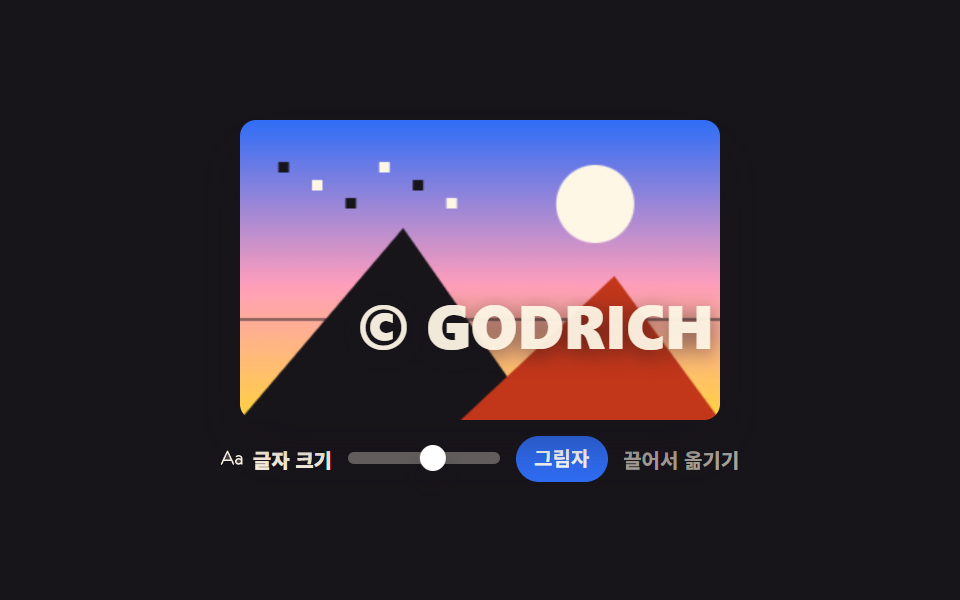
<main class="stage">
<div class="wm is-demo" id="wm">
  <div class="wm__frame" id="frame">
    <canvas class="wm__view" id="view" width="320" height="200" role="img" aria-label="Photo with a watermark"></canvas>
    <span class="wm__ghost" aria-hidden="true"><span class="wm__mark">© GODRICH</span></span>
  </div>
  <div class="wm__foot">
    <span class="wm__lab" id="sizeLab"><svg xmlns="http://www.w3.org/2000/svg" viewBox="0 0 256 256" class="wm__ico" aria-hidden="true"><g fill="currentColor"><path d="M232 164c0 15.46-14.33 28-32 28s-32-12.54-32-28s14.33-28 32-28s32 12.54 32 28M34.82 152h90.36L80 56Z" opacity=".2"/><path d="M87.24 52.59a8 8 0 0 0-14.48 0l-64 136a8 8 0 1 0 14.48 6.81L39.9 160h80.2l16.66 35.4a8 8 0 1 0 14.48-6.81ZM47.43 144L80 74.79L112.57 144ZM200 96c-12.76 0-22.73 3.47-29.63 10.32a8 8 0 0 0 11.26 11.36c3.8-3.77 10-5.68 18.37-5.68c13.23 0 24 9 24 20v3.22a42.76 42.76 0 0 0-24-7.22c-22.06 0-40 16.15-40 36s17.94 36 40 36a42.73 42.73 0 0 0 24-7.25a8 8 0 0 0 16-.75v-60c0-19.85-17.94-36-40-36m0 88c-13.23 0-24-9-24-20s10.77-20 24-20s24 9 24 20s-10.77 20-24 20"/></g></svg><span>Text size</span></span>
    <span class="wm__track" id="track" role="slider" tabindex="0" aria-labelledby="sizeLab" aria-valuemin="14" aria-valuemax="42" aria-valuenow="24"><span class="wm__thumb" id="thumb"></span></span>
    <button type="button" class="wm__btn" id="shadowBtn" aria-pressed="true">Shadow</button>
    <span class="wm__hint">Drag to move</span>
  </div>
</div>
</main>
@use "../../../../site/static/demo-tokens" as *;
// 텍스트 워터마크 — 실제 글자는 canvas 2D 의 fillText 가 굽는다(shadowBlur 로 밝은 하늘 위에서도 읽히게).
// 격자 미리보기(.is-demo)에서는 캔버스가 사진만 그리고 글자 몫을 유령 판이 맡는다 —
// 한 번 구운 캔버스 글자는 CSS 로 움직일 수 없어 끌어 옮기는 장면을 보여줄 수가 없기 때문이다.
$duration: $dur-loop;
$easing: $ease-spring;
$color: $subject-cream;
@include stage($stage-ink);
.wm { display: flex; flex-direction: column; align-items: center; gap: $sp-2; width: 100%; }
.wm__frame {
position: relative; height: clamp(96px, 50vh, 170px); aspect-ratio: 16 / 10; max-width: 100%;
border-radius: $r-sm; overflow: hidden; box-shadow: $shadow-raised;
cursor: grab; touch-action: none;
}
.wm__view { display: block; width: 100%; height: 100%; }
// 유령 판은 무대 전체를 덮는 층이다 — 층을 퍼센트로 옮기면 그 퍼센트가 사진 크기 기준이 되어
// 폭이 달라져도 글자가 같은 자리에 떨어진다. 글자 자체는 제자리에서 커지기만 한다
.wm__ghost { display: none; position: absolute; inset: 0; }
.wm__mark {
position: absolute; left: 50%; top: 78%;
font-weight: 800; font-size: 24px; line-height: 1;
color: rgba(255, 247, 230, .94); text-shadow: 0 2px 9px rgba(23, 20, 26, .62);
white-space: nowrap; transform: translate(-50%, -50%);
}
.wm__foot { display: flex; align-items: center; gap: $sp-2; flex-wrap: wrap; justify-content: center; color: $color; }
.wm__lab {
display: inline-flex; align-items: center; gap: $sp-1;
font-weight: 800; font-size: clamp(8px, 2.2vw, 10px);
}
.wm__ico { width: 12px; height: 12px; flex: 0 0 auto; }
.wm__track {
position: relative; display: block; width: 76px; height: 6px; cursor: pointer;
border-radius: $r-pill; background: rgba(255, 247, 230, .32);
}
.wm__track:focus-visible { outline: 3px solid $subject-blue; outline-offset: 4px; }
.wm__thumb {
position: absolute; top: 50%; left: 36%; width: 13px; height: 13px;
border-radius: 50%; background: $stage-paper; box-shadow: $shadow-press;
transform: translate(-50%, -50%);
}
.wm__btn {
cursor: pointer; border: 1px solid rgba(255, 247, 230, .34); background: transparent; color: $color;
border-radius: $r-pill; font-family: inherit; font-weight: 700; line-height: 1.3;
font-size: clamp(8px, 2.2vw, 10px); padding: $sp-1 $sp-2;
}
// 눌린 알약의 글자는 크림이 아니라 흰색이다 — 파랑 위 크림은 4.25:1 로 AA 미달이다
.wm__btn[aria-pressed="true"] { background: $subject-blue; border-color: $subject-blue; color: $stage-paper; }
.wm__btn:focus-visible { outline: 3px solid $subject-blue; outline-offset: 2px; }
.wm__hint { font-weight: 700; font-size: clamp(8px, 2.1vw, 10px); color: rgba(255, 247, 230, .64); }
// ── 미리보기 루프: 워터마크를 오른쪽 아래 모서리로 끌어다 놓고 글자를 키웠다가 제자리로 돌아온다.
// 글자는 늘 화면 안에 남는다 — 사라지는 장면이 poster 로 뽑히면 대표 이미지가 빈 사진이 된다.
// 복귀는 88% 에 끝난다. 24장 표본의 마지막 장이 2초의 95.8% 지점이라 그 뒤는 안 찍힌다
.wm.is-demo .wm__ghost {
display: block;
animation-name: wmMove; animation-duration: $duration;
animation-timing-function: $easing; animation-iteration-count: infinite;
}
@keyframes wmMove {
0%, 6% { transform: translate(0, 0); }
36%, 60% { transform: translate(18%, -16%); }
88%, 100% { transform: translate(0, 0); }
}
.wm.is-demo .wm__mark {
animation-name: wmGrow; animation-duration: $duration;
animation-timing-function: $easing; animation-iteration-count: infinite;
}
@keyframes wmGrow {
0%, 6% { transform: translate(-50%, -50%) scale(1); }
36%, 60% { transform: translate(-50%, -50%) scale(1.42); }
88%, 100% { transform: translate(-50%, -50%) scale(1); }
}
.wm.is-demo .wm__thumb {
animation-name: wmThumb; animation-duration: $duration;
animation-timing-function: $easing; animation-iteration-count: infinite;
}
@keyframes wmThumb {
0%, 6% { transform: translate(-50%, -50%); }
36%, 60% { transform: translate(-50%, -50%) translateX(24px); }
88%, 100% { transform: translate(-50%, -50%); }
}
@media (max-width: 340px) {
.wm__foot { gap: $sp-1; }
.wm__hint { display: none; }
}
@media (prefers-reduced-motion: reduce) {
.wm.is-demo .wm__ghost,
.wm.is-demo .wm__mark,
.wm.is-demo .wm__thumb { animation: none !important; }
// 움직임 없이 오른쪽 위로 옮겨 키운 상태로 세운다
.wm.is-demo .wm__ghost { transform: translate(18%, -16%) !important; }
.wm.is-demo .wm__mark { transform: translate(-50%, -50%) scale(1.42) !important; }
.wm.is-demo .wm__thumb { transform: translate(-50%, -50%) translateX(24px) !important; }
}html, body {
margin: 0;
overflow: hidden;
}
.stage {
box-sizing: border-box;
min-height: 100vh;
display: grid;
place-items: center;
margin: 0;
background: #17141a;
font-family: -apple-system, "Segoe UI", "Noto Sans KR", sans-serif;
padding: clamp(8px, 4vw, 24px);
}
.wm {
display: flex;
flex-direction: column;
align-items: center;
gap: 8px;
width: 100%;
}
.wm__frame {
position: relative;
height: clamp(96px, 50vh, 170px);
aspect-ratio: 16/10;
max-width: 100%;
border-radius: 8px;
overflow: hidden;
box-shadow: 0 14px 24px rgba(23, 20, 26, 0.32);
cursor: grab;
touch-action: none;
}
.wm__view {
display: block;
width: 100%;
height: 100%;
}
.wm__ghost {
display: none;
position: absolute;
inset: 0;
}
.wm__mark {
position: absolute;
left: 50%;
top: 78%;
font-weight: 800;
font-size: 24px;
line-height: 1;
color: rgba(255, 247, 230, 0.94);
text-shadow: 0 2px 9px rgba(23, 20, 26, 0.62);
white-space: nowrap;
transform: translate(-50%, -50%);
}
.wm__foot {
display: flex;
align-items: center;
gap: 8px;
flex-wrap: wrap;
justify-content: center;
color: #fff7e6;
}
.wm__lab {
display: inline-flex;
align-items: center;
gap: 4px;
font-weight: 800;
font-size: clamp(8px, 2.2vw, 10px);
}
.wm__ico {
width: 12px;
height: 12px;
flex: 0 0 auto;
}
.wm__track {
position: relative;
display: block;
width: 76px;
height: 6px;
cursor: pointer;
border-radius: 999px;
background: rgba(255, 247, 230, 0.32);
}
.wm__track:focus-visible {
outline: 3px solid #2f6df6;
outline-offset: 4px;
}
.wm__thumb {
position: absolute;
top: 50%;
left: 36%;
width: 13px;
height: 13px;
border-radius: 50%;
background: #ffffff;
box-shadow: 0 6px 12px rgba(23, 20, 26, 0.32);
transform: translate(-50%, -50%);
}
.wm__btn {
cursor: pointer;
border: 1px solid rgba(255, 247, 230, 0.34);
background: transparent;
color: #fff7e6;
border-radius: 999px;
font-family: inherit;
font-weight: 700;
line-height: 1.3;
font-size: clamp(8px, 2.2vw, 10px);
padding: 4px 8px;
}
.wm__btn[aria-pressed=true] {
background: #2f6df6;
border-color: #2f6df6;
color: #ffffff;
}
.wm__btn:focus-visible {
outline: 3px solid #2f6df6;
outline-offset: 2px;
}
.wm__hint {
font-weight: 700;
font-size: clamp(8px, 2.1vw, 10px);
color: rgba(255, 247, 230, 0.64);
}
.wm.is-demo .wm__ghost {
display: block;
animation-name: wmMove;
animation-duration: 2s;
animation-timing-function: cubic-bezier(0.2, 0.8, 0.2, 1);
animation-iteration-count: infinite;
}
@keyframes wmMove {
0%, 6% {
transform: translate(0, 0);
}
36%, 60% {
transform: translate(18%, -16%);
}
88%, 100% {
transform: translate(0, 0);
}
}
.wm.is-demo .wm__mark {
animation-name: wmGrow;
animation-duration: 2s;
animation-timing-function: cubic-bezier(0.2, 0.8, 0.2, 1);
animation-iteration-count: infinite;
}
@keyframes wmGrow {
0%, 6% {
transform: translate(-50%, -50%) scale(1);
}
36%, 60% {
transform: translate(-50%, -50%) scale(1.42);
}
88%, 100% {
transform: translate(-50%, -50%) scale(1);
}
}
.wm.is-demo .wm__thumb {
animation-name: wmThumb;
animation-duration: 2s;
animation-timing-function: cubic-bezier(0.2, 0.8, 0.2, 1);
animation-iteration-count: infinite;
}
@keyframes wmThumb {
0%, 6% {
transform: translate(-50%, -50%);
}
36%, 60% {
transform: translate(-50%, -50%) translateX(24px);
}
88%, 100% {
transform: translate(-50%, -50%);
}
}
@media (max-width: 340px) {
.wm__foot {
gap: 4px;
}
.wm__hint {
display: none;
}
}
@media (prefers-reduced-motion: reduce) {
.wm.is-demo .wm__ghost,
.wm.is-demo .wm__mark,
.wm.is-demo .wm__thumb {
animation: none !important;
}
.wm.is-demo .wm__ghost {
transform: translate(18%, -16%) !important;
}
.wm.is-demo .wm__mark {
transform: translate(-50%, -50%) scale(1.42) !important;
}
.wm.is-demo .wm__thumb {
transform: translate(-50%, -50%) translateX(24px) !important;
}
}var wm = document.getElementById('wm');
var frame = document.getElementById('frame');
var view = document.getElementById('view');
var track = document.getElementById('track');
var thumb = document.getElementById('thumb');
var shadowBtn = document.getElementById('shadowBtn');
var vctx = view.getContext('2d');
var src = document.createElement('canvas');
var mark = '© GODRICH';
var spot = { x: 0.5, y: 0.78 };
var size = 24, shadowOn = true;
var VOICE = '%s pixels';
// 가짜 사진 — 외부 파일 없이 그라디언트와 도형으로 합성한다. 필터·히스토그램이 보이도록 대비를 세게 준다
function paintPhoto(c, w, h) {
var sky = c.createLinearGradient(0, 0, 0, h);
sky.addColorStop(0, '#2f6df6'); sky.addColorStop(0.55, '#ff9ebb'); sky.addColorStop(1, '#ffd23f');
c.fillStyle = sky; c.fillRect(0, 0, w, h);
c.fillStyle = '#fff7e6';
c.beginPath(); c.arc(w * 0.74, h * 0.28, h * 0.13, 0, Math.PI * 2); c.fill();
// 곧은 수평선 하나 — 기울기 보정이 눈에 보이려면 비교할 직선이 있어야 한다
c.fillStyle = 'rgba(23, 20, 26, 0.5)'; c.fillRect(0, Math.round(h * 0.66), w, 2);
c.fillStyle = '#17141a';
c.beginPath(); c.moveTo(0, h); c.lineTo(w * 0.34, h * 0.36); c.lineTo(w * 0.62, h); c.closePath(); c.fill();
c.fillStyle = '#c2361a';
c.beginPath(); c.moveTo(w * 0.46, h); c.lineTo(w * 0.78, h * 0.52); c.lineTo(w, h); c.closePath(); c.fill();
for (var i = 0; i < 6; i++) { c.fillStyle = i % 2 ? '#fff7e6' : '#17141a'; c.fillRect(w * (0.08 + i * 0.07), h * (0.14 + (i % 3) * 0.06), 7, 7); }
}
function render() {
var w = view.width, h = view.height;
vctx.setTransform(1, 0, 0, 1, 0, 0);
vctx.clearRect(0, 0, w, h);
vctx.drawImage(src, 0, 0, w, h);
thumb.style.left = ((size - 14) / 28 * 100) + '%';
track.setAttribute('aria-valuenow', size);
track.setAttribute('aria-valuetext', VOICE.replace('%s', size));
// 격자 미리보기 동안에는 글자를 유령 판이 맡는다 — 캔버스에 구운 글자는 CSS 로 못 움직인다
if (wm.classList.contains('is-demo')) { return; }
vctx.textAlign = 'center';
vctx.textBaseline = 'middle';
vctx.fillStyle = 'rgba(255, 247, 230, 0.94)';
vctx.shadowColor = 'rgba(23, 20, 26, 0.62)';
// 그림자는 글자 아래 번지는 정도만 — 0 이면 밝은 하늘 위에서 글자가 묻힌다
vctx.shadowBlur = shadowOn ? 9 : 0;
vctx.shadowOffsetY = shadowOn ? 2 : 0;
vctx.fillText(mark, spot.x * w, spot.y * h);
}
function setFont(px) {
size = Math.max(14, Math.min(42, Math.round(px)));
vctx.font = '800 ' + size + 'px system-ui, sans-serif';
wm.classList.remove('is-demo');
render();
}
frame.addEventListener('pointerdown', function (e) {
frame.setPointerCapture(e.pointerId);
wm.classList.remove('is-demo');
moveMark(e);
});
frame.addEventListener('pointermove', function (e) { if (e.buttons) { moveMark(e); } });
function moveMark(e) {
var r = frame.getBoundingClientRect();
spot.x = Math.max(0.12, Math.min(0.88, (e.clientX - r.left) / r.width));
spot.y = Math.max(0.12, Math.min(0.9, (e.clientY - r.top) / r.height));
render();
}
function fromPointer(e) {
var r = track.getBoundingClientRect();
setFont((e.clientX - r.left) / r.width * 28 + 14);
}
track.addEventListener('pointerdown', function (e) { track.setPointerCapture(e.pointerId); fromPointer(e); });
track.addEventListener('pointermove', function (e) { if (e.buttons) { fromPointer(e); } });
// 화살표 1픽셀, Shift 와 함께면 6픽셀
track.addEventListener('keydown', function (e) {
var step = e.shiftKey ? 6 : 1;
if (e.key === 'ArrowLeft' || e.key === 'ArrowDown') { e.preventDefault(); setFont(size - step); }
else if (e.key === 'ArrowRight' || e.key === 'ArrowUp') { e.preventDefault(); setFont(size + step); }
});
shadowBtn.addEventListener('click', function () {
shadowOn = !shadowOn;
shadowBtn.setAttribute('aria-pressed', shadowOn ? 'true' : 'false');
wm.classList.remove('is-demo'); render();
});
// 미리보기 클래스가 어떤 경로로 떨어지든 캔버스를 다시 그린다 —
// 손을 대지 않고 클래스만 벗겨진 상태에서 글자가 없는 사진만 남는 일이 없게
new MutationObserver(render).observe(wm, { attributes: true, attributeFilter: ['class'] });
src.width = 320; src.height = 200;
paintPhoto(src.getContext('2d'), src.width, src.height);
vctx.font = '800 ' + size + 'px system-ui, sans-serif';
render();// TextWatermark — vanilla 판(run/295/demo/07-image-edit-text-watermark/index.html) 의 React 포트.
// 실제 워터마크는 canvas 2D 의 fillText 가 굽는다(shadowBlur 로 밝은 하늘 위에서도 읽히게).
// 격자 미리보기(.isDemo) 동안에는 캔버스가 사진만 그리고 글자 몫을 유령 판이 맡는다 —
// 한 번 구운 캔버스 글자는 CSS 로 움직일 수 없어 끌어 옮기는 장면을 보여줄 수가 없기 때문이다.
// 값·수치는 vanilla 와 같다.
import { useCallback, useEffect, useRef, useState } from "react";
import type { CSSProperties, PointerEvent as ReactPointerEvent } from "react";
import styles from "./TextWatermark.module.scss";
export type TextWatermarkProps = {
duration?: number;
easing?: string;
color?: string;
};
type Vars = CSSProperties & { "--duration"?: string; "--easing"?: string; "--color"?: string };
type Spot = { x: number; y: number };
// ambient 타입에 KeyboardEvent 가 없다 — 화살표 조작에 쓰는 것만 지역 타입으로 선언한다
type KeyEvt = { key: string; shiftKey: boolean; preventDefault(): void };
const MARK = "© GODRICH";
const VOICE = "%s 픽셀";
// 가짜 사진 — 외부 파일 없이 그라디언트와 도형으로 합성한다. 필터·히스토그램이 보이도록 대비를 세게 준다
function paintPhoto(c: CanvasRenderingContext2D, w: number, h: number): void {
const sky = c.createLinearGradient(0, 0, 0, h);
sky.addColorStop(0, "#2f6df6");
sky.addColorStop(0.55, "#ff9ebb");
sky.addColorStop(1, "#ffd23f");
c.fillStyle = sky;
c.fillRect(0, 0, w, h);
c.fillStyle = "#fff7e6";
c.beginPath();
c.arc(w * 0.74, h * 0.28, h * 0.13, 0, Math.PI * 2);
c.fill();
// 곧은 수평선 하나 — 기울기 보정이 눈에 보이려면 비교할 직선이 있어야 한다
c.fillStyle = "rgba(23, 20, 26, 0.5)";
c.fillRect(0, Math.round(h * 0.66), w, 2);
c.fillStyle = "#17141a";
c.beginPath();
c.moveTo(0, h);
c.lineTo(w * 0.34, h * 0.36);
c.lineTo(w * 0.62, h);
c.closePath();
c.fill();
c.fillStyle = "#c2361a";
c.beginPath();
c.moveTo(w * 0.46, h);
c.lineTo(w * 0.78, h * 0.52);
c.lineTo(w, h);
c.closePath();
c.fill();
for (let i = 0; i < 6; i++) {
c.fillStyle = i % 2 ? "#fff7e6" : "#17141a";
c.fillRect(w * (0.08 + i * 0.07), h * (0.14 + (i % 3) * 0.06), 7, 7);
}
}
export default function TextWatermark({
duration = 2000,
easing = "cubic-bezier(.2, .8, .2, 1)",
color = "#fff7e6",
}: TextWatermarkProps) {
const frameRef = useRef<HTMLDivElement | null>(null);
const viewRef = useRef<HTMLCanvasElement | null>(null);
const trackRef = useRef<HTMLSpanElement | null>(null);
const srcRef = useRef<HTMLCanvasElement | null>(null);
const [demo, setDemo] = useState(true);
const [size, setSize] = useState(24);
const [shadowOn, setShadowOn] = useState(true);
const [spot, setSpot] = useState<Spot>({ x: 0.5, y: 0.78 });
const vars: Vars = { "--duration": `${duration}ms`, "--easing": easing, "--color": color };
// 사진은 한 번만 굽는다 — 보이는 캔버스는 이 판을 그대로 옮겨 그린 위에 글자를 얹는다
const ensureSrc = useCallback((): HTMLCanvasElement | null => {
if (!srcRef.current) {
const src = document.createElement("canvas");
src.width = 320;
src.height = 200;
const sctx = src.getContext("2d");
if (!sctx) return null;
paintPhoto(sctx, src.width, src.height);
srcRef.current = src;
}
return srcRef.current;
}, []);
const render = useCallback(() => {
const view = viewRef.current;
const src = ensureSrc();
if (!view || !src) return;
const vctx = view.getContext("2d");
if (!vctx) return;
const w = view.width;
const h = view.height;
vctx.setTransform(1, 0, 0, 1, 0, 0);
vctx.clearRect(0, 0, w, h);
vctx.drawImage(src, 0, 0, w, h);
// 격자 미리보기 동안에는 글자를 유령 판이 맡는다 — 캔버스에 구운 글자는 CSS 로 못 움직인다
if (demo) return;
vctx.font = "800 " + size + "px system-ui, sans-serif";
vctx.textAlign = "center";
vctx.textBaseline = "middle";
vctx.fillStyle = "rgba(255, 247, 230, 0.94)";
vctx.shadowColor = "rgba(23, 20, 26, 0.62)";
// 그림자는 글자 아래 번지는 정도만 — 0 이면 밝은 하늘 위에서 글자가 묻힌다
vctx.shadowBlur = shadowOn ? 9 : 0;
vctx.shadowOffsetY = shadowOn ? 2 : 0;
vctx.fillText(MARK, spot.x * w, spot.y * h);
}, [demo, ensureSrc, shadowOn, size, spot]);
useEffect(() => {
render();
}, [render]);
const setFont = useCallback((px: number) => {
setSize(Math.max(14, Math.min(42, Math.round(px))));
setDemo(false);
}, []);
function moveMark(event: ReactPointerEvent<HTMLDivElement>): void {
const frame = frameRef.current;
if (!frame) return;
const r = frame.getBoundingClientRect();
setSpot({
x: Math.max(0.12, Math.min(0.88, (event.clientX - r.left) / r.width)),
y: Math.max(0.12, Math.min(0.9, (event.clientY - r.top) / r.height)),
});
}
function onFrameDown(event: ReactPointerEvent<HTMLDivElement>): void {
const frame = frameRef.current;
if (!frame) return;
frame.setPointerCapture(event.pointerId);
setDemo(false);
moveMark(event);
}
function onFrameMove(event: ReactPointerEvent<HTMLDivElement>): void {
if (event.buttons) moveMark(event);
}
function fromPointer(event: ReactPointerEvent<HTMLSpanElement>): void {
const track = trackRef.current;
if (!track) return;
const r = track.getBoundingClientRect();
setFont(((event.clientX - r.left) / r.width) * 28 + 14);
}
function onTrackDown(event: ReactPointerEvent<HTMLSpanElement>): void {
const track = trackRef.current;
if (!track) return;
track.setPointerCapture(event.pointerId);
fromPointer(event);
}
function onTrackMove(event: ReactPointerEvent<HTMLSpanElement>): void {
if (event.buttons) fromPointer(event);
}
// 화살표 1픽셀, Shift 와 함께면 6픽셀
function onTrackKey(event: KeyEvt): void {
const step = event.shiftKey ? 6 : 1;
if (event.key === "ArrowLeft" || event.key === "ArrowDown") {
event.preventDefault();
setFont(size - step);
} else if (event.key === "ArrowRight" || event.key === "ArrowUp") {
event.preventDefault();
setFont(size + step);
}
}
function onShadow(): void {
setShadowOn(!shadowOn);
setDemo(false);
}
const cls = [styles.root, demo ? styles.isDemo : ""].filter(Boolean).join(" ");
return (
<main className={styles.stage}>
<div className={cls} style={vars}>
<div className={styles.frame} ref={frameRef} onPointerDown={onFrameDown} onPointerMove={onFrameMove}>
<canvas className={styles.view} ref={viewRef} width={320} height={200} role="img" aria-label="워터마크를 얹은 사진"></canvas>
<span className={styles.ghost} aria-hidden="true"><span className={styles.mark}>{MARK}</span></span>
</div>
<div className={styles.foot}>
<span className={styles.lab} id="sizeLab">
<svg xmlns="http://www.w3.org/2000/svg" viewBox="0 0 256 256" className={styles.ico} aria-hidden="true"><g fill="currentColor"><path d="M232 164c0 15.46-14.33 28-32 28s-32-12.54-32-28s14.33-28 32-28s32 12.54 32 28M34.82 152h90.36L80 56Z" opacity=".2"/><path d="M87.24 52.59a8 8 0 0 0-14.48 0l-64 136a8 8 0 1 0 14.48 6.81L39.9 160h80.2l16.66 35.4a8 8 0 1 0 14.48-6.81ZM47.43 144L80 74.79L112.57 144ZM200 96c-12.76 0-22.73 3.47-29.63 10.32a8 8 0 0 0 11.26 11.36c3.8-3.77 10-5.68 18.37-5.68c13.23 0 24 9 24 20v3.22a42.76 42.76 0 0 0-24-7.22c-22.06 0-40 16.15-40 36s17.94 36 40 36a42.73 42.73 0 0 0 24-7.25a8 8 0 0 0 16-.75v-60c0-19.85-17.94-36-40-36m0 88c-13.23 0-24-9-24-20s10.77-20 24-20s24 9 24 20s-10.77 20-24 20"/></g></svg>
<span>글자 크기</span>
</span>
<span
className={styles.track}
ref={trackRef}
role="slider"
tabIndex={0}
aria-labelledby="sizeLab"
aria-valuemin={14}
aria-valuemax={42}
aria-valuenow={size}
aria-valuetext={VOICE.replace("%s", String(size))}
onPointerDown={onTrackDown}
onPointerMove={onTrackMove}
onKeyDown={onTrackKey}
>
<span className={styles.thumb} style={{ left: `${((size - 14) / 28) * 100}%` }}></span>
</span>
<button type="button" className={styles.btn} aria-pressed={shadowOn} onClick={onShadow}>그림자</button>
<span className={styles.hint}>끌어서 옮기기</span>
</div>
</div>
</main>
);
}07 Text watermark — Measured area 6.188% · moving frames 14/23Original by GODRICH · SCSS and React ship in the zip · Image Crop JavaScript: 9 Canvas Editor UIs
The post this demo lives in
 Image Crop JavaScript: 9 Canvas Editor UIsAn image crop JavaScript widget picks out the part of a photo worth keeping and throws the rest away. These nine do it w See all demos in this post
If you like this effect - similar demos
 Creative UI09 A flock that spells — a sentence assembling while dodging the pointer9 Canvas Boids Algorithm Flocking Birds Simulation
 Creative UI08 Text that scatters into particlesCanvas Particle Animation: 9 Engine Patterns
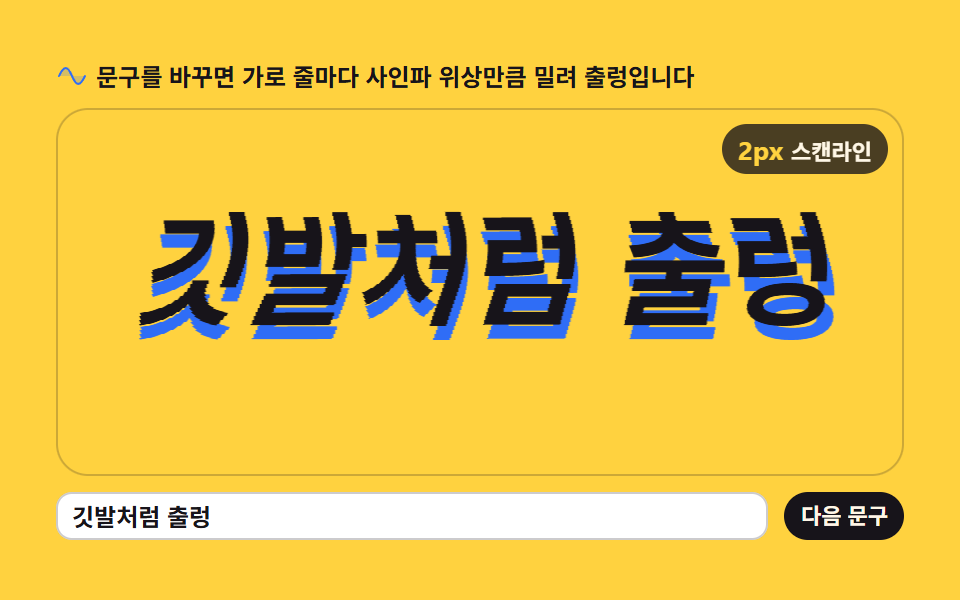 Creative UI04 Wobbling 3D textHTML5 Canvas Animation: 9 Warp & Droplet Effects