03Minimap that shows where you are
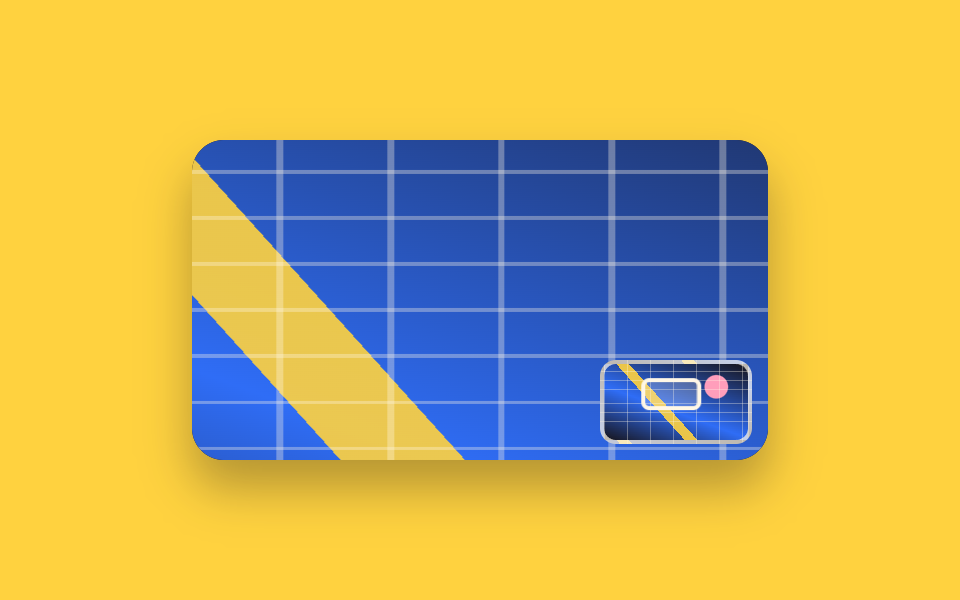
A shrunken copy of the whole picture sits in the corner of the zoomed view, and a white outlined box inside it traces exactly what you are looking at. The box size and offset come from real numbers measured with getBoundingClientRect.
Best forLarge blueprints and illustrations where zooming loses your place
getBoundingClientRectaspect-ratiotranslate
<main class="stage">
  <div class="mm is-demo" id="mm">
    <div class="mm__view" id="mm-view" tabindex="0" role="img" aria-label="Zoomed blueprint. Move the view with the arrow keys">
      <div class="mm__layer" id="mm-layer"></div>
      <div class="mm__map" id="mm-map" aria-hidden="true"><div class="mm__box" id="mm-box"></div></div>
    </div>
  </div>
</main>
@use "../../../../site/static/demo-tokens" as *;
$duration: $dur-base;
$easing: $ease-spring;
$color: $subject-cream;
@include stage($stage-yellow);
// 가짜 사진 — 파일 없이 그린 설계 도면. 확대하면 어디를 보고 있는지 잃어버리기 딱 좋은 그림
$plan:
repeating-linear-gradient(0deg, rgba(255, 247, 230, .34) 0 .5%, transparent .5% 6%),
repeating-linear-gradient(90deg, rgba(255, 247, 230, .34) 0 .5%, transparent .5% 8%),
radial-gradient(circle at 78% 30%, $subject-pink 0 9%, transparent 10%),
linear-gradient(48deg, transparent 0 38%, rgba($stage-yellow, .9) 38% 44%, transparent 44%),
linear-gradient(200deg, $stage-ink 0%, $subject-blue 58%, $stage-ink 100%);
.mm { position: relative; }
.mm__view {
position: relative;
box-sizing: border-box;
width: 288px;
height: 160px;
overflow: hidden;
border-radius: $r-card;
background: $stage-ink;
box-shadow: $shadow-raised;
cursor: grab;
touch-action: none;
}
.mm__view:focus-visible { outline: 3px solid $stage-ink; outline-offset: 2px; }
.mm__layer {
width: 100%;
height: 100%;
background: $plan;
transform-origin: center center;
transform: scale(2.4) translate(0, 0);
}
// 미니맵 — 같은 그림을 통째로 줄여 둔다. 비율은 aspect-ratio 로 본 화면과 맞춘다
.mm__map {
position: absolute;
right: $sp-2;
bottom: $sp-2;
box-sizing: border-box;
width: 76px;
aspect-ratio: 288 / 160;
overflow: hidden;
border: 2px solid rgba(255, 247, 230, .72);
border-radius: $r-sm;
background: $plan;
background-size: 100% 100%;
}
.mm__box {
box-sizing: border-box;
width: 41.67%;
height: 41.67%;
border: 2px solid $color;
border-radius: $r-xs;
background: rgba(255, 247, 230, .22);
transform: translate(21px, 11.7px);
}
// ── 자동 루프 (2s) ────────────────────────────────────
// 본 화면과 미니맵 상자가 같은 시간표로 움직인다. 값이 어긋나면 상자가 거짓말을 한다
.mm.is-demo .mm__layer {
animation-name: mm-layer;
animation-duration: $dur-loop;
animation-timing-function: $easing;
animation-iteration-count: infinite;
}
.mm.is-demo .mm__box {
animation-name: mm-box;
animation-duration: $dur-loop;
animation-timing-function: $easing;
animation-iteration-count: infinite;
}
@keyframes mm-layer {
0% { transform: scale(2.4) translate(0, 0); }
26% { transform: scale(2.4) translate(-84px, -28px); }
54% { transform: scale(2.4) translate(75.6px, 32.7px); }
80% { transform: scale(2.4) translate(-33.6px, 9.3px); }
100% { transform: scale(2.4) translate(0, 0); }
}
@keyframes mm-box {
0% { transform: translate(21px, 11.7px); }
26% { transform: translate(42px, 18.7px); }
54% { transform: translate(2.1px, 3.5px); }
80% { transform: translate(29.4px, 9.4px); }
100% { transform: translate(21px, 11.7px); }
}
@media (prefers-reduced-motion: reduce) {
.mm.is-demo .mm__layer,
.mm.is-demo .mm__box { animation: none !important; }
}html, body {
margin: 0;
overflow: hidden;
}
.stage {
box-sizing: border-box;
min-height: 100vh;
display: grid;
place-items: center;
margin: 0;
background: #ffd23f;
font-family: -apple-system, "Segoe UI", "Noto Sans KR", sans-serif;
padding: clamp(8px, 4vw, 24px);
}
.mm {
position: relative;
}
.mm__view {
position: relative;
box-sizing: border-box;
width: 288px;
height: 160px;
overflow: hidden;
border-radius: 16px;
background: #17141a;
box-shadow: 0 14px 24px rgba(23, 20, 26, 0.32);
cursor: grab;
touch-action: none;
}
.mm__view:focus-visible {
outline: 3px solid #17141a;
outline-offset: 2px;
}
.mm__layer {
width: 100%;
height: 100%;
background: repeating-linear-gradient(0deg, rgba(255, 247, 230, 0.34) 0 0.5%, transparent 0.5% 6%), repeating-linear-gradient(90deg, rgba(255, 247, 230, 0.34) 0 0.5%, transparent 0.5% 8%), radial-gradient(circle at 78% 30%, #ff9ebb 0 9%, transparent 10%), linear-gradient(48deg, transparent 0 38%, rgba(255, 210, 63, 0.9) 38% 44%, transparent 44%), linear-gradient(200deg, #17141a 0%, #2f6df6 58%, #17141a 100%);
transform-origin: center center;
transform: scale(2.4) translate(0, 0);
}
.mm__map {
position: absolute;
right: 8px;
bottom: 8px;
box-sizing: border-box;
width: 76px;
aspect-ratio: 288/160;
overflow: hidden;
border: 2px solid rgba(255, 247, 230, 0.72);
border-radius: 8px;
background: repeating-linear-gradient(0deg, rgba(255, 247, 230, 0.34) 0 0.5%, transparent 0.5% 6%), repeating-linear-gradient(90deg, rgba(255, 247, 230, 0.34) 0 0.5%, transparent 0.5% 8%), radial-gradient(circle at 78% 30%, #ff9ebb 0 9%, transparent 10%), linear-gradient(48deg, transparent 0 38%, rgba(255, 210, 63, 0.9) 38% 44%, transparent 44%), linear-gradient(200deg, #17141a 0%, #2f6df6 58%, #17141a 100%);
background-size: 100% 100%;
}
.mm__box {
box-sizing: border-box;
width: 41.67%;
height: 41.67%;
border: 2px solid #fff7e6;
border-radius: 4px;
background: rgba(255, 247, 230, 0.22);
transform: translate(21px, 11.7px);
}
.mm.is-demo .mm__layer {
animation-name: mm-layer;
animation-duration: 2s;
animation-timing-function: cubic-bezier(0.2, 0.8, 0.2, 1);
animation-iteration-count: infinite;
}
.mm.is-demo .mm__box {
animation-name: mm-box;
animation-duration: 2s;
animation-timing-function: cubic-bezier(0.2, 0.8, 0.2, 1);
animation-iteration-count: infinite;
}
@keyframes mm-layer {
0% {
transform: scale(2.4) translate(0, 0);
}
26% {
transform: scale(2.4) translate(-84px, -28px);
}
54% {
transform: scale(2.4) translate(75.6px, 32.7px);
}
80% {
transform: scale(2.4) translate(-33.6px, 9.3px);
}
100% {
transform: scale(2.4) translate(0, 0);
}
}
@keyframes mm-box {
0% {
transform: translate(21px, 11.7px);
}
26% {
transform: translate(42px, 18.7px);
}
54% {
transform: translate(2.1px, 3.5px);
}
80% {
transform: translate(29.4px, 9.4px);
}
100% {
transform: translate(21px, 11.7px);
}
}
@media (prefers-reduced-motion: reduce) {
.mm.is-demo .mm__layer,
.mm.is-demo .mm__box {
animation: none !important;
}
}// 실제 동작: 큰 화면을 옮기면 미니맵 상자가 같은 비율로 따라간다.
var mm = document.getElementById('mm');
var mmView = document.getElementById('mm-view');
var mmLayer = document.getElementById('mm-layer');
var mmMap = document.getElementById('mm-map');
var mmBox = document.getElementById('mm-box');
var MM_SCALE = 2.4;
var mmPx = 0, mmPy = 0, mmDrag = null;
function mmPaint() {
var view = mmView.getBoundingClientRect();
var map = mmMap.getBoundingClientRect();
var rest = (1 - 1 / MM_SCALE) / 2;
mmPx = Math.min(Math.max(mmPx, -1), 1);
mmPy = Math.min(Math.max(mmPy, -1), 1);
var tx = mmPx * view.width * (MM_SCALE - 1) / 2 / MM_SCALE;
var ty = mmPy * view.height * (MM_SCALE - 1) / 2 / MM_SCALE;
mmLayer.style.transform = 'scale(' + MM_SCALE + ') translate(' + tx + 'px,' + ty + 'px)';
mmBox.style.transform = 'translate(' + rest * map.width * (1 - mmPx) + 'px,' + rest * map.height * (1 - mmPy) + 'px)';
}
function mmMoveBy(dx, dy) { mm.classList.remove('is-demo'); mmPx += dx; mmPy += dy; mmPaint(); }
mmView.addEventListener('pointerdown', function (e) { mmDrag = { x: e.clientX, y: e.clientY }; mmView.setPointerCapture(e.pointerId); });
mmView.addEventListener('pointermove', function (e) {
if (!mmDrag) return;
var view = mmView.getBoundingClientRect();
mmMoveBy((e.clientX - mmDrag.x) / view.width * 2, (e.clientY - mmDrag.y) / view.height * 2);
mmDrag = { x: e.clientX, y: e.clientY };
});
mmView.addEventListener('pointerup', function () { mmDrag = null; });
mmView.addEventListener('keydown', function (e) {
var pan = { ArrowLeft: [0.2, 0], ArrowRight: [-0.2, 0], ArrowUp: [0, 0.2], ArrowDown: [0, -0.2] }[e.key];
if (!pan) return;
e.preventDefault();
mmMoveBy(pan[0], pan[1]);
});import { useRef, useState } from "react";
import type { CSSProperties } from "react";
import styles from "./ZoomMinimap.module.scss";
export type ZoomMinimapProps = {
label?: string;
/** 본 화면 배율. style.scss 의 scale 값과 같아야 미니맵 상자가 맞는다 */
scale?: number;
/** 자동 재생 루프 (갤러리용). 사람이 손대면 꺼진다 */
demo?: boolean;
duration?: number;
easing?: string;
color?: string;
};
type Vars = CSSProperties & { "--duration"?: string; "--easing"?: string; "--color"?: string };
type DragEvt = { clientX: number; clientY: number; pointerId: number };
type KeyEvt = { key: string; preventDefault: () => void };
const clamp = (v: number, lo: number, hi: number) => Math.min(Math.max(v, lo), hi);
export default function ZoomMinimap({
label = "Zoomed blueprint. Move the view with the arrow keys",
scale = 2.4,
demo = true,
duration = 300,
easing = "cubic-bezier(.2,.8,.2,1)",
color = "#fff7e6",
}: ZoomMinimapProps) {
const view = useRef<HTMLDivElement>(null);
const map = useRef<HTMLDivElement>(null);
const drag = useRef<{ x: number; y: number } | null>(null);
const [live, setLive] = useState(demo);
const [p, setP] = useState({ x: 0, y: 0 });
function moveBy(dx: number, dy: number) {
setLive(false);
setP({ x: clamp(p.x + dx, -1, 1), y: clamp(p.y + dy, -1, 1) });
}
const viewBox = view.current ? view.current.getBoundingClientRect() : null;
const mapBox = map.current ? map.current.getBoundingClientRect() : null;
const w = viewBox ? viewBox.width : 288;
const h = viewBox ? viewBox.height : 160;
const mw = mapBox ? mapBox.width : 76;
const mh = mapBox ? mapBox.height : 42;
const rest = (1 - 1 / scale) / 2;
const vars: Vars = { "--duration": `${duration}ms`, "--easing": easing, "--color": color };
const layer: CSSProperties = {
transform: `scale(${scale}) translate(${(p.x * w * (scale - 1)) / 2 / scale}px,${(p.y * h * (scale - 1)) / 2 / scale}px)`,
};
const box: CSSProperties = {
transform: `translate(${rest * mw * (1 - p.x)}px,${rest * mh * (1 - p.y)}px)`,
};
return (
<div className={[styles.root, live ? styles.isDemo : ""].join(" ")} style={vars}>
<div
className={styles.view}
ref={view}
tabIndex={0}
role="img"
aria-label={label}
onPointerDown={(e: DragEvt) => { drag.current = { x: e.clientX, y: e.clientY }; }}
onPointerMove={(e: DragEvt) => {
const d = drag.current;
if (!d) return;
moveBy(((e.clientX - d.x) / w) * 2, ((e.clientY - d.y) / h) * 2);
drag.current = { x: e.clientX, y: e.clientY };
}}
onPointerUp={() => { drag.current = null; }}
onKeyDown={(e: KeyEvt) => {
const pan: { [k: string]: number[] } = {
ArrowLeft: [0.2, 0], ArrowRight: [-0.2, 0], ArrowUp: [0, 0.2], ArrowDown: [0, -0.2],
};
if (!pan[e.key]) return;
e.preventDefault();
moveBy(pan[e.key][0], pan[e.key][1]);
}}
>
<div className={styles.layer} style={live ? undefined : layer} />
<div className={styles.map} ref={map} aria-hidden="true">
<div className={styles.box} style={live ? undefined : box} />
</div>
</div>
</div>
);
}03 Minimap that shows where you are — Measured area 30.806% · moving frames 23/23Original by GODRICH · SCSS and React ship in the zip · 9 Image Zoom Viewer Interactions — No Photo Files
The post this demo lives in
 9 Image Zoom Viewer Interactions — No Photo FilesAn image zoom viewer is the layer between a picture and the person studying it: it magnifies, turns, or lights up one pa See all demos in this post
If you like this effect - similar demos
 Galleries09 Slider that changes how many photos show by widthCSS Image Slider — 9 Responsive Sliders, No GSAP
 Galleries03 A Bleed That Spreads Only Through Wet Cells and Mixes Where Two Colors MeetWatercolor Effect CSS: 9 Bleeding Paint Scenes
 Galleries08 Zoom-synced comparison slider9 Before After Slider UIs — Drag to Compare