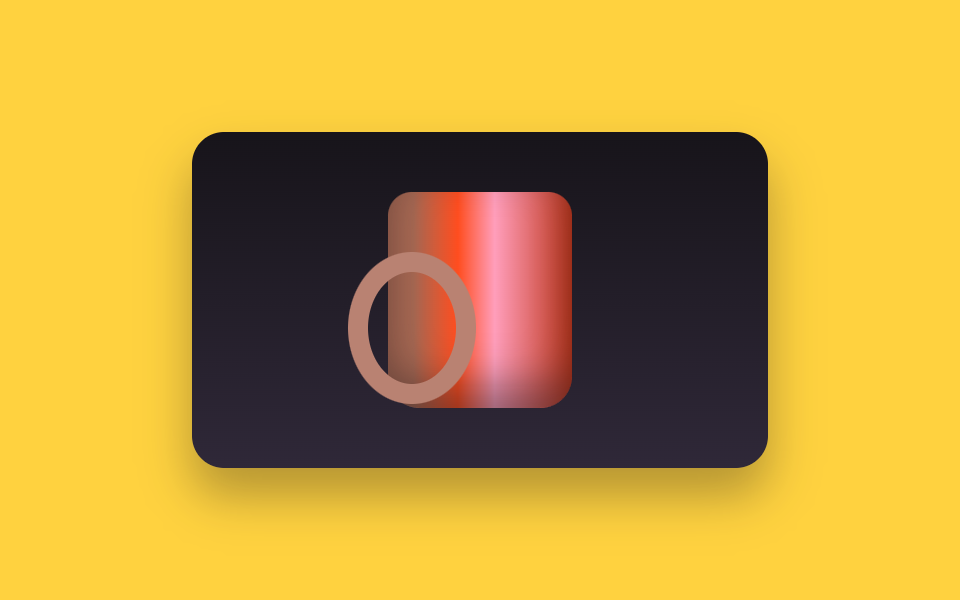
07360-degree view you drag around
Twelve drawings sit in one row and the window shows a single cell. Dragging pushes the row one cell at a time with translateX, and the autoplay walks the same cells with steps(12, end), joining the twelfth back to the first.
Best forProduct pages for shoes or bags that must show every side
steps(12, end)translateXpointerdown
<main class="stage">
  <div class="sp is-demo" id="sp">
    <div class="sp__win" id="sp-win" tabindex="0" role="img" aria-label="Mug in 360 degrees. Turn it with the arrow keys">
      <div class="sp__track" id="sp-track">
        <div class="sp__f"><i class="sp__handle"></i><i class="sp__body"></i><i class="sp__logo"></i></div>
        <div class="sp__f"><i class="sp__handle"></i><i class="sp__body"></i><i class="sp__logo"></i></div>
        <div class="sp__f"><i class="sp__handle"></i><i class="sp__body"></i><i class="sp__logo"></i></div>
        <div class="sp__f"><i class="sp__handle"></i><i class="sp__body"></i><i class="sp__logo"></i></div>
        <div class="sp__f"><i class="sp__handle"></i><i class="sp__body"></i><i class="sp__logo"></i></div>
        <div class="sp__f"><i class="sp__handle"></i><i class="sp__body"></i><i class="sp__logo"></i></div>
        <div class="sp__f"><i class="sp__handle"></i><i class="sp__body"></i><i class="sp__logo"></i></div>
        <div class="sp__f"><i class="sp__handle"></i><i class="sp__body"></i><i class="sp__logo"></i></div>
        <div class="sp__f"><i class="sp__handle"></i><i class="sp__body"></i><i class="sp__logo"></i></div>
        <div class="sp__f"><i class="sp__handle"></i><i class="sp__body"></i><i class="sp__logo"></i></div>
        <div class="sp__f"><i class="sp__handle"></i><i class="sp__body"></i><i class="sp__logo"></i></div>
        <div class="sp__f"><i class="sp__handle"></i><i class="sp__body"></i><i class="sp__logo"></i></div>
      </div>
    </div>
  </div>
</main>
@use "../../../../site/static/demo-tokens" as *;
$duration: $dur-base;
$easing: $ease-out;
$color: $subject-ink;
@include stage($stage-yellow);
.sp { position: relative; }
.sp__win {
box-sizing: border-box;
width: 288px;
height: 168px;
overflow: hidden;
border-radius: $r-card;
background: linear-gradient($stage-ink, #2f2838);
box-shadow: $shadow-raised;
cursor: grab;
touch-action: none;
}
.sp__win:focus-visible { outline: 3px solid $subject-ink; outline-offset: 2px; }
// 열두 칸이 한 줄로 붙어 있고 창은 한 칸만 보여 준다. gap 은 0 — 있으면 한 바퀴마다 어긋난다
.sp__track {
display: flex;
width: 1200%;
height: 100%;
transform: translateX(0);
}
.sp__f {
position: relative;
flex: 0 0 8.3333%;
height: 100%;
display: grid;
place-items: center;
}
.sp__f > i {
position: absolute;
left: 50%;
top: 50%;
display: block;
}
// 가짜 사진 — 파일 없이 그린 머그컵. 손잡이와 로고가 각도마다 자리를 바꾼다
.sp__body {
width: 92px;
height: 108px;
margin-left: -46px;
margin-top: -54px;
border-radius: $r-control $r-control $r-card $r-card;
background: linear-gradient(90deg, #a96953 0 14%, $stage-orange 38%, $subject-pink 58%, $error 100%);
box-shadow: inset 0 -12px 20px rgba(23, 20, 26, .45);
z-index: 1;
}
.sp__handle {
width: 44px;
height: 56px;
margin-left: -22px;
margin-top: -24px;
border: 10px solid #b98272;
border-radius: 50%;
transform: translateX(calc(44px * var(--sin))) scaleX(var(--hs));
z-index: var(--hz);
}
.sp__logo {
width: 36px;
height: 36px;
margin-left: -18px;
margin-top: -16px;
border-radius: 50%;
background: $stage-yellow;
opacity: var(--lo);
transform: translateX(calc(-44px * var(--sin))) scaleX(var(--ls));
z-index: 2;
}
// 30도씩 열두 각도. --sin 은 손잡이 가로 위치(반지름 44px 에 곱한다),
// --hs 는 옆으로 뻗은 손잡이가 정면을 볼수록 납작해지는 정도, --ls 는 컵에 찍힌 로고가 돌아가며 눌리는 정도,
// --hz 는 손잡이가 컵 앞(2)인지 뒤(0)인지, --lo 는 로고가 이쪽을 보는지.
// 첫 칸을 60도로 잡아, 루프를 끈 정지 화면에서도 손잡이가 보이는 3/4 각도로 선다
.sp__f:nth-child(1) { --sin: .87; --hs: .87; --ls: .5; --hz: 2; --lo: 0; }
.sp__f:nth-child(2) { --sin: 1; --hs: 1; --ls: 0; --hz: 2; --lo: 0; }
.sp__f:nth-child(3) { --sin: .87; --hs: .87; --ls: .5; --hz: 0; --lo: 1; }
.sp__f:nth-child(4) { --sin: .5; --hs: .5; --ls: .87; --hz: 0; --lo: 1; }
.sp__f:nth-child(5) { --sin: 0; --hs: .06; --ls: 1; --hz: 0; --lo: 1; }
.sp__f:nth-child(6) { --sin: -.5; --hs: .5; --ls: .87; --hz: 0; --lo: 1; }
.sp__f:nth-child(7) { --sin: -.87; --hs: .87; --ls: .5; --hz: 0; --lo: 1; }
.sp__f:nth-child(8) { --sin: -1; --hs: 1; --ls: 0; --hz: 2; --lo: 0; }
.sp__f:nth-child(9) { --sin: -.87; --hs: .87; --ls: .5; --hz: 2; --lo: 0; }
.sp__f:nth-child(10) { --sin: -.5; --hs: .5; --ls: .87; --hz: 2; --lo: 0; }
.sp__f:nth-child(11) { --sin: 0; --hs: .06; --ls: 1; --hz: 2; --lo: 0; }
.sp__f:nth-child(12) { --sin: .5; --hs: .5; --ls: .87; --hz: 2; --lo: 0; }
// ── 자동 루프 (2s) ────────────────────────────────────
// steps(12, end) 가 0/12 부터 11/12 까지 열두 칸을 정확히 밟는다.
// 열두 번째 다음이 첫 장이고 그 둘은 이어지는 각도라 한 바퀴가 매끄럽다
.sp.is-demo .sp__track {
animation-name: sp-spin;
animation-duration: $dur-loop;
animation-timing-function: steps(12, end);
animation-iteration-count: infinite;
}
@keyframes sp-spin {
0% { transform: translateX(0); }
100% { transform: translateX(-100%); }
}
@media (max-width: 360px) {
.sp__win { height: 160px; }
.sp__body { width: 84px; height: 100px; margin-left: -42px; margin-top: -50px; }
}
@media (prefers-reduced-motion: reduce) {
.sp.is-demo .sp__track { animation: none !important; transform: translateX(-25%); }
}html, body {
margin: 0;
overflow: hidden;
}
.stage {
box-sizing: border-box;
min-height: 100vh;
display: grid;
place-items: center;
margin: 0;
background: #ffd23f;
font-family: -apple-system, "Segoe UI", "Noto Sans KR", sans-serif;
padding: clamp(8px, 4vw, 24px);
}
.sp {
position: relative;
}
.sp__win {
box-sizing: border-box;
width: 288px;
height: 168px;
overflow: hidden;
border-radius: 16px;
background: linear-gradient(#17141a, #2f2838);
box-shadow: 0 14px 24px rgba(23, 20, 26, 0.32);
cursor: grab;
touch-action: none;
}
.sp__win:focus-visible {
outline: 3px solid #17141a;
outline-offset: 2px;
}
.sp__track {
display: flex;
width: 1200%;
height: 100%;
transform: translateX(0);
}
.sp__f {
position: relative;
flex: 0 0 8.3333%;
height: 100%;
display: grid;
place-items: center;
}
.sp__f > i {
position: absolute;
left: 50%;
top: 50%;
display: block;
}
.sp__body {
width: 92px;
height: 108px;
margin-left: -46px;
margin-top: -54px;
border-radius: 12px 12px 16px 16px;
background: linear-gradient(90deg, #a96953 0 14%, #ff4d1f 38%, #ff9ebb 58%, #c2361a 100%);
box-shadow: inset 0 -12px 20px rgba(23, 20, 26, 0.45);
z-index: 1;
}
.sp__handle {
width: 44px;
height: 56px;
margin-left: -22px;
margin-top: -24px;
border: 10px solid #b98272;
border-radius: 50%;
transform: translateX(calc(44px * var(--sin))) scaleX(var(--hs));
z-index: var(--hz);
}
.sp__logo {
width: 36px;
height: 36px;
margin-left: -18px;
margin-top: -16px;
border-radius: 50%;
background: #ffd23f;
opacity: var(--lo);
transform: translateX(calc(-44px * var(--sin))) scaleX(var(--ls));
z-index: 2;
}
.sp__f:nth-child(1) {
--sin: .87;
--hs: .87;
--ls: .5;
--hz: 2;
--lo: 0;
}
.sp__f:nth-child(2) {
--sin: 1;
--hs: 1;
--ls: 0;
--hz: 2;
--lo: 0;
}
.sp__f:nth-child(3) {
--sin: .87;
--hs: .87;
--ls: .5;
--hz: 0;
--lo: 1;
}
.sp__f:nth-child(4) {
--sin: .5;
--hs: .5;
--ls: .87;
--hz: 0;
--lo: 1;
}
.sp__f:nth-child(5) {
--sin: 0;
--hs: .06;
--ls: 1;
--hz: 0;
--lo: 1;
}
.sp__f:nth-child(6) {
--sin: -.5;
--hs: .5;
--ls: .87;
--hz: 0;
--lo: 1;
}
.sp__f:nth-child(7) {
--sin: -.87;
--hs: .87;
--ls: .5;
--hz: 0;
--lo: 1;
}
.sp__f:nth-child(8) {
--sin: -1;
--hs: 1;
--ls: 0;
--hz: 2;
--lo: 0;
}
.sp__f:nth-child(9) {
--sin: -.87;
--hs: .87;
--ls: .5;
--hz: 2;
--lo: 0;
}
.sp__f:nth-child(10) {
--sin: -.5;
--hs: .5;
--ls: .87;
--hz: 2;
--lo: 0;
}
.sp__f:nth-child(11) {
--sin: 0;
--hs: .06;
--ls: 1;
--hz: 2;
--lo: 0;
}
.sp__f:nth-child(12) {
--sin: .5;
--hs: .5;
--ls: .87;
--hz: 2;
--lo: 0;
}
.sp.is-demo .sp__track {
animation-name: sp-spin;
animation-duration: 2s;
animation-timing-function: steps(12, end);
animation-iteration-count: infinite;
}
@keyframes sp-spin {
0% {
transform: translateX(0);
}
100% {
transform: translateX(-100%);
}
}
@media (max-width: 360px) {
.sp__win {
height: 160px;
}
.sp__body {
width: 84px;
height: 100px;
margin-left: -42px;
margin-top: -50px;
}
}
@media (prefers-reduced-motion: reduce) {
.sp.is-demo .sp__track {
animation: none !important;
transform: translateX(-25%);
}
}// 실제 동작: 끈 거리를 프레임 번호로 바꾼다. 열두 장이 한 바퀴다.
var sp = document.getElementById('sp');
var spWin = document.getElementById('sp-win');
var spTrack = document.getElementById('sp-track');
var SP_N = 12, SP_STEP = 18;
var spI = 0, spDrag = null;
function spPaint() {
sp.classList.remove('is-demo'); // 사람이 손대면 자동 루프를 멈춘다
spI = ((spI % SP_N) + SP_N) % SP_N;
spTrack.style.transform = 'translateX(' + (-spI * 100 / SP_N) + '%)';
}
spWin.addEventListener('pointerdown', function (e) {
spDrag = { x: e.clientX, i: spI };
spWin.setPointerCapture(e.pointerId);
});
spWin.addEventListener('pointermove', function (e) {
if (!spDrag) return;
spI = spDrag.i - Math.round((e.clientX - spDrag.x) / SP_STEP);
spPaint();
});
spWin.addEventListener('pointerup', function () { spDrag = null; });
spWin.addEventListener('keydown', function (e) {
if (e.key !== 'ArrowLeft' && e.key !== 'ArrowRight') return;
e.preventDefault();
spI += e.key === 'ArrowRight' ? 1 : -1;
spPaint();
});import { useRef, useState } from "react";
import type { CSSProperties } from "react";
import styles from "./SpinView360.module.scss";
export type SpinView360Props = {
label?: string;
/** 한 바퀴를 이루는 칸 수. module.scss 의 steps(N, end) 와 같아야 한다 */
frames?: number;
/** 한 칸을 넘기는 데 필요한 드래그 거리(px) */
dragStep?: number;
/** 자동 재생 루프 (갤러리용). 사람이 손대면 꺼진다 */
demo?: boolean;
duration?: number;
easing?: string;
color?: string;
};
type Vars = CSSProperties & { "--duration"?: string; "--easing"?: string; "--color"?: string };
type DragEvt = { clientX: number; pointerId: number };
type KeyEvt = { key: string; preventDefault: () => void };
export default function SpinView360({
label = "Mug in 360 degrees. Turn it with the arrow keys",
frames = 12,
dragStep = 18,
demo = true,
duration = 300,
easing = "ease-out",
color = "#17141a",
}: SpinView360Props) {
const drag = useRef<{ x: number; i: number } | null>(null);
const [live, setLive] = useState(demo);
const [i, setI] = useState(0);
function go(next: number) {
setLive(false);
setI(((next % frames) + frames) % frames);
}
const vars: Vars = { "--duration": `${duration}ms`, "--easing": easing, "--color": color };
const track: CSSProperties = { transform: `translateX(${(-i * 100) / frames}%)` };
return (
<div className={[styles.root, live ? styles.isDemo : ""].join(" ")} style={vars}>
<div
className={styles.win}
tabIndex={0}
role="img"
aria-label={label}
onPointerDown={(e: DragEvt) => { drag.current = { x: e.clientX, i }; }}
onPointerMove={(e: DragEvt) => {
const d = drag.current;
if (!d) return;
go(d.i - Math.round((e.clientX - d.x) / dragStep));
}}
onPointerUp={() => { drag.current = null; }}
onKeyDown={(e: KeyEvt) => {
if (e.key !== "ArrowLeft" && e.key !== "ArrowRight") return;
e.preventDefault();
go(i + (e.key === "ArrowRight" ? 1 : -1));
}}
>
<div className={styles.track} style={live ? undefined : track}>
{Array.from({ length: frames }, (_, k) => (
<div className={styles.f} key={k}>
<i className={styles.handle} />
<i className={styles.body} />
<i className={styles.logo} />
</div>
))}
</div>
</div>
</div>
);
}07 360-degree view you drag around — Measured area 5.815% · moving frames 11/23Original by GODRICH · SCSS and React ship in the zip · 9 Image Zoom Viewer Interactions — No Photo Files
The post this demo lives in
 9 Image Zoom Viewer Interactions — No Photo FilesAn image zoom viewer is the layer between a picture and the person studying it: it magnifies, turns, or lights up one pa See all demos in this post