01Stacked box shadow
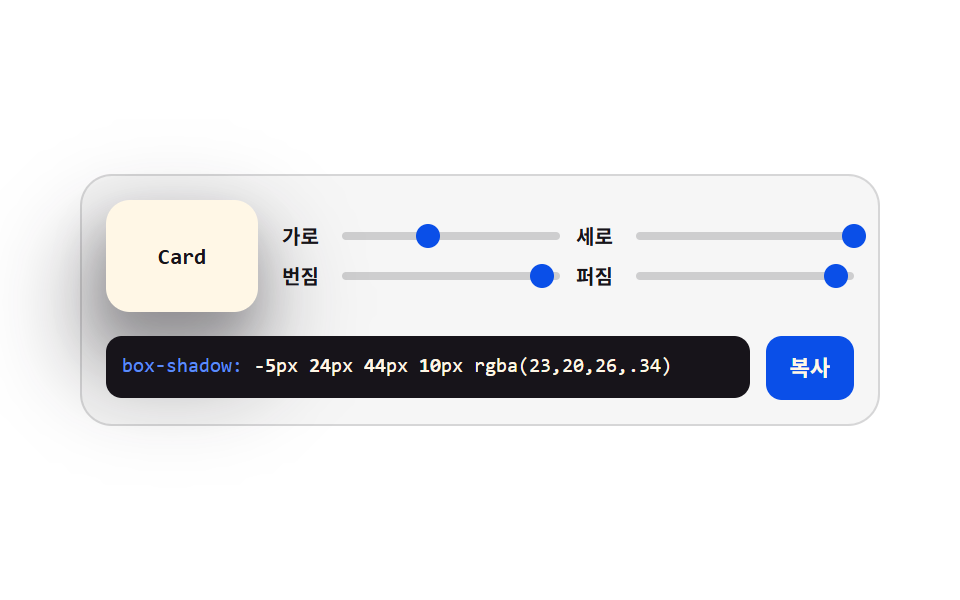
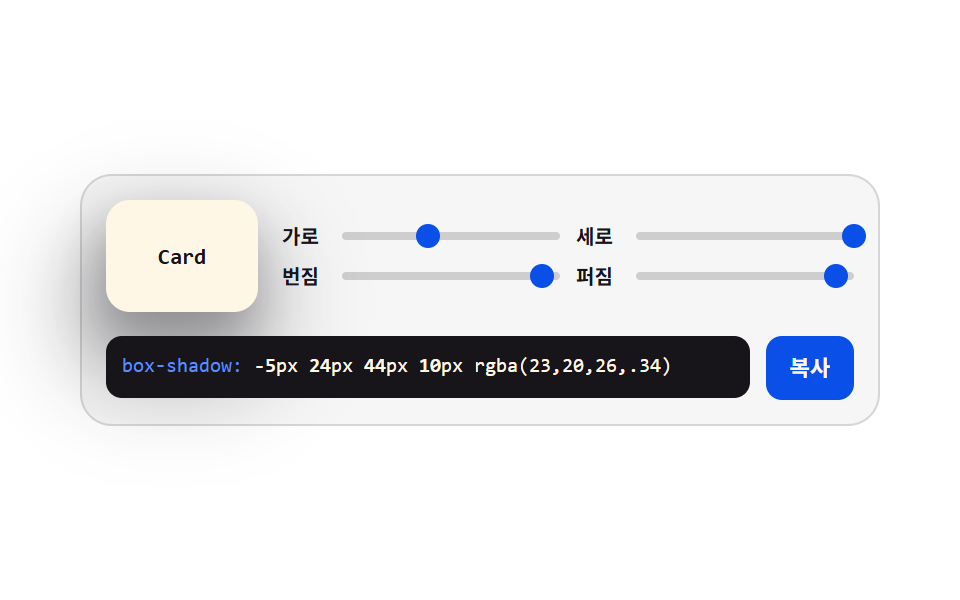
Four sliders hold the x, y, blur, and spread axes, and two stacked shadows give the card depth. Every change rewrites the code box underneath.
Best forLifting cards and buttons, deciding the shadow steps of a design system
box-shadow@property--shadow-y
<main class="stage">
<div class="gen is-demo" id="gen">
  <div class="gen__top">
    <div class="gen__preview" aria-hidden="true"><span class="gen__chip">Card</span></div>
    <div class="gen__grid">
      <label class="gen__row">
        <span class="gen__lab">X</span>
        <span class="gen__slot">
          <input class="gen__rng" type="range" min="-24" max="24" step="2" value="0" data-var="--shadow-x" aria-label="Horizontal distance">
          <span class="gen__thumb" aria-hidden="true"></span>
        </span>
      </label>
      <label class="gen__row">
        <span class="gen__lab">Y</span>
        <span class="gen__slot">
          <input class="gen__rng" type="range" min="-24" max="24" step="2" value="10" data-var="--shadow-y" aria-label="Vertical distance">
          <span class="gen__thumb" aria-hidden="true"></span>
        </span>
      </label>
      <label class="gen__row">
        <span class="gen__lab">Blur</span>
        <span class="gen__slot">
          <input class="gen__rng" type="range" min="0" max="48" step="2" value="20" data-var="--shadow-blur" aria-label="Blur amount">
          <span class="gen__thumb" aria-hidden="true"></span>
        </span>
      </label>
      <label class="gen__row">
        <span class="gen__lab">Spread</span>
        <span class="gen__slot">
          <input class="gen__rng" type="range" min="-12" max="12" step="2" value="-4" data-var="--shadow-spread" aria-label="Spread amount">
          <span class="gen__thumb" aria-hidden="true"></span>
        </span>
      </label>
    </div>
  </div>
  <div class="gen__out">
    <code class="gen__code"><span class="gen__prop">box-shadow:</span> <span class="gen__v gen__v--x"></span>px <span class="gen__v gen__v--y"></span>px <span class="gen__v gen__v--blur"></span>px <span class="gen__v gen__v--spread"></span>px rgba(23,20,26,.34)</code>
    <button class="gen__copy" type="button" id="copy">Copy</button>
  </div>
</div>
</main>@use "../../../../site/static/demo-tokens" as *;
// 그림자 겹쳐 쌓기 — 네 축을 사용자 지정 속성 네 개에 모으고, 미리보기 카드와 코드 상자가
// **같은 속성**을 읽는다. 슬라이더를 끌면 JS 가 속성을 갱신하고, 격자 미리보기(.is-demo)는
// 같은 속성을 CSS 키프레임으로 움직인다 — 그래서 손으로 만질 때와 자동 재생이 같은 그림이다.
// 네이티브 thumb 은 투명으로 두고 손잡이는 `.gen__thumb` 이 그린다. 값이 속성 하나라
// 자동 재생에서도 손잡이가 같이 움직인다 (input 의 value 는 CSS 로 못 움직인다).
$duration: $dur-loop;
$easing: $ease-spring;
$color: $subject-blue-deep;
$mono: ui-monospace, SFMono-Regular, "SF Mono", Consolas, "Liberation Mono", monospace;
$line: rgba(23, 20, 26, .14);
$track: rgba(23, 20, 26, .18);
$rail: 4px;
$thumb: 12px;
// 네 축을 정수로 등록한다. 등록해야 키프레임에서 보간되고 counter() 로도 읽힌다
@property --shadow-x { syntax: "<integer>"; inherits: true; initial-value: 0; }
@property --shadow-y { syntax: "<integer>"; inherits: true; initial-value: 10; }
@property --shadow-blur { syntax: "<integer>"; inherits: true; initial-value: 20; }
@property --shadow-spread { syntax: "<integer>"; inherits: true; initial-value: -4; }
@include stage($stage-paper);
.gen {
min-width: 0; // stage grid item 의 자동 최소폭(min-content) 을 끊는다 — BD9
--shadow-x: 0;
--shadow-y: 10;
--shadow-blur: 20;
--shadow-spread: -4;
display: flex; flex-direction: column; gap: $sp-3;
box-sizing: border-box; width: min(100%, 400px);
padding: $sp-3; border: 1px solid $line; border-radius: $r-card;
background: rgba(23, 20, 26, .04);
}
.gen__top { display: flex; align-items: center; gap: $sp-3; }
// ── 미리보기 — 네 속성을 그대로 box-shadow 로 읽는다
.gen__preview {
flex: 0 0 auto;
display: grid; place-items: center;
box-sizing: border-box; width: 76px; height: 56px;
border-radius: $r-control;
background: $subject-cream;
box-shadow:
calc(var(--shadow-x) * 1px) calc(var(--shadow-y) * 1px) calc(var(--shadow-blur) * 1px) calc(var(--shadow-spread) * 1px) rgba(23, 20, 26, .34),
calc(var(--shadow-x) * .5px) calc(var(--shadow-y) * .5px) calc(var(--shadow-blur) * .5px) 0 rgba(23, 20, 26, .22);
}
.gen__chip {
color: $subject-ink;
font-family: $mono; font-weight: 700; font-size: 11px; line-height: 1.4;
}
// ── 슬라이더 네 줄 (2열)
.gen__grid { flex: 1 1 auto; min-width: 0; display: grid; grid-template-columns: repeat(2, minmax(0, 1fr)); gap: $sp-1 $sp-2; }
.gen__row { display: flex; align-items: center; gap: $sp-1; cursor: pointer; }
.gen__lab {
flex: 0 0 auto; width: 26px;
color: $subject-ink;
font-weight: 700; font-size: 10px; line-height: 1.4;
}
.gen__slot {
position: relative; flex: 1 1 auto; min-width: 0;
display: grid; align-items: center; height: 16px;
}
.gen__slot::before {
content: ""; grid-area: 1 / 1;
height: $rail; border-radius: $r-pill; background: $track;
}
.gen__rng {
grid-area: 1 / 1; appearance: none; -webkit-appearance: none;
width: 100%; min-width: 0; height: 16px; margin: 0; background: transparent;
cursor: pointer;
}
.gen__rng::-webkit-slider-thumb {
-webkit-appearance: none; appearance: none;
width: $thumb; height: $thumb; border: 0; border-radius: 50%;
background: transparent;
}
.gen__rng::-moz-range-thumb {
width: $thumb; height: $thumb; border: 0; border-radius: 50%;
background: transparent;
}
.gen__rng:focus-visible { outline: 2px solid $color; outline-offset: 2px; border-radius: $r-pill; }
// 손잡이 — 값(사용자 지정 속성)에서 위치를 계산한다. 축마다 최소·최대가 달라 --pct 를 줄마다 준다
.gen__thumb {
position: absolute; top: 50%; left: calc(var(--pct) * 1%);
width: $thumb; height: $thumb; margin-top: -($thumb * .5); margin-left: -($thumb * .5);
border-radius: 50%; background: $color;
pointer-events: none;
}
.gen__row:nth-child(1) .gen__thumb { --pct: calc((var(--shadow-x) + 24) / 48 * 100); }
.gen__row:nth-child(2) .gen__thumb { --pct: calc((var(--shadow-y) + 24) / 48 * 100); }
.gen__row:nth-child(3) .gen__thumb { --pct: calc(var(--shadow-blur) / 48 * 100); }
.gen__row:nth-child(4) .gen__thumb { --pct: calc((var(--shadow-spread) + 12) / 24 * 100); }
// ── 코드 출력
.gen__out { display: flex; align-items: flex-start; gap: $sp-2; }
.gen__code {
flex: 1 1 auto; min-width: 0;
padding: $sp-2; border-radius: $r-sm;
background: $subject-ink; color: $subject-cream;
font-family: $mono; font-weight: 500; font-size: 10px; line-height: 1.5;
white-space: nowrap; overflow: hidden;
}
.gen__prop { color: $subject-blue-light; }
// 코드 숫자는 counter() 로 그린다 — 속성이 곧 글자라 자동 재생에서도 숫자가 같이 바뀐다.
// textContent 로 쓰면 JS 가 도는 순간에만 바뀌어 미리보기 루프와 코드가 갈라진다
.gen__v { font-weight: 700; }
.gen__v--x::after { counter-reset: v var(--shadow-x); content: counter(v); }
.gen__v--y::after { counter-reset: v var(--shadow-y); content: counter(v); }
.gen__v--blur::after { counter-reset: v var(--shadow-blur); content: counter(v); }
.gen__v--spread::after { counter-reset: v var(--shadow-spread); content: counter(v); }
.gen__copy {
flex: 0 0 auto;
padding: $sp-2 $sp-3; border: 0; border-radius: $r-sm;
background: $subject-blue-deep; color: $subject-cream;
font-family: inherit; font-weight: 700; font-size: 11px; line-height: 1.4;
cursor: pointer;
}
.gen__copy:focus-visible { outline: 2px solid $color; outline-offset: 2px; }
// ── 격자 미리보기 — 네 속성을 그대로 움직인다. 미리보기·손잡이·코드 숫자가 한 소스에서 나온다
@keyframes shadowX { 0%, 100% { --shadow-x: 0; } 30% { --shadow-x: -18; } 65% { --shadow-x: 16; } }
@keyframes shadowY { 0%, 100% { --shadow-y: 10; } 40% { --shadow-y: 24; } 80% { --shadow-y: 2; } }
@keyframes shadowBlur { 0%, 100% { --shadow-blur: 20; } 45% { --shadow-blur: 44; } 85% { --shadow-blur: 6; } }
@keyframes shadowSpread { 0%, 100% { --shadow-spread: -4; } 50% { --shadow-spread: 10; } }
.gen.is-demo {
animation-name: shadowX, shadowY, shadowBlur, shadowSpread;
animation-duration: $duration;
animation-timing-function: $easing;
animation-iteration-count: infinite;
}
@media (prefers-reduced-motion: reduce) {
.gen.is-demo { animation: none !important; }
}
@media (max-width: 340px) {
.gen { gap: $sp-2; padding: $sp-2; }
.gen__top { gap: $sp-2; }
.gen__preview { width: 64px; height: 48px; }
.gen__code { font-size: 9px; }
}@property --shadow-x {
syntax: "<integer>";
inherits: true;
initial-value: 0;
}
@property --shadow-y {
syntax: "<integer>";
inherits: true;
initial-value: 10;
}
@property --shadow-blur {
syntax: "<integer>";
inherits: true;
initial-value: 20;
}
@property --shadow-spread {
syntax: "<integer>";
inherits: true;
initial-value: -4;
}
html, body {
margin: 0;
overflow: hidden;
}
.stage {
box-sizing: border-box;
min-height: 100vh;
display: grid;
place-items: center;
margin: 0;
background: #ffffff;
font-family: -apple-system, "Segoe UI", "Noto Sans KR", sans-serif;
padding: clamp(8px, 4vw, 24px);
}
.gen {
min-width: 0;
--shadow-x: 0;
--shadow-y: 10;
--shadow-blur: 20;
--shadow-spread: -4;
display: flex;
flex-direction: column;
gap: 12px;
box-sizing: border-box;
width: min(100%, 400px);
padding: 12px;
border: 1px solid rgba(23, 20, 26, 0.14);
border-radius: 16px;
background: rgba(23, 20, 26, 0.04);
}
.gen__top {
display: flex;
align-items: center;
gap: 12px;
}
.gen__preview {
flex: 0 0 auto;
display: grid;
place-items: center;
box-sizing: border-box;
width: 76px;
height: 56px;
border-radius: 12px;
background: #fff7e6;
box-shadow: calc(var(--shadow-x) * 1px) calc(var(--shadow-y) * 1px) calc(var(--shadow-blur) * 1px) calc(var(--shadow-spread) * 1px) rgba(23, 20, 26, 0.34), calc(var(--shadow-x) * 0.5px) calc(var(--shadow-y) * 0.5px) calc(var(--shadow-blur) * 0.5px) 0 rgba(23, 20, 26, 0.22);
}
.gen__chip {
color: #17141a;
font-family: ui-monospace, SFMono-Regular, "SF Mono", Consolas, "Liberation Mono", monospace;
font-weight: 700;
font-size: 11px;
line-height: 1.4;
}
.gen__grid {
flex: 1 1 auto;
min-width: 0;
display: grid;
grid-template-columns: repeat(2, minmax(0, 1fr));
gap: 4px 8px;
}
.gen__row {
display: flex;
align-items: center;
gap: 4px;
cursor: pointer;
}
.gen__lab {
flex: 0 0 auto;
width: 26px;
color: #17141a;
font-weight: 700;
font-size: 10px;
line-height: 1.4;
}
.gen__slot {
position: relative;
flex: 1 1 auto;
min-width: 0;
display: grid;
align-items: center;
height: 16px;
}
.gen__slot::before {
content: "";
grid-area: 1/1;
height: 4px;
border-radius: 999px;
background: rgba(23, 20, 26, 0.18);
}
.gen__rng {
grid-area: 1/1;
appearance: none;
-webkit-appearance: none;
width: 100%;
min-width: 0;
height: 16px;
margin: 0;
background: transparent;
cursor: pointer;
}
.gen__rng::-webkit-slider-thumb {
-webkit-appearance: none;
appearance: none;
width: 12px;
height: 12px;
border: 0;
border-radius: 50%;
background: transparent;
}
.gen__rng::-moz-range-thumb {
width: 12px;
height: 12px;
border: 0;
border-radius: 50%;
background: transparent;
}
.gen__rng:focus-visible {
outline: 2px solid #0a4fe8;
outline-offset: 2px;
border-radius: 999px;
}
.gen__thumb {
position: absolute;
top: 50%;
left: calc(var(--pct) * 1%);
width: 12px;
height: 12px;
margin-top: -6px;
margin-left: -6px;
border-radius: 50%;
background: #0a4fe8;
pointer-events: none;
}
.gen__row:nth-child(1) .gen__thumb {
--pct: calc((var(--shadow-x) + 24) / 48 * 100);
}
.gen__row:nth-child(2) .gen__thumb {
--pct: calc((var(--shadow-y) + 24) / 48 * 100);
}
.gen__row:nth-child(3) .gen__thumb {
--pct: calc(var(--shadow-blur) / 48 * 100);
}
.gen__row:nth-child(4) .gen__thumb {
--pct: calc((var(--shadow-spread) + 12) / 24 * 100);
}
.gen__out {
display: flex;
align-items: flex-start;
gap: 8px;
}
.gen__code {
flex: 1 1 auto;
min-width: 0;
padding: 8px;
border-radius: 8px;
background: #17141a;
color: #fff7e6;
font-family: ui-monospace, SFMono-Regular, "SF Mono", Consolas, "Liberation Mono", monospace;
font-weight: 500;
font-size: 10px;
line-height: 1.5;
white-space: nowrap;
overflow: hidden;
}
.gen__prop {
color: #5b8cf8;
}
.gen__v {
font-weight: 700;
}
.gen__v--x::after {
counter-reset: v var(--shadow-x);
content: counter(v);
}
.gen__v--y::after {
counter-reset: v var(--shadow-y);
content: counter(v);
}
.gen__v--blur::after {
counter-reset: v var(--shadow-blur);
content: counter(v);
}
.gen__v--spread::after {
counter-reset: v var(--shadow-spread);
content: counter(v);
}
.gen__copy {
flex: 0 0 auto;
padding: 8px 12px;
border: 0;
border-radius: 8px;
background: #0a4fe8;
color: #fff7e6;
font-family: inherit;
font-weight: 700;
font-size: 11px;
line-height: 1.4;
cursor: pointer;
}
.gen__copy:focus-visible {
outline: 2px solid #0a4fe8;
outline-offset: 2px;
}
@keyframes shadowX {
0%, 100% {
--shadow-x: 0;
}
30% {
--shadow-x: -18;
}
65% {
--shadow-x: 16;
}
}
@keyframes shadowY {
0%, 100% {
--shadow-y: 10;
}
40% {
--shadow-y: 24;
}
80% {
--shadow-y: 2;
}
}
@keyframes shadowBlur {
0%, 100% {
--shadow-blur: 20;
}
45% {
--shadow-blur: 44;
}
85% {
--shadow-blur: 6;
}
}
@keyframes shadowSpread {
0%, 100% {
--shadow-spread: -4;
}
50% {
--shadow-spread: 10;
}
}
.gen.is-demo {
animation-name: shadowX, shadowY, shadowBlur, shadowSpread;
animation-duration: 2s;
animation-timing-function: cubic-bezier(0.2, 0.8, 0.2, 1);
animation-iteration-count: infinite;
}
@media (prefers-reduced-motion: reduce) {
.gen.is-demo {
animation: none !important;
}
}
@media (max-width: 340px) {
.gen {
gap: 8px;
padding: 8px;
}
.gen__top {
gap: 8px;
}
.gen__preview {
width: 64px;
height: 48px;
}
.gen__code {
font-size: 9px;
}
}var gen = document.getElementById('gen');
var copyBtn = document.getElementById('copy');
var ranges = Array.prototype.slice.call(gen.querySelectorAll('.gen__rng'));
var COPY_LABEL = 'Copy';
var DONE_LABEL = 'Copied';
// 슬라이더 값은 전부 gen 요소의 사용자 지정 속성 네 개에 모인다. 미리보기 카드의 box-shadow 도,
// 코드 상자의 숫자(counter() 로 그린다)도, 손잡이 위치도 같은 속성을 읽는다 — 그래서 자동 재생
// 루프가 속성만 움직여도 셋이 함께 바뀐다. JS 는 조작할 때 속성을 넣고 복사용 문자열만 만든다.
function readVar(name) {
return parseInt(getComputedStyle(gen).getPropertyValue(name), 10) || 0;
}
function shadowText() {
var x = readVar('--shadow-x'), y = readVar('--shadow-y');
var blur = readVar('--shadow-blur'), spread = readVar('--shadow-spread');
// 두 겹 중 아래 겹은 절반 거리·절반 번짐으로 깔아 깊이를 만든다
return 'box-shadow: ' + x + 'px ' + y + 'px ' + blur + 'px ' + spread + 'px rgba(23,20,26,.34),\n'
+ ' ' + Math.round(x / 2) + 'px ' + Math.round(y / 2) + 'px ' + Math.round(blur / 2) + 'px 0 rgba(23,20,26,.22);';
}
ranges.forEach(function (input) {
input.addEventListener('input', function () {
gen.classList.remove('is-demo');
gen.style.setProperty(input.dataset.var, input.value);
});
input.addEventListener('pointerdown', function () { gen.classList.remove('is-demo'); });
});
// 클립보드는 iframe·http 환경에서 막힐 수 있다. writeText 는 **거부된 프로미스**를 돌려주므로
// try/catch 로는 못 잡는다 — 반드시 catch 를 달아 선택 방식으로 떨어뜨린다 (조작 실측에서 잡았다)
function fallbackCopy(text) {
var area = document.createElement('textarea');
area.value = text;
area.setAttribute('readonly', '');
area.style.position = 'fixed';
area.style.opacity = '0';
document.body.appendChild(area);
area.select();
try { document.execCommand('copy'); } catch (err) { /* 여기까지 막히면 조용히 포기한다 */ }
document.body.removeChild(area);
}
copyBtn.addEventListener('click', function () {
gen.classList.remove('is-demo');
var text = shadowText();
if (navigator.clipboard && navigator.clipboard.writeText) {
navigator.clipboard.writeText(text).catch(function () { fallbackCopy(text); });
} else {
fallbackCopy(text);
}
copyBtn.textContent = DONE_LABEL;
setTimeout(function () { copyBtn.textContent = COPY_LABEL; }, 1200);
});import { useState, useMemo } from 'react';
import styles from './ShadowStack.module.scss';
type Axis = { key: string; cssVar: string; label: string; min: number; max: number };
// ambient 선언에 React 이벤트 제네릭이 없어 로컬 타입으로 받는다 (blog-demo TS7006 항)
type RangeEvt = { target: { value: string } };
// 바닐라 판과 같은 네 축. 값은 사용자 지정 속성으로 내려보내고 미리보기·손잡이·코드가 함께 읽는다
const AXES: Axis[] = [
{ key: 'x', cssVar: '--shadow-x', label: '가로', min: -24, max: 24 },
{ key: 'y', cssVar: '--shadow-y', label: '세로', min: -24, max: 24 },
{ key: 'blur', cssVar: '--shadow-blur', label: '번짐', min: 0, max: 48 },
{ key: 'spread', cssVar: '--shadow-spread', label: '퍼짐', min: -12, max: 12 }
];
export type ShadowStackProps = {
duration?: string;
easing?: string;
color?: string;
};
export default function ShadowStack({ duration = '2s', easing = 'cubic-bezier(.2, .8, .2, 1)', color = '#5b8cf8' }: ShadowStackProps) {
const [values, setValues] = useState<Record<string, number>>({ x: 0, y: 10, blur: 20, spread: -4 });
const [live, setLive] = useState(true);
const codeText = useMemo(() => {
const { x, y, blur, spread } = values;
return `box-shadow: ${x}px ${y}px ${blur}px ${spread}px rgba(23,20,26,.34),\n ${Math.round(x / 2)}px ${Math.round(y / 2)}px ${Math.round(blur / 2)}px 0 rgba(23,20,26,.22);`;
}, [values]);
const style = {
'--dur-loop': duration,
'--ease-spring': easing,
'--accent': color,
'--shadow-x': values.x,
'--shadow-y': values.y,
'--shadow-blur': values.blur,
'--shadow-spread': values.spread
} as Record<string, string | number>;
function copy() {
setLive(false);
try {
navigator.clipboard.writeText(codeText);
} catch (err) {
/* 클립보드가 막힌 환경에서는 조용히 넘어간다 */
}
}
return (
<div className={live ? `${styles.gen} ${styles.isDemo}` : styles.gen} style={style}>
<div className={styles.top}>
<div className={styles.preview} aria-hidden="true"><span className={styles.chip}>Card</span></div>
<div className={styles.grid}>
{AXES.map((axis) => (
<label className={styles.row} key={axis.key}>
<span className={styles.lab}>{axis.label}</span>
<span className={styles.slot}>
<input
className={styles.rng}
type="range"
min={axis.min}
max={axis.max}
step={2}
value={values[axis.key]}
aria-label={axis.label}
onChange={(e: RangeEvt) => {
setLive(false);
setValues((v) => ({ ...v, [axis.key]: Number(e.target.value) }));
}}
/>
<span
className={styles.thumb}
aria-hidden="true"
style={{ left: `${((values[axis.key] - axis.min) / (axis.max - axis.min)) * 100}%` }}
/>
</span>
</label>
))}
</div>
</div>
<div className={styles.out}>
<code className={styles.code}>
<span className={styles.prop}>box-shadow:</span> {values.x}px {values.y}px {values.blur}px {values.spread}px rgba(23,20,26,.34)
</code>
<button className={styles.copy} type="button" onClick={copy}>복사</button>
</div>
</div>
);
}01 Stacked box shadow — Measured area 10.931% · moving frames 23/23Original by GODRICH · SCSS and React ship in the zip · CSS Generator: 9 Sliders That Write the Code
The post this demo lives in
 CSS Generator: 9 Sliders That Write the CodeA CSS generator is a small panel that turns a CSS value into a control you can move: drag a slider, read the code. Nine See all demos in this post