06Energy gradient background
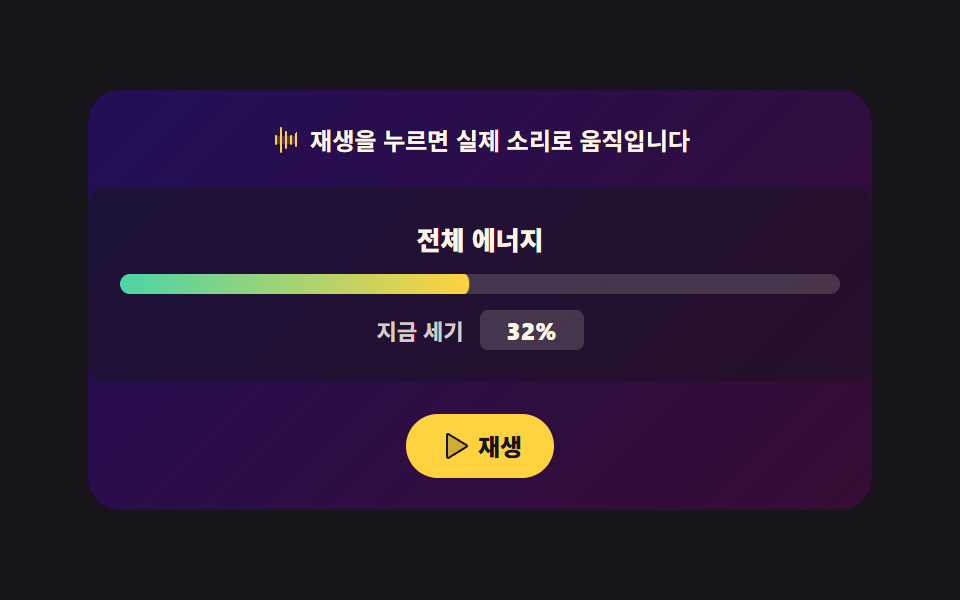
Total energy becomes a single hue angle that slowly stains the background gradient. Registering that angle with @property is what makes the gradient ease instead of jumping.
Best forNow-playing screen background in a streaming app, live stream page
@propertylinear-gradienthsl
<svg width="0" height="0" style="position:absolute" aria-hidden="true">
  <defs>
    <symbol id="ico-waveform" viewBox="0 0 256 256" fill="currentColor"><path d="M208 96v64H48V96Z" opacity=".2"/><path d="M56 96v64a8 8 0 0 1-16 0V96a8 8 0 0 1 16 0m32-72a8 8 0 0 0-8 8v192a8 8 0 0 0 16 0V32a8 8 0 0 0-8-8m40 32a8 8 0 0 0-8 8v128a8 8 0 0 0 16 0V64a8 8 0 0 0-8-8m40 32a8 8 0 0 0-8 8v64a8 8 0 0 0 16 0V96a8 8 0 0 0-8-8m40-16a8 8 0 0 0-8 8v96a8 8 0 0 0 16 0V72a8 8 0 0 0-8-8"/></symbol>
    <symbol id="ico-play" viewBox="0 0 256 256" fill="currentColor"><path d="M228.23 134.69L84.15 222.81A8 8 0 0 1 72 216.12V39.88a8 8 0 0 1 12.15-6.69l144.08 88.12a7.82 7.82 0 0 1 0 13.38" opacity=".2"/><path d="M232.4 114.49L88.32 26.35a16 16 0 0 0-16.2-.3A15.86 15.86 0 0 0 64 39.87v176.26A15.94 15.94 0 0 0 80 232a16.07 16.07 0 0 0 8.36-2.35l144.04-88.14a15.88 15.88 0 0 0 0-27.02M80 215.94V40l143.83 88Z"/></symbol>
    <symbol id="ico-pause" viewBox="0 0 256 256" fill="currentColor"><path d="M208 48v160a8 8 0 0 1-8 8h-40a8 8 0 0 1-8-8V48a8 8 0 0 1 8-8h40a8 8 0 0 1 8 8M96 40H56a8 8 0 0 0-8 8v160a8 8 0 0 0 8 8h40a8 8 0 0 0 8-8V48a8 8 0 0 0-8-8" opacity=".2"/><path d="M200 32h-40a16 16 0 0 0-16 16v160a16 16 0 0 0 16 16h40a16 16 0 0 0 16-16V48a16 16 0 0 0-16-16m0 176h-40V48h40zM96 32H56a16 16 0 0 0-16 16v160a16 16 0 0 0 16 16h40a16 16 0 0 0 16-16V48a16 16 0 0 0-16-16m0 176H56V48h40z"/></symbol>
  </defs>
</svg>
<main class="stage">
<div class="ge is-demo" id="ge">
  <p class="ge__hint"><svg class="ge__ico" aria-hidden="true"><use href="#ico-waveform"/></svg><span>Press play and it moves with real sound</span></p>
  <div class="ge__panel">
    <p class="ge__label">Total energy</p>
    <div class="ge__meter" aria-hidden="true"><i class="ge__fill" id="fill"></i></div>
    <p class="ge__read">
      <span class="ge__readLabel">Level now</span>
      <b class="ge__readBox">
        <span class="ge__readText" id="energyText" aria-live="polite">32%</span>
        <span class="ge__loop" aria-hidden="true"><i>32%</i><i>74%</i><i>51%</i></span>
      </b>
    </p>
  </div>
  <div class="ge__foot">
    <button class="ge__play" id="play" type="button" aria-pressed="false">
      <svg class="ge__ico ge__ico--play" aria-hidden="true"><use href="#ico-play"/></svg>
      <svg class="ge__ico ge__ico--pause" aria-hidden="true"><use href="#ico-pause"/></svg>
      <span id="playLabel">Play</span>
    </button>
  </div>
</div>
</main>@use "../../../../site/static/demo-tokens" as *;
// 에너지 그라디언트 배경 — 전체 에너지를 색상각 하나로 바꿔 무대를 물들인다.
// --hue 를 @property 로 <angle> 로 등록했기 때문에 키프레임에서 연속으로 보간된다.
// 등록 없이는 커스텀 속성이 문자열로 취급되어 그라디언트가 뚝뚝 끊겨 바뀐다 — 이 항목의 교육 포인트.
// 광과민성: 밝기(lightness)는 20%·13% 두 정지점에 고정하고 색상각만 210→340 도로 돌린다.
// 명도가 고정되면 큰 면적의 "밝기 반전"은 생기지 않는다 — 2초에 왕복 한 번(0.5Hz), WCAG 2.3.1 한계(초당 3회) 안.
$duration: $dur-base;
$easing: $ease-out;
$color: $stage-yellow;
@property --hue {
syntax: '<angle>';
inherits: false;
initial-value: 210deg;
}
@include stage($stage-ink);
.ge {
position: relative; display: flex; flex-direction: column; align-items: center; gap: $sp-4;
width: 100%; max-width: 360px;
padding: $sp-4; border-radius: $r-card;
// 그라디언트는 --hue 를 쓰는 이 판 자신에 깔린다 — inherits: false 로 등록했으므로
// 값을 쓰는 요소가 그 값을 직접 가져야 한다 (262 실측: 부모에 걸면 안 먹는다).
background: linear-gradient(135deg, hsl(var(--hue) 72% 20%) 0%, hsl(calc(var(--hue) + 48deg) 62% 13%) 100%);
transition: --hue $duration $ease-out;
}
.ge__hint {
display: flex; align-items: center; gap: $sp-1; margin: 0;
font-weight: 700; font-size: clamp(11px, 3vw, 12px); color: $subject-cream;
}
.ge__ico { width: 16px; height: 16px; color: $color; }
.ge__panel {
display: flex; flex-direction: column; align-items: center; gap: $sp-2;
width: 100%; padding: $sp-4; border-radius: $r-sm;
background: rgba($subject-ink, .45);
}
.ge__label { margin: 0; font-weight: 800; font-size: clamp(12px, 3.2vw, 13px); color: $subject-cream; }
.ge__meter {
width: 100%; height: 10px; border-radius: $r-pill; overflow: hidden;
background: rgba($subject-cream, .16);
}
.ge__fill {
display: block; height: 100%; width: 100%; border-radius: $r-pill;
background: linear-gradient(90deg, $subject-mint 0%, $color 100%);
transform-origin: left center;
transform: scaleX(var(--e, .3));
transition: transform $duration $ease-out;
}
.ge__read { margin: 0; display: flex; align-items: center; gap: $sp-2; }
.ge__readLabel { font-weight: 700; font-size: clamp(10px, 2.6vw, 11px); color: rgba($subject-cream, .82); }
.ge__readBox {
position: relative; display: grid; place-items: center;
min-width: 44px; height: 20px; border-radius: $r-xs; padding: 0 $sp-1;
background: rgba($subject-cream, .16); color: $subject-cream;
font-weight: 800; font-size: clamp(11px, 3vw, 12px); line-height: 1;
}
.ge__loop { position: absolute; inset: 0; display: grid; place-items: center; visibility: hidden; }
.ge__loop i { grid-area: 1 / 1; font-style: normal; visibility: hidden; }
.ge__foot { display: flex; align-items: center; justify-content: center; width: 100%; }
.ge__play {
display: inline-flex; align-items: center; gap: $sp-1;
border: 0; border-radius: $r-pill; padding: $sp-2 $sp-4;
background: $color; color: $subject-ink; cursor: pointer;
font-family: inherit; font-weight: 800; font-size: clamp(11px, 3vw, 12px); line-height: 1;
}
.ge__ico--pause { display: none; }
.ge__play[aria-pressed="true"] .ge__ico--play { display: none; }
.ge__play[aria-pressed="true"] .ge__ico--pause { display: inline-block; }
.ge__play .ge__ico { color: $subject-ink; }
// ── 격자 미리보기 루프 ─────────────────────────────────────────────
// 색상각이 210 → 340 → 210 으로 2초에 한 번 왕복(0.5Hz). 에너지 막대와 숫자가 같은 박자로 붙는다.
.ge.is-demo {
animation-name: geHueLoop; animation-duration: $dur-loop; animation-timing-function: ease-in-out;
animation-iteration-count: infinite;
transition: none;
}
@keyframes geHueLoop {
0% { --hue: 210deg; }
50% { --hue: 340deg; }
100% { --hue: 210deg; }
}
.ge.is-demo .ge__fill {
animation-name: geFillLoop; animation-duration: $dur-loop; animation-timing-function: ease-in-out;
animation-iteration-count: infinite;
transition: none;
}
@keyframes geFillLoop {
0% { transform: scaleX(.32); }
50% { transform: scaleX(.78); }
100% { transform: scaleX(.32); }
}
// 세기 숫자는 32 → 74 → 51 → 32 로 컷 교체. 지연 구간에 fill-mode 를 두지 않는다(작성 상태가 숨김).
.ge.is-demo .ge__readText { color: transparent; }
.ge.is-demo .ge__loop { visibility: visible; }
.ge.is-demo .ge__loop i {
animation-name: geNumLoop; animation-duration: $dur-loop; animation-timing-function: steps(1, end);
animation-iteration-count: infinite;
}
.ge.is-demo .ge__loop i:nth-child(1) { animation-delay: 0ms; }
.ge.is-demo .ge__loop i:nth-child(2) { animation-delay: 666ms; }
.ge.is-demo .ge__loop i:nth-child(3) { animation-delay: 1332ms; }
@keyframes geNumLoop {
0%, 33% { visibility: visible; }
34%, 100% { visibility: hidden; }
}
@media (max-width: 340px) {
.ge { gap: $sp-2; padding: $sp-3; }
.ge__panel { padding: $sp-3; gap: $sp-1; }
.ge__play { padding: $sp-1 $sp-3; }
}
// reduce 에서는 색이 도는 것도 멈춘다 — 초기값 색(210deg) 한 장으로 판이 서 있는다
@media (prefers-reduced-motion: reduce) {
.ge.is-demo,
.ge.is-demo .ge__fill,
.ge.is-demo .ge__loop i { animation: none !important; }
.ge.is-demo .ge__readText { color: $subject-cream !important; }
.ge.is-demo .ge__loop { visibility: hidden !important; }
.ge { transition: none !important; }
.ge__fill { transition: none !important; }
}@property --hue {
syntax: "<angle>";
inherits: false;
initial-value: 210deg;
}
html, body {
margin: 0;
overflow: hidden;
}
.stage {
box-sizing: border-box;
min-height: 100vh;
display: grid;
place-items: center;
margin: 0;
background: #17141a;
font-family: -apple-system, "Segoe UI", "Noto Sans KR", sans-serif;
padding: clamp(8px, 4vw, 24px);
}
.ge {
position: relative;
display: flex;
flex-direction: column;
align-items: center;
gap: 16px;
width: 100%;
max-width: 360px;
padding: 16px;
border-radius: 16px;
background: linear-gradient(135deg, hsl(var(--hue), 72%, 20%) 0%, hsl(calc(var(--hue) + 48deg), 62%, 13%) 100%);
transition: --hue 300ms ease-out;
}
.ge__hint {
display: flex;
align-items: center;
gap: 4px;
margin: 0;
font-weight: 700;
font-size: clamp(11px, 3vw, 12px);
color: #fff7e6;
}
.ge__ico {
width: 16px;
height: 16px;
color: #ffd23f;
}
.ge__panel {
display: flex;
flex-direction: column;
align-items: center;
gap: 8px;
width: 100%;
padding: 16px;
border-radius: 8px;
background: rgba(23, 20, 26, 0.45);
}
.ge__label {
margin: 0;
font-weight: 800;
font-size: clamp(12px, 3.2vw, 13px);
color: #fff7e6;
}
.ge__meter {
width: 100%;
height: 10px;
border-radius: 999px;
overflow: hidden;
background: rgba(255, 247, 230, 0.16);
}
.ge__fill {
display: block;
height: 100%;
width: 100%;
border-radius: 999px;
background: linear-gradient(90deg, #4cd4a6 0%, #ffd23f 100%);
transform-origin: left center;
transform: scaleX(var(--e, 0.3));
transition: transform 300ms ease-out;
}
.ge__read {
margin: 0;
display: flex;
align-items: center;
gap: 8px;
}
.ge__readLabel {
font-weight: 700;
font-size: clamp(10px, 2.6vw, 11px);
color: rgba(255, 247, 230, 0.82);
}
.ge__readBox {
position: relative;
display: grid;
place-items: center;
min-width: 44px;
height: 20px;
border-radius: 4px;
padding: 0 4px;
background: rgba(255, 247, 230, 0.16);
color: #fff7e6;
font-weight: 800;
font-size: clamp(11px, 3vw, 12px);
line-height: 1;
}
.ge__loop {
position: absolute;
inset: 0;
display: grid;
place-items: center;
visibility: hidden;
}
.ge__loop i {
grid-area: 1/1;
font-style: normal;
visibility: hidden;
}
.ge__foot {
display: flex;
align-items: center;
justify-content: center;
width: 100%;
}
.ge__play {
display: inline-flex;
align-items: center;
gap: 4px;
border: 0;
border-radius: 999px;
padding: 8px 16px;
background: #ffd23f;
color: #17141a;
cursor: pointer;
font-family: inherit;
font-weight: 800;
font-size: clamp(11px, 3vw, 12px);
line-height: 1;
}
.ge__ico--pause {
display: none;
}
.ge__play[aria-pressed=true] .ge__ico--play {
display: none;
}
.ge__play[aria-pressed=true] .ge__ico--pause {
display: inline-block;
}
.ge__play .ge__ico {
color: #17141a;
}
.ge.is-demo {
animation-name: geHueLoop;
animation-duration: 2s;
animation-timing-function: ease-in-out;
animation-iteration-count: infinite;
transition: none;
}
@keyframes geHueLoop {
0% {
--hue: 210deg;
}
50% {
--hue: 340deg;
}
100% {
--hue: 210deg;
}
}
.ge.is-demo .ge__fill {
animation-name: geFillLoop;
animation-duration: 2s;
animation-timing-function: ease-in-out;
animation-iteration-count: infinite;
transition: none;
}
@keyframes geFillLoop {
0% {
transform: scaleX(0.32);
}
50% {
transform: scaleX(0.78);
}
100% {
transform: scaleX(0.32);
}
}
.ge.is-demo .ge__readText {
color: transparent;
}
.ge.is-demo .ge__loop {
visibility: visible;
}
.ge.is-demo .ge__loop i {
animation-name: geNumLoop;
animation-duration: 2s;
animation-timing-function: steps(1, end);
animation-iteration-count: infinite;
}
.ge.is-demo .ge__loop i:nth-child(1) {
animation-delay: 0ms;
}
.ge.is-demo .ge__loop i:nth-child(2) {
animation-delay: 666ms;
}
.ge.is-demo .ge__loop i:nth-child(3) {
animation-delay: 1332ms;
}
@keyframes geNumLoop {
0%, 33% {
visibility: visible;
}
34%, 100% {
visibility: hidden;
}
}
@media (max-width: 340px) {
.ge {
gap: 8px;
padding: 12px;
}
.ge__panel {
padding: 12px;
gap: 4px;
}
.ge__play {
padding: 4px 12px;
}
}
@media (prefers-reduced-motion: reduce) {
.ge.is-demo,
.ge.is-demo .ge__fill,
.ge.is-demo .ge__loop i {
animation: none !important;
}
.ge.is-demo .ge__readText {
color: #fff7e6 !important;
}
.ge.is-demo .ge__loop {
visibility: hidden !important;
}
.ge {
transition: none !important;
}
.ge__fill {
transition: none !important;
}
}var root = document.getElementById('ge');
var fill = document.getElementById('fill');
var playBtn = document.getElementById('play');
var playLabel = document.getElementById('playLabel');
var energyText = document.getElementById('energyText');
var ctx = null, analyser = null, freq = null, timer = 0, playing = false;
function buildAudio() {
ctx = new (window.AudioContext || window.webkitAudioContext)();
analyser = ctx.createAnalyser();
analyser.fftSize = 64;
analyser.smoothingTimeConstant = 0.7;
freq = new Uint8Array(analyser.frequencyBinCount);
var out = ctx.createGain();
out.gain.value = 0.06;
out.connect(analyser);
analyser.connect(ctx.destination);
// 외부 음원 파일 없이 코드 진행을 직접 합성한다 — 네 박자마다 화음이 바뀐다.
[196, 246.94, 293.66, 392].forEach(function (hz, n) {
var osc = ctx.createOscillator();
var amp = ctx.createGain();
osc.type = n === 3 ? 'triangle' : 'sawtooth';
osc.frequency.value = hz;
amp.gain.value = 0;
for (var beat = 0; beat < 64; beat++) {
var at = ctx.currentTime + beat * 0.5;
amp.gain.setValueAtTime(beat % 4 === n % 4 ? 0.9 : 0.25, at);
amp.gain.exponentialRampToValueAtTime(0.02, at + 0.45);
}
osc.connect(amp); amp.connect(out); osc.start();
});
}
function draw() {
analyser.getByteFrequencyData(freq);
var sum = 0;
for (var k = 0; k < freq.length; k++) { sum += freq[k]; }
var e = Math.min(1, (sum / (freq.length * 255)) * 2.6); // ×2.6 은 미터 눈금 보정 — 소리 자체는 바꾸지 않는다
fill.style.setProperty('--e', e.toFixed(3));
// --hue 는 이 그라디언트 판 자신의 등록된 속성이라 여기(그 판의 부모 .ge) 에 쓴다 —
// inherits: false 로 등록했으니 값을 쓰는 요소가 스스로 가져야 한다 (262 실측).
root.style.setProperty('--hue', (200 + e * 140).toFixed(1) + 'deg');
var pct = Math.round(e * 100);
if (energyText.textContent !== pct + '%') { energyText.textContent = pct + '%'; }
timer = requestAnimationFrame(draw);
}
playBtn.addEventListener('click', function () {
root.classList.remove('is-demo');
if (!ctx) { buildAudio(); }
playing = !playing;
playBtn.setAttribute('aria-pressed', playing ? 'true' : 'false');
playLabel.textContent = playing ? 'Stop' : 'Play';
// 자동재생 정책: AudioContext 는 사용자 제스처 뒤 resume() 해야 소리가 난다.
if (playing) { ctx.resume(); timer = requestAnimationFrame(draw); }
else { ctx.suspend(); cancelAnimationFrame(timer); }
});// GradientEnergy — vanilla 판(run/291/demo/06-audio-viz-gradient-energy/index.html) 의 React 포트.
// 전체 에너지를 색상각 하나로 바꿔 판을 물들인다. --hue 는 @property 로 등록돼 있어 연속 보간된다.
import { useEffect, useRef, useState } from "react";
import type { CSSProperties } from "react";
import styles from "./GradientEnergy.module.scss";
export type GradientEnergyProps = {
/** 격자 미리보기용 2초 자동 루프. 재생을 누르면 꺼진다 */
demo?: boolean;
duration?: number;
easing?: string;
color?: string;
};
type Vars = CSSProperties & { "--duration"?: string; "--easing"?: string; "--color"?: string };
/** ambient 타입에 useRef<T> 의 null 합집합이 없어 로컬로 좁힌다 */
type Box<T> = { current: T };
export default function GradientEnergy({
demo = true,
duration = 300,
easing = "ease-out",
color = "#ffd23f",
}: GradientEnergyProps) {
const [live, setLive] = useState(demo);
const [playing, setPlaying] = useState(false);
const [energy, setEnergy] = useState(0.32);
const ctxBox = useRef(null) as Box<AudioContext | null>;
const nodeBox = useRef(null) as Box<AnalyserNode | null>;
const frameBox = useRef(0) as Box<number>;
const vars: Vars = { "--duration": `${duration}ms`, "--easing": easing, "--color": color };
useEffect(() => {
return () => {
cancelAnimationFrame(frameBox.current);
if (ctxBox.current) {
ctxBox.current.close();
}
};
}, []);
function buildAudio() {
const ctx = new AudioContext();
const analyser = ctx.createAnalyser();
analyser.fftSize = 64;
analyser.smoothingTimeConstant = 0.7;
const out = ctx.createGain();
out.gain.value = 0.06;
out.connect(analyser);
analyser.connect(ctx.destination);
// 외부 음원 파일 없이 코드 진행을 직접 합성한다 — 네 박자마다 화음이 바뀐다.
[196, 246.94, 293.66, 392].forEach((hz, n) => {
const osc = ctx.createOscillator();
const amp = ctx.createGain();
osc.type = n === 3 ? "triangle" : "sawtooth";
osc.frequency.value = hz;
amp.gain.value = 0;
for (let beat = 0; beat < 64; beat++) {
const at = ctx.currentTime + beat * 0.5;
amp.gain.setValueAtTime(beat % 4 === n % 4 ? 0.9 : 0.25, at);
amp.gain.exponentialRampToValueAtTime(0.02, at + 0.45);
}
osc.connect(amp);
amp.connect(out);
osc.start();
});
ctxBox.current = ctx;
nodeBox.current = analyser;
}
function draw() {
const analyser = nodeBox.current;
if (!analyser) {
return;
}
const freq = new Uint8Array(analyser.frequencyBinCount);
analyser.getByteFrequencyData(freq);
let sum = 0;
for (let k = 0; k < freq.length; k++) {
sum += freq[k];
}
setEnergy(Math.min(1, (sum / (freq.length * 255)) * 2.6)); // ×2.6 은 미터 눈금 보정
frameBox.current = requestAnimationFrame(draw);
}
function toggle() {
setLive(false);
if (!ctxBox.current) {
buildAudio();
}
const ctx = ctxBox.current;
if (!ctx) {
return;
}
const next = !playing;
setPlaying(next);
// 자동재생 정책: AudioContext 는 사용자 제스처 뒤 resume() 해야 소리가 난다.
if (next) {
ctx.resume();
frameBox.current = requestAnimationFrame(draw);
} else {
ctx.suspend();
cancelAnimationFrame(frameBox.current);
}
}
const cls = [styles.root, live ? styles.isDemo : ""].filter(Boolean).join(" ");
// --hue 는 이 판 자신의 등록된 속성 — inherits: false 라 값을 쓰는 요소가 스스로 가져야 한다 (262 실측).
const rootVars: Vars = { ...vars, "--hue": (200 + energy * 140).toFixed(1) + "deg" };
return (
<main className={styles.stage} style={rootVars}>
<svg width="0" height="0" style={{ position: "absolute" }} aria-hidden="true">
<defs>
<symbol id="ico-waveform" viewBox="0 0 256 256" fill="currentColor">
<path d="M208 96v64H48V96Z" opacity=".2" />
<path d="M56 96v64a8 8 0 0 1-16 0V96a8 8 0 0 1 16 0m32-72a8 8 0 0 0-8 8v192a8 8 0 0 0 16 0V32a8 8 0 0 0-8-8m40 32a8 8 0 0 0-8 8v128a8 8 0 0 0 16 0V64a8 8 0 0 0-8-8m40 32a8 8 0 0 0-8 8v64a8 8 0 0 0 16 0V96a8 8 0 0 0-8-8m40-16a8 8 0 0 0-8 8v96a8 8 0 0 0 16 0V72a8 8 0 0 0-8-8" />
</symbol>
<symbol id="ico-play" viewBox="0 0 256 256" fill="currentColor">
<path d="M228.23 134.69L84.15 222.81A8 8 0 0 1 72 216.12V39.88a8 8 0 0 1 12.15-6.69l144.08 88.12a7.82 7.82 0 0 1 0 13.38" opacity=".2" />
<path d="M232.4 114.49L88.32 26.35a16 16 0 0 0-16.2-.3A15.86 15.86 0 0 0 64 39.87v176.26A15.94 15.94 0 0 0 80 232a16.07 16.07 0 0 0 8.36-2.35l144.04-88.14a15.88 15.88 0 0 0 0-27.02M80 215.94V40l143.83 88Z" />
</symbol>
<symbol id="ico-pause" viewBox="0 0 256 256" fill="currentColor">
<path d="M208 48v160a8 8 0 0 1-8 8h-40a8 8 0 0 1-8-8V48a8 8 0 0 1 8-8h40a8 8 0 0 1 8 8M96 40H56a8 8 0 0 0-8 8v160a8 8 0 0 0 8 8h40a8 8 0 0 0 8-8V48a8 8 0 0 0-8-8" opacity=".2" />
<path d="M200 32h-40a16 16 0 0 0-16 16v160a16 16 0 0 0 16 16h40a16 16 0 0 0 16-16V48a16 16 0 0 0-16-16m0 176h-40V48h40zM96 32H56a16 16 0 0 0-16 16v160a16 16 0 0 0 16 16h40a16 16 0 0 0 16-16V48a16 16 0 0 0-16-16m0 176H56V48h40z" />
</symbol>
</defs>
</svg>
<div className={cls}>
<p className={styles.hint}>
<svg className={styles.ico} aria-hidden="true">
<use href="#ico-waveform" />
</svg>
<span>재생을 누르면 실제 소리로 움직입니다</span>
</p>
<div className={styles.panel}>
<p className={styles.label}>전체 에너지</p>
<div className={styles.meter} aria-hidden="true">
<i className={styles.fill} style={{ transform: `scaleX(${energy.toFixed(3)})` }} />
</div>
<p className={styles.read}>
<span className={styles.readLabel}>지금 세기</span>
<b className={styles.readBox}>
<span className={styles.readText} aria-live="polite">
{Math.round(energy * 100)}%
</span>
<span className={styles.loop} aria-hidden="true">
<i>32%</i>
<i>74%</i>
<i>51%</i>
</span>
</b>
</p>
</div>
<div className={styles.foot}>
<button className={styles.play} type="button" aria-pressed={playing} onClick={toggle}>
<svg className={[styles.ico, playing ? styles.icoHidden : ""].join(" ")} aria-hidden="true">
<use href="#ico-play" />
</svg>
<svg className={[styles.ico, playing ? "" : styles.icoHidden].join(" ")} aria-hidden="true">
<use href="#ico-pause" />
</svg>
<span>{playing ? "정지" : "재생"}</span>
</button>
</div>
</div>
</main>
);
}06 Energy gradient background — Measured area 54.717% · moving frames 23/23Original by GODRICH · SCSS and React ship in the zip · Audio Visualizer JavaScript: 9 Parts, No Library
The post this demo lives in
 Audio Visualizer JavaScript: 9 Parts, No LibraryAn audio visualizer JavaScript project needs one thing from the browser: Web Audio's AnalyserNode, which turns live soun See all demos in this post