05A 3D Box Whose Four Flaps Spring Open One After Another on Click
It turns the box faces and flaps with rotation matrices around their own hinge axes, integrates each flap's opening angle with a damped spring that starts a little later per flap, and skips faces turned away from the screen by the sign of the normal's depth component.
Best forProduct reveals and gift event screens
LID_OPEN_DEGLID_SPRINGFLAP_STAGGER
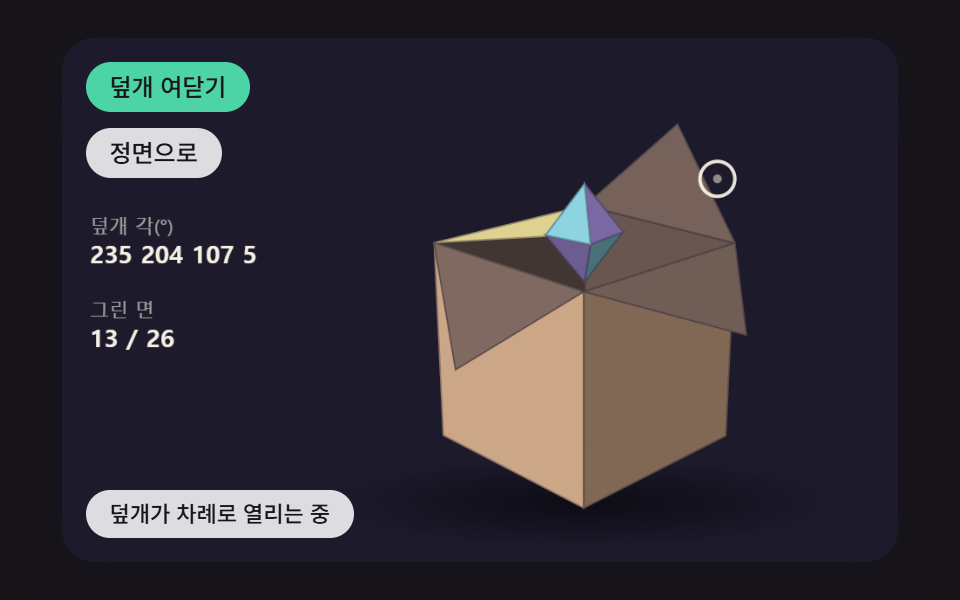
<main class="stage">
<div class="pc is-demo" id="pc">
  <canvas class="pc__canvas" data-role="canvas" width="480" height="300" tabindex="0" aria-label="A 3D box whose four flaps spring open one after another on a press while a gem rises inside. Rotate with the arrow keys, and open or close the flaps with Enter"></canvas>
  <p class="pc__status" data-role="status" aria-live="off">Closed — press to open the flaps</p>
  <div class="pc__tools">
    <button class="pc__btn" data-role="lid" type="button" aria-pressed="false">Open or close</button>
    <button class="pc__btn" data-role="home" type="button">Face front</button>
  </div>
</div>
</main>
@use "../../../../site/static/demo-tokens" as *;
@include stage($stage-ink);
.pc {
position: relative;
width: min(92vw, calc(160vh - 12.8vw));
aspect-ratio: 480 / 300;
margin: 0 auto;
border-radius: $r-card;
overflow: hidden;
box-shadow: $shadow-raised;
background: $subject-ink;
}
.pc__canvas {
display: block;
width: 100%;
height: 100%;
cursor: crosshair;
}
.pc__canvas:focus-visible {
outline: 2px solid rgba(255, 255, 255, .85);
outline-offset: -6px;
}
.pc__status {
position: absolute;
left: $sp-3;
bottom: $sp-3;
box-sizing: border-box;
max-width: 34%;
margin: 0;
padding: $sp-1 $sp-3;
border-radius: $r-control;
background: rgba(255, 255, 255, .85);
color: $subject-ink;
font-weight: 500;
font-size: 11px;
line-height: 1.4;
pointer-events: none;
}
// 판은 오른쪽에 있다 — 버튼은 왼쪽 위 칸에 두고, 좁으면 줄을 바꿔 판을 덮지 않는다
.pc__tools {
position: absolute;
left: $sp-3;
top: $sp-3;
box-sizing: border-box;
max-width: 34%;
display: flex;
flex-wrap: wrap;
gap: $sp-2;
}
.pc__btn {
margin: 0;
padding: $sp-1 $sp-3;
border: 0;
border-radius: $r-pill;
background: rgba(255, 255, 255, .85);
color: $subject-ink;
font: inherit;
font-weight: 500;
font-size: 12px;
line-height: 1.4;
cursor: pointer;
transition: background-color $dur-quick ease-out;
}
.pc__btn:hover {
background: $subject-cream;
}
.pc__btn[aria-pressed="true"] {
background: $subject-mint;
}
.pc__btn:focus-visible {
outline: 2px solid rgba(255, 255, 255, .95);
outline-offset: 2px;
}
// 손가락 가로 끌기는 이 캔버스가 받고, 세로 쓸기는 브라우저에 남겨 페이지 스크롤이 막히지 않게 한다
.pc__canvas { touch-action: pan-y; }
@media (max-width: 340px) {
.pc__btn { font-size: 10px; padding: $sp-1 $sp-2; }
.pc__status { font-size: 10px; padding: $sp-1 $sp-2; }
}
@media (prefers-reduced-motion: reduce) {
.pc__btn { transition: none; }
}html, body {
margin: 0;
overflow: hidden;
}
.stage {
box-sizing: border-box;
min-height: 100vh;
display: grid;
place-items: center;
margin: 0;
background: #17141a;
font-family: -apple-system, "Segoe UI", "Noto Sans KR", sans-serif;
padding: clamp(8px, 4vw, 24px);
}
.pc {
position: relative;
width: min(92vw, 160vh - 12.8vw);
aspect-ratio: 480/300;
margin: 0 auto;
border-radius: 16px;
overflow: hidden;
box-shadow: 0 14px 24px rgba(23, 20, 26, 0.32);
background: #17141a;
}
.pc__canvas {
display: block;
width: 100%;
height: 100%;
cursor: crosshair;
}
.pc__canvas:focus-visible {
outline: 2px solid rgba(255, 255, 255, 0.85);
outline-offset: -6px;
}
.pc__status {
position: absolute;
left: 12px;
bottom: 12px;
box-sizing: border-box;
max-width: 34%;
margin: 0;
padding: 4px 12px;
border-radius: 12px;
background: rgba(255, 255, 255, 0.85);
color: #17141a;
font-weight: 500;
font-size: 11px;
line-height: 1.4;
pointer-events: none;
}
.pc__tools {
position: absolute;
left: 12px;
top: 12px;
box-sizing: border-box;
max-width: 34%;
display: flex;
flex-wrap: wrap;
gap: 8px;
}
.pc__btn {
margin: 0;
padding: 4px 12px;
border: 0;
border-radius: 999px;
background: rgba(255, 255, 255, 0.85);
color: #17141a;
font: inherit;
font-weight: 500;
font-size: 12px;
line-height: 1.4;
cursor: pointer;
transition: background-color 220ms ease-out;
}
.pc__btn:hover {
background: #fff7e6;
}
.pc__btn[aria-pressed=true] {
background: #4cd4a6;
}
.pc__btn:focus-visible {
outline: 2px solid rgba(255, 255, 255, 0.95);
outline-offset: 2px;
}
.pc__canvas {
touch-action: pan-y;
}
@media (max-width: 340px) {
.pc__btn {
font-size: 10px;
padding: 4px 8px;
}
.pc__status {
font-size: 10px;
padding: 4px 8px;
}
}
@media (prefers-reduced-motion: reduce) {
.pc__btn {
transition: none;
}
}(function () {
const root = document.getElementById("pc");
if (!root) return;
const W = 480;
const H = 300;
const FIXED_DT = 16;
const TAU = Math.PI * 2;
const DEG = Math.PI / 180;
// 모형 중심 — 왼쪽 위는 버튼, 왼쪽 아래는 상태 줄이라 모형은 오른쪽으로 비켜 둔다
const CX = 300;
const CY = 150;
// 파스텔 팔레트 — 어두운 무대 위에 밝은 조각을 얹어 명도 차로 경계가 읽힌다
const BG = [29, 26, 44];
const PANEL = [44, 39, 64];
const PAPER = [255, 248, 234];
const PAL = [
[124, 196, 255],
[255, 160, 190],
[126, 226, 192],
[190, 164, 255],
[255, 208, 168],
[246, 228, 140],
[150, 222, 236],
[232, 182, 228],
[196, 220, 160],
];
function clamp(v, lo, hi) { return v < lo ? lo : (v > hi ? hi : v); }
function lerp(a, b, k) { return a + (b - a) * k; }
function smooth(x) { const c = clamp(x, 0, 1); return c * c * (3 - 2 * c); }
function rgba(c, a) {
return 'rgba(' + Math.round(clamp(c[0], 0, 255)) + ',' + Math.round(clamp(c[1], 0, 255)) + ',' + Math.round(clamp(c[2], 0, 255)) + ',' + clamp(a, 0, 1).toFixed(3) + ')';
}
function mix(a, b, k) { return [lerp(a[0], b[0], k), lerp(a[1], b[1], k), lerp(a[2], b[2], k)]; }
function shadeRGB(c, k) { return [c[0] * k, c[1] * k, c[2] * k]; }
// 3차원 계산 — 화면 오른쪽이 +x, 아래가 +y, 화면 안쪽이 +z (화면 쪽을 보는 면은 법선 z 가 음수)
function vadd(a, b) { return [a[0] + b[0], a[1] + b[1], a[2] + b[2]]; }
function vsub(a, b) { return [a[0] - b[0], a[1] - b[1], a[2] - b[2]]; }
function vscale(a, k) { return [a[0] * k, a[1] * k, a[2] * k]; }
function dot(a, b) { return a[0] * b[0] + a[1] * b[1] + a[2] * b[2]; }
function cross(a, b) { return [a[1] * b[2] - a[2] * b[1], a[2] * b[0] - a[0] * b[2], a[0] * b[1] - a[1] * b[0]]; }
function vnorm(a) {
const l = Math.hypot(a[0], a[1], a[2]);
return l > 1e-9 ? [a[0] / l, a[1] / l, a[2] / l] : [0, 0, 0];
}
// 회전 행렬 — 가로축(x)·세로축(y)·깊이축(z) 둘레로 a 라디안
function rotX(a) { const c = Math.cos(a), s = Math.sin(a); return [1, 0, 0, 0, c, -s, 0, s, c]; }
function rotY(a) { const c = Math.cos(a), s = Math.sin(a); return [c, 0, s, 0, 1, 0, -s, 0, c]; }
function rotZ(a) { const c = Math.cos(a), s = Math.sin(a); return [c, -s, 0, s, c, 0, 0, 0, 1]; }
function matMul(a, b) {
return [
a[0] * b[0] + a[1] * b[3] + a[2] * b[6], a[0] * b[1] + a[1] * b[4] + a[2] * b[7], a[0] * b[2] + a[1] * b[5] + a[2] * b[8],
a[3] * b[0] + a[4] * b[3] + a[5] * b[6], a[3] * b[1] + a[4] * b[4] + a[5] * b[7], a[3] * b[2] + a[4] * b[5] + a[5] * b[8],
a[6] * b[0] + a[7] * b[3] + a[8] * b[6], a[6] * b[1] + a[7] * b[4] + a[8] * b[7], a[6] * b[2] + a[7] * b[5] + a[8] * b[8],
];
}
function apply(m, p) {
return [m[0] * p[0] + m[1] * p[1] + m[2] * p[2], m[3] * p[0] + m[4] * p[1] + m[5] * p[2], m[6] * p[0] + m[7] * p[1] + m[8] * p[2]];
}
// 회전 행렬의 역은 전치 — 화면 방향을 모형 좌표로 되돌릴 때 쓴다
function applyT(m, p) {
return [m[0] * p[0] + m[3] * p[1] + m[6] * p[2], m[1] * p[0] + m[4] * p[1] + m[7] * p[2], m[2] * p[0] + m[5] * p[1] + m[8] * p[2]];
}
// 시점 행렬 — 먼저 세로축으로 돌리고(yaw) 그다음 가로축으로 기울인다(pitch)
function viewMatrix(yaw, pitch) { return matMul(rotX(pitch), rotY(yaw)); }
// 원근 나눗셈 — 화면 배율 s = focal / (focal + z). 깊이 z 가 클수록(안쪽) 작아지고 가운데로 모인다
function project(p, focal) {
const s = focal / (focal + p[2]);
return { x: CX + p[0] * s, y: CY + p[1] * s, s: s, z: p[2] };
}
// 빛 — 왼쪽 위 앞에서 비춘다
const LIGHT = vnorm([-0.45, -0.62, -0.64]);
function lambert(n) { return Math.max(0, dot(n, LIGHT)); }
function makeView(yaw, pitch) { return { yaw: yaw, pitch: pitch, yawTo: yaw, pitchTo: pitch, yaw0: yaw, pitch0: pitch }; }
function viewFollow(v, k) {
v.yaw += (v.yawTo - v.yaw) * k;
v.pitch += (v.pitchTo - v.pitch) * k;
}
function viewSnap(v) { v.yaw = v.yawTo; v.pitch = v.pitchTo; }
function viewHome(v) { v.yawTo = v.yaw0; v.pitchTo = v.pitch0; }
function viewGap(v) { return Math.hypot(v.yawTo - v.yaw, v.pitchTo - v.pitch); }
// 포인터 → 목표 각. 모형 중심에서 가로로 벗어난 만큼 yaw, 세로로 벗어난 만큼 pitch (오른쪽을 가리키면 앞면이 오른쪽으로 돈다)
const YAW_RANGE = 1.1;
const PITCH_RANGE = 0.8;
function aimAt(v, px, py) {
v.yawTo = v.yaw0 - clamp((px - CX) / (W / 2), -1, 1) * YAW_RANGE;
v.pitchTo = v.pitch0 + clamp((py - CY) / (H / 2), -1, 1) * PITCH_RANGE;
}
// 방향키 한 번에 돌리는 각
const KEY_STEP = 0.3;
function arrowNudge(ev, v) {
if (ev.key === 'ArrowLeft') {
v.yawTo = clamp(v.yawTo + KEY_STEP, -Math.PI, Math.PI);
}
else if (ev.key === 'ArrowRight') {
v.yawTo = clamp(v.yawTo - KEY_STEP, -Math.PI, Math.PI);
}
else if (ev.key === 'ArrowUp') {
v.pitchTo = clamp(v.pitchTo - KEY_STEP, -1.3, 1.3);
}
else if (ev.key === 'ArrowDown') {
v.pitchTo = clamp(v.pitchTo + KEY_STEP, -1.3, 1.3);
}
else {
return false;
}
ev.preventDefault();
return true;
}
const canvasEl = root.querySelector('[data-role="canvas"]');
const statusEl = root.querySelector('[data-role="status"]');
const ctxRaw = canvasEl ? canvasEl.getContext('2d') : null;
if (!canvasEl || !ctxRaw || !statusEl) {
return;
}
const cv = canvasEl;
const ctx = ctxRaw;
const status = statusEl;
const reduceQuery = window.matchMedia('(prefers-reduced-motion: reduce)');
// 페이지를 연 채 동작 줄이기 설정을 바꿔도 tail 의 change 리스너가 이 값을 다시 읽는다
let still = reduceQuery.matches;
// 자동 시연 중인가 — 사람이 처음 만지는 순간 시연을 멈추고 상태 줄을 읽어 주기 시작한다
let demo = root.classList.contains('is-demo');
function wake() {
if (!demo) {
return;
}
demo = false;
root.classList.remove('is-demo');
status.setAttribute('aria-live', 'polite');
}
function say(text) {
if (status.textContent !== text) {
status.textContent = text;
}
}
function fitCanvas() {
// 배율은 2 에서 자른다 — 배율 3 기기에서 화소가 2.25배로 늘어 프레임마다 일이 그만큼 커지지 않게
const dpr = Math.min(window.devicePixelRatio || 1, 2);
cv.width = Math.round(W * dpr);
cv.height = Math.round(H * dpr);
ctx.setTransform(dpr, 0, 0, dpr, 0, 0);
}
function onResize() {
fitCanvas();
draw();
}
fitCanvas();
window.addEventListener('resize', onResize);
// 화면 좌표(CSS px) → 장면 좌표(480x300). 리사이즈 뒤에도 늘 현재 크기로 다시 잰다
function toScene(ev) {
const r = cv.getBoundingClientRect();
return [((ev.clientX - r.left) / r.width) * W, ((ev.clientY - r.top) / r.height) * H];
}
// 시드 고정 난수 — 같은 시드면 같은 배치가 다시 나온다 (32비트 정수 섞기)
function makeRng(seed) {
let s = seed >>> 0;
return function () {
s = (s + 0x6d2b79f5) >>> 0;
let t = s;
t = Math.imul(t ^ (t >>> 15), t | 1);
t ^= t + Math.imul(t ^ (t >>> 7), t | 61);
return ((t ^ (t >>> 14)) >>> 0) / 4294967296;
};
}
// 화면 투영된 다각형 칠하기
function fillPoly(pts, c, a) {
ctx.beginPath();
ctx.moveTo(pts[0].x, pts[0].y);
for (let i = 1; i < pts.length; i += 1) {
ctx.lineTo(pts[i].x, pts[i].y);
}
ctx.closePath();
ctx.fillStyle = rgba(c, a);
ctx.fill();
// 이웃 면 사이 머리카락 틈을 같은 색 얇은 선으로 메운다
ctx.strokeStyle = rgba(c, a);
ctx.lineWidth = 0.7;
ctx.stroke();
}
// 왼쪽 수치 한 줄 — 이름표 + 값
const LEG_X = 16;
function statRow(y, label, value) {
ctx.textBaseline = 'alphabetic';
ctx.textAlign = 'left';
ctx.fillStyle = rgba(PAPER, 0.6);
ctx.font = '500 11px sans-serif';
ctx.fillText(label, LEG_X, y);
ctx.fillStyle = rgba(PAPER, 0.96);
ctx.font = '700 14px sans-serif';
ctx.fillText(value, LEG_X, y + 17);
}
function clearStage() {
ctx.fillStyle = rgba(BG, 1);
ctx.fillRect(0, 0, W, H);
}
// 바닥 그림자 — 모형 아래 납작한 타원, 모형이 떠 있지 않고 놓여 보이게
function floorShadow(rx, y, a) {
const g = ctx.createRadialGradient(CX, y, 0, CX, y, rx);
g.addColorStop(0, rgba([0, 0, 0], a));
g.addColorStop(1, rgba([0, 0, 0], 0));
ctx.save();
ctx.translate(CX, y);
ctx.scale(1, 0.18);
ctx.translate(-CX, -y);
ctx.fillStyle = g;
ctx.beginPath();
ctx.arc(CX, y, rx, 0, TAU);
ctx.fill();
ctx.restore();
}
const ghost = { x: -1, y: -1, fx: 0, fy: 0, tx: 0, ty: 0, t0: 0, dur: 1, down: false };
function ghostGo(x, y, dur, t) {
ghost.fx = ghost.x < 0 ? x : ghost.x;
ghost.fy = ghost.y < 0 ? y : ghost.y;
ghost.tx = x;
ghost.ty = y;
ghost.t0 = t;
ghost.dur = Math.max(1, dur);
}
function ghostAt(t) {
const e = smooth((t - ghost.t0) / ghost.dur);
ghost.x = lerp(ghost.fx, ghost.tx, e);
ghost.y = lerp(ghost.fy, ghost.ty, e);
}
function drawGhost() {
if (!demo || ghost.x < 0) {
return;
}
ctx.strokeStyle = rgba(PAPER, 0.9);
ctx.lineWidth = 2;
ctx.beginPath();
ctx.arc(ghost.x, ghost.y, ghost.down ? 7 : 10, 0, TAU);
ctx.stroke();
ctx.fillStyle = rgba(PAPER, ghost.down ? 0.9 : 0.5);
ctx.beginPath();
ctx.arc(ghost.x, ghost.y, ghost.down ? 4 : 2.5, 0, TAU);
ctx.fill();
}
// 시연 일정 — 루프 안의 시각(ms) 표를 지날 때마다 한 번씩 부른다
let schedCycle = -1;
let schedIdx = 0;
function runSchedule(t, loop, marks, fire) {
const cyc = Math.floor(t / loop);
const p = t - cyc * loop;
if (cyc !== schedCycle) {
schedCycle = cyc;
schedIdx = 0;
}
while (schedIdx < marks.length && p >= marks[schedIdx]) {
fire(schedIdx, cyc);
schedIdx += 1;
}
}
function fmt(v, d) { return v.toFixed(d); }
function springStep(s, k, d, dt) {
const a = -k * (s.x - s.to) - d * s.v;
s.v += a * dt;
s.x += s.v * dt;
}
// 덮개가 열려 멈추는 각(도) — 90 이면 수직, 180 이면 바깥으로 눕고, 그 너머는 옆면 쪽으로 처진다
const LID_OPEN_DEG = 210;
// 덮개 열림 각 스프링 세기(1/s²)와 감쇠(1/s)
const LID_SPRING = 90;
const LID_DAMP = 10;
// 덮개 i 는 i × FLAP_STAGGER(ms) 늦게 출발한다
const FLAP_STAGGER = 110;
// 상자 반 변(px)
const S = 60;
// 상자 중심을 아래로 내려 열린 덮개가 화면 위로 잘리지 않게
const DROP = 26;
const FOCAL = 620;
const VIEW_LERP = 0.07;
const DEMO_LOOP = 2000;
const TXT_OPEN = 'Flaps opening one after another';
const TXT_CLOSE = 'Flaps closing one after another';
const TXT_SHUT = 'Closed — press to open the flaps';
const homeBtn = root.querySelector('[data-role="home"]');
const lidBtn = root.querySelector('[data-role="lid"]');
const TOP_Y = -S + DROP;
function makeFlap(hx, hz, ax, az, bx, bz) {
return { hinge: [hx, TOP_Y, hz], inward: vnorm([-hx, 0, -hz]), a: [ax, TOP_Y, az], b: [bx, TOP_Y, bz], spring: { x: 0, v: 0, to: 0 }, start: -1 };
}
const flaps = [
makeFlap(0, -S, -S, -S, S, -S),
makeFlap(S, 0, S, -S, S, S),
makeFlap(0, S, S, S, -S, S),
makeFlap(-S, 0, -S, S, -S, -S),
];
const view = makeView(0.6, 0.55);
let open = false;
let lidClock = 0;
let gemSpin = 0;
let shownFaces = 0;
let totalFaces = 0;
let pointerIn = false;
function report() {
let moving = false;
for (let i = 0; i < flaps.length; i += 1) {
if (flaps[i].spring.x > DEG) {
moving = true;
}
}
say(open ? TXT_OPEN : (moving ? TXT_CLOSE : TXT_SHUT));
}
// 덮개 끝점 — 경첩에서 안쪽으로 S 만큼 뻗은 꼭짓점을 경첩 축 둘레로 θ 만큼 들어 올린다
function flapTip(f, th) {
return vadd(f.hinge, vadd(vscale(f.inward, S * Math.cos(th)), [0, -S * Math.sin(th), 0]));
}
function setOpen(v) {
open = v;
for (let i = 0; i < flaps.length; i += 1) {
// 닫을 때는 마지막에 연 덮개부터
const order = open ? i : flaps.length - 1 - i;
flaps[i].start = lidClock + order * FLAP_STAGGER;
}
if (lidBtn) {
lidBtn.setAttribute('aria-pressed', open ? 'true' : 'false');
}
}
function step() {
viewFollow(view, VIEW_LERP);
lidClock += FIXED_DT;
gemSpin += 1.2 * FIXED_DT / 1000;
for (let i = 0; i < flaps.length; i += 1) {
const f = flaps[i];
if (f.start >= 0 && lidClock >= f.start) {
f.spring.to = open ? LID_OPEN_DEG * DEG : 0;
}
springStep(f.spring, LID_SPRING, LID_DAMP, FIXED_DT / 1000);
// 닫히다 넘친 덮개는 상자 안으로 들어가지 않고 윗면에서 살짝 튕긴다
if (f.spring.x < 0) {
f.spring.x = 0;
f.spring.v = -f.spring.v * 0.3;
}
}
}
function settle() {
viewSnap(view);
for (let i = 0; i < flaps.length; i += 1) {
flaps[i].spring.to = open ? LID_OPEN_DEG * DEG : 0;
flaps[i].spring.x = flaps[i].spring.to;
flaps[i].spring.v = 0;
}
}
function demoTick(t) {
runSchedule(t, DEMO_LOOP, [200, 1250], function (k) {
if (k === 0) {
setOpen(true);
ghostGo(420, 90, 400, t);
}
else {
setOpen(false);
ghostGo(200, 220, 400, t);
}
report();
});
ghostAt(t);
aimAt(view, CX + (ghost.x - CX) * 0.4, CY + (ghost.y - CY) * 0.4);
}
const OUT = PAL[4];
const INSIDE = mix(PAL[4], BG, 0.55);
// 덮개 겉면 — 벽보다 밝게 해 열린 덮개가 벽과 구분되게
const LID = mix(PAL[5], PAPER, 0.2);
// 면 하나 — 꼭짓점 순서에서 법선을 구하고, 원하는 바깥 방향과 반대면 뒤집는다
function face(pts, want, c) {
let n = vnorm(cross(vsub(pts[1], pts[0]), vsub(pts[2], pts[0])));
if (dot(n, want) < 0) {
n = vscale(n, -1);
}
return { pts: pts, n: n, c: c };
}
function boxFaces() {
const y0 = TOP_Y, y1 = S + DROP;
const e = 0.6;
const fs = [];
// 바깥 네 벽과 바닥 — 법선이 상자 밖을 향한다
fs.push(face([[-S, y0, -S], [S, y0, -S], [S, y1, -S], [-S, y1, -S]], [0, 0, -1], OUT));
fs.push(face([[S, y0, -S], [S, y0, S], [S, y1, S], [S, y1, -S]], [1, 0, 0], OUT));
fs.push(face([[S, y0, S], [-S, y0, S], [-S, y1, S], [S, y1, S]], [0, 0, 1], OUT));
fs.push(face([[-S, y0, S], [-S, y0, -S], [-S, y1, -S], [-S, y1, S]], [-1, 0, 0], OUT));
fs.push(face([[-S, y1, -S], [S, y1, -S], [S, y1, S], [-S, y1, S]], [0, 1, 0], OUT));
// 안쪽 네 벽과 바닥 — 조금 안으로 들이고 법선을 상자 안으로
const s = S - e;
fs.push(face([[-s, y0, -s], [s, y0, -s], [s, y1 - e, -s], [-s, y1 - e, -s]], [0, 0, 1], INSIDE));
fs.push(face([[s, y0, -s], [s, y0, s], [s, y1 - e, s], [s, y1 - e, -s]], [-1, 0, 0], INSIDE));
fs.push(face([[s, y0, s], [-s, y0, s], [-s, y1 - e, s], [s, y1 - e, s]], [0, 0, -1], INSIDE));
fs.push(face([[-s, y0, s], [-s, y0, -s], [-s, y1 - e, -s], [-s, y1 - e, s]], [1, 0, 0], INSIDE));
fs.push(face([[-s, y1 - e, -s], [s, y1 - e, -s], [s, y1 - e, s], [-s, y1 - e, s]], [0, -1, 0], INSIDE));
// 덮개 넷 — 겉(닫혔을 때 위를 보는 쪽)과 속을 두 면으로
for (let i = 0; i < flaps.length; i += 1) {
const f = flaps[i];
const th = f.spring.x;
const tip = flapTip(f, th);
const up = vadd(vscale(f.inward, -Math.sin(th)), [0, -Math.cos(th), 0]);
fs.push(face([f.a, f.b, tip], up, LID));
fs.push(face([f.a, f.b, tip], vscale(up, -1), INSIDE));
}
// 상자 안 보석 — 덮개가 열린 만큼 떠오르는 팔면체
let openAvg = 0;
for (let i = 0; i < flaps.length; i += 1) {
openAvg += clamp(flaps[i].spring.x / (LID_OPEN_DEG * DEG), 0, 1.2);
}
openAvg /= flaps.length;
const gy = lerp(DROP + 10, TOP_Y - 34, smooth(openAvg));
const gr = 22;
const gm = rotY(gemSpin);
const tipU = [0, gy - gr * 1.3, 0];
const tipD = [0, gy + gr * 1.3, 0];
const ring = [];
for (let k = 0; k < 4; k += 1) {
const q = apply(gm, [Math.cos(k * TAU / 4) * gr, 0, Math.sin(k * TAU / 4) * gr]);
ring.push([q[0], gy, q[2]]);
}
for (let k = 0; k < 4; k += 1) {
const a = ring[k], b = ring[(k + 1) % 4];
const mid = vscale(vadd(a, b), 0.5);
fs.push(face([a, b, tipU], vsub(vadd(mid, tipU), [0, 2 * gy, 0]), k % 2 ? PAL[6] : PAL[3]));
fs.push(face([a, b, tipD], vsub(vadd(mid, tipD), [0, 2 * gy, 0]), k % 2 ? PAL[3] : PAL[6]));
}
return fs;
}
function draw() {
clearStage();
floorShadow(150, 266, 0.55);
const m = viewMatrix(view.yaw, view.pitch);
const fs = boxFaces();
totalFaces = fs.length;
const vis = [];
for (let i = 0; i < fs.length; i += 1) {
const n = apply(m, fs[i].n);
// 화면을 등진 면 — 법선의 깊이 성분이 양수면 그리지 않는다
if (n[2] >= 0) {
continue;
}
const rv = fs[i].pts.map(function (p) { return apply(m, p); });
let z = 0;
for (let k = 0; k < rv.length; k += 1) {
z += rv[k][2];
}
vis.push({ pts: rv.map(function (p) { return project(p, FOCAL); }), z: z / rv.length, c: shadeRGB(fs[i].c, 0.5 + 0.5 * lambert(n)) });
}
shownFaces = vis.length;
vis.sort(function (a, b) { return b.z - a.z; });
for (let i = 0; i < vis.length; i += 1) {
fillPoly(vis[i].pts, vis[i].c, 1);
// 모서리 선 — 같은 색 면이 맞닿아도 상자 꼴이 읽히게
ctx.strokeStyle = rgba(BG, 0.35);
ctx.lineWidth = 1;
ctx.stroke();
}
let degs = '';
for (let i = 0; i < flaps.length; i += 1) {
degs += (i ? ' ' : '') + Math.round(flaps[i].spring.x / DEG);
}
statRow(112, 'Flap angles (°)', degs);
statRow(160, 'Faces drawn', shownFaces + ' / ' + totalFaces);
drawGhost();
}
function after() {
if (still) {
settle();
}
report();
draw();
}
function toggle() { setOpen(!open); after(); }
cv.addEventListener('pointermove', function (ev) {
wake();
pointerIn = true;
const p = toScene(ev);
aimAt(view, CX + (p[0] - CX) * 0.4, CY + (p[1] - CY) * 0.4);
after();
});
cv.addEventListener('pointerleave', function () {
if (!pointerIn) {
return;
}
pointerIn = false;
viewHome(view);
after();
});
cv.addEventListener('pointerdown', function () { wake(); toggle(); });
cv.addEventListener('keydown', function (ev) {
if (arrowNudge(ev, view)) {
wake();
after();
return;
}
if (ev.key === 'Enter' || ev.key === ' ') {
ev.preventDefault();
wake();
toggle();
}
else if (ev.key === 'Escape') {
ev.preventDefault();
wake();
viewHome(view);
after();
}
});
if (homeBtn) {
homeBtn.addEventListener('click', function () { wake(); viewHome(view); after(); });
}
if (lidBtn) {
lidBtn.addEventListener('click', function () { wake(); toggle(); });
}
report();
let rafId = 0;
let lastTs = -1;
let acc = 0;
let clock = 0;
function frame(ts) {
if (still) {
rafId = 0;
return;
}
if (lastTs < 0) {
lastTs = ts;
}
// 탭이 숨었다 돌아와도 한 번에 100ms 까지만 따라잡는다 — 순간이동 대신 이어서 움직인다
acc += Math.min(ts - lastTs, 100);
lastTs = ts;
let n = 0;
while (acc >= FIXED_DT && n < 6) {
clock += FIXED_DT;
if (demo) {
demoTick(clock);
}
step();
acc -= FIXED_DT;
n += 1;
}
draw();
rafId = window.requestAnimationFrame(frame);
}
function startLoop() {
if (rafId) {
return;
}
lastTs = -1;
acc = 0;
rafId = window.requestAnimationFrame(frame);
}
// 동작 줄이기 설정이 페이지를 연 채 바뀌면 — 켜지면 루프를 멈추고 끝 상태로, 꺼지면 루프를 다시 돈다
function onMotionPref() {
still = reduceQuery.matches;
if (still) {
if (rafId) {
window.cancelAnimationFrame(rafId);
rafId = 0;
}
settle();
report();
draw();
}
else {
startLoop();
}
}
if (typeof reduceQuery.addEventListener === 'function') {
reduceQuery.addEventListener('change', onMotionPref);
}
if (still) {
settle();
draw();
}
else {
startLoop();
}
return function () {
window.cancelAnimationFrame(rafId);
window.removeEventListener('resize', onResize);
if (typeof reduceQuery.removeEventListener === 'function') {
reduceQuery.removeEventListener('change', onMotionPref);
}
};
})();// BoxLidSpring - vanilla 판(05-model3d-box-lid-spring) 의 React 포트. 같은 계산을 useEffect 안에서 돌린다.
import { useEffect, useRef } from "react";
import styles from "./BoxLidSpring.module.scss";
const cx = (s: string): string => s.split(" ").map((n) => styles[n] ?? n).join(" ");
export default function BoxLidSpring() {
const rootRef = useRef<HTMLDivElement | null>(null);
useEffect(() => {
const rootEl = rootRef.current;
if (!rootEl) return;
const root: HTMLElement = rootEl;
type RGB = [number, number, number];
type V3 = [number, number, number];
type M3 = [number, number, number, number, number, number, number, number, number];
const W = 480;
const H = 300;
const FIXED_DT = 16;
const TAU = Math.PI * 2;
const DEG = Math.PI / 180;
// 모형 중심 — 왼쪽 위는 버튼, 왼쪽 아래는 상태 줄이라 모형은 오른쪽으로 비켜 둔다
const CX = 300;
const CY = 150;
// 파스텔 팔레트 — 어두운 무대 위에 밝은 조각을 얹어 명도 차로 경계가 읽힌다
const BG: RGB = [29, 26, 44];
const PANEL: RGB = [44, 39, 64];
const PAPER: RGB = [255, 248, 234];
const PAL: RGB[] = [
[124, 196, 255],
[255, 160, 190],
[126, 226, 192],
[190, 164, 255],
[255, 208, 168],
[246, 228, 140],
[150, 222, 236],
[232, 182, 228],
[196, 220, 160],
];
function clamp(v: number, lo: number, hi: number): number { return v < lo ? lo : (v > hi ? hi : v); }
function lerp(a: number, b: number, k: number): number { return a + (b - a) * k; }
function smooth(x: number): number { const c = clamp(x, 0, 1); return c * c * (3 - 2 * c); }
function rgba(c: RGB, a: number): string {
return 'rgba(' + Math.round(clamp(c[0], 0, 255)) + ',' + Math.round(clamp(c[1], 0, 255)) + ',' + Math.round(clamp(c[2], 0, 255)) + ',' + clamp(a, 0, 1).toFixed(3) + ')';
}
function mix(a: RGB, b: RGB, k: number): RGB { return [lerp(a[0], b[0], k), lerp(a[1], b[1], k), lerp(a[2], b[2], k)]; }
function shadeRGB(c: RGB, k: number): RGB { return [c[0] * k, c[1] * k, c[2] * k]; }
// 3차원 계산 — 화면 오른쪽이 +x, 아래가 +y, 화면 안쪽이 +z (화면 쪽을 보는 면은 법선 z 가 음수)
function vadd(a: V3, b: V3): V3 { return [a[0] + b[0], a[1] + b[1], a[2] + b[2]]; }
function vsub(a: V3, b: V3): V3 { return [a[0] - b[0], a[1] - b[1], a[2] - b[2]]; }
function vscale(a: V3, k: number): V3 { return [a[0] * k, a[1] * k, a[2] * k]; }
function dot(a: V3, b: V3): number { return a[0] * b[0] + a[1] * b[1] + a[2] * b[2]; }
function cross(a: V3, b: V3): V3 { return [a[1] * b[2] - a[2] * b[1], a[2] * b[0] - a[0] * b[2], a[0] * b[1] - a[1] * b[0]]; }
function vnorm(a: V3): V3 {
const l = Math.hypot(a[0], a[1], a[2]);
return l > 1e-9 ? [a[0] / l, a[1] / l, a[2] / l] : [0, 0, 0];
}
// 회전 행렬 — 가로축(x)·세로축(y)·깊이축(z) 둘레로 a 라디안
function rotX(a: number): M3 { const c = Math.cos(a), s = Math.sin(a); return [1, 0, 0, 0, c, -s, 0, s, c]; }
function rotY(a: number): M3 { const c = Math.cos(a), s = Math.sin(a); return [c, 0, s, 0, 1, 0, -s, 0, c]; }
function rotZ(a: number): M3 { const c = Math.cos(a), s = Math.sin(a); return [c, -s, 0, s, c, 0, 0, 0, 1]; }
function matMul(a: M3, b: M3): M3 {
return [
a[0] * b[0] + a[1] * b[3] + a[2] * b[6], a[0] * b[1] + a[1] * b[4] + a[2] * b[7], a[0] * b[2] + a[1] * b[5] + a[2] * b[8],
a[3] * b[0] + a[4] * b[3] + a[5] * b[6], a[3] * b[1] + a[4] * b[4] + a[5] * b[7], a[3] * b[2] + a[4] * b[5] + a[5] * b[8],
a[6] * b[0] + a[7] * b[3] + a[8] * b[6], a[6] * b[1] + a[7] * b[4] + a[8] * b[7], a[6] * b[2] + a[7] * b[5] + a[8] * b[8],
];
}
function apply(m: M3, p: V3): V3 {
return [m[0] * p[0] + m[1] * p[1] + m[2] * p[2], m[3] * p[0] + m[4] * p[1] + m[5] * p[2], m[6] * p[0] + m[7] * p[1] + m[8] * p[2]];
}
// 회전 행렬의 역은 전치 — 화면 방향을 모형 좌표로 되돌릴 때 쓴다
function applyT(m: M3, p: V3): V3 {
return [m[0] * p[0] + m[3] * p[1] + m[6] * p[2], m[1] * p[0] + m[4] * p[1] + m[7] * p[2], m[2] * p[0] + m[5] * p[1] + m[8] * p[2]];
}
// 시점 행렬 — 먼저 세로축으로 돌리고(yaw) 그다음 가로축으로 기울인다(pitch)
function viewMatrix(yaw: number, pitch: number): M3 { return matMul(rotX(pitch), rotY(yaw)); }
type Proj = { x: number; y: number; s: number; z: number };
// 원근 나눗셈 — 화면 배율 s = focal / (focal + z). 깊이 z 가 클수록(안쪽) 작아지고 가운데로 모인다
function project(p: V3, focal: number): Proj {
const s = focal / (focal + p[2]);
return { x: CX + p[0] * s, y: CY + p[1] * s, s: s, z: p[2] };
}
// 빛 — 왼쪽 위 앞에서 비춘다
const LIGHT: V3 = vnorm([-0.45, -0.62, -0.64]);
function lambert(n: V3): number { return Math.max(0, dot(n, LIGHT)); }
// 시점 추종 — 포인터가 정한 목표 각을 매 스텝 남은 차의 k 만큼 따라간다
type View = { yaw: number; pitch: number; yawTo: number; pitchTo: number; yaw0: number; pitch0: number };
function makeView(yaw: number, pitch: number): View { return { yaw: yaw, pitch: pitch, yawTo: yaw, pitchTo: pitch, yaw0: yaw, pitch0: pitch }; }
function viewFollow(v: View, k: number): void {
v.yaw += (v.yawTo - v.yaw) * k;
v.pitch += (v.pitchTo - v.pitch) * k;
}
function viewSnap(v: View): void { v.yaw = v.yawTo; v.pitch = v.pitchTo; }
function viewHome(v: View): void { v.yawTo = v.yaw0; v.pitchTo = v.pitch0; }
function viewGap(v: View): number { return Math.hypot(v.yawTo - v.yaw, v.pitchTo - v.pitch); }
// 포인터 → 목표 각. 모형 중심에서 가로로 벗어난 만큼 yaw, 세로로 벗어난 만큼 pitch (오른쪽을 가리키면 앞면이 오른쪽으로 돈다)
const YAW_RANGE = 1.1;
const PITCH_RANGE = 0.8;
function aimAt(v: View, px: number, py: number): void {
v.yawTo = v.yaw0 - clamp((px - CX) / (W / 2), -1, 1) * YAW_RANGE;
v.pitchTo = v.pitch0 + clamp((py - CY) / (H / 2), -1, 1) * PITCH_RANGE;
}
// 방향키 한 번에 돌리는 각
const KEY_STEP = 0.3;
function arrowNudge(ev: KeyboardEvent, v: View): boolean {
if (ev.key === 'ArrowLeft') { v.yawTo = clamp(v.yawTo + KEY_STEP, -Math.PI, Math.PI); }
else if (ev.key === 'ArrowRight') { v.yawTo = clamp(v.yawTo - KEY_STEP, -Math.PI, Math.PI); }
else if (ev.key === 'ArrowUp') { v.pitchTo = clamp(v.pitchTo - KEY_STEP, -1.3, 1.3); }
else if (ev.key === 'ArrowDown') { v.pitchTo = clamp(v.pitchTo + KEY_STEP, -1.3, 1.3); }
else { return false; }
ev.preventDefault();
return true;
}
const canvasEl = root.querySelector('[data-role="canvas"]') as HTMLCanvasElement | null;
const statusEl = root.querySelector('[data-role="status"]') as HTMLElement | null;
const ctxRaw = canvasEl ? canvasEl.getContext('2d') : null;
if (!canvasEl || !ctxRaw || !statusEl) { return; }
const cv: HTMLCanvasElement = canvasEl;
const ctx: CanvasRenderingContext2D = ctxRaw;
const status: HTMLElement = statusEl;
const reduceQuery = window.matchMedia('(prefers-reduced-motion: reduce)');
// 페이지를 연 채 동작 줄이기 설정을 바꿔도 tail 의 change 리스너가 이 값을 다시 읽는다
let still = reduceQuery.matches;
// 자동 시연 중인가 — 사람이 처음 만지는 순간 시연을 멈추고 상태 줄을 읽어 주기 시작한다
let demo = root.classList.contains('is-demo');
function wake(): void {
if (!demo) { return; }
demo = false;
root.classList.remove('is-demo');
status.setAttribute('aria-live', 'polite');
}
function say(text: string): void {
if (status.textContent !== text) { status.textContent = text; }
}
function fitCanvas(): void {
// 배율은 2 에서 자른다 — 배율 3 기기에서 화소가 2.25배로 늘어 프레임마다 일이 그만큼 커지지 않게
const dpr = Math.min(window.devicePixelRatio || 1, 2);
cv.width = Math.round(W * dpr);
cv.height = Math.round(H * dpr);
ctx.setTransform(dpr, 0, 0, dpr, 0, 0);
}
function onResize(): void {
fitCanvas();
draw();
}
fitCanvas();
window.addEventListener('resize', onResize);
// 화면 좌표(CSS px) → 장면 좌표(480x300). 리사이즈 뒤에도 늘 현재 크기로 다시 잰다
function toScene(ev: PointerEvent): [number, number] {
const r = cv.getBoundingClientRect();
return [((ev.clientX - r.left) / r.width) * W, ((ev.clientY - r.top) / r.height) * H];
}
// 시드 고정 난수 — 같은 시드면 같은 배치가 다시 나온다 (32비트 정수 섞기)
function makeRng(seed: number): () => number {
let s = seed >>> 0;
return function (): number {
s = (s + 0x6d2b79f5) >>> 0;
let t = s;
t = Math.imul(t ^ (t >>> 15), t | 1);
t ^= t + Math.imul(t ^ (t >>> 7), t | 61);
return ((t ^ (t >>> 14)) >>> 0) / 4294967296;
};
}
// 화면 투영된 다각형 칠하기
function fillPoly(pts: Proj[], c: RGB, a: number): void {
ctx.beginPath();
ctx.moveTo(pts[0].x, pts[0].y);
for (let i = 1; i < pts.length; i += 1) { ctx.lineTo(pts[i].x, pts[i].y); }
ctx.closePath();
ctx.fillStyle = rgba(c, a);
ctx.fill();
// 이웃 면 사이 머리카락 틈을 같은 색 얇은 선으로 메운다
ctx.strokeStyle = rgba(c, a);
ctx.lineWidth = 0.7;
ctx.stroke();
}
// 왼쪽 수치 한 줄 — 이름표 + 값
const LEG_X = 16;
function statRow(y: number, label: string, value: string): void {
ctx.textBaseline = 'alphabetic';
ctx.textAlign = 'left';
ctx.fillStyle = rgba(PAPER, 0.6);
ctx.font = '500 11px sans-serif';
ctx.fillText(label, LEG_X, y);
ctx.fillStyle = rgba(PAPER, 0.96);
ctx.font = '700 14px sans-serif';
ctx.fillText(value, LEG_X, y + 17);
}
function clearStage(): void {
ctx.fillStyle = rgba(BG, 1);
ctx.fillRect(0, 0, W, H);
}
// 바닥 그림자 — 모형 아래 납작한 타원, 모형이 떠 있지 않고 놓여 보이게
function floorShadow(rx: number, y: number, a: number): void {
const g = ctx.createRadialGradient(CX, y, 0, CX, y, rx);
g.addColorStop(0, rgba([0, 0, 0], a));
g.addColorStop(1, rgba([0, 0, 0], 0));
ctx.save();
ctx.translate(CX, y);
ctx.scale(1, 0.18);
ctx.translate(-CX, -y);
ctx.fillStyle = g;
ctx.beginPath();
ctx.arc(CX, y, rx, 0, TAU);
ctx.fill();
ctx.restore();
}
// 시연용 가상 포인터 — 시연 동안만 고리로 그려 무엇이 모형을 움직이는지 보이게 한다
type Ghost = { x: number; y: number; fx: number; fy: number; tx: number; ty: number; t0: number; dur: number; down: boolean };
const ghost: Ghost = { x: -1, y: -1, fx: 0, fy: 0, tx: 0, ty: 0, t0: 0, dur: 1, down: false };
function ghostGo(x: number, y: number, dur: number, t: number): void {
ghost.fx = ghost.x < 0 ? x : ghost.x;
ghost.fy = ghost.y < 0 ? y : ghost.y;
ghost.tx = x;
ghost.ty = y;
ghost.t0 = t;
ghost.dur = Math.max(1, dur);
}
function ghostAt(t: number): void {
const e = smooth((t - ghost.t0) / ghost.dur);
ghost.x = lerp(ghost.fx, ghost.tx, e);
ghost.y = lerp(ghost.fy, ghost.ty, e);
}
function drawGhost(): void {
if (!demo || ghost.x < 0) { return; }
ctx.strokeStyle = rgba(PAPER, 0.9);
ctx.lineWidth = 2;
ctx.beginPath();
ctx.arc(ghost.x, ghost.y, ghost.down ? 7 : 10, 0, TAU);
ctx.stroke();
ctx.fillStyle = rgba(PAPER, ghost.down ? 0.9 : 0.5);
ctx.beginPath();
ctx.arc(ghost.x, ghost.y, ghost.down ? 4 : 2.5, 0, TAU);
ctx.fill();
}
// 시연 일정 — 루프 안의 시각(ms) 표를 지날 때마다 한 번씩 부른다
let schedCycle = -1;
let schedIdx = 0;
function runSchedule(t: number, loop: number, marks: number[], fire: (k: number, cycle: number) => void): void {
const cyc = Math.floor(t / loop);
const p = t - cyc * loop;
if (cyc !== schedCycle) { schedCycle = cyc; schedIdx = 0; }
while (schedIdx < marks.length && p >= marks[schedIdx]) {
fire(schedIdx, cyc);
schedIdx += 1;
}
}
function fmt(v: number, d: number): string { return v.toFixed(d); }
// 감쇠 스프링 — x 가 목표 to 로 당겨지고(k, 1/s²) 속도에 비례해 끌린다(d, 1/s). 속도를 먼저 고치는 반암시 오일러
type Spring = { x: number; v: number; to: number };
function springStep(s: Spring, k: number, d: number, dt: number): void {
const a = -k * (s.x - s.to) - d * s.v;
s.v += a * dt;
s.x += s.v * dt;
}
// 덮개가 열려 멈추는 각(도) — 90 이면 수직, 180 이면 바깥으로 눕고, 그 너머는 옆면 쪽으로 처진다
const LID_OPEN_DEG = 210;
// 덮개 열림 각 스프링 세기(1/s²)와 감쇠(1/s)
const LID_SPRING = 90;
const LID_DAMP = 10;
// 덮개 i 는 i × FLAP_STAGGER(ms) 늦게 출발한다
const FLAP_STAGGER = 110;
// 상자 반 변(px)
const S = 60;
// 상자 중심을 아래로 내려 열린 덮개가 화면 위로 잘리지 않게
const DROP = 26;
const FOCAL = 620;
const VIEW_LERP = 0.07;
const DEMO_LOOP = 2000;
const TXT_OPEN = '덮개가 차례로 열리는 중';
const TXT_CLOSE = '덮개가 차례로 닫히는 중';
const TXT_SHUT = '닫힘 — 눌러서 덮개 열기';
const homeBtn = root.querySelector('[data-role="home"]') as HTMLButtonElement | null;
const lidBtn = root.querySelector('[data-role="lid"]') as HTMLButtonElement | null;
const TOP_Y = -S + DROP;
// 덮개 넷 — 경첩(윗면 모서리 가운데)과 안쪽 방향. 앞·오른쪽·뒤·왼쪽 순서로 열린다
type Flap = { hinge: V3; inward: V3; a: V3; b: V3; spring: Spring; start: number };
function makeFlap(hx: number, hz: number, ax: number, az: number, bx: number, bz: number): Flap {
return { hinge: [hx, TOP_Y, hz], inward: vnorm([-hx, 0, -hz]), a: [ax, TOP_Y, az], b: [bx, TOP_Y, bz], spring: { x: 0, v: 0, to: 0 }, start: -1 };
}
const flaps: Flap[] = [
makeFlap(0, -S, -S, -S, S, -S),
makeFlap(S, 0, S, -S, S, S),
makeFlap(0, S, S, S, -S, S),
makeFlap(-S, 0, -S, S, -S, -S),
];
const view = makeView(0.6, 0.55);
let open = false;
let lidClock = 0;
let gemSpin = 0;
let shownFaces = 0;
let totalFaces = 0;
let pointerIn = false;
function report(): void {
let moving = false;
for (let i = 0; i < flaps.length; i += 1) { if (flaps[i].spring.x > DEG) { moving = true; } }
say(open ? TXT_OPEN : (moving ? TXT_CLOSE : TXT_SHUT));
}
// 덮개 끝점 — 경첩에서 안쪽으로 S 만큼 뻗은 꼭짓점을 경첩 축 둘레로 θ 만큼 들어 올린다
function flapTip(f: Flap, th: number): V3 {
return vadd(f.hinge, vadd(vscale(f.inward, S * Math.cos(th)), [0, -S * Math.sin(th), 0]));
}
function setOpen(v: boolean): void {
open = v;
for (let i = 0; i < flaps.length; i += 1) {
// 닫을 때는 마지막에 연 덮개부터
const order = open ? i : flaps.length - 1 - i;
flaps[i].start = lidClock + order * FLAP_STAGGER;
}
if (lidBtn) { lidBtn.setAttribute('aria-pressed', open ? 'true' : 'false'); }
}
function step(): void {
viewFollow(view, VIEW_LERP);
lidClock += FIXED_DT;
gemSpin += 1.2 * FIXED_DT / 1000;
for (let i = 0; i < flaps.length; i += 1) {
const f = flaps[i];
if (f.start >= 0 && lidClock >= f.start) { f.spring.to = open ? LID_OPEN_DEG * DEG : 0; }
springStep(f.spring, LID_SPRING, LID_DAMP, FIXED_DT / 1000);
// 닫히다 넘친 덮개는 상자 안으로 들어가지 않고 윗면에서 살짝 튕긴다
if (f.spring.x < 0) { f.spring.x = 0; f.spring.v = -f.spring.v * 0.3; }
}
}
function settle(): void {
viewSnap(view);
for (let i = 0; i < flaps.length; i += 1) {
flaps[i].spring.to = open ? LID_OPEN_DEG * DEG : 0;
flaps[i].spring.x = flaps[i].spring.to;
flaps[i].spring.v = 0;
}
}
function demoTick(t: number): void {
runSchedule(t, DEMO_LOOP, [200, 1250], function (k: number): void {
if (k === 0) { setOpen(true); ghostGo(420, 90, 400, t); }
else { setOpen(false); ghostGo(200, 220, 400, t); }
report();
});
ghostAt(t);
aimAt(view, CX + (ghost.x - CX) * 0.4, CY + (ghost.y - CY) * 0.4);
}
type Face = { pts: V3[]; n: V3; c: RGB };
const OUT: RGB = PAL[4];
const INSIDE: RGB = mix(PAL[4], BG, 0.55);
// 덮개 겉면 — 벽보다 밝게 해 열린 덮개가 벽과 구분되게
const LID: RGB = mix(PAL[5], PAPER, 0.2);
// 면 하나 — 꼭짓점 순서에서 법선을 구하고, 원하는 바깥 방향과 반대면 뒤집는다
function face(pts: V3[], want: V3, c: RGB): Face {
let n = vnorm(cross(vsub(pts[1], pts[0]), vsub(pts[2], pts[0])));
if (dot(n, want) < 0) { n = vscale(n, -1); }
return { pts: pts, n: n, c: c };
}
function boxFaces(): Face[] {
const y0 = TOP_Y, y1 = S + DROP;
const e = 0.6;
const fs: Face[] = [];
// 바깥 네 벽과 바닥 — 법선이 상자 밖을 향한다
fs.push(face([[-S, y0, -S], [S, y0, -S], [S, y1, -S], [-S, y1, -S]], [0, 0, -1], OUT));
fs.push(face([[S, y0, -S], [S, y0, S], [S, y1, S], [S, y1, -S]], [1, 0, 0], OUT));
fs.push(face([[S, y0, S], [-S, y0, S], [-S, y1, S], [S, y1, S]], [0, 0, 1], OUT));
fs.push(face([[-S, y0, S], [-S, y0, -S], [-S, y1, -S], [-S, y1, S]], [-1, 0, 0], OUT));
fs.push(face([[-S, y1, -S], [S, y1, -S], [S, y1, S], [-S, y1, S]], [0, 1, 0], OUT));
// 안쪽 네 벽과 바닥 — 조금 안으로 들이고 법선을 상자 안으로
const s = S - e;
fs.push(face([[-s, y0, -s], [s, y0, -s], [s, y1 - e, -s], [-s, y1 - e, -s]], [0, 0, 1], INSIDE));
fs.push(face([[s, y0, -s], [s, y0, s], [s, y1 - e, s], [s, y1 - e, -s]], [-1, 0, 0], INSIDE));
fs.push(face([[s, y0, s], [-s, y0, s], [-s, y1 - e, s], [s, y1 - e, s]], [0, 0, -1], INSIDE));
fs.push(face([[-s, y0, s], [-s, y0, -s], [-s, y1 - e, -s], [-s, y1 - e, s]], [1, 0, 0], INSIDE));
fs.push(face([[-s, y1 - e, -s], [s, y1 - e, -s], [s, y1 - e, s], [-s, y1 - e, s]], [0, -1, 0], INSIDE));
// 덮개 넷 — 겉(닫혔을 때 위를 보는 쪽)과 속을 두 면으로
for (let i = 0; i < flaps.length; i += 1) {
const f = flaps[i];
const th = f.spring.x;
const tip = flapTip(f, th);
const up = vadd(vscale(f.inward, -Math.sin(th)), [0, -Math.cos(th), 0]);
fs.push(face([f.a, f.b, tip], up, LID));
fs.push(face([f.a, f.b, tip], vscale(up, -1), INSIDE));
}
// 상자 안 보석 — 덮개가 열린 만큼 떠오르는 팔면체
let openAvg = 0;
for (let i = 0; i < flaps.length; i += 1) { openAvg += clamp(flaps[i].spring.x / (LID_OPEN_DEG * DEG), 0, 1.2); }
openAvg /= flaps.length;
const gy = lerp(DROP + 10, TOP_Y - 34, smooth(openAvg));
const gr = 22;
const gm = rotY(gemSpin);
const tipU: V3 = [0, gy - gr * 1.3, 0];
const tipD: V3 = [0, gy + gr * 1.3, 0];
const ring: V3[] = [];
for (let k = 0; k < 4; k += 1) {
const q = apply(gm, [Math.cos(k * TAU / 4) * gr, 0, Math.sin(k * TAU / 4) * gr]);
ring.push([q[0], gy, q[2]]);
}
for (let k = 0; k < 4; k += 1) {
const a = ring[k], b = ring[(k + 1) % 4];
const mid = vscale(vadd(a, b), 0.5);
fs.push(face([a, b, tipU], vsub(vadd(mid, tipU), [0, 2 * gy, 0]), k % 2 ? PAL[6] : PAL[3]));
fs.push(face([a, b, tipD], vsub(vadd(mid, tipD), [0, 2 * gy, 0]), k % 2 ? PAL[3] : PAL[6]));
}
return fs;
}
function draw(): void {
clearStage();
floorShadow(150, 266, 0.55);
const m = viewMatrix(view.yaw, view.pitch);
const fs = boxFaces();
totalFaces = fs.length;
const vis: { pts: Proj[]; z: number; c: RGB }[] = [];
for (let i = 0; i < fs.length; i += 1) {
const n = apply(m, fs[i].n);
// 화면을 등진 면 — 법선의 깊이 성분이 양수면 그리지 않는다
if (n[2] >= 0) { continue; }
const rv = fs[i].pts.map(function (p: V3): V3 { return apply(m, p); });
let z = 0;
for (let k = 0; k < rv.length; k += 1) { z += rv[k][2]; }
vis.push({ pts: rv.map(function (p: V3): Proj { return project(p, FOCAL); }), z: z / rv.length, c: shadeRGB(fs[i].c, 0.5 + 0.5 * lambert(n)) });
}
shownFaces = vis.length;
vis.sort(function (a, b): number { return b.z - a.z; });
for (let i = 0; i < vis.length; i += 1) {
fillPoly(vis[i].pts, vis[i].c, 1);
// 모서리 선 — 같은 색 면이 맞닿아도 상자 꼴이 읽히게
ctx.strokeStyle = rgba(BG, 0.35);
ctx.lineWidth = 1;
ctx.stroke();
}
let degs = '';
for (let i = 0; i < flaps.length; i += 1) { degs += (i ? ' ' : '') + Math.round(flaps[i].spring.x / DEG); }
statRow(112, '덮개 각(°)', degs);
statRow(160, '그린 면', shownFaces + ' / ' + totalFaces);
drawGhost();
}
function after(): void {
if (still) { settle(); }
report();
draw();
}
function toggle(): void { setOpen(!open); after(); }
cv.addEventListener('pointermove', function (ev: PointerEvent): void {
wake();
pointerIn = true;
const p = toScene(ev);
aimAt(view, CX + (p[0] - CX) * 0.4, CY + (p[1] - CY) * 0.4);
after();
});
cv.addEventListener('pointerleave', function (): void {
if (!pointerIn) { return; }
pointerIn = false;
viewHome(view);
after();
});
cv.addEventListener('pointerdown', function (): void { wake(); toggle(); });
cv.addEventListener('keydown', function (ev: KeyboardEvent): void {
if (arrowNudge(ev, view)) { wake(); after(); return; }
if (ev.key === 'Enter' || ev.key === ' ') { ev.preventDefault(); wake(); toggle(); }
else if (ev.key === 'Escape') { ev.preventDefault(); wake(); viewHome(view); after(); }
});
if (homeBtn) { homeBtn.addEventListener('click', function (): void { wake(); viewHome(view); after(); }); }
if (lidBtn) { lidBtn.addEventListener('click', function (): void { wake(); toggle(); }); }
report();
let rafId = 0;
let lastTs = -1;
let acc = 0;
let clock = 0;
function frame(ts: number): void {
if (still) { rafId = 0; return; }
if (lastTs < 0) { lastTs = ts; }
// 탭이 숨었다 돌아와도 한 번에 100ms 까지만 따라잡는다 — 순간이동 대신 이어서 움직인다
acc += Math.min(ts - lastTs, 100);
lastTs = ts;
let n = 0;
while (acc >= FIXED_DT && n < 6) {
clock += FIXED_DT;
if (demo) { demoTick(clock); }
step();
acc -= FIXED_DT;
n += 1;
}
draw();
rafId = window.requestAnimationFrame(frame);
}
function startLoop(): void {
if (rafId) { return; }
lastTs = -1;
acc = 0;
rafId = window.requestAnimationFrame(frame);
}
// 동작 줄이기 설정이 페이지를 연 채 바뀌면 — 켜지면 루프를 멈추고 끝 상태로, 꺼지면 루프를 다시 돈다
function onMotionPref(): void {
still = reduceQuery.matches;
if (still) {
if (rafId) { window.cancelAnimationFrame(rafId); rafId = 0; }
settle();
report();
draw();
} else {
startLoop();
}
}
if (typeof reduceQuery.addEventListener === 'function') { reduceQuery.addEventListener('change', onMotionPref); }
if (still) {
settle();
draw();
} else {
startLoop();
}
return function (): void {
window.cancelAnimationFrame(rafId);
window.removeEventListener('resize', onResize);
if (typeof reduceQuery.removeEventListener === 'function') { reduceQuery.removeEventListener('change', onMotionPref); }
};
}, []);
return (
<div className={cx("pc") + " is-demo"} ref={rootRef}>
<canvas className={cx("pc__canvas")} data-role="canvas" width={480} height={300} tabIndex={0} aria-label="누르면 덮개 네 장이 차례로 스프링처럼 열리고 안의 보석이 떠오르는 3D 상자. 방향키로 돌리고 Enter 로 덮개를 여닫는다"></canvas>
<p className={cx("pc__status")} data-role="status" aria-live="off">닫힘 — 눌러서 덮개 열기</p>
<div className={cx("pc__tools")}>
<button className={cx("pc__btn")} data-role="lid" type="button" aria-pressed="false">덮개 여닫기</button>
<button className={cx("pc__btn")} data-role="home" type="button">정면으로</button>
</div>
</div>
);
}05 A 3D Box Whose Four Flaps Spring Open One After Another on Click — Measured area 20.651% · moving frames 23/23Original by GODRICH · SCSS and React ship in the zip · JavaScript 3D Animation: 9 Pointer-Led Models
The post this demo lives in
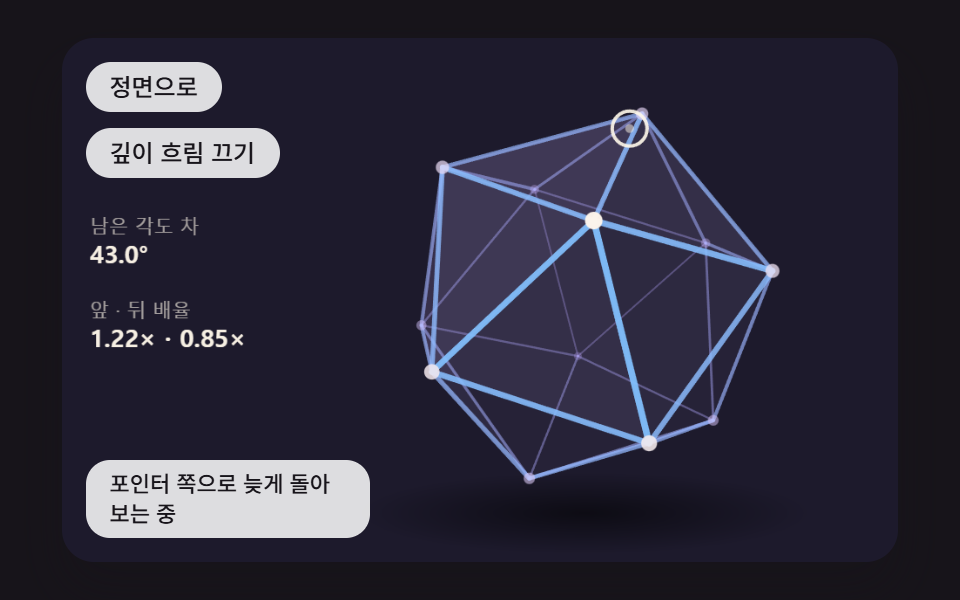 JavaScript 3D Animation: 9 Pointer-Led ModelsA 3D website can run on point coordinates and one projection formula — 02 twists a knot tube toward the pointer, 05 spri See all demos in this post
If you like this effect - similar demos
 Interactions02 A Popover That Springs Open from the Anchor PointCSS Popover: 9 Ways to Anchor, Flip and Spring
 Interactions05 A Bubble Whose Outline Wobbles on Layered Spring Modes and SettlesBubble Animation CSS: 9 Soap-Film Scenes That Pop
 Interactions06 A Weighted Coin Whose Ratio Leans Toward One FaceCoin Flip: 9 Canvas Toss Scenes