03Shortcut hint tooltip
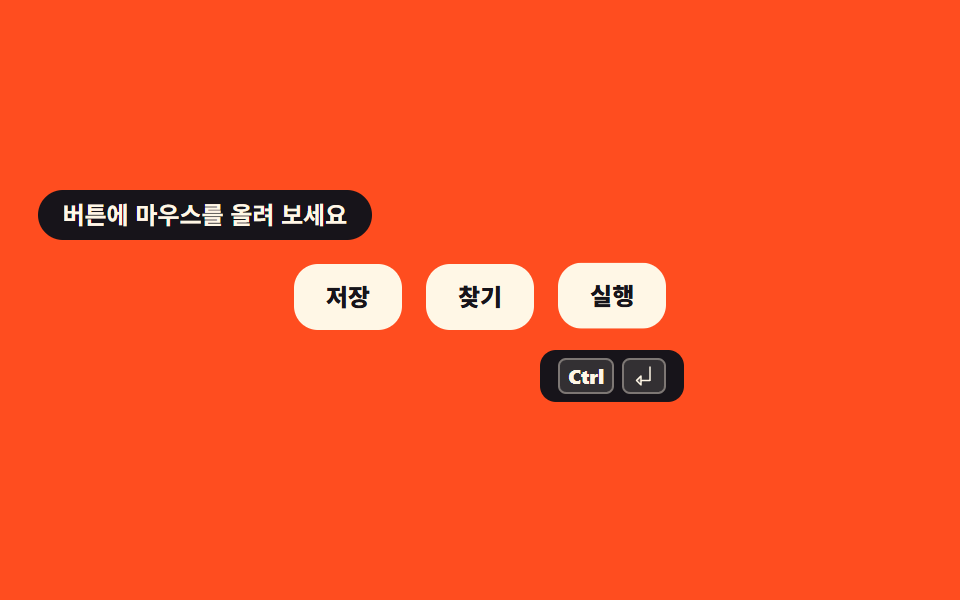
Hover a button and its shortcut floats up as a small keycap. The same value is written into aria-keyshortcuts so a screen reader announces it next to the button name.
Best forEditor toolbar buttons, save and run buttons in a document app
aria-keyshortcutstranslateYtransition
<svg width="0" height="0" style="position:absolute" aria-hidden="true">
  <defs>
    <symbol id="enter" viewBox="0 0 256 256" fill="currentColor"><path d="M96,128v96L48,176Z" opacity="0.2"/><path d="M192,24a8,8,0,0,0-8,8V168H104V128a8,8,0,0,0-13.66-5.66l-48,48a8,8,0,0,0,0,11.32l48,48A8,8,0,0,0,104,224V184h88a8,8,0,0,0,8-8V32A8,8,0,0,0,192,24ZM88,204.69,59.31,176,88,147.31Z"/></symbol>
  </defs>
</svg>
<main class="stage">
<div class="ht is-demo" id="ht">
  <p class="ht__cap">Hover a button</p>
  <div class="ht__bar" role="toolbar" aria-label="Editing tools">
    <button type="button" class="ht__btn" data-combo="s" aria-keyshortcuts="Control+S">
      <span class="ht__label">Save</span>
      <span class="ht__tip" role="tooltip"><kbd class="ht__cap1">Ctrl</kbd><kbd class="ht__cap1">S</kbd></span>
    </button>
    <button type="button" class="ht__btn" data-combo="f" aria-keyshortcuts="Control+F">
      <span class="ht__label">Find</span>
      <span class="ht__tip" role="tooltip"><kbd class="ht__cap1">Ctrl</kbd><kbd class="ht__cap1">F</kbd></span>
    </button>
    <button type="button" class="ht__btn" data-combo="enter" aria-keyshortcuts="Control+Enter">
      <span class="ht__label">Run</span>
      <span class="ht__tip" role="tooltip"><kbd class="ht__cap1">Ctrl</kbd><kbd class="ht__cap1"><svg class="ht__ico" aria-hidden="true"><use href="#enter"/></svg></kbd></span>
    </button>
  </div>
</div>
</main>
@use "../../../../site/static/demo-tokens" as *;
// 단축키 힌트 툴팁 — 버튼 아래에 그 버튼의 단축키를 키캡으로 띄운다.
// 같은 값을 HTML 의 aria-keyshortcuts 에도 적어 스크린리더가 버튼 이름과 함께 읽는다.
// 절대배치 툴팁은 부모 높이에서 빠지므로 .ht__bar 에 padding-bottom 으로 자리를 미리 잡는다 (237 실측).
// 나타남은 visibility 컷 + translateY 이동으로 — opacity 페이드는 poster 에 반투명 유령을 남긴다 (248 실측).
$duration: $dur-quick;
$easing: $ease-spring;
$color: $subject-ink;
@include stage($stage-orange);
.ht { display: flex; flex-direction: column; align-items: center; gap: $sp-3; width: 100%; }
.ht__cap {
margin: 0; align-self: flex-start; border-radius: $r-pill; padding: $sp-1 $sp-3;
// 주황 무대 위 크림 글자는 3.11:1 이라 잉크 알약 배경 위로 옮겼다 (실측)
background: $subject-ink; font-weight: 700; font-size: clamp(11px, 3vw, 12px); line-height: 1.4; color: $subject-cream;
}
.ht__bar {
display: flex; align-items: flex-start; justify-content: center; gap: $sp-3;
padding-bottom: 40px;
}
.ht__btn {
position: relative; border: 0; cursor: pointer;
background: $subject-cream; color: $color; border-radius: $r-control;
padding: $sp-2 $sp-4; font-family: inherit;
font-weight: 800; font-size: clamp(11px, 3vw, 12px); line-height: 1.4;
transition: transform $duration $easing;
}
.ht__btn:focus-visible { outline: 3px solid $subject-ink; outline-offset: 2px; }
.ht__btn.is-hit { transform: translateY(2px); }
.ht__label { pointer-events: none; }
.ht__tip {
position: absolute; top: calc(100% + 8px); left: 50%; margin-left: -36px;
display: flex; align-items: center; justify-content: center; gap: $sp-1;
width: 72px; box-sizing: border-box;
background: $color; border-radius: $r-sm; padding: $sp-1 $sp-2;
visibility: hidden; transform: translateY(4px);
transition: transform $duration $easing;
}
.ht__cap1 {
display: grid; place-items: center; box-sizing: border-box; height: 18px; min-width: 18px;
border-radius: $r-xs; border: 1px solid rgba(255, 247, 230, .36);
background: rgba(255, 247, 230, .12); color: $subject-cream;
font-family: inherit; font-weight: 800; font-size: 10px; line-height: 1; padding: 0 $sp-1;
}
.ht__ico { width: 12px; height: 12px; }
.ht__btn:hover .ht__tip,
.ht__btn:focus-visible .ht__tip { visibility: visible; transform: translateY(0); }
// ── 격자 미리보기 루프: 세 툴팁이 0.66s 씩 이어 달린다 — 항상 한 개는 떠 있다.
// 툴팁이 전부 닫히는 순간을 루프에 두면 그 빈 화면이 최대 변화 프레임이 되어 poster 가 된다 (255 실측).
.ht.is-demo .ht__tip {
animation-name: htTip; animation-duration: $dur-loop; animation-timing-function: $easing;
animation-iteration-count: infinite; animation-fill-mode: backwards;
}
.ht.is-demo .ht__btn:nth-child(1) .ht__tip { animation-delay: 0ms; }
.ht.is-demo .ht__btn:nth-child(2) .ht__tip { animation-delay: 660ms; }
.ht.is-demo .ht__btn:nth-child(3) .ht__tip { animation-delay: 1320ms; }
@keyframes htTip {
0% { visibility: visible; transform: translateY(4px); }
8%, 32% { visibility: visible; transform: translateY(0); }
33%, 100% { visibility: hidden; transform: translateY(0); }
}
.ht.is-demo .ht__btn {
animation-name: htLift; animation-duration: $dur-loop; animation-timing-function: $easing;
animation-iteration-count: infinite; animation-fill-mode: backwards;
}
.ht.is-demo .ht__btn:nth-child(1) { animation-delay: 0ms; }
.ht.is-demo .ht__btn:nth-child(2) { animation-delay: 660ms; }
.ht.is-demo .ht__btn:nth-child(3) { animation-delay: 1320ms; }
@keyframes htLift {
0% { transform: translateY(0); }
8%, 30% { transform: translateY(-2px); }
33%, 100% { transform: translateY(0); }
}
@media (max-width: 340px) {
.ht__bar { gap: $sp-1; padding-bottom: 36px; }
.ht__btn { padding: $sp-2 $sp-2; }
}
@media (prefers-reduced-motion: reduce) {
.ht.is-demo .ht__tip,
.ht.is-demo .ht__btn { animation: none !important; }
.ht__tip, .ht__btn { transition: none !important; }
}html, body {
margin: 0;
overflow: hidden;
}
.stage {
box-sizing: border-box;
min-height: 100vh;
display: grid;
place-items: center;
margin: 0;
background: #ff4d1f;
font-family: -apple-system, "Segoe UI", "Noto Sans KR", sans-serif;
padding: clamp(8px, 4vw, 24px);
}
.ht {
display: flex;
flex-direction: column;
align-items: center;
gap: 12px;
width: 100%;
}
.ht__cap {
margin: 0;
align-self: flex-start;
border-radius: 999px;
padding: 4px 12px;
background: #17141a;
font-weight: 700;
font-size: clamp(11px, 3vw, 12px);
line-height: 1.4;
color: #fff7e6;
}
.ht__bar {
display: flex;
align-items: flex-start;
justify-content: center;
gap: 12px;
padding-bottom: 40px;
}
.ht__btn {
position: relative;
border: 0;
cursor: pointer;
background: #fff7e6;
color: #17141a;
border-radius: 12px;
padding: 8px 16px;
font-family: inherit;
font-weight: 800;
font-size: clamp(11px, 3vw, 12px);
line-height: 1.4;
transition: transform 220ms cubic-bezier(0.2, 0.8, 0.2, 1);
}
.ht__btn:focus-visible {
outline: 3px solid #17141a;
outline-offset: 2px;
}
.ht__btn.is-hit {
transform: translateY(2px);
}
.ht__label {
pointer-events: none;
}
.ht__tip {
position: absolute;
top: calc(100% + 8px);
left: 50%;
margin-left: -36px;
display: flex;
align-items: center;
justify-content: center;
gap: 4px;
width: 72px;
box-sizing: border-box;
background: #17141a;
border-radius: 8px;
padding: 4px 8px;
visibility: hidden;
transform: translateY(4px);
transition: transform 220ms cubic-bezier(0.2, 0.8, 0.2, 1);
}
.ht__cap1 {
display: grid;
place-items: center;
box-sizing: border-box;
height: 18px;
min-width: 18px;
border-radius: 4px;
border: 1px solid rgba(255, 247, 230, 0.36);
background: rgba(255, 247, 230, 0.12);
color: #fff7e6;
font-family: inherit;
font-weight: 800;
font-size: 10px;
line-height: 1;
padding: 0 4px;
}
.ht__ico {
width: 12px;
height: 12px;
}
.ht__btn:hover .ht__tip,
.ht__btn:focus-visible .ht__tip {
visibility: visible;
transform: translateY(0);
}
.ht.is-demo .ht__tip {
animation-name: htTip;
animation-duration: 2s;
animation-timing-function: cubic-bezier(0.2, 0.8, 0.2, 1);
animation-iteration-count: infinite;
animation-fill-mode: backwards;
}
.ht.is-demo .ht__btn:nth-child(1) .ht__tip {
animation-delay: 0ms;
}
.ht.is-demo .ht__btn:nth-child(2) .ht__tip {
animation-delay: 660ms;
}
.ht.is-demo .ht__btn:nth-child(3) .ht__tip {
animation-delay: 1320ms;
}
@keyframes htTip {
0% {
visibility: visible;
transform: translateY(4px);
}
8%, 32% {
visibility: visible;
transform: translateY(0);
}
33%, 100% {
visibility: hidden;
transform: translateY(0);
}
}
.ht.is-demo .ht__btn {
animation-name: htLift;
animation-duration: 2s;
animation-timing-function: cubic-bezier(0.2, 0.8, 0.2, 1);
animation-iteration-count: infinite;
animation-fill-mode: backwards;
}
.ht.is-demo .ht__btn:nth-child(1) {
animation-delay: 0ms;
}
.ht.is-demo .ht__btn:nth-child(2) {
animation-delay: 660ms;
}
.ht.is-demo .ht__btn:nth-child(3) {
animation-delay: 1320ms;
}
@keyframes htLift {
0% {
transform: translateY(0);
}
8%, 30% {
transform: translateY(-2px);
}
33%, 100% {
transform: translateY(0);
}
}
@media (max-width: 340px) {
.ht__bar {
gap: 4px;
padding-bottom: 36px;
}
.ht__btn {
padding: 8px 8px;
}
}
@media (prefers-reduced-motion: reduce) {
.ht.is-demo .ht__tip,
.ht.is-demo .ht__btn {
animation: none !important;
}
.ht__tip, .ht__btn {
transition: none !important;
}
}var ht = document.getElementById('ht');
var buttons = Array.prototype.slice.call(document.querySelectorAll('.ht__btn'));
function flash(btn) {
btn.classList.add('is-hit');
setTimeout(function () { btn.classList.remove('is-hit'); }, 240);
}
buttons.forEach(function (btn) {
btn.addEventListener('pointerenter', function () { ht.classList.remove('is-demo'); });
btn.addEventListener('focus', function () { ht.classList.remove('is-demo'); });
});
// aria-keyshortcuts 에 적어 둔 조합을 실제로 눌러도 같은 버튼이 반응한다
window.addEventListener('keydown', function (e) {
if (!e.ctrlKey && !e.metaKey) { return; }
var want = e.key === 'Enter' ? 'enter' : String(e.key).toLowerCase();
for (var i = 0; i < buttons.length; i++) {
if (buttons[i].getAttribute('data-combo') === want) {
e.preventDefault();
ht.classList.remove('is-demo');
flash(buttons[i]);
return;
}
}
});// ShortcutHintTooltip — vanilla 판(run/288/demo/03-shortcut-hint-tooltip/index.html) 의 React 포트.
// 버튼마다 aria-keyshortcuts 를 달아 두고, 같은 조합을 실제로 누르면 그 버튼이 한 번 눌린다.
import { useEffect, useState } from "react";
import type { CSSProperties } from "react";
import styles from "./ShortcutHintTooltip.module.scss";
export type ShortcutHintTooltipProps = {
/** 격자 미리보기용 2초 자동 루프. 마우스를 올리거나 초점이 들어오면 꺼진다 */
demo?: boolean;
duration?: number;
easing?: string;
color?: string;
};
type Vars = CSSProperties & { "--duration"?: string; "--easing"?: string; "--color"?: string };
type Tool = { combo: string; label: string; shortcut: string; cap: string };
const TOOLS: Tool[] = [
{ combo: "s", label: "저장", shortcut: "Control+S", cap: "S" },
{ combo: "f", label: "찾기", shortcut: "Control+F", cap: "F" },
{ combo: "enter", label: "실행", shortcut: "Control+Enter", cap: "" },
];
export default function ShortcutHintTooltip({
demo = true,
duration = 220,
easing = "cubic-bezier(.2, .8, .2, 1)",
color = "#17141a",
}: ShortcutHintTooltipProps) {
const [live, setLive] = useState(demo);
const [hit, setHit] = useState("");
const vars: Vars = { "--duration": `${duration}ms`, "--easing": easing, "--color": color };
useEffect(() => {
let timer = 0;
function handleDown(e: KeyboardEvent) {
if (!e.ctrlKey && !e.metaKey) {
return;
}
const want = e.key === "Enter" ? "enter" : e.key.toLowerCase();
if (!TOOLS.some((tool) => tool.combo === want)) {
return;
}
e.preventDefault();
setLive(false);
setHit(want);
window.clearTimeout(timer);
timer = window.setTimeout(() => setHit(""), 240);
}
window.addEventListener("keydown", handleDown);
return () => {
window.clearTimeout(timer);
window.removeEventListener("keydown", handleDown);
};
}, []);
const cls = [styles.root, live ? styles.isDemo : ""].filter(Boolean).join(" ");
return (
<main className={styles.stage} style={vars}>
<svg width="0" height="0" style={{ position: "absolute" }} aria-hidden="true">
<defs>
<symbol id="enter" viewBox="0 0 256 256" fill="currentColor">
<path d="M96,128v96L48,176Z" opacity="0.2" />
<path d="M192,24a8,8,0,0,0-8,8V168H104V128a8,8,0,0,0-13.66-5.66l-48,48a8,8,0,0,0,0,11.32l48,48A8,8,0,0,0,104,224V184h88a8,8,0,0,0,8-8V32A8,8,0,0,0,192,24ZM88,204.69,59.31,176,88,147.31Z" />
</symbol>
</defs>
</svg>
<div className={cls}>
<p className={styles.cap}>버튼에 마우스를 올려 보세요</p>
<div className={styles.bar} role="toolbar" aria-label="편집 도구">
{TOOLS.map((tool) => (
<button
type="button"
key={tool.combo}
className={[styles.btn, hit === tool.combo ? styles.isHit : ""].filter(Boolean).join(" ")}
aria-keyshortcuts={tool.shortcut}
onPointerEnter={() => setLive(false)}
onFocus={() => setLive(false)}
>
<span className={styles.label}>{tool.label}</span>
<span className={styles.tip} role="tooltip">
<kbd className={styles.cap1}>Ctrl</kbd>
<kbd className={styles.cap1}>
{tool.cap === "" ? <svg className={styles.ico} aria-hidden="true"><use href="#enter" /></svg> : tool.cap}
</kbd>
</span>
</button>
))}
</div>
</div>
</main>
);
}03 Shortcut hint tooltip — Measured area 5.105% · moving frames 8/23Original by GODRICH · SCSS and React ship in the zip · Keyboard Shortcuts UI Design: 9 Working Parts
The post this demo lives in
 Keyboard Shortcuts UI Design: 9 Working PartsKeyboard shortcuts UI design is the craft of making a page answer the keyboard: keycaps, hints, recorders, help sheets. See all demos in this post