09Keycast stream
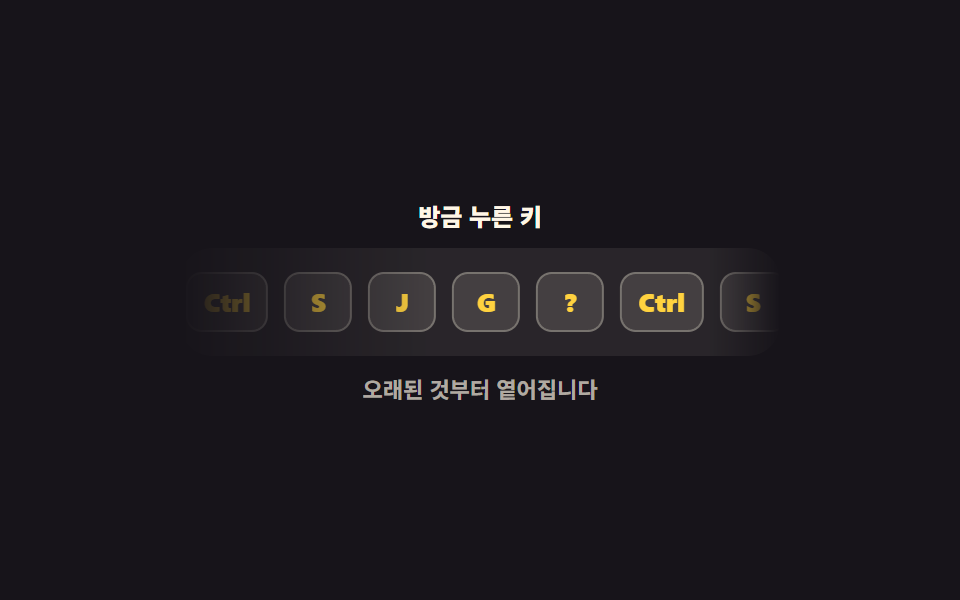
Keys you just pressed stack up in a corner, then fade and slide away oldest-first. Only the last five stay, so anyone watching a recording or a live demo can see what your hands did.
Best forScreen-recording and live-demo overlay, key display in tutorial videos
translateXmask-imagemargin-right
<main class="stage">
<div class="kt is-demo" id="kt">
  <p class="kt__cap">Keys you just pressed</p>
  <div class="kt__panel">
    <div class="kt__strip" id="strip" aria-live="polite" aria-label="Recent keys">
      <kbd class="kt__chip">Ctrl</kbd>
      <kbd class="kt__chip">S</kbd>
      <kbd class="kt__chip">J</kbd>
      <kbd class="kt__chip">G</kbd>
      <kbd class="kt__chip">?</kbd>
      <kbd class="kt__chip kt__dup" aria-hidden="true">Ctrl</kbd>
      <kbd class="kt__chip kt__dup" aria-hidden="true">S</kbd>
      <kbd class="kt__chip kt__dup" aria-hidden="true">J</kbd>
      <kbd class="kt__chip kt__dup" aria-hidden="true">G</kbd>
      <kbd class="kt__chip kt__dup" aria-hidden="true">?</kbd>
    </div>
  </div>
  <p class="kt__note">The oldest ones fade first</p>
</div>
</main>
@use "../../../../site/static/demo-tokens" as *;
// 눌린 키 흘림 표시 — 새 키는 오른쪽에서 들어오고, 오래된 키일수록 왼쪽에서 옅어지다 사라진다.
// 옅어짐은 칸마다 opacity 를 매기는 대신 판 전체에 mask-image 그라디언트를 한 번 씌워 만든다.
// 오른쪽 끝 12% 도 함께 흐리게 두어 새 키가 판 밖에서 잘린 채 튀어나오지 않는다 —
// 자리(왼쪽일수록 오래됨)가 곧 나이라 JS 는 칩을 붙이고 다섯 개를 넘으면 지우기만 하면 된다.
// 격자 미리보기(.is-demo)는 같은 다섯 칸을 한 벌 더 두고 translateX(-50%) 로 흘린다.
// 두 벌 사이 간격은 gap 이 아니라 margin-right 로 준다 — gap 은 2N 개 사이에 2N-1 개만 생겨
// -50% 가 gap 절반만큼 모자라 한 바퀴마다 튄다 (BD15).
$duration: $dur-base;
$easing: $ease-out;
$color: $stage-yellow;
@include stage($stage-ink);
.kt { display: flex; flex-direction: column; align-items: center; gap: $sp-2; width: 100%; }
.kt__cap { margin: 0; font-weight: 800; font-size: clamp(11px, 3vw, 12px); color: $subject-cream; }
.kt__panel {
// width 를 min(100%, …) 로 주면 흐름 트랙(width: max-content)이 이 칸의 max-content 기여로 새어
// 부모가 폰 폭보다 넓어진다 (이 편 320px 실측 369px — run/288/_수리전실측.json). 고정 폭 + max-width 로 기여를 못 박는다
box-sizing: border-box; width: 300px; max-width: 100%; overflow: hidden;
background: rgba(255, 247, 230, .08); border-radius: $r-card; padding: $sp-3;
mask-image: linear-gradient(to right, transparent 0, #000 42%, #000 88%, transparent 100%);
}
.kt__strip { display: flex; align-items: center; justify-content: flex-end; }
.kt__chip {
display: grid; place-items: center; box-sizing: border-box; flex: 0 0 auto;
height: 30px; min-width: 34px; padding: 0 $sp-2; margin-right: $sp-2;
border-radius: $r-sm; border: 1px solid rgba(255, 247, 230, .28);
background: rgba(255, 247, 230, .12); color: $color;
font-family: inherit; font-weight: 800; font-size: 13px; line-height: 1;
}
.kt:not(.is-demo) .kt__chip:last-child { margin-right: 0; }
.kt__chip.is-new { animation: ktEnter $duration $easing both; }
@keyframes ktEnter {
0% { transform: translateX(10px) scale(.85); }
100% { transform: translateX(0) scale(1); }
}
// 미리보기용 두 번째 벌은 사람이 키를 누르는 순간 JS 가 DOM 에서 지운다
.kt:not(.is-demo) .kt__dup { display: none; }
.kt__note { margin: 0; font-weight: 700; font-size: clamp(10px, 2.8vw, 11px); color: rgba(255, 247, 230, .66); }
// ── 격자 미리보기 루프: 열 칸(다섯 칸 × 두 벌)이 2초에 정확히 한 벌만큼 왼쪽으로 흐른다.
// 두 벌이 같은 내용이라 -50% 지점의 그림이 0% 와 같고, 이음새가 보이지 않는다.
.kt.is-demo .kt__strip {
justify-content: flex-start; width: max-content;
animation: ktFlow $dur-loop linear infinite;
}
@keyframes ktFlow {
0% { transform: translateX(0); }
100% { transform: translateX(-50%); }
}
@media (max-width: 340px) {
.kt__panel { padding: $sp-2; }
.kt__chip { height: 26px; min-width: 30px; font-size: 11px; padding: 0 $sp-1; margin-right: $sp-1; }
}
@media (prefers-reduced-motion: reduce) {
.kt.is-demo .kt__strip,
.kt__chip.is-new { animation: none !important; }
}html, body {
margin: 0;
overflow: hidden;
}
.stage {
box-sizing: border-box;
min-height: 100vh;
display: grid;
place-items: center;
margin: 0;
background: #17141a;
font-family: -apple-system, "Segoe UI", "Noto Sans KR", sans-serif;
padding: clamp(8px, 4vw, 24px);
}
.kt {
display: flex;
flex-direction: column;
align-items: center;
gap: 8px;
width: 100%;
}
.kt__cap {
margin: 0;
font-weight: 800;
font-size: clamp(11px, 3vw, 12px);
color: #fff7e6;
}
.kt__panel {
box-sizing: border-box;
width: 300px;
max-width: 100%;
overflow: hidden;
background: rgba(255, 247, 230, 0.08);
border-radius: 16px;
padding: 12px;
mask-image: linear-gradient(to right, transparent 0, #000 42%, #000 88%, transparent 100%);
}
.kt__strip {
display: flex;
align-items: center;
justify-content: flex-end;
}
.kt__chip {
display: grid;
place-items: center;
box-sizing: border-box;
flex: 0 0 auto;
height: 30px;
min-width: 34px;
padding: 0 8px;
margin-right: 8px;
border-radius: 8px;
border: 1px solid rgba(255, 247, 230, 0.28);
background: rgba(255, 247, 230, 0.12);
color: #ffd23f;
font-family: inherit;
font-weight: 800;
font-size: 13px;
line-height: 1;
}
.kt:not(.is-demo) .kt__chip:last-child {
margin-right: 0;
}
.kt__chip.is-new {
animation: ktEnter 300ms ease-out both;
}
@keyframes ktEnter {
0% {
transform: translateX(10px) scale(0.85);
}
100% {
transform: translateX(0) scale(1);
}
}
.kt:not(.is-demo) .kt__dup {
display: none;
}
.kt__note {
margin: 0;
font-weight: 700;
font-size: clamp(10px, 2.8vw, 11px);
color: rgba(255, 247, 230, 0.66);
}
.kt.is-demo .kt__strip {
justify-content: flex-start;
width: max-content;
animation: ktFlow 2s linear infinite;
}
@keyframes ktFlow {
0% {
transform: translateX(0);
}
100% {
transform: translateX(-50%);
}
}
@media (max-width: 340px) {
.kt__panel {
padding: 8px;
}
.kt__chip {
height: 26px;
min-width: 30px;
font-size: 11px;
padding: 0 4px;
margin-right: 4px;
}
}
@media (prefers-reduced-motion: reduce) {
.kt.is-demo .kt__strip,
.kt__chip.is-new {
animation: none !important;
}
}var kt = document.getElementById('kt');
var strip = document.getElementById('strip');
var MAX = 5;
function labelFor(e) {
if (e.key === ' ') { return 'Space'; }
return e.key.length === 1 ? e.key.toUpperCase() : e.key;
}
function pushKey(text) {
var chip = document.createElement('kbd');
chip.className = 'kt__chip is-new';
chip.textContent = text;
strip.appendChild(chip);
// 다섯 개를 넘으면 가장 오래된 것부터 지운다 — 화면 구석을 침범하지 않게
while (strip.children.length > MAX) {
strip.removeChild(strip.firstChild);
}
}
function dropPreviewChips() {
var dup = Array.prototype.slice.call(strip.querySelectorAll('.kt__dup'));
dup.forEach(function (node) { strip.removeChild(node); });
}
window.addEventListener('keydown', function (e) {
if (e.isComposing) { return; }
if (kt.classList.contains('is-demo')) {
kt.classList.remove('is-demo');
dropPreviewChips();
}
pushKey(labelFor(e));
});// KeycastStream — vanilla 판(run/288/demo/09-kbd-keycast-stream/index.html) 의 React 포트.
// 새 키는 오른쪽에서 들어오고 다섯 개를 넘으면 가장 오래된 것부터 빠진다. 옅어짐은 판의 mask 가 맡는다.
import { useEffect, useState } from "react";
import type { CSSProperties } from "react";
import styles from "./KeycastStream.module.scss";
export type KeycastStreamProps = {
/** 격자 미리보기용 2초 자동 루프. 사람이 키를 누르면 꺼지고 미리보기용 두 번째 벌이 빠진다 */
demo?: boolean;
duration?: number;
easing?: string;
color?: string;
};
type Vars = CSSProperties & { "--duration"?: string; "--easing"?: string; "--color"?: string };
const MAX = 5;
/** 미리보기에서 보여 주는 다섯 칸 — 흐름이 이어지도록 한 벌을 더 붙인다 */
const SEED = ["Ctrl", "S", "J", "G", "?"];
function labelFor(e: KeyboardEvent): string {
if (e.key === " ") { return "Space"; }
return e.key.length === 1 ? e.key.toUpperCase() : e.key;
}
export default function KeycastStream({
demo = true,
duration = 300,
easing = "ease-out",
color = "#ffd23f",
}: KeycastStreamProps) {
const [live, setLive] = useState(demo);
const [keys, setKeys] = useState<string[]>(SEED);
const vars: Vars = { "--duration": `${duration}ms`, "--easing": easing, "--color": color };
useEffect(() => {
function handleDown(e: KeyboardEvent) {
if (e.isComposing) { return; }
setLive(false);
const text = labelFor(e);
setKeys((prev) => prev.concat([text]).slice(-MAX));
}
window.addEventListener("keydown", handleDown);
return () => window.removeEventListener("keydown", handleDown);
}, []);
const cls = [styles.root, live ? styles.isDemo : ""].filter(Boolean).join(" ");
return (
<main className={styles.stage} style={vars}>
<div className={cls}>
<p className={styles.cap}>방금 누른 키</p>
<div className={styles.panel}>
<div className={styles.strip} aria-live="polite" aria-label="최근 누른 키">
{keys.map((text, i) => (
<kbd className={styles.chip} key={"live" + String(i) + text}>{text}</kbd>
))}
{live
? SEED.map((text, i) => (
<kbd className={[styles.chip, styles.dup].join(" ")} aria-hidden="true" key={"dup" + String(i) + text}>{text}</kbd>
))
: null}
</div>
</div>
<p className={styles.note}>오래된 것부터 옅어집니다</p>
</div>
</main>
);
}09 Keycast stream — Measured area 5.389% · moving frames 23/23Original by GODRICH · SCSS and React ship in the zip · Keyboard Shortcuts UI Design: 9 Working Parts
The post this demo lives in
 Keyboard Shortcuts UI Design: 9 Working PartsKeyboard shortcuts UI design is the craft of making a page answer the keyboard: keycaps, hints, recorders, help sheets. See all demos in this post