08Idle timeout back to home
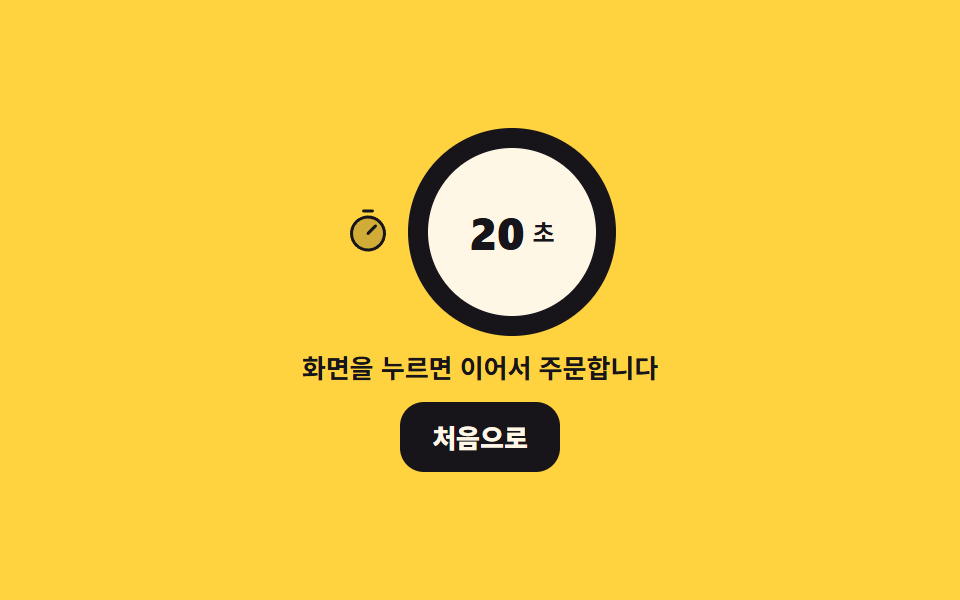
When nobody touches it, a countdown ring drains and the number drops one step at a time. An empty ring throws the order away and returns home, and any touch refills the ring.
Best forClearing the screen after a customer walks away mid-order, a terminal in a store with a long queue
@propertyconic-gradientsteps(1, end)
<main class="stage">
<div class="kt is-demo" id="kt">
  <div class="kt__top">
    <svg xmlns="http://www.w3.org/2000/svg" viewBox="0 0 256 256" fill="currentColor" class="kt__ico" aria-hidden="true"><path d="M216,136a88,88,0,1,1-88-88A88,88,0,0,1,216,136Z" opacity="0.2"/><path d="M128,40a96,96,0,1,0,96,96A96.11,96.11,0,0,0,128,40Zm0,176a80,80,0,1,1,80-80A80.09,80.09,0,0,1,128,216ZM173.66,90.34a8,8,0,0,1,0,11.32l-40,40a8,8,0,0,1-11.32-11.32l40-40A8,8,0,0,1,173.66,90.34ZM96,16a8,8,0,0,1,8-8h48a8,8,0,0,1,0,16H104A8,8,0,0,1,96,16Z"/></svg>
    <div class="kt__ring" id="ring" role="img">
      <div class="kt__face">
        <span class="kt__win"><span class="kt__nums" id="nums"><i class="kt__num">20</i><i class="kt__num">19</i><i class="kt__num">18</i><i class="kt__num">17</i><i class="kt__num">16</i><i class="kt__num">15</i><i class="kt__num">14</i><i class="kt__num">13</i><i class="kt__num">12</i><i class="kt__num">11</i><i class="kt__num">10</i><i class="kt__num">9</i><i class="kt__num">8</i><i class="kt__num">7</i><i class="kt__num">6</i><i class="kt__num">5</i><i class="kt__num">4</i><i class="kt__num">3</i><i class="kt__num">2</i><i class="kt__num">1</i><i class="kt__num">0</i></span></span>
        <i class="kt__unit"> sec</i>
      </div>
    </div>
  </div>
  <p class="kt__note" id="note">Touch the screen to keep ordering</p>
  <button type="button" class="kt__home" id="home">Start over</button>
</div>
</main>
@use "../../../../site/static/demo-tokens" as *;
// 손을 떼면 처음으로 — 남은 시간 고리가 닳고 그 안의 숫자가 한 칸씩 떨어진다.
// 고리는 conic-gradient 한 장이고 각도는 @property 로 등록한 --sweep 이 움직인다.
// inherits: false 로 등록했으니 값은 그 고리 요소 자신에 놓는다 (부모나 트랙에 걸면 아무 일도 안 일어난다).
// 숫자는 0 부터 20 까지를 세로로 쌓은 줄을 창 하나로 들여다보는 방식이라, 남은 초 --left 만 바꾸면
// 줄이 그만큼 밀린다. 미리보기에서는 그 밀림을 steps(1, end) 컷으로 해서 초가 "떨어지게" 보이고,
// 사람이 만진 뒤에는 JS 가 같은 --left 에 1초마다 값을 놓는다 — 표시하는 코드는 한 벌이다.
// 고리(연속)와 숫자(컷)가 같은 2초 시계를 쓰고, 다 닳은 장면을 보여 준 뒤 87.5% 에 되돌아온다
// (24장 표본의 마지막은 95.8% 지점이라 복귀는 90% 안에 끝나야 찍힌다).
$duration: $dur-loop;
$easing: $ease-spring;
$color: $subject-ink;
$ring-size: clamp(76px, 26vw, 104px);
$ring-band: 10px; // 고리 두께 (안쪽 원의 inset)
$digit-h: clamp(24px, 8vw, 32px); // 숫자 한 칸 높이 = 창 높이. 둘이 어긋나면 줄이 반 칸씩 선다
$total: 20; // 처음 남은 초. JS 의 TOTAL 과 같은 값
@include stage($stage-yellow);
// 노랑 무대 위 글자는 먹이다. 크림·흰 글자는 노랑 위에서 AA(4.5:1) 에 한참 못 미친다
@property --sweep {
syntax: "<angle>";
inherits: false;
initial-value: 360deg;
}
@property --left {
syntax: "<integer>";
inherits: false;
initial-value: 20;
}
.kt { display: grid; justify-items: center; gap: $sp-2; width: 100%; max-width: 400px; }
.kt__top { display: flex; align-items: center; gap: $sp-2; }
.kt__ico { width: clamp(20px, 5vw, 24px); height: clamp(20px, 5vw, 24px); flex: 0 0 auto; color: $color; }
.kt__ring {
position: relative; flex: 0 0 auto;
width: $ring-size; height: $ring-size; border-radius: 50%;
background: conic-gradient($color var(--sweep), rgba(23, 20, 26, .16) 0);
}
.kt__face {
position: absolute; inset: $ring-band; border-radius: 50%;
display: flex; align-items: center; justify-content: center; gap: $sp-1;
background: $subject-cream;
}
.kt__win { display: block; height: $digit-h; overflow: hidden; }
// 0 부터 20 까지 스물한 칸이 쌓인 줄. 남은 초가 줄면 그만큼 위로 밀린다
.kt__nums { display: block; transform: translateY(calc((#{$total} - var(--left)) * -100% / 21)); }
.kt__num {
display: block; height: $digit-h; line-height: $digit-h; text-align: center;
font-style: normal; font-weight: 800; font-size: clamp(17px, 5.6vw, 23px); color: $subject-ink;
}
.kt__unit {
font-style: normal; font-weight: 700; font-size: clamp(10px, 3vw, 12px); line-height: 1;
color: $subject-ink;
}
.kt__note {
margin: 0; text-align: center;
font-weight: 700; font-size: clamp(11px, 3.2vw, 13px); line-height: 1.3; color: $subject-ink;
}
.kt__home {
padding: $sp-2 $sp-4; cursor: pointer; border: 0; border-radius: $r-control;
background: $subject-ink; color: $subject-cream;
font-family: inherit; font-weight: 800; font-size: clamp(11px, 3vw, 13px);
transition: transform $dur-quick $easing;
}
.kt__home:active { transform: translateY(2px); }
.kt__home:focus-visible { outline: 3px solid $color; outline-offset: 3px; }
// ── 미리보기 루프 ────────────────────────────────────────────────
// 고리는 연속으로 닳는다 (0 → 60%), 다 닳은 자리를 잠깐 보여 주고 (60 → 75%), 87.5% 에 다시 찬다.
.kt.is-demo .kt__ring {
animation-name: ktSweep; animation-duration: $duration;
animation-timing-function: linear; animation-iteration-count: infinite;
}
@keyframes ktSweep {
0% { --sweep: 360deg; }
60% { --sweep: 0deg; }
75% { --sweep: 0deg; }
87.5% { --sweep: 360deg; }
100% { --sweep: 360deg; }
}
// 숫자는 컷이다. 20 → 15 → 10 → 5 → 0 이 한 프레임에 갈린다 — 보간하면 중간 프레임에 반 칸이 선다
.kt.is-demo .kt__nums {
animation-name: ktLeft; animation-duration: $duration;
animation-timing-function: steps(1, end); animation-iteration-count: infinite;
}
@keyframes ktLeft {
0% { --left: 20; }
15% { --left: 15; }
30% { --left: 10; }
45% { --left: 5; }
60% { --left: 0; }
87.5% { --left: 20; }
100% { --left: 20; }
}
@media (max-width: 340px) {
.kt { gap: $sp-1; }
.kt__home { padding: $sp-1 $sp-3; }
}
@media (prefers-reduced-motion: reduce) {
.kt.is-demo .kt__ring,
.kt.is-demo .kt__nums { animation: none !important; }
// 움직임 없이 일곱 칸쯤 닳은 고리와 그 숫자를 세워 둔다
.kt.is-demo .kt__ring { --sweep: 234deg !important; }
.kt.is-demo .kt__nums { --left: 13 !important; }
}html, body {
margin: 0;
overflow: hidden;
}
.stage {
box-sizing: border-box;
min-height: 100vh;
display: grid;
place-items: center;
margin: 0;
background: #ffd23f;
font-family: -apple-system, "Segoe UI", "Noto Sans KR", sans-serif;
padding: clamp(8px, 4vw, 24px);
}
@property --sweep {
syntax: "<angle>";
inherits: false;
initial-value: 360deg;
}
@property --left {
syntax: "<integer>";
inherits: false;
initial-value: 20;
}
.kt {
display: grid;
justify-items: center;
gap: 8px;
width: 100%;
max-width: 400px;
}
.kt__top {
display: flex;
align-items: center;
gap: 8px;
}
.kt__ico {
width: clamp(20px, 5vw, 24px);
height: clamp(20px, 5vw, 24px);
flex: 0 0 auto;
color: #17141a;
}
.kt__ring {
position: relative;
flex: 0 0 auto;
width: clamp(76px, 26vw, 104px);
height: clamp(76px, 26vw, 104px);
border-radius: 50%;
background: conic-gradient(#17141a var(--sweep), rgba(23, 20, 26, 0.16) 0);
}
.kt__face {
position: absolute;
inset: 10px;
border-radius: 50%;
display: flex;
align-items: center;
justify-content: center;
gap: 4px;
background: #fff7e6;
}
.kt__win {
display: block;
height: clamp(24px, 8vw, 32px);
overflow: hidden;
}
.kt__nums {
display: block;
transform: translateY(calc((20 - var(--left)) * -100% / 21));
}
.kt__num {
display: block;
height: clamp(24px, 8vw, 32px);
line-height: clamp(24px, 8vw, 32px);
text-align: center;
font-style: normal;
font-weight: 800;
font-size: clamp(17px, 5.6vw, 23px);
color: #17141a;
}
.kt__unit {
font-style: normal;
font-weight: 700;
font-size: clamp(10px, 3vw, 12px);
line-height: 1;
color: #17141a;
}
.kt__note {
margin: 0;
text-align: center;
font-weight: 700;
font-size: clamp(11px, 3.2vw, 13px);
line-height: 1.3;
color: #17141a;
}
.kt__home {
padding: 8px 16px;
cursor: pointer;
border: 0;
border-radius: 12px;
background: #17141a;
color: #fff7e6;
font-family: inherit;
font-weight: 800;
font-size: clamp(11px, 3vw, 13px);
transition: transform 220ms cubic-bezier(0.2, 0.8, 0.2, 1);
}
.kt__home:active {
transform: translateY(2px);
}
.kt__home:focus-visible {
outline: 3px solid #17141a;
outline-offset: 3px;
}
.kt.is-demo .kt__ring {
animation-name: ktSweep;
animation-duration: 2s;
animation-timing-function: linear;
animation-iteration-count: infinite;
}
@keyframes ktSweep {
0% {
--sweep: 360deg;
}
60% {
--sweep: 0deg;
}
75% {
--sweep: 0deg;
}
87.5% {
--sweep: 360deg;
}
100% {
--sweep: 360deg;
}
}
.kt.is-demo .kt__nums {
animation-name: ktLeft;
animation-duration: 2s;
animation-timing-function: steps(1, end);
animation-iteration-count: infinite;
}
@keyframes ktLeft {
0% {
--left: 20;
}
15% {
--left: 15;
}
30% {
--left: 10;
}
45% {
--left: 5;
}
60% {
--left: 0;
}
87.5% {
--left: 20;
}
100% {
--left: 20;
}
}
@media (max-width: 340px) {
.kt {
gap: 4px;
}
.kt__home {
padding: 4px 12px;
}
}
@media (prefers-reduced-motion: reduce) {
.kt.is-demo .kt__ring,
.kt.is-demo .kt__nums {
animation: none !important;
}
.kt.is-demo .kt__ring {
--sweep: 234deg !important;
}
.kt.is-demo .kt__nums {
--left: 13 !important;
}
}// 손을 떼면 Start over — 아무도 안 만지면 남은 시간 고리가 닳고 숫자가 한 칸씩 떨어진다.
// 미리보기 루프(.is-demo)는 CSS 키프레임이고 여기 카운트다운은 setInterval 이다. 둘은 별개 코드다 —
// 사람이 화면을 만지는 순간 루프를 떼고, 그때부터 보이는 값은 전부 이 코드가 놓는다.
// --sweep(고리 각도)과 --left(남은 sec)는 @property 에 inherits: false 로 등록했다.
// 상속을 끊었으니 값은 부모가 아니라 그 값을 쓰는 요소 자신에 놓아야 한다.
var TOTAL = 20; // 처음 남은 sec. 고리 한 바퀴가 이 값이다
var TICK = 1000; // 1초마다 한 칸
var RING_LABEL = '{n} sec left';
var NOTE_IDLE = 'Touch the screen to keep ordering';
var NOTE_RESET = 'Your picks were cleared and the screen went home';
var kt = document.getElementById('kt');
var ring = document.getElementById('ring');
var nums = document.getElementById('nums');
var note = document.getElementById('note');
var home = document.getElementById('home');
var left = TOTAL;
function paint() {
ring.style.setProperty('--sweep', (360 * left / TOTAL) + 'deg');
nums.style.setProperty('--left', String(left));
ring.setAttribute('aria-label', RING_LABEL.replace('{n}', String(left)));
}
function reset(text) {
left = TOTAL;
note.textContent = text;
paint();
}
function tick() {
left = left - 1;
if (left <= 0) { reset(NOTE_RESET); return; } // 다 닳으면 고른 것을 버리고 첫 화면 상태로
paint();
}
function touch() {
kt.classList.remove('is-demo'); // 사람이 만지면 미리보기 루프를 뗀다
reset(NOTE_IDLE);
}
paint();
setInterval(tick, TICK);
document.addEventListener('pointerdown', touch);
document.addEventListener('keydown', touch);
home.addEventListener('click', function () { reset(NOTE_RESET); });// TimeoutReturnHome — vanilla 판(run/298/demo/08-kiosk-timeout-return-home/index.html) 의 React 포트.
// 아무도 안 만지면 남은 시간 고리가 닳고 숫자가 한 칸씩 떨어진다.
// 미리보기 루프(.isDemo)는 CSS 키프레임이고 여기 카운트다운은 setInterval 이다. 둘은 별개 코드다 —
// 사람이 화면을 만지는 순간 루프를 떼고, 그때부터 보이는 값은 전부 이 코드가 놓는다.
// --sweep(고리 각도)과 --left(남은 초)는 짝 scss 에서 @property 에 inherits: false 로 등록했다.
// 상속을 끊었으니 값은 부모가 아니라 그 값을 쓰는 요소 자신에 놓는다 (고리에 --sweep, 숫자 줄에 --left).
import { useEffect, useRef, useState } from "react";
import type { CSSProperties } from "react";
import styles from "./TimeoutReturnHome.module.scss";
export type TimeoutReturnHomeProps = {
duration?: number;
easing?: string;
color?: string;
};
type Vars = CSSProperties & {
"--duration"?: string;
"--easing"?: string;
"--color"?: string;
};
type RingVars = CSSProperties & { "--sweep"?: string };
type NumsVars = CSSProperties & { "--left"?: string };
// useRef 는 T | null 을 돌려준다. 처음부터 값이 있고 절대 비지 않는 상자는 이렇게 좁혀 쓴다
type Box<T> = { current: T };
const TOTAL = 20; // 처음 남은 초. 고리 한 바퀴가 이 값이다
const TICK = 1000; // 1초마다 한 칸
const RING_LABEL = "남은 시간 {n}초";
const NOTE_IDLE = "화면을 누르면 이어서 주문합니다";
const NOTE_RESET = "고른 것을 지우고 첫 화면으로 돌아갔습니다";
const HOME_LABEL = "처음으로";
const UNIT = "초";
// 20 부터 0 까지 쌓아 둔 스물한 칸. 창 하나로 그중 한 칸만 들여다본다
const DIGITS: number[] = [];
for (let n = TOTAL; n >= 0; n--) DIGITS.push(n);
export default function TimeoutReturnHome({
duration = 2000,
easing = "cubic-bezier(.2, .8, .2, 1)",
color = "#17141a",
}: TimeoutReturnHomeProps) {
const leftRef = useRef<number>(TOTAL) as Box<number>;
const [left, setLeft] = useState(TOTAL);
const [note, setNote] = useState(NOTE_IDLE);
const [demo, setDemo] = useState(true);
const vars: Vars = { "--duration": `${duration}ms`, "--easing": easing, "--color": color };
const ringVars: RingVars = { "--sweep": `${360 * left / TOTAL}deg` };
const numsVars: NumsVars = { "--left": String(left) };
function reset(text: string): void {
leftRef.current = TOTAL;
setLeft(TOTAL);
setNote(text);
}
function touch(): void {
setDemo(false); // 사람이 만지면 미리보기 루프를 뗀다
reset(NOTE_IDLE);
}
useEffect(() => {
const id = setInterval(() => {
const next = leftRef.current - 1;
if (next <= 0) { reset(NOTE_RESET); return; } // 다 닳으면 고른 것을 버리고 첫 화면 상태로
leftRef.current = next;
setLeft(next);
}, TICK);
document.addEventListener("pointerdown", touch);
document.addEventListener("keydown", touch);
return () => {
clearInterval(id);
document.removeEventListener("pointerdown", touch);
document.removeEventListener("keydown", touch);
};
}, []);
const cls = [styles.root, demo ? styles.isDemo : ""].filter(Boolean).join(" ");
return (
<main className={styles.stage}>
<div className={cls} style={vars}>
<div className={styles.top}>
<svg xmlns="http://www.w3.org/2000/svg" viewBox="0 0 256 256" fill="currentColor" className={styles.ico} aria-hidden="true"><path d="M216,136a88,88,0,1,1-88-88A88,88,0,0,1,216,136Z" opacity="0.2"/><path d="M128,40a96,96,0,1,0,96,96A96.11,96.11,0,0,0,128,40Zm0,176a80,80,0,1,1,80-80A80.09,80.09,0,0,1,128,216ZM173.66,90.34a8,8,0,0,1,0,11.32l-40,40a8,8,0,0,1-11.32-11.32l40-40A8,8,0,0,1,173.66,90.34ZM96,16a8,8,0,0,1,8-8h48a8,8,0,0,1,0,16H104A8,8,0,0,1,96,16Z"/></svg>
<div className={styles.ring} role="img" aria-label={RING_LABEL.replace("{n}", String(left))} style={ringVars}>
<div className={styles.face}>
<span className={styles.win}>
<span className={styles.nums} style={numsVars}>
{DIGITS.map((n) => (
<i className={styles.num} key={n}>{n}</i>
))}
</span>
</span>
<i className={styles.unit}>{UNIT}</i>
</div>
</div>
</div>
<p className={styles.note}>{note}</p>
<button type="button" className={styles.home} onClick={() => reset(NOTE_RESET)}>{HOME_LABEL}</button>
</div>
</main>
);
}08 Idle timeout back to home — Measured area 2.486% · moving frames 18/23Original by GODRICH · SCSS and React ship in the zip · Kiosk UI Design: 9 Finger-Sized Order Screens
The post this demo lives in
 Kiosk UI Design: 9 Finger-Sized Order ScreensKiosk UI design is the craft of handing a standing stranger one decision per screen. These nine finger-sized order scree See all demos in this post