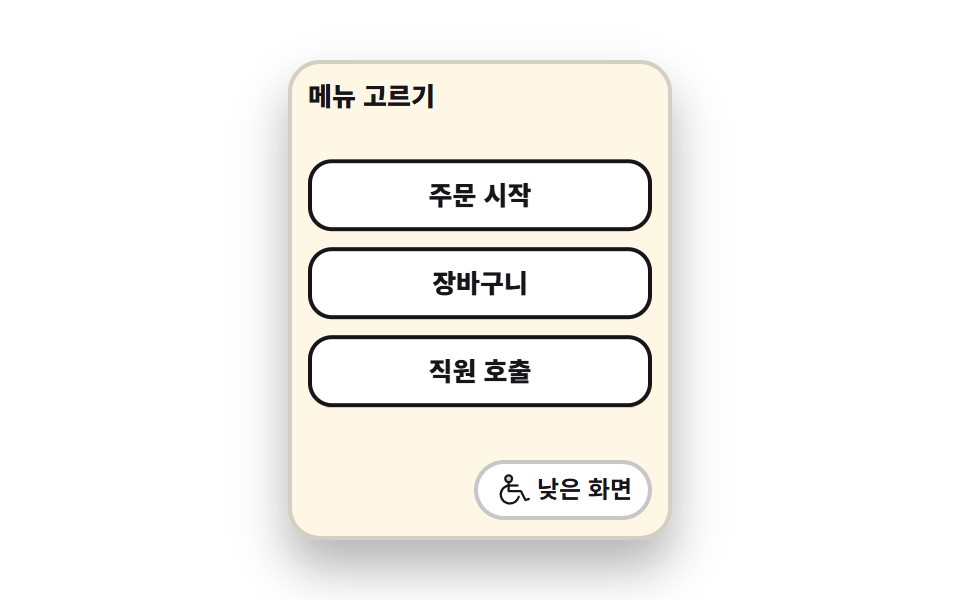
09Low reach mode
The button cluster drops from the top of the screen to the bottom and the labels step up one size. It matches a seated eye level while the tap targets keep their size.
Best forA low-layout switch for wheelchair users, a terminal setting for shorter users
aria-pressedtranslateYclamp
<main class="stage">
<div class="lr is-demo" id="lr">
  <div class="lr__frame">
    <p class="lr__title">Pick a menu</p>
    <div class="lr__body">
      <ul class="lr__group" id="group">
        <li><button type="button" class="lr__btn"><span class="lr__label">Start order</span></button></li>
        <li><button type="button" class="lr__btn"><span class="lr__label">Cart</span></button></li>
        <li><button type="button" class="lr__btn"><span class="lr__label">Call staff</span></button></li>
      </ul>
    </div>
    <div class="lr__foot">
      <button type="button" class="lr__toggle" id="toggle" aria-pressed="false">
        <svg xmlns="http://www.w3.org/2000/svg" viewBox="0 0 256 256" fill="currentColor" class="lr__ico" aria-hidden="true"><path d="M128,48a24,24,0,1,1-24-24A24,24,0,0,1,128,48Z" opacity="0.2"/><path d="M255.59,189.47a8,8,0,0,0-10.12-5.06l-17.42,5.81-28.9-57.8A8,8,0,0,0,192,128H112V104h56a8,8,0,0,0,0-16H112V79a32,32,0,1,0-16,0V89.81A72,72,0,0,0,112,232c33.52,0,63.69-22.71,71.75-54a8,8,0,1,0-15.5-4C162.09,198,137.91,216,112,216A56,56,0,0,1,96,106.34V136a8,8,0,0,0,8,8h83.05l29.79,59.58a8,8,0,0,0,9.69,4l24-8A8,8,0,0,0,255.59,189.47ZM88,48a16,16,0,1,1,16,16A16,16,0,0,1,88,48Z"/></svg>
        <span class="lr__toggleLabel">Low reach</span>
      </button>
    </div>
  </div>
</div>
</main>
@use "../../../../site/static/demo-tokens" as *;
// 낮은 화면 모드 — 세로로 긴 키오스크 틀 안에서 버튼 묶음이 위쪽에서 아래쪽으로 통째로 내려앉는다.
// 내려앉는 거리는 $drop 한 값이다. 묶음 아래에 같은 값만큼 자리를 미리 비워 두었으므로
// translateY($drop) 이면 묶음이 정확히 바닥에 닿는다 (레이아웃을 다시 계산하지 않는다).
// 글자 크기는 보간이 애매해서 steps(1, end) 컷으로 갈리고, 전환 버튼의 눌림 표시도 같은 시각표에 올린다.
// 누르는 칸의 높이($btn-h)는 두 모드에서 같다 — 앉은 눈높이로 내리는 것이지 칸을 줄이는 것이 아니다.
// 실제 조작은 transition 이 맡고 미리보기 루프만 키프레임이라, 두 경로가 같은 자리에서 만나게
// 눌림 표시를 mixin 하나로 묶어 둔다.
$duration: $dur-loop;
$easing: $ease-spring;
$color: $subject-blue;
$drop: clamp(20px, 7vw, 36px); // 묶음이 내려앉는 거리 = 묶음 아래 비워 둔 자리
$btn-h: clamp(24px, 8vw, 36px); // 누르는 칸 높이. 모드가 바뀌어도 이 값은 그대로다
$label-sm: clamp(11px, 3.2vw, 13px); // 기본 글자
$label-lg: clamp(13px, 3.8vw, 16px); // 낮은 화면 모드의 한 단계 큰 글자
@include stage($stage-paper);
@mixin toggle-off {
border-color: rgba(23, 20, 26, .24);
background: $stage-paper;
color: $subject-ink;
}
@mixin toggle-on {
border-color: $subject-ink;
background: $subject-ink;
color: $subject-cream;
}
.lr { display: grid; place-items: center; width: 100%; }
// 세로로 긴 틀. 높이는 내용이 정한다 — 묶음 + 비워 둔 자리 + 전환 줄
.lr__frame {
box-sizing: border-box; width: clamp(152px, 42vw, 192px);
display: grid; gap: $sp-2;
padding: $sp-2; border: 2px solid rgba(23, 20, 26, .18); border-radius: $r-card;
background: $subject-cream; box-shadow: $shadow-raised;
}
.lr__title {
margin: 0; font-weight: 800; font-size: clamp(11px, 3.2vw, 13px); line-height: 1.2; color: $subject-ink;
}
.lr__body { padding-bottom: $drop; }
.lr__group {
display: grid; gap: $sp-2; margin: 0; padding: 0; list-style: none;
transform: translateY(0); transition: transform $dur-base $easing;
}
.lr.is-low .lr__group { transform: translateY($drop); }
.lr__btn {
display: flex; align-items: center; justify-content: center;
width: 100%; min-height: $btn-h; padding: $sp-1 $sp-2; cursor: pointer;
border: 2px solid $subject-ink; border-radius: $r-control;
background: $stage-paper; color: $subject-ink; font-family: inherit;
}
.lr__btn:focus-visible { outline: 3px solid $color; outline-offset: 2px; }
.lr__label { font-weight: 800; font-size: $label-sm; line-height: 1.1; }
.lr.is-low .lr__label { font-size: $label-lg; }
.lr__foot { display: flex; justify-content: flex-end; }
.lr__toggle {
display: inline-flex; align-items: center; gap: $sp-1;
padding: $sp-1 $sp-2; cursor: pointer; border-width: 2px; border-style: solid; border-radius: $r-pill;
font-family: inherit; font-weight: 700; font-size: clamp(10px, 2.8vw, 12px); line-height: 1.2;
@include toggle-off;
}
.lr__toggle[aria-pressed="true"] { @include toggle-on; }
.lr__toggle:focus-visible { outline: 3px solid $color; outline-offset: 2px; }
.lr__ico { width: clamp(14px, 4vw, 18px); height: clamp(14px, 4vw, 18px); flex: 0 0 auto; }
// ── 미리보기 루프 ────────────────────────────────────────────────
// 묶음이 8 → 44% 동안 내려앉고, **바닥에 닿은 44% 에** 글자와 눌림 표시가 한 프레임에 갈린다.
// 컷을 내려앉기 전에 두면 poster(앞 장과 가장 크게 달라진 장)가 "켜졌는데 아직 위에 있는" 어중간한
// 장면으로 뽑힌다 — 상태 교체는 움직임이 끝난 뒤로 미룬다 (242-06 과 같은 계열).
// 바닥에 선 자리를 68% 까지 보여 주고 88% 에 원래 자리로 돌아온다 — 복귀는 90% 안이다.
.lr.is-demo .lr__group {
animation-name: lrDrop; animation-duration: $duration;
animation-timing-function: $easing; animation-iteration-count: infinite;
}
@keyframes lrDrop {
0%, 8% { transform: translateY(0); }
44%, 68% { transform: translateY($drop); }
88%, 100% { transform: translateY(0); }
}
.lr.is-demo .lr__label {
animation-name: lrLabel; animation-duration: $duration;
animation-timing-function: steps(1, end); animation-iteration-count: infinite;
}
@keyframes lrLabel {
0% { font-size: $label-sm; }
44% { font-size: $label-lg; }
68%, 100% { font-size: $label-sm; }
}
.lr.is-demo .lr__toggle {
animation-name: lrToggle; animation-duration: $duration;
animation-timing-function: steps(1, end); animation-iteration-count: infinite;
}
@keyframes lrToggle {
0% { @include toggle-off; }
44% { @include toggle-on; }
68%, 100% { @include toggle-off; }
}
@media (max-width: 340px) {
// 좁은 화면에서는 간격을 올리지 않는다 — 320×200 의 세로 여유는 174px 뿐이다
.lr__frame { gap: $sp-1; padding: $sp-1; }
.lr__group { gap: $sp-1; }
}
@media (prefers-reduced-motion: reduce) {
.lr.is-demo .lr__group,
.lr.is-demo .lr__label,
.lr.is-demo .lr__toggle { animation: none !important; }
// 움직임 없이 낮은 배치로 내려앉은 상태를 세워 둔다 — 이 데모가 주장하는 자리다
.lr.is-demo .lr__group { transform: translateY($drop) !important; }
.lr.is-demo .lr__label { font-size: $label-lg !important; }
.lr.is-demo .lr__toggle {
border-color: $subject-ink !important; background: $subject-ink !important; color: $subject-cream !important;
}
}html, body {
margin: 0;
overflow: hidden;
}
.stage {
box-sizing: border-box;
min-height: 100vh;
display: grid;
place-items: center;
margin: 0;
background: #ffffff;
font-family: -apple-system, "Segoe UI", "Noto Sans KR", sans-serif;
padding: clamp(8px, 4vw, 24px);
}
.lr {
display: grid;
place-items: center;
width: 100%;
}
.lr__frame {
box-sizing: border-box;
width: clamp(152px, 42vw, 192px);
display: grid;
gap: 8px;
padding: 8px;
border: 2px solid rgba(23, 20, 26, 0.18);
border-radius: 16px;
background: #fff7e6;
box-shadow: 0 14px 24px rgba(23, 20, 26, 0.32);
}
.lr__title {
margin: 0;
font-weight: 800;
font-size: clamp(11px, 3.2vw, 13px);
line-height: 1.2;
color: #17141a;
}
.lr__body {
padding-bottom: clamp(20px, 7vw, 36px);
}
.lr__group {
display: grid;
gap: 8px;
margin: 0;
padding: 0;
list-style: none;
transform: translateY(0);
transition: transform 300ms cubic-bezier(0.2, 0.8, 0.2, 1);
}
.lr.is-low .lr__group {
transform: translateY(clamp(20px, 7vw, 36px));
}
.lr__btn {
display: flex;
align-items: center;
justify-content: center;
width: 100%;
min-height: clamp(24px, 8vw, 36px);
padding: 4px 8px;
cursor: pointer;
border: 2px solid #17141a;
border-radius: 12px;
background: #ffffff;
color: #17141a;
font-family: inherit;
}
.lr__btn:focus-visible {
outline: 3px solid #2f6df6;
outline-offset: 2px;
}
.lr__label {
font-weight: 800;
font-size: clamp(11px, 3.2vw, 13px);
line-height: 1.1;
}
.lr.is-low .lr__label {
font-size: clamp(13px, 3.8vw, 16px);
}
.lr__foot {
display: flex;
justify-content: flex-end;
}
.lr__toggle {
display: inline-flex;
align-items: center;
gap: 4px;
padding: 4px 8px;
cursor: pointer;
border-width: 2px;
border-style: solid;
border-radius: 999px;
font-family: inherit;
font-weight: 700;
font-size: clamp(10px, 2.8vw, 12px);
line-height: 1.2;
border-color: rgba(23, 20, 26, 0.24);
background: #ffffff;
color: #17141a;
}
.lr__toggle[aria-pressed=true] {
border-color: #17141a;
background: #17141a;
color: #fff7e6;
}
.lr__toggle:focus-visible {
outline: 3px solid #2f6df6;
outline-offset: 2px;
}
.lr__ico {
width: clamp(14px, 4vw, 18px);
height: clamp(14px, 4vw, 18px);
flex: 0 0 auto;
}
.lr.is-demo .lr__group {
animation-name: lrDrop;
animation-duration: 2s;
animation-timing-function: cubic-bezier(0.2, 0.8, 0.2, 1);
animation-iteration-count: infinite;
}
@keyframes lrDrop {
0%, 8% {
transform: translateY(0);
}
44%, 68% {
transform: translateY(clamp(20px, 7vw, 36px));
}
88%, 100% {
transform: translateY(0);
}
}
.lr.is-demo .lr__label {
animation-name: lrLabel;
animation-duration: 2s;
animation-timing-function: steps(1, end);
animation-iteration-count: infinite;
}
@keyframes lrLabel {
0% {
font-size: clamp(11px, 3.2vw, 13px);
}
44% {
font-size: clamp(13px, 3.8vw, 16px);
}
68%, 100% {
font-size: clamp(11px, 3.2vw, 13px);
}
}
.lr.is-demo .lr__toggle {
animation-name: lrToggle;
animation-duration: 2s;
animation-timing-function: steps(1, end);
animation-iteration-count: infinite;
}
@keyframes lrToggle {
0% {
border-color: rgba(23, 20, 26, 0.24);
background: #ffffff;
color: #17141a;
}
44% {
border-color: #17141a;
background: #17141a;
color: #fff7e6;
}
68%, 100% {
border-color: rgba(23, 20, 26, 0.24);
background: #ffffff;
color: #17141a;
}
}
@media (max-width: 340px) {
.lr__frame {
gap: 4px;
padding: 4px;
}
.lr__group {
gap: 4px;
}
}
@media (prefers-reduced-motion: reduce) {
.lr.is-demo .lr__group,
.lr.is-demo .lr__label,
.lr.is-demo .lr__toggle {
animation: none !important;
}
.lr.is-demo .lr__group {
transform: translateY(clamp(20px, 7vw, 36px)) !important;
}
.lr.is-demo .lr__label {
font-size: clamp(13px, 3.8vw, 16px) !important;
}
.lr.is-demo .lr__toggle {
border-color: #17141a !important;
background: #17141a !important;
color: #fff7e6 !important;
}
}// Low reach 모드 — 버튼 묶음이 화면 위쪽에서 아래쪽으로 통째로 내려앉고 글자가 한 단계 커진다.
// 앉은 눈높이에 맞추는 것이 목적이라 누르는 칸의 높이는 그대로 둔다 (글자만 커진다).
// 미리보기 루프(.is-demo)는 CSS 키프레임이고, 사람이 전환 버튼을 누르면 여기서 루프를 떼고
// is-low 클래스와 aria-pressed 를 뒤집는다 — 내려앉는 움직임은 그때부터 transition 이 맡는다.
var lr = document.getElementById('lr');
var toggle = document.getElementById('toggle');
function setLow(on) {
lr.classList.remove('is-demo');
lr.classList.toggle('is-low', on);
toggle.setAttribute('aria-pressed', on ? 'true' : 'false');
}
// <button> 은 클릭과 Enter·Space 가 모두 click 으로 온다 — 키보드 경로를 따로 둘 필요가 없다
toggle.addEventListener('click', function () {
setLow(toggle.getAttribute('aria-pressed') !== 'true');
});// LowReachMode — vanilla 판(run/298/demo/09-kiosk-low-reach-mode/index.html) 의 React 포트.
// 버튼 묶음이 화면 위쪽에서 아래쪽으로 통째로 내려앉고 글자가 한 단계 커진다.
// 앉은 눈높이에 맞추는 것이 목적이라 누르는 칸의 높이는 그대로 둔다 (글자만 커진다).
// 미리보기 루프(.isDemo)는 CSS 키프레임이고, 사람이 전환 버튼을 누르면 여기서 루프를 떼고
// isLow 클래스와 aria-pressed 를 뒤집는다 — 내려앉는 움직임은 그때부터 transition 이 맡는다.
import { useState } from "react";
import type { CSSProperties } from "react";
import styles from "./LowReachMode.module.scss";
export type LowReachModeProps = {
duration?: number;
easing?: string;
color?: string;
};
type Vars = CSSProperties & {
"--duration"?: string;
"--easing"?: string;
"--color"?: string;
};
const FRAME_TITLE = "메뉴 고르기";
const TOGGLE_LABEL = "낮은 화면";
const MENU = ["주문 시작", "장바구니", "직원 호출"];
export default function LowReachMode({
duration = 2000,
easing = "cubic-bezier(.2, .8, .2, 1)",
color = "#2f6df6",
}: LowReachModeProps) {
const [demo, setDemo] = useState(true);
const [low, setLow] = useState(false);
const vars: Vars = { "--duration": `${duration}ms`, "--easing": easing, "--color": color };
// <button> 은 클릭과 Enter·Space 가 모두 click 으로 온다 — 키보드 경로를 따로 둘 필요가 없다
function onToggle(): void {
setDemo(false);
setLow(!low);
}
const cls = [styles.root, demo ? styles.isDemo : "", low ? styles.isLow : ""].filter(Boolean).join(" ");
return (
<main className={styles.stage}>
<div className={cls} style={vars}>
<div className={styles.frame}>
<p className={styles.title}>{FRAME_TITLE}</p>
<div className={styles.body}>
<ul className={styles.group}>
{MENU.map((item) => (
<li key={item}>
<button type="button" className={styles.btn}><span className={styles.label}>{item}</span></button>
</li>
))}
</ul>
</div>
<div className={styles.foot}>
<button type="button" className={styles.toggle} aria-pressed={low ? "true" : "false"} onClick={onToggle}>
<svg xmlns="http://www.w3.org/2000/svg" viewBox="0 0 256 256" fill="currentColor" className={styles.ico} aria-hidden="true"><path d="M128,48a24,24,0,1,1-24-24A24,24,0,0,1,128,48Z" opacity="0.2"/><path d="M255.59,189.47a8,8,0,0,0-10.12-5.06l-17.42,5.81-28.9-57.8A8,8,0,0,0,192,128H112V104h56a8,8,0,0,0,0-16H112V79a32,32,0,1,0-16,0V89.81A72,72,0,0,0,112,232c33.52,0,63.69-22.71,71.75-54a8,8,0,1,0-15.5-4C162.09,198,137.91,216,112,216A56,56,0,0,1,96,106.34V136a8,8,0,0,0,8,8h83.05l29.79,59.58a8,8,0,0,0,9.69,4l24-8A8,8,0,0,0,255.59,189.47ZM88,48a16,16,0,1,1,16,16A16,16,0,0,1,88,48Z"/></svg>
<span className={styles.toggleLabel}>{TOGGLE_LABEL}</span>
</button>
</div>
</div>
</div>
</main>
);
}09 Low reach mode — Measured area 20.542% · moving frames 15/23Original by GODRICH · SCSS and React ship in the zip · Kiosk UI Design: 9 Finger-Sized Order Screens
The post this demo lives in
 Kiosk UI Design: 9 Finger-Sized Order ScreensKiosk UI design is the craft of handing a standing stranger one decision per screen. These nine finger-sized order scree See all demos in this post