03The Afterglow Left on a Dot That Switched Off
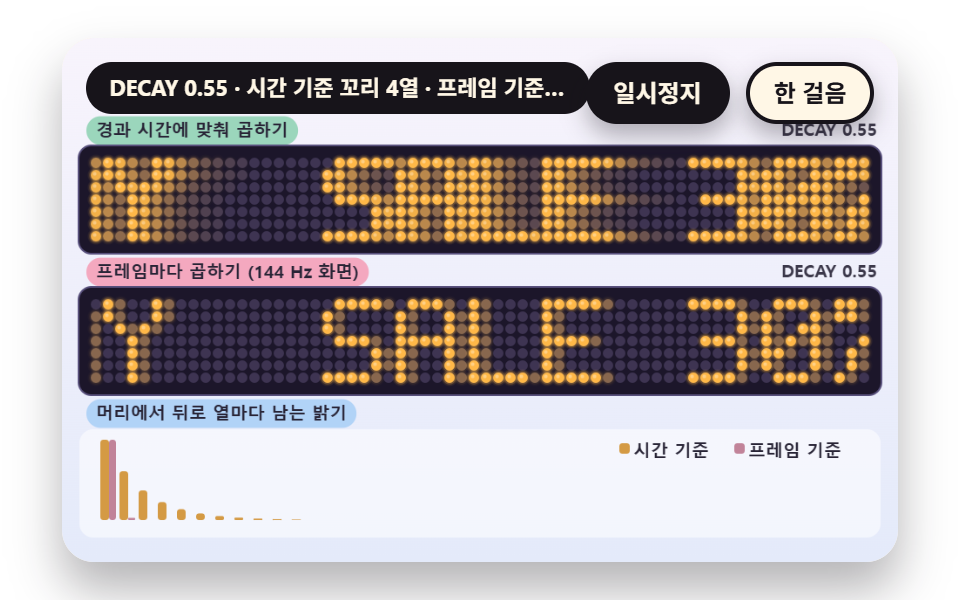
Each dot keeps its own brightness, jumping straight to 1 when lit and multiplying the previous brightness by DECAY once it goes dark. The top board multiplies by elapsed time so the tail is the same on any refresh rate, the middle board multiplies on every frame of a 144 Hz screen so the tail gets shorter, and the bars below compare the brightness left per column behind the head in both ways.
Best forAfterimage handling that makes motion look smooth to the eye
DECAYlevelfadeStep
<main class="stage">
<div class="vj is-demo" id="vj">
  <div class="vj__pad" data-role="pad" tabindex="0" role="application" aria-label="LED sign demo stage - Enter or Space pauses, N steps once, R restarts">
    <canvas class="vj__canvas" data-role="canvas" width="480" height="300" role="img" aria-label="Behind two boards where the phrase SALE 30% OFF TODAY flows, the afterglow tail of dark dots remains. The top board multiplies the decay by elapsed time so the tail stays constant, the middle board multiplies the decay on every frame of a 144 Hz screen so the tail gets shorter. Below, the brightness left per column behind the head is compared as two bars."></canvas>
  </div>
  <p class="vj__status" data-role="status" aria-live="off">LED sign demo</p>
  <div class="vj__ctrl">
    <button class="vj__pause" data-role="pause" type="button" aria-pressed="false">Pause</button>
    <button class="vj__step" data-role="step" type="button">Step</button>
  </div>
  <p class="vj__done" data-role="done" role="status" aria-live="polite"></p>
</div>
</main>
@use "../../../../site/static/demo-tokens" as *;
@include stage($stage-paper);
.vj {
position: relative;
width: min(92vw, calc(160vh - 12.8vw));
aspect-ratio: 480 / 300;
margin: 0 auto;
border-radius: $r-card;
overflow: hidden;
box-shadow: $shadow-raised;
background: $subject-cream;
}
// 무대 상자 — 여기서 시작한 터치만 칸 누르기로 읽는다(touch-action: none 은 이 상자에만). 무대 밖 터치는 페이지 스크롤 그대로
.vj__pad {
position: absolute;
inset: 0;
border-radius: inherit;
outline: none;
touch-action: none;
cursor: pointer;
}
// 바깥 .vj 가 넘침을 자르므로 포커스 테두리는 안쪽으로 들인다
.vj__pad:focus-visible {
outline: 3px solid $subject-ink;
outline-offset: -3px;
}
.vj__canvas {
position: absolute;
inset: 0;
display: block;
width: 100%;
height: 100%;
}
.vj__ctrl {
position: absolute;
right: $sp-3;
top: $sp-3;
display: flex;
gap: $sp-2;
}
.vj__pause,
.vj__step {
padding: $sp-1 $sp-3;
border: 2px solid $subject-ink;
border-radius: $r-pill;
background: $subject-ink;
color: $subject-cream;
font-family: inherit;
font-weight: 700;
font-size: 12px;
line-height: 1.6;
cursor: pointer;
box-shadow: $shadow-press;
transition: transform $dur-quick $ease-spring;
}
.vj__step {
background: $subject-cream;
color: $subject-ink;
}
// 스크린리더에만 읽히는 완료 알림
.vj__done {
position: absolute;
width: 1px;
height: 1px;
margin: 0;
overflow: hidden;
clip-path: inset(50%);
white-space: nowrap;
}
// 눌린 상태(멈춤) — 바탕과 글자색을 뒤집어 aria-pressed 가 눈에도 보이게
.vj__pause[aria-pressed="true"] {
background: $subject-cream;
color: $subject-ink;
}
.vj__pause:hover,
.vj__step:hover {
transform: translateY(-2px);
}
.vj__pause:active,
.vj__step:active {
transform: translateY(1px);
}
.vj__pause:focus-visible,
.vj__step:focus-visible {
outline: 3px solid $subject-ink;
outline-offset: 3px;
}
// 상태 줄 — 지금 장면의 수치를 글자로. 시연 중에는 aria-live off, 사람이 처음 손대면 polite
.vj__status {
position: absolute;
left: $sp-3;
top: $sp-3;
max-width: calc(100% - 190px);
margin: 0;
padding: $sp-1 $sp-3;
border-radius: $r-pill;
background: $subject-ink;
color: $subject-cream;
font-weight: 700;
font-size: 11px;
line-height: 1.6;
white-space: nowrap;
overflow: hidden;
text-overflow: ellipsis;
pointer-events: none;
}
@media (max-width: 340px) {
.vj__pause,
.vj__step,
.vj__status { font-size: 10px; padding: 0 $sp-2; }
}
// 움직임 줄이기 — 장면은 스크립트가 정지 장면 한 장으로 멈춘다. 버튼도 떠오르지 않게
@media (prefers-reduced-motion: reduce) {
.vj__pause,
.vj__step { transition: none !important; }
.vj__pause:hover,
.vj__pause:active,
.vj__step:hover,
.vj__step:active { transform: none !important; }
}html, body {
margin: 0;
overflow: hidden;
}
.stage {
box-sizing: border-box;
min-height: 100vh;
display: grid;
place-items: center;
margin: 0;
background: #ffffff;
font-family: -apple-system, "Segoe UI", "Noto Sans KR", sans-serif;
padding: clamp(8px, 4vw, 24px);
}
.vj {
position: relative;
width: min(92vw, 160vh - 12.8vw);
aspect-ratio: 480/300;
margin: 0 auto;
border-radius: 16px;
overflow: hidden;
box-shadow: 0 14px 24px rgba(23, 20, 26, 0.32);
background: #fff7e6;
}
.vj__pad {
position: absolute;
inset: 0;
border-radius: inherit;
outline: none;
touch-action: none;
cursor: pointer;
}
.vj__pad:focus-visible {
outline: 3px solid #17141a;
outline-offset: -3px;
}
.vj__canvas {
position: absolute;
inset: 0;
display: block;
width: 100%;
height: 100%;
}
.vj__ctrl {
position: absolute;
right: 12px;
top: 12px;
display: flex;
gap: 8px;
}
.vj__pause,
.vj__step {
padding: 4px 12px;
border: 2px solid #17141a;
border-radius: 999px;
background: #17141a;
color: #fff7e6;
font-family: inherit;
font-weight: 700;
font-size: 12px;
line-height: 1.6;
cursor: pointer;
box-shadow: 0 6px 12px rgba(23, 20, 26, 0.32);
transition: transform 220ms cubic-bezier(0.2, 0.8, 0.2, 1);
}
.vj__step {
background: #fff7e6;
color: #17141a;
}
.vj__done {
position: absolute;
width: 1px;
height: 1px;
margin: 0;
overflow: hidden;
clip-path: inset(50%);
white-space: nowrap;
}
.vj__pause[aria-pressed=true] {
background: #fff7e6;
color: #17141a;
}
.vj__pause:hover,
.vj__step:hover {
transform: translateY(-2px);
}
.vj__pause:active,
.vj__step:active {
transform: translateY(1px);
}
.vj__pause:focus-visible,
.vj__step:focus-visible {
outline: 3px solid #17141a;
outline-offset: 3px;
}
.vj__status {
position: absolute;
left: 12px;
top: 12px;
max-width: calc(100% - 190px);
margin: 0;
padding: 4px 12px;
border-radius: 999px;
background: #17141a;
color: #fff7e6;
font-weight: 700;
font-size: 11px;
line-height: 1.6;
white-space: nowrap;
overflow: hidden;
text-overflow: ellipsis;
pointer-events: none;
}
@media (max-width: 340px) {
.vj__pause,
.vj__step,
.vj__status {
font-size: 10px;
padding: 0 8px;
}
}
@media (prefers-reduced-motion: reduce) {
.vj__pause,
.vj__step {
transition: none !important;
}
.vj__pause:hover,
.vj__pause:active,
.vj__step:hover,
.vj__step:active {
transform: none !important;
}
}(function () {
const root = document.getElementById("vj");
if (!root) return;
// 무대 좌표 — 캔버스 안 계산은 늘 480×300. 화면에 보이는 크기와 상관없다
const W = 480;
const H = 300;
const TAU = Math.PI * 2;
function clamp(v, lo, hi) { return v < lo ? lo : (v > hi ? hi : v); }
function lerp(a, b, k) { return a + (b - a) * k; }
function ease(x) { const c = clamp(x, 0, 1); return c * c * (3 - 2 * c); }
// 파스텔 바깥 무대 — 판 바깥은 연한 면, 글자는 짙은 잉크
const BG_TOP = [248, 244, 252];
const BG_BOT = [228, 234, 250];
const INK = [40, 36, 54];
const PAPER = [250, 246, 240];
const WHITE = [255, 255, 255];
const ROSE = [244, 162, 186];
const MINT = [148, 212, 182];
const SKY = [172, 208, 246];
const BUTTER = [250, 228, 150];
// 전광판 판 — 짙은 남보라 바탕, 꺼진 점은 바탕보다 한 단계 밝은 보라, 켜진 점은 호박색(LED 색은 기능색이라 채도를 유지한다)
const BOARD = [28, 22, 42];
const BOARD_EDGE = [88, 80, 124];
const DOT_OFF = [62, 52, 82];
const AMBER = [255, 184, 72];
const AMBER_HI = [255, 232, 170];
function mix(a, b, k) { return [lerp(a[0], b[0], k), lerp(a[1], b[1], k), lerp(a[2], b[2], k)]; }
function rgba(c, a) {
return 'rgba(' + Math.round(clamp(c[0], 0, 255)) + ',' + Math.round(clamp(c[1], 0, 255)) + ',' + Math.round(clamp(c[2], 0, 255)) + ',' + clamp(a, 0, 1).toFixed(3) + ')';
}
// 장면 시계(초)·판 반복 번호
let sceneT = 0;
let lap = 0;
// ── 5x7 점 글꼴 — 자체 정의. 글자 하나는 가로 5칸 세로 7칸의 0·1 표이고 1 인 칸이 켜진다 ──
const GLYPH_W = 5;
const GLYPH_H = 7;
// 글자와 글자 사이 빈 col 한 줄
const LETTER_GAP = 1;
const ADV = GLYPH_W + LETTER_GAP;
const GL = {
' ': ['00000', '00000', '00000', '00000', '00000', '00000', '00000'],
'A': ['01110', '10001', '10001', '11111', '10001', '10001', '10001'],
'B': ['11110', '10001', '10001', '11110', '10001', '10001', '11110'],
'C': ['01110', '10001', '10000', '10000', '10000', '10001', '01110'],
'D': ['11110', '10001', '10001', '10001', '10001', '10001', '11110'],
'E': ['11111', '10000', '10000', '11110', '10000', '10000', '11111'],
'F': ['11111', '10000', '10000', '11110', '10000', '10000', '10000'],
'G': ['01110', '10001', '10000', '10111', '10001', '10001', '01111'],
'H': ['10001', '10001', '10001', '11111', '10001', '10001', '10001'],
'I': ['01110', '00100', '00100', '00100', '00100', '00100', '01110'],
'J': ['00111', '00010', '00010', '00010', '00010', '10010', '01100'],
'K': ['10001', '10010', '10100', '11000', '10100', '10010', '10001'],
'L': ['10000', '10000', '10000', '10000', '10000', '10000', '11111'],
'M': ['10001', '11011', '10101', '10101', '10001', '10001', '10001'],
'N': ['10001', '11001', '10101', '10011', '10001', '10001', '10001'],
'O': ['01110', '10001', '10001', '10001', '10001', '10001', '01110'],
'P': ['11110', '10001', '10001', '11110', '10000', '10000', '10000'],
'Q': ['01110', '10001', '10001', '10001', '10101', '10010', '01101'],
'R': ['11110', '10001', '10001', '11110', '10100', '10010', '10001'],
'S': ['01111', '10000', '10000', '01110', '00001', '00001', '11110'],
'T': ['11111', '00100', '00100', '00100', '00100', '00100', '00100'],
'U': ['10001', '10001', '10001', '10001', '10001', '10001', '01110'],
'V': ['10001', '10001', '10001', '10001', '10001', '01010', '00100'],
'W': ['10001', '10001', '10001', '10101', '10101', '11011', '10001'],
'X': ['10001', '10001', '01010', '00100', '01010', '10001', '10001'],
'Y': ['10001', '10001', '01010', '00100', '00100', '00100', '00100'],
'Z': ['11111', '00001', '00010', '00100', '01000', '10000', '11111'],
'0': ['01110', '10001', '10011', '10101', '11001', '10001', '01110'],
'1': ['00100', '01100', '00100', '00100', '00100', '00100', '01110'],
'2': ['01110', '10001', '00001', '00010', '00100', '01000', '11111'],
'3': ['11110', '00001', '00001', '01110', '00001', '00001', '11110'],
'4': ['00010', '00110', '01010', '10010', '11111', '00010', '00010'],
'5': ['11111', '10000', '11110', '00001', '00001', '10001', '01110'],
'6': ['00110', '01000', '10000', '11110', '10001', '10001', '01110'],
'7': ['11111', '00001', '00010', '00100', '01000', '01000', '01000'],
'8': ['01110', '10001', '10001', '01110', '10001', '10001', '01110'],
'9': ['01110', '10001', '10001', '01111', '00001', '00010', '01100'],
'!': ['00100', '00100', '00100', '00100', '00100', '00000', '00100'],
'.': ['00000', '00000', '00000', '00000', '00000', '01100', '01100'],
'-': ['00000', '00000', '00000', '11111', '00000', '00000', '00000'],
':': ['00000', '01100', '01100', '00000', '01100', '01100', '00000'],
'%': ['11001', '11010', '00010', '00100', '01000', '01011', '10011'],
'+': ['00000', '00100', '00100', '11111', '00100', '00100', '00000'],
'>': ['10000', '01000', '00100', '00010', '00100', '01000', '10000'],
'*': ['00000', '10101', '01110', '11111', '01110', '10101', '00000'],
};
function glyphRows(ch) { return GL[ch] ? GL[ch] : GL[' ']; }
// 문구를 col 목록으로 편다 — col 하나는 7 비트 정수(0 번 비트가 맨 윗줄). 글자 사이 빈 열도 목록에 들어 있고 맨 끝 빈 열은 뺀다
function colsOf(s) {
const out = [];
for (let i = 0; i < s.length; i += 1) {
const rows = glyphRows(s.charAt(i));
for (let c = 0; c < GLYPH_W; c += 1) {
let v = 0;
for (let r = 0; r < GLYPH_H; r += 1) {
if (rows[r].charAt(c) === '1') {
v |= 1 << r;
}
}
out.push(v);
}
if (i < s.length - 1) {
out.push(0);
}
}
return out;
}
function bitOf(cols, c, r) {
return c < 0 || c >= cols.length ? 0 : (cols[c] >> r) & 1;
}
// 순환 목록 — 문구 col 뒤에 gap 개의 빈 열을 이어 한 바퀴를 만든다. 번호는 한 바퀴 길이로 나머지를 취한다
function loopBit(cols, gap, c, r) {
const n = cols.length + gap;
const k = ((c % n) + n) % n;
return k < cols.length ? (cols[k] >> r) & 1 : 0;
}
// ── 판 그리기 도구 ──
let ctxRef = null;
const BOARD_PAD = 6;
function boardW(n, pitch) { return n * pitch + 2 * BOARD_PAD; }
// 점 하나 — halo 가 0 이면 가장자리가 딱 떨어지는 점, 0 보다 크면 그 배율 반지름의 옅은 테두리가 한 겹 더 번진다
function dotOne(cx, cy, rad, round, halo, c, a) {
if (a <= 0.01 || !ctxRef) {
return;
}
const ctx = ctxRef;
if (round) {
if (halo > 0) {
ctx.beginPath();
ctx.arc(cx, cy, rad * halo, 0, TAU);
ctx.fillStyle = rgba(c, a * 0.28);
ctx.fill();
}
ctx.beginPath();
ctx.arc(cx, cy, rad, 0, TAU);
ctx.fillStyle = rgba(c, a);
ctx.fill();
}
else {
const s = rad * 1.75;
if (halo > 0) {
ctx.fillStyle = rgba(c, a * 0.28);
ctx.fillRect(cx - s * halo / 2, cy - s * halo / 2, s * halo, s * halo);
}
ctx.fillStyle = rgba(c, a);
ctx.fillRect(cx - s / 2, cy - s / 2, s, s);
}
}
// 판 한 장 — 점 cols×rows. lvAt(c, r) 이 0 에서 1 의 밝기를 돌려주고 colAt 이 있으면 열마다 색을 고른다
function board(x, y, cols, rows, pitch, fill, round, halo, lvAt, colAt) {
if (!ctxRef) {
return;
}
const ctx = ctxRef;
const w = boardW(cols, pitch);
const h = boardW(rows, pitch);
ctx.beginPath();
ctx.roundRect(x - 1, y - 1, w + 2, h + 2, 8);
ctx.fillStyle = rgba(BOARD_EDGE, 1);
ctx.fill();
ctx.beginPath();
ctx.roundRect(x, y, w, h, 7);
ctx.fillStyle = rgba(BOARD, 1);
ctx.fill();
const rad = pitch * fill;
for (let c = 0; c < cols; c += 1) {
const col = colAt ? colAt(c) : AMBER;
const cx = x + BOARD_PAD + (c + 0.5) * pitch;
for (let r = 0; r < rows; r += 1) {
const cy = y + BOARD_PAD + (r + 0.5) * pitch;
dotOne(cx, cy, rad, round, 0, DOT_OFF, 1);
const lv = lvAt(c, r);
if (lv > 0.03) {
dotOne(cx, cy, rad * 1.6, true, 0, col, 0.1 * lv);
dotOne(cx, cy, rad, round, halo, col, lv);
if (lv > 0.85 && round) {
dotOne(cx - rad * 0.25, cy - rad * 0.25, rad * 0.34, true, 0, mix(col, [255, 255, 255], 0.6), 0.55 * lv);
}
}
}
}
}
// ── 바깥 무대 도구 ──
const FONT_STACK = 'system-ui, -apple-system, "Segoe UI", "Noto Sans KR", sans-serif';
function box(x, y, w, h, r, c, a) {
if (!ctxRef || w <= 0.2 || h <= 0.2 || a <= 0) {
return;
}
ctxRef.beginPath();
ctxRef.roundRect(x, y, w, h, Math.max(0, Math.min(r, w / 2, h / 2)));
ctxRef.fillStyle = rgba(c, a);
ctxRef.fill();
}
function text(s, x, y, c, a, px, weight, align) {
if (!ctxRef) {
return;
}
ctxRef.font = weight + ' ' + px + 'px ' + FONT_STACK;
ctxRef.textAlign = align;
ctxRef.textBaseline = 'middle';
ctxRef.fillStyle = rgba(c, a);
ctxRef.fillText(s, x, y);
}
// 글자 이름표 — 바탕 알약 위에 글자
function tag(s, x, y, bg, fg, px, align) {
if (!ctxRef) {
return;
}
ctxRef.font = '700 ' + px + 'px ' + FONT_STACK;
const w = ctxRef.measureText(s).width + px * 1.1;
const left = align === 'center' ? x - w / 2 : (align === 'right' ? x - w : x);
box(left, y - px * 0.82, w, px * 1.64, px * 0.82, bg, 0.92);
text(s, left + w / 2, y + 0.5, fg, 1, px, 700, 'center');
}
function skyFill() {
if (!ctxRef) {
return;
}
const g = ctxRef.createLinearGradient(0, 0, 0, H);
g.addColorStop(0, rgba(BG_TOP, 1));
g.addColorStop(1, rgba(BG_BOT, 1));
ctxRef.fillStyle = g;
ctxRef.fillRect(0, 0, W, H);
}
// 판 줄 배치 — 위 46 은 상태 줄·단추 자리. 블록 하나는 이름표 줄 + 판 한 장
const VIEW_X = 10;
const VIEW_COLS = 64;
const PITCH = 7;
const BLOCK_Y = [46, 127, 208];
// 블록 y0 에서 이름표는 y0+7, 판은 y0+16
function blockTag(i, s, bg, fg) { tag(s, VIEW_X + 4, BLOCK_Y[i] + 7, bg, fg, 10, 'left'); }
function blockRight(i, s) { text(s, VIEW_X + boardW(VIEW_COLS, PITCH) - 2, BLOCK_Y[i] + 7, INK, 0.9, 10, 700, 'right'); }
function boardY(i) { return BLOCK_Y[i] + 16; }
const canvasEl = root.querySelector('[data-role="canvas"]');
const padEl = root.querySelector('[data-role="pad"]');
const pauseEl = root.querySelector('[data-role="pause"]');
const statusEl = root.querySelector('[data-role="status"]');
const stepEl = root.querySelector('[data-role="step"]');
const doneEl = root.querySelector('[data-role="done"]');
const ctxRaw = canvasEl ? canvasEl.getContext('2d') : null;
if (!canvasEl || !ctxRaw || !pauseEl || !padEl || !stepEl || !doneEl) {
return;
}
const cv = canvasEl;
const ctx = ctxRaw;
ctxRef = ctx;
const pauseBtn = pauseEl;
const stepBtn = stepEl;
const doneP = doneEl;
const pad = padEl;
let dpr = 1;
function fitCanvas() {
// 배율은 2 에서 자른다 — 배율 3 기기에서 화소가 2.25배로 늘지 않게
dpr = Math.min(window.devicePixelRatio || 1, 2);
cv.width = Math.round(W * dpr);
cv.height = Math.round(H * dpr);
ctx.setTransform(dpr, 0, 0, dpr, 0, 0);
}
let shownStatus = '';
function pushStatus(s) {
if (!statusEl || s === shownStatus) {
return;
}
shownStatus = s;
statusEl.textContent = s;
}
// 화면 낭독기로 가는 문장 — 문구·모드가 바뀔 때만 달라진다. 보이는 상태 줄(statusText)은 따로 두어 계속 바뀌어도 읽히지 않는다
let spoken = '';
function pushSpeak(s) {
if (s === spoken) {
return;
}
spoken = s;
doneP.textContent = s;
}
let paused = false;
const reduceQuery = window.matchMedia('(prefers-reduced-motion: reduce)');
// 페이지를 연 채 움직임 줄이기 설정을 바꿔도 change 리스너가 다시 읽는다
let still = reduceQuery.matches;
// 자동 시연 표시 — 사람이 처음 손대면 떼고 낭독용 문장을 읽히기 시작한다
let demo = root.classList.contains('is-demo');
const off = new AbortController();
function wake() {
if (!demo) {
return;
}
demo = false;
root.classList.remove('is-demo');
pushSpeak(speakText());
}
// 한 판 시연이 끝났음을 스크린리더에 한 번만 알린다 — 판이 되풀이돼도 다시 읽지 않는다
let doneSaid = false;
function checkDone() {
if (!doneSaid && sceneT >= LAP_S - 0.6) {
doneSaid = true;
pushSpeak(speakText());
}
}
function advance(dt) {
sceneT += dt;
if (sceneT >= LAP_S) {
sceneT -= LAP_S;
lap += 1;
build();
}
update(dt);
}
// 첫 판은 START_S 만큼 앞서 시작한다 — 글자가 이미 흐르는 중인 장면에서 보인다
function runTo(t) {
while (sceneT < t - 1e-6) {
advance(Math.min(1 / 30, t - sceneT));
}
}
function begin() {
sceneT = 0;
build();
if (lap === 0 && !still) {
runTo(START_S);
}
}
const DT_MAX = 0.05;
const STEP_S = 0.4;
function showNow() {
draw();
pushStatus(statusText());
if (!demo) {
pushSpeak(speakText());
}
checkDone();
}
let rafId = 0;
let lastTs = -1;
function frame(ts) {
if (still || paused) {
rafId = 0;
return;
}
if (lastTs < 0) {
lastTs = ts;
}
const dt = Math.min((ts - lastTs) / 1000, DT_MAX);
lastTs = ts;
if (dt > 0) {
advance(dt);
}
showNow();
rafId = window.requestAnimationFrame(frame);
}
function startLoop() {
if (rafId) {
return;
}
// 멈췄던 사이의 시간을 첫 프레임 dt 로 넘기지 않는다
lastTs = -1;
rafId = window.requestAnimationFrame(frame);
}
function stopLoop() {
if (rafId) {
window.cancelAnimationFrame(rafId);
rafId = 0;
}
}
// 움직임 줄이기 — 루프 없이 글자가 읽히는 정지 장면 한 장
function showRest() {
stopLoop();
lap = 0;
sceneT = 0;
build();
runTo(REST_S);
showNow();
}
function play() {
begin();
showNow();
if (!paused) {
startLoop();
}
}
function togglePause() {
paused = !paused;
pauseBtn.setAttribute('aria-pressed', paused ? 'true' : 'false');
wake();
if (paused) {
stopLoop();
}
else if (!still) {
startLoop();
}
}
function restart() {
wake();
doneSaid = false;
lap += 1;
begin();
showNow();
}
// Step — 멈춘 채 장면 시계를 0.4 초 앞으로
function stepOnce() {
wake();
if (!paused) {
paused = true;
pauseBtn.setAttribute('aria-pressed', 'true');
stopLoop();
}
runTo(sceneT + STEP_S);
showNow();
}
pauseBtn.addEventListener('click', togglePause, { signal: off.signal });
stepBtn.addEventListener('click', stepOnce, { signal: off.signal });
// 키보드 — 무대에 포커스가 있을 때만. Enter·Space·P 는 Pause, N 은 Step, R 은 처음부터
pad.addEventListener('keydown', function (e) {
if (e.altKey || e.ctrlKey || e.metaKey) {
return;
}
const k = e.key;
if (k === 'Enter' || k === ' ' || k === 'p' || k === 'P') {
e.preventDefault();
togglePause();
}
else if (k === 'n' || k === 'N') {
e.preventDefault();
stepOnce();
}
else if (k === 'r' || k === 'R') {
e.preventDefault();
restart();
}
}, { signal: off.signal });
// 마우스·터치 — 무대를 누르면 Pause 토글
pad.addEventListener('click', function () { togglePause(); }, { signal: off.signal });
// 탭이 숨으면 멈추고, 돌아오면 시계를 다시 맞춰 시작 — 숨은 동안의 몇 초가 한 프레임에 몰리지 않게
document.addEventListener('visibilitychange', function () {
if (document.hidden) {
stopLoop();
}
else if (!paused && !still) {
startLoop();
}
}, { signal: off.signal });
// 설정이 바뀌면 — 켜지면 정지 장면 한 장, 꺼지면 다시 움직인다
reduceQuery.addEventListener('change', function () {
still = reduceQuery.matches;
if (still) {
showRest();
}
else {
lap = 0;
play();
}
}, { signal: off.signal });
window.addEventListener('resize', function () {
fitCanvas();
showNow();
}, { signal: off.signal });
// ── 03 꺼진 점에 남는 잔광 — 점마다 밝기를 남기고 경과 시간으로 곱해 줄인다 / 프레임마다 곱하면 화면 주사율에 따라 꼬리가 달라진다 ────
// 켜져야 할 점은 밝기 1 로 올리고, 꺼져야 할 점은 이전 밝기에 감쇠를 곱한다. 감쇠는 TICK_S 초 동안 DECAY 배로 정의해 경과 시간 h 에는 DECAY 의 h / TICK_S 제곱을 곱한다
const SCROLL_SPEED = 24;
const DECAY = 0.55;
const TICK_S = 0.05;
const FRAME_HZ = 144;
const GAP_COLS = 13;
const LEAD = 4;
const LAP_S = 10;
const START_S = 2.4;
const REST_S = 3.1;
const MSG = 'SALE 30% OFF TODAY';
const cols = colsOf(MSG);
const N = VIEW_COLS * GLYPH_H;
const levelT = [];
const levelF = [];
for (let i = 0; i < N; i += 1) {
levelT.push(0);
levelF.push(0);
}
function clock() { return sceneT + lap * LAP_S; }
function build() { return; }
// 켜져야 하면 1, 아니면 이전 밝기에 k 를 곱한 값 — 둘 중 큰 쪽
function fadeStep(level, target, k) {
const v = level * k;
return target > v ? target : v;
}
function targetAt(t, c, r) {
return loopBit(cols, GAP_COLS, Math.floor(t * SCROLL_SPEED) + c - LEAD, r);
}
function update(dt) {
const t1 = clock();
// 경과 Time basis — 60 분의 1 초 조각마다 h 에 맞는 감쇠를 곱한다
const nT = Math.max(1, Math.ceil(dt * 60));
const hT = dt / nT;
const kT = Math.pow(DECAY, hT / TICK_S);
for (let s = 0; s < nT; s += 1) {
const t = t1 - dt + (s + 1) * hT;
for (let c = 0; c < VIEW_COLS; c += 1) {
for (let r = 0; r < GLYPH_H; r += 1) {
const i = c * GLYPH_H + r;
levelT[i] = fadeStep(levelT[i], targetAt(t, c, r), kT);
}
}
}
// Frame basis — 144 Hz 화면의 프레임마다 DECAY 를 한 번씩 곱한다
const nF = Math.max(1, Math.ceil(dt * FRAME_HZ));
const hF = dt / nF;
for (let s = 0; s < nF; s += 1) {
const t = t1 - dt + (s + 1) * hF;
for (let c = 0; c < VIEW_COLS; c += 1) {
for (let r = 0; r < GLYPH_H; r += 1) {
const i = c * GLYPH_H + r;
levelF[i] = fadeStep(levelF[i], targetAt(t, c, r), DECAY);
}
}
}
}
// 머리에서 뒤로 k col 떨어진 점의 남은 밝기 — 시간 기준과 Frame basis
function tailT(k) { return Math.pow(DECAY, k / SCROLL_SPEED / TICK_S); }
function tailF(k) { return Math.pow(DECAY, k / SCROLL_SPEED * FRAME_HZ); }
function tailLen(f) {
let n = 0;
while (n < 60 && f(n + 1) > 0.1) {
n += 1;
}
return n;
}
function draw() {
skyFill();
blockTag(0, 'Multiply by elapsed time', MINT, INK);
blockTag(1, 'Multiply every frame ({f} Hz screen)'.replace('{f}', String(FRAME_HZ)), ROSE, INK);
blockTag(2, 'Brightness left per column behind the head', SKY, INK);
blockRight(0, 'DECAY ' + DECAY);
blockRight(1, 'DECAY ' + DECAY);
board(VIEW_X, boardY(0), VIEW_COLS, GLYPH_H, PITCH, 0.42, true, 1.3, function (c, r) { return levelT[c * GLYPH_H + r]; }, null);
board(VIEW_X, boardY(1), VIEW_COLS, GLYPH_H, PITCH, 0.42, true, 1.3, function (c, r) { return levelF[c * GLYPH_H + r]; }, null);
// 꼬리 곡선 — col 간격 11px 막대 두 줄(Time basis 5px·Frame basis 4px 폭)
const base = 276;
box(VIEW_X, BLOCK_Y[2] + 16, boardW(VIEW_COLS, PITCH), 62, 8, WHITE, 0.55);
for (let k = 0; k < 40; k += 1) {
const a = tailT(k);
const b = tailF(k);
box(VIEW_X + 12 + k * 11, base - 46 * a, 5, 46 * a, 2, mix(AMBER, INK, 0.2), 1);
box(VIEW_X + 17 + k * 11, base - 46 * b, 4, 46 * b, 2, mix(ROSE, INK, 0.25), 1);
}
text('Time basis', VIEW_X + 318, BLOCK_Y[2] + 29, INK, 1, 10, 700, 'left');
text('Frame basis', VIEW_X + 384, BLOCK_Y[2] + 29, INK, 1, 10, 700, 'left');
box(VIEW_X + 310, BLOCK_Y[2] + 24, 6, 6, 2, mix(AMBER, INK, 0.2), 1);
box(VIEW_X + 376, BLOCK_Y[2] + 24, 6, 6, 2, mix(ROSE, INK, 0.25), 1);
}
// 화면 낭독기로 보내는 문장 — 표시 문구와 판 이름만 담아 장면이 흘러도 달라지지 않는다
function speakText() {
return 'Phrase {s} - afterglow tail comparison boards'.replace('{s}', MSG);
}
function statusText() {
return 'DECAY {d} · time-based tail {a} cols · frame-based tail {b} cols'.replace('{d}', String(DECAY)).replace('{a}', String(tailLen(tailT))).replace('{b}', String(tailLen(tailF)));
}
fitCanvas();
if (still) {
showRest();
}
else {
play();
}
return function () {
stopLoop();
off.abort();
};
})();// GlowDecayAfterimageTrail - 같은 항목 vanilla index.html 의 React 판. 같은 계산을 useEffect 안에서 돌린다
import { useEffect, useRef } from "react";
import styles from "./GlowDecayAfterimageTrail.module.scss";
const cx = (s: string): string => s.split(" ").map((n) => styles[n] ?? n).join(" ");
export default function GlowDecayAfterimageTrail() {
const rootRef = useRef<HTMLDivElement | null>(null);
useEffect(() => {
const rootEl = rootRef.current;
if (!rootEl) return;
const root: HTMLElement = rootEl;
type RGB = [number, number, number];
// 무대 좌표 — 캔버스 안 계산은 늘 480×300. 화면에 보이는 크기와 상관없다
const W = 480;
const H = 300;
const TAU = Math.PI * 2;
function clamp(v: number, lo: number, hi: number): number { return v < lo ? lo : (v > hi ? hi : v); }
function lerp(a: number, b: number, k: number): number { return a + (b - a) * k; }
function ease(x: number): number { const c = clamp(x, 0, 1); return c * c * (3 - 2 * c); }
// 파스텔 바깥 무대 — 판 바깥은 연한 면, 글자는 짙은 잉크
const BG_TOP: RGB = [248, 244, 252];
const BG_BOT: RGB = [228, 234, 250];
const INK: RGB = [40, 36, 54];
const PAPER: RGB = [250, 246, 240];
const WHITE: RGB = [255, 255, 255];
const ROSE: RGB = [244, 162, 186];
const MINT: RGB = [148, 212, 182];
const SKY: RGB = [172, 208, 246];
const BUTTER: RGB = [250, 228, 150];
// 전광판 판 — 짙은 남보라 바탕, 꺼진 점은 바탕보다 한 단계 밝은 보라, 켜진 점은 호박색(LED 색은 기능색이라 채도를 유지한다)
const BOARD: RGB = [28, 22, 42];
const BOARD_EDGE: RGB = [88, 80, 124];
const DOT_OFF: RGB = [62, 52, 82];
const AMBER: RGB = [255, 184, 72];
const AMBER_HI: RGB = [255, 232, 170];
function mix(a: RGB, b: RGB, k: number): RGB { return [lerp(a[0], b[0], k), lerp(a[1], b[1], k), lerp(a[2], b[2], k)]; }
function rgba(c: RGB, a: number): string {
return 'rgba(' + Math.round(clamp(c[0], 0, 255)) + ',' + Math.round(clamp(c[1], 0, 255)) + ',' + Math.round(clamp(c[2], 0, 255)) + ',' + clamp(a, 0, 1).toFixed(3) + ')';
}
// 장면 시계(초)·판 반복 번호
let sceneT = 0;
let lap = 0;
// ── 5x7 점 글꼴 — 자체 정의. 글자 하나는 가로 5칸 세로 7칸의 0·1 표이고 1 인 칸이 켜진다 ──
const GLYPH_W = 5;
const GLYPH_H = 7;
// 글자와 글자 사이 빈 열 한 줄
const LETTER_GAP = 1;
const ADV = GLYPH_W + LETTER_GAP;
const GL: { [k: string]: string[] } = {
' ': ['00000', '00000', '00000', '00000', '00000', '00000', '00000'],
'A': ['01110', '10001', '10001', '11111', '10001', '10001', '10001'],
'B': ['11110', '10001', '10001', '11110', '10001', '10001', '11110'],
'C': ['01110', '10001', '10000', '10000', '10000', '10001', '01110'],
'D': ['11110', '10001', '10001', '10001', '10001', '10001', '11110'],
'E': ['11111', '10000', '10000', '11110', '10000', '10000', '11111'],
'F': ['11111', '10000', '10000', '11110', '10000', '10000', '10000'],
'G': ['01110', '10001', '10000', '10111', '10001', '10001', '01111'],
'H': ['10001', '10001', '10001', '11111', '10001', '10001', '10001'],
'I': ['01110', '00100', '00100', '00100', '00100', '00100', '01110'],
'J': ['00111', '00010', '00010', '00010', '00010', '10010', '01100'],
'K': ['10001', '10010', '10100', '11000', '10100', '10010', '10001'],
'L': ['10000', '10000', '10000', '10000', '10000', '10000', '11111'],
'M': ['10001', '11011', '10101', '10101', '10001', '10001', '10001'],
'N': ['10001', '11001', '10101', '10011', '10001', '10001', '10001'],
'O': ['01110', '10001', '10001', '10001', '10001', '10001', '01110'],
'P': ['11110', '10001', '10001', '11110', '10000', '10000', '10000'],
'Q': ['01110', '10001', '10001', '10001', '10101', '10010', '01101'],
'R': ['11110', '10001', '10001', '11110', '10100', '10010', '10001'],
'S': ['01111', '10000', '10000', '01110', '00001', '00001', '11110'],
'T': ['11111', '00100', '00100', '00100', '00100', '00100', '00100'],
'U': ['10001', '10001', '10001', '10001', '10001', '10001', '01110'],
'V': ['10001', '10001', '10001', '10001', '10001', '01010', '00100'],
'W': ['10001', '10001', '10001', '10101', '10101', '11011', '10001'],
'X': ['10001', '10001', '01010', '00100', '01010', '10001', '10001'],
'Y': ['10001', '10001', '01010', '00100', '00100', '00100', '00100'],
'Z': ['11111', '00001', '00010', '00100', '01000', '10000', '11111'],
'0': ['01110', '10001', '10011', '10101', '11001', '10001', '01110'],
'1': ['00100', '01100', '00100', '00100', '00100', '00100', '01110'],
'2': ['01110', '10001', '00001', '00010', '00100', '01000', '11111'],
'3': ['11110', '00001', '00001', '01110', '00001', '00001', '11110'],
'4': ['00010', '00110', '01010', '10010', '11111', '00010', '00010'],
'5': ['11111', '10000', '11110', '00001', '00001', '10001', '01110'],
'6': ['00110', '01000', '10000', '11110', '10001', '10001', '01110'],
'7': ['11111', '00001', '00010', '00100', '01000', '01000', '01000'],
'8': ['01110', '10001', '10001', '01110', '10001', '10001', '01110'],
'9': ['01110', '10001', '10001', '01111', '00001', '00010', '01100'],
'!': ['00100', '00100', '00100', '00100', '00100', '00000', '00100'],
'.': ['00000', '00000', '00000', '00000', '00000', '01100', '01100'],
'-': ['00000', '00000', '00000', '11111', '00000', '00000', '00000'],
':': ['00000', '01100', '01100', '00000', '01100', '01100', '00000'],
'%': ['11001', '11010', '00010', '00100', '01000', '01011', '10011'],
'+': ['00000', '00100', '00100', '11111', '00100', '00100', '00000'],
'>': ['10000', '01000', '00100', '00010', '00100', '01000', '10000'],
'*': ['00000', '10101', '01110', '11111', '01110', '10101', '00000'],
};
function glyphRows(ch: string): string[] { return GL[ch] ? GL[ch] : GL[' ']; }
// 문구를 열 목록으로 편다 — 열 하나는 7 비트 정수(0 번 비트가 맨 윗줄). 글자 사이 빈 열도 목록에 들어 있고 맨 끝 빈 열은 뺀다
function colsOf(s: string): number[] {
const out: number[] = [];
for (let i = 0; i < s.length; i += 1) {
const rows = glyphRows(s.charAt(i));
for (let c = 0; c < GLYPH_W; c += 1) {
let v = 0;
for (let r = 0; r < GLYPH_H; r += 1) {
if (rows[r].charAt(c) === '1') { v |= 1 << r; }
}
out.push(v);
}
if (i < s.length - 1) { out.push(0); }
}
return out;
}
function bitOf(cols: number[], c: number, r: number): number {
return c < 0 || c >= cols.length ? 0 : (cols[c] >> r) & 1;
}
// 순환 목록 — 문구 열 뒤에 gap 개의 빈 열을 이어 한 바퀴를 만든다. 번호는 한 바퀴 길이로 나머지를 취한다
function loopBit(cols: number[], gap: number, c: number, r: number): number {
const n = cols.length + gap;
const k = ((c % n) + n) % n;
return k < cols.length ? (cols[k] >> r) & 1 : 0;
}
// ── 판 그리기 도구 ──
let ctxRef: CanvasRenderingContext2D | null = null;
const BOARD_PAD = 6;
function boardW(n: number, pitch: number): number { return n * pitch + 2 * BOARD_PAD; }
// 점 하나 — halo 가 0 이면 가장자리가 딱 떨어지는 점, 0 보다 크면 그 배율 반지름의 옅은 테두리가 한 겹 더 번진다
function dotOne(cx: number, cy: number, rad: number, round: boolean, halo: number, c: RGB, a: number): void {
if (a <= 0.01 || !ctxRef) { return; }
const ctx = ctxRef;
if (round) {
if (halo > 0) {
ctx.beginPath();
ctx.arc(cx, cy, rad * halo, 0, TAU);
ctx.fillStyle = rgba(c, a * 0.28);
ctx.fill();
}
ctx.beginPath();
ctx.arc(cx, cy, rad, 0, TAU);
ctx.fillStyle = rgba(c, a);
ctx.fill();
} else {
const s = rad * 1.75;
if (halo > 0) {
ctx.fillStyle = rgba(c, a * 0.28);
ctx.fillRect(cx - s * halo / 2, cy - s * halo / 2, s * halo, s * halo);
}
ctx.fillStyle = rgba(c, a);
ctx.fillRect(cx - s / 2, cy - s / 2, s, s);
}
}
// 판 한 장 — 점 cols×rows. lvAt(c, r) 이 0 에서 1 의 밝기를 돌려주고 colAt 이 있으면 열마다 색을 고른다
function board(x: number, y: number, cols: number, rows: number, pitch: number, fill: number, round: boolean, halo: number,
lvAt: (c: number, r: number) => number, colAt: ((c: number) => RGB) | null): void {
if (!ctxRef) { return; }
const ctx = ctxRef;
const w = boardW(cols, pitch);
const h = boardW(rows, pitch);
ctx.beginPath();
ctx.roundRect(x - 1, y - 1, w + 2, h + 2, 8);
ctx.fillStyle = rgba(BOARD_EDGE, 1);
ctx.fill();
ctx.beginPath();
ctx.roundRect(x, y, w, h, 7);
ctx.fillStyle = rgba(BOARD, 1);
ctx.fill();
const rad = pitch * fill;
for (let c = 0; c < cols; c += 1) {
const col = colAt ? colAt(c) : AMBER;
const cx = x + BOARD_PAD + (c + 0.5) * pitch;
for (let r = 0; r < rows; r += 1) {
const cy = y + BOARD_PAD + (r + 0.5) * pitch;
dotOne(cx, cy, rad, round, 0, DOT_OFF, 1);
const lv = lvAt(c, r);
if (lv > 0.03) {
dotOne(cx, cy, rad * 1.6, true, 0, col, 0.1 * lv);
dotOne(cx, cy, rad, round, halo, col, lv);
if (lv > 0.85 && round) { dotOne(cx - rad * 0.25, cy - rad * 0.25, rad * 0.34, true, 0, mix(col, [255, 255, 255], 0.6), 0.55 * lv); }
}
}
}
}
// ── 바깥 무대 도구 ──
const FONT_STACK = 'system-ui, -apple-system, "Segoe UI", "Noto Sans KR", sans-serif';
function box(x: number, y: number, w: number, h: number, r: number, c: RGB, a: number): void {
if (!ctxRef || w <= 0.2 || h <= 0.2 || a <= 0) { return; }
ctxRef.beginPath();
ctxRef.roundRect(x, y, w, h, Math.max(0, Math.min(r, w / 2, h / 2)));
ctxRef.fillStyle = rgba(c, a);
ctxRef.fill();
}
function text(s: string, x: number, y: number, c: RGB, a: number, px: number, weight: number, align: CanvasTextAlign): void {
if (!ctxRef) { return; }
ctxRef.font = weight + ' ' + px + 'px ' + FONT_STACK;
ctxRef.textAlign = align;
ctxRef.textBaseline = 'middle';
ctxRef.fillStyle = rgba(c, a);
ctxRef.fillText(s, x, y);
}
// 글자 이름표 — 바탕 알약 위에 글자
function tag(s: string, x: number, y: number, bg: RGB, fg: RGB, px: number, align: CanvasTextAlign): void {
if (!ctxRef) { return; }
ctxRef.font = '700 ' + px + 'px ' + FONT_STACK;
const w = ctxRef.measureText(s).width + px * 1.1;
const left = align === 'center' ? x - w / 2 : (align === 'right' ? x - w : x);
box(left, y - px * 0.82, w, px * 1.64, px * 0.82, bg, 0.92);
text(s, left + w / 2, y + 0.5, fg, 1, px, 700, 'center');
}
function skyFill(): void {
if (!ctxRef) { return; }
const g = ctxRef.createLinearGradient(0, 0, 0, H);
g.addColorStop(0, rgba(BG_TOP, 1));
g.addColorStop(1, rgba(BG_BOT, 1));
ctxRef.fillStyle = g;
ctxRef.fillRect(0, 0, W, H);
}
// 판 줄 배치 — 위 46 은 상태 줄·단추 자리. 블록 하나는 이름표 줄 + 판 한 장
const VIEW_X = 10;
const VIEW_COLS = 64;
const PITCH = 7;
const BLOCK_Y = [46, 127, 208];
// 블록 y0 에서 이름표는 y0+7, 판은 y0+16
function blockTag(i: number, s: string, bg: RGB, fg: RGB): void { tag(s, VIEW_X + 4, BLOCK_Y[i] + 7, bg, fg, 10, 'left'); }
function blockRight(i: number, s: string): void { text(s, VIEW_X + boardW(VIEW_COLS, PITCH) - 2, BLOCK_Y[i] + 7, INK, 0.9, 10, 700, 'right'); }
function boardY(i: number): number { return BLOCK_Y[i] + 16; }
const canvasEl = root.querySelector('[data-role="canvas"]') as HTMLCanvasElement | null;
const padEl = root.querySelector('[data-role="pad"]') as HTMLElement | null;
const pauseEl = root.querySelector('[data-role="pause"]') as HTMLButtonElement | null;
const statusEl = root.querySelector('[data-role="status"]') as HTMLElement | null;
const stepEl = root.querySelector('[data-role="step"]') as HTMLButtonElement | null;
const doneEl = root.querySelector('[data-role="done"]') as HTMLElement | null;
const ctxRaw = canvasEl ? canvasEl.getContext('2d') : null;
if (!canvasEl || !ctxRaw || !pauseEl || !padEl || !stepEl || !doneEl) { return; }
const cv: HTMLCanvasElement = canvasEl;
const ctx: CanvasRenderingContext2D = ctxRaw;
ctxRef = ctx;
const pauseBtn: HTMLButtonElement = pauseEl;
const stepBtn: HTMLButtonElement = stepEl;
const doneP: HTMLElement = doneEl;
const pad: HTMLElement = padEl;
let dpr = 1;
function fitCanvas(): void {
// 배율은 2 에서 자른다 — 배율 3 기기에서 화소가 2.25배로 늘지 않게
dpr = Math.min(window.devicePixelRatio || 1, 2);
cv.width = Math.round(W * dpr);
cv.height = Math.round(H * dpr);
ctx.setTransform(dpr, 0, 0, dpr, 0, 0);
}
let shownStatus = '';
function pushStatus(s: string): void {
if (!statusEl || s === shownStatus) { return; }
shownStatus = s;
statusEl.textContent = s;
}
// 화면 낭독기로 가는 문장 — 문구·모드가 바뀔 때만 달라진다. 보이는 상태 줄(statusText)은 따로 두어 계속 바뀌어도 읽히지 않는다
let spoken = '';
function pushSpeak(s: string): void {
if (s === spoken) { return; }
spoken = s;
doneP.textContent = s;
}
let paused = false;
const reduceQuery = window.matchMedia('(prefers-reduced-motion: reduce)');
// 페이지를 연 채 움직임 줄이기 설정을 바꿔도 change 리스너가 다시 읽는다
let still = reduceQuery.matches;
// 자동 시연 표시 — 사람이 처음 손대면 떼고 낭독용 문장을 읽히기 시작한다
let demo = root.classList.contains('is-demo');
const off = new AbortController();
function wake(): void {
if (!demo) { return; }
demo = false;
root.classList.remove('is-demo');
pushSpeak(speakText());
}
// 한 판 시연이 끝났음을 스크린리더에 한 번만 알린다 — 판이 되풀이돼도 다시 읽지 않는다
let doneSaid = false;
function checkDone(): void {
if (!doneSaid && sceneT >= LAP_S - 0.6) {
doneSaid = true;
pushSpeak(speakText());
}
}
function advance(dt: number): void {
sceneT += dt;
if (sceneT >= LAP_S) { sceneT -= LAP_S; lap += 1; build(); }
update(dt);
}
// 첫 판은 START_S 만큼 앞서 시작한다 — 글자가 이미 흐르는 중인 장면에서 보인다
function runTo(t: number): void {
while (sceneT < t - 1e-6) { advance(Math.min(1 / 30, t - sceneT)); }
}
function begin(): void {
sceneT = 0;
build();
if (lap === 0 && !still) { runTo(START_S); }
}
const DT_MAX = 0.05;
const STEP_S = 0.4;
function showNow(): void {
draw();
pushStatus(statusText());
if (!demo) { pushSpeak(speakText()); }
checkDone();
}
let rafId = 0;
let lastTs = -1;
function frame(ts: number): void {
if (still || paused) { rafId = 0; return; }
if (lastTs < 0) { lastTs = ts; }
const dt = Math.min((ts - lastTs) / 1000, DT_MAX);
lastTs = ts;
if (dt > 0) { advance(dt); }
showNow();
rafId = window.requestAnimationFrame(frame);
}
function startLoop(): void {
if (rafId) { return; }
// 멈췄던 사이의 시간을 첫 프레임 dt 로 넘기지 않는다
lastTs = -1;
rafId = window.requestAnimationFrame(frame);
}
function stopLoop(): void {
if (rafId) { window.cancelAnimationFrame(rafId); rafId = 0; }
}
// 움직임 줄이기 — 루프 없이 글자가 읽히는 정지 장면 한 장
function showRest(): void {
stopLoop();
lap = 0;
sceneT = 0;
build();
runTo(REST_S);
showNow();
}
function play(): void {
begin();
showNow();
if (!paused) { startLoop(); }
}
function togglePause(): void {
paused = !paused;
pauseBtn.setAttribute('aria-pressed', paused ? 'true' : 'false');
wake();
if (paused) { stopLoop(); } else if (!still) { startLoop(); }
}
function restart(): void {
wake();
doneSaid = false;
lap += 1;
begin();
showNow();
}
// 한 걸음 — 멈춘 채 장면 시계를 0.4 초 앞으로
function stepOnce(): void {
wake();
if (!paused) {
paused = true;
pauseBtn.setAttribute('aria-pressed', 'true');
stopLoop();
}
runTo(sceneT + STEP_S);
showNow();
}
pauseBtn.addEventListener('click', togglePause, { signal: off.signal });
stepBtn.addEventListener('click', stepOnce, { signal: off.signal });
// 키보드 — 무대에 포커스가 있을 때만. Enter·Space·P 는 일시정지, N 은 한 걸음, R 은 처음부터
pad.addEventListener('keydown', function (e: KeyboardEvent): void {
if (e.altKey || e.ctrlKey || e.metaKey) { return; }
const k = e.key;
if (k === 'Enter' || k === ' ' || k === 'p' || k === 'P') {
e.preventDefault();
togglePause();
} else if (k === 'n' || k === 'N') {
e.preventDefault();
stepOnce();
} else if (k === 'r' || k === 'R') {
e.preventDefault();
restart();
}
}, { signal: off.signal });
// 마우스·터치 — 무대를 누르면 일시정지 토글
pad.addEventListener('click', function (): void { togglePause(); }, { signal: off.signal });
// 탭이 숨으면 멈추고, 돌아오면 시계를 다시 맞춰 시작 — 숨은 동안의 몇 초가 한 프레임에 몰리지 않게
document.addEventListener('visibilitychange', function (): void {
if (document.hidden) { stopLoop(); } else if (!paused && !still) { startLoop(); }
}, { signal: off.signal });
// 설정이 바뀌면 — 켜지면 정지 장면 한 장, 꺼지면 다시 움직인다
reduceQuery.addEventListener('change', function (): void {
still = reduceQuery.matches;
if (still) { showRest(); } else { lap = 0; play(); }
}, { signal: off.signal });
window.addEventListener('resize', function (): void {
fitCanvas();
showNow();
}, { signal: off.signal });
// ── 03 꺼진 점에 남는 잔광 — 점마다 밝기를 남기고 경과 시간으로 곱해 줄인다 / 프레임마다 곱하면 화면 주사율에 따라 꼬리가 달라진다 ────
// 켜져야 할 점은 밝기 1 로 올리고, 꺼져야 할 점은 이전 밝기에 감쇠를 곱한다. 감쇠는 TICK_S 초 동안 DECAY 배로 정의해 경과 시간 h 에는 DECAY 의 h / TICK_S 제곱을 곱한다
const SCROLL_SPEED = 24;
const DECAY = 0.55;
const TICK_S = 0.05;
const FRAME_HZ = 144;
const GAP_COLS = 13;
const LEAD = 4;
const LAP_S = 10;
const START_S = 2.4;
const REST_S = 3.1;
const MSG = 'SALE 30% OFF TODAY';
const cols = colsOf(MSG);
const N = VIEW_COLS * GLYPH_H;
const levelT: number[] = [];
const levelF: number[] = [];
for (let i = 0; i < N; i += 1) { levelT.push(0); levelF.push(0); }
function clock(): number { return sceneT + lap * LAP_S; }
function build(): void { return; }
// 켜져야 하면 1, 아니면 이전 밝기에 k 를 곱한 값 — 둘 중 큰 쪽
function fadeStep(level: number, target: number, k: number): number {
const v = level * k;
return target > v ? target : v;
}
function targetAt(t: number, c: number, r: number): number {
return loopBit(cols, GAP_COLS, Math.floor(t * SCROLL_SPEED) + c - LEAD, r);
}
function update(dt: number): void {
const t1 = clock();
// 경과 시간 기준 — 60 분의 1 초 조각마다 h 에 맞는 감쇠를 곱한다
const nT = Math.max(1, Math.ceil(dt * 60));
const hT = dt / nT;
const kT = Math.pow(DECAY, hT / TICK_S);
for (let s = 0; s < nT; s += 1) {
const t = t1 - dt + (s + 1) * hT;
for (let c = 0; c < VIEW_COLS; c += 1) {
for (let r = 0; r < GLYPH_H; r += 1) {
const i = c * GLYPH_H + r;
levelT[i] = fadeStep(levelT[i], targetAt(t, c, r), kT);
}
}
}
// 프레임 기준 — 144 Hz 화면의 프레임마다 DECAY 를 한 번씩 곱한다
const nF = Math.max(1, Math.ceil(dt * FRAME_HZ));
const hF = dt / nF;
for (let s = 0; s < nF; s += 1) {
const t = t1 - dt + (s + 1) * hF;
for (let c = 0; c < VIEW_COLS; c += 1) {
for (let r = 0; r < GLYPH_H; r += 1) {
const i = c * GLYPH_H + r;
levelF[i] = fadeStep(levelF[i], targetAt(t, c, r), DECAY);
}
}
}
}
// 머리에서 뒤로 k 열 떨어진 점의 남은 밝기 — 시간 기준과 프레임 기준
function tailT(k: number): number { return Math.pow(DECAY, k / SCROLL_SPEED / TICK_S); }
function tailF(k: number): number { return Math.pow(DECAY, k / SCROLL_SPEED * FRAME_HZ); }
function tailLen(f: (k: number) => number): number {
let n = 0;
while (n < 60 && f(n + 1) > 0.1) { n += 1; }
return n;
}
function draw(): void {
skyFill();
blockTag(0, '경과 시간에 맞춰 곱하기', MINT, INK);
blockTag(1, '프레임마다 곱하기 ({f} Hz 화면)'.replace('{f}', String(FRAME_HZ)), ROSE, INK);
blockTag(2, '머리에서 뒤로 열마다 남는 밝기', SKY, INK);
blockRight(0, 'DECAY ' + DECAY);
blockRight(1, 'DECAY ' + DECAY);
board(VIEW_X, boardY(0), VIEW_COLS, GLYPH_H, PITCH, 0.42, true, 1.3, function (c: number, r: number): number { return levelT[c * GLYPH_H + r]; }, null);
board(VIEW_X, boardY(1), VIEW_COLS, GLYPH_H, PITCH, 0.42, true, 1.3, function (c: number, r: number): number { return levelF[c * GLYPH_H + r]; }, null);
// 꼬리 곡선 — 열 간격 11px 막대 두 줄(시간 기준 5px·프레임 기준 4px 폭)
const base = 276;
box(VIEW_X, BLOCK_Y[2] + 16, boardW(VIEW_COLS, PITCH), 62, 8, WHITE, 0.55);
for (let k = 0; k < 40; k += 1) {
const a = tailT(k);
const b = tailF(k);
box(VIEW_X + 12 + k * 11, base - 46 * a, 5, 46 * a, 2, mix(AMBER, INK, 0.2), 1);
box(VIEW_X + 17 + k * 11, base - 46 * b, 4, 46 * b, 2, mix(ROSE, INK, 0.25), 1);
}
text('시간 기준', VIEW_X + 318, BLOCK_Y[2] + 29, INK, 1, 10, 700, 'left');
text('프레임 기준', VIEW_X + 384, BLOCK_Y[2] + 29, INK, 1, 10, 700, 'left');
box(VIEW_X + 310, BLOCK_Y[2] + 24, 6, 6, 2, mix(AMBER, INK, 0.2), 1);
box(VIEW_X + 376, BLOCK_Y[2] + 24, 6, 6, 2, mix(ROSE, INK, 0.25), 1);
}
// 화면 낭독기로 보내는 문장 — 표시 문구와 판 이름만 담아 장면이 흘러도 달라지지 않는다
function speakText(): string {
return '표시 문구 {s} · 잔광 꼬리 비교 판'.replace('{s}', MSG);
}
function statusText(): string {
return 'DECAY {d} · 시간 기준 꼬리 {a}열 · 프레임 기준 꼬리 {b}열'.replace('{d}', String(DECAY)).replace('{a}', String(tailLen(tailT))).replace('{b}', String(tailLen(tailF)));
}
fitCanvas();
if (still) { showRest(); } else { play(); }
return function (): void {
stopLoop();
off.abort();
};
}, []);
return (
<div className={cx("vj") + " is-demo"} ref={rootRef}>
<div className={cx("vj__pad")} data-role="pad" tabIndex={0} role="application" aria-label={'LED 전광판 시연 무대 — Enter 나 Space 로 일시정지, N 으로 한 걸음, R 로 처음부터'}>
<canvas className={cx("vj__canvas")} data-role="canvas" width={480} height={300} role="img" aria-label={'SALE 30% OFF TODAY 문구가 흐르는 판 두 장 뒤로 꺼진 점의 잔광 꼬리가 남는다. 위 판은 경과 시간에 맞춰 감쇠를 곱해 꼬리가 일정하고, 가운데 판은 144 Hz 화면의 프레임마다 감쇠를 곱해 꼬리가 짧아진다. 아래에는 머리에서 뒤로 열마다 남는 밝기를 두 줄 막대로 비교한다'}></canvas>
</div>
<p className={cx("vj__status")} data-role="status" aria-live="off">{'LED 전광판 시연'}</p>
<div className={cx("vj__ctrl")}>
<button className={cx("vj__pause")} data-role="pause" type="button" aria-pressed="false">{'일시정지'}</button>
<button className={cx("vj__step")} data-role="step" type="button">{'한 걸음'}</button>
</div>
<p className={cx("vj__done")} data-role="done" role="status" aria-live="polite"></p>
</div>
);
}03 The Afterglow Left on a Dot That Switched Off — Measured area 24.035% · moving frames 23/23Original by GODRICH · SCSS and React ship in the zip · Dot Matrix Display: 9 Canvas LED Sign Scenes
The post this demo lives in
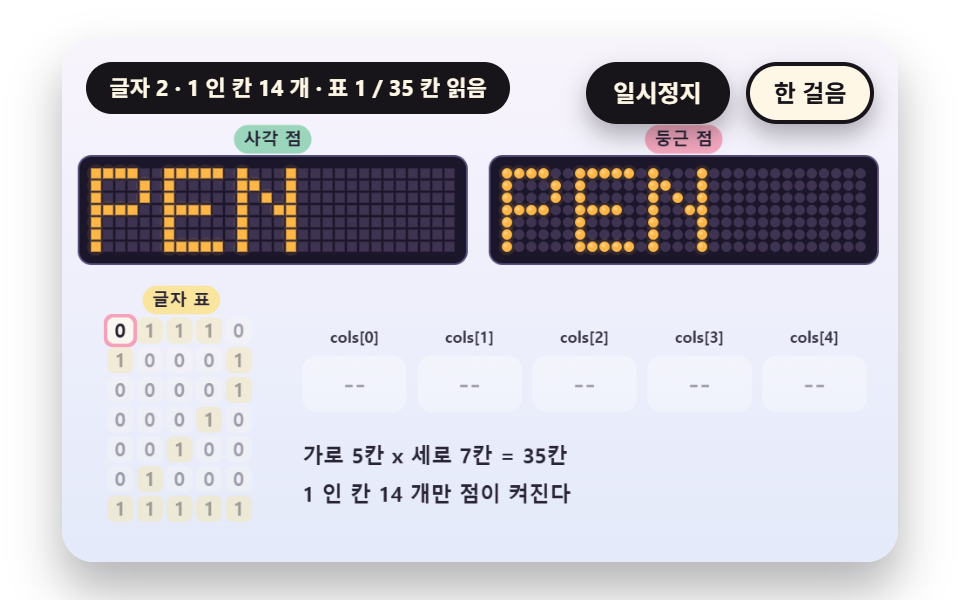 Dot Matrix Display: 9 Canvas LED Sign ScenesHow does an LED sign turn a letter into dots? 01 lights only the 1 cells of a 5x7 table, 03 leaves an afterglow on dark See all demos in this post
If you like this effect - similar demos
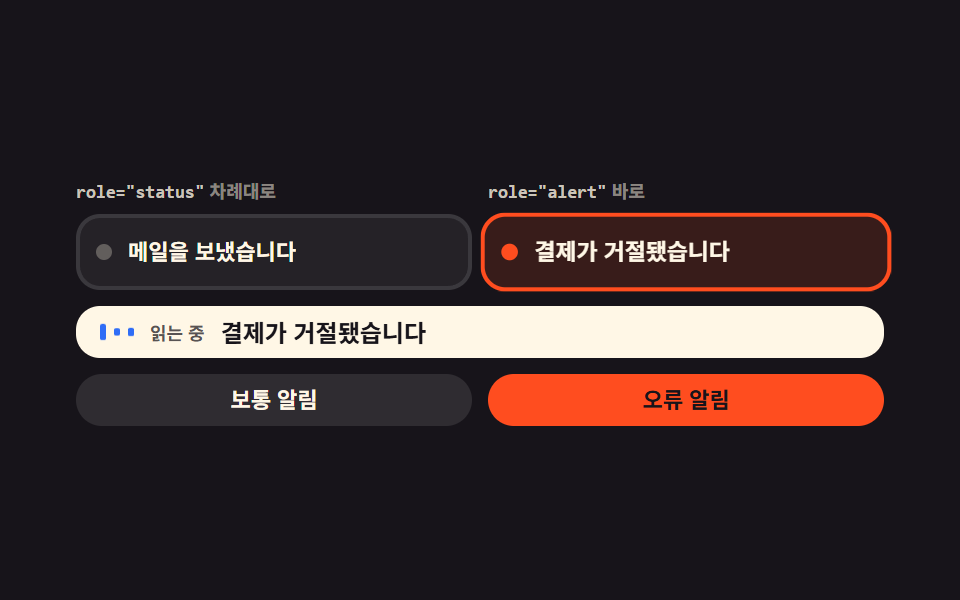 Feedback09 Live regions that split the reading orderToast Notification UI: 9 Stacking Patterns
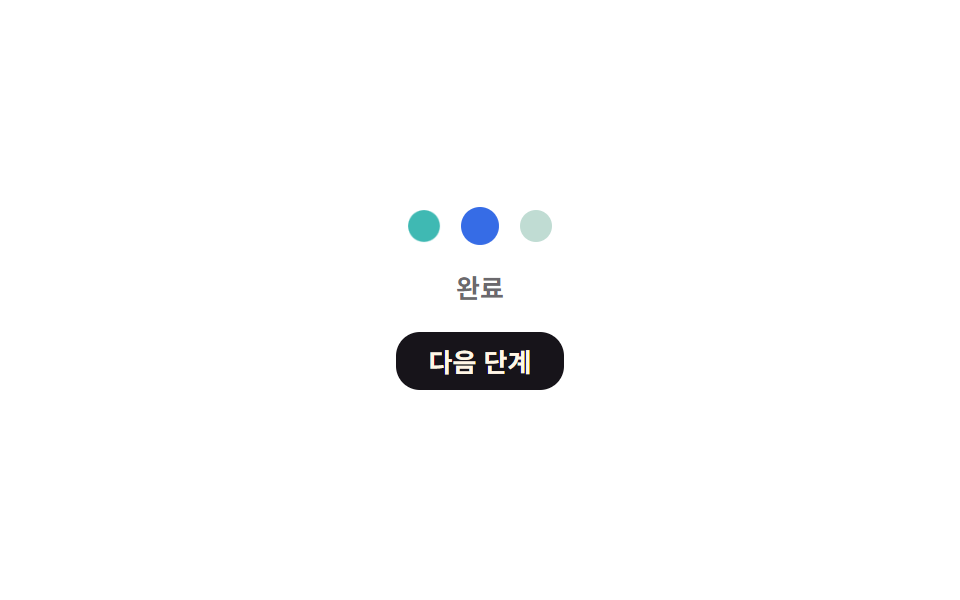 Feedback06 Status-dot color cycle — the dot's color value changes in sequence across idle, in-progress, and done stagesAutosave Indicator: 9 Save-Status Patterns
 Feedback03 Foil Flakes That Fly Off Under GravityScratch Card Reveal: 9 Pixel-Calculated Patterns