09Live regions that split the reading order
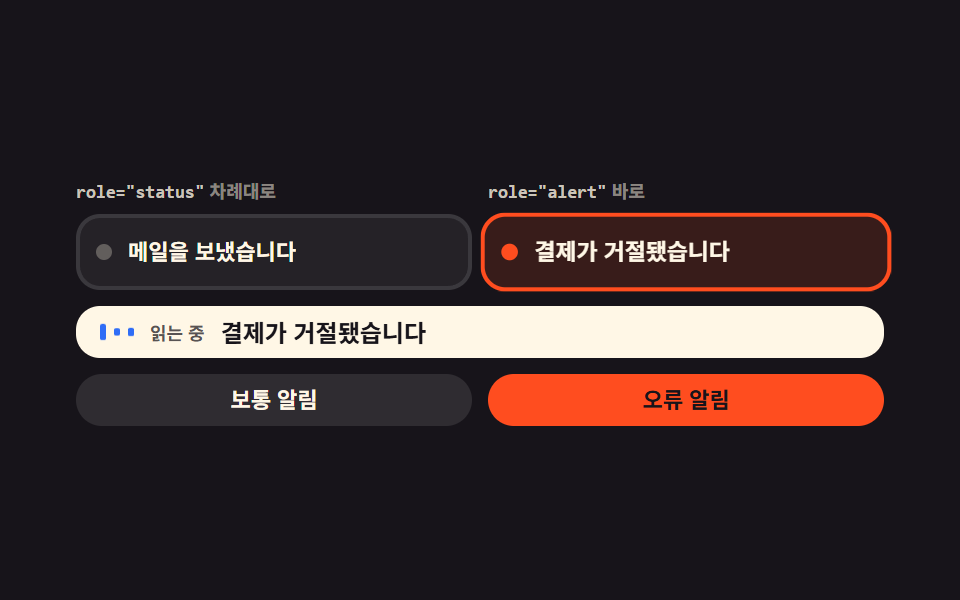
Ordinary notices go to a region that waits its turn while errors go to one that interrupts, and the two streams show up as separate colored lanes on screen.
Best forCheckout and form flows where a screen reader user must not miss an error
role="alert"aria-live="assertive"aria-atomic
<main class="stage">
  <div class="lr is-demo">
    <div class="lr__grid">
      <div class="lr__col is-live" data-lane="polite">
        <span class="lr__tag"><code>role="status"</code> waits its turn</span>
        <p class="lr__card" role="status" aria-live="polite" aria-atomic="true" aria-label="Polite notification lane">
          <span class="lr__dot" aria-hidden="true"></span>
          <span class="lr__msg">Mail sent</span>
        </p>
      </div>
      <div class="lr__col" data-lane="alert">
        <span class="lr__tag"><code>role="alert"</code> cuts in</span>
        <p class="lr__card" role="alert" aria-live="assertive" aria-atomic="true" aria-label="Urgent notification lane">
          <span class="lr__dot" aria-hidden="true"></span>
          <span class="lr__msg">The payment was declined</span>
        </p>
      </div>
    </div>
    <div class="lr__say" id="lr-say" data-lane="polite">
      <span class="lr__wave" aria-hidden="true"><i></i><i></i><i></i></span>
      <span class="lr__saycap">reading</span>
      <span class="lr__saytxt">
        <span class="lr__sayone" data-lane="polite">Mail sent</span>
        <span class="lr__sayone" data-lane="alert">The payment was declined</span>
      </span>
    </div>
    <div class="lr__btns">
      <button class="lr__btn" type="button" data-lane="polite">Normal notice</button>
      <button class="lr__btn" type="button" data-lane="alert">Error notice</button>
    </div>
  </div>
</main>@use "../../../../site/static/demo-tokens" as *;
$duration: $dur-quick;
$easing: $ease-pop;
$color: $subject-mint;
@include stage($stage-ink);
.lr {
box-sizing: border-box;
width: min(404px, 88vw);
display: flex;
flex-direction: column;
gap: $sp-2;
font-family: -apple-system, "Segoe UI", "Noto Sans KR", sans-serif;
color: $subject-cream;
}
.lr__grid {
display: grid;
grid-template-columns: 1fr 1fr;
gap: $sp-2;
}
.lr__col { display: flex; flex-direction: column; gap: $sp-1; }
.lr__tag {
display: block;
font-size: 9px;
line-height: 14px;
font-weight: 700;
color: rgba(255, 247, 230, .5);
white-space: nowrap;
overflow: hidden;
text-overflow: ellipsis;
}
.lr__tag code {
font-family: ui-monospace, "Consolas", monospace;
font-size: 9px;
color: rgba(255, 247, 230, .78);
}
.lr__card {
box-sizing: border-box;
display: flex;
align-items: center;
gap: $sp-2;
margin: 0;
padding: $sp-2 $sp-2;
border: 2px solid rgba(255, 255, 255, .1);
border-radius: $r-control;
background: rgba(255, 255, 255, .06);
}
.lr__dot {
flex: 0 0 auto;
width: 8px;
height: 8px;
border-radius: 50%;
background: rgba(255, 247, 230, .28);
}
.lr__msg {
flex: 1 1 auto;
min-width: 0;
font-size: 11px;
line-height: 18px;
font-weight: 700;
white-space: nowrap;
overflow: hidden;
text-overflow: ellipsis;
}
// 지금 읽히고 있는 줄만 테두리가 켜진다
.lr__col.is-live .lr__card { border-color: $color; background: rgba(76, 212, 166, .12); }
.lr__col.is-live .lr__dot { background: $color; }
.lr__col[data-lane="alert"].is-live .lr__card { border-color: $stage-orange; background: rgba(255, 77, 31, .14); }
.lr__col[data-lane="alert"].is-live .lr__dot { background: $stage-orange; }
.lr__say {
box-sizing: border-box;
display: flex;
align-items: center;
gap: $sp-2;
padding: $sp-1 $sp-3;
border-radius: $r-control;
background: $subject-cream;
color: $subject-ink;
}
.lr__wave { display: inline-flex; align-items: center; gap: $sp-1; flex: 0 0 auto; height: 14px; }
.lr__wave i {
display: block;
width: 3px;
height: 14px;
border-radius: $r-xs;
background: $subject-blue;
transform: scaleY(.3);
}
.lr__saycap {
flex: 0 0 auto;
font-size: 9px;
line-height: 18px;
font-weight: 700;
color: rgba($stage-ink, .72);
}
.lr__saytxt { position: relative; display: block; flex: 1 1 auto; min-width: 0; height: 18px; }
.lr__sayone {
position: absolute;
left: 0;
right: 0;
top: 0;
opacity: 0;
font-size: 12px;
line-height: 18px;
font-weight: 700;
white-space: nowrap;
overflow: hidden;
text-overflow: ellipsis;
}
.lr__say[data-lane="polite"] .lr__sayone[data-lane="polite"],
.lr__say[data-lane="alert"] .lr__sayone[data-lane="alert"] { opacity: 1; }
.lr__say[data-lane="alert"] .lr__sayone[data-lane="alert"] { color: $error; }
.lr__btns { display: flex; gap: $sp-2; }
.lr__btn {
box-sizing: border-box;
flex: 1 1 0;
margin: 0;
padding: $sp-1 $sp-2;
border: 0;
border-radius: $r-pill;
background: rgba(255, 255, 255, .1);
color: $subject-cream;
font-family: inherit;
font-size: 11px;
line-height: 18px;
font-weight: 700;
cursor: pointer;
}
.lr__btn[data-lane="alert"] { background: $stage-orange; color: $subject-ink; }
.lr__btn:focus-visible { outline: 2px solid $color; outline-offset: 2px; }
// ── 자동 루프: 정중한 줄을 읽다가 오류가 들어와 읽던 문장을 끊고 넘어간다 ──
// 읽는 막대는 늘 움직이고 카드는 사라지지 않으므로 어느 프레임도 빈 화면이 아니다
.lr__wave i {
animation-name: lr-wave;
animation-duration: 600ms;
animation-timing-function: ease-in-out;
animation-iteration-count: infinite;
animation-direction: alternate;
}
.lr__wave i:nth-child(1) { animation-delay: 0ms; }
.lr__wave i:nth-child(2) { animation-delay: -200ms; }
.lr__wave i:nth-child(3) { animation-delay: -400ms; }
@keyframes lr-wave {
0% { transform: scaleY(.24); }
100% { transform: scaleY(1); }
}
// 켜진 줄과 읽히는 문장은 샘플 프레임 사이(45% · 89%)에서 끊어 바꾼다
.lr.is-demo .lr__card,
.lr.is-demo .lr__dot,
.lr.is-demo .lr__sayone {
animation-duration: $dur-loop;
animation-timing-function: steps(1, end);
animation-iteration-count: infinite;
}
.lr.is-demo .lr__col[data-lane="polite"] .lr__card { animation-name: lr-on-polite; }
.lr.is-demo .lr__col[data-lane="polite"] .lr__dot { animation-name: lr-dot-polite; }
.lr.is-demo .lr__col[data-lane="alert"] .lr__card { animation-name: lr-on-alert; }
.lr.is-demo .lr__col[data-lane="alert"] .lr__dot { animation-name: lr-dot-alert; }
.lr.is-demo .lr__sayone[data-lane="polite"] { animation-name: lr-say-polite; }
.lr.is-demo .lr__sayone[data-lane="alert"] { animation-name: lr-say-alert; }
@keyframes lr-on-polite {
0% { border-color: $color; background-color: rgba(76, 212, 166, .12); }
45% { border-color: rgba(255, 255, 255, .1); background-color: rgba(255, 255, 255, .06); }
89% { border-color: $color; background-color: rgba(76, 212, 166, .12); }
100% { border-color: $color; background-color: rgba(76, 212, 166, .12); }
}
@keyframes lr-dot-polite {
0% { background-color: $color; }
45% { background-color: rgba(255, 247, 230, .28); }
89% { background-color: $color; }
100% { background-color: $color; }
}
@keyframes lr-on-alert {
0% { border-color: rgba(255, 255, 255, .1); background-color: rgba(255, 255, 255, .06); }
45% { border-color: $stage-orange; background-color: rgba(255, 77, 31, .14); }
89% { border-color: rgba(255, 255, 255, .1); background-color: rgba(255, 255, 255, .06); }
100% { border-color: rgba(255, 255, 255, .1); background-color: rgba(255, 255, 255, .06); }
}
@keyframes lr-dot-alert {
0% { background-color: rgba(255, 247, 230, .28); }
45% { background-color: $stage-orange; }
89% { background-color: rgba(255, 247, 230, .28); }
100% { background-color: rgba(255, 247, 230, .28); }
}
@keyframes lr-say-polite {
0% { opacity: 1; }
45% { opacity: 0; }
89% { opacity: 1; }
100% { opacity: 1; }
}
@keyframes lr-say-alert {
0% { opacity: 0; }
45% { opacity: 1; }
89% { opacity: 0; }
100% { opacity: 0; }
}
// 오류가 끼어드는 순간 그 카드가 한 번 튄다
.lr.is-demo .lr__col[data-lane="alert"] .lr__card {
animation-name: lr-on-alert, lr-jolt;
animation-duration: $dur-loop, $dur-loop;
animation-timing-function: steps(1, end), $easing;
animation-iteration-count: infinite, infinite;
}
@keyframes lr-jolt {
0%, 45% { transform: scale(1); }
52% { transform: scale(1.06); }
62% { transform: scale(1); }
90%, 100% { transform: scale(1); }
}
@media (max-width: 340px) {
.lr__card { padding: $sp-1; gap: $sp-1; }
.lr__msg { font-size: 10px; line-height: 16px; }
.lr__say { padding: 0 $sp-2; gap: $sp-1; }
.lr__sayone { font-size: 11px; }
.lr__btn { font-size: 10px; line-height: 16px; }
}
@media (prefers-reduced-motion: reduce) {
.lr__wave i,
.lr.is-demo .lr__col,
.lr.is-demo .lr__card,
.lr.is-demo .lr__dot,
.lr.is-demo .lr__sayone { animation: none !important; }
.lr.is-demo .lr__sayone[data-lane="polite"] { opacity: 1; }
.lr__wave i { transform: scaleY(.7); }
}html, body {
margin: 0;
overflow: hidden;
}
.stage {
box-sizing: border-box;
min-height: 100vh;
display: grid;
place-items: center;
margin: 0;
background: #17141a;
font-family: -apple-system, "Segoe UI", "Noto Sans KR", sans-serif;
padding: clamp(8px, 4vw, 24px);
}
.lr {
box-sizing: border-box;
width: min(404px, 88vw);
display: flex;
flex-direction: column;
gap: 8px;
font-family: -apple-system, "Segoe UI", "Noto Sans KR", sans-serif;
color: #fff7e6;
}
.lr__grid {
display: grid;
grid-template-columns: 1fr 1fr;
gap: 8px;
}
.lr__col {
display: flex;
flex-direction: column;
gap: 4px;
}
.lr__tag {
display: block;
font-size: 9px;
line-height: 14px;
font-weight: 700;
color: rgba(255, 247, 230, 0.5);
white-space: nowrap;
overflow: hidden;
text-overflow: ellipsis;
}
.lr__tag code {
font-family: ui-monospace, "Consolas", monospace;
font-size: 9px;
color: rgba(255, 247, 230, 0.78);
}
.lr__card {
box-sizing: border-box;
display: flex;
align-items: center;
gap: 8px;
margin: 0;
padding: 8px 8px;
border: 2px solid rgba(255, 255, 255, 0.1);
border-radius: 12px;
background: rgba(255, 255, 255, 0.06);
}
.lr__dot {
flex: 0 0 auto;
width: 8px;
height: 8px;
border-radius: 50%;
background: rgba(255, 247, 230, 0.28);
}
.lr__msg {
flex: 1 1 auto;
min-width: 0;
font-size: 11px;
line-height: 18px;
font-weight: 700;
white-space: nowrap;
overflow: hidden;
text-overflow: ellipsis;
}
.lr__col.is-live .lr__card {
border-color: #4cd4a6;
background: rgba(76, 212, 166, 0.12);
}
.lr__col.is-live .lr__dot {
background: #4cd4a6;
}
.lr__col[data-lane=alert].is-live .lr__card {
border-color: #ff4d1f;
background: rgba(255, 77, 31, 0.14);
}
.lr__col[data-lane=alert].is-live .lr__dot {
background: #ff4d1f;
}
.lr__say {
box-sizing: border-box;
display: flex;
align-items: center;
gap: 8px;
padding: 4px 12px;
border-radius: 12px;
background: #fff7e6;
color: #17141a;
}
.lr__wave {
display: inline-flex;
align-items: center;
gap: 4px;
flex: 0 0 auto;
height: 14px;
}
.lr__wave i {
display: block;
width: 3px;
height: 14px;
border-radius: 4px;
background: #2f6df6;
transform: scaleY(0.3);
}
.lr__saycap {
flex: 0 0 auto;
font-size: 9px;
line-height: 18px;
font-weight: 700;
color: rgba(23, 20, 26, 0.72);
}
.lr__saytxt {
position: relative;
display: block;
flex: 1 1 auto;
min-width: 0;
height: 18px;
}
.lr__sayone {
position: absolute;
left: 0;
right: 0;
top: 0;
opacity: 0;
font-size: 12px;
line-height: 18px;
font-weight: 700;
white-space: nowrap;
overflow: hidden;
text-overflow: ellipsis;
}
.lr__say[data-lane=polite] .lr__sayone[data-lane=polite],
.lr__say[data-lane=alert] .lr__sayone[data-lane=alert] {
opacity: 1;
}
.lr__say[data-lane=alert] .lr__sayone[data-lane=alert] {
color: #c2361a;
}
.lr__btns {
display: flex;
gap: 8px;
}
.lr__btn {
box-sizing: border-box;
flex: 1 1 0;
margin: 0;
padding: 4px 8px;
border: 0;
border-radius: 999px;
background: rgba(255, 255, 255, 0.1);
color: #fff7e6;
font-family: inherit;
font-size: 11px;
line-height: 18px;
font-weight: 700;
cursor: pointer;
}
.lr__btn[data-lane=alert] {
background: #ff4d1f;
color: #17141a;
}
.lr__btn:focus-visible {
outline: 2px solid #4cd4a6;
outline-offset: 2px;
}
.lr__wave i {
animation-name: lr-wave;
animation-duration: 600ms;
animation-timing-function: ease-in-out;
animation-iteration-count: infinite;
animation-direction: alternate;
}
.lr__wave i:nth-child(1) {
animation-delay: 0ms;
}
.lr__wave i:nth-child(2) {
animation-delay: -200ms;
}
.lr__wave i:nth-child(3) {
animation-delay: -400ms;
}
@keyframes lr-wave {
0% {
transform: scaleY(0.24);
}
100% {
transform: scaleY(1);
}
}
.lr.is-demo .lr__card,
.lr.is-demo .lr__dot,
.lr.is-demo .lr__sayone {
animation-duration: 2s;
animation-timing-function: steps(1, end);
animation-iteration-count: infinite;
}
.lr.is-demo .lr__col[data-lane=polite] .lr__card {
animation-name: lr-on-polite;
}
.lr.is-demo .lr__col[data-lane=polite] .lr__dot {
animation-name: lr-dot-polite;
}
.lr.is-demo .lr__col[data-lane=alert] .lr__card {
animation-name: lr-on-alert;
}
.lr.is-demo .lr__col[data-lane=alert] .lr__dot {
animation-name: lr-dot-alert;
}
.lr.is-demo .lr__sayone[data-lane=polite] {
animation-name: lr-say-polite;
}
.lr.is-demo .lr__sayone[data-lane=alert] {
animation-name: lr-say-alert;
}
@keyframes lr-on-polite {
0% {
border-color: #4cd4a6;
background-color: rgba(76, 212, 166, 0.12);
}
45% {
border-color: rgba(255, 255, 255, 0.1);
background-color: rgba(255, 255, 255, 0.06);
}
89% {
border-color: #4cd4a6;
background-color: rgba(76, 212, 166, 0.12);
}
100% {
border-color: #4cd4a6;
background-color: rgba(76, 212, 166, 0.12);
}
}
@keyframes lr-dot-polite {
0% {
background-color: #4cd4a6;
}
45% {
background-color: rgba(255, 247, 230, 0.28);
}
89% {
background-color: #4cd4a6;
}
100% {
background-color: #4cd4a6;
}
}
@keyframes lr-on-alert {
0% {
border-color: rgba(255, 255, 255, 0.1);
background-color: rgba(255, 255, 255, 0.06);
}
45% {
border-color: #ff4d1f;
background-color: rgba(255, 77, 31, 0.14);
}
89% {
border-color: rgba(255, 255, 255, 0.1);
background-color: rgba(255, 255, 255, 0.06);
}
100% {
border-color: rgba(255, 255, 255, 0.1);
background-color: rgba(255, 255, 255, 0.06);
}
}
@keyframes lr-dot-alert {
0% {
background-color: rgba(255, 247, 230, 0.28);
}
45% {
background-color: #ff4d1f;
}
89% {
background-color: rgba(255, 247, 230, 0.28);
}
100% {
background-color: rgba(255, 247, 230, 0.28);
}
}
@keyframes lr-say-polite {
0% {
opacity: 1;
}
45% {
opacity: 0;
}
89% {
opacity: 1;
}
100% {
opacity: 1;
}
}
@keyframes lr-say-alert {
0% {
opacity: 0;
}
45% {
opacity: 1;
}
89% {
opacity: 0;
}
100% {
opacity: 0;
}
}
.lr.is-demo .lr__col[data-lane=alert] .lr__card {
animation-name: lr-on-alert, lr-jolt;
animation-duration: 2s, 2s;
animation-timing-function: steps(1, end), cubic-bezier(0.2, 1.4, 0.4, 1);
animation-iteration-count: infinite, infinite;
}
@keyframes lr-jolt {
0%, 45% {
transform: scale(1);
}
52% {
transform: scale(1.06);
}
62% {
transform: scale(1);
}
90%, 100% {
transform: scale(1);
}
}
@media (max-width: 340px) {
.lr__card {
padding: 4px;
gap: 4px;
}
.lr__msg {
font-size: 10px;
line-height: 16px;
}
.lr__say {
padding: 0 8px;
gap: 4px;
}
.lr__sayone {
font-size: 11px;
}
.lr__btn {
font-size: 10px;
line-height: 16px;
}
}
@media (prefers-reduced-motion: reduce) {
.lr__wave i,
.lr.is-demo .lr__col,
.lr.is-demo .lr__card,
.lr.is-demo .lr__dot,
.lr.is-demo .lr__sayone {
animation: none !important;
}
.lr.is-demo .lr__sayone[data-lane=polite] {
opacity: 1;
}
.lr__wave i {
transform: scaleY(0.7);
}
}// 실제 동작: 같은 글자를 다시 넣어야 스크린리더가 한 번 더 읽는다. 오류만 assertive 줄로 보내 읽던 문장을 끊는다
var root = document.querySelector('.lr');
var cols = [].slice.call(document.querySelectorAll('.lr__col'));
var say = document.getElementById('lr-say');
function send(lane) {
root.classList.remove('is-demo');
var col = cols.filter(function (c) { return c.getAttribute('data-lane') === lane; })[0];
cols.forEach(function (c) { c.classList.toggle('is-live', c === col); });
say.setAttribute('data-lane', lane); // 화면에도 지금 읽히는 문장을 그대로 보여 준다
var msg = col.querySelector('.lr__msg');
var text = msg.textContent;
msg.textContent = '';
setTimeout(function () { msg.textContent = text; }, 40);
}
[].forEach.call(document.querySelectorAll('.lr__btn'), function (b) {
b.addEventListener('click', function () { send(b.getAttribute('data-lane')); });
});import { useEffect, useRef, useState } from "react";
import type { CSSProperties } from "react";
import styles from "./LiveRegionLanes.module.scss";
export type Lane = "polite" | "alert";
export type LiveRegionLanesProps = {
messages?: Record<Lane, string>;
tags?: Record<Lane, string>;
laneLabels?: Record<Lane, string>;
buttons?: Record<Lane, string>;
sayCap?: string;
easing?: string;
color?: string;
};
type Vars = CSSProperties & { "--easing"?: string; "--color"?: string };
const LANES: Lane[] = ["polite", "alert"];
export default function LiveRegionLanes({
messages = { polite: "Mail sent", alert: "The payment was declined" },
tags = { polite: "waits its turn", alert: "cuts in" },
laneLabels = { polite: "Polite notification lane", alert: "Urgent notification lane" },
buttons = { polite: "Normal notice", alert: "Error notice" },
sayCap = "reading",
easing = "cubic-bezier(.2,1.4,.4,1)",
color = "#4cd4a6",
}: LiveRegionLanesProps) {
const [demo, setDemo] = useState(true);
const [lane, setLane] = useState<Lane>("polite");
const [beat, setBeat] = useState(0);
const [blank, setBlank] = useState<Lane | "">("");
const timer = useRef<number[]>([0]);
const vars: Vars = { "--easing": easing, "--color": color };
useEffect(() => () => { clearTimeout((timer.current ?? [0])[0]); }, []);
// 같은 글자를 비웠다 다시 넣어야 스크린리더가 한 번 더 읽는다
function send(next: Lane) {
setDemo(false);
setLane(next);
setBeat((v) => v + 1);
setBlank(next);
const t = timer.current ?? [0];
clearTimeout(t[0]);
t[0] = setTimeout(() => setBlank(""), 40) as unknown as number;
}
return (
<div className={`${styles.lr} ${demo ? styles.isDemo : ""}`} style={vars}>
<div className={styles.grid}>
{LANES.map((l) => (
<div key={l} className={`${styles.col} ${!demo && lane === l ? styles.isLive : ""}`} data-lane={l}>
<span className={styles.tag}><code>{l === "alert" ? 'role="alert"' : 'role="status"'}</code> {tags[l]}</span>
<p
className={styles.card}
role={l === "alert" ? "alert" : "status"}
aria-live={l === "alert" ? "assertive" : "polite"}
aria-atomic="true"
aria-label={laneLabels[l]}
>
<span className={styles.dot} aria-hidden="true" />
<span className={styles.msg} key={`${l}-${beat}`}>{blank === l ? "" : messages[l]}</span>
</p>
</div>
))}
</div>
<div className={styles.say} data-lane={demo ? undefined : lane}>
<span className={styles.wave} aria-hidden="true"><i /><i /><i /></span>
<span className={styles.saycap}>{sayCap}</span>
<span className={styles.saytxt}>
{LANES.map((l) => (
<span key={l} className={styles.sayone} data-lane={l}>{messages[l]}</span>
))}
</span>
</div>
<div className={styles.btns}>
{LANES.map((l) => (
<button key={l} className={styles.btn} type="button" data-lane={l} onClick={() => send(l)}>{buttons[l]}</button>
))}
</div>
</div>
);
}09 Live regions that split the reading order — Measured area 7.215% · moving frames 23/23Original by GODRICH · SCSS and React ship in the zip · Toast Notification UI: 9 Stacking Patterns
The post this demo lives in
 Toast Notification UI: 9 Stacking PatternsToast notification UI is what decides how those corner messages pile up and how they leave again. All nine run without a See all demos in this post